center console DODGE DURANGO 2020 User Guide
[x] Cancel search | Manufacturer: DODGE, Model Year: 2020, Model line: DURANGO, Model: DODGE DURANGO 2020Pages: 464, PDF Size: 22.14 MB
Page 290 of 464
288IN CASE OF EMERGENCY
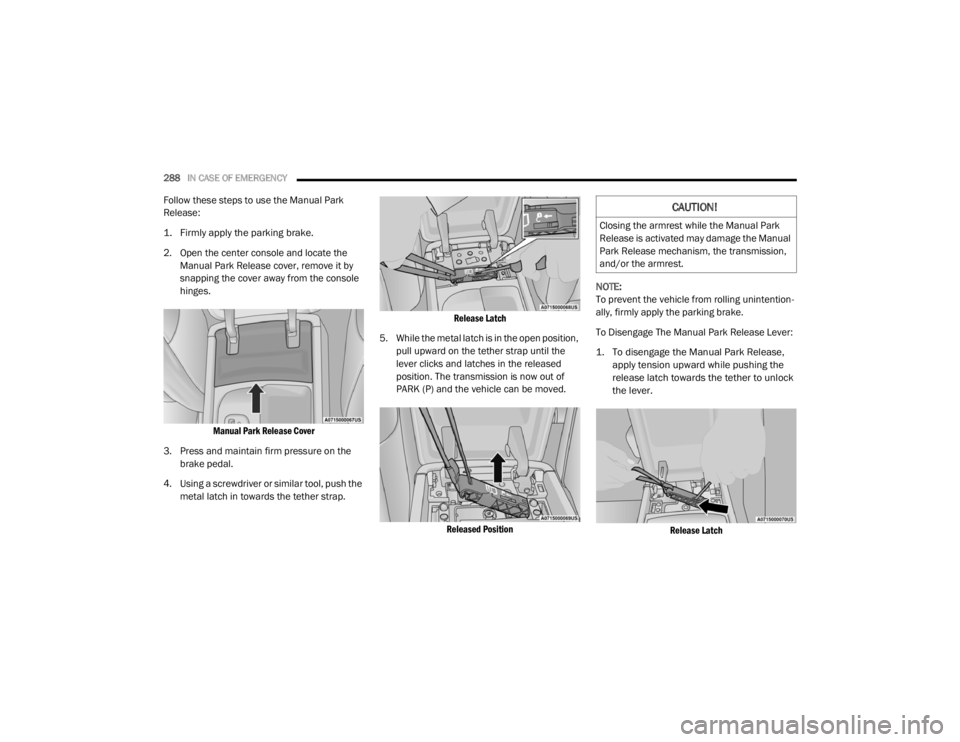
Follow these steps to use the Manual Park
Release:
1. Firmly apply the parking brake.
2. Open the center console and locate the
Manual Park Release cover, remove it by
snapping the cover away from the console
hinges.
Manual Park Release Cover
3. Press and maintain firm pressure on the brake pedal.
4. Using a screwdriver or similar tool, push the metal latch in towards the tether strap.
Release Latch
5. While the metal latch is in the open position, pull upward on the tether strap until the
lever clicks and latches in the released
position. The transmission is now out of
PARK (P) and the vehicle can be moved.
Released Position
NOTE:
To prevent the vehicle from rolling unintention
-
ally, firmly apply the parking brake.
To Disengage The Manual Park Release Lever:
1. To disengage the Manual Park Release, apply tension upward while pushing the
release latch towards the tether to unlock
the lever.
Release Latch
CAUTION!
Closing the armrest while the Manual Park
Release is activated may damage the Manual
Park Release mechanism, the transmission,
and/or the armrest.
20_WD_OM_EN_USC_t.book Page 288
Page 426 of 464
424MULTIMEDIA
IPOD®/USB/MP3 CONTROL — IF EQUIPPED
This feature allows an iPod® or external USB
device to be plugged into the USB port, located
inside the storage area on the center stack of
the instrument panel.
Plugging in a smartphone device to a USB Port
may activate Android Auto™ or Apple CarPlay®
features, if equipped. For further information,
refer to “Android Auto™” or “Apple CarPlay®” in
the Owner’s Manual Supplement.
iPod® control supports Mini, 4G, Photo, iPod
nano®, 5G iPod® and iPhone® devices. Some
iPod® software versions may not fully support
the iPod® control features. Please visit
Apple’s® website for software updates.
For further information, refer to the Uconnect
Owner’s Manual Supplement.
CONNECTING THE AU X AUDIO INPUT OR
E
XTERNAL USB DEVICE
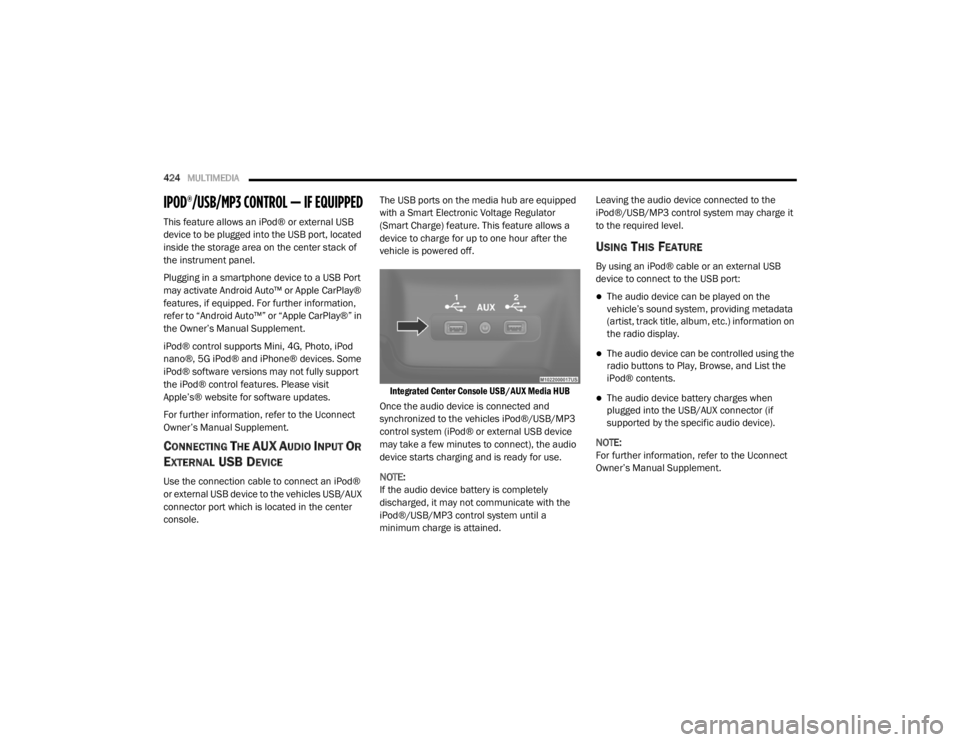
Use the connection cable to connect an iPod®
or external USB device to the vehicles USB/AUX
connector port which is located in the center
console. The USB ports on the media hub are equipped
with a Smart Electronic Voltage Regulator
(Smart Charge) feature. This feature allows a
device to charge for up to one hour after the
vehicle is powered off.
Integrated Center Console USB/AUX Media HUB
Once the audio device is connected and
synchronized to the vehicles iPod®/USB/MP3
control system (iPod® or external USB device
may take a few minutes to connect), the audio
device starts charging and is ready for use.
NOTE:
If the audio device battery is completely
discharged, it may not communicate with the
iPod®/USB/MP3 control system until a
minimum charge is attained. Leaving the audio device connected to the
iPod®/USB/MP3 control system may charge it
to the required level.
USING THIS FEATURE
By using an iPod® cable or an external USB
device to connect to the USB port:
The audio device can be played on the
vehicle’s sound system, providing metadata
(artist, track title, album, etc.) information on
the radio display.
The audio device can be controlled using the
radio buttons to Play, Browse, and List the
iPod® contents.
The audio device battery charges when
plugged into the USB/AUX connector (if
supported by the specific audio device).
NOTE:
For further information, refer to the Uconnect
Owner’s Manual Supplement.
20_WD_OM_EN_USC_t.book Page 424
Page 427 of 464
MULTIMEDIA425
SECOND ROW USB CHARGING PORT
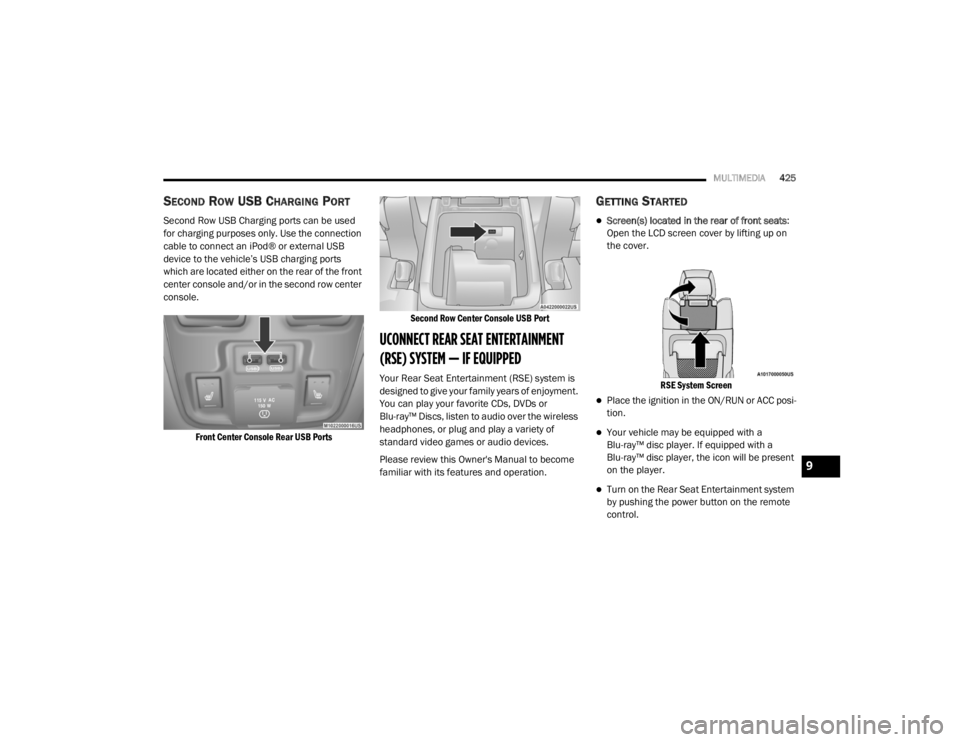
Second Row USB Charging ports can be used
for charging purposes only. Use the connection
cable to connect an iPod® or external USB
device to the vehicle’s USB charging ports
which are located either on the rear of the front
center console and/or in the second row center
console.
Front Center Console Rear USB Ports Second Row Center Console USB Port
UCONNECT REAR SEAT ENTERTAINMENT
(RSE) SYSTEM — IF EQUIPPED
Your Rear Seat Entertainment (RSE) system is
designed to give your family years of enjoyment.
You can play your favorite CDs, DVDs or
Blu-ray™ Discs, listen to audio over the wireless
headphones, or plug and play a variety of
standard video games or audio devices.
Please review this Owner's Manual to become
familiar with its features and operation.
GETTING STARTED
Screen(s) located in the rear of front seats
:
Open the LCD screen cover by lifting up on
the cover.
RSE System Screen
Place the ignition in the ON/RUN or ACC posi -
tion.
Your vehicle may be equipped with a
Blu-ray™ disc player. If equipped with a
Blu-ray™ disc player, the icon will be present
on the player.
Turn on the Rear Seat Entertainment system
by pushing the power button on the remote
control.
9
20_WD_OM_EN_USC_t.book Page 425
Page 429 of 464
MULTIMEDIA427
BLU-RAY™ DISC PLAYER
Play A Blu-ray™ Disc
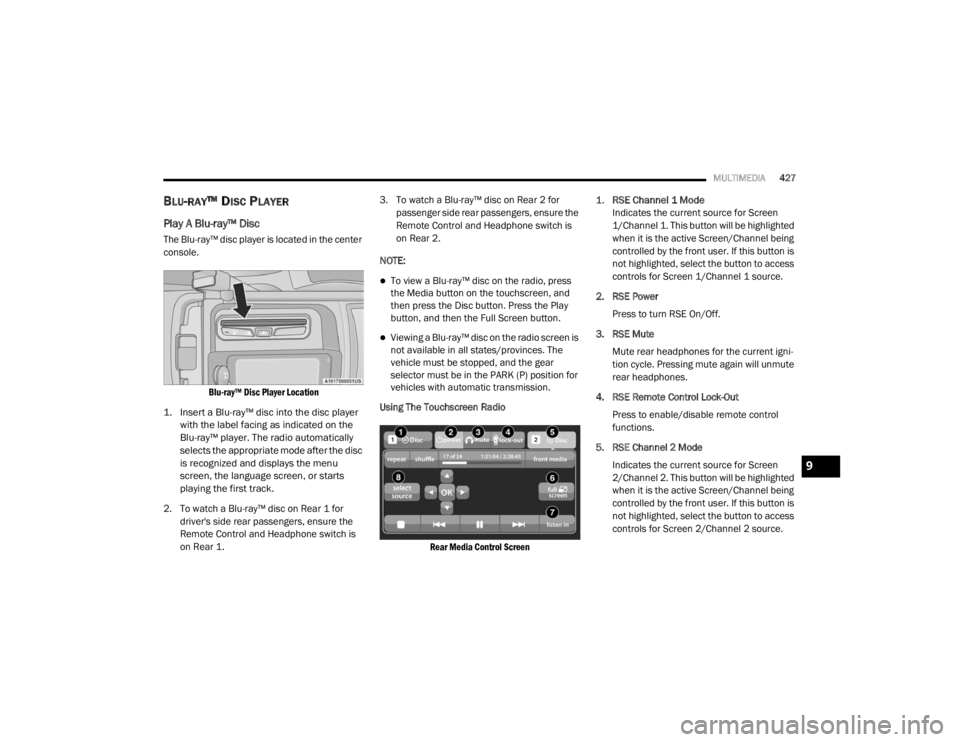
The Blu-ray™ disc player is located in the center
console.
Blu-ray™ Disc Player Location
1. Insert a Blu-ray™ disc into the disc player with the label facing as indicated on the
Blu-ray™ player. The radio automatically
selects the appropriate mode after the disc
is recognized and displays the menu
screen, the language screen, or starts
playing the first track.
2. To watch a Blu-ray™ disc on Rear 1 for driver's side rear passengers, ensure the
Remote Control and Headphone switch is
on Rear 1. 3. To watch a Blu-ray™ disc on Rear 2 for
passenger side rear passengers, ensure the
Remote Control and Headphone switch is
on Rear 2.
NOTE:
To view a Blu-ray™ disc on the radio, press
the Media button on the touchscreen, and
then press the Disc button. Press the Play
button, and then the Full Screen button.
Viewing a Blu-ray™ disc on the radio screen is
not available in all states/provinces. The
vehicle must be stopped, and the gear
selector must be in the PARK (P) position for
vehicles with automatic transmission.
Using The Touchscreen Radio
Rear Media Control Screen
1.
RSE Channel 1 Mode
Indicates the current source for Screen
1/Channel 1. This button will be highlighted
when it is the active Screen/Channel being
controlled by the front user. If this button is
not highlighted, select the button to access
controls for Screen 1/Channel 1 source.
2. RSE Power Press to turn RSE On/Off.
3. RSE Mute Mute rear headphones for the current igni -
tion cycle. Pressing mute again will unmute
rear headphones.
4. RSE Remote Control Lock-Out Press to enable/disable remote control
functions.
5. RSE Channel 2 Mode Indicates the current source for Screen
2/Channel 2. This button will be highlighted
when it is the active Screen/Channel being
controlled by the front user. If this button is
not highlighted, select the button to access
controls for Screen 2/Channel 2 source.
9
20_WD_OM_EN_USC_t.book Page 427