interior lights DODGE DURANGO 2020 User Guide
[x] Cancel search | Manufacturer: DODGE, Model Year: 2020, Model line: DURANGO, Model: DODGE DURANGO 2020Pages: 464, PDF Size: 22.14 MB
Page 163 of 464
SAFETY161
(Continued)
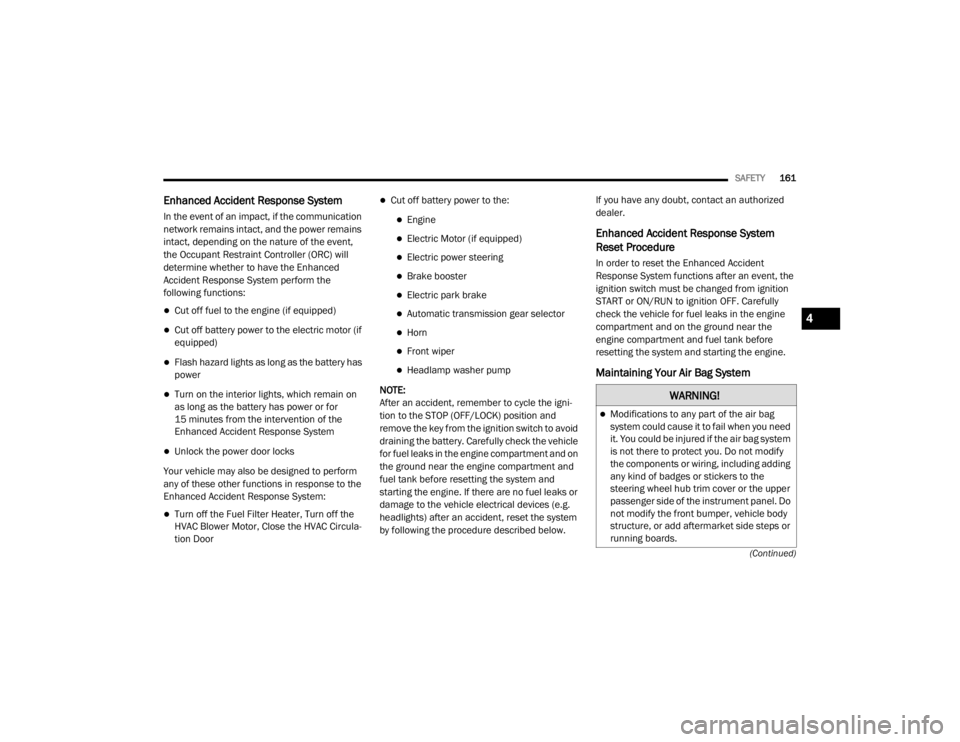
Enhanced Accident Response System
In the event of an impact, if the communication
network remains intact, and the power remains
intact, depending on the nature of the event,
the Occupant Restraint Controller (ORC) will
determine whether to have the Enhanced
Accident Response System perform the
following functions:
Cut off fuel to the engine (if equipped)
Cut off battery power to the electric motor (if
equipped)
Flash hazard lights as long as the battery has
power
Turn on the interior lights, which remain on
as long as the battery has power or for
15 minutes from the intervention of the
Enhanced Accident Response System
Unlock the power door locks
Your vehicle may also be designed to perform
any of these other functions in response to the
Enhanced Accident Response System:
Turn off the Fuel Filter Heater, Turn off the
HVAC Blower Motor, Close the HVAC Circula -
tion Door
Cut off battery power to the:
Engine
Electric Motor (if equipped)
Electric power steering
Brake booster
Electric park brake
Automatic transmission gear selector
Horn
Front wiper
Headlamp washer pump
NOTE:
After an accident, remember to cycle the igni -
tion to the STOP (OFF/LOCK) position and
remove the key from the ignition switch to avoid
draining the battery. Carefully check the vehicle
for fuel leaks in the engine compartment and on
the ground near the engine compartment and
fuel tank before resetting the system and
starting the engine. If there are no fuel leaks or
damage to the vehicle electrical devices (e.g.
headlights) after an accident, reset the system
by following the procedure described below. If you have any doubt, contact an authorized
dealer.
Enhanced Accident Response System
Reset Procedure
In order to reset the Enhanced Accident
Response System functions after an event, the
ignition switch must be changed from ignition
START or ON/RUN to ignition OFF. Carefully
check the vehicle for fuel leaks in the engine
compartment and on the ground near the
engine compartment and fuel tank before
resetting the system and starting the engine.
Maintaining Your Air Bag System
WARNING!
Modifications to any part of the air bag
system could cause it to fail when you need
it. You could be injured if the air bag system
is not there to protect you. Do not modify
the components or wiring, including adding
any kind of badges or stickers to the
steering wheel hub trim cover or the upper
passenger side of the instrument panel. Do
not modify the front bumper, vehicle body
structure, or add aftermarket side steps or
running boards.
4
20_WD_OM_EN_USC_t.book Page 161
Page 273 of 464
IN CASE OF EMERGENCY271
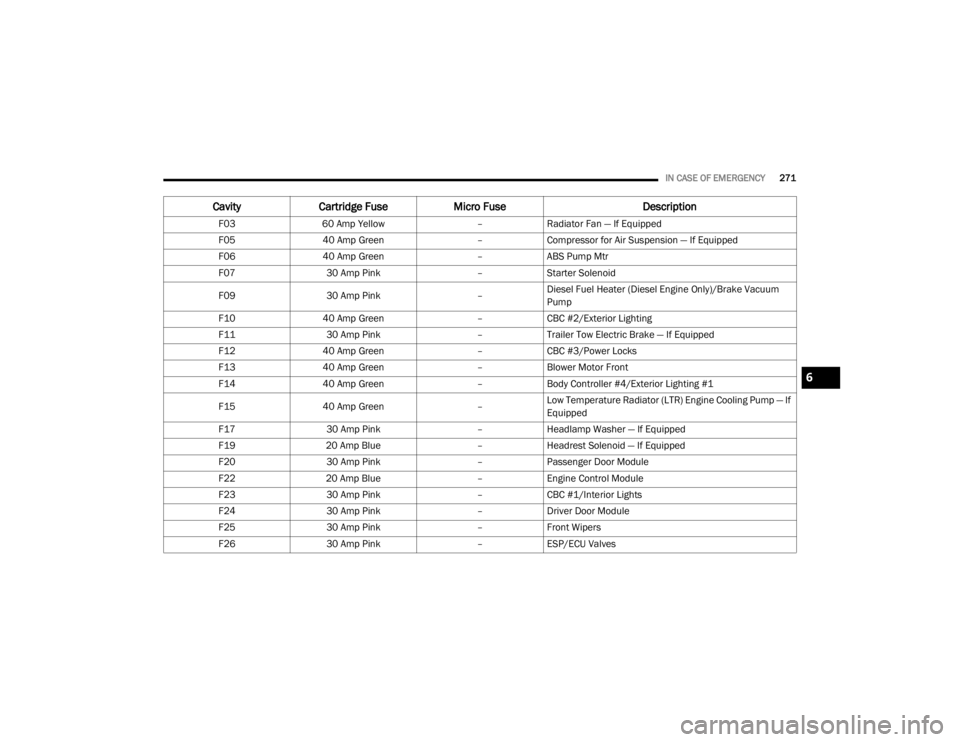
CavityCartridge Fuse Micro Fuse Description
F0360 Amp Yellow –Radiator Fan — If Equipped
F05 40 Amp Green –Compressor for Air Suspension — If Equipped
F06 40 Amp Green –ABS Pump Mtr
F07 30 Amp Pink –Starter Solenoid
F09 30 Amp Pink –Diesel Fuel Heater (Diesel Engine Only)/Brake Vacuum
Pump
F10 40 Amp Green –CBC #2/Exterior Lighting
F11 30 Amp Pink –Trailer Tow Electric Brake — If Equipped
F12 40 Amp Green –CBC #3/Power Locks
F13 40 Amp Green –Blower Motor Front
F14 40 Amp Green –Body Controller #4/Exterior Lighting #1
F15 40 Amp Green –Low Temperature Radiator (LTR) Engine Cooling Pump — If
Equipped
F17 30 Amp Pink –Headlamp Washer — If Equipped
F19 20 Amp Blue –Headrest Solenoid — If Equipped
F20 30 Amp Pink –Passenger Door Module
F22 20 Amp Blue –Engine Control Module
F23 30 Amp Pink –CBC #1/Interior Lights
F24 30 Amp Pink –Driver Door Module
F25 30 Amp Pink –Front Wipers
F26 30 Amp Pink –ESP/ECU Valves
6
20_WD_OM_EN_USC_t.book Page 271
Page 296 of 464
294
SERVICING AND MAINTENANCE
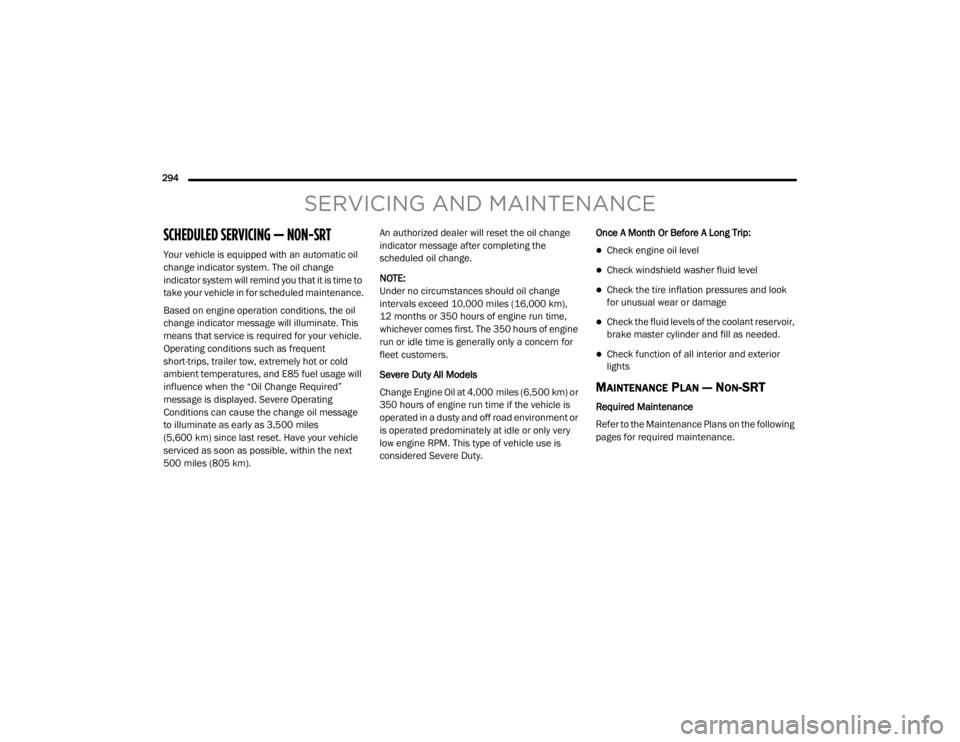
SCHEDULED SERVICING — NON-SRT
Your vehicle is equipped with an automatic oil
change indicator system. The oil change
indicator system will remind you that it is time to
take your vehicle in for scheduled maintenance.
Based on engine operation conditions, the oil
change indicator message will illuminate. This
means that service is required for your vehicle.
Operating conditions such as frequent
short-trips, trailer tow, extremely hot or cold
ambient temperatures, and E85 fuel usage will
influence when the “Oil Change Required”
message is displayed. Severe Operating
Conditions can cause the change oil message
to illuminate as early as 3,500 miles
(5,600 km) since last reset. Have your vehicle
serviced as soon as possible, within the next
500 miles (805 km).An authorized dealer will reset the oil change
indicator message after completing the
scheduled oil change.
NOTE:
Under no circumstances should oil change
intervals exceed 10,000 miles (16,000 km),
12 months or 350 hours of engine run time,
whichever comes first. The 350 hours of engine
run or idle time is generally only a concern for
fleet customers.
Severe Duty All Models
Change Engine Oil at 4,000 miles (6,500 km) or
350 hours of engine run time if the vehicle is
operated in a dusty and off road environment or
is operated predominately at idle or only very
low engine RPM. This type of vehicle use is
considered Severe Duty.
Once A Month Or Before A Long Trip:Check engine oil level
Check windshield washer fluid level
Check the tire inflation pressures and look
for unusual wear or damage
Check the fluid levels of the coolant reservoir,
brake master cylinder and fill as needed.
Check function of all interior and exterior
lights
MAINTENANCE PLAN — NON-SRT
Required Maintenance
Refer to the Maintenance Plans on the following
pages for required maintenance.
20_WD_OM_EN_USC_t.book Page 294
Page 366 of 464

364MULTIMEDIA
Language
After pressing the Language button on the touchscreen, the following setting will be available:
Display
After pressing the Display button on the touchscreen, the following settings will be available:
Setting Name Selectable Options
Set LanguageEnglishFrançais Español
NOTE:
When the “Set Language” feature is selected, you may select one of multiple languages (English / Français / Español) for all display nomenclature,
including the trip functions and the navigation system (if equipped). Press the Set Language button on the touchscreen, and then press the desired
language button on the touchscreen until a check mark appears next to the language, showing that setting has been selected.
Setting Name Selectable Options
Display ModeManual Auto
Display Brightness With Headlights ON +
-
NOTE:
To make changes to the "Display Brightness With Headlights ON" setting, the headlights must be on and the interior dimmer switch must not be in
the "party" or "parade" position.
20_WD_OM_EN_USC_t.book Page 364
Page 367 of 464
MULTIMEDIA365
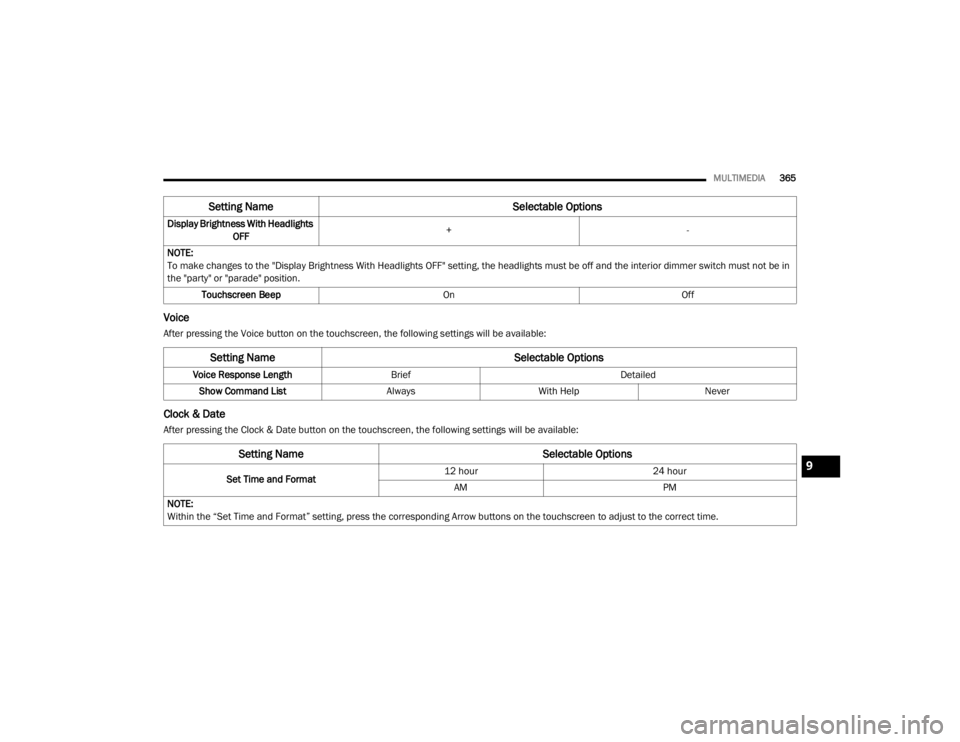
Voice
After pressing the Voice button on the touchscreen, the following settings will be available:
Clock & Date
After pressing the Clock & Date button on the touchscreen, the following settings will be available:Display Brightness With Headlights
OFF +
-
NOTE:
To make changes to the "Display Brightness With Headlights OFF" setting, the headlights must be off and the interior dimmer switch must not be in
the "party" or "parade" position. Touchscreen Beep OnOff
Setting Name Selectable Options
Setting NameSelectable Options
Voice Response LengthBrief Detailed
Show Command List AlwaysWith Help Never
Setting Name Selectable Options
Set Time and Format12 hour
24 hour
AM PM
NOTE:
Within the “Set Time and Format” setting, press the corresponding Arrow buttons on the touchscreen to adjust to the correct time.
9
20_WD_OM_EN_USC_t.book Page 365
Page 380 of 464

378MULTIMEDIA
Language
After pressing the Language button on the touchscreen, the following setting will be available:
Display
After pressing the Display button on the touchscreen, the following settings will be available:
Setting Name Selectable Options
LanguageEnglishFrançaisEspañol
NOTE:
When the “Language” feature is selected, you may select one of multiple languages (English / Français / Español) for all display nomenclature,
including the trip functions and the navigation system (if equipped). Press the Language button on the touchscreen, then press the desired language
button on the touchscreen until a check mark appears next to the language, showing that setting has been selected.
Setting Name Selectable Options
Display ModeAutoManual
Display Brightness With Headlights On +-
NOTE:
To make changes to the "Display Brightness With Headlights On" setting, the headlights must be on and the interior dimmer switch must not be in the
"party" or "parade" position. Display Brightness With Headlights Off +-
NOTE:
To make changes to the "Display Brightness With Headlights Off" setting, the headlights must be off and the interior dimmer switch must not be in
the "party" or "parade" position.
20_WD_OM_EN_USC_t.book Page 378
Page 453 of 464

451
Fluid Capacities
................................... 355, 356Fluid Leaks.................................................... 183Fluid Level Checks Brake........................................................ 325Fluid, Brake................................................... 360Fluids And Lubricants................. 357, 358, 359Fog Lights...................................................... 269Fog Lights, Service......................................... 269Fold-Flat Seats................................................. 32Folding Rear Seats.......................................... 34Forward Collision Warning............................. 136Four-Way Hazard Flasher............................... 261Freeing A Stuck Vehicle................................. 289Front Axle (Differential).................................. 327Fuel............................................................... 351Additives................................................... 352Clean Air.................................................... 352Economy Mode.......................................... 192Ethanol...................................................... 353Gasoline.................................................... 351Materials Added........................................ 352Methanol................................................... 353Octane Rating................................. 351, 359Requirements................................. 351, 355Specifications.................................. 357, 359Tank Capacity.................................. 355, 356Fueling........................................................... 238Fuses............................................................. 269
G
Garage Door Opener (HomeLink)..................... 78Gasoline, (Fuel)............................................. 351Gasoline, Clean Air........................................ 352Gasoline, Reformulated................................ 352Gear Ranges................................................. 194Glass Cleaning.............................................. 349Gross Axle Weight Rating.............................. 242Gross Vehicle Weight Rating......................... 241GVWR............................................................ 240
H
Hazard Warning Flashers.............................. 261Head Restraints............................................... 42Headlights.................................................... 268Automatic.................................................... 52Bulb Replacement.................................... 268Cleaning................................................... 346High Beam/Low Beam Select Switch.......... 51Lights On Reminder..................................... 52On With Wipers............................................ 52Passing........................................................ 52Replacing................................................. 268Heated Mirrors................................................. 49Heated Seats................................................... 40Heated Steering Wheel.................................... 47Heater, Engine Block.................................... 188Hill Start Assist.............................................. 128
HitchesTrailer Towing........................................... 243Holder, Cup......................................................86HomeLink (Garage Door Opener).....................78Hood Prop........................................................75Hood Release...................................................75
I
Ignition.............................................................17Key Fob Battery Low Or Dead......................17Key Fob Not Detected..................................17Keyless Ignition...........................................17Keyless Push Button....................................17Push Button Ignition....................................17Switch..........................................................17Immobilizer (Sentry Key)..................................21In Vehicle HelpVehicle User Guide......................................12Inside Rearview Mirror.................... 47, 48, 261Instrument Cluster...................... 95, 96, 97, 98Descriptions.............................................. 118Display.........................................................99Menu Items.............................................. 103Instrument Panel Lens Cleaning................... 348Integrated Trailer Brake Control.................... 249Interior And Instrument Lights.........................54Interior Appearance Care.............................. 348Interior Lights...................................................5411
20_WD_OM_EN_USC_t.book Page 451
Page 454 of 464

452
Intermittent Wipers (Delay Wipers)
.................. 56Introduction....................................................... 9Inverter Power.......................................................... 90iPod/USB/MP3 Control....................... 404, 424
J
Jack Location................................................. 276Jack Operation..................................... 279, 327Jacking And Tire Changing Instructions......... 279Jacking Instructions....................................... 279Jump Starting................................................ 283
K
Key Fob........................................................... 13Arm The System.......................................... 23Disarm The System..................................... 24Programming Additional Key Fobs....... 16, 22Key Fob Battery Service (Remote
Keyless Entry).................................................. 15Key Fob Programming (Remote
Keyless Entry).................................................. 16Key-In Reminder.............................................. 18Keyless Enter-N-Go........................................ 184Passive Entry............................................... 26Passive Entry Programming................ 26, 370Keys................................................................. 13Replacement........................................ 16, 22Sentry (Immobilizer).................................... 21
L
Lane Change Assist......................................... 53LaneSense.................................................... 234Lap/Shoulder Belts....................................... 145Latches......................................................... 183Hood............................................................ 75Lead Free Gasoline....................................... 351Leaks, Fluid.................................................. 183Life Of Tires................................................... 338Liftgate............................................................ 75Liftgate Window Wiper/Washer....................... 58Light Bulbs.................................................... 183Lights............................................................ 183Air Bag.................................... 110, 153, 181Automatic Headlights.................................. 52Brake Assist Warning............................... 127Brake Warning.......................................... 110Bulb Replacement........................... 266, 268Cargo........................................................... 77Center Mounted Stop............................... 269Cruise.............................................. 117, 119Daytime Running......................................... 51Dimmer Switch, Headlight........................... 50Electronic Stability Program(ESP) Indicator............................................... 112Exterior...............................................50, 183Fog........................................................... 269Hazard Warning Flasher........................... 261
Headlights................................................ 268Headlights On With Wipers..........................52High Beam/Low Beam Select......................51Interior.........................................................54Lights On Reminder.....................................52Malfunction Indicator (Check Engine)....... 113Park................................................... 52, 118Passing........................................................52Reading.......................................................54Rear Servicing.......................................... 269Rear Tail Lamps........................................ 269Seat Belt Reminder.................................. 110Security Alarm.......................................... 113Service............................................. 266, 268Side Marker.............................................. 269Traction Control........................................ 127Turn Signals..................... 50, 118, 183, 269Vanity Mirror................................................50Warning Instrument ClusterDescriptions................................ 112, 118Load Shed Battery Saver Mode..................... 108Load Shed Battery Saver On......................... 108Load Shed Electrical Load Reduction........... 108Load Shed Intelligent Battery Sensor............ 108Loading Vehicle............................................. 240Tires.......................................................... 332
20_WD_OM_EN_USC_t.book Page 452