steering wheel DODGE DURANGO 2020 Service Manual
[x] Cancel search | Manufacturer: DODGE, Model Year: 2020, Model line: DURANGO, Model: DODGE DURANGO 2020Pages: 464, PDF Size: 22.14 MB
Page 270 of 464

268IN CASE OF EMERGENCY
BULB REPLACEMENT
NOTE:
Lens fogging can occur under certain atmo -
spheric conditions. This will usually clear as
atmospheric conditions change to allow the
condensation to change back into a vapor.
Turning the lamps on will usually accelerate the
clearing process.
High Intensity Discharge Headlamps
(Bi-Xenon) — If Equipped
The headlamps are a type of high voltage
discharge tube. High voltage can remain in the
circuit even with the headlamp switch off.
Because of this, you should not attempt to
service a headlamp bulb yourself. If a headlamp
bulb fails, take your vehicle to an authorized
dealer for service. NOTE:
On vehicles equipped with High Intensity
Discharge (HID) headlamps, when the head
-
lamps are turned on, there is a blue hue to the
lamps. This diminishes and becomes more
white after approximately 10 seconds, as the
system charges.
Bi-Halogen Headlamps — If Equipped
1. Turn the steering wheel to the left to replace the bulb from the right hand lamp,
or to the right to replace the bulb from the
left hand lamp.
2. Turn the access cap located on the wheel liner counterclockwise to remove from liner.
3. Locate the headlamp bulb access cap through the opening in the wheel liner.
4. Firmly grasp the access cap and rotate counterclockwise to remove lamp housing. 5. Firmly grasp the low/high beam bulb and
connector assembly and rotate counter -
clockwise to remove from housing.
6. Disconnect the electrical connector and then connect the replacement bulb.
7. Install the bulb and connector assembly into the headlamp housing and rotate
clockwise to lock in place.
8. Install the bulb access cap in the headlamp housing and rotate clockwise to lock it in
place.
9. Install the access cap in the wheel liner and rotate clockwise to lock it in place.
WARNING!
A transient high voltage occurs at the bulb
sockets of High Intensity Discharge (HID)
headlamps when the headlamp switch is
turned ON. It may cause serious electrical
shock or electrocution if not serviced
properly. See an authorized dealer for
service.
CAUTION!
Do not touch the new bulb with your fingers.
Oil contamination will severely shorten bulb
life. If the bulb comes in contact with an oily
surface, clean the bulb with rubbing alcohol.
20_WD_OM_EN_USC_t.book Page 268
Page 277 of 464

IN CASE OF EMERGENCY275
(Continued)
(Continued)
JACKING AND TIRE CHANGING
F97 –20 Amp Yellow Rear Heated Seats & Heated Steering Wheel — If
Equipped
F98 –20 Amp Yellow Ventilated Seats/Front Heated Seats — If Equipped
F99 –10 Amp RedClimate Control/Driver Assistance Systems Module/HALF/
Park Assist
F100 –10 Amp Red Active Damping — If Equipped
F101 –15 Amp Blue ECCM/SMRT HI-Beams
F102 –15 Amp Blue Spare
F103 –10 Amp RedCabin Heater (Diesel Engine Only)/Rear HVAC — If
Equipped
F104 –20 Amp Yellow Power Outlets (Instrument Panel/Center Console/Rear
Cargo — If Equipped)
Cavity
Cartridge Fuse Micro Fuse Description
CAUTION!
When installing the power distribution
center cover, it is important to ensure the
cover is properly positioned and fully
latched. Failure to do so may allow water to
get into the power distribution center and
possibly result in an electrical system
failure.When replacing a blown fuse, it is important
to use only a fuse having the correct
amperage rating. The use of a fuse with a
rating other than indicated may result in a
dangerous electrical system overload. If a
properly rated fuse continues to blow, it
indicates a problem in the circuit that must
be corrected.
CAUTION! (Continued)
WARNING!
Do not attempt to change a tire on the side
of the vehicle close to moving traffic. Pull
far enough off the road to avoid the danger
of being hit when operating the jack or
changing the wheel.
6
20_WD_OM_EN_USC_t.book Page 275
Page 291 of 464
IN CASE OF EMERGENCY289
2. Once the tension has been released and the
lever has been unlocked, be sure it is
stowed properly and locks into position.
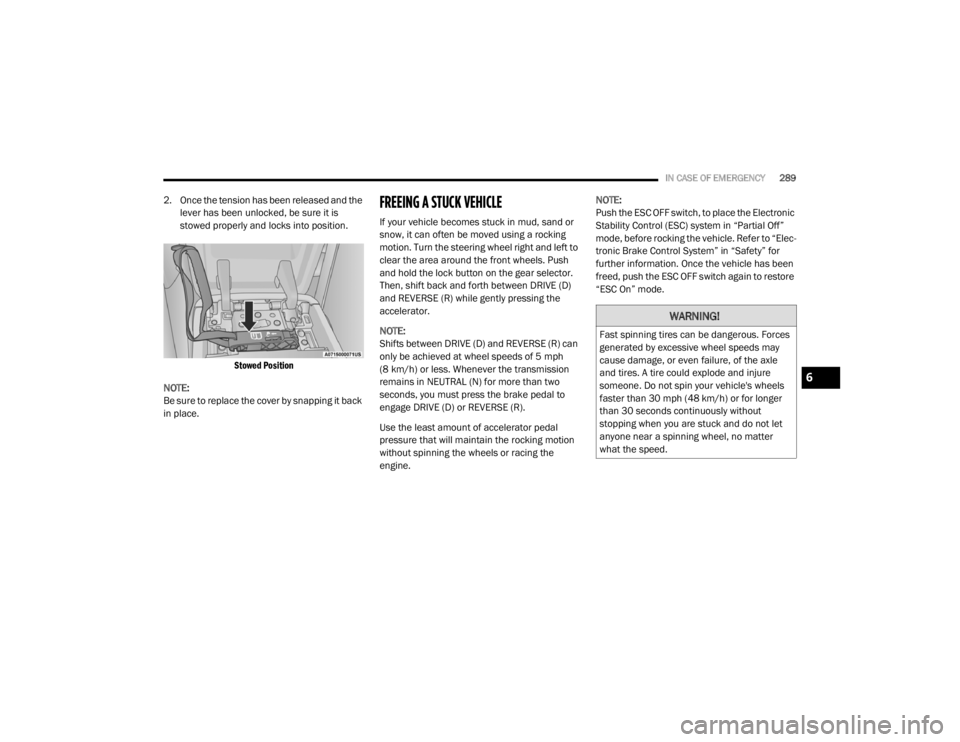
Stowed Position
NOTE:
Be sure to replace the cover by snapping it back
in place.FREEING A STUCK VEHICLE
If your vehicle becomes stuck in mud, sand or
snow, it can often be moved using a rocking
motion. Turn the steering wheel right and left to
clear the area around the front wheels. Push
and hold the lock button on the gear selector.
Then, shift back and forth between DRIVE (D)
and REVERSE (R) while gently pressing the
accelerator.
NOTE:
Shifts between DRIVE (D) and REVERSE (R) can
only be achieved at wheel speeds of 5 mph
(8 km/h) or less. Whenever the transmission
remains in NEUTRAL (N) for more than two
seconds, you must press the brake pedal to
engage DRIVE (D) or REVERSE (R).
Use the least amount of accelerator pedal
pressure that will maintain the rocking motion
without spinning the wheels or racing the
engine. NOTE:
Push the ESC OFF switch, to place the Electronic
Stability Control (ESC) system in “Partial Off”
mode, before rocking the vehicle. Refer to “Elec
-
tronic Brake Control System” in “Safety” for
further information. Once the vehicle has been
freed, push the ESC OFF switch again to restore
“ESC On” mode.
WARNING!
Fast spinning tires can be dangerous. Forces
generated by excessive wheel speeds may
cause damage, or even failure, of the axle
and tires. A tire could explode and injure
someone. Do not spin your vehicle's wheels
faster than 30 mph (48 km/h) or for longer than 30 seconds continuously without
stopping when you are stuck and do not let
anyone near a spinning wheel, no matter
what the speed.
6
20_WD_OM_EN_USC_t.book Page 289
Page 294 of 464

292IN CASE OF EMERGENCY
Proper towing or lifting equipment is required to
prevent damage to your vehicle. Use only tow
bars and other equipment designed for this
purpose, following equipment manufacturer’s
instructions. Use of safety chains is mandatory.
Attach a tow bar or other towing device to main
structural members of the vehicle, not to
bumpers or associated brackets. State and
local laws regarding vehicles under tow must be
observed.
If you must use the accessories (wipers,
defrosters, etc.) while being towed, the ignition
must be in the ON/RUN mode, not the ACC
mode.
If the key fob is unavailable, or the vehicle's
battery is discharged, refer to “Manual Park
Release” in this chapter for instructions on
shifting the transmission out of PARK (P) for
towing or loading onto a flatbed truck. NOTE:
SRT Models:
The manufacturer requires towing
your vehicle with all four wheels OFF the ground
using a flatbed.
REAR WHEEL DRIVE MODELS
The manufacturer recommends towing your
vehicle with all four wheels OFF the ground
using a flatbed.
If flatbed equipment is not available, and the
transmission is operable, the vehicle may be
towed (with rear wheels on the ground) under
the following conditions:
The transmission must be in NEUTRAL (N).
Refer to “Manual Park Release” in this
section for instructions on shifting the trans -
mission to NEUTRAL (N) when the engine is
off.
The towing speed must not exceed 30 mph
(48 km/h).
The towing distance must not exceed
30 miles (48 km). If the transmission is not operable, or the
vehicle must be towed faster than 30 mph
(48 km/h) or farther than 30 miles (48 km), tow
with the rear wheels
OFF the ground.
Acceptable methods are to tow the vehicle on a
flatbed, or with the front wheels raised and the
rear wheels on a towing dolly, or (when using a
suitable steering wheel stabilizer to hold the
front wheels in the straight position) with the
rear wheels raised and the front wheels ON the
ground.
ALL WHEEL DRIVE MODELS
The manufacturer recommends towing with all
wheels OFF the ground. Acceptable methods
are to tow the vehicle on a flatbed or with one
end of the vehicle raised and the opposite end
on a towing dolly.
CAUTION!
Do not use sling type equipment when
towing. Vehicle damage may occur.
When securing the vehicle to a flat bed
truck, do not attach to front or rear suspen -
sion components. Damage to your vehicle
may result from improper towing.
CAUTION!
Towing faster than 30 mph (48 km/h) or
farther than 30 miles (48 km) with rear
wheels on the ground can cause severe
transmission damage. Damage from
improper towing is not covered under the
New Vehicle Limited Warranty.
20_WD_OM_EN_USC_t.book Page 292
Page 341 of 464

SERVICING AND MAINTENANCE339
See the Tire Sizing Chart example found in the
“Tire Safety Information” section of this manual
for more information relating to the Load Index
and Speed Symbol of a tire.
It is recommended to replace the two front tires
or two rear tires as a pair. Replacing just one tire
can seriously affect your vehicle’s handling. If
you ever replace a wheel, make sure that the
wheel’s specifications match those of the
original wheels.
It is recommended you contact an authorized
tire dealer or original equipment dealer with any
questions you may have on tire specifications or
capability. Failure to use equivalent
replacement tires may adversely affect the
safety, handling, and ride of your vehicle.
TIRE TYPES
All Season Tires — If Equipped
All Season tires provide traction for all seasons
(Spring, Summer, Autumn, and Winter). Traction
levels may vary between different all season
tires. All season tires can be identified by the
M+S, M&S, M/S or MS designation on the tire
sidewall. Use all season tires only in sets of four;
failure to do so may adversely affect the safety
and handling of your vehicle.
Summer Or Three Season Tires — If
Equipped
Summer tires provide traction in both wet and
dry conditions, and are not intended to be
driven in snow or on ice. If your vehicle is
equipped with Summer tires, be aware these
tires are not designed for Winter or cold driving
conditions.
WARNING!
Do not use a tire, wheel size, load rating, or
speed rating other than that specified for
your vehicle. Some combinations of unap -
proved tires and wheels may change
suspension dimensions and performance
characteristics, resulting in changes to
steering, handling, and braking of your
vehicle. This can cause unpredictable
handling and stress to steering and
suspension components. You could lose
control and have a collision resulting in
serious injury or death. Use only the tire and
wheel sizes with load ratings approved for
your vehicle.
Never use a tire with a smaller load index or
capacity, other than what was originally
equipped on your vehicle. Using a tire with
a smaller load index could result in tire
overloading and failure. You could lose
control and have a collision.
Failure to equip your vehicle with tires
having adequate speed capability can
result in sudden tire failure and loss of
vehicle control.
CAUTION!
Replacing original tires with tires of a
different size may result in false speedometer
and odometer readings.
7
20_WD_OM_EN_USC_t.book Page 339
Page 368 of 464

366MULTIMEDIA
Safety/Driving Assistance
After pressing the Safety/Driving Assistance button on the touchscreen, the following settings will be available: Set Date
MonthDayYear
NOTE:
Within the “Set Date” setting, press the corresponding Arrow buttons on the touchscreen to adjust to the correct date.
Setting Name Selectable Options
Setting NameSelectable Options
ParkView Backup Camera DelayOn Off
NOTE:
The “ParkView Backup Camera Delay” setting determines whether or not the screen will display the rear view image with dynamic grid lines for up to
10 seconds after the vehicle is shifted out of REVERSE. This delay is canceled if the vehicle’s speed exceeds 8 mph (13 km/h), the transmission is
shifted into PARK, or the ignition is switched to the OFF position. ParkView Backup Camera Active Guide Lines On
Off
NOTE:
The “ParkView Backup Camera Active Guide Lines” feature overlays the Rear Backup Camera image with active, or dynamic, grid lines to help illustrate
the width of the vehicle and its projected backup path, based on the steering wheel position when the option is checked. A dashed center line overlay
indicates the center of the vehicle to assist with parking or aligning to a hitch/receiver.
20_WD_OM_EN_USC_t.book Page 366
Page 370 of 464

368MULTIMEDIA
Rear ParkSense Braking Assist — If
Equipped On
Off
NOTE:
When the “Rear ParkSense Braking Assist” feature is selected, the Park Assist system detects objects located behind the vehicle and utilizes auton -
omous braking to stop the vehicle.
LaneSense Warning — If Equipped EarlyMedium Late
NOTE:
The “LaneSense Warning” setting determines at what distance the LaneSense system warns you, through steering wheel feedback, of a possible lane
departure. LaneSense Strength — If Equipped LowMedium High
Blind Spot Alert — If Equipped OffLightsLights & Chime
NOTE:
When the “Blind Spot Alert” feature is selected, the Blind Spot Monitor (BSM) system is activated and shows a visual alert in the outside mirrors, or
it shows a visual alert in the outside mirrors as well as plays an audible alert when the turn signal is on. When “Off” is selected, the BSM system is
deactivated.
If your vehicle has experienced any damage in the area where the sensor is located, even if the fascia is not damaged, the sensor may have become
misaligned. Take your vehicle to an authorized dealer to verify sensor alignment. A sensor that is misaligned results in the BSM not operating to spec -
ification.
Rain Sensing Auto Wipers — If Equipped On
Off
Hill Start Assist — If Equipped On Off
Tilt Side Mirrors in Reverse On Off
Paddle Shifters Enable Disable
Setting Name Selectable Options
20_WD_OM_EN_USC_t.book Page 368
Page 374 of 464

372MULTIMEDIA
Auto-On Comfort Systems — If Equipped
After pressing the Auto-On Comfort Systems button on the touchscreen, the following setting will be available:
Engine Off Options
After pressing the Engine Off Options button on the touchscreen, the following settings will be available:
Setting Name Selectable Options
Auto-On Driver Heated/Ventilated
Seat & Steering Wheel With Vehicle Start — If Equipped Off
Remote Start All Starts
NOTE:
When this feature is selected, the driver’s heated seat and heated steering wheel will automatically turn on when temperatures are below 40°F
(4.4°C). When temperatures are above 80°F (26.7°C) the driver vented seat will turn on.
Setting Name Selectable Options
Engine Off Power Delay — If Equipped 0 sec
45 sec
5 min 10 min
NOTE:
When the “Engine Off Power Delay” feature is selected, the power window switches, radio, Uconnect phone system (if equipped), DVD video system
(if equipped), power sunroof (if equipped), and power outlets will remain active for up to 10 minutes after the ignition is cycled to OFF. Opening either
front door will cancel this feature.
Headlight Off Delay 0 sec
30 sec
60 sec 90 sec
NOTE:
When the “Headlight Off Delay” feature is selected, it allows the adjustment of the amount of time the headlights remain on after the engine is shut off.
20_WD_OM_EN_USC_t.book Page 372
Page 383 of 464

MULTIMEDIA381
Safety & Driving Assistance
After pressing the Safety & Driving Assistance button on the touchscreen, the following settings will be available:Active ParkView Backup Camera Guidelines
OnOff
NOTE:
The “Active ParkView Backup Camera Guidelines” feature overlays the Rear Backup Camera image with active, or dynamic, grid lines to help illustrate
the width of the vehicle and its projected backup path, based on the steering wheel position when the option is checked. A dashed center line overlay
indicates the center of the vehicle to assist with parking or aligning to a hitch/receiver.
Setting Name Selectable Options
Setting NameSelectable Options
Automatic Emergency Braking — If
Equipped Selectable Options
NOTE:
“Forward Collision Warning” and “Forward Collision Warning Sensitivity” are selectable options when the “Automatic Emergency Braking” setting is
selected first. Forward Collision Warning — If Equipped Off
Warning Only Warning & Braking
NOTE:
Changing the FCW status to “Off” prevents the system from warning you of a possible collision with the vehicle in front of you.
The FCW system state is kept in memory from one ignition cycle to the next. If the system is turned Off, it will remain off when the vehicle is restarted.
FCW includes Advanced Brake Assist (ABA). The ABA applies additional brake pressure when the driver requests insufficient brake pressure to avoid
a potential frontal collision. When the “Warning Only” option is selected a chime sounds alerting you of a possible collision with the vehicle in front of
you and more brake pressure is needed. When the “Warning & Braking” option is selected, it applies the brakes to slow your vehicle in case of a
potential forward collision and sounds an audible chime to alert you.
9
20_WD_OM_EN_USC_t.book Page 381
Page 384 of 464

382MULTIMEDIA
Forward Collision Warning
Sensitivity — If Equipped Near
Med Far
NOTE:
The “Forward Collision Warning Sensitivity” setting determines at what relative distance the vehicle directly in front of you needs to be at before the
system warns you of a possible collision based on the option selected. “Far” gives you the most amount of reaction time, whereas “Near” gives you
the least amount of reaction time, based on the distance between the two vehicles. The default setting is “Med”. LaneSense Warning — If Equipped EarlyMedium Late
NOTE:
The “LaneSense Warning” setting determines at what distance the LaneSense system warns you, through steering wheel feedback, of a possible lane
departure. LaneSense Strength — If Equipped LowMedium High
ParkSense — If Equipped Sound Only Sound & Display
NOTE:
The “ParkSense” system setting scans for objects in front or behind the vehicle. Front ParkSense scans for objects when the transmission gear
selector is in DRIVE, and Rear Parksense scans for objects when the transmission gear selector is in REVERSE and the vehicle speed is less than
7 mph (11 km/h), when enabled. It provides an alert (audible and/or visual) to indicate the proximity to other objects. The system can be enabled
with “Sound Only” or “Sound & Display”. Front ParkSense Volume LowMedium High
Rear ParkSense Volume LowMedium High
Setting Name Selectable Options
20_WD_OM_EN_USC_t.book Page 382