wiring DODGE DURANGO 2020 Owners Manual
[x] Cancel search | Manufacturer: DODGE, Model Year: 2020, Model line: DURANGO, Model: DODGE DURANGO 2020Pages: 464, PDF Size: 22.14 MB
Page 155 of 464
SAFETY153
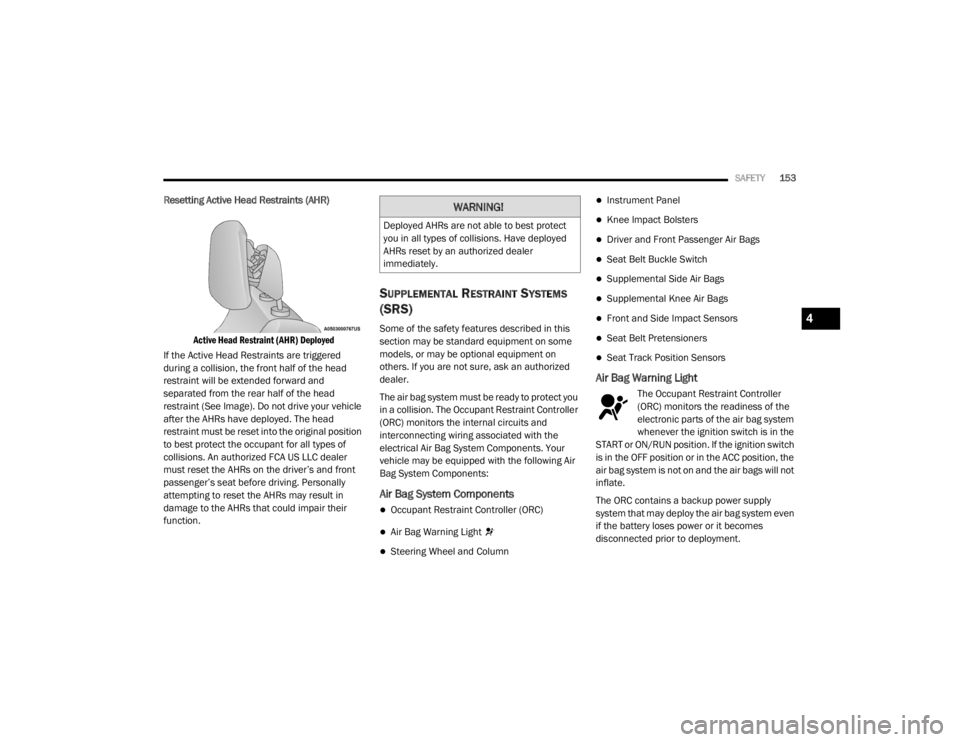
Resetting Active Head Restraints (AHR)
Active Head Restraint (AHR) Deployed
If the Active Head Restraints are triggered
during a collision, the front half of the head
restraint will be extended forward and
separated from the rear half of the head
restraint (See Image). Do not drive your vehicle
after the AHRs have deployed. The head
restraint must be reset into the original position
to best protect the occupant for all types of
collisions. An authorized FCA US LLC dealer
must reset the AHRs on the driver’s and front
passenger’s seat before driving. Personally
attempting to reset the AHRs may result in
damage to the AHRs that could impair their
function.
SUPPLEMENTAL RESTRAINT SYSTEMS
(SRS)
Some of the safety features described in this
section may be standard equipment on some
models, or may be optional equipment on
others. If you are not sure, ask an authorized
dealer.
The air bag system must be ready to protect you
in a collision. The Occupant Restraint Controller
(ORC) monitors the internal circuits and
interconnecting wiring associated with the
electrical Air Bag System Components. Your
vehicle may be equipped with the following Air
Bag System Components:
Air Bag System Components
Occupant Restraint Controller (ORC)
Air Bag Warning Light
Steering Wheel and Column
Instrument Panel
Knee Impact Bolsters
Driver and Front Passenger Air Bags
Seat Belt Buckle Switch
Supplemental Side Air Bags
Supplemental Knee Air Bags
Front and Side Impact Sensors
Seat Belt Pretensioners
Seat Track Position Sensors
Air Bag Warning Light
The Occupant Restraint Controller
(ORC) monitors the readiness of the
electronic parts of the air bag system
whenever the ignition switch is in the
START or ON/RUN position. If the ignition switch
is in the OFF position or in the ACC position, the
air bag system is not on and the air bags will not
inflate.
The ORC contains a backup power supply
system that may deploy the air bag system even
if the battery loses power or it becomes
disconnected prior to deployment.
WARNING!
Deployed AHRs are not able to best protect
you in all types of collisions. Have deployed
AHRs reset by an authorized dealer
immediately.
4
20_WD_OM_EN_USC_t.book Page 153
Page 161 of 464
SAFETY159
(Continued)
NOTE:
Air bag covers may not be obvious in the interior
trim, but they will open during air bag deploy -
ment.
Rollover Events
Side Air Bags and seat belt pretensioners are
designed to activate in certain rollover events.
The Occupant Restraint Controller (ORC)
determines whether deployment in a particular
rollover event is appropriate, based on the
severity and type of collision. Vehicle damage by
itself is not a good indicator of whether or not
Side Air Bags and seat belt pretensioners
should have deployed. The Side Air Bags and seat belt pretensioners
will not deploy in all rollover events. The rollover
sensing system determines if a rollover event
may be in progress and whether deployment is
appropriate. In the event the vehicle
experiences a rollover or near rollover event,
and deployment is appropriate, the rollover
sensing system will deploy the side air bags and
seat belt pretensioners on both sides of the
vehicle.
The SABICs may help reduce the risk of partial
or complete ejection of vehicle occupants
through side windows in certain rollover or side
impact events.
Air Bag System Components
NOTE:
The Occupant Restraint Controller (ORC) moni
-
tors the internal circuits and interconnecting
wiring associated with electrical Air Bag System
Components listed below:
Occupant Restraint Controller (ORC)
Air Bag Warning Light
Steering Wheel and Column
Instrument Panel
Seat belts (and child restraints where
appropriate) are necessary for your protec -
tion in all collisions. They also help keep
you in position, away from an inflating Side
Air Bag. To get the best protection from the
Side Air Bags, occupants must wear their
seat belts properly and sit upright with their
backs against the seats. Children must be
properly restrained in a child restraint or
booster seat that is appropriate for the size
of the child.
WARNING!
Side Air Bags need room to inflate. Do not
lean against the door or window. Sit upright
in the center of the seat.
Being too close to the Side Air Bags during
deployment could cause you to be severely
injured or killed.
WARNING! (Continued)
Relying on the Side Air Bags alone could
lead to more severe injuries in a collision.
The Side Air Bags work with your seat belt
to restrain you properly. In some collisions,
Side Air Bags won’t deploy at all. Always
wear your seat belt even though you have
Side Air Bags.
WARNING! (Continued)
4
20_WD_OM_EN_USC_t.book Page 159
Page 163 of 464
SAFETY161
(Continued)
Enhanced Accident Response System
In the event of an impact, if the communication
network remains intact, and the power remains
intact, depending on the nature of the event,
the Occupant Restraint Controller (ORC) will
determine whether to have the Enhanced
Accident Response System perform the
following functions:
Cut off fuel to the engine (if equipped)
Cut off battery power to the electric motor (if
equipped)
Flash hazard lights as long as the battery has
power
Turn on the interior lights, which remain on
as long as the battery has power or for
15 minutes from the intervention of the
Enhanced Accident Response System
Unlock the power door locks
Your vehicle may also be designed to perform
any of these other functions in response to the
Enhanced Accident Response System:
Turn off the Fuel Filter Heater, Turn off the
HVAC Blower Motor, Close the HVAC Circula -
tion Door
Cut off battery power to the:
Engine
Electric Motor (if equipped)
Electric power steering
Brake booster
Electric park brake
Automatic transmission gear selector
Horn
Front wiper
Headlamp washer pump
NOTE:
After an accident, remember to cycle the igni -
tion to the STOP (OFF/LOCK) position and
remove the key from the ignition switch to avoid
draining the battery. Carefully check the vehicle
for fuel leaks in the engine compartment and on
the ground near the engine compartment and
fuel tank before resetting the system and
starting the engine. If there are no fuel leaks or
damage to the vehicle electrical devices (e.g.
headlights) after an accident, reset the system
by following the procedure described below. If you have any doubt, contact an authorized
dealer.
Enhanced Accident Response System
Reset Procedure
In order to reset the Enhanced Accident
Response System functions after an event, the
ignition switch must be changed from ignition
START or ON/RUN to ignition OFF. Carefully
check the vehicle for fuel leaks in the engine
compartment and on the ground near the
engine compartment and fuel tank before
resetting the system and starting the engine.
Maintaining Your Air Bag System
WARNING!
Modifications to any part of the air bag
system could cause it to fail when you need
it. You could be injured if the air bag system
is not there to protect you. Do not modify
the components or wiring, including adding
any kind of badges or stickers to the
steering wheel hub trim cover or the upper
passenger side of the instrument panel. Do
not modify the front bumper, vehicle body
structure, or add aftermarket side steps or
running boards.
4
20_WD_OM_EN_USC_t.book Page 161
Page 251 of 464
STARTING AND OPERATING249
Integrated Trailer Brake Module — If
Equipped
Your vehicle may have an Integrated Trailer
Brake Module (ITBM) for Electric and Electric
Over Hydraulic (EOH) trailer brakes.
NOTE:
This module has been designed and verified
with electric trailer brakes and new Electric Over
Hydraulic systems. Some previous EOH systems
may not be compatible with ITBM.
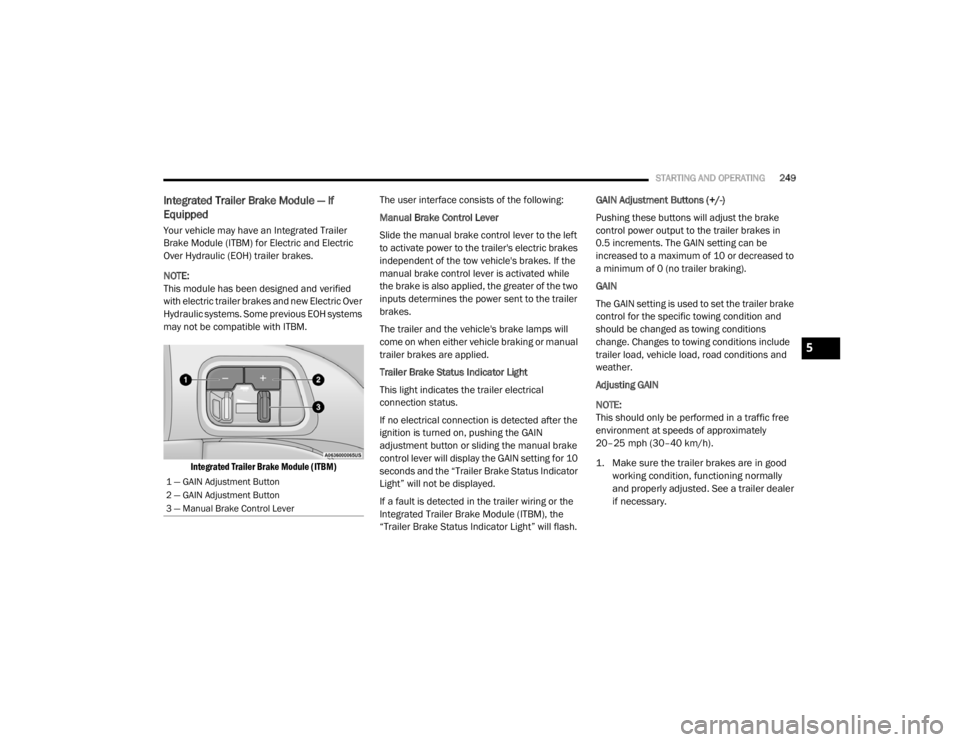
Integrated Trailer Brake Module (ITBM)
The user interface consists of the following:
Manual Brake Control Lever
Slide the manual brake control lever to the left
to activate power to the trailer's electric brakes
independent of the tow vehicle's brakes. If the
manual brake control lever is activated while
the brake is also applied, the greater of the two
inputs determines the power sent to the trailer
brakes.
The trailer and the vehicle's brake lamps will
come on when either vehicle braking or manual
trailer brakes are applied.
Trailer Brake Status Indicator Light
This light indicates the trailer electrical
connection status.
If no electrical connection is detected after the
ignition is turned on, pushing the GAIN
adjustment button or sliding the manual brake
control lever will display the GAIN setting for 10
seconds and the “Trailer Brake Status Indicator
Light” will not be displayed.
If a fault is detected in the trailer wiring or the
Integrated Trailer Brake Module (ITBM), the
“Trailer Brake Status Indicator Light” will flash. GAIN Adjustment Buttons (+/-)
Pushing these buttons will adjust the brake
control power output to the trailer brakes in
0.5 increments. The GAIN setting can be
increased to a maximum of 10 or decreased to
a minimum of 0 (no trailer braking).
GAIN
The GAIN setting is used to set the trailer brake
control for the specific towing condition and
should be changed as towing conditions
change. Changes to towing conditions include
trailer load, vehicle load, road conditions and
weather.
Adjusting GAIN
NOTE:
This should only be performed in a traffic free
environment at speeds of approximately
20–25 mph (30–40 km/h).
1. Make sure the trailer brakes are in good
working condition, functioning normally
and properly adjusted. See a trailer dealer
if necessary.
1 — GAIN Adjustment Button
2 — GAIN Adjustment Button
3 — Manual Brake Control Lever
5
20_WD_OM_EN_USC_t.book Page 249
Page 253 of 464
STARTING AND OPERATING251
NOTE:
An aftermarket controller may be available
for use with trailers with air or Electric Over
Hydraulic trailer brake systems. To determine
the type of brakes on your trailer and the
availability of controllers, check with your
trailer manufacturer or dealer.
Removal of the ITBM will cause errors and it
may cause damage to the electrical system
and electronic modules of the vehicle. See an
authorized dealer if an aftermarket module is
to be installed.
Towing Requirements — Trailer Lights And
Wiring
Whenever pulling a trailer, regardless of the
trailer size, stoplights and turn signals on the
trailer are required for motoring safety.
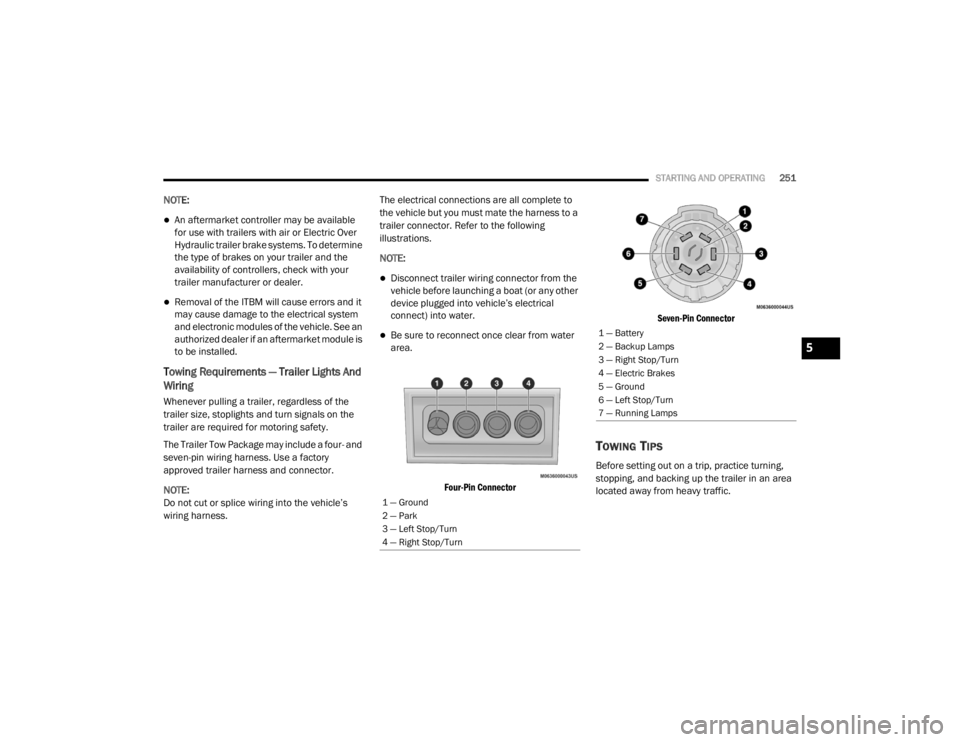
The Trailer Tow Package may include a four- and
seven-pin wiring harness. Use a factory
approved trailer harness and connector.
NOTE:
Do not cut or splice wiring into the vehicle’s
wiring harness. The electrical connections are all complete to
the vehicle but you must mate the harness to a
trailer connector. Refer to the following
illustrations.
NOTE:
Disconnect trailer wiring connector from the
vehicle before launching a boat (or any other
device plugged into vehicle’s electrical
connect) into water.
Be sure to reconnect once clear from water
area.
Four-Pin Connector Seven-Pin Connector
TOWING TIPS
Before setting out on a trip, practice turning,
stopping, and backing up the trailer in an area
located away from heavy traffic.
1 — Ground
2 — Park
3 — Left Stop/Turn
4 — Right Stop/Turn
1 — Battery
2 — Backup Lamps
3 — Right Stop/Turn
4 — Electric Brakes
5 — Ground
6 — Left Stop/Turn
7 — Running Lamps
5
20_WD_OM_EN_USC_t.book Page 251
Page 271 of 464

IN CASE OF EMERGENCY269
(Continued)
Front Turn Signal
1. Open the hood.
2. Turn the turn signal bulb a quarter turn counterclockwise to remove from housing.
3. Disconnect the electrical connector and replace the bulb.
Front Fog Lamps
1. Reach through the cutout in the splash shield and rotate the bulb’s electrical
connector a quarter turn counterclockwise
and remove it from the fog lamp housing.
2. Remove the bulb from the connector and install the replacement bulb.
3. Install the bulb and connector assembly into the fog lamp housing and rotate the
connector a quarter turn clockwise to lock it
in place.
Rear Tail, Stop And Turn Signal Lamps
The rear tail, stop, and turn signal lamps are
LED. See an authorized dealer for replacement.
Rear Liftgate Mounted Back-up Lamps
1. Raise the liftgate.
2. Use a fiber stick or flat blade screw driver to pry the lower trim from the liftgate.
3. Back-up lamps are now visible. Rotate socket(s) counterclockwise.
4. Remove/replace bulb(s).
5. Reinstall the socket(s). 6. Reverse process to reinstall the liftgate
trim.
Center High Mounted Stop Lamp (CHMSL)
The Center High Mounted Stop Lamp is an LED
assembly. See an authorized dealer for
replacement.
Rear License Lamp
The rear license lamps are LEDs. See an
authorized dealer for service.
FUSES
CAUTION!
Do not touch the new bulb with your fingers.
Oil contamination will severely shorten bulb
life. If the bulb comes in contact with an oily
surface, clean the bulb with rubbing alcohol.
CAUTION!
Do not touch the new bulb with your fingers.
Oil contamination will severely shorten bulb
life. If the bulb comes in contact with any
oily surface, clean the bulb with rubbing
alcohol.
Always use the correct bulb size and type
for replacement. An incorrect bulb size or
type may overheat and cause damage to
the lamp, the socket or the lamp wiring.
WARNING!
When replacing a blown fuse, always use
an appropriate replacement fuse with the
same amp rating as the original fuse. Never
replace a fuse with another fuse of higher
amp rating. Never replace a blown fuse with
metal wires or any other material. Do not
place a fuse inside a circuit breaker cavity
or vice versa. Failure to use proper fuses
may result in serious personal injury, fire
and/or property damage.
Before replacing a fuse, make sure that the
ignition is off and that all the other services
are switched off and/or disengaged.
6
20_WD_OM_EN_USC_t.book Page 269
Page 458 of 464

456
T
Telescoping Steering Column
.......................... 46Temperature Control, Automatic (ATC)............ 69Tie Down Hooks, Cargo.................................... 78Tilt Steering Column........................................ 46Tire And Loading Information Placard........... 332Tire Markings................................................. 328Tire Safety Information.................................. 327Tires................................... 183, 335, 340, 344Aging (Life Of Tires)................................... 338Air Pressure............................................... 335Chains............................................. 343, 344Changing................................ 275, 283, 327Compact Spare......................................... 341Flat Changing............................................ 283General Information........................ 335, 340High Speed................................................ 336Inflation Pressure...................................... 336Jacking...................................................... 327Life Of Tires............................................... 338Load Capacity............................................ 332Pressure Monitoring System (TPMS)........................................ 114, 138Quality Grading.......................................... 344Radial........................................................ 337Replacement................................... 283, 338Rotation.................................................... 344Safety.............................................. 327, 335Sizes.......................................................... 329Snow Tires................................................. 340
Spare Tires............................. 277, 340, 342Spinning................................................... 337Trailer Towing........................................... 248Tread Wear Indicators.............................. 338Wheel Mounting....................................... 283Wheel Nut Torque..................................... 350To Open Hood.................................................. 75Tongue Weight/Trailer Weight...................... 246Towing................................................. 241, 290Disabled Vehicle....................................... 290Guide............................................... 244, 245Recreational............................................. 253Weight............................................. 244, 245Towing Behind A Motorhome........................ 253Traction Control............................................ 130Trailer Sway Control (TSC)............................. 130Trailer Towing............................................... 241Cooling System Tips................................. 252Hitches..................................................... 243Minimum Requirements........................... 247Tips........................................................... 251Trailer And Tongue Weight........................ 246Wiring....................................................... 251Trailer Towing Guide............................ 244, 245Trailer Weight....................................... 244, 245Transfer Case............................................... 327Electronically Shifted................................ 199Fluid......................................................... 358Maintenance............................................ 327
Transmission................................................. 193Automatic........................................ 193, 326Fluid.......................................................... 358Maintenance............................................ 326Shifting..................................................... 191Transmitter, Garage Door Opener
(Homelink).......................................................78Transporting Pets.......................................... 180Tread Wear Indicators................................... 338Turn Signals......................................... 118, 269
U
UconnectAdvanced Phone Connectivity
................... 421Phone Call Features................................. 418Things You Should Know About Your Uconnect Phone................................................... 422Uconnect Settings.................................... 372Uconnect Phone..........................414, 416, 417Answer Or Ignore An Incoming Call — Call Currently In Progress..................... 420Answer Or Ignore An Incoming Call — No Call Currently In Progress................ 420Bluetooth Communication Link................ 423Call By Saying A Phonebook Name........... 419Call Continuation...................................... 421Call Controls............................................. 419Call Termination....................................... 421Cancel Command..................................... 414
20_WD_OM_EN_USC_t.book Page 456