phone DODGE DURANGO 2021 User Guide
[x] Cancel search | Manufacturer: DODGE, Model Year: 2021, Model line: DURANGO, Model: DODGE DURANGO 2021Pages: 340, PDF Size: 20.38 MB
Page 164 of 340
162MULTIMEDIA
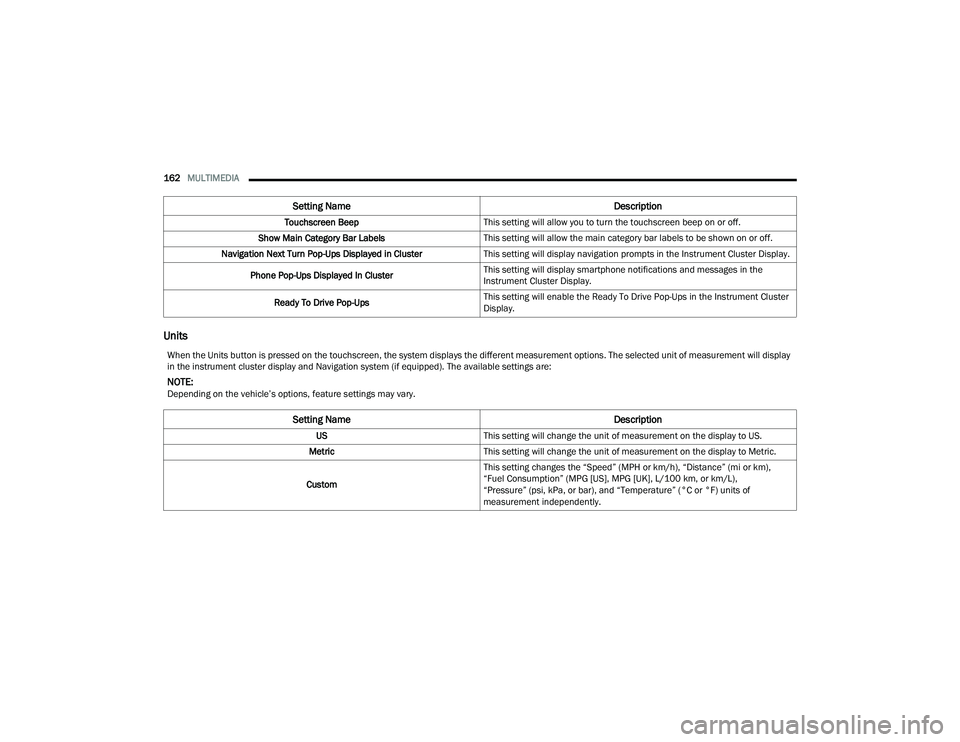
Units
Touchscreen Beep This setting will allow you to turn the touchscreen beep on or off.
Show Main Category Bar Labels This setting will allow the main category bar labels to be shown on or off.
Navigation Next Turn Pop-Ups Displayed in Cluster This setting will display navigation prompts in the Instrument Cluster Display.
Phone Pop-Ups Displayed In Cluster This setting will display smartphone notifications and messages in the
Instrument Cluster Display.
Ready To Drive Pop-Ups This setting will enable the Ready To Drive Pop-Ups in the Instrument Cluster
Display.
Setting Name
Description
When the Units button is pressed on the touchscreen, the system displays the different measurement options. The selected unit of measurement will display
in the instrument cluster display and Navigation system (if equipped). The available settings are:
NOTE:Depending on the vehicle’s options, feature settings may vary.
Setting NameDescription
USThis setting will change the unit of measurement on the display to US.
Metric This setting will change the unit of measurement on the display to Metric.
Custom This setting changes the “Speed” (MPH or km/h), “Distance” (mi or km),
“Fuel Consumption” (MPG [US], MPG [UK], L/100 km, or km/L),
“Pressure” (psi, kPa, or bar), and “Temperature” (°C or °F) units of
measurement independently.
21_WD_OM_EN_USC_t.book Page 162
Page 168 of 340
166MULTIMEDIA
Phone/Bluetooth®
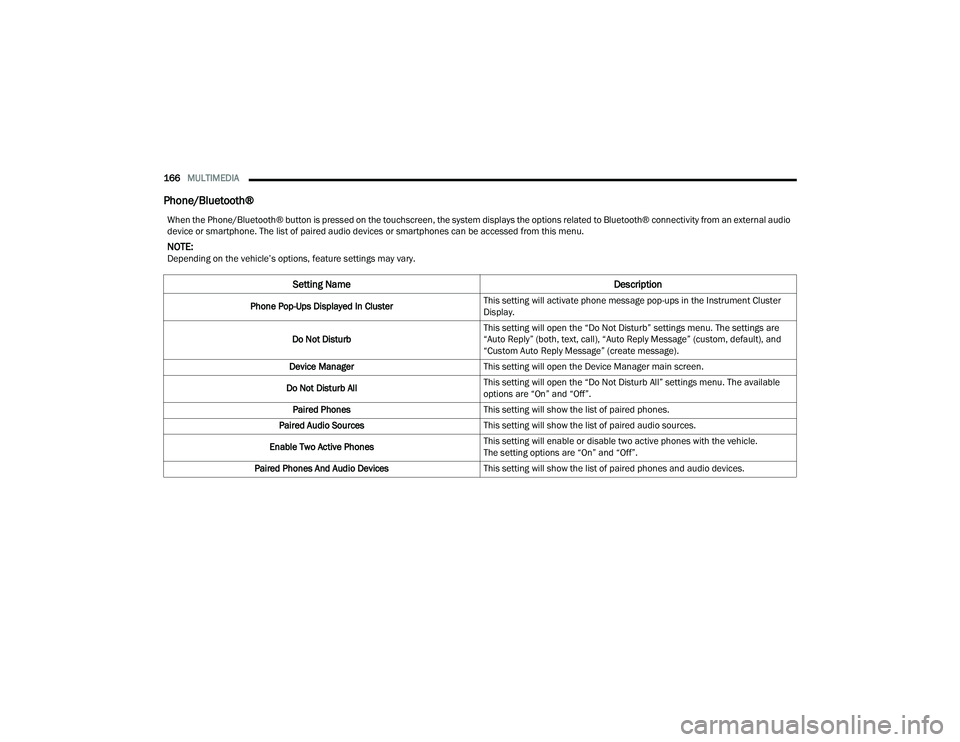
When the Phone/Bluetooth® button is pressed on the touchscreen, the system displays the options related to Bluetooth® connectivity from an external audio
device or smartphone. The list of paired audio devices or smartphones can be accessed from this menu.
NOTE:Depending on the vehicle’s options, feature settings may vary.
Setting Name Description
Phone Pop-Ups Displayed In ClusterThis setting will activate phone message pop-ups in the Instrument Cluster
Display.
Do Not Disturb This setting will open the “Do Not Disturb” settings menu. The settings are
“Auto Reply” (both, text, call), “Auto Reply Message” (custom, default), and
“Custom Auto Reply Message” (create message).
Device Manager This setting will open the Device Manager main screen.
Do Not Disturb All This setting will open the “Do Not Disturb All” settings menu. The available
options are “On” and “Off”.
Paired Phones This setting will show the list of paired phones.
Paired Audio Sources This setting will show the list of paired audio sources.
Enable Two Active Phones This setting will enable or disable two active phones with the vehicle.
The setting options are “On” and “Off”.
Paired Phones And Audio Devices This setting will show the list of paired phones and audio devices.
21_WD_OM_EN_USC_t.book Page 166
Page 176 of 340
174MULTIMEDIA
Audio
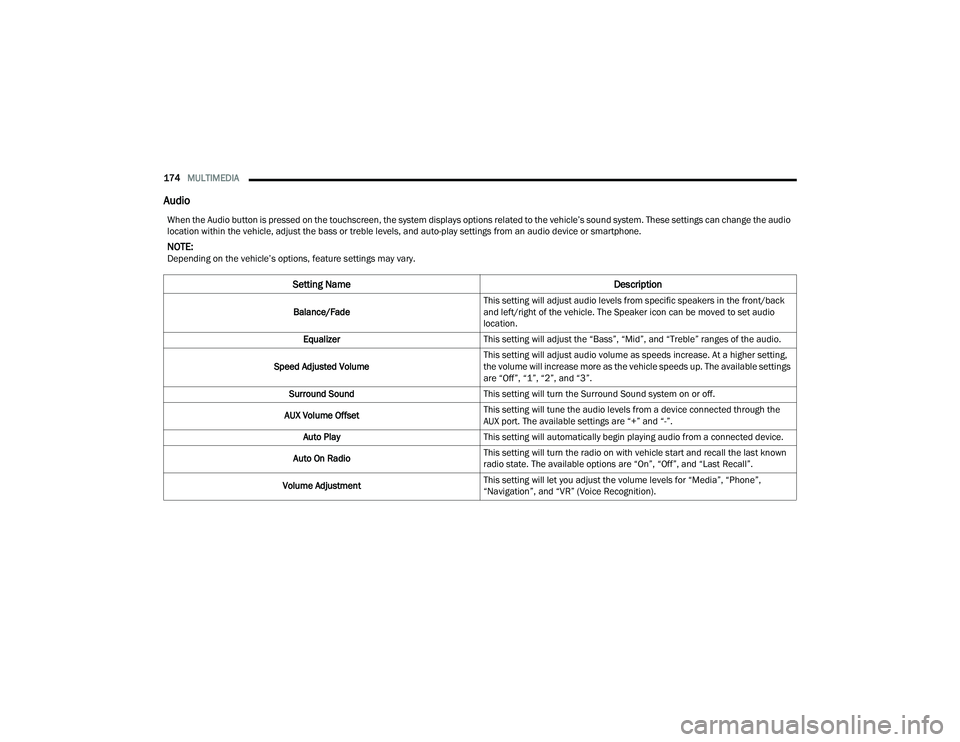
When the Audio button is pressed on the touchscreen, the system displays options related to the vehicle’s sound system. These settings can change the audio
location within the vehicle, adjust the bass or treble levels, and auto-play settings from an audio device or smartphone.
NOTE:Depending on the vehicle’s options, feature settings may vary.
Setting Name Description
Balance/FadeThis setting will adjust audio levels from specific speakers in the front/back
and left/right of the vehicle. The Speaker icon can be moved to set audio
location.
Equalizer This setting will adjust the “Bass”, “Mid”, and “Treble” ranges of the audio.
Speed Adjusted Volume This setting will adjust audio volume as speeds increase. At a higher setting,
the volume will increase more as the vehicle speeds up. The available settings
are “Off”, “1”, “2”, and “3”.
Surround Sound This setting will turn the Surround Sound system on or off.
AUX Volume Offset This setting will tune the audio levels from a device connected through the
AUX port. The available settings are “+” and “-”.
Auto Play This setting will automatically begin playing audio from a connected device.
Auto On Radio This setting will turn the radio on with vehicle start and recall the last known
radio state. The available options are “On”, “Off”, and “Last Recall”.
Volume Adjustment This setting will let you adjust the volume levels for “Media”, “Phone”,
“Navigation”, and “VR” (Voice Recognition).
21_WD_OM_EN_USC_t.book Page 174
Page 180 of 340
178MULTIMEDIA
STEERING WHEEL AUDIO CONTROLS
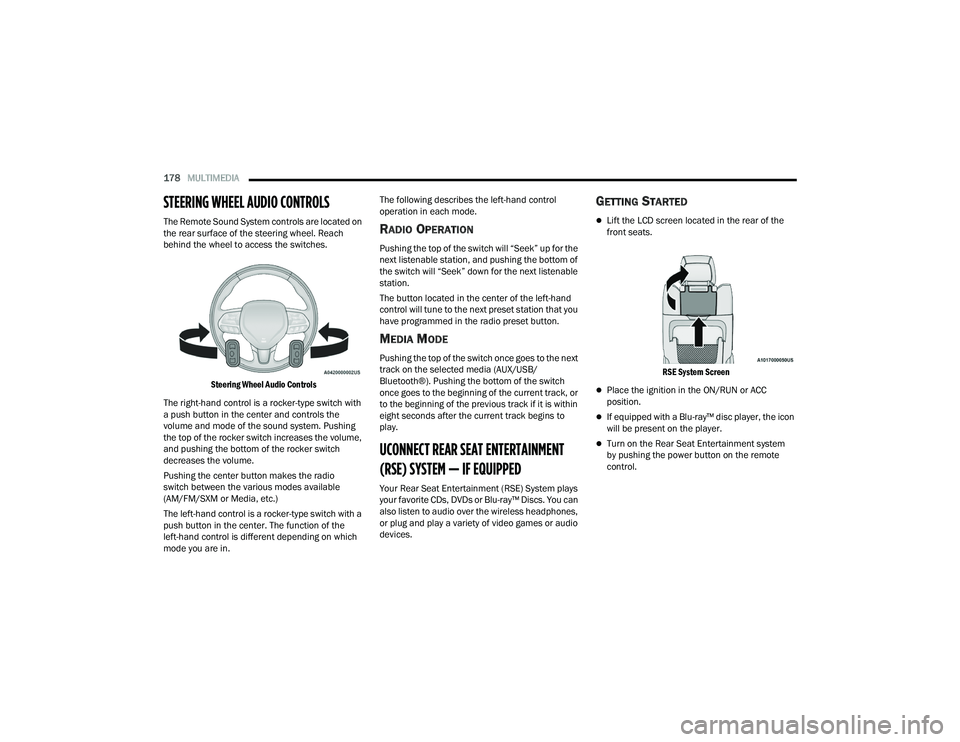
The Remote Sound System controls are located on
the rear surface of the steering wheel. Reach
behind the wheel to access the switches.
Steering Wheel Audio Controls
The right-hand control is a rocker-type switch with
a push button in the center and controls the
volume and mode of the sound system. Pushing
the top of the rocker switch increases the volume,
and pushing the bottom of the rocker switch
decreases the volume.
Pushing the center button makes the radio
switch between the various modes available
(AM/FM/SXM or Media, etc.)
The left-hand control is a rocker-type switch with a
push button in the center. The function of the
left-hand control is different depending on which
mode you are in. The following describes the left-hand control
operation in each mode.RADIO OPERATION
Pushing the top of the switch will “Seek” up for the
next listenable station, and pushing the bottom of
the switch will “Seek” down for the next listenable
station.
The button located in the center of the left-hand
control will tune to the next preset station that you
have programmed in the radio preset button.
MEDIA MODE
Pushing the top of the switch once goes to the next
track on the selected media (AUX/USB/
Bluetooth®). Pushing the bottom of the switch
once goes to the beginning of the current track, or
to the beginning of the previous track if it is within
eight seconds after the current track begins to
play.
UCONNECT REAR SEAT ENTERTAINMENT
(RSE) SYSTEM — IF EQUIPPED
Your Rear Seat Entertainment (RSE) System plays
your favorite CDs, DVDs or Blu-ray™ Discs. You can
also listen to audio over the wireless headphones,
or plug and play a variety of video games or audio
devices.
GETTING STARTED
Lift the LCD screen located in the rear of the
front seats.
RSE System Screen
Place the ignition in the ON/RUN or ACC
position.
If equipped with a Blu-ray™ disc player, the icon
will be present on the player.
Turn on the Rear Seat Entertainment system
by pushing the power button on the remote
control.
21_WD_OM_EN_USC_t.book Page 178
Page 181 of 340
MULTIMEDIA179
When the Video Screen(s) are open and a
DVD/Blu-ray™ disc is inserted into the disc
player, the screen(s) turn(s) on automatically,
the headphone transmitters turn on, and play -
back begins.
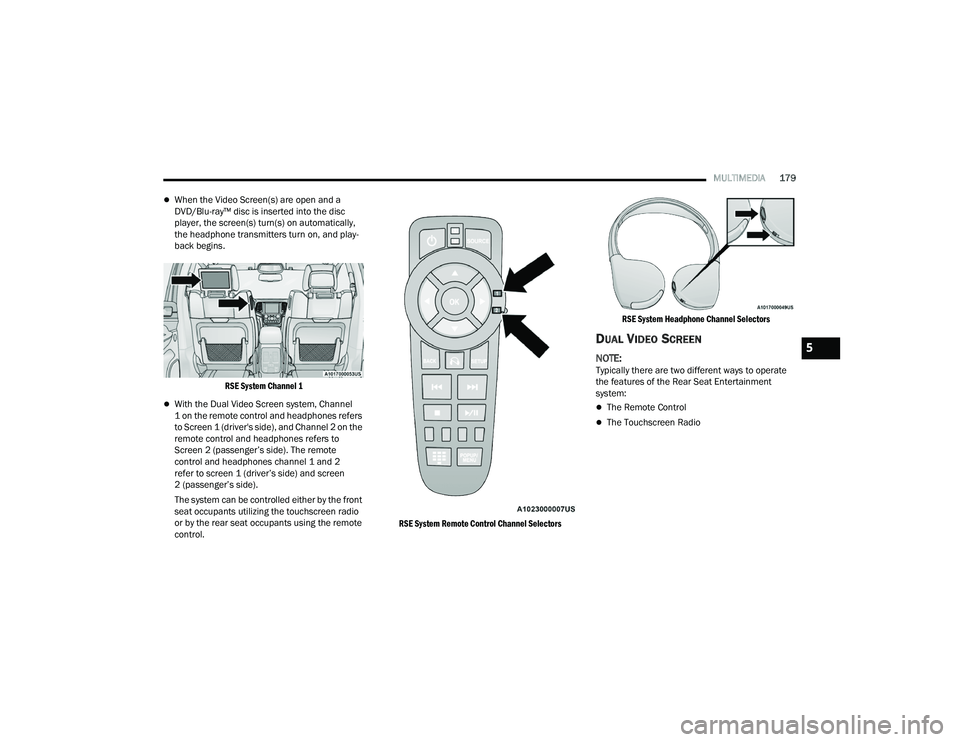
RSE System Channel 1
With the Dual Video Screen system, Channel
1 on the remote control and headphones refers
to Screen 1 (driver's side), and Channel 2 on the
remote control and headphones refers to
Screen 2 (passenger’s side). The remote
control and headphones channel 1 and 2
refer to screen 1 (driver’s side) and screen
2 (passenger’s side).
The system can be controlled either by the front
seat occupants utilizing the touchscreen radio
or by the rear seat occupants using the remote
control.
RSE System Remote Control Channel SelectorsRSE System Headphone Channel Selectors
DUAL VIDEO SCREEN
NOTE:Typically there are two different ways to operate
the features of the Rear Seat Entertainment
system:
The Remote Control
The Touchscreen Radio
5
21_WD_OM_EN_USC_t.book Page 179
Page 182 of 340
180MULTIMEDIA
PLAY A BLU-RAY™ DISC
The Blu-ray™ disc player is located in the center
console.
Blu-ray™ Disc Player Location
1. Insert the DVD/Blu-ray™ Disc with the label facing as indicated on the DVD/Blu-ray™ Disc
player. The radio automatically selects the
appropriate mode after the disc is recognized
and displays the menu screen or starts
playing the first track.
2. To watch a DVD/Blu-ray™ Disc on Channel 1 (driver’s side rear passenger), ensure the
Remote Control and Headphone channel
selector switches are on Channel 1.
3. To watch a DVD/Blu-ray™ Disc on Channel 2 (passenger’s side rear passenger), ensure
the Remote Control and Headphone channel
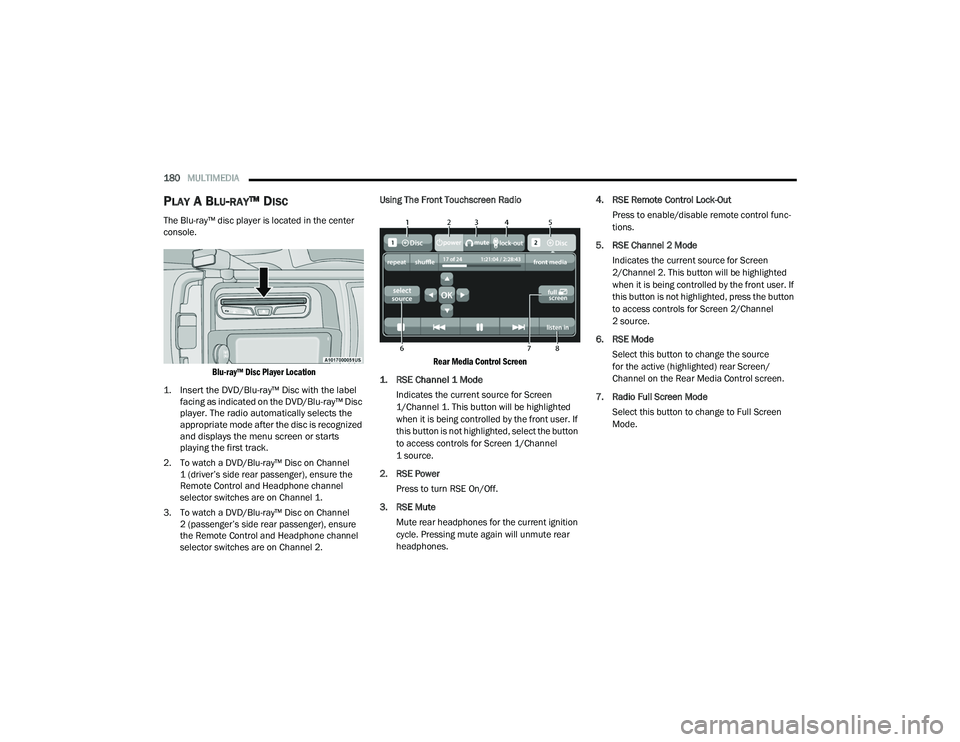
selector switches are on Channel 2. Using The Front Touchscreen Radio
Rear Media Control Screen
1. RSE Channel 1 Mode
Indicates the current source for Screen
1/Channel 1. This button will be highlighted
when it is being controlled by the front user. If
this button is not highlighted, select the button
to access controls for Screen 1/Channel
1 source.
2. RSE Power Press to turn RSE On/Off.
3. RSE Mute Mute rear headphones for the current ignition
cycle. Pressing mute again will unmute rear
headphones. 4. RSE Remote Control Lock-Out
Press to enable/disable remote control func -
tions.
5. RSE Channel 2 Mode Indicates the current source for Screen
2/Channel 2. This button will be highlighted
when it is being controlled by the front user. If
this button is not highlighted, press the button
to access controls for Screen 2/Channel
2 source.
6. RSE Mode Select this button to change the source
for the active (highlighted) rear Screen/
Channel on the Rear Media Control screen.
7. Radio Full Screen Mode Select this button to change to Full Screen
Mode.
21_WD_OM_EN_USC_t.book Page 180
Page 184 of 340
182MULTIMEDIA
PLAY VIDEO GAMES
Connect the video game console to the Audio/
Video RCA/HDMI input jacks located on the side of
each seat.
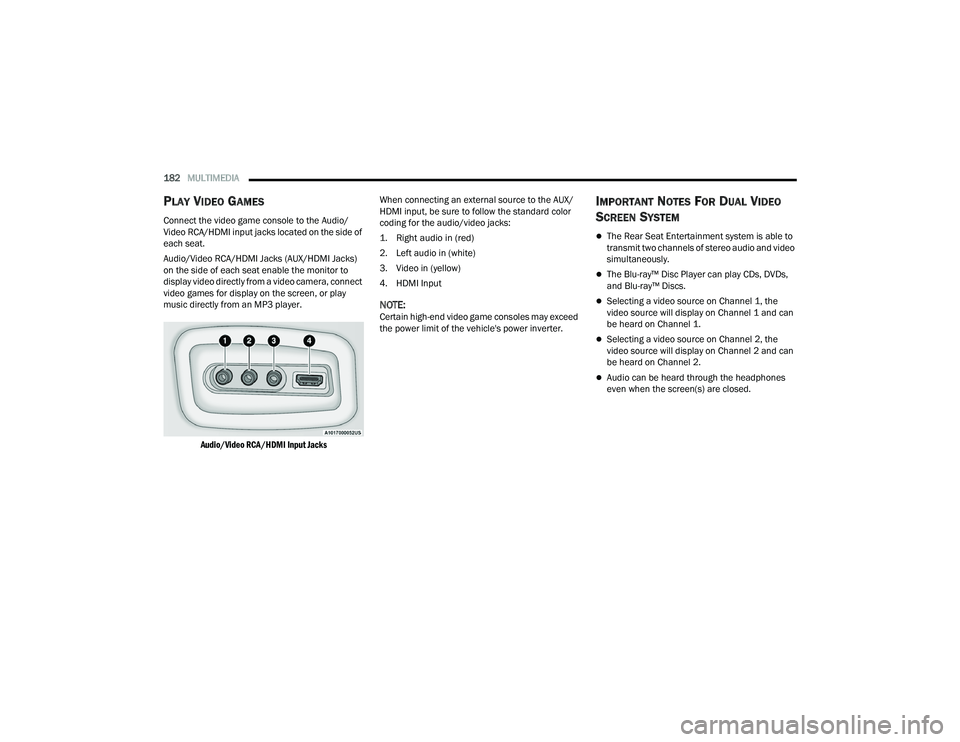
Audio/Video RCA/HDMI Jacks (AUX/HDMI Jacks)
on the side of each seat enable the monitor to
display video directly from a video camera, connect
video games for display on the screen, or play
music directly from an MP3 player.
Audio/Video RCA/HDMI Input Jacks
When connecting an external source to the AUX/
HDMI input, be sure to follow the standard color
coding for the audio/video jacks:
1. Right audio in (red)
2. Left audio in (white)
3. Video in (yellow)
4. HDMI Input
NOTE:Certain high-end video game consoles may exceed
the power limit of the vehicle's power inverter.
IMPORTANT NOTES FOR DUAL VIDEO
S
CREEN SYSTEM
The Rear Seat Entertainment system is able to
transmit two channels of stereo audio and video
simultaneously.
The Blu-ray™ Disc Player can play CDs, DVDs,
and Blu-ray™ Discs.
Selecting a video source on Channel 1, the
video source will display on Channel 1 and can
be heard on Channel 1.
Selecting a video source on Channel 2, the
video source will display on Channel 2 and can
be heard on Channel 2.
Audio can be heard through the headphones
even when the screen(s) are closed.
21_WD_OM_EN_USC_t.book Page 182
Page 185 of 340
MULTIMEDIA183
BLU-RAY™ DISC PLAYER REMOTE
C
ONTROL
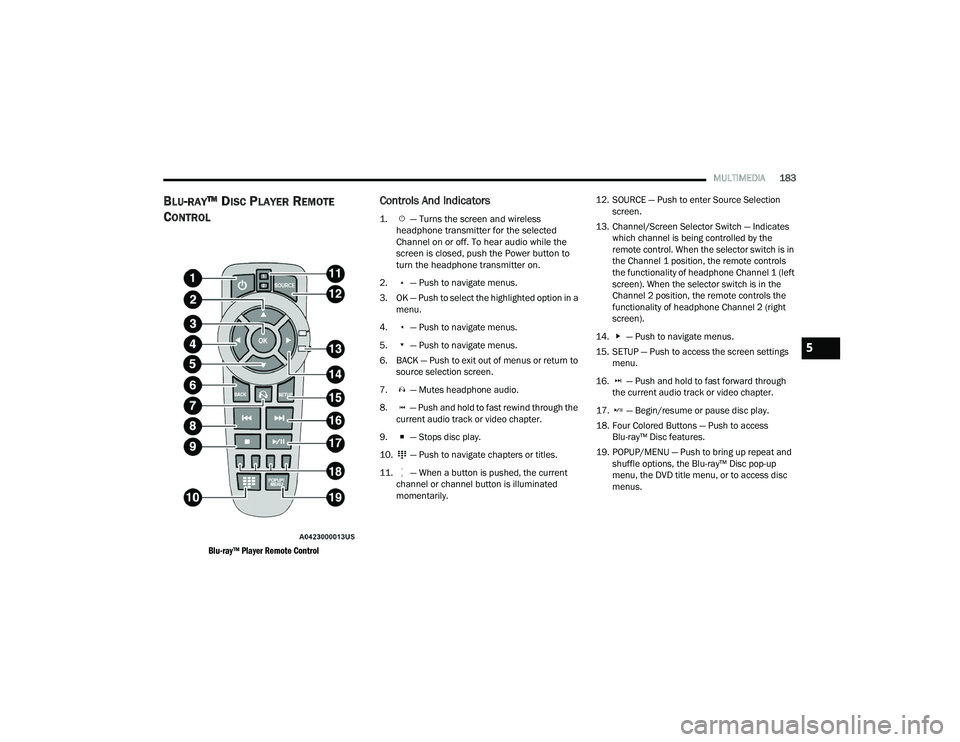
Blu-ray™ Player Remote Control
Controls And Indicators
1. — Turns the screen and wireless
headphone transmitter for the selected
Channel on or off. To hear audio while the
screen is closed, push the Power button to
turn the headphone transmitter on.
2. — Push to navigate menus.
3. OK — Push to select the highlighted option in a menu.
4. — Push to navigate menus.
5. — Push to navigate menus.
6. BACK — Push to exit out of menus or return to source selection screen.
7. — Mutes headphone audio.
8. — Push and hold to fast rewind through the current audio track or video chapter.
9. — Stops disc play.
10. — Push to navigate chapters or titles.
11. — When a button is pushed, the current channel or channel button is illuminated
momentarily. 12. SOURCE — Push to enter Source Selection
screen.
13. Channel/Screen Selector Switch — Indicates which channel is being controlled by the
remote control. When the selector switch is in
the Channel 1 position, the remote controls
the functionality of headphone Channel 1 (left
screen). When the selector switch is in the
Channel 2 position, the remote controls the
functionality of headphone Channel 2 (right
screen).
14. — Push to navigate menus.
15. SETUP — Push to access the screen settings menu.
16. — Push and hold to fast forward through the current audio track or video chapter.
17. — Begin/resume or pause disc play.
18. Four Colored Buttons — Push to access Blu-ray™ Disc features.
19. POPUP/MENU — Push to bring up repeat and shuffle options, the Blu-ray™ Disc pop-up
menu, the DVD title menu, or to access disc
menus.
5
21_WD_OM_EN_USC_t.book Page 183
Page 186 of 340
184MULTIMEDIA
HEADPHONES OPERATION
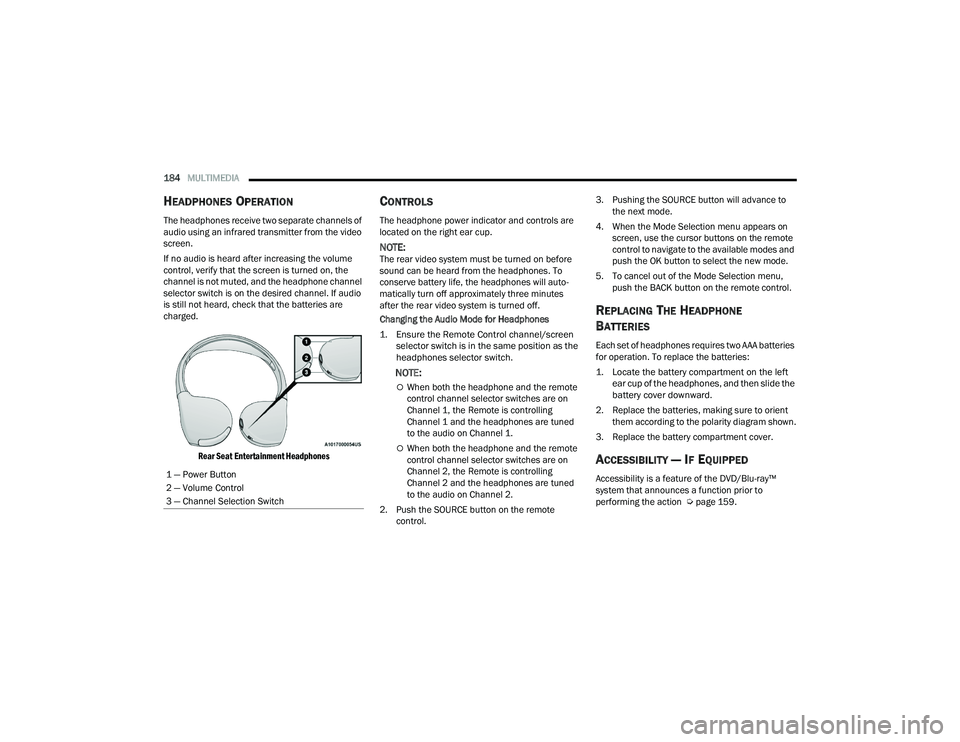
The headphones receive two separate channels of
audio using an infrared transmitter from the video
screen.
If no audio is heard after increasing the volume
control, verify that the screen is turned on, the
channel is not muted, and the headphone channel
selector switch is on the desired channel. If audio
is still not heard, check that the batteries are
charged.
Rear Seat Entertainment Headphones
CONTROLS
The headphone power indicator and controls are
located on the right ear cup.
NOTE:The rear video system must be turned on before
sound can be heard from the headphones. To
conserve battery life, the headphones will auto -
matically turn off approximately three minutes
after the rear video system is turned off.
Changing the Audio Mode for Headphones
1. Ensure the Remote Control channel/screen selector switch is in the same position as the
headphones selector switch.
NOTE:
When both the headphone and the remote
control channel selector switches are on
Channel 1, the Remote is controlling
Channel 1 and the headphones are tuned
to the audio on Channel 1.
When both the headphone and the remote
control channel selector switches are on
Channel 2, the Remote is controlling
Channel 2 and the headphones are tuned
to the audio on Channel 2.
2. Push the SOURCE button on the remote control. 3. Pushing the SOURCE button will advance to
the next mode.
4. When the Mode Selection menu appears on screen, use the cursor buttons on the remote
control to navigate to the available modes and
push the OK button to select the new mode.
5. To cancel out of the Mode Selection menu, push the BACK button on the remote control.
REPLACING THE HEADPHONE
B
ATTERIES
Each set of headphones requires two AAA batteries
for operation. To replace the batteries:
1. Locate the battery compartment on the left
ear cup of the headphones, and then slide the
battery cover downward.
2. Replace the batteries, making sure to orient them according to the polarity diagram shown.
3. Replace the battery compartment cover.
ACCESSIBILITY — IF EQUIPPED
Accessibility is a feature of the DVD/Blu-ray™
system that announces a function prior to
performing the action Ú page 159.
1 — Power Button
2 — Volume Control
3 — Channel Selection Switch
21_WD_OM_EN_USC_t.book Page 184
Page 187 of 340
MULTIMEDIA185
STEREO HEADPHONE LIFETIME LIMITED
W
ARRANTY
Who Does This Warranty Cover? This warranty
covers the initial user or purchaser ("you" or "your")
of this particular Aptiv PLC (“Aptiv”) wireless
headphone ("Product"). The warranty is not
transferable.
How Long Does the Coverage Last? This warranty
lasts as long as you own the Product.
What Does This Warranty Cover? Except as
specified below, this warranty covers any Product
that in normal use is defective in workmanship or
materials.
What Does This Warranty Not Cover? This warranty
does not cover any damage or defect that results
from misuse, abuse, or modification of the Product
other than by Aptiv. Foam earpieces, which will
wear over time through normal use, are specifically
not covered (replacement foam is available for a
nominal charge). APTIV IS NOT LIABLE FOR ANY
INJURIES OR DAMAGES TO PERSONS OR
PROPERTY RESULTING FROM THE USE OF, OR ANY
FAILURE OR DEFECT IN, THE PRODUCT, NOR IS
APTIV LIABLE FOR ANY GENERAL, SPECIAL,
DIRECT, INDIRECT, INCIDENTAL, CONSEQUENTIAL,
EXEMPLARY, PUNITIVE OR OTHER DAMAGES OF
ANY KIND OR NATURE WHATSOEVER. Some states
and jurisdictions may not allow the exclusion or
limitation of incidental or consequential damages, so the above limitation may not apply to you. This
warranty gives you specific legal rights. You may
also have other rights, which vary from jurisdiction
to jurisdiction.
What Will Aptiv Do?
Aptiv, at its option, will repair or
replace any defective Product. Aptiv reserves the
right to replace any discontinued Product with a
comparable model. THIS WARRANTY IS THE SOLE
WARRANTY FOR THIS PRODUCT, SETS FORTH
YOUR EXCLUSIVE REMEDY REGARDING
DEFECTIVE PRODUCTS, AND IS IN LIEU OF ALL
OTHER WARRANTIES (EXPRESS OR IMPLIED),
INCLUDING ANY WARRANTY FOR
MERCHANTABILITY OR FITNESS FOR A
PARTICULAR PURPOSE.
If you have any questions or comments regarding
your Aptiv wireless headphones, please email
[email protected] or phone: 888-293-3332
System Information
Disc Menu
When listening to a CD Audio or CD Data disc,
pushing the remote control’s POPUP/MENU button
displays a list of all commands which control
playback of the disc.
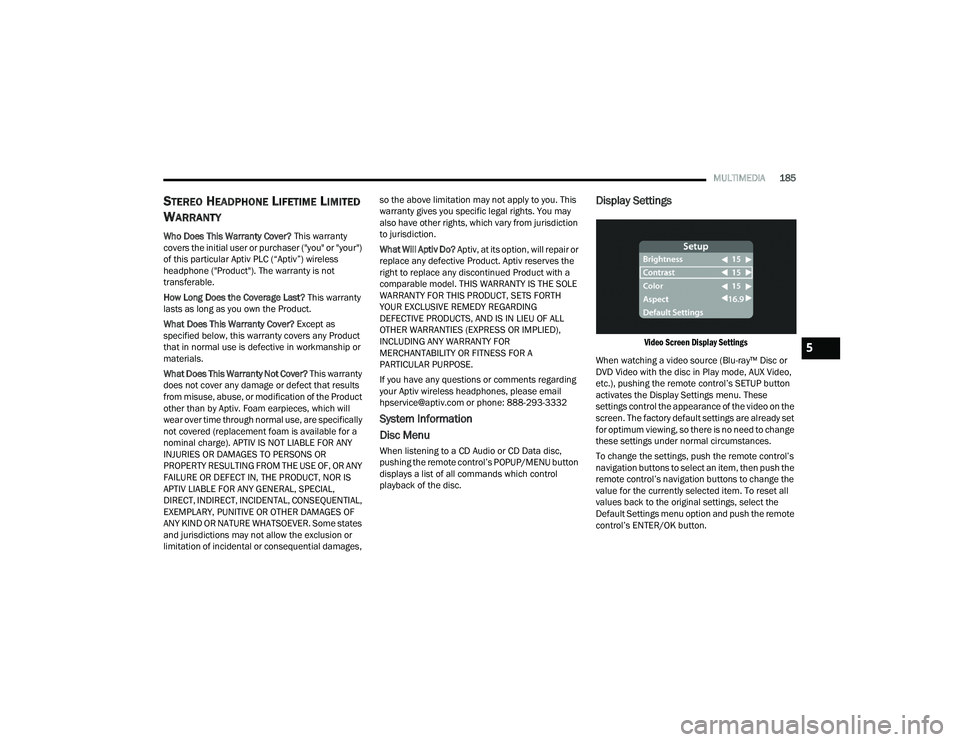
Display Settings
Video Screen Display Settings
When watching a video source (Blu-ray™ Disc or
DVD Video with the disc in Play mode, AUX Video,
etc.), pushing the remote control’s SETUP button
activates the Display Settings menu. These
settings control the appearance of the video on the
screen. The factory default settings are already set
for optimum viewing, so there is no need to change
these settings under normal circumstances.
To change the settings, push the remote control’s
navigation buttons to select an item, then push the
remote control’s navigation buttons to change the
value for the currently selected item. To reset all
values back to the original settings, select the
Default Settings menu option and push the remote
control’s ENTER/OK button.5
21_WD_OM_EN_USC_t.book Page 185