reset DODGE DURANGO 2022 Owner's Manual
[x] Cancel search | Manufacturer: DODGE, Model Year: 2022, Model line: DURANGO, Model: DODGE DURANGO 2022Pages: 332, PDF Size: 19.82 MB
Page 182 of 332
180MULTIMEDIA
Reset
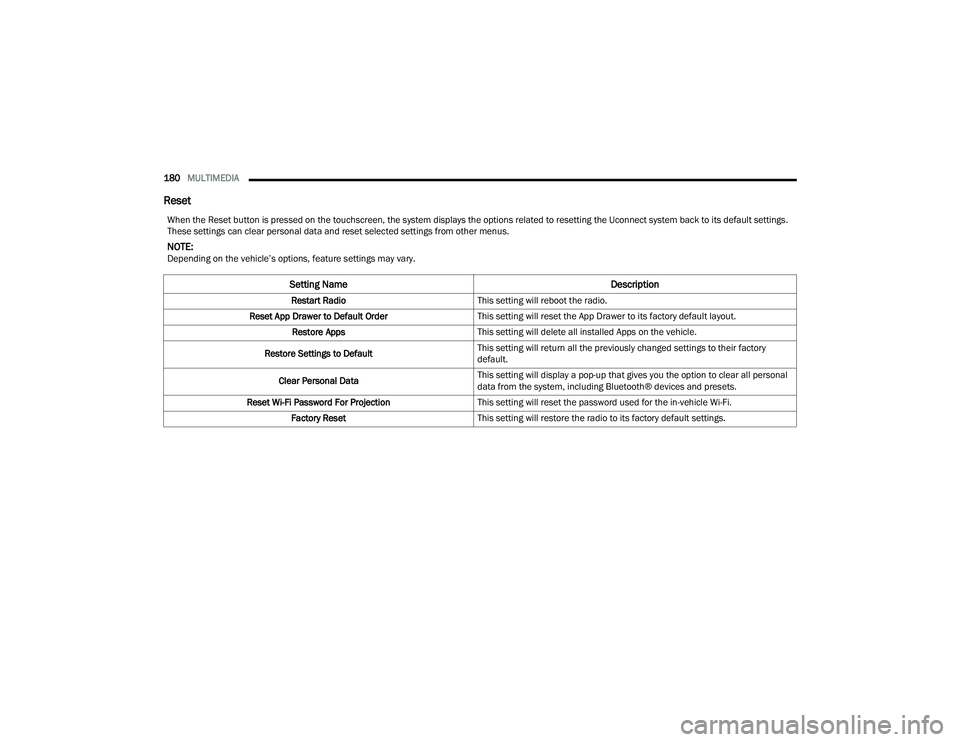
When the Reset button is pressed on the touchscreen, the system displays the options related to resetting the Uconnect system back to its default settings.
These settings can clear personal data and reset selected settings from other menus.
NOTE:Depending on the vehicle’s options, feature settings may vary.
Setting Name Description
Restart RadioThis setting will reboot the radio.
Reset App Drawer to Default Order This setting will reset the App Drawer to its factory default layout.
Restore Apps This setting will delete all installed Apps on the vehicle.
Restore Settings to Default This setting will return all the previously changed settings to their factory
default.
Clear Personal Data This setting will display a pop-up that gives you the option to clear all personal
data from the system, including Bluetooth® devices and presets.
Reset Wi-Fi Password For Projection This setting will reset the password used for the in-vehicle Wi-Fi.
Factory Reset This setting will restore the radio to its factory default settings.
22_WD_OM_EN_USC_t.book Page 180
Page 183 of 332
MULTIMEDIA181
STEERING WHEEL AUDIO CONTROLS
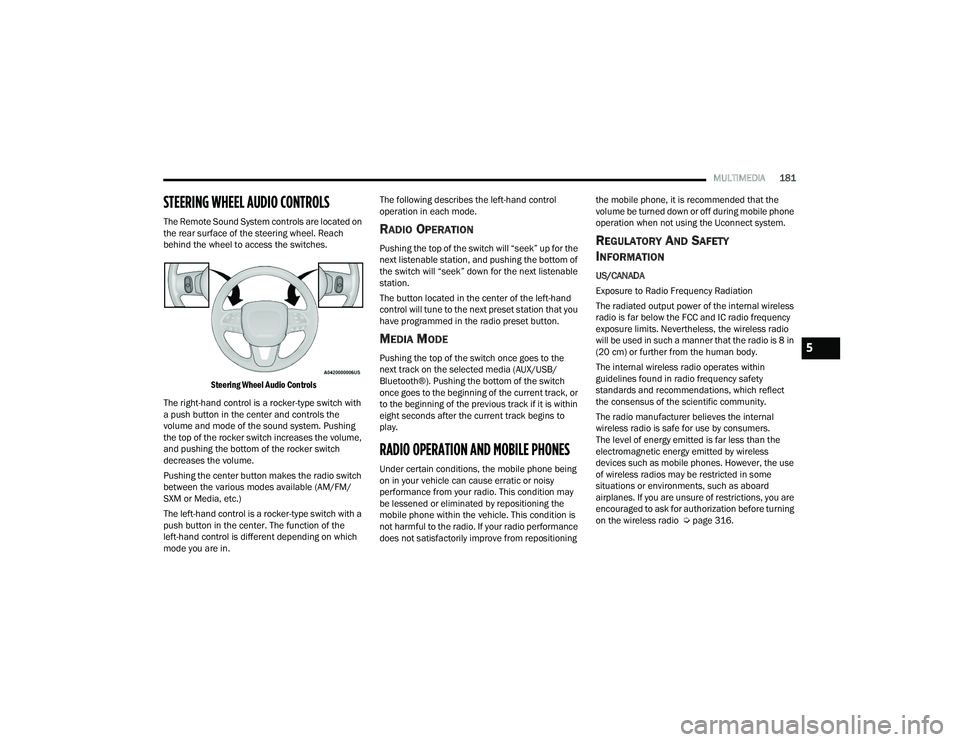
The Remote Sound System controls are located on
the rear surface of the steering wheel. Reach
behind the wheel to access the switches.
Steering Wheel Audio Controls
The right-hand control is a rocker-type switch with
a push button in the center and controls the
volume and mode of the sound system. Pushing
the top of the rocker switch increases the volume,
and pushing the bottom of the rocker switch
decreases the volume.
Pushing the center button makes the radio switch
between the various modes available (AM/FM/
SXM or Media, etc.)
The left-hand control is a rocker-type switch with a
push button in the center. The function of the
left-hand control is different depending on which
mode you are in. The following describes the left-hand control
operation in each mode.RADIO OPERATION
Pushing the top of the switch will “seek” up for the
next listenable station, and pushing the bottom of
the switch will “seek” down for the next listenable
station.
The button located in the center of the left-hand
control will tune to the next preset station that you
have programmed in the radio preset button.
MEDIA MODE
Pushing the top of the switch once goes to the
next track on the selected media (AUX/USB/
Bluetooth®). Pushing the bottom of the switch
once goes to the beginning of the current track, or
to the beginning of the previous track if it is within
eight seconds after the current track begins to
play.
RADIO OPERATION AND MOBILE PHONES
Under certain conditions, the mobile phone being
on in your vehicle can cause erratic or noisy
performance from your radio. This condition may
be lessened or eliminated by repositioning the
mobile phone within the vehicle. This condition is
not harmful to the radio. If your radio performance
does not satisfactorily improve from repositioning
the mobile phone, it is recommended that the
volume be turned down or off during mobile phone
operation when not using the Uconnect system.
REGULATORY AND SAFETY
I
NFORMATION
US/CANADA
Exposure to Radio Frequency Radiation
The radiated output power of the internal wireless
radio is far below the FCC and IC radio frequency
exposure limits. Nevertheless, the wireless radio
will be used in such a manner that the radio is 8 in
(20 cm) or further from the human body.
The internal wireless radio operates within
guidelines found in radio frequency safety
standards and recommendations, which reflect
the consensus of the scientific community.
The radio manufacturer believes the internal
wireless radio is safe for use by consumers.
The level of energy emitted is far less than the
electromagnetic energy emitted by wireless
devices such as mobile phones. However, the use
of wireless radios may be restricted in some
situations or environments, such as aboard
airplanes. If you are unsure of restrictions, you are
encouraged to ask for authorization before turning
on the wireless radio Ú page 316.
5
22_WD_OM_EN_USC_t.book Page 181
Page 216 of 332
214SAFETY
As the air bags deflate, you may see some
smoke-like particles. The particles are a normal
by-product of the process that generates the
non-toxic gas used for air bag inflation. These
airborne particles may irritate the skin, eyes,
nose, or throat. If you have skin or eye irritation,
rinse the area with cool water. For nose or throat
irritation, move to fresh air. If the irritation
continues, see your doctor. If these particles
settle on your clothing, follow the garment
manufacturer’s instructions for cleaning.
Do not drive your vehicle after the air bags have
deployed. If you are involved in another collision,
the air bags will not be in place to protect you.
NOTE:
Air bag covers may not be obvious in the interior
trim, but they will open during air bag deploy -
ment.
After any collision, the vehicle should be taken
to an authorized dealer immediately.
Enhanced Accident Response System
In the event of an impact, if the communication
network remains intact, and the power remains
intact, depending on the nature of the event, the
Occupant Restraint Controller (ORC) will determine
whether to have the Enhanced Accident Response
System perform the following functions:
Cut off fuel to the engine (if equipped).
Cut off battery power to the electric motor
(if equipped).
Flash hazard lights as long as the battery has
power.
Turn on the interior lights, which remain on as
long as the battery has power or for 15 minutes
from the intervention of the Enhanced Accident
Response System.
Unlock the power door locks.
Your vehicle may also be designed to perform any
of these other functions in response to the
Enhanced Accident Response System:
Turn off the Fuel Filter Heater, Turn off the HVAC
Blower Motor, Close the HVAC Circulation Door
Cut off battery power to the:
Engine
Electric Motor (if equipped)
Electric power steering
Brake booster
Electric park brake
Automatic transmission gear selector
Horn
Front wiper
Headlamp washer pump (if equipped)
NOTE:After an accident, remember to cycle the ignition to
the STOP (OFF/LOCK) position and remove the key
from the ignition switch to avoid draining the
battery. Carefully check the vehicle for fuel leaks in
the engine compartment and on the ground near
the engine compartment and fuel tank before
resetting the system and starting the engine. If
there are no fuel leaks or damage to the vehicle
electrical devices (e.g. headlights) after an
accident, reset the system by following the
procedure described below. If you have any doubt,
contact an authorized dealer.
Enhanced Accident Response System
Reset Procedure
In order to reset the Enhanced Accident Response
System functions after an event, the ignition switch
must be changed from ignition START or ON/RUN
to ignition OFF. Carefully check the vehicle for fuel
leaks in the engine compartment and on the
ground near the engine compartment and fuel
tank before resetting the system and starting the
engine.
WARNING!
Deployed air bags and seat belt pretensioners
cannot protect you in another collision. Have the
air bags, seat belt pretensioners, and the seat belt
retractor assemblies replaced by an authorized
dealer immediately. Also, have the Occupant
Restraint Controller System serviced as well.
22_WD_OM_EN_USC_t.book Page 214
Page 217 of 332
SAFETY215
(Continued)
After an accident, if the vehicle will not start after
performing the reset procedure, the vehicle must
be towed to an authorized dealer to be inspected
and to have the Enhanced Accident Response
System reset.
Maintaining Your Air Bag System
Event Data Recorder (EDR)
This vehicle is equipped with an event data
recorder (EDR). The main purpose of an EDR is to
record, in certain crash or near crash-like
situations, such as an air bag deployment or hitting
a road obstacle, data that will assist in
understanding how a vehicle’s systems performed.
The EDR is designed to record data related to
vehicle dynamics and safety systems for a short
period of time, typically 30 seconds or less. The EDR in this vehicle is designed to record such
data as:
How various systems in your vehicle were oper
-
ating;
Whether or not the driver and passenger safety
belts were buckled/fastened;
How far (if at all) the driver was depressing the
accelerator and/or brake pedal; and,
How fast the vehicle was traveling.
These data can help provide a better
understanding of the circumstances in which
crashes and injuries occur.
NOTE:EDR data are recorded by your vehicle only if a
non-trivial crash situation occurs; no data are
recorded by the EDR under normal driving condi -
tions and no personal data (e.g., name, gender,
age, and crash location) are recorded. However,
other parties, such as law enforcement, could
combine the EDR data with the type of personally
identifying data routinely acquired during a crash
investigation.
WARNING!
Modifications to any part of the air bag system
could cause it to fail when you need it. You
could be injured if the air bag system is not
there to protect you. Do not modify the compo -
nents or wiring, including adding any kind of
badges or stickers to the steering wheel hub
trim cover or the upper passenger side of the
instrument panel. Do not modify the front
fascia/bumper, vehicle body structure, or add
aftermarket side steps or running boards.
It is dangerous to try to repair any part of the
air bag system yourself. Be sure to tell anyone
who works on your vehicle that it has an air
bag system.
Do not attempt to modify any part of your air
bag system. The air bag may inflate acciden -
tally or may not function properly if modifica -
tions are made. Take your vehicle to an
authorized dealer for any air bag system
service. If your seat, including your trim cover
and cushion, needs to be serviced in any way
(including removal or loosening/tightening of
seat attachment bolts), take the vehicle to an
authorized dealer. Only manufacturer
approved seat accessories may be used. If it is
necessary to modify the air bag system for
persons with disabilities, contact an autho -
rized dealer.
WARNING!
6
22_WD_OM_EN_USC_t.book Page 215
Page 257 of 332
255
SERVICING AND MAINTENANCE
SCHEDULED SERVICING
Your vehicle is equipped with an automatic oil
change indicator system. The oil change indicator
system will remind you that it is time to take your
vehicle in for scheduled maintenance.
Based on engine operation conditions, the oil
change indicator message will illuminate. This
means that service is required for your vehicle.
Operating conditions such as frequent short-trips,
trailer tow, extremely hot or cold ambient
temperatures, and E85 fuel usage will influence
when the “Oil Change Required” message is
displayed. Have your vehicle serviced as soon as
possible, within the next 500 miles (805 km).An authorized dealer will reset the oil change
indicator message after completing the scheduled
oil change.
NOTE:Under no circumstances should oil change
intervals exceed 10,000 miles (16,000 km),
12 months or 350 hours of engine run time,
whichever comes first. The 350 hours of engine
run or idle time is generally only a concern for fleet
customers.
Once A Month Or Before A Long Trip:
Check engine oil level
Check windshield washer fluid level
Check the tire pressure and look for unusual
wear or damage
Check the fluid levels of the coolant reservoir,
brake master cylinder and fill as needed
Check function of all interior and exterior lights
8
22_WD_OM_EN_USC_t.book Page 255
Page 277 of 332
SERVICING AND MAINTENANCE275
AUTOMATIC TRANSMISSION
Special Additives
The manufacturer strongly recommends against
using any special additives in the transmission.
Automatic Transmission Fluid (ATF) is an
engineered product and its performance may be
impaired by supplemental additives. Therefore, do
not add any fluid additives to the transmission.
Avoid using transmission sealers as they may
adversely affect seals.
Fluid Level Check
The fluid level is preset at the factory and does not
require adjustment under normal operating
conditions. Routine fluid level checks are not
required; therefore the transmission has no
dipstick. An authorized dealer can check your
transmission fluid level using special service tools. If you notice fluid leakage or transmission
malfunction, visit an authorized dealer
immediately to have the transmission fluid level
checked. Operating the vehicle with an improper
fluid level can cause severe transmission damage.
Fluid And Filter Changes
Under normal operating conditions, the fluid
installed at the factory will provide satisfactory
lubrication for the life of the vehicle.
Routine fluid and filter changes are not required.
However, change the fluid and filter if the fluid
becomes contaminated (with water, etc.), or if the
transmission is disassembled for any reason.
To avoid contamination from foreign matter or
moisture, use only new brake fluid or fluid that
has been in a tightly closed container. Keep
the master cylinder reservoir cap secured at
all times. Brake fluid in an open container
absorbs moisture from the air resulting in a
lower boiling point. This may cause it to boil
unexpectedly during hard or prolonged
braking, resulting in sudden brake failure.
This could result in a collision.
Overfilling the brake fluid reservoir can result
in spilling brake fluid on hot engine parts,
causing the brake fluid to catch fire. Brake
fluid can also damage painted and vinyl
surfaces, care should be taken to avoid its
contact with these surfaces.
Do not allow petroleum based fluid to contam
-
inate the brake fluid. Brake seal components
could be damaged, causing partial or
complete brake failure. This could result in
a collision.
WARNING!
CAUTION!
Do not use chemical flushes in your
transmission as the chemicals can damage your
transmission components. Such damage is not
covered by the New Vehicle Limited Warranty.
CAUTION!
If a transmission fluid leak occurs, visit an
authorized dealer immediately. Severe
transmission damage may occur. An authorized
dealer has the proper tools to adjust the fluid
level accurately.
8
22_WD_OM_EN_USC_t.book Page 275
Page 324 of 332
322 Locks Child Protection
........................................... 25Manual........................................................ 22Power Door.................................................. 23Lubrication, Body........................................... 267Lug Nuts/Bolts.............................................. 307Luggage Carrier............................................... 76
M
Maintenance................................................... 72Maintenance Free Battery............................. 261Maintenance Schedule.................................. 255Malfunction Indicator Light
(Check Engine)......................................... 93, 98ManualService...................................................... 315Memory Feature (Memory Seats).................... 27Memory Seat................................................... 27Memory Seats And Radio................................ 27Methanol....................................................... 309Mirrors............................................................. 41Electric Remote........................................... 42Exterior Folding........................................... 42Heated........................................................ 42Outside........................................................ 42Rearview............................................ 41, 235Vanity.......................................................... 41Modifications/AlterationsVehicle........................................................ 10
Monitor, Tire Pressure System...................... 193Mopar Parts.................................................. 315Multi-Function Control Lever............................ 47
N
New Vehicle Break-In Period......................... 102
O
Occupant Restraints..................................... 196Octane Rating, Gasoline (Fuel)............ 308, 309Oil Change Indicator........................................ 84Reset........................................................... 84Oil Filter, Change.......................................... 263Oil Filter, Selection........................................ 263Oil Pressure Light............................................. 91Oil, Engine..................................................... 262Capacity.................................................... 311Checking................................................... 261Dipstick.................................................... 261Disposal................................................... 263Filter......................................................... 263Filter Disposal........................................... 263Identification Logo.................................... 263Materials Added To.................................. 263Pressure Warning Light............................... 91Recommendation............................ 262, 311Synthetic.................................................. 263Viscosity................................................... 311Onboard Diagnostic System............................. 97Operating Precautions..................................... 97
Operator ManualOwner's Manual........................................ 315Outside Rearview Mirrors.................................42
P
Paint Care..................................................... 304Parking Brake............................................... 103ParkSense System, Rear............................... 127Passive Entry....................................................23Pets............................................................... 232Pinch Protection...............................................72Placard, Tire And Loading Information.......... 290PowerBrakes...................................................... 307Distribution Center (Fuses)....................... 277Door Locks...................................................23Inverter........................................................68Liftgate........................................................73Mirrors.........................................................42Outlet (Auxiliary Electrical Outlet).................66Seats...........................................................34Steering........................................... 114, 312Sunroof........................................................71Tilt/Telescoping Steering Column................26Windows......................................................69Power SeatsDown....................................................34, 35Forward................................................34, 35Rearward..............................................34, 35Up.........................................................34, 35
22_WD_OM_EN_USC_t.book Page 322
Page 327 of 332
325
Towing
................................................. 139, 253Disabled Vehicle........................................ 253Guide......................................................... 142Recreational.............................................. 149Weight....................................................... 142Towing Behind A Motorhome......................... 149Traction Control............................................. 187Trailer Sway Control (TSC)............................. 187Trailer Towing................................................ 139Hitches...................................................... 141Minimum Requirements............................ 144Tips........................................................... 148Trailer And Tongue Weight........................ 143Wiring........................................................ 147Trailer Towing Guide...................................... 142Trailer Weight................................................ 142Transfer Case................................................ 276Electronically Shifted................................. 109Fluid.......................................................... 312Maintenance............................................. 276Transmission................................................. 105Automatic........................................ 105, 275Fluid.......................................................... 312Maintenance............................................. 275Shifting...................................................... 104Transporting Pets.......................................... 232Tread Wear Indicators................................... 295Turn Signals............................................ 96, 285
U
Uconnect Settings Customer Programmable Features
...... 23, 25Passive Entry Programming.................. 23, 25Uniform Tire Quality Grades.......................... 303Universal Garage Door Opener
(Homelink®)
b
.............................................. 43Unleaded Gasoline....................................... 308Untwisting Procedure, Seat Belt................... 200
V
Vanity Mirrors.................................................. 41Vehicle Identification Number (VIN).............. 307Vehicle Loading................................... 138, 290Vehicle Maintenance.................................... 262Vehicle Modifications/Alterations.................... 10Vehicle Security System................................... 21Vehicle Storage.......................................61, 304Voice Command............................................... 39Voice Recognition System (VR)........................ 39
W
Warning Flashers, Hazard............................. 235Warning Lights
(Instrument Cluster Descriptions).................... 93Warnings, Roll Over........................................... 9Warranty Information.................................... 315
Washers, Windshield............................. 52, 261Washing Vehicle............................................ 304Wheel And Wheel Tire Care........................... 299Wheel And Wheel Tire Trim........................... 299Wind Buffeting.................................................71Window Fogging...............................................61Windows..........................................................69Power...........................................................69Reset Auto-Up..............................................70Windshield Defroster.................................... 232Windshield Washers.............................. 52, 261Fluid.......................................................... 261Windshield Wiper Blades.............................. 268Windshield Wipers...........................................52Wipers Blade Replacement........................... 268Wipers, Intermittent.........................................52Wipers, Rain Sensitive.....................................53Wireless Charging Pad.....................................69
11
22_WD_OM_EN_USC_t.book Page 325