radio controls DODGE DURANGO SRT 2019 User Guide
[x] Cancel search | Manufacturer: DODGE, Model Year: 2019, Model line: DURANGO SRT, Model: DODGE DURANGO SRT 2019Pages: 572, PDF Size: 6.59 MB
Page 520 of 572
NOTE:
•To view a Blu-ray disc on the radio, press the “Media”
button on the touchscreen, and then press the “Disc”
button. Press the “Play” button, and then the “full
screen” button.
• Viewing a Blu-ray disc on the radio screen is not
available in all states/provinces. The vehicle must be
stopped, and the gear selector must be in the PARK
position for vehicles with automatic transmission.
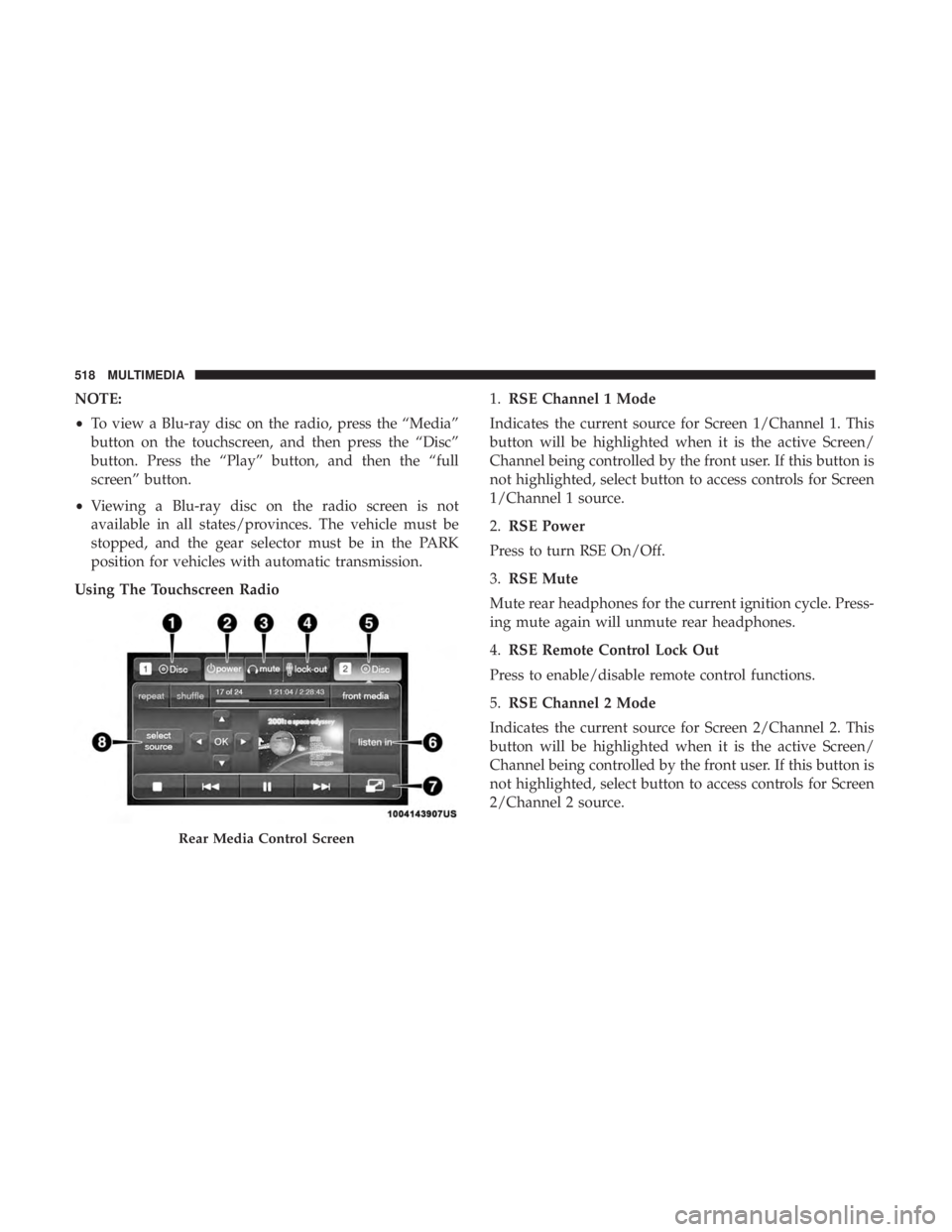
Using The Touchscreen Radio 1.
RSE Channel 1 Mode
Indicates the current source for Screen 1/Channel 1. This
button will be highlighted when it is the active Screen/
Channel being controlled by the front user. If this button is
not highlighted, select button to access controls for Screen
1/Channel 1 source.
2. RSE Power
Press to turn RSE On/Off.
3. RSE Mute
Mute rear headphones for the current ignition cycle. Press-
ing mute again will unmute rear headphones.
4. RSE Remote Control Lock Out
Press to enable/disable remote control functions.
5. RSE Channel 2 Mode
Indicates the current source for Screen 2/Channel 2. This
button will be highlighted when it is the active Screen/
Channel being controlled by the front user. If this button is
not highlighted, select button to access controls for Screen
2/Channel 2 source.
Rear Media Control Screen
518 MULTIMEDIA
Page 523 of 572
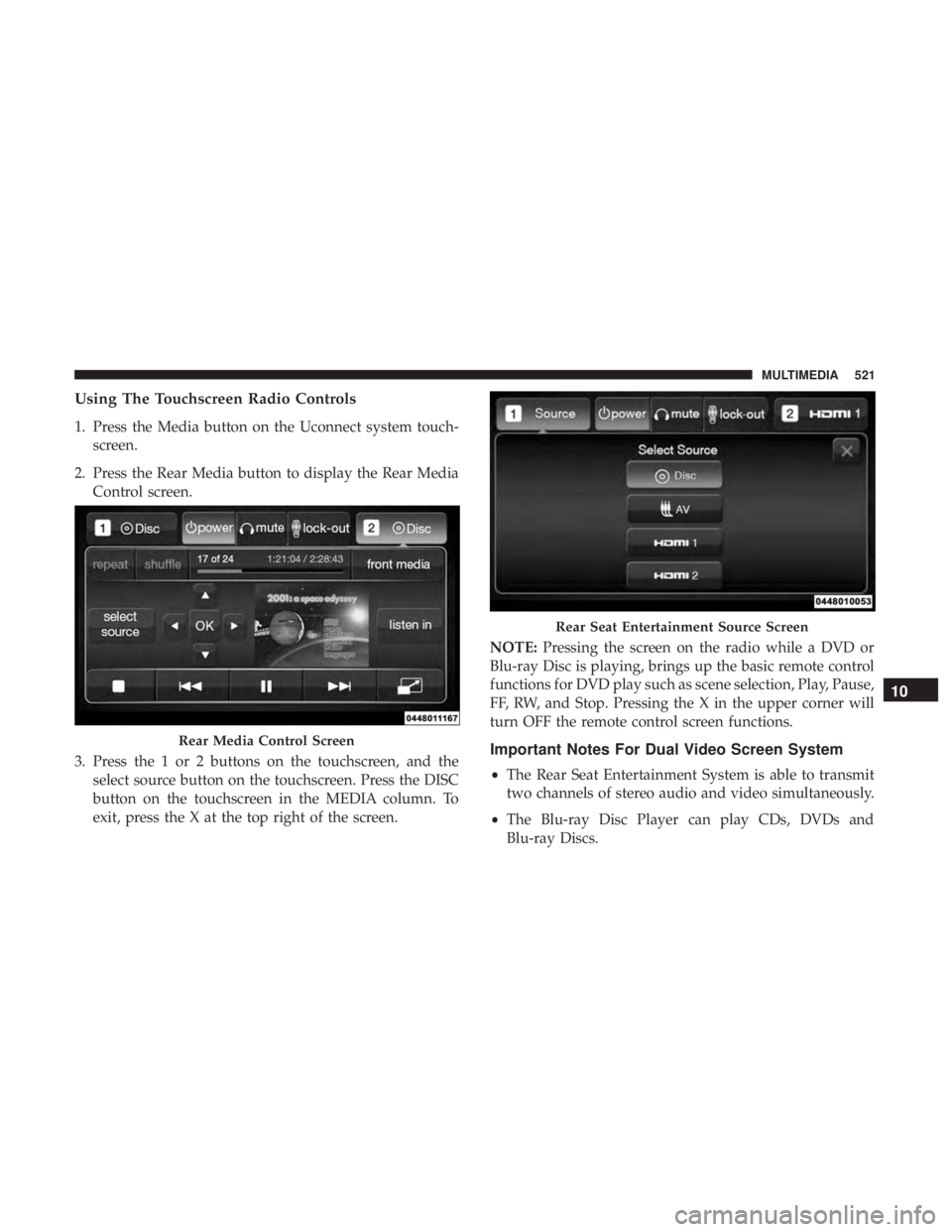
Using The Touchscreen Radio Controls
1. Press the Media button on the Uconnect system touch-screen.
2. Press the Rear Media button to display the Rear Media Control screen.
3. Press the 1 or 2 buttons on the touchscreen, and the select source button on the touchscreen. Press the DISC
button on the touchscreen in the MEDIA column. To
exit, press the X at the top right of the screen. NOTE:
Pressing the screen on the radio while a DVD or
Blu-ray Disc is playing, brings up the basic remote control
functions for DVD play such as scene selection, Play, Pause,
FF, RW, and Stop. Pressing the X in the upper corner will
turn OFF the remote control screen functions.
Important Notes For Dual Video Screen System
• The Rear Seat Entertainment System is able to transmit
two channels of stereo audio and video simultaneously.
• The Blu-ray Disc Player can play CDs, DVDs and
Blu-ray Discs.
Rear Media Control Screen
Rear Seat Entertainment Source Screen
10
MULTIMEDIA 521
Page 565 of 572
ParkSense System, Rear...................306, 315
Passive Entry ..............................35
Performance ............................. .147
Pets ................................... .250
Pinch Protection .......................... .102
Placard, Tire And Loading Information ...........429
Power Brakes ............................... .455
Distribution Center (Fuses) ..................365
Door Locks ..............................35
Inverter .............................. .127
Liftgate ............................... .105
Mirrors ................................68
Outlet (Auxiliary Electrical Outlet) ............122
Seats ..................................49
Steering .............................. .281
Sunroof .............................. .101
Tilt/Telescoping Steering Column ..............64
Windows ...............................98
Power Seats Down .............................. .50, 52
Forward ............................ .50, 52
Rearward ........................... .50, 52
Up ................................ .50, 52
Pregnant Women And Seat Belts ................206Preparation For Jacking
..................... .375
Pretensioners Seat Belts ............................. .206
Radial Ply Tires ........................... .435
Radiator Cap (Coolant Pressure Cap) .............418
Radio Frequency General Information ................24, 30, 31, 40
Radio Operation .......................... .530
Radio Remote Controls ..................... .512
Rain Sensitive Wiper System ...................81
Rear Air Conditioning ........................91
Rear Axle (Differential) ..................... .422
Rear Camera ............................. .329
Rear Cross Path ........................... .185
Rear Cupholders .......................... .121
Rear
ParkSense System ...................306, 315
Rear Seats, Folding ..........................42
Rear Wiper/Washer ..........................82
Recreational Towing ........................ .349
Reformulated Gasoline ...................... .457
Refrigerant .............................. .404
Release, Hood ............................ .104
Reminder, Seat Belt ........................ .199
12
INDEX 563
Page 566 of 572
Remote ControlStarting System ...........................27
Remote Keyless Entry ........................20
Arm The Alarm ..........................32
Disarm The Alarm ........................32
Programming Additional Key Fobs ..........24, 31
Remote Sound System (Radio) Control ...........512
Remote Starting Exit Remote Start Mode .....................29
Remote Starting System .......................27
Replacement Bulbs ........................ .360
Replacement Keys ....................... .24, 31
Replacement Tires ......................... .438
Reporting Safety Defects .....................551
Restraints, Child .......................... .225
Restraints, Head ............................59
Retractable Cargo Area Cover ..................107
Roll Over Warning ...........................5
Roof Type Carrier ......................... .128
Rotation, Tires ............................ .444
Safety Checks Inside Vehicle ...................251
Safety Checks Outside Vehicle .................253
Safety Defects, Reporting .....................551
Safety, Exhaust Gas ........................ .251Safety Information, Tire
..................... .424
Safety Tips .............................. .250
Schedule, Maintenance ...................... .393
Seat Belt Reminder ........................ .154
Seat Belts ............................ .198, 251
Adjustable Shoulder Belt ...................204
Adjustable Upper Shoulder Anchorage .........204
Adjustable Upper Shoulder Belt Anchorage ......204
Automatic Locking Retractor (ALR) ...........207
Child Restraints ........................ .225
Energy Management Feature ................206
Extender .............................. .205
Front Seat ...................... .198, 200, 202
Inspection ............................. .251
Lap/Shoulder
Belt Operation ................202
Lap/Shoulder Belts ...................... .200
Lap/Shoulder Belt Untwisting ...............204
Operating Instructions .....................202
Pregnant Women ........................ .206
Pretensioners .......................... .206
Rear Seat ............................. .200
Reminder ............................. .199
Seat Belt Extender ....................... .205
Seat Belt Pretensioner .....................206
Untwisting Procedure .....................204
564 INDEX