trip computer DODGE GRAND CARAVAN 2009 5.G Owners Manual
[x] Cancel search | Manufacturer: DODGE, Model Year: 2009, Model line: GRAND CARAVAN, Model: DODGE GRAND CARAVAN 2009 5.GPages: 535, PDF Size: 18.61 MB
Page 197 of 535
CAUTION!
To avoid vehicle damage, the Rear Park Assist
should only be used as a parking aid and is unable
to recognize every obstacle, including small ob-
jects. Parking curbs might be temporarily detected
or not detected at all. Obstacles located above or
below the sensors will not be detected when they
are in close proximity to the rear of the vehicle.
To avoid vehicle damage, the vehicle must be
driven slowly when using the Rear Park Assist, to
be able to stop in time when an obstacle is
detected. It is recommended that you look over
your shoulder when using the Rear Park Assist.
NOTE:
Ensure that the rear bumper is free of dirt and debris
to keep the system operating properly.
Jackhammers, large trucks, and other vibrations could
affect the performance of the system.
Enabling and Disabling The Rear Park Assist
There are times when you may want to disable the Rear
Park Assist, such as when towing a trailer.
Vehicles Equipped With the Electronic Vehicle
Information Center (EVIC)
You can turn the Rear Park Assist ON or OFF through the
EVIC. For details, refer to “Personal Settings (Customer-
Programmable Features)” under “Electronic Vehicle In-
formation Center (EVIC)” in Section 4.
Vehicles Equipped With the Compass Mini-Trip
Computer (CMTC)
You can turn the Rear Park Assist ON or OFF through the
CMTC by pressing the left reset button in the instrument
cluster. Turn the ignition switch to the ON position, then
press and hold the RESET button for approximately two
seconds.
UNDERSTANDING THE FEATURES OF YOUR VEHICLE 195 3
Page 235 of 535
UNDERSTANDING YOUR INSTRUMENT PANELCONTENTS
m
Instrument Panel Features . . . . . . . . . . . . . . . 237
m Instrument Cluster – Base . . . . . . . . . . . . . . . 238
m Instrument Cluster – Premium . . . . . . . . . . . . 239
m Instrument Cluster Descriptions . . . . . . . . . . . 240
m Compass Mini-Trip Computer (CMTC) —
If Equipped . . . . . . . . . . . . . . . . . . . . . . . . . . 252
▫ CMTC Reset Buttons . . . . . . . . . . . . . . . . . . 253
▫ Compass/Temperature Display . . . . . . . . . . 254 m
Electronic Vehicle Information Center (EVIC) —
If Equipped . . . . . . . . . . . . . . . . . . . . . . . . . . 256
▫ Electronic Vehicle Information Center (EVIC)
Displays . . . . . . . . . . . . . . . . . . . . . . . . . . . 258
▫ Trip Functions . . . . . . . . . . . . . . . . . . . . . . 260
▫ Compass Display . . . . . . . . . . . . . . . . . . . . 261
▫ Personal Settings
(Customer-Programmable Features) . . . . . . . 263 4
Page 247 of 535
NOTE:
If your vehicle is equipped with a hood switch, in the
case of hood ajar, a warning message will be displayed
in either the PRNDL/Odometer display as “hood” or
“Hood Ajar” in the EVIC display.
Some of the above warnings will be displayed in the
Compass Mini-Trip Computer / Electronic Vehicle
Information Center Display Area located in the instru-
ment cluster.
Refer to ”Compass Mini-Trip Computer (CMTC)
Display— If Equipped” / ”Electronic Vehicle Informa-
tion Center (EVIC) Display — If Equipped” later in
this section for more information.
LoW tirE
When the appropriate condition exists, the odometer
display will toggle between LoW and tirE for three
cycles. HOTOIL
When this message is displayed there is a transaxle
over-temperature condition. When this condition occurs,
the “HOTOIL” message will be displayed in the odom-
eter along with a chime.
If this message appears, stop the vehicle and run the
engine at idle or faster, with the transmission in NEU-
TRAL, until the light goes off.
NOTE:
When this message is displayed, bring the
vehicle to a stop and idle the engine until the message
clears.
CHAngE OIL
Your vehicle is equipped with an engine oil change
indicator system. The “Change Oil” message will flash in
the instrument cluster odometer for approximately
12 seconds after a single chime has sounded to indicate
the next scheduled oil change interval. The engine oil
change indicator system is duty cycle-based, which
UNDERSTANDING YOUR INSTRUMENT PANEL 245 4
Page 253 of 535
CAUTION!The TPMS has been optimized for the original
equipment tires and wheels. TPMS pressures and
warning have been established for the tire size
equipped on your vehicle. Undesirable system opera-
tion or sensor damage may result when using re-
placement equipment that is not of the same size,
type, and/or style. Aftermarket wheels can cause
sensor damage. Do not use tire sealant from a can, or
balance beads if your vehicle is equipped with a
TPMS, as damage to the sensors may result.
26. Electronic Stability Program (ESP) Indicator Light
/ Brake Assist System (BAS) Warning Light The malfunction light for the Electronic Stabil-
ity Program (ESP) is combined with Brake
Assist System (BAS). The yellow “ESP/BAS
Warning Light” comes on when the ignition switch is turned to the “ON” position. They should go
out with the engine running. If the “ESP/BAS Warning
Light” comes on continuously with the engine running, a
malfunction has been detected in either the ESP or the
BAS system. If this light remains on after several ignition
cycles, and the vehicle has been driven several miles/
kilometers at speeds greater than 30 mph (48 km/h), see
an authorized dealer as soon as possible.
27. Compass Mini-Trip Computer (CMTC) Reset
Button
Press the reset button to scroll through sub menus (i.e.,
Outside Temperature, Trip Functions: AVG Fuel
Economy, DTE, Elapsed Time, and Units. Press and hold
the reset button for approximately two seconds to reset
the display shown.
NOTE:
For more detailed operation, refer to “Compass
Mini-Trip Computer” later in this section. UNDERSTANDING YOUR INSTRUMENT PANEL 251
4
Page 254 of 535
28. Compass Mini-Trip Computer (CMTC) Display /
Electronic Vehicle Information Center (EVIC) Display—
If Equipped
Compass Mini-Trip Computer (CMTC) Display — If
Equipped
On vehicles equipped with Compass Mini-Trip Com-
puter (CMTC), the display provides the outside tempera-
ture, one of eight compass headings to indicate the
direction the vehicle is facing and the current radio
station. For more information refer to “Compass Mini-
Trip Computer” in this section.
Electronic Vehicle Information Center (EVIC) Display
— If Equipped
The Electronic Vehicle Information Center (EVIC) fea-
tures a driver-interactive display that is located in the
instrument cluster. For more information refer to “Elec-
tronic Vehicle Information Center (EVIC)” in this section.COMPASS MINI-TRIP COMPUTER (CMTC) — IF
EQUIPPED
NOTE:
The compass on your vehicle is self-calibrating, elimi-
nating the need to manually calibrate the compass.
If the vehicle is equipped with a Chrysler uconnectt
gps (Navigation Radio), the NAV system will provide
the compass direction, and the variance and calibra-
tion menus will be unavailable. The compass will
perform accurately, based on GPS signals instead of
the Earths magnetic field.
The Compass Mini-Trip Computer is located in the
instrument cluster and features a driver-interactive dis-
play (displays information on outside temperature, com-
pass direction, and trip information).
252 UNDERSTANDING YOUR INSTRUMENT PANEL
Page 258 of 535
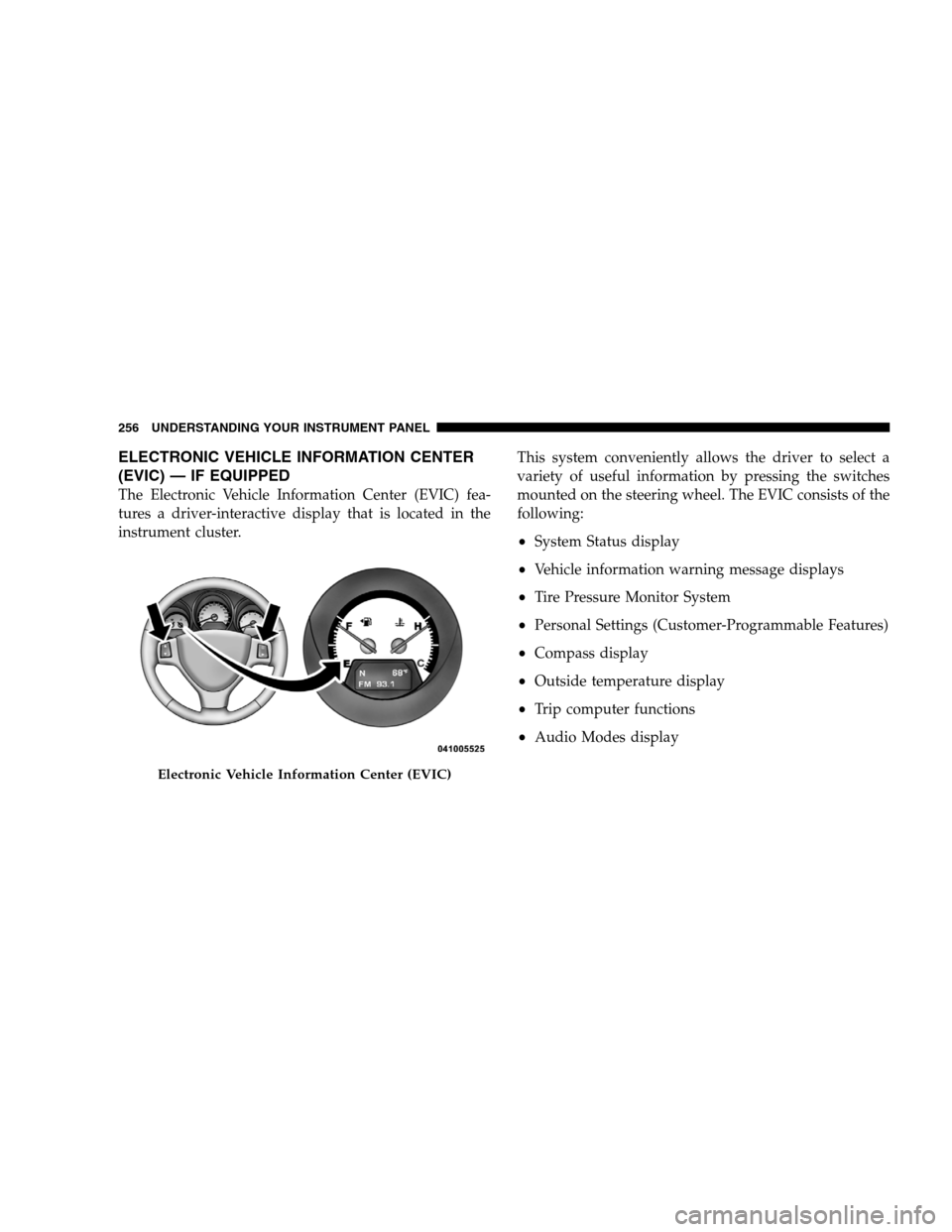
ELECTRONIC VEHICLE INFORMATION CENTER
(EVIC) —
IF EQUIPPED
The Electronic Vehicle Information Center (EVIC) fea-
tures a driver-interactive display that is located in the
instrument cluster. This system conveniently allows the driver to select a
variety of useful information by pressing the switches
mounted on the steering wheel. The EVIC consists of the
following:
System Status display
Vehicle information warning message displays
Tire Pressure Monitor System
Personal Settings (Customer-Programmable Features)
Compass display
Outside temperature display
Trip computer functions
Audio Modes displayElectronic Vehicle Information Center (EVIC)
256 UNDERST
ANDING YOUR INSTRUMENT PANEL
Page 262 of 535
Trip FunctionsPress and release the MENU button until one of the
following Trip Functions displays in the EVIC.
Press the STEP button to scroll through all the Trip
Computer functions.
The Trip Functions mode displays the following informa-
tion.
Average Fuel Economy
Shows the average fuel economy since the last reset.
When the fuel economy is reset, the display will read
“RESET” or show dashes for two seconds. Then, the
history information will be erased, and the averaging will
continue from the last fuel average reading before the
reset.
Distance To Empty (DTE)
Shows the estimated distance that can be traveled with
the fuel remaining in the tank. This estimated distance is
determined by a weighted average of the instantaneous
and average fuel economy, according to the current fuel
tank level.
NOTE:
Significant changes in driving style or vehicle
loading will greatly affect the actual drivable distance of
the vehicle, regardless of the DTE displayed value.
When the DTE value is less than 30 miles (48 km)
estimated driving distance, the DTE display will change
to a text display of 9LOW FUEL.9This display will
continue until the vehicle runs out of fuel. Adding a
significant amount of fuel to the vehicle will turn off the
9LOW FUEL9 text and a new DTE value will display.
Elapsed Time
Shows the total elapsed time of travel since the last reset
when the ignition switch is in the ACC position. Elapsed
time will increment when the ignition switch is in the ON
or START position.
260 UNDERSTANDING YOUR INSTRUMENT PANEL
Page 517 of 535
Compass Calibration . . . . . . . . . . . . . . . . . . 255,261
Compass Variance . . . . . . . . . . . . . . . . . . . . 254,262
Computer, Trip/Travel . . . . . . . . . . . . . . . . . . . . 260
ConnectorUCI . . . . . . . . . . . . . . . . . . . . . . . . . . . . . . . . 290
Universal Consumer Interface (UCI) . . . . . . . . . 290
Console . . . . . . . . . . . . . . . . . . . . . . . . . . . . . . 221
Console, Floor . . . . . . . . . . . . . . . . . . . . . . . . . . 221
Console, Overhead . . . . . . . . . . . . . . . . . . . . . . . 198
Console, Removable . . . . . . . . . . . . . . . . . . . . . . 226
Contract, Service . . . . . . . . . . . . . . . . . . . . . . . . 505
Coolant Pressure Cap (Radiator Cap) . . . . . . . . . . 454
Cooling System . . . . . . . . . . . . . . . . . . . . . . . . . 451 Adding Coolant (Antifreeze) . . . . . . . . . . . . . . 453
Coolant Capacity . . . . . . . . . . . . . . . . . . . . . . 480
Coolant Level . . . . . . . . . . . . . . . . . . . . . . 451,455
Disposal of Used Coolant . . . . . . . . . . . . . . . . 454
Drain, Flush, and Refill . . . . . . . . . . . . . . . . . . 452
Inspection . . . . . . . . . . . . . . . . . . . . . . . . . . . 455 Points to Remember . . . . . . . . . . . . . . . . . . . . 455
Pressure Cap . . . . . . . . . . . . . . . . . . . . . . . . . 454
Radiator Cap . . . . . . . . . . . . . . . . . . . . . . . . . 454
Selection of Coolant (Antifreeze) . . . . . . 452,480,481
Cruise Control (Speed Control) . . . . . . . . . . . . . . 188
Cupholders . . . . . . . . . . . . . . . . . . . . . . . . . 214,466
Customer Assistance . . . . . . . . . . . . . . . . . . . . . 503
Data Recorder, Event . . . . . . . . . . . . . . . . . . . . . . 74
Daytime Running Lights . . . . . . . . . . . . . . . . . . . 181
Dealer Service . . . . . . . . . . . . . . . . . . . . . . . . . . 438
Defroster, Rear Window . . . . . . . . . . . . . . . . . . . 226
Defroster, Windshield . . . . . . . . . . . . . . . . 94,308,318
Diagnostic System, Onboard . . . . . . . . . . . . . . . . 435
Dimmer Control . . . . . . . . . . . . . . . . . . . . . . . . 178
Dipsticks Automatic Transaxle . . . . . . . . . . . . . . . . . . . . 459
Automatic Transmission . . . . . . . . . . . . . . . . . 459
Oil (Engine) . . . . . . . . . . . . . . . . . . . . . . . . . . 439
INDEX 515
10
Page 524 of 535
Reading . . . . . . . . . . . . . . . . . . . . . . . . . . . . . 199
Rear Servicing . . . . . . . . . . . . . . . . . . . . . . . . 478
Rear Tail . . . . . . . . . . . . . . . . . . . . . . . . . . . . 478
Seat Belt Reminder . . . . . . . . . . . . . . . . . . . . . 248
Security Alarm (Theft Alarm) . . . . . . . . . . . . . . 249
Service . . . . . . . . . . . . . . . . . . . . . . . . . . . 475,476
Service Engine Soon (Malfunction Indicator) . . . 246
Side Marker . . . . . . . . . . . . . . . . . . . . . . . . . . 478
Theft Alarm (Security Alarm) . . . . . . . . . . . . . . 249
Tire Pressure Monitoring (TPMS) . . . . . . . . . . . 249
Turn Signal . . . . . . . . . . . . . . . . . . . . . . 94,477,478
Voltage . . . . . . . . . . . . . . . . . . . . . . . . . . . . . 249
Warning (Instrument Cluster Description) . . . . . 240
Load Leveling System . . . . . . . . . . . . . . . . . . . . 227
Loading Vehicle . . . . . . . . . . . . . . . . . . . 220,389,391
Capacities . . . . . . . . . . . . . . . . . . . . . . . . . . . 391
Tires . . . . . . . . . . . . . . . . . . . . . . . . . . . . . . . 356
Locks Door . . . . . . . . . . . . . . . . . . . . . . . . . . . . . . . . 30 Lower Anchors and Tether for CHildren
(LATCH) . . . . . . . . . . . . . . . . . . . . . . . . . . . . . . 84
Lubrication, Body . . . . . . . . . . . . . . . . . . . . . . . 449
Luggage Rack (Roof Rack) . . . . . . . . . . . . . . . . . 228
Lumbar Support . . . . . . . . . . . . . . . . . . . . . . . . 152
Maintenance Free Battery . . . . . . . . . . . . . . . . . . 445
Maintenance Procedures . . . . . . . . . . . . . . . . . . . 438
Maintenance Schedule . . . . . . . . . . . . . . . . . . . . 484
Maintenance, Sunroof . . . . . . . . . . . . . . . . . . . . . 210
Malfunction Indicator Light (Check Engine) . . 246,436
Manual, Service . . . . . . . . . . . . . . . . . . . . . . . . . 507
Map/Reading Lights . . . . . . . . . . . . . . . . . . . . . 199
Memory Feature (Memory Seat) . . . . . . . . . . . . . 170
Memory Seat . . . . . . . . . . . . . . . . . . . . . . . . 103,170
Mini-Trip Computer . . . . . . . . . . . . . . . . . . . 252,260
Mirrors . . . . . . . . . . . . . . . . . . . . . . . . . . . . . . . 100
Automatic Dimming . . . . . . . . . . . . . . . . . . . . 100
Electric Remote . . . . . . . . . . . . . . . . . . . . . . . 102
522 INDEX
Page 531 of 535
Trailer Weight . . . . . . . . . . . . . . . . . . . . . . . . . . 398
Transaxle . . . . . . . . . . . . . . . . . . . . . . . . . . . . . 332Automatic . . . . . . . . . . . . . . . . . . . . . . . . . . . 332
Operation . . . . . . . . . . . . . . . . . . . . . . . . . . . 332
Selection of Lubricant . . . . . . . . . . . . . . . . 458,482
Transmission . . . . . . . . . . . . . . . . . . . . . . . . . . . 458 Automatic . . . . . . . . . . . . . . . . . . . . . . . . . . . 458
Fluid . . . . . . . . . . . . . . . . . . . . . . . . . . . . 458,482
Transmitter Battery Service
(Remote Keyless Entry) . . . . . . . . . . . . . . . . . . . . 25
Transmitter, Garage Door Opener (HomeLinkt) . . 201
Transmitter, Remote Keyless Entry (RKE) . . . . . . . . 19
Transporting Pets . . . . . . . . . . . . . . . . . . . . . . . . 87
Tread Wear Indicators . . . . . . . . . . . . . . . . . . . . 365
Trip Computer . . . . . . . . . . . . . . . . . . . . . . . . . . 252
Trip Odometer . . . . . . . . . . . . . . . . . . . . . . . . . . 244
Turn Signals . . . . . . . . . . . . . . . . . . . 182,241,477,478
UCI Connector . . . . . . . . . . . . . . . . . . . . . . . . . 290 uconnectt
(Hands-Free Phone) . . . . . . . . . . . . . . 113
Umbrella Holder . . . . . . . . . . . . . . . . . . . . . . . . 218
Uniform Tire Quality Grades . . . . . . . . . . . . . . . . 509
Universal Consumer Interface (UCI) Connector . . . 290
Universal Transmitter . . . . . . . . . . . . . . . . . . . . . 201
Unleaded Gasoline . . . . . . . . . . . . . . . . . . . . . . . 378
Upholstery Care . . . . . . . . . . . . . . . . . . . . . . . . 464
Vanity Mirrors . . . . . . . . . . . . . . . . . . . . . . . . . . 104
Variance, Compass . . . . . . . . . . . . . . . . . . . . 254,262
Vehicle Certification Label . . . . . . . . . . . . . . . . . 389
Vehicle Identification Number (VIN) . . . . . . . . . . . . 6
Vehicle Loading . . . . . . . . . . . . . . . . . . . 357,389,391
Vehicle Modifications/Alterations . . . . . . . . . . . . . . 7
Vehicle Storage . . . . . . . . . . . . . . . . . . . . . . . 323,475
Video Entertainment System™
(Rear Seat Video System) . . . . . . . . . . . . . . . . . . 301
Voice Recognition System (VR) . . . . . . . . . . . . . . 141
INDEX 529
10