key DODGE GRAND CARAVAN 2009 5.G Owner's Manual
[x] Cancel search | Manufacturer: DODGE, Model Year: 2009, Model line: GRAND CARAVAN, Model: DODGE GRAND CARAVAN 2009 5.GPages: 535, PDF Size: 18.61 MB
Page 45 of 535
If anything obstructs the power sliding side door
while it is closing or opening, the door will automati-
cally reverse to the closed or open position, provided
it meets sufficient resistance.
If the power sliding side door is not in the full open or
close position, it will fully open when a power sliding
door switch is pressed. To close the door, wait until it
is fully open and then press the switch again.
If the power sliding door encounters multiple obstruc-
tions within the same cycle, the system will automati-
cally stop and must be opened or closed manually.
WARNING!
You, or others, could be injured if caught in the path
of the sliding door. Make sure the door path is clear
before closing the door.
Power Sliding Side Door Open Flash
The left and right exterior hazard lights will flash for
12 seconds when either sliding door is opened. This will
alert other drivers in the area that passenger(s) could be
entering or exiting the vehicle.
The Sliding Side Door Open Flash can be enabled or
disabled by performing the following procedure:
1. Place the key in the ignition switch.
2. Cycle the ignition switch ON/OFF five times ending
in the ON position
(do not start the engine).
3. Within 10 seconds of the final cycle, press the HAZ-
ARD switch.
4. A single chime will sound to signify that you have
successfully completed the programming.
You can turn the feature back on by repeating the
previous procedure.
THINGS TO KNOW BEFORE STARTING YOUR VEHICLE 43 2
Page 49 of 535
NOTE:
After setting the Child Protection Door Lock system,
always test the door from the inside to make certain it
is in the desired position.
The power sliding side door switches will not open the
power sliding doors if the vehicle is in gear or the
vehicle speed is above 0 mph (0 km/h).
The power sliding door will operate from the outside
door handle, the RKE transmitter, the switches on the
overhead console, or the switches located on the trim
panel just in front of the power sliding door when the
shift lever is in PARK, regardless of the child lock lever
position.
LIFTGATE
On vehicles equipped with power locks, the liftgate can
be unlocked using the Remote Keyless Entry (RKE)
transmitter button, or by activating the power door lock
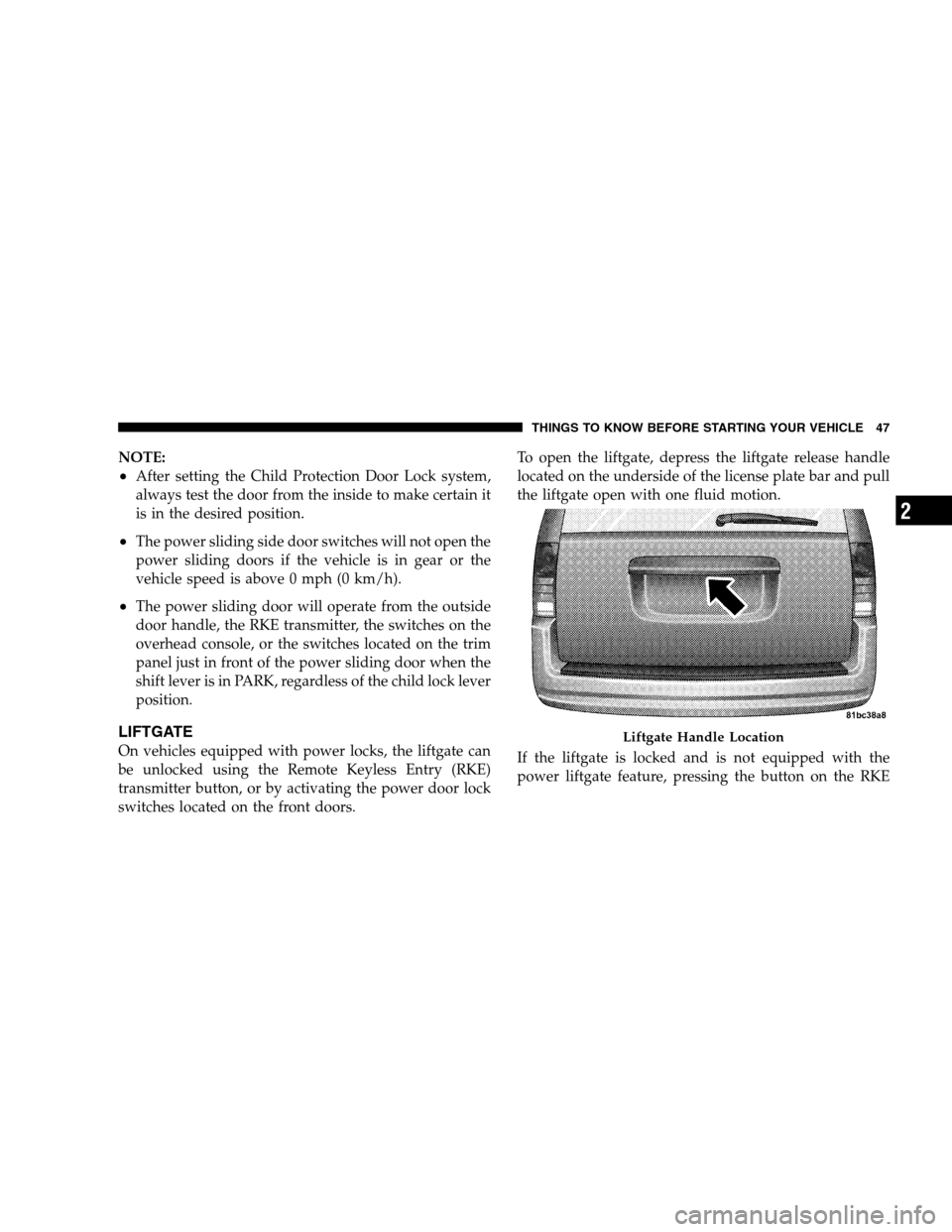
switches located on the front doors.To open the liftgate, depress the liftgate release handle
located on the underside of the license plate bar and pull
the liftgate open with one fluid motion.
If the liftgate is locked and is not equipped with the
power liftgate feature, pressing the button on the RKE Liftgate Handle Location
THINGS T
O KNOW BEFORE STARTING YOUR VEHICLE 47 2
Page 50 of 535
transmitter will result in the liftgate becoming unlocked
for 30 seconds allowing you to manually access the
liftgate area.
Power Liftgate — If Equipped
The power liftgate may be opened manually or by using
the button on the Remote Keyless Entry (RKE) transmit-
ter. Press the button on the transmitter twice within five
seconds, to open the power liftgate. When the liftgate is
fully open, pressing the button twice within five seconds,
a second time, will close the liftgate.
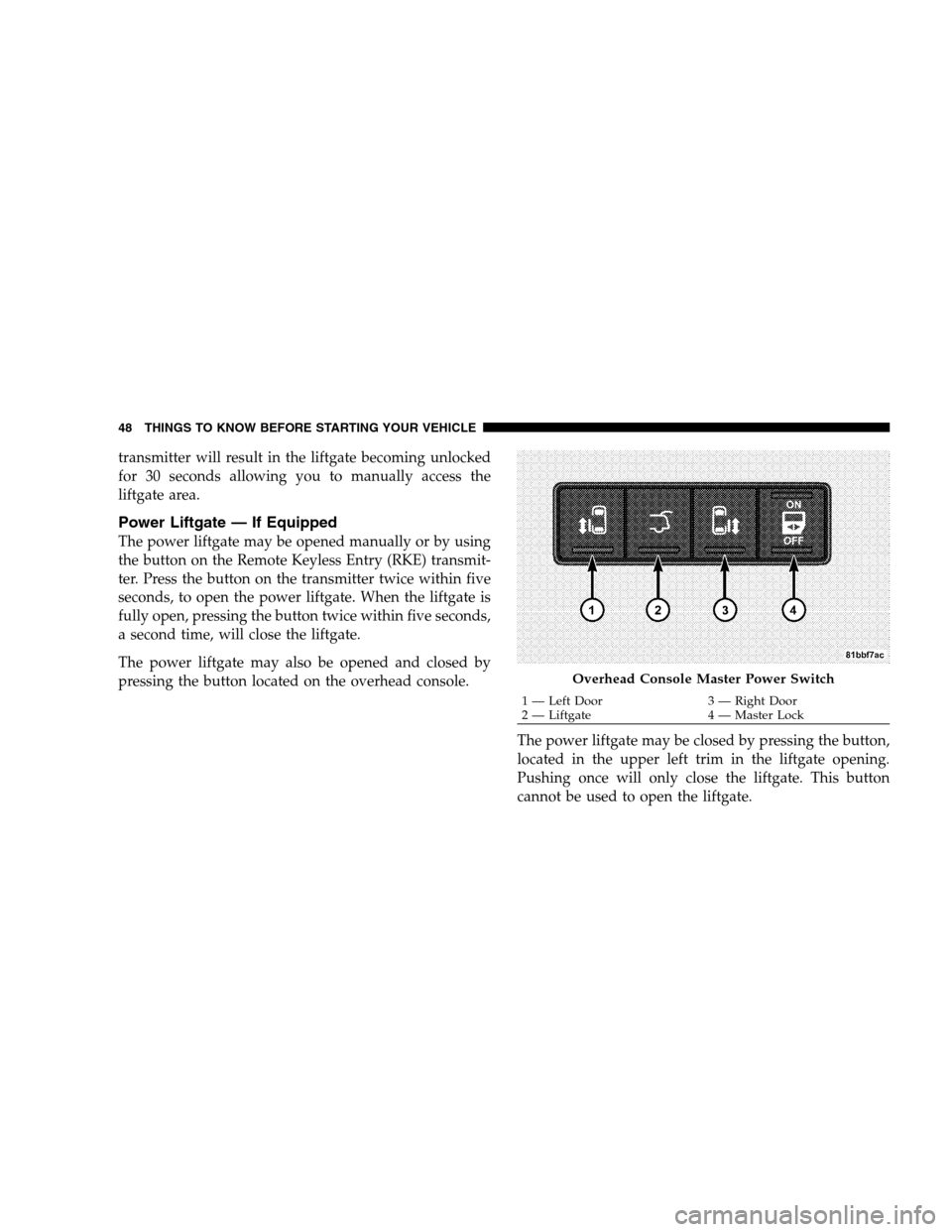
The power liftgate may also be opened and closed by
pressing the button located on the overhead console.The power liftgate may be closed by pressing the button,
located in the upper left trim in the liftgate opening.
Pushing once will only close the liftgate. This button
cannot be used to open the liftgate. Overhead Console Master Power Switch
1 — Left Door
3 — Right Door
2 —
Liftgate 4 — Master Lock
48 THINGS TO KNOW BEFORE STARTING YOUR VEHICLE
Page 70 of 535
WARNING!
Relying on the airbags alone could lead to more
severe injuries in a collision. The airbags work
with your seat belt to restrain you properly. In
some collisions, the airbags won’t deploy at all.
Always wear your seat belts even though you have
airbags.
Being too close to the steering wheel or instrument
panel during front airbag deployment could cause
serious injury. Airbags need room to inflate. Sit
back, comfortably extending your arms to reach
the steering wheel or instrument panel.
Side airbags also need room to inflate. Do not lean
against the door. Sit upright in the center of the
seat.
Airbag Deployment Sensors and Controls
Occupant Restraint Controller (ORC)
The ORC is part of a Federally regulated safety system
required for this vehicle.
The ORC determines if a frontal or side collision is severe
enough to require the airbags to inflate. Based on the
impact sensors signals, a central electronic ORC deploys
the front airbags, side airbag inflatable curtains, and front
seat belt pretensioners as required for each type of
impact.
The ORC monitors the readiness of the electronic parts of
the system whenever the ignition switch is in the START
or ON position. These include all of the components
listed above except the steering wheel and column,
instrument panel, and Seat Belt Reminder Light. If the
key is in the OFF position, in the ACC position, or not in
the ignition, the airbags are not on and will not inflate.
68 THINGS TO KNOW BEFORE STARTING YOUR VEHICLE
Page 72 of 535
Acceleration SensorsAcceleration Sensors trigger airbag deployment based on
dramatic acceleration change of the vehicle.
Pressure Sensors
Pressure Sensors trigger airbag deployment based on
door cavity pressure changes.
Rollover Sensors
Rollover Sensors trigger airbag deployment in the event
of vehicle rollover and aid the ORC in deploying Side
Airbag Inflatable Curtains (SABIC) for rollover events.
Supplemental Side Airbag Inflatable Curtain
(SABIC) — If Equipped
The ORC deploys the SABIC during a collision with
other vehicles and during collisions where the impact is
confined to a particular area of the vehicle, such as,
collisions with poles, trees or similar objects. In these
events, the ORC will deploy the SABIC only on the
impact side of the vehicle.
NOTE:
The ORC will also detect and protect for rollover
when equipped with SABIC airbags. In a rollover the
SABIC airbags will deploy on both sides of the vehicle.
Enhanced Accident Response System
In the event of an impact causing airbag deployment, the
vehicle communication network intact, and the power
intact, the Enhanced Accident Response System performs
the following functions:
Cuts off fuel to the engine.
Flashes hazard lights as long as the battery has power
or until the ignition key is turned off
Turns on the interior lights, which remain on as long as
the battery has power or until the ignition key is
removed.
Unlocks the doors automatically.
70 THINGS TO KNOW BEFORE STARTING YOUR VEHICLE
Page 127 of 535
Three-Way CallingTo initiate three-way calling, press the VOICE RECOG-
NITION button while a call is in progress, and make a
second phone call, as described under
9Making a Second
Call While Current Call is in Progress.9 After the second
call has established, press and hold the PHONE button
until you hear a double beep, indicating that the two calls
have been joined into one conference call.
Call Termination
To end a call in progress, momentarily press the PHONE
button. Only the active call(s) will be terminated and if
there is a call on hold, it will become the new active call.
If the active call is terminated by the far end, a call on
hold may not become active automatically. This is cell
phone-dependent. To bring the call back from hold, press
and hold the PHONE button until you hear a single beep.
Redial
Press the PHONE button to begin.
After the 9Ready9prompt and the following beep, say
9Redial.9
The uconnectt phone will call the last number that
was dialed from your cellular phone.
NOTE: This may not be the last number dialed from the
uconnectt phone.
Call Continuation
Call continuation is the progression of a phone call on the
uconnectt phone after the vehicle ignition key has been
switched to OFF. Call continuation functionality avail-
able on the vehicle can be any one of three types:
After the ignition key is switched to OFF, a call can
continue on the uconnectt phone either until the call
ends, or until the vehicle battery condition dictates
cessation of the call on the uconnectt phone and
transfer of the call to the cellular phone.
UNDERSTANDING THE FEATURES OF YOUR VEHICLE 125 3
Page 128 of 535
After the ignition key is switched to OFF, a call can
continue on the uconnectt
phone for a certain dura-
tion, after which the call is automatically transferred
from the uconnectt phone to the cellular phone.
An active call is automatically transferred to the
cellular phone after the ignition key is switched to
OFF.
uconnectTphone Features
Language Selection
To change the language that the uconnectt phone is
using:
Press the PHONE button to begin.
After the 9Ready9prompt and the following beep, say
the name of the language you wish to switch to
English, Espanol, or Francais.
Continue to follow the system prompts to complete
the language selection. After selecting one of the languages, all prompts and
voice commands will be in that language.
NOTE:
After every uconnectt phone language change
operation, only the language-specific 32-name phone-
book is usable. The paired phone name is not language-
specific and usable across all languages.
Emergency Assistance
If you are in an emergency and the cellular phone is
reachable:
Pick up the phone and manually dial the emergency
number for your area.
If the phone is not reachable and the uconnectt phone is
operational, you may reach the emergency number as
follows:
Press the PHONE button to begin.
126 UNDERSTANDING THE FEATURES OF YOUR VEHICLE
Page 130 of 535
NOTE:
The towing assistance number dialed is based on the
country where the vehicle is purchased (1-800-528-
2069 for the U.S., 1-877-213-4525 for Canada, 55-14-
3454 for Mexico City and 1-800-712-3040 for outside
Mexico City in Mexico).
If supported, this number may be programmable on
some systems. To do this, press the PHONE button
and say “Setup”, followed by “Towing Assistance”.
Paging
To learn how to page, refer to9Working with Automated
Systems.9 Paging works properly except for pagers of
certain companies, which time out a little too soon to
work properly with the uconnectt phone.
Voice Mail Calling
To learn how to access your voice mail, refer to 9Working
with Automated Systems.9
Working with Automated Systems
This method is used in instances where one generally has
to press numbers on the cellular phone keypad while
navigating through an automated telephone system.
You can use your uconnectt phone to access a voice mail
system or an automated service, such as a paging service
or automated customer service line. Some services re-
quire immediate response selection. In some instances,
that may be too quick for use of the uconnectt phone.
When calling a number with your uconnectt phone that
normally requires you to enter in a touch-tone sequence
on your cellular phone keypad, you can press the VOICE
RECOGNITION button and say the sequence you wish
to enter, followed by the word 9Send.9For example, if
required to enter your PIN followed with a pound, (3 7 4
6 #), you can press the VOICE RECOGNITION button
and say, 93 7 4 6 # Send.9 Saying a number, or sequence of
numbers, followed by 9Send,9is also to be used for
128 UNDERSTANDING THE FEATURES OF YOUR VEHICLE
Page 132 of 535
Phone and Network Status IndicatorsIf available on the radio and/or on a premium display
such as the instrument panel cluster, and supported by
your cellular phone, the uconnectt
phone will provide
notification to inform you of your phone and network
status when you are attempting to make a phone call
using uconnectt phone. The status is given for roaming,
network signal strength, phone battery strength, etc.
Dialing Using the Cellular Phone Keypad
You can dial a phone number with your cellular phone
keypad and still use the uconnectt phone (while dialing
via the cellular phone keypad, the user must exercise
caution and take precautionary safety measures). By
dialing a number with your paired Bluetootht cellular
phone, the audio will be played through your vehicle’s
audio system. The uconnectt phone will work the same
as if you dial the number using voice recognition. NOTE:
Certain brands of cellular phones do not send
the dial ring to the uconnectt phone to play it on the
vehicle audio system, so you will not hear it. Under this
situation, after successfully dialing a number the user
may feel that the call did not go through even though the
call is in progress. Once your call is answered, you will
hear the audio.
Mute/Un-Mute (Mute OFF)
When you mute the uconnectt phone, you will still be
able to hear the conversation coming from the other
party, but the other party will not be able to hear you. In
order to mute the uconnectt phone:
Press the VOICE RECOGNITION button.
Following the beep, say9Mute.9
In order to un-mute the uconnectt phone:
Press the VOICE RECOGNITION button.
Following the beep, say9Mute off.9
130 UNDERSTANDING THE FEATURES OF YOUR VEHICLE
Page 137 of 535
Performance, such as audio clarity, echo, and loudness
to a large degree rely on the phone and network, and
not the uconnectt
phone.
Echo at the far end can sometimes be reduced by
lowering the in-vehicle audio volume.
In a convertible vehicle, system performance may be
compromised with the convertible top down.
BluetoothtCommunication Link
Cellular phones have been found to lose connection to
the uconnectt phone. When this happens, the connection
can generally be reestablished by switching the phone
off/on. Your cellular phone is recommended to remain in
Bluetootht ON mode.
Power-Up
After switching the ignition key from OFF to either the
ON or ACC position, or after a language change, you
must wait at least five seconds prior to using the system.
UNDERSTANDING THE FEATURES OF YOUR VEHICLE 135 3