key DODGE GRAND CARAVAN 2009 5.G Service Manual
[x] Cancel search | Manufacturer: DODGE, Model Year: 2009, Model line: GRAND CARAVAN, Model: DODGE GRAND CARAVAN 2009 5.GPages: 535, PDF Size: 18.61 MB
Page 211 of 535
WARNING!Never leave children in a vehicle with the key in the
ignition switch. Occupants, particularly unattended
children, can become entrapped by the power sun-
roof while operating the power sunroof switch. Such
entrapment may result in serious injury or death.
Express-Open
Press the switch rearward and release, and the sunroof
will open automatically from any position. The sunroof
will open fully, then stop automatically. This is called
“Express-Open”. During Express-Open operation, any
movement of the sunroof switch will stop the sunroof.
Express-Vent
Press and release the
9V9button, and the sunroof will
automatically open to the vent position. This is called
“Express-Vent”.
Express-Close
Press the switch forward and release, and the sunroof
will close automatically from any position. The sunroof
will close fully, then stop automatically. This is called
“Express-Close”. During Express-Close operation, any
movement of the sunroof switch will stop the sunroof. WARNING!
Do not allow small children to operate the sunroof.
Never allow your fingers, other body parts, or any
object to project through the sunroof opening. Injury
may result.
Ignition Off Operation
The power sunroof switch will remain active for 10 min-
utes after the ignition switch is turned OFF. Opening
either front door will cancel this feature.
UNDERSTANDING THE FEATURES OF YOUR VEHICLE 209 3
Page 213 of 535
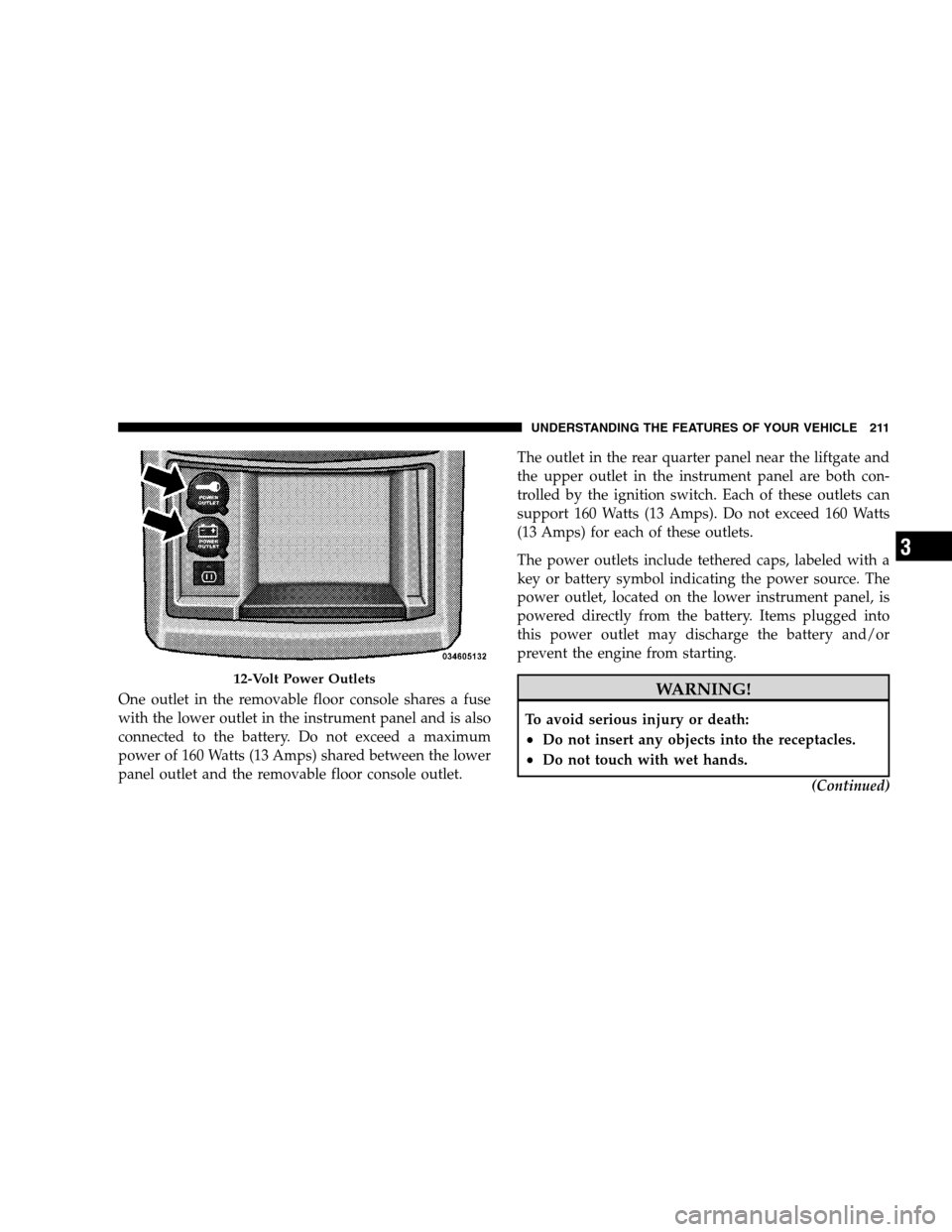
One outlet in the removable floor console shares a fuse
with the lower outlet in the instrument panel and is also
connected to the battery. Do not exceed a maximum
power of 160 Watts (13 Amps) shared between the lower
panel outlet and the removable floor console outlet.The outlet in the rear quarter panel near the liftgate and
the upper outlet in the instrument panel are both con-
trolled by the ignition switch. Each of these outlets can
support 160 Watts (13 Amps). Do not exceed 160 Watts
(13 Amps) for each of these outlets.
The power outlets include tethered caps, labeled with a
key or battery symbol indicating the power source. The
power outlet, located on the lower instrument panel, is
powered directly from the battery. Items plugged into
this power outlet may discharge the battery and/or
prevent the engine from starting. WARNING!
To avoid serious injury or death:
Do not insert any objects into the receptacles.
Do not touch with wet hands.
(Continued)12-Volt Power Outlets
UNDERSTANDING
THE FEATURES OF YOUR VEHICLE 211 3
Page 248 of 535
means the engine oil change interval may fluctuate
dependent upon your personal driving style.
Unless reset, this message will continue to display each
time you turn the ignition switch to the ON/RUN
position. To turn off the message temporarily, press and
release the Trip Odometer button on the instrument
cluster. To reset the oil change indicator system (after
performing the scheduled maintenance), refer to the
following procedure:
1. Turn the ignition switch to the ON position (Do not
start the engine).
2. Fully depress the accelerator pedal slowly three times
within 10 seconds.
3. Turn the ignition switch to the OFF/LOCK position.
NOTE:If the indicator message illuminates when you
start the vehicle, the oil change indicator system did not
reset. If necessary repeat this procedure. 13. Odometer Display Reset Button
To reset a message display (gATE, gASCAP, noFUSE,
CHAngE OIL, LoCOOL, LoWASH), push and hold the
button until the display resets (approximately two sec-
onds).
14. Electronic Stability Program (ESP) Indicator Light
/ Traction Control System (TCS) Indicator Light
If this indicator light flashes during accelera-
tion, apply as little throttle as possible. While
driving, ease up on the accelerator. Adapt your
speed and driving to the prevailing road con-
ditions, and do not switch off the Electronic Stability
Program (ESP), or Traction Control System (TCS).
15. Malfunction Indicator Light (MIL) The Malfunction Indicator Light (MIL) is part of
an onboard diagnostic system called OBD that
monitors engine and automatic transmission con-
trol systems. The light will illuminate when the key is in 246 UNDERSTANDING YOUR INSTRUMENT PANEL
Page 249 of 535
the ON position before engine start. If the bulb does not
come on when turning the key from OFF to ON, have the
condition checked promptly.
Certain conditions such as a loose or missing gas cap,
poor fuel quality, etc., may illuminate the MIL after
engine start. The vehicle should be serviced if the light
stays on through several of your typical driving cycles. In
most situations, the vehicle will drive normally and will
not require towing.
The MIL flashes to alert to serious conditions that could
lead to immediate loss of power or severe catalytic
converter damage. The vehicle should be serviced at an
authorized dealer as soon as possible if this occurs.
16. Engine Temperature Warning LightThis light warns of an overheated engine condi-
tion. As temperatures rise and the gauge ap-
proaches H,this indicator will illuminate and a
single chime will sound after reaching a set threshold. Further overheating will cause the temperature gauge to
pass
H,the indicator will continuously flash and a
continuous chime will occur until the engine is allowed
to cool.
If the light turns on while driving, safely pull over and
stop the vehicle. If the A/C system is on, turn it off. Also,
shift the transmission into NEUTRAL and idle the ve-
hicle. If the temperature reading does not return to
normal, turn the engine off immediately and call for
service. Refer to “If Your Engine Overheats” in Section 6
for more information.
17. Electronic Throttle Control (ETC) Light This light informs you of a problem with the
Electronic Throttle Control (ETC) system. The
light will come on when the ignition is first
turned ON and remain on briefly as a bulb
check. If the light does not come on during starting, have
the system checked by an authorized dealer. UNDERSTANDING YOUR INSTRUMENT PANEL 247
4
Page 250 of 535
If a problem is detected, the light will come on while the
engine is running. Cycle the ignition key when the
vehicle has completely stopped and the shift lever is
placed in the PARK position, the light should turn off.
If the light remains lit with the engine running, your
vehicle will usually be drivable; however, see an autho-
rized dealer for service as soon as possible. If the light is
flashing when the engine is running, immediate service is
required and you may experience reduced performance,
an elevated/rough idle or engine stall and your vehicle
may require towing.
18. Oil Pressure Warning LightThis light indicates low engine oil pressure. The
light should turn on momentarily when the engine
is started. If the light turns on while driving, stop the
vehicle and shut off the engine as soon as possible. A
chime will sound for four minutes when this light turns
on. Do not operate the vehicle until the cause is corrected.
This light does not indicate how much oil is in the engine.
The engine oil level must be checked under the hood.
19. Front Fog Light Indicator — If Equipped
This indicator will illuminate when the front fog
lights are on.
20. Seat Belt Reminder Light When the ignition switch is first turned ON, this
light will turn on for five to eight seconds as a bulb
check. During the bulb check, if the driver’s seat
belt is unbuckled, a chime will sound. After the bulb
check or when driving, if the driver’s seat belt remains
unbuckled, the Seat Belt Reminder Light will illuminate
and the chime will sound. Refer to the Occupant Re-
straints section for more information. 248 UNDERSTANDING YOUR INSTRUMENT PANEL
Page 266 of 535
Auto UNLK On ExitWhen ON is selected, all doors will unlock when the
vehicle is stopped and the transmission is in the PARK or
NEUTRAL position and the driver’s door is opened. To
make your selection, press and release the RESET button
until ON or OFF appears.
RKE Unlock
When
Driver Door 1st Press is selected, only the driver’s
door will unlock on the first press of the Remote Keyless
Entry (RKE) transmitter UNLOCK button. When Driver
Door 1st Press is selected, you must press the RKE
transmitter UNLOCK button twice, to unlock the passen-
ger’s doors. When All Doors 1st Press is selected, all of
the doors will unlock on the first press of the RKE
transmitter UNLOCK button. To make your selection,
press and release the RESET button until “Driver Door
1st Press” or “All Doors 1st Press” appears.
RKE Linked To Memory
When this feature is selected the memory seat, mirror,
and radio settings will return to the memory set position
when the RKE transmitter UNLOCK button is pressed. If
this feature is not selected then the memory seat, mirror,
and radio settings can only return to the memory set
position using the door mounted switch. Pressing the
RESET button when in this display will select 9Yes9or
9No.9
Flash Lamp Lock
When ON is selected, the front and rear turn signals will
flash when the doors are locked or unlocked with the
RKE transmitter. This feature may be selected with or
without the sound horn on lock feature selected. To make
your selection, press and release the RESET button until
ON or OFF appears.
264 UNDERSTANDING YOUR INSTRUMENT PANEL
Page 267 of 535
Headlamp Off DelayWhen this feature is selected, the driver can choose to
have the headlights remain on for 0, 30, 60, or 90 seconds
when exiting the vehicle. To make your selection, press
and release the RESET button until 0, 30, 60, or 90
appears.
Easy Exit Seat
This feature provides automatic driver seat positioning to
enhance driver mobility when entering and exiting the
vehicle. To make your selection, press and release the
RESET button until YES (Y) or NO (N) appears.
NOTE:
The seat will return to the memorized seat
location (if Recall Memory with Remote Key Unlock is set
to ON) when the RKE transmitter is used to unlock the
door. Refer to “Easy Entry/Exit Seat” under “Driver
Memory Seat” in Section 3 of this manual for more
information.
Tilt MIRR. In Reverse
When this feature is selected and the vehicle is placed in
a reverse gear, the side mirrors tilt downward to allow
the driver to see into the previous blind spot and avoid
objects in close proximity to the rear of the vehicle.
Key-Off Power Delay
When this feature is selected, the power window
switches, radio, hands-free system (if equipped), DVD
video system (if equipped), power sunroof (if equipped),
and power outlets will remain active for up to 10 minutes
after the ignition switch is turned OFF. Opening a vehicle
door will cancel this feature. To make your selection,
press and release the RESET button until Off, 45 sec.,
5 min., or 10 min. appears.
ILLUMIN. Approach
When this feature is selected, the headlights will activate
and remain on for up to 90 seconds when the doors are
UNDERSTANDING YOUR INSTRUMENT PANEL 265 4
Page 269 of 535
Door AlertWhen this feature is selected the signal lamps activate
when power or manual sliding doors are in operation,
signaling other drivers that someone may be exiting or
entering the vehicle.
Sound Horn with Remote Key Lock
When ON is selected, a short horn sound will occur when
the RKE transmitter LOCK button is pressed. This feature
may be selected with or without the Flash Lights with
Remote Key Lock feature. To make your selection, press
and release the RESET button until ON or OFF appears.
Turn Headlights On with Remote Key Unlock
When this feature is selected, the headlights will activate,
and remain on for up to 90 seconds, when the doors are
unlocked with the RKE transmitter. To make your selec-
tion, press and release the RESET button until OFF,
30 sec., 60 sec., or 90 sec. appears.
Automatic High Beams — If Equipped
When this feature is selected, the high beam headlights
will deactivate automatically under certain conditions. To
make your selection, press and release the RESET button
until “ON” or “OFF” appears. Refer to “SmartBeams” in
Section 3.
Rain Sensing Intermittent Wipers — If Equipped
When ON is selected, the system will automatically
activate the windshield wipers if it senses moisture on
the windshield. To make your selection, press and release
the RESET button until “ON” or “OFF” appears. When
OFF is selected, the system reverts to the standard
intermittent wiper operation.
UNDERSTANDING YOUR INSTRUMENT PANEL 267
4
Page 331 of 535
STARTING PROCEDURESBefore starting your vehicle, adjust your seat, adjust the
inside and outside mirrors, fasten your seat belt, and if
present, instruct all other occupants to buckle their seat
belts.
WARNING!
Never leave unattended children alone in a ve-
hicle. Leaving children in a vehicle is dangerous
for a number of reasons. A child or others could be
seriously or fatally injured. Do not leave the key in
the ignition. A child could operate power win-
dows, other controls, or move the vehicle.
Do not leave animals or children inside parked
vehicles in hot weather. Interior heat build-up may
cause serious injury or death.
Automatic Transaxle
The shift lever must be in the NEUTRAL or PARK
position before you can start the engine. Press the brake
pedal before shifting into any driving gear.
Normal Starting
1. Do not press the accelerator.
2. Use the Fob with Integrated Key to briefly turn the
ignition switch to the START position and release it as
soon as the starter engages. The starter motor will
continue to run, and it will disengage automatically
when the engine is running.
3. If the engine fails to start, the starter will disengage
automatically in 10 seconds. If this occurs, turn the
ignition switch to the OFF position, wait 10 to 15 seconds,
then repeat the “Normal Starting” procedure (Steps 1–3
above).
STARTING AND OPERATING 329 5
Page 333 of 535
CAUTION!To prevent damage to the starter, DO NOT crank the
engine for more than 15–second intervals at one time.
Wait 10 to 15 seconds before trying again.
If the engine has been flooded, it may start to run, but not
have enough power to continue running when the key is
released. If this occurs, continue cranking with the accel-
erator pedal pushed all the way to the floor. Release the
accelerator pedal and the key once the engine is running
smoothly.
If the engine shows no sign of starting after two 15–
second intervals of cranking with the accelerator pedal
held to the floor, the “Normal Starting” procedure should
be repeated.
After Starting
The idle speed will automatically decrease as the engine
warms up.
ENGINE BLOCK HEATER — IF EQUIPPED
The engine block heater warms the engine, and permits
quicker starts in cold weather. Connect the electrical cord
to a standard 110-115 Volt AC electrical outlet with a
grounded, three-wire extension cord.
The engine block heater cord is routed under the hood on
the driver’s side of the vehicle. It has a removable cap
that is located on the driver side of the Integrated Power
Module. WARNING!
Remember to disconnect the electrical cord before
driving. Damage to the 110-115 volt electrical cord
could cause electrocution.
STARTING AND OPERATING 331 5