display DODGE GRAND CARAVAN 2015 5.G Owner's Manual
[x] Cancel search | Manufacturer: DODGE, Model Year: 2015, Model line: GRAND CARAVAN, Model: DODGE GRAND CARAVAN 2015 5.GPages: 703, PDF Size: 19.83 MB
Page 306 of 703
▫Units..............................338
▫Vehicle Info (Customer Information Features) . .338
▫Messages #..........................339
▫Keyless Enter-N-Go™ Display — If Equipped . .339
▫Compass / Temperature Display..........340
▫Compass Variance.....................342
▫Turn Menu Off.......................342
▫Customer-Programmable Features
(System Setup).......................342
!Uconnect® 430/430N CD/DVD/HDD/NAV — IF
EQUIPPED...........................350
▫Operating Instructions (Voice Command System)
— If Equipped.......................350
▫Operating Instructions (Uconnect® Phone) — If
Equipped...........................350
!Uconnect® 130........................350
▫Operating Instructions — Radio Mode......350
▫Operation Instructions — CD MODE For CD And
MP3 Audio Play......................354
▫Notes On Playing MP3 Files.............356
▫Operation Instructions — Auxiliary Mode . . . .359
!Uconnect® 130 WITH SATELLITE RADIO.....360
▫Operating Instructions — Radio Mode.......360
▫Operation Instructions — CD MODE For CD And
MP3 Audio Play......................366
▫Notes On Playing MP3 Files.............368
▫LIST Button — CD Mode For MP3 Play......371
304 UNDERSTANDING YOUR INSTRUMENT PANEL
Page 314 of 703
6. Odometer Display/Electronic Vehicle Information
Center (EVIC) — If Equipped
Odometer Display / Trip Odometer DisplayThe odom-
eter display shows the total distance the vehicle has been
driven.
U.S. Federal regulations require that upon transfer of
vehicle ownership, the seller certify to the purchaser the
correct mileage that the vehicle has been driven. If your
odometer needs to be repaired or serviced, the repair
technician should leave the odometer reading the same
as it was before the repair or service. If s/he cannot do so,
then the odometer must be set at zero, and a sticker must
be placed in the door jamb stating what the mileage was
before the repair or service. It is a good idea for you to
make a record of the odometer reading before the repair/
service, so that you can be sure that it is properly reset, or
that the door jamb sticker is accurate if the odometer
must be reset at zero.
This also displays Trip A and Trip B, DTE, MPG or
L/100km, OAT (Outside Air Temperature) information to
Base Cluster, use STEP and RESET button (on steering
wheel) to access or reset the display.
Message Display Area
When the appropriate conditions exist, the following
odometer messages will display:
door.............................Door Ajar
gATE..........................Liftgate Ajar
LoW tirE....................LowTirePressure
gASCAP......................Fuel Cap Fault
noFUSE..........................Fuse Fault
312 UNDERSTANDING YOUR INSTRUMENT PANEL
Page 315 of 703

CHAngE OIL..............OilChange Required
LoCOOL.......................LowCoolant
NOTE:Some of the above warnings will be displayed in
the Electronic Vehicle Information Center Display Area
located in the instrument cluster.
Refer to ”Electronic Vehicle Information Center (EVIC) —
If Equipped” in this section for further information.
LoW tirE
When the appropriate condition exists, the odometer
display will toggle between LoW and tirE for three
cycles.
gASCAP
If the vehicle diagnostic system determines that the fuel
filler cap is loose, improperly installed, or damaged, a
“gASCAP” message will display in the odometer display
area. Tighten the fuel filler cap properly and push the
STEP button on the steering wheel to turn off the
message. If the problem continues, the message will
appear the next time the vehicle is started.
noFUSE
If the vehicle diagnostic system determines that the
Ignition Off Draw (IOD) fuse is improperly installed, or
damaged, a “noFUSE” message will display in the odom-
eter display area. For further information on fuses and
fuse locations refer to “Fuses” in “Maintaining Your
Vehicle”.
CHAngE OIL
Your vehicle is equipped with an engine oil change
indicator system. TheCHAngE OILmessage will flash in
the instrument cluster odometer for approximately 12
seconds, after a single chime has sounded, to indicate the
next scheduled oil change interval. The engine oil change
4
UNDERSTANDING YOUR INSTRUMENT PANEL 313
Page 316 of 703

indicator system is duty cycle-based, which means the
engine oil change interval may fluctuate dependent upon
your personal driving style.
Unless reset, this message will continue to display each
time you turn the ignition switch to the ON/RUN
position. To reset the oil change indicator system (after
performing the scheduled maintenance), perform the
following steps.
1. Turn the ignition switch to the ON/RUN position (do
not start the engine).
2. Fully push the accelerator pedal, slowly, three times
within 10 seconds.
3. Turn the ignition switch to the OFF position.
NOTE:If the indicator message illuminates when you
start the engine, the oil change indicator system did not
reset. If necessary, repeat these steps.
Electronic Vehicle Information Center (EVIC) — If
Equipped
The Electronic Vehicle Information Center (EVIC) fea-
tures a driver-interactive display that is located in the
instrument cluster. For further information, refer to
“Electronic Vehicle Information Center (EVIC)” in this
section.
7. Anti-Lock Brake (ABS) Light
This light monitors the Anti-Lock Brake System
(ABS). The light will turn on when the ignition
switch is turned to the ON/RUN position and
may stay on for as long as four seconds.
If the ABS light remains on or turns on while driving, it
indicates that the Anti-Lock portion of the brake system
is not functioning and that service is required. However,
the conventional brake system will continue to operate
normally if the BRAKE warning light is not on.
314 UNDERSTANDING YOUR INSTRUMENT PANEL
Page 321 of 703
15. Air Bag Warning Light
This light will turn on for four to eight seconds
as a bulb check when the ignition switch is first
turned to ON/RUN. If the light is either not on
during starting, stays on, or turns on while
driving, have the system inspected at an authorized
dealer as soon as possible. Refer to “Occupant Restraints”
in “Things To Know Before Starting Your Vehicle” for
further information.
16. Shift Lever Indicator
The Shift Lever Indicator is self-contained within the
instrument cluster. It displays the gear position of the
automatic transmission.
NOTE:
•You must apply the brakes before shifting from
PARK.
•The highest available transmission gear is displayed
in the lower right corner of the Electronic Vehicle
Information Center (EVIC) whenever the Electronic
Range Select (ERS) feature is active. Use the +/-
selector on the shift lever to activate ERS. Refer to
“Automatic Transmission” in “Starting And Operat-
ing” for further information.
17. Vehicle Security Light — If Equipped
This light will flash at a fast rate for approxi-
mately 15 seconds, when the vehicle security
alarm is arming, and then will flash slowly
until the vehicle is disarmed.
4
UNDERSTANDING YOUR INSTRUMENT PANEL 319
Page 327 of 703
CAUTION!
Continuous driving with the Transmission Tempera-
ture Warning Light illuminated will eventually cause
severe transmission damage or transmission failure.
WARNING!
If you continue operating the vehicle when the
Transmission Temperature Warning Light is illumi-
nated you could cause the fluid to boil over, come in
contact with hot engine or exhaust components and
cause a fire.
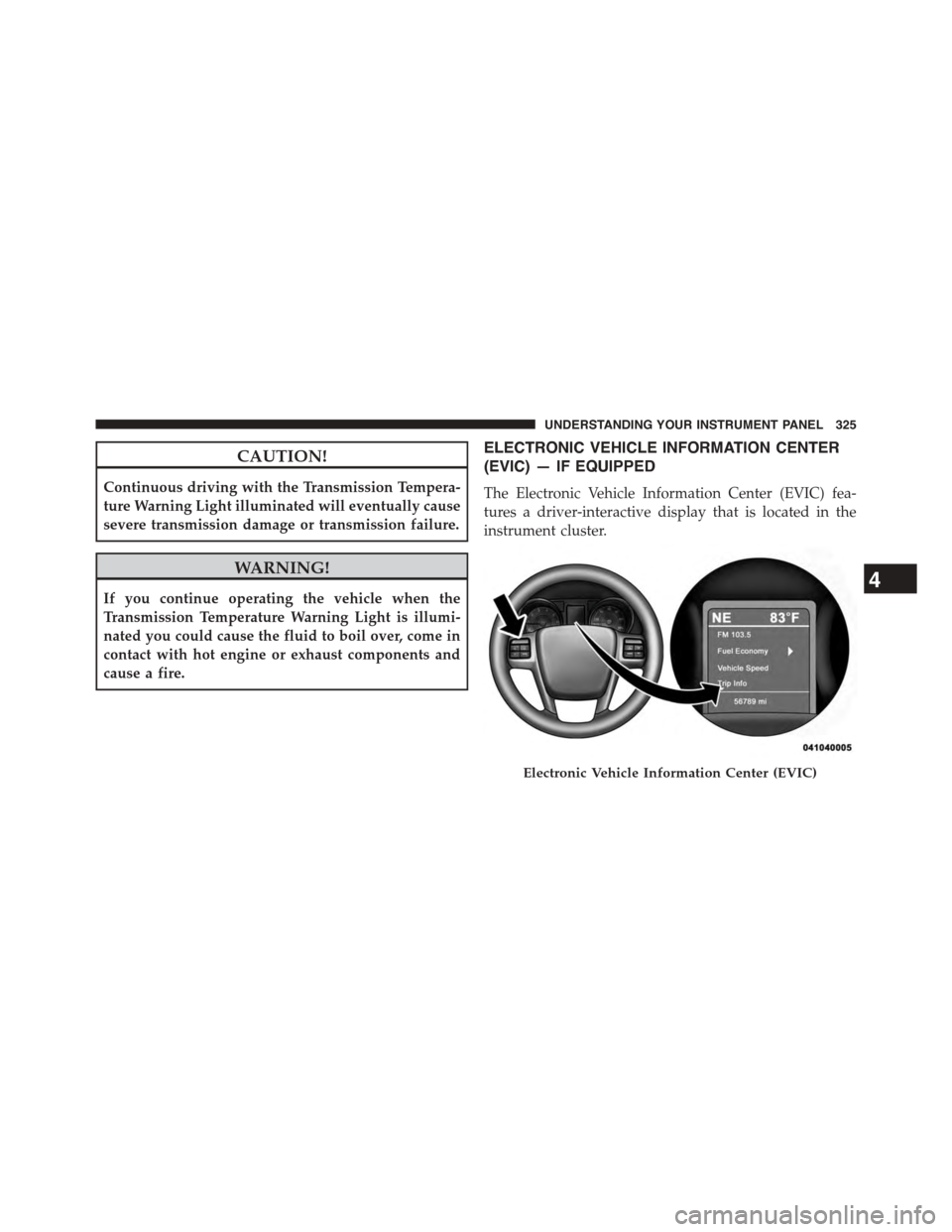
ELECTRONIC VEHICLE INFORMATION CENTER
(EVIC) — IF EQUIPPED
The Electronic Vehicle Information Center (EVIC) fea-
tures a driver-interactive display that is located in the
instrument cluster.
Electronic Vehicle Information Center (EVIC)
4
UNDERSTANDING YOUR INSTRUMENT PANEL 325
Page 329 of 703
•DOWN Button
Push and release the DOWN button to scroll
downward through the main menu items.
•RIGHT Button
The RIGHT button allows access to informa-
tion in EVIC submenus, selects some feature
settings, and resets some EVIC features. The
EVIC prompts the driver when the RIGHT
button can be used by displaying the right arrow graphic.
Once the RIGHT button has been selected for the desired
submenu list, follow the EVIC prompts to
properly select the desired submenu EVIC
features
•BACK Button
Push and release the BACK button to scroll
back to a previous menu or sub-menu.
Electronic Vehicle Information Center (EVIC)
Displays
The EVIC display consists of three sections:
1. The top line where compass direction and outside
temperature are displayed.
2. The main display area where the menus and pop up
messages are displayed.
3. The reconfigurable telltales section below the odom-
eter line.
The main display area will normally display the main
menu or the screens of a selected feature of the main
menu. The main display area also displays#pop up#
4
UNDERSTANDING YOUR INSTRUMENT PANEL 327
Page 330 of 703

messages that consist of approximately 60 possible warn-
ing or information messages. These pop up messages fall
into several categories:
•Five Second Stored Messages
When the appropriate conditions occur, this type of
message takes control of the main display area for five
seconds and then returns to the previous screen. Most of
the messages of this type are then stored (as long as the
condition that activated it remains active) and can be
reviewed from the#Messages#main menu item. As long
as there is a stored message, an#i#will be displayed in the
EVIC’s compass/outside temp line. Examples of this
message type are#Right Front Turn Signal Lamp Out#
and#Low Tire Pressure#.
•Unstored Messages
This message type is displayed indefinitely or until the
condition that activated the message is cleared. Examples
of this message type are#Turn Signal On#(if a turn signal
is left on) and#Lights On#(if driver leaves the vehicle).
•Unstored Messages Until RUN
These messages deal primarily with the Remote Start
feature. This message type is displayed until the ignition
is in the RUN state. Examples of this message type are
#Remote Start Aborted - Door Ajar#and#Press Brake
Pedal and Push Button to Start#.
•Five Second Unstored Messages
When the appropriate conditions occur, this type of
message takes control of the main display area for five
seconds and then returns to the previous screen. Ex-
amples of this message type are#Memory System Un-
available - Not in Park#and#Automatic High Beams On#.
328 UNDERSTANDING YOUR INSTRUMENT PANEL
Page 331 of 703
The Reconfigurable Telltales section is divided into the
white telltales area on the right, amber telltales in the
middle, and red telltales on the left.
When the appropriate conditions exist, the EVIC displays
the following messages:
•Key in ignition
•Ignition or Accessory On
•Remote start aborted — Door ajar
•Remote start aborted — Hood ajar
•Remote start aborted — L/Gate ajar
•Remote start aborted — Fuel low
•Remote start disabled — Start Vehicle to Reset
•Remote start active — Push Start Button
•Remote start active — Key to Run
•Wrong Key
•Damaged Key
•Key not programmed
•Vehicle Not in Park
•Key Left Vehicle
•Key Not Detected
•Press Brake Pedal and Push Button to Start
•Liftgate Ajar (chime will sound when vehicle starts
moving)
•Low Tire Pressure
•Service TPM System (refer to “Tire Pressure Monitor-
ing System” in “Starting And Operating”)
•Tire Pressure Screen With Low Tire(s) “Inflate Tire to
XX”
4
UNDERSTANDING YOUR INSTRUMENT PANEL 329
Page 332 of 703
•Turn Signal On
•RKE Battery Low
•Service Keyless System
•Low Washer Fluid
•Oil Change Required
•Check Gascap
•Left Front Turn Signal Light Out
•Left Rear Turn Signal Light Out
•Right Front Turn Signal Light Out
•Right Rear Turn Signal Light Out
•Park Assist Disabled
•Service Park Assist System
•Personal Settings Not Available — Vehicle Not in Park
•Blind Spot System Off — This message is displayed
when the ignition is turned to ON to indicate the Blind
Spot System has been turned off.
•Blind Spot System Not Available — This message is
displayed to indicate the Blind Spot Monitor (BSM)
system is temporarily unavailable due to sensor block-
age, electronic interference, or other#temporary#con-
ditions. When this message is displayed both outside
rear view icons will be illuminated. If electronic inter-
ference is present, the BSM system will illuminate the
icon only on the side of interference as long as inter-
ference is present.
•Service Blind Spot System — This message is dis-
played to indicate the Blind Spot Monitor (BSM)
system is permanently unavailable. The driver will
receive an EVIC message and the BSM display warn-
ing in both mirrors will be permanently illuminated. If
this message is present see an authorized dealer.
330 UNDERSTANDING YOUR INSTRUMENT PANEL