display DODGE GRAND CARAVAN 2015 5.G Owner's Guide
[x] Cancel search | Manufacturer: DODGE, Model Year: 2015, Model line: GRAND CARAVAN, Model: DODGE GRAND CARAVAN 2015 5.GPages: 703, PDF Size: 19.83 MB
Page 333 of 703
EVIC White Telltale Lights
This area will show reconfigurable white caution tell-
tales. These telltales include:
•Electronic Range Select (ERS) Status
The shift lever status “5,4,3,2,1” are displayed indicating
the shift lever position. Telltales “5,4,3,2,1” indicate the
Electronic Range Select (ERS) feature has been engaged
and the gear selected is displayed. For further informa-
tion on ERS, refer to “Starting And Operating”.
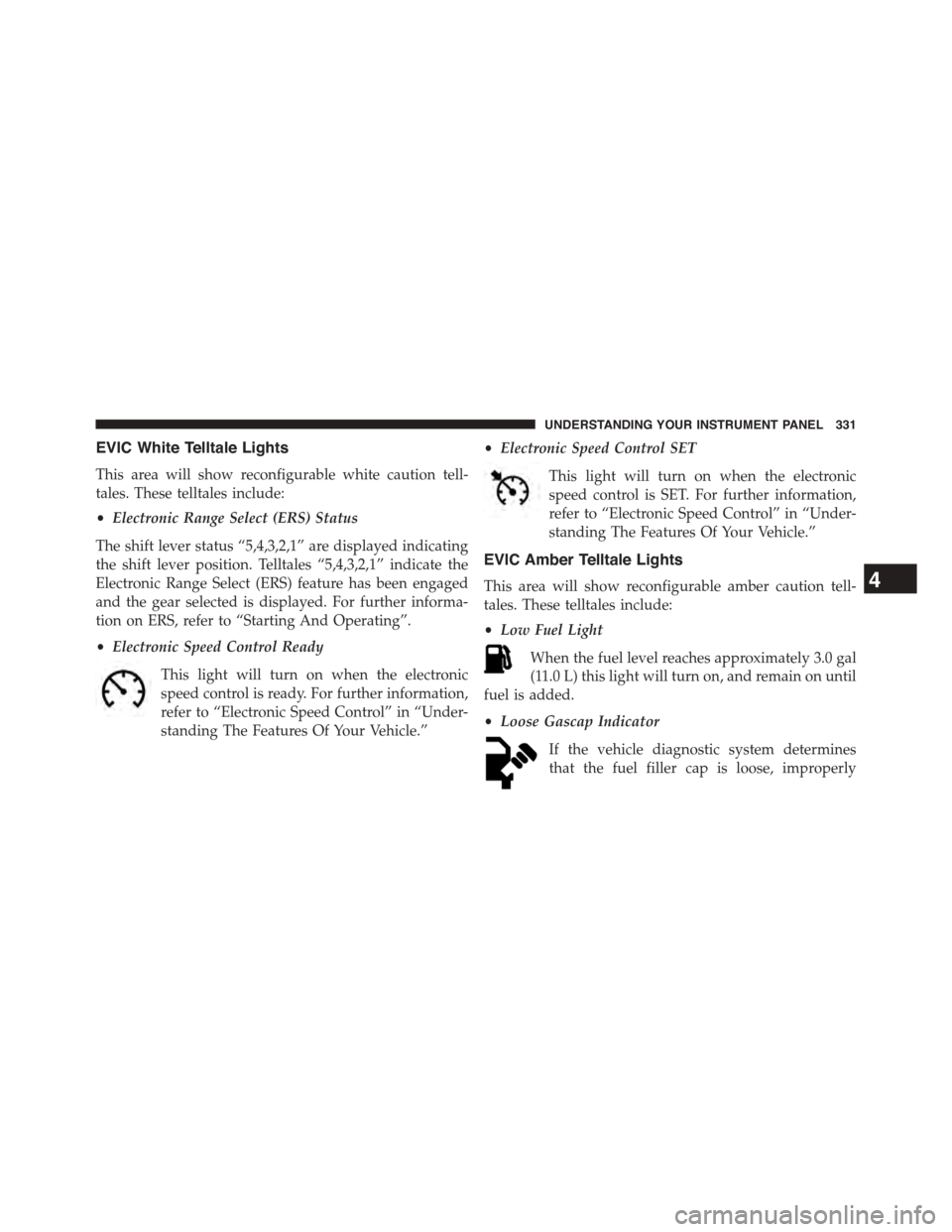
•Electronic Speed Control Ready
This light will turn on when the electronic
speed control is ready. For further information,
refer to “Electronic Speed Control” in “Under-
standing The Features Of Your Vehicle.”
•Electronic Speed Control SET
This light will turn on when the electronic
speed control is SET. For further information,
refer to “Electronic Speed Control” in “Under-
standing The Features Of Your Vehicle.”
EVIC Amber Telltale Lights
This area will show reconfigurable amber caution tell-
tales. These telltales include:
•Low Fuel Light
When the fuel level reaches approximately 3.0 gal
(11.0 L) this light will turn on, and remain on until
fuel is added.
•Loose Gascap Indicator
If the vehicle diagnostic system determines
that the fuel filler cap is loose, improperly
4
UNDERSTANDING YOUR INSTRUMENT PANEL 331
Page 334 of 703
installed, or damaged, a loose gascap indicator will
display in the telltale display area. Tighten the fuel filler
cap properly.
A loose, improperly installed, or damaged fuel filler cap
may also turn on the Malfunction Indicator Light (MIL).
If the message continues to appear for more than three
days after tightening the gas cap, have the vehicle
serviced by an authorized service center immediately.
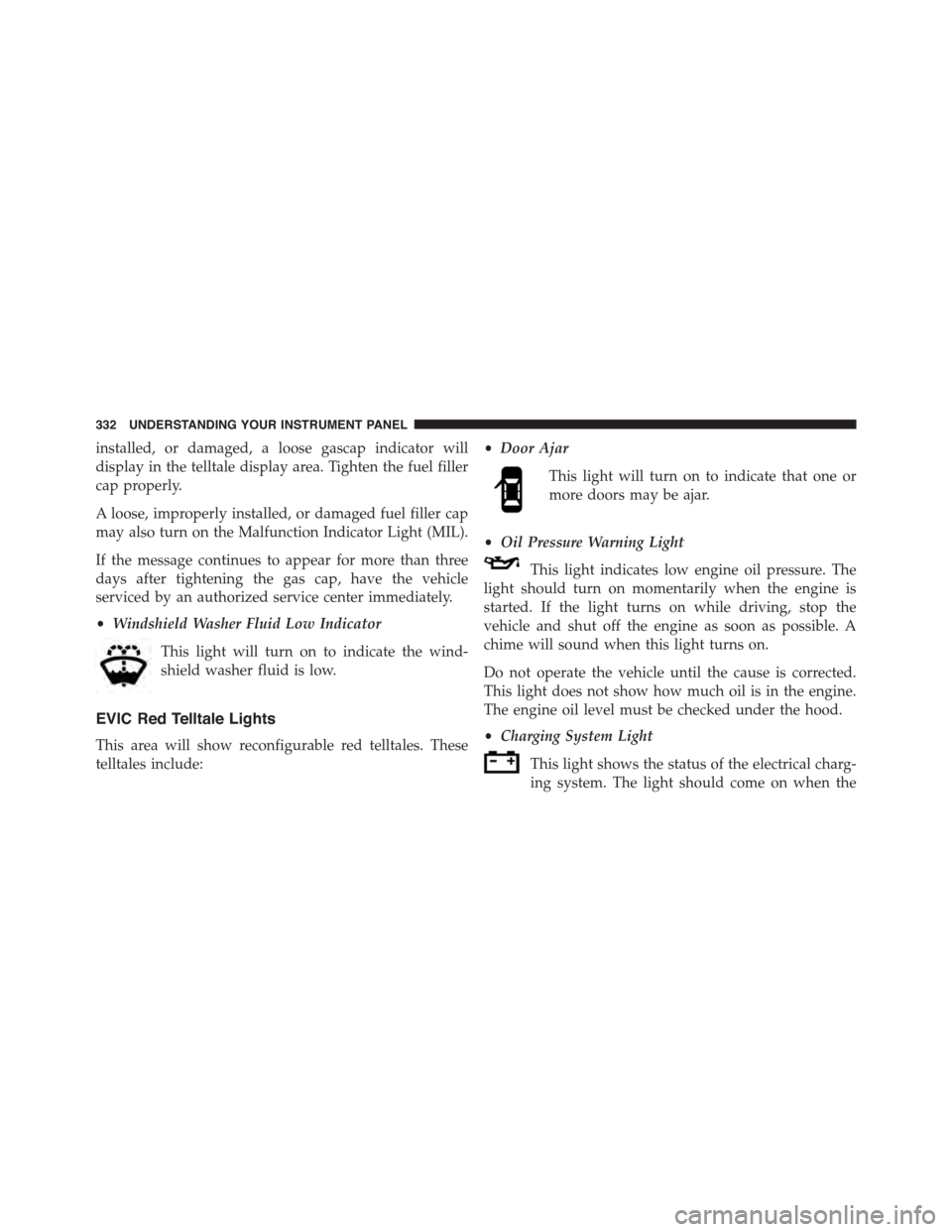
•Windshield Washer Fluid Low Indicator
This light will turn on to indicate the wind-
shield washer fluid is low.
EVIC Red Telltale Lights
This area will show reconfigurable red telltales. These
telltales include:
•Door Ajar
This light will turn on to indicate that one or
more doors may be ajar.
•Oil Pressure Warning Light
This light indicates low engine oil pressure. The
light should turn on momentarily when the engine is
started. If the light turns on while driving, stop the
vehicle and shut off the engine as soon as possible. A
chime will sound when this light turns on.
Do not operate the vehicle until the cause is corrected.
This light does not show how much oil is in the engine.
The engine oil level must be checked under the hood.
•Charging System Light
This light shows the status of the electrical charg-
ing system. The light should come on when the
332 UNDERSTANDING YOUR INSTRUMENT PANEL
Page 337 of 703
display in the EVIC display for approximately 10 sec-
onds, after a single chime has sounded, to indicate the
next scheduled oil change interval. The engine oil change
indicator system is duty-cycle based, which means the
engine oil change interval may fluctuate dependent upon
your personal driving style.
Unless reset, this message will continue to display each
time you turn the ignition switch to the ON/RUN
position or cycle the ignition to the ON/RUN position if
equipped with Keyless Enter-N-Go™. To turn off the
message temporarily, push and release the MENU but-
ton. To reset the oil change indicator system (after
performing the scheduled maintenance) refer to the fol-
lowing procedure.
Vehicles Equipped With Keyless Enter-N-Go™
1. Without pushing the brake pedal, push the ENGINE
START/STOP button and cycle the ignition to the
ON/RUN position (do not start the engine.)
2. Fully depress the accelerator pedal, slowly, three times
within 10 seconds.
3. Without pushing the brake pedal, push the ENGINE
START/STOP button once to return the ignition to the
OFF/LOCK position.
Vehicles Not Equipped With Keyless Enter-N-Go™
1. Turn the ignition switch to the ON/RUN position (do
not start the engine.)
2. Fully depress the accelerator pedal, slowly, three times
within 10 seconds.
3. Turn the ignition switch to the OFF/LOCK position.
NOTE:If the indicator message illuminates when you
start the engine, the oil change indicator system did not
reset. If necessary, repeat these steps.
4
UNDERSTANDING YOUR INSTRUMENT PANEL 335
Page 338 of 703
Fuel Economy
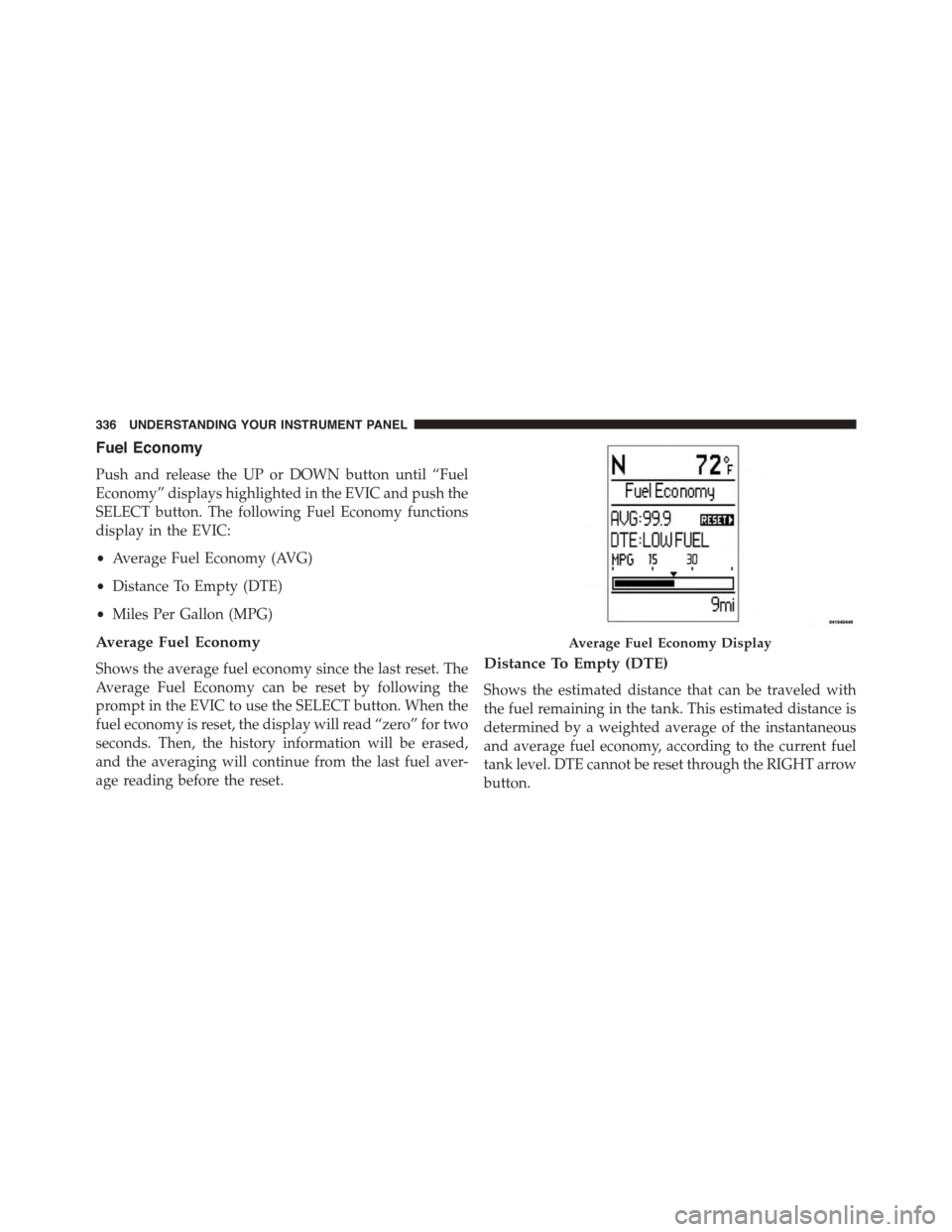
Push and release the UP or DOWN button until “Fuel
Economy” displays highlighted in the EVIC and push the
SELECT button. The following Fuel Economy functions
display in the EVIC:
•Average Fuel Economy (AVG)
•Distance To Empty (DTE)
•Miles Per Gallon (MPG)
Average Fuel Economy
Shows the average fuel economy since the last reset. The
Average Fuel Economy can be reset by following the
prompt in the EVIC to use the SELECT button. When the
fuel economy is reset, the display will read “zero” for two
seconds. Then, the history information will be erased,
and the averaging will continue from the last fuel aver-
age reading before the reset.
Distance To Empty (DTE)
Shows the estimated distance that can be traveled with
the fuel remaining in the tank. This estimated distance is
determined by a weighted average of the instantaneous
and average fuel economy, according to the current fuel
tank level. DTE cannot be reset through the RIGHT arrow
button.
Average Fuel Economy Display
336 UNDERSTANDING YOUR INSTRUMENT PANEL
Page 339 of 703
NOTE:Significant changes in driving style or vehicle
loading will greatly affect the actual drivable distance of
the vehicle, regardless of the DTE displayed value.
When the DTE value is less than 30 miles (48 km)
estimated driving distance, the DTE display will change
to a “LOW FUEL” message. This display will continue
until the vehicle runs out of fuel. Adding a significant
amount of fuel to the vehicle will turn off the “LOW
FUEL” message and a new DTE value will display.
Miles Per Gallon (MPG)
This display shows the instantaneous MPG in bar graph
form while driving. This will monitor the gas mileage in
real-time as you drive and can be used to modify driving
habits in order to increase fuel economy.
Vehicle Speed
Push and release the UP or DOWN button until “Vehicle
Speed” displays highlighted in the EVIC and push the
RIGHT arrow button. Push and release the RIGHT arrow
button to display the current speed in mph or km/h.
Pushing the RIGHT arrow button a second time will
toggle the unit of measure between mph or km/h.
NOTE:Changing the unit of measure in the Vehicle
Speed menu will not change the unit of measure in the
EVIC.
Trip Info
Push and release the UP or DOWN button until “Trip
Info” is highlighted in the EVIC and push the SELECT
button. Push and release the UP/DOWN buttons to
highlight one of the following functions if you want to
reset it:
Trip A
Shows the total distance traveled for Trip A since the last
reset.
4
UNDERSTANDING YOUR INSTRUMENT PANEL 337
Page 340 of 703
Trip B
Shows the total distance traveled for Trip B since the last
reset.
Elapsed Time
Shows the total elapsed time of travel since the last reset
when the ignition switch is in the ACC position. Elapsed
time will increment when the ignition switch is in the ON
or START position.
To Reset A Trip Function
Reset will only occur while a resettable function is
selected (highlighted). Push and hold the SELECT button
to clear the resettable function being displayed.
Tire PSI
Push and release the UP or DOWN button until “Tire
PSI:” displays highlighted in the EVIC. Push and release
the SELECT button to view a graphic of the vehicle with
a tire pressure value at each corner of the graphic.
Units
Push and release the UP or DOWN button until “Units”
displays highlighted in the EVIC and push the SELECT
button. The EVIC, odometer, and navigation system (if
equipped) can be changed between English and Metric
units of measure. To make your selection, scroll up or
down until the preferred setting is highlighted, then push
and release the SELECT button until a check-mark ap-
pears next to the setting, showing that the setting has
been selected.
Vehicle Info (Customer Information Features)
Push and release the UP or DOWN button until “Vehicle
Info” displays in the EVIC. Then, push and release the
SELECT button. Push and release the UP and DOWN
338 UNDERSTANDING YOUR INSTRUMENT PANEL
Page 341 of 703
button to scroll through the available information dis-
plays, then push and release SELECT to display any one
of the following choices.
•Coolant Temp
Displays the actual coolant temperature.
•Oil Temp
Displays the actual oil temperature.
•Oil Pressure
Displays the actual oil pressure.
•Trailer Brake — If Equipped
Displays trailer brake output power and trailer brake
status indicator.
•Engine Hours
Displays the number of hours of engine operation.
Messages #
Select from Main Menu using the UP or DOWN buttons.
This feature shows the number of stored warning mes-
sages (in the # place holder). Pushing the SELECT button
will allow you to see what the stored messages are. Push
and release the UP and DOWN buttons if there is more
than one message to step through the remaining stored
messages. Pushing the BACK button takes you back to
the Main Menu.
Keyless Enter-N-Go™ Display — If Equipped
When the ENGINE START/STOP button is pushed to
change ignition switch position, current ignition status
will be displayed in the lower right corner of the EVIC
display to the right of the odometer value.
Refer to “Keyless Enter-N-Go™” in “Starting And Oper-
ating” for more information.
4
UNDERSTANDING YOUR INSTRUMENT PANEL 339
Page 342 of 703
Compass / Temperature Display
The compass readings indicate the direction the vehicle is
facing. The EVIC will display one of eight compass
readings and the outside temperature.
NOTE:The system will display the last known outside
temperature when starting the vehicle and may need to
be driven several minutes before the updated tempera-
ture is displayed. Engine temperature can also affect the
displayed temperature; therefore, temperature readings
are not updated when the vehicle is not moving.
Automatic Compass Calibration
This compass is self-calibrating, which eliminates the
need to manually reset the compass. When the vehicle is
new, the compass may appear erratic until it is calibrated.
You may also calibrate the compass by completing one or
more 360–degree turns (in an area free from large metal
or metallic objects). The compass will now function
normally.
NOTE:A good calibration requires a level surface and
an environment free from large metallic objects such as
buildings, bridges, underground cables, railroad tracks,
etc.
Manual Compass Calibration
If the compass appears erratic and the CAL indicator
does not appear in the EVIC display, you must put the
compass into the Calibration Mode manually, as follows:
1. Turn ON the ignition switch.
2. Push and release the UP or DOWN button until the
System Setup (Customer-Programmable Features)
menu is reached, then push and release the SELECT
button.
3. Push and releasethe DOWN button until “Calibrate
Compass” is displayed in the EVIC then push and
release the SELECT button.
340 UNDERSTANDING YOUR INSTRUMENT PANEL
Page 343 of 703
4. Push and release the SELECT button to start the
calibration. The “CAL” indicator will be displayed in
the EVIC.
5. Complete one or more 360–degree turns (in an area
free from large metal or metallic objects) until the
“CAL” indicator turns off. The compass will now
function normally.
Compass Variance
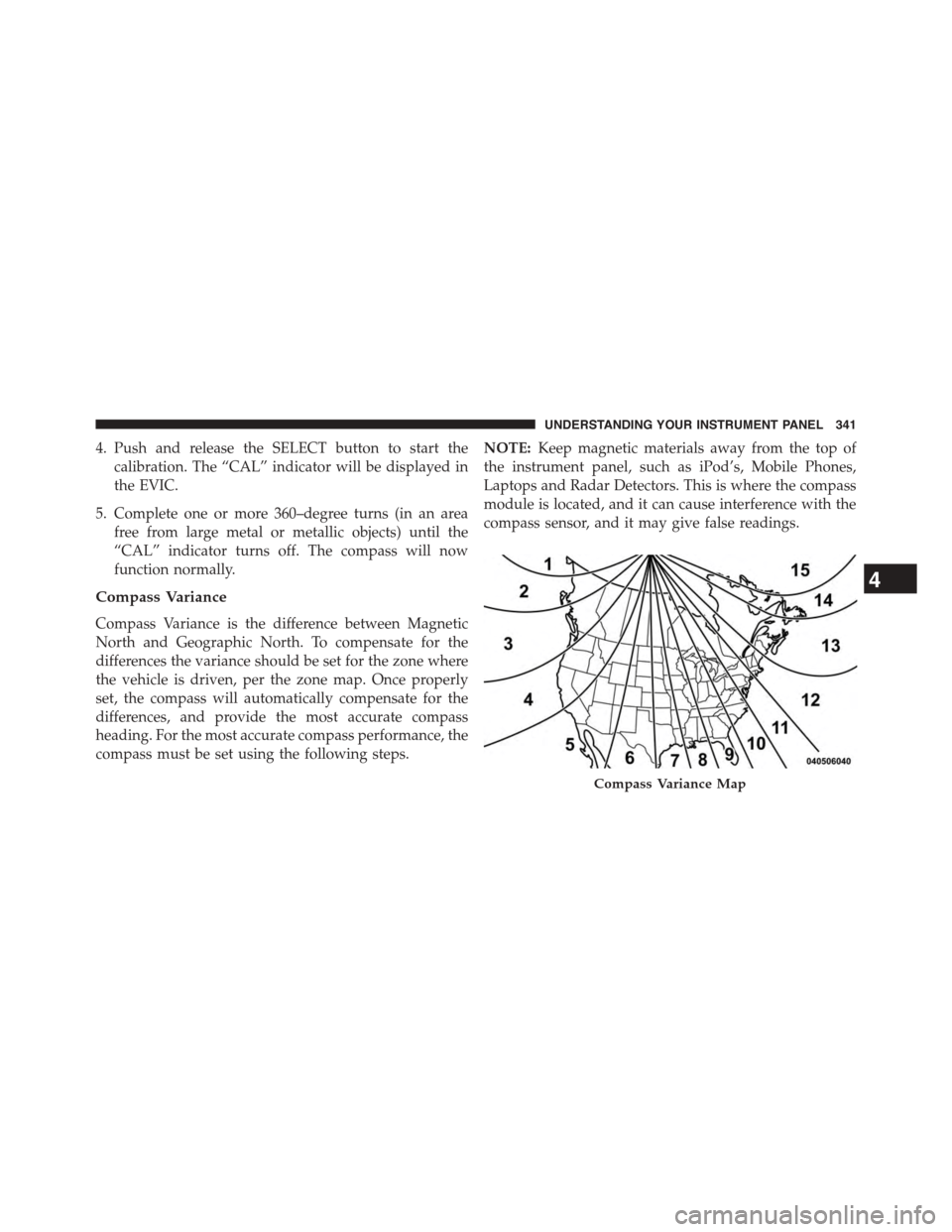
Compass Variance is the difference between Magnetic
North and Geographic North. To compensate for the
differences the variance should be set for the zone where
the vehicle is driven, per the zone map. Once properly
set, the compass will automatically compensate for the
differences, and provide the most accurate compass
heading. For the most accurate compass performance, the
compass must be set using the following steps.
NOTE:Keep magnetic materials away from the top of
the instrument panel, such as iPod’s, Mobile Phones,
Laptops and Radar Detectors. This is where the compass
module is located, and it can cause interference with the
compass sensor, and it may give false readings.
Compass Variance Map
4
UNDERSTANDING YOUR INSTRUMENT PANEL 341
Page 344 of 703
1. Turn the ignition switch ON.
2. Press the UP or DOWN button until the Setup
(Customer-Programmable Features) menu is reached,
then press the SELECT button.
3. Press the DOWN button until the “Compass Variance”
message is displayed in the EVIC, then press the
SELECT button. The last variance zone number dis-
plays in the EVIC.
4. Press and release the SELECT button until the proper
variance zone is selected, according to the map.
5. Press and release the RETURN button to exit.
Compass Variance
Refer to “Compass/Temperature Display” in “Electronic
Vehicle Information (EVIC)” in “Understanding Your
Instrument Panel” for more information.
Turn Menu Off
Push and release RIGHT arrow button to turn the menu
off.
Customer-Programmable Features (System
Setup)
Personal Settings allows you to set and recall features
when the transmission is in PARK. If the transmission is
out of PARK or the vehicle begins moving, a warning
messageSYSTEM SETUP NOT AVAILABLE VEHICLE
NOT IN PARKdisplays when you try to select “System
Setup” from the main menu.
Push and release the UP or DOWN button until#System
Setup#is highlighted in the main menu of the EVIC. Then
push and release the SELECT button to enter the System
Setup sub-menu. Push and release the UP or DOWN
button to select a feature form the following choices:
342 UNDERSTANDING YOUR INSTRUMENT PANEL