instrument cluster DODGE GRAND CARAVAN 2020 Service Manual
[x] Cancel search | Manufacturer: DODGE, Model Year: 2020, Model line: GRAND CARAVAN, Model: DODGE GRAND CARAVAN 2020Pages: 380, PDF Size: 14.92 MB
Page 267 of 380

SERVICING AND MAINTENANCE265
Cleaning Plastic Instrument Cluster Lenses
The lenses in front of the instruments in this
vehicle are molded in clear plastic. When
cleaning the lenses, care must be taken to
avoid scratching the plastic.
1. Clean with a wet soft cloth. A mild soap
solution may be used, but do not use high
alcohol content or abrasive cleaners. If
soap is used, wipe clean with a clean damp
cloth.
2. Dry with a soft cloth.
Glass Surfaces
All glass surfaces should be cleaned on a
regular basis with Mopar Glass Cleaner, or any
commercial household-type glass cleaner.
Never use an abrasive type cleaner. Use caution
when cleaning the inside rear window equipped
with electric defrosters or windows equipped
with radio antennas. Do not use scrapers or
other sharp instruments that may scratch the
elements.
When cleaning the rear view mirror, spray
cleaner on the towel or cloth that you are using.
Do not spray cleaner directly on the mirror.
Cleaning The Instrument Panel Cupholders
Removal
Pull the flexible liner from the cupholder drawer
starting at one edge to ease removal.
Cleaning
The liner is top shelf dishwasher safe, or you
may follow the cleaning procedure below.
Soak the liner in a mixture of medium hot tap
water and one teaspoon of mild liquid dish
soap. Let soak for approximately 30 minutes.
After 30 minutes, pull the liner from the water
and dip it back into the water about six times.
This will loosen any remaining debris. Rinse the
liner thoroughly under warm running water.
Shake the excess water from the liner and dry
the outer surfaces with a clean soft cloth.
Installation
Place the liner into the cupholder drawer and
push the liner into place so that the retention
tabs seat into the corresponding openings in
the drawer.
7
20_RT_OM_EN_USC_t.book Page 265
Page 281 of 380
MULTIMEDIA279
Audio Control Menu
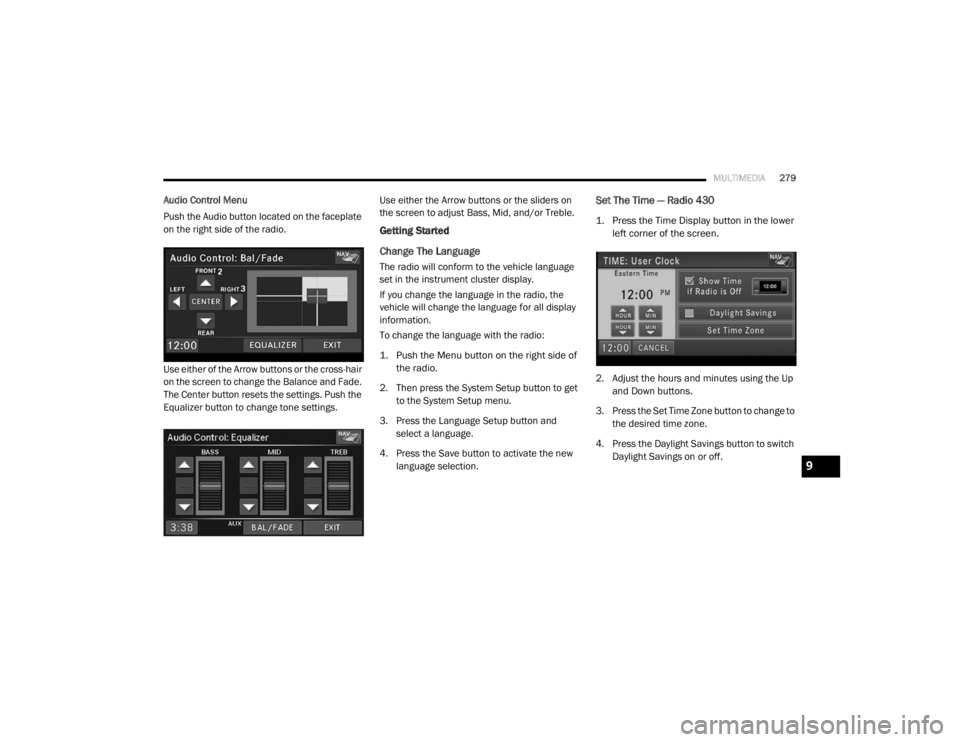
Push the Audio button located on the faceplate
on the right side of the radio.
Use either of the Arrow buttons or the cross-hair
on the screen to change the Balance and Fade.
The Center button resets the settings. Push the
Equalizer button to change tone settings. Use either the Arrow buttons or the sliders on
the screen to adjust Bass, Mid, and/or Treble.
Getting Started
Change The Language
The radio will conform to the vehicle language
set in the instrument cluster display.
If you change the language in the radio, the
vehicle will change the language for all display
information.
To change the language with the radio:
1. Push the Menu button on the right side of
the radio.
2. Then press the System Setup button to get to the System Setup menu.
3. Press the Language Setup button and select a language.
4. Press the Save button to activate the new language selection.
Set The Time — Radio 430
1. Press the Time Display button in the lower left corner of the screen.
2. Adjust the hours and minutes using the Up and Down buttons.
3. Press the Set Time Zone button to change to the desired time zone.
4. Press the Daylight Savings button to switch Daylight Savings on or off.
9
20_RT_OM_EN_USC_t.book Page 279
Page 315 of 380
MULTIMEDIA313
You can also send stored Uconnect Phonebook
entries as tones for fast and easy access to
voice mail and pager entries. To use this
feature, dial the number you wish to call and
then push the Voice Command button and
say, “Send.” The system will prompt you to enter
the name or number and say the name of the
phonebook entry you wish to send. The
Uconnect Phone will then send the
corresponding phone number associated with
the phonebook entry, as tones over the phone.
NOTE:
You may not hear all of the tones due to
mobile phone network configurations. This is
normal.
Some paging and voice mail systems have
system time out settings that are too short
and may not allow the use of this feature.
Barge In – Overriding Prompts
The “Voice Command” button can be used
when you wish to skip part of a prompt and
issue your voice command immediately. For
example, if a prompt is asking “Would you like to pair a phone, clear a...,” you could push the
Voice Recognition button and say, “Pair a
Phone” to select that option without having to
listen to the rest of the voice prompt.
Turning Confirmation Prompts On/Off
Turning confirmation prompts off will stop the
system from confirming your choices (e.g., the
Uconnect Phone will not repeat a phone
number before you dial it).
To turn confirmation prompts on or off using
Voice Command:
1. Push the Phone button to begin.
2. After the “Ready” prompt and the following
beep, say:“Setup Confirmations Prompts On” or
“Setup Confirmations Prompts Off”
Phone And Network Status Indicators
If available on the radio and/or on a premium
display such as the instrument panel cluster,
and supported by your mobile phone, the
Uconnect Phone will provide notification to
inform you of your phone and network status when you are attempting to make a phone call
using Uconnect Phone. The status is given for
roaming, network signal strength, phone battery
strength, etc.
Dialing Using The Mobile Phone Keypad
You can dial a phone number with your mobile
phone keypad and still use the Uconnect Phone
(while dialing via the mobile phone keypad, the
user must exercise caution and take precau
-
tionary safety measures). By dialing a number
with your paired Bluetooth® mobile phone, the
audio will be played through your vehicles audio
system. The Uconnect Phone will work the same
as if you dial the number using Voice Command.
NOTE:
Certain brands of mobile phones do not send
the dial ring to the Uconnect Phone to play it on
the vehicle audio system, so you will not hear it.
Under this situation, after successfully dialing a
number the user may feel that the call did not
go through even though the call is in progress.
Once your call is answered, you will hear the
audio.
9
20_RT_OM_EN_USC_t.book Page 313
Page 373 of 380

371
Fluid, Brake
................................................... 274Fluids And Lubricants.................................... 272Fog Lights........................................ 37, 39, 196Fog Lights, Service......................................... 196Fold In Floor (Stow ‘n Go) Seating.................... 21Fold-Flat Seats................................................. 20Freeing A Stuck Vehicle................................. 223Fuel............................................................... 267Adding....................................................... 181Additives................................................... 268Clean Air.................................................... 268Economy Mode.......................................... 167Ethanol...................................................... 268Gasoline.................................................... 267Materials Added........................................ 268Methanol................................................... 268Octane Rating................................. 267, 272Specifications............................................ 272Tank Capacity............................................ 271Fueling........................................................... 181Fuses................................................... 197, 198
G
Garage Door Opener (HomeLink).................... 63Gasoline, (Fuel)............................................. 267Gasoline, Clean Air........................................ 268Gasoline, Reformulated................................. 268Gear Ranges.................................................. 168
Gear Selector Override................................. 222Glass Cleaning.............................................. 265Gross Axle Weight Rating.............................. 183Gross Vehicle Weight Rating......................... 183GVWR............................................................ 182
H
Hands-Free Phone Uconnect
.................................................. 304HazardDriving Through Flowing, Rising,
Or Shallow Standing Water
....................... 192Hazard Warning Flashers.............................. 194Head Restraints............................................... 30Headlights....................................................... 37Automatic.................................................... 38Bulb Replacement.................................... 196Cleaning................................................... 263High Beam/Low Beam Select Switch... 37, 38Lights On Reminder.............................. 37, 39Passing................................................. 37, 38Replacing................................................. 196Switch.......................................................... 37Time Delay............................................ 37, 38Heated Mirrors.......................................... 34, 37Heater, Engine Block.................................... 163
High Beam/Low Beam Select
(Dimmer) Switch..............................................38Hill Start Assist.............................................. 108HitchesTrailer Towing........................................... 184HomeLink (Garage Door Opener).....................63Hood Prop........................................................61Hood Release...................................................61Hook, Coat.......................................................73
I
Ignition.............................................................11Switch..........................................................11Inside Rearview Mirror.....................................35Instrument Cluster...........................................82Descriptions....................................... 84, 100Display.........................................................85Display Controls...........................................85Menu Items.................................................87Instrument Panel Lens Cleaning................... 265Integrated Power Module (Fuses)................. 198Interior And Instrument Lights.........................39Interior Appearance Care.............................. 264Interior Lights...................................................39Intermittent Wipers (Delay Wipers)..................42InverterPower...........................................................77iPod/USB/MP3 Control................................. 340Bluetooth Streaming Audio.............. 343, 362
11
20_RT_OM_EN_USC_t.book Page 371
Page 374 of 380

372
J
Jack Location
................................................. 203Jack Operation..................................... 202, 244Jump Starting................................................ 219
K
Key Fob Arm The Alarm
............................................. 15Disarm The Alarm........................................ 15Programming Additional Key Fobs....... 10, 14Key Fob Battery Service
(Remote Keyless Entry)................................... 10Key Fob Programming
(Remote Keyless Entry)................................... 10Keys................................................................... 9Replacement............................................... 14
L
Lane Change And Turn Signals........................ 37Lane Change Assist.................................. 37, 39Lap/Shoulder Belts....................................... 121Latches.......................................................... 161Hood........................................................... 61Leaks, Fluid................................................... 161Life Of Tires................................................... 255Liftgate............................................................ 62Closing........................................................ 62Opening....................................................... 62Light Bulbs..................................................... 161
Lights............................................................ 161Air Bag...................................... 94, 131, 160Automatic Headlights.................................. 38Back-Up.................................................... 197Battery Saver............................................... 39Brake Assist Warning............................... 107Brake Warning............................................. 94Bulb Replacement.................................... 194Center Mounted Stop............................... 197Cruise....................................................... 100Daytime Running.................................. 37, 38Dimmer Switch, Headlight.................... 37, 38Electronic Stability Program(ESP) Indicator.................................................. 96Exterior..................................................... 161Fog.....................................................39, 196Hazard Warning Flasher........................... 194Headlights..........................................37, 196Headlights On Reminder............................. 39High Beam................................................... 38High Beam/Low Beam Select............... 37, 38Instrument Cluster....................................... 37Interior......................................................... 39License..................................................... 197Lights On Reminder.............................. 37, 39Malfunction Indicator (Check Engine).......... 98Parade Mode (Daytime Brightness)............. 41Park................................................. 100, 196Passing................................................. 37, 38Reading....................................................... 39
Rear Servicing.......................................... 197Rear Tail Lamps........................................ 197Seat Belt Reminder.....................................96Security Alarm.............................................97Service...................................................... 194Side Marker.............................................. 197Traction Control........................................ 107Turn Signals............37, 100, 161, 196, 197Warning Instrument Cluster
Descriptions....................................... 96, 100Load Leveling System......................................63Loading Vehicle...................................... 63, 182Tires.......................................................... 249LocksAutomatic Door............................................17Low Tire Pressure System............................. 115Lubrication, Body.......................................... 237Lug Nuts/Bolts.............................................. 266Luggage Carrier................................................79
M
Maintenance Free Battery............................ 232Maintenance Schedule................................. 226Malfunction Indicator Light
(Check Engine)....................................... 98, 102ManualService...................................................... 367Map/Reading Lights........................................39Media Hub.................................................... 340Methanol....................................................... 268
20_RT_OM_EN_USC_t.book Page 372
Page 378 of 380

376
Transfer Case Fluid
.......................................................... 274TransmissionAutomatic........................................ 165, 243Fluid................................................ 243, 274Maintenance............................................. 243Transporting Pets.......................................... 159Tread Wear Indicators................................... 255Turn Signals......................... 37, 100, 196, 197
U
UconnectAdvanced Phone Connectivity
...................314Phone Call Features.................................. 309Uconnect (Hands-Free Phone)....................... 304Uconnect Phone............................................ 311Umbrella Holder.............................................. 72Uniform Tire Quality Grades........................... 261Universal Garage Door Opener (HomeLink)..... 63Universal Transmitter...................................... 63Untwisting Procedure, Seat Belt.................... 123USB............................................................... 340
V
Vanity Mirrors.................................................. 37VarianceCompass..................................................... 89Vehicle Identification Number (VIN).............. 266Vehicle Loading................................... 182, 249Vehicle Modifications/Alterations...................... 8Vehicle Storage.......................................57, 262Viscosity, Engine Oil...................................... 234Voice CommandCommands............................................... 361System Operation..................................... 360Voice Training........................................... 363Voice Recognition System (VR)..................... 360
W
Warning Flashers, Hazard............................. 194Warning Lights
(Instrument Cluster Descriptions).................... 97Warnings And Cautions...................................... 8Warranty Information.................................... 366WasherAdding Fluid.............................................. 232
Washers, Windshield.......................................41Washing Vehicle............................................ 263WaterDriving Through........................................ 192Wheel And Wheel Tire Care........................... 259Wheel And Wheel Tire Trim........................... 259Window Fogging...............................................58Windows..........................................................59Rear Vent.....................................................59Windshield Defroster.................................... 160Windshield Washers.............................. 41, 232Windshield Wiper Blades.............................. 238Wipers Blade Replacement........................... 238Wipers, Intermittent.........................................42
20_RT_OM_EN_USC_t.book Page 376