wheel DODGE JOURNEY 2015 1.G Owner's Guide
[x] Cancel search | Manufacturer: DODGE, Model Year: 2015, Model line: JOURNEY, Model: DODGE JOURNEY 2015 1.GPages: 648
Page 328 of 648
touchscreen. Refer to “Lights/SmartBeam™ — If
Equipped” in “Understanding The Features Of Your
Vehicle” for further information.
•Daytime Running Lights — If Available
Press the “Daytime Running Lights” button on the touch-
screen to change this display. When this feature is se-
lected, the headlights will turn on whenever the engine is
running. To make your selection, press the “Daytime
Running Lights” button on the touchscreen and select
“ON” or “OFF.” Then press the back arrow button on the
touchscreen.
•Steering Directed Lights — If Equipped
Press the “Steering Directed Lights” button on the touch-
screen to change this display. When this feature is se-
lected, the headlights turn relative to a change in direc-
tion of the steering wheel. To make your selection, press
the “Steering Directed Lights” button on the touchscreen
and select “ON” or ‘OFF.” Then press the back arrow
button on the touchscreen.
•Flash Lamps With Lock
Press the “Flash Lamps With Lock” button on the touch-
screen to change this display. When this feature is se-
lected, the exterior lights will flash when the doors are
locked with the Remote Keyless Entry (RKE) transmitter.
This feature may be selected with or without the sound
horn on lock feature selected. To make your selection,
press the “Flash Lamps With Lock” button on the touch-
screen and select “ON” or “OFF.” Then press the back
arrow button on the touchscreen.
326 UNDERSTANDING YOUR INSTRUMENT PANEL
Page 342 of 648
make your selection, press the “Auto High Beams”
button on the touchscreen, until a check-mark appears
next to setting, showing that setting has been selected.
Press the back arrow button on the touchscreen to return
to the previous menu. Refer to “Lights/SmartBeam™ —
If Equipped” in “Understanding The Features Of Your
Vehicle” for further information.
•Daytime Running Lights — If Equipped
When this feature is selected, the headlights will turn on
whenever the engine is running. To make your selection,
press the “Daytime Running Lights” button on the touch-
screen, until a check-mark appears next to setting, show-
ing that setting has been selected. Press the back arrow
button on the touchscreen to return to the previous
menu.
•Steering Directed Headlights — If Equipped
When this feature is selected, the headlights turn relative
to a change in direction of the steering wheel. To make
your selection, press the “Steering Directed Lights” but-
ton on the touchscreen, until a check-mark appears next
to setting, showing that setting has been selected. Press
the back arrow button on the touchscreen to return to the
previous menu.
•Flash Lamps With Lock
When this feature is selected, the exterior lights will flash
when the doors are locked with the Remote Keyless
Entry (RKE) transmitter. This feature may be selected
with or without the sound horn on lock feature selected.
To make your selection, press the “Flash Lamps with
Lock” button on the touchscreen, until a check-mark
appears next to setting, showing that setting has been
selected. Press the back arrow button on the touchscreen
to return to the previous menu.
340 UNDERSTANDING YOUR INSTRUMENT PANEL
Page 372 of 648
General Information
This device complies with Part 15 of the FCC rules and
RSS 210 of Industry Canada. Operation is subject to the
following conditions:
1. This device may not cause harmful interference.
2.This device must accept any interference received, in-
cluding interference that may cause undesired operation.
iPod®/USB/MP3 CONTROL
This feature allows an iPod® or external USB device to be
plugged into the USB port.
iPod® control supports Mini, 4G, Photo, Nano, 5G iPod®
and iPhone® devices. Some iPod® software versions
may not fully support the iPod® control features. Please
visit Apple’s website for software updates.
For further information, refer to the Uconnect® Supple-
ment Manual.
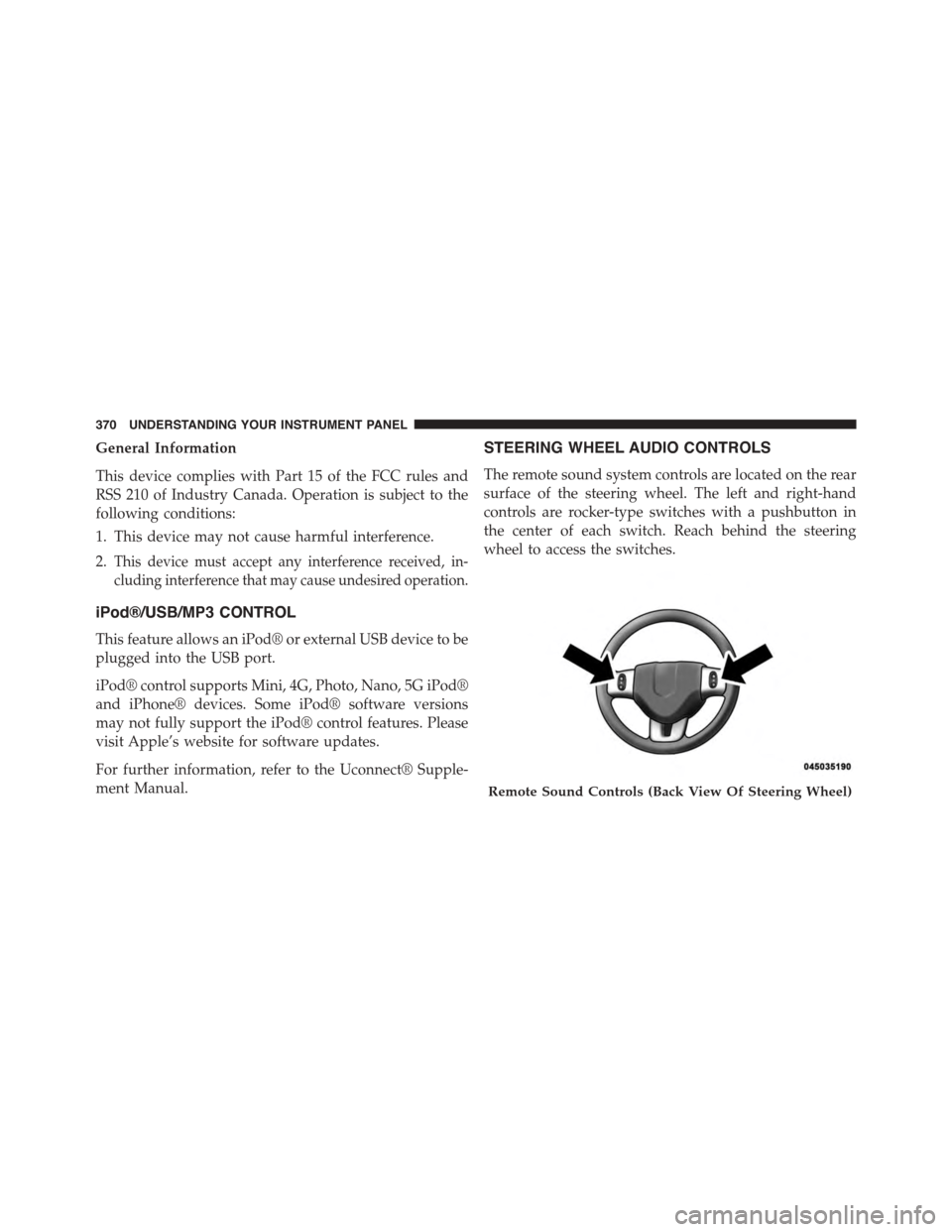
STEERING WHEEL AUDIO CONTROLS
The remote sound system controls are located on the rear
surface of the steering wheel. The left and right-hand
controls are rocker-type switches with a pushbutton in
the center of each switch. Reach behind the steering
wheel to access the switches.
Remote Sound Controls (Back View Of Steering Wheel)
370 UNDERSTANDING YOUR INSTRUMENT PANEL
Page 380 of 648
Button On The Touchscreen
Use the small blower icon to reduce the blower setting
and the large blower icon to increase the blower setting.
Blower can also be selected by pressing the blower bar
area between the icons.
11. Modes
The airflow distribution mode can be adjusted so air
comes from the instrument panel outlets, floor outlets,
and demist outlets. The Mode settings are as follows:
•Panel Mode
Air comes from the outlets in the instrument
panel. Each of these outlets can be individu-
ally adjusted to direct the flow of air. The air
vanes of the center outlets and outboard outlets can
be moved up and down or side to side to regulate
airflow direction. There is a shut off wheel located
below the air vanes to shut off or adjust the amount
of airflow from these outlets.
•Bi-Level Mode
Air comes from the instrument panel outlets
and floor outlets. A slight amount of air is
directed through the defrost and side window
demister outlets.
NOTE:BI-LEVEL mode is designed under comfort con-
ditions to provide cooler air out of the panel outlets and
warmer air from the floor outlets.
•Floor Mode
Air comes from the floor outlets. A slight
amount of air is directed through the defrost
and side window demister outlets.
•Mix Mode
Air comes from the floor, defrost and side
window demist outlets. This mode works best
in cold or snowy conditions.
378 UNDERSTANDING YOUR INSTRUMENT PANEL
Page 393 of 648
Blower Control Knob On The Faceplate
The blower speed increases as you turn the blower
control knob clockwise from the lowest blower setting.
The blower speed decreases as you turn the blower
control knob counterclockwise.
Buttons On The Touchscreen
Use the small blower icon to reduce the blower setting
and the large blower icon to increase the blower setting.
Blower can also be selected by pressing the blower bar
area between the icons.
12. Modes
The airflow distribution mode can be adjusted so air
comes from the instrument panel outlets, floor outlets
and demist outlets. The Mode settings are as follows:
•Panel Mode
Air comes from the outlets in the instrument
panel. Each of these outlets can be individu-
ally adjusted to direct the flow of air. The air
vanes of the center outlets and outboard outlets can
be moved up and down or side to side to regulate
airflow direction. There is a shut off wheel located
below the air vanes to shut off or adjust the amount
of airflow from these outlets.
•Bi-Level Mode
Air comes from the instrument panel outlets
and floor outlets. A slight amount of air is
directed through the defrost and side window
demister outlets.
NOTE:BI-LEVEL mode is designed under comfort con-
ditions to provide cooler air out of the panel outlets and
warmer air from the floor outlets.
4
UNDERSTANDING YOUR INSTRUMENT PANEL 391
Page 405 of 648
STARTING AND OPERATING
CONTENTS
!STARTING PROCEDURES................408
▫Automatic Transmission................408
▫Keyless Enter-N-Go™..................409
▫Normal Starting.......................409
▫Extreme Cold Weather
(Below –20°F Or−29°C).................411
▫If Engine Fails To Start.................411
▫After Starting........................413
!ENGINE BLOCK HEATER — IF EQUIPPED . . .413
!AUTOMATIC TRANSMISSION............413
▫Key Ignition Park Interlock...............415
▫Brake/Transmission Shift Interlock System . . .415
▫Four-Speed Or Six-Speed Automatic
Transmission.........................415
▫Gear Ranges.........................417
!AUTOSTICK®.........................424
▫Operation...........................424
!ALL WHEEL DRIVE (AWD) — IF EQUIPPED . .425
!DRIVING ON SLIPPERY SURFACES.........426
▫Acceleration.........................426
5
Page 407 of 648
▫Radial Ply Tires......................460
▫All Season Tires — If Equipped............461
▫Summer Or Three Season Tires —
If Equipped..........................461
▫Snow Tires..........................462
▫Spare Tire Matching Original Equipped Tire And
Wheel — If Equipped..................462
▫Compact Spare Tire — If Equipped........462
▫Full Size Spare — If Equipped............463
▫Limited-Use Spare — If Equipped.........464
▫Tire Spinning........................464
▫Tread Wear Indicators..................465
▫Life Of Tire.........................466
▫Replacement Tires.....................466
!TIRE CHAINS (TRACTION DEVICES).......468
!TIRE ROTATION RECOMMENDATIONS.....469
!TIRE PRESSURE MONITOR SYSTEM (TPMS) . .470
▫Base System.........................473
▫Premium System — If Equipped...........476
▫General Information...................480
!FUEL REQUIREMENTS..................480
▫Reformulated Gasoline.................481
▫Gasoline/Oxygenate Blends..............481
▫E-85 Usage In Non-Flex Fuel Vehicles.......482
▫MMT In Gasoline.....................482
▫Materials Added To Fuel................483
▫Fuel System Cautions...................483
5
STARTING AND OPERATING 405
Page 419 of 648
Gear Ranges
DO NOT race the engine when shifting from PARK or
NEUTRAL into another gear range.
NOTE:After selecting any gear range, wait a moment to
allow the selected gear to engage before accelerating.
This is especially important when the engine is cold.
PARK (P)
This range supplements the parking brake by locking the
transmission. The engine can be started in this range.
Never attempt to use PARK while the vehicle is in
motion. Apply the parking brake when leaving the
vehicle in this range.
When parking on a level surface, you may shift the
transmission into PARK first, and then apply the parking
brake.
When parking on a hill, apply the parking brake before
shifting the transmission to PARK, otherwise the load on
the transmission locking mechanism may make it diffi-
cult to move the shift lever out of PARK. As an added
precaution, turn the front wheels toward the curb on a
downhill grade and away from the curb on an uphill
grade.
WARNING!
•Never use the PARK position as a substitute for the
parking brake. Always apply the parking brake
fully when parked to guard against vehicle move-
ment and possible injury or damage.
•Your vehicle could move and injure you and others
if it is not completely in PARK. Check by trying to
move the shift lever out of PARK with the brake
pedal released. Make sure the transmission is in
PARK before leaving the vehicle.
(Continued)
5
STARTING AND OPERATING 417
Page 427 of 648
•If a requested downshift would cause the engine to
over-speed, that shift will not occur.
•Avoid using speed control when AutoStick® is en-
gaged.
•Transmission shifting will be more noticeable when
AutoStick® is engaged.
•The system may revert to automatic shift mode if a
fault or overheat condition is detected.
To disengage AutoStick® mode, return the shift lever to
the DRIVE position. You can shift in or out of the
AutoStick® position at any time without taking your foot
off the accelerator pedal.
WARNING!
Do not downshift for additional engine braking on a
slippery surface. The drive wheels could lose their
grip and the vehicle could skid, causing a collision or
personal injury.
ALL WHEEL DRIVE (AWD) — IF EQUIPPED
This feature provides on-demand All-Wheel Drive
(AWD). The system is automatic with no driver inputs or
additional driving skills required. Under normal driving
conditions, the front wheels provide most of the traction.
If the front wheels begin to lose traction, power is shifted
automatically to the rear wheels. The greater the front
wheel traction loss, the greater the power transfer to the
rear wheels.
Additionally, on dry pavement under heavy throttle
input (where one may have no wheel spin), torque will be
5
STARTING AND OPERATING 425
Page 428 of 648
sent to the rear in a pre-emptive effort to improve vehicle
launch and performance characteristics.
CAUTION!
All wheels must have the same size and type tires.
Unequal tire sizes must not be used. Unequal tire
size may cause failure of the power transfer unit.
DRIVING ON SLIPPERY SURFACES
Acceleration
Rapid acceleration on snow covered, wet, or other slip-
pery surfaces may cause the driving wheels to pull
erratically to the right or left. This phenomenon occurs
when there is a difference in the surface traction under
the front (driving) wheels.
WARNING!
Rapid acceleration on slippery surfaces is dangerous.
Unequal traction can cause sudden pulling of the
front wheels. You could lose control of the vehicle
and possibly have a collision. Accelerate slowly and
carefully whenever there is likely to be poor traction
(ice, snow, wet, mud, loose sand, etc.).
Traction
When driving on wet or slushy roads, it is possible for a
wedge of water to build up between the tire and road
surface. This is hydroplaning and may cause partial or
complete loss of vehicle control and stopping ability. To
reduce this possibility, the following precautions should
be observed:
1. Slow down during rainstorms or when the roads are
slushy.
426 STARTING AND OPERATING