remote control DODGE JOURNEY 2020 User Guide
[x] Cancel search | Manufacturer: DODGE, Model Year: 2020, Model line: JOURNEY, Model: DODGE JOURNEY 2020Pages: 396, PDF Size: 25.53 MB
Page 368 of 396
366 MULTIMEDIA
When connecting an external source to the AUX
input, be sure to follow the standard color
coding for the VES jacks:
NOTE:
Certain high-end video games consoles will
ex
ceed the power limit of the vehicle's power
inverter. Refer to the Power Inverter section
within “Internal Equipment” in “Getting To Know
Your Vehicle”.
Ensure the remote control channel selector
s w
itch and headphone switch (IR channel) are
the same number.
Using The Remote Control
1. Push the MODE button on the Remote Control.
2. W hile looking at the video screen, highlight
V
ES AUX 2, by either pushing Up/Down/
Left/Right buttons or by repeatedly pushing
the MODE button, then push ENTER on the
Remote Control.
Using The Touchscreen Radio Controls
1. Press the MORE button on the touchscreen.
2. P ress the Rear Entertainment button on the
t
ouchscreen to display the Rear
Entertainment Controls.
3. I f the Rear Entertainment is turned off,
p
ress the Power button on the touchscreen.
4. P ress the 1 or 2 button on the touchscreen
f
or the channel desired and press the
Source button on the touchscreen to select
the desired mode.
LISTEN TO AN AUDIO SOURCE ON
C
HANNEL 2 WHILE A VIDEO IS PLAYING
O
N CHANNEL 1
Ensure the Remote Control and Headphone
switch is on Channel 2.
Using The Remote Control
1. Push the MODE button on the Remote
Control and the Mode Select Screen will
display, unless a video is playing, then only
a small banner will appear on the bottom
of the screen.
2. W
hile looking at the video screen, either
p
ress Up/Down/Left/Right on the Remote
Control to highlight the desired audio
source or repeatedly push the MODE button
on the remote until the desired audio
source appears on the screen.
Using The Touchscreen Radio Controls
1. Press the MORE button on the touchscreen.
2. P ress the Rear Entertainment button on
t
he touchscreen to display the Rear
E n
tertainment Controls.
3. I f the Rear Entertainment is turned off,
p
ress the Power button on the touchscreen.
4. P ress the 1 or 2 button on the touchscreen
f
or the channel desired and press the
Source button on the touchscreen to select
the desired mode.
Page 369 of 396
MULTIMEDIA 367
PLAY A DVD USING THE TOUCHSCREEN
R
ADIO
Insert the DVD with the label facing up.
The radio automatically selects the appropriate
m o
de after the disc is recognized and displays
the menu screen or starts playing the first track.
Using The Remote Control
1. Push the MODE button on the Remote Control.
2. W hile looking at the Video Screen, highlight
D
ISC by either pushing Up/Down/Left/Right
buttons or by repeatedly pushing the MODE
button, then push ENTER.
NOTE:
The VES system will retain the last setting
when turned off.
Viewing a DVD on the Touchscreen radio
screen is not available in some regions or
locations, the vehicle must be stopped, and
the gear selector must be in the PARK posi -
tion. Refer to local and state laws.
Using The Touchscreen Radio Controls
1. Press the MORE button on the
touchscreen.
2. P ress the Rear Entertainment button on the
t
ouchscreen to display the Rear
Entertainment Controls.
3. I f the Rear Entertainment is turned off,
p
ress the Power button on the touchscreen.
4. P ress the 1 or 2 button on the touchscreen
f
or the channel desired and press the
Source button on the touchscreen to select
the desired mode.
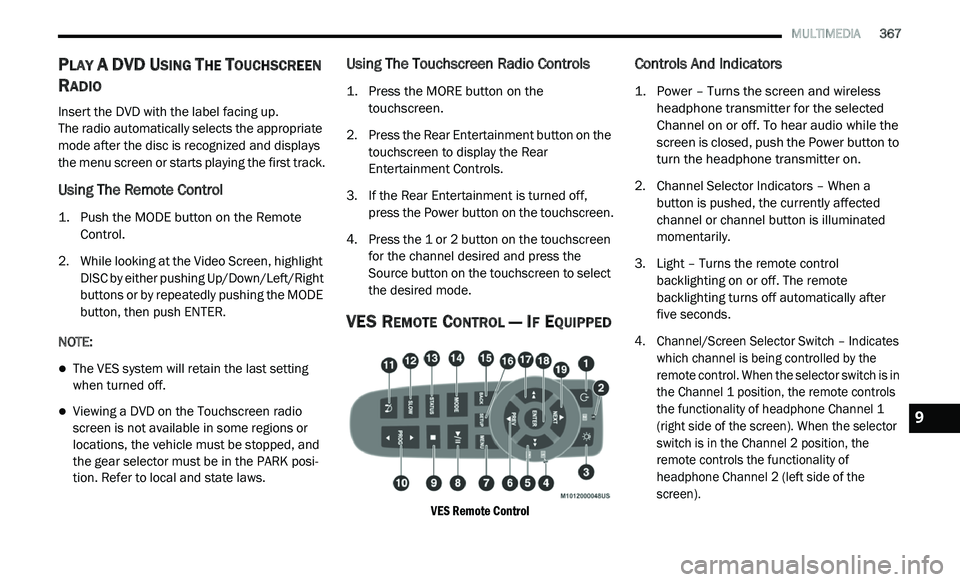
VES REMOTE CONTROL — IF EQUIPPED
VES Remote Control
Controls And Indicators
1. Power – Turns the screen and wireless headphone transmitter for the selected
Channel on or off. To hear audio while the
screen is closed, push the Power button to
turn the headphone transmitter on.
2. C hannel Selector Indicators – When a
b
utton is pushed, the currently affected
channel or channel button is illuminated
momentarily.
3. Light – Turns the remote control b
acklighting on or off. The remote
backlighting turns off automatically after
five seconds.
4. Channel/Screen Selector Switch – Indicates w
hich channel is being controlled by the
remote control. When the selector switch is in
the Channel 1 position, the remote controls
the functionality of headphone Channel 1
(right side of the screen). When the selector
switch is in the Channel 2 position, the
remote controls the functionality of
headphone Channel 2 (left side of the
screen).
9
Page 371 of 396
MULTIMEDIA 369
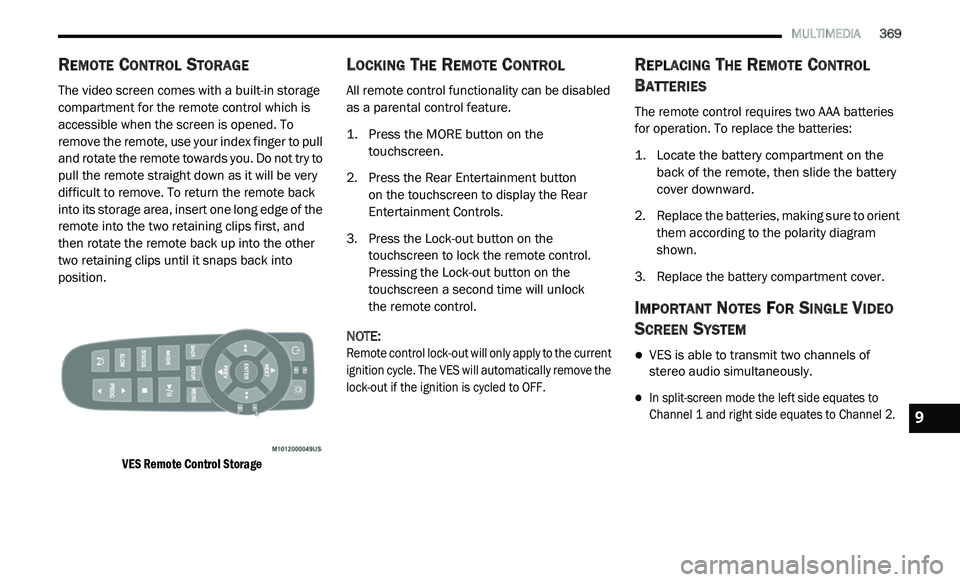
REMOTE CONTROL STORAGE
The video screen comes with a built-in storage
compartment for the remote control which is
accessible when the screen is opened. To
remove the remote, use your index finger to pull
and rotate the remote towards you. Do not try to
pull the remote straight down as it will be very
difficult to remove. To return the remote back
into its storage area, insert one long edge of the
remote into the two retaining clips first, and
then rotate the remote back up into the other
two retaining clips until it snaps back into
position.
VES Remote Control Storage
LOCKING THE REMOTE CONTROL
All remote control functionality can be disabled
as a parental control feature.
1. Press the MORE button on the
t
ouchscreen.
2. P ress the Rear Entertainment button
o
n the touchscreen to display the Rear
E n
tertainment Controls.
3. P ress the Lock-out button on the
t
ouchscreen to lock the remote control.
Pressing the Lock-out button on the
touchscreen a second time will unlock
the remote control.
NOTE:
Remote control lock-out will only apply to the current
i g
nition cycle. The VES will automatically remove the
lock-out if the ignition is cycled to OFF.
REPLACING THE REMOTE CONTROL
B
ATTERIES
The remote control requires two AAA batteries
for operation. To replace the batteries:
1. L ocate the battery compartment on the
b
ack of the remote, then slide the battery
cover downward.
2. R eplace the batteries, making sure to orient
t
hem according to the polarity diagram
shown.
3. R eplace the battery compartment cover.
IMPORTANT NOTES FOR SINGLE VIDEO
S
CREEN SYSTEM
VES is able to transmit two channels of
stereo audio simultaneously.
In split-screen mode the left side equates to
Channel 1 and right side equates to Channel 2.
9
Page 372 of 396
370 MULTIMEDIA
If a video source is selected on Channel 1,
then Channel 2 is for audio only.
When selecting a video source on Channel 1,
the video will display on the screen and the
audio will be heard on Channel 1 in the head-
phones.
Audio can be heard through the headphones
even when the Video Screen is closed.
UCONNECT HEADPHONES OPERATION
The headphones receive two separate channels
of audio using an infrared transmitter from the
video screen.
If no audio is heard after increasing the volume
c o
ntrol, verify that the screen is turned on and
in the down position, and the channel is not
muted and the headphone channel selector
switch is on the desired channel. If audio is still
not heard, check that fully charged batteries are
installed in the headphones.
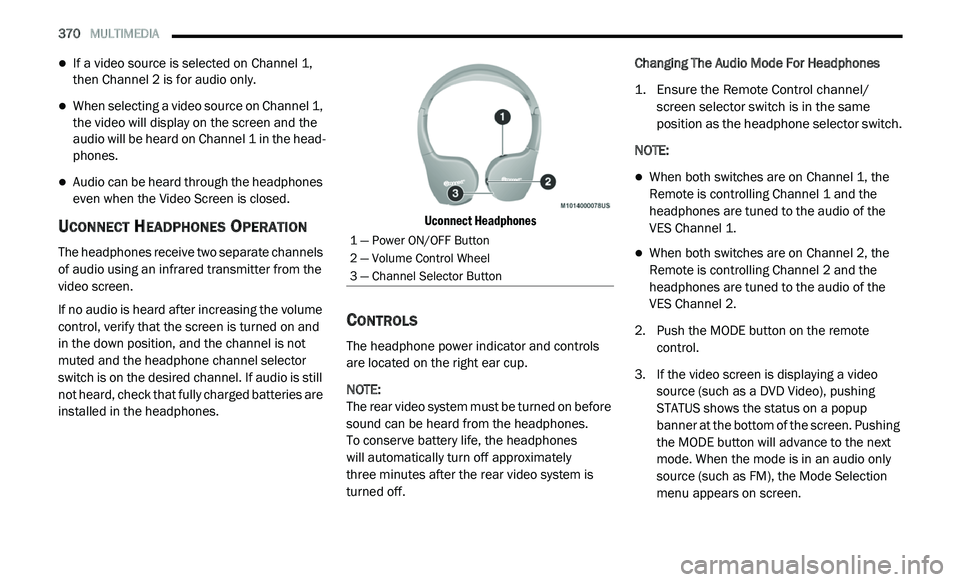
Uconnect Headphones
CONTROLS
The headphone power indicator and controls
are located on the right ear cup.
NOTE:
The rear video system must be turned on before
s o
und can be heard from the headphones.
To conserve battery life, the headphones
will automatically turn off approximately
three minutes after the rear video system is
t u
rned off. Changing The Audio Mode For Headphones
1. E
nsure the Remote Control channel/
s
creen selector switch is in the same
position as the headphone selector switch.
NOTE:
When both switches are on Channel 1, the
Remote is controlling Channel 1 and the
headphones are tuned to the audio of the
VES Channel 1.
When both switches are on Channel 2, the
Remote is controlling Channel 2 and the
headphones are tuned to the audio of the
VES Channel 2.
2. Push the MODE button on the remote c
ontrol.
3. I f the video screen is displaying a video
s
ource (such as a DVD Video), pushing
STATUS shows the status on a popup
banner at the bottom of the screen. Pushing
the MODE button will advance to the next
mode. When the mode is in an audio only
source (such as FM), the Mode Selection
menu appears on screen.
1 — Power ON/OFF Button
2 — Volume Control Wheel
3 — Channel Selector Button
Page 373 of 396
MULTIMEDIA 371
4. When the Mode Selection menu appears on
screen, use the cursor buttons on the
remote control to navigate to the available
modes and push the ENTER button to select
the new mode.
5. T o cancel out of the Mode Selection menu,
p
ush the BACK button on the remote
control.
REPLACING THE HEADPHONE
B
ATTERIES
Each set of headphones requires two AAA
batteries for operation. To replace the batteries:
1. L ocate the battery compartment on the left
e
ar cup of the headphones, and then slide
the battery cover downward.
2. R eplace the batteries, making sure to orient
t
hem according to the polarity diagram
shown.
3. R eplace the battery compartment cover.
ACCESSIBILITY
Accessibility is a feature of the DVD system that
announces a function prior to performing the
action. The first time a button is pressed the
system will identify the button, and will enact
the function of the button the second time it
is pressed. For further information, refer to
“ U
connect Settings” in “Multimedia.”
STEREO HEADPHONE LIFETIME LIMITED
W
ARRANTY
Who Does This Warranty Cover?
This warranty covers the initial user or
p u
rchaser ("you" or "your") of this particular
Aptiv PLC (“Aptiv”) wireless headphone
("Product"). The warranty is not transferable.
How Long Does the Coverage Last?
This warranty lasts as long as you own the
Pr
oduct.
What Does This Warranty Cover?
Except as specified below, this warranty covers
a n
y Product that in normal use is defective in
workmanship or materials. What Does This Warranty Not Cover?
This warranty does not cover any damage or
d e
fect that results from misuse, abuse or
modification of the Product other than by Aptiv.
Foam earpieces, which will wear over time
through normal use, are specifically not covered
(replacement foam is available for a nominal
charge). APTIV IS NOT LIABLE FOR ANY
INJURIES OR DAMAGES TO PERSONS OR
PROPERTY RESULTING FROM THE USE OF, OR
ANY FAILURE OR DEFECT IN, THE PRODUCT,
NOR IS APTIV LIABLE FOR ANY GENERAL,
SPECIAL, DIRECT, INDIRECT, INCIDENTAL,
CONSEQUENTIAL, EXEMPLARY, PUNITIVE OR
OTHER DAMAGES OF ANY KIND OR NATURE
WHATSOEVER. Some states and jurisdictions
may not allow the exclusion or limitation of
incidental or consequential damages, so
the above limitation may not apply to you.
This warranty gives you specific legal rights.
You may also have other rights, which vary from
j u
risdiction to jurisdiction.9
Page 374 of 396
372 MULTIMEDIA
What Will Aptiv Do?
Aptiv, at its option, will repair or replace any
d e
fective Product. Aptiv reserves the right to replace
any discontinued Product with a comparable model.
THIS WARRANTY IS THE SOLE WARRANTY FOR THIS
PRODUCT, SETS FORTH YOUR EXCLUSIVE REMEDY
REGARDING DEFECTIVE PRODUCTS, AND IS IN LIEU
OF ALL OTHER WARRANTIES (EXPRESS OR
IMPLIED), INCLUDING ANY WARRANTY FOR
MERCHANTABILITY OR FITNESS FOR A PARTICULAR
PURPOSE.
If you have any questions or comments
r e
garding your Aptiv wireless headphones,
please email [email protected] or phone:
888-293-3332
SYSTEM INFORMATION
Shared Modes
This allows the VES to output radio sources to the
headphones and the radio to output VES sources
to the vehicle speakers. When the radio and VES
channel 1 or 2 are in the same (shared) mode, a
VES icon will be visible on the radio’s display for
that channel, and the shared icon will be visible
on the VES screen. When in shared mode, the
same audio source is heard in the shared
headphone channel 1 or channel 2.
If the radio functions (FM, AM, or SAT) are in the
sh
ared mode with the VES, only the radio is able
to control the radio functions. In this case, VES
can share the radio mode, but not change
stations until the radio mode is changed to a
mode that is different from the VES selected
radio mode. When shared, the radio has priority
for all radio modes (FM, AM). The VES has the
ability to switch tuner (AM/FM), SEEK, TUNE,
and recall presets in radio modes as long as it is
not in shared mode.
When in shared disc, both the radio and the VES
h a
ve control of the video functions. The VES has
the ability to control the following video modes:
NOTE:
CD: Ability to Fast Forward, Rewind, and
Track Up/Down.
The VES can even control radio modes or video
m o
des while the radio is turned off. The VES can
access the radio modes or disc modes by
navigating to those modes on the VES and
activating a radio mode or disc mode.
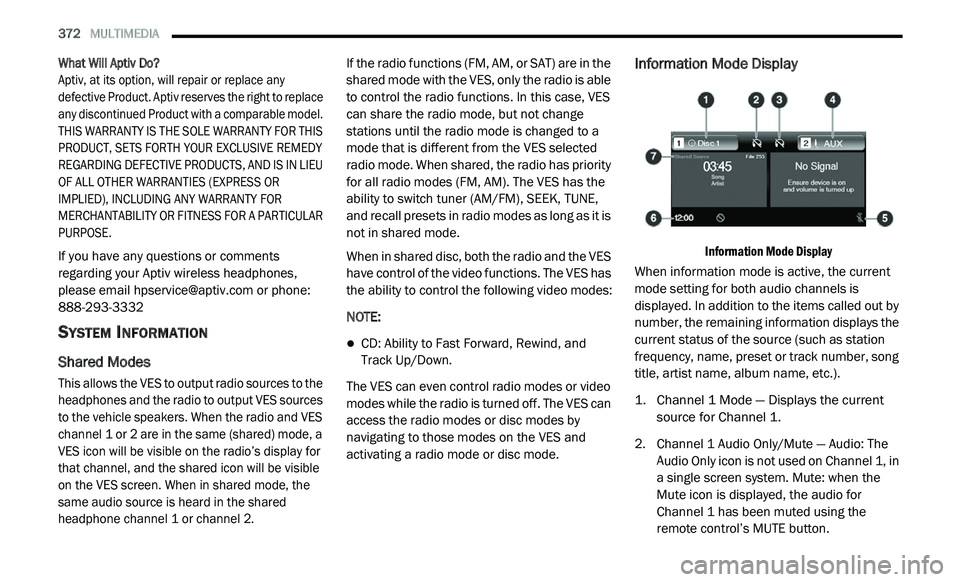
Information Mode Display
Information Mode Display
When information mode is active, the current
m o
de setting for both audio channels is
displayed. In addition to the items called out by
number, the remaining information displays the
current status of the source (such as station
frequency, name, preset or track number, song
title, artist name, album name, etc.).
1. C hannel 1 Mode — Displays the current
s
ource for Channel 1.
2. C hannel 1 Audio Only/Mute — Audio: The
A
udio Only icon is not used on Channel 1, in
a single screen system. Mute: when the
Mute icon is displayed, the audio for
Channel 1 has been muted using the
remote control’s MUTE button.
Page 375 of 396
MULTIMEDIA 373
3. Channel 2 Audio Only/Mute — Audio: Only in
a single screen system: The Audio Only icon
is displayed on Channel 2 when Channel 1
is in a video mode. Mute: when the Mute
icon is displayed, the audio for Channel 2
has been muted using the remote control’s
MUTE button.
4. C hannel 2 Mode — Displays the current
s
ource for Channel 2.
5. R emote Locked Out — When the icon is
d
isplayed, the remote control functions are
disabled.
6. C lock — Displays the time.
7
. C hannel 1 Shared Status — When the icon is
d
isplayed, the audio for Channel 1 is also
shared with the radio and playing through
the cabin speakers.
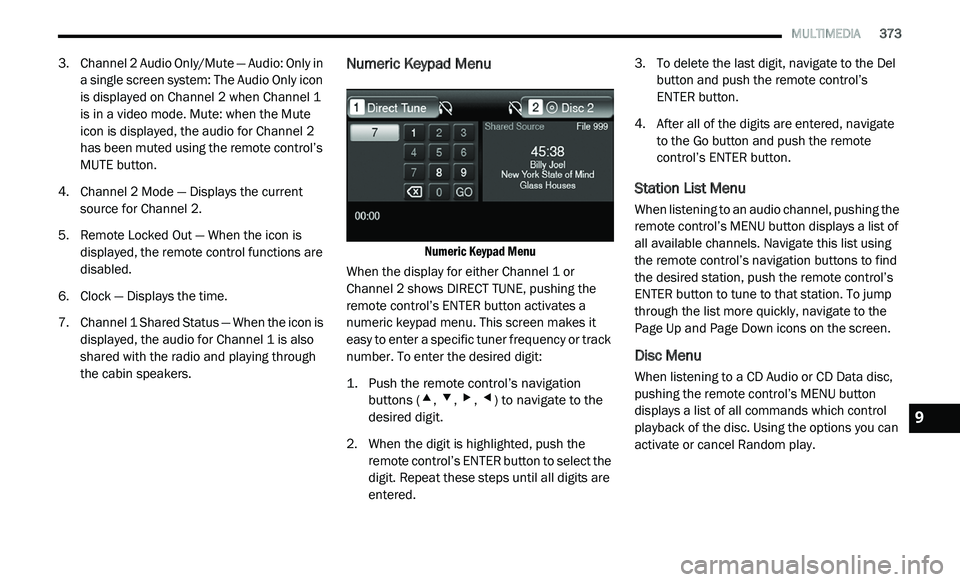
Numeric Keypad Menu
Numeric Keypad Menu
When the display for either Channel 1 or
C h
annel 2 shows DIRECT TUNE, pushing the
remote control’s ENTER button activates a
numeric keypad menu. This screen makes it
easy to enter a specific tuner frequency or track
number. To enter the desired digit:
1. P ush the remote control’s navigation
b
uttons (
▴, ▾, ▸, ◂) to navigate to the
desired digit.
2. W hen the digit is highlighted, push the
r
emote control’s ENTER button to select the
digit. Repeat these steps until all digits are
entered. 3. T
o delete the last digit, navigate to the Del
b
utton and push the remote control’s
ENTER button.
4. A fter all of the digits are entered, navigate
t
o the Go button and push the remote
control’s ENTER button.
Station List Menu
When listening to an audio channel, pushing the
remote control’s MENU button displays a list of
all available channels. Navigate this list using
the remote control’s navigation buttons to find
the desired station, push the remote control’s
ENTER button to tune to that station. To jump
through the list more quickly, navigate to the
Page Up and Page Down icons on the screen.
Disc Menu
When listening to a CD Audio or CD Data disc,
pushing the remote control’s MENU button
displays a list of all commands which control
playback of the disc. Using the options you can
activate or cancel Random play.
9
Page 376 of 396
374 MULTIMEDIA
Options Menu
When watching a video source (DVD Video with
the disc in Play mode, Aux Video, etc.), pressing
the Options button on the touchscreen activates
the Options Settings menu. From this menu you
can adjust Audio, Subtitles, Angle and Title.
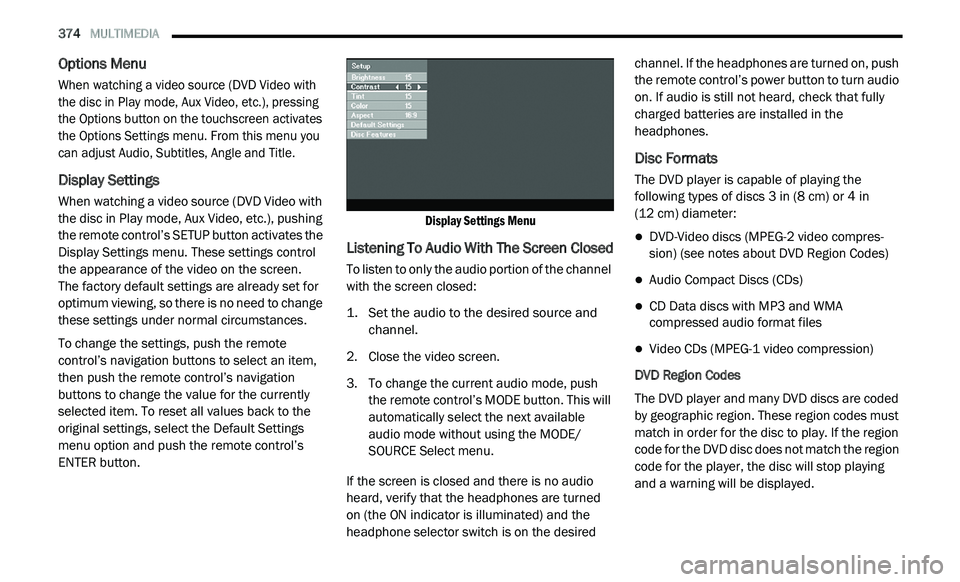
Display Settings
When watching a video source (DVD Video with
the disc in Play mode, Aux Video, etc.), pushing
the remote control’s SETUP button activates the
Display Settings menu. These settings control
the appearance of the video on the screen.
The factory default settings are already set for
o p
timum viewing, so there is no need to change
these settings under normal circumstances.
To change the settings, push the remote
c o
ntrol’s navigation buttons to select an item,
then push the remote control’s navigation
buttons to change the value for the currently
selected item. To reset all values back to the
original settings, select the Default Settings
menu option and push the remote control’s
ENTER button.
Display Settings Menu
Listening To Audio With The Screen Closed
To listen to only the audio portion of the channel
with the screen closed:
1. S
et the audio to the desired source and
c
hannel.
2. C lose the video screen.
3
. T o change the current audio mode, push
t
he remote control’s MODE button. This will
automatically select the next available
audio mode without using the MODE/
SOURCE Select menu.
If the screen is closed and there is no audio
h e
ard, verify that the headphones are turned
on (the ON indicator is illuminated) and the
h e
adphone selector switch is on the desired channel. If the headphones are turned on, push
the remote control’s power button to turn audio
on. If audio is still not heard, check that fully
charged batteries are installed in the
headphones.
Disc Formats
The DVD player is capable of playing the
following types of discs 3
in (8 cm) or 4 in
(12 cm) diameter:
DVD-Video discs (MPEG-2 video compres -
sion) (see notes about DVD Region Codes)
Audio Compact Discs (CDs)
CD Data discs with MP3 and WMA
compressed audio format files
Video CDs (MPEG-1 video compression)
DVD Region Codes
The DVD player and many DVD discs are coded
b y
geographic region. These region codes must
match in order for the disc to play. If the region
code for the DVD disc does not match the region
code for the player, the disc will stop playing
and a warning will be displayed.
Page 378 of 396
376 MULTIMEDIA
Other compression formats such as AAC,
MP3 Pro, Ogg Vorbis, and ATRAC3 will not
play. The DVD player will automatically skip
the file and begin playing the next available
file.
If you are creating your own files, the recom -
mended fixed bit rate for MP3 files is between 96
a n
d 192Kbps and the recommended fixed bit
rate for WMA files is between 64 and 192Kbps.
Variable bit rates are also supported. For both
formats, the recommended sample rate is either
44.1kHz or 48kHz.
To change the current file, use the remote
control’s or DVD player’s Play button to
advance to the next file, or the Menu button
to return to the start of the current or
previous file.
To change the current directory, use the
remote control’s PROG UP and Down buttons
or Rewind/skip back and fast fwd/skip
forward.
Disc Errors
If the DVD player is unable to read the disc, a
" D
isc Error" message is displayed on the Radio
display and the disc is automatically ejected. A dirty, damaged, or incompatible disc format
a
r
e all potential causes for a "Disc Error"
message.
If a disc has a damaged track which results in
a u
dible or visible errors that persists for 2
seconds, the DVD player will attempt to continue
playing the disc by skipping forward 1 to 3
seconds at a time. If the end of the disc is
reached, the DVD player will return to the
beginning of the disc and attempt to play the
start of the first track.
The DVD player may shut down during extremely
h o
t conditions, such as when the vehicle’s
interior temperature is above 120°F (49°C).
When this occurs, the DVD player will display
"High Temp" and will shut off the display until a
safe temperature is reached. This shutdown is
necessary to protect the optics of the DVD player.
Product Agreement
This product incorporates copyright protection
technology that is protected by US patents and
other intellectual property rights. Use of this
copyright protection technology must be
authorized by Macrovision, and is intended for home or other limited viewing uses otherwise
authorized by Macrovision. Reverse
engineering or disassembly is prohibited.
Dolby Digital and MLP Lossless
Manufactured under license from
Do
lby Laboratories. "Dolby," "MLP
Lossless," and the double-D symbol are
trademarks of Dolby Laboratories. Confidential
unpublished works. Copyright 1992-1997
Dolby Laboratories. All rights reserved.
RADIO OPERATION AND MOBILE PHONES
Under certain conditions, the mobile phone
being on in your vehicle can cause erratic or
noisy performance from your radio. This
condition may be lessened or eliminated by
relocating the mobile phone antenna. This
condition is not harmful to the radio. If your
radio performance does not satisfactorily
“clear” by the repositioning of the antenna, it is
recommended that the radio volume be turned
down or off during mobile phone operation
when not using Uconnect (if equipped).
Page 388 of 396
386
Dimmer Switch
Headlight..............................................40, 41DipsticksAutomatic Transmission............................233Oil (Engine)................................................221Power Steering..........................................168Disabled Vehicle Towing................................212DisposalAntifreeze (Engine Coolant).......................230Door Ajar........................................................103Door Ajar Light...............................................103Door LocksAutomatic....................................................20Doors...............................................................19Driver’s Seat Back Tilt.....................................25DrivingThrough Flowing, Rising, Or Shallow
Standing Water
.....................................187DVD Player (Video Entertainment System)....365
E
Electric Brake Control System Anti-Lock Brake System
.............................109Electronic Roll Mitigation...........................115Electric Remote Mirrors...................................38Electronic Brake Control System...................110Electronic Stability Control (ESC)...................111Electronic Throttle Control Warning Light......102
Emergency, In Case OfFreeing Vehicle When Stuck.....................211Hazard Warning Flasher...........................189Jacking............................................199, 234Jump Starting...........................................206Towing......................................................212Emission Control System Maintenance........108Engine...........................................................220Air Cleaner................................................224Block Heater.............................................159Break-In Recommendations.....................160Checking Oil Level....................................221Compartment...........................................220Coolant (Antifreeze).........................228, 262Cooling.....................................................228Exhaust Gas Caution.......................154, 260Fails To Start............................................159Flooded, Starting......................................159Fuel Requirements...................................257Jump Starting...........................................206Oil...........................................223, 261, 262Oil Filler Cap....................................220, 223Oil Filter....................................................224Oil Reset......................................................96Oil Selection....................................223, 261Oil Synthetic.............................................223Overheating..............................................209Starting............................................157, 158Engine Oil Viscosity.......................................223
Enhanced Accident Response
Feature................................................137, 215Ethanol..........................................................258Exhaust Gas Cautions..........................154, 260Exhaust System...................................154, 227Exterior Lights........................................40, 156
F
Filters Air Cleaner
................................................224Air Conditioning...........................................72Engine Oil........................................224, 262Engine Oil Disposal...................................224Flashers........................................................189Hazard Warning........................................189Turn Signals..............................42, 106, 156Flash-To-Pass...................................................41Flooded Engine Starting................................159Floor Console...................................................85Fluid Capacities............................................261Fluid Leaks....................................................156Fluid Level ChecksAutomatic Transmission...........................233Brake...............................................232, 264Cooling System.........................................228Engine Oil.................................................221Power Steering................................168, 264Fluid, Brake...................................................264Fluids And Lubricants....................................262
Fog Lights..............................................42, 192