turn signal DODGE JOURNEY 2020 User Guide
[x] Cancel search | Manufacturer: DODGE, Model Year: 2020, Model line: JOURNEY, Model: DODGE JOURNEY 2020Pages: 396, PDF Size: 25.53 MB
Page 107 of 396
GETTING TO KNOW YOUR INSTRUMENT PANEL 105
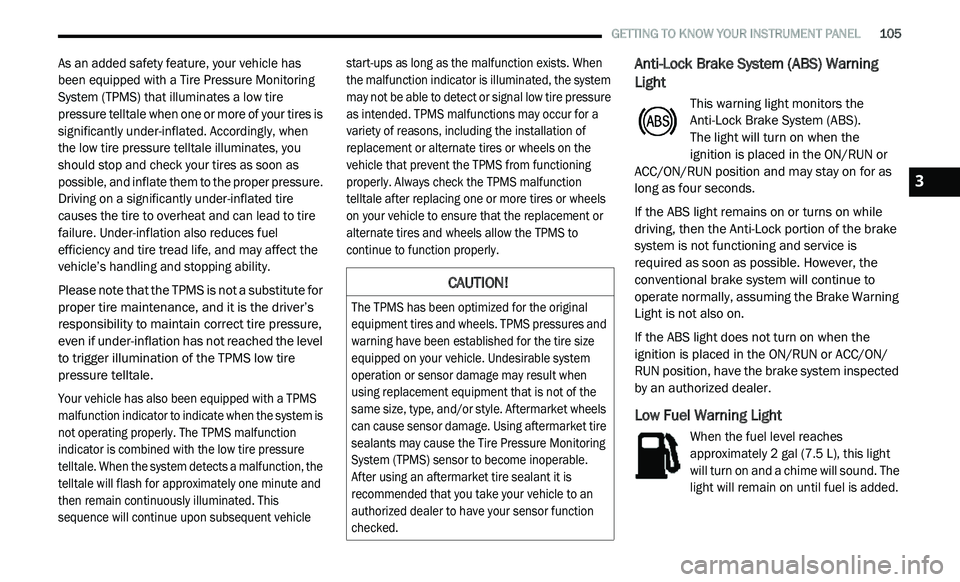
As an added safety feature, your vehicle has
been equipped with a Tire Pressure Monitoring
System (TPMS) that illuminates a low tire
pressure telltale when one or more of your tires is
significantly under-inflated. Accordingly, when
the low tire pressure telltale illuminates, you
should stop and check your tires as soon as
possible, and inflate them to the proper pressure.
Driving on a significantly under-inflated tire
causes the tire to overheat and can lead to tire
failure. Under-inflation also reduces fuel
efficiency and tire tread life, and may affect the
vehicle’s handling and stopping ability.
Please note that the TPMS is not a substitute for
pr
oper tire maintenance, and it is the driver’s
responsibility to maintain correct tire pressure,
even if under-inflation has not reached the level
to trigger illumination of the TPMS low tire
pressure telltale.
Your vehicle has also been equipped with a TPMS
m a
lfunction indicator to indicate when the system is
not operating properly. The TPMS malfunction
indicator is combined with the low tire pressure
telltale. When the system detects a malfunction, the
telltale will flash for approximately one minute and
then remain continuously illuminated. This
sequence will continue upon subsequent vehicle start-ups as long as the malfunction exists. When
the malfunction indicator is illuminated, the system
may not be able to detect or signal low tire pressure
as intended. TPMS malfunctions may occur for a
variety of reasons, including the installation of
replacement or alternate tires or wheels on the
vehicle that prevent the TPMS from functioning
properly. Always check the TPMS malfunction
telltale after replacing one or more tires or wheels
on your vehicle to ensure that the replacement or
alternate tires and wheels allow the TPMS to
continue to function properly.
Anti-Lock Brake System (ABS) Warning
Light
This warning light monitors the
Anti-Lock Brake System (ABS).
The light will turn on when the
ignition is placed in the ON/RUN or
A C
C/ON/RUN position and may stay on for as
long as four seconds.
If the ABS light remains on or turns on while
d r
iving, then the Anti-Lock portion of the brake
system is not functioning and service is
required as soon as possible. However, the
conventional brake system will continue to
operate normally, assuming the Brake Warning
Light is not also on.
If the ABS light does not turn on when the
i g
nition is placed in the ON/RUN or ACC/ON/
RUN position, have the brake system inspected
by an authorized dealer.
Low Fuel Warning Light
When the fuel level reaches
approximately 2 gal (7.5 L), this light
w i
ll turn on and a chime will sound. The
light will remain on until fuel is added.
CAUTION!
The TPMS has been optimized for the original
equipment tires and wheels. TPMS pressures and
warning have been established for the tire size
equipped on your vehicle. Undesirable system
operation or sensor damage may result when
using replacement equipment that is not of the
same size, type, and/or style. Aftermarket wheels
can cause sensor damage. Using aftermarket tire
sealants may cause the Tire Pressure Monitoring
System (TPMS) sensor to become inoperable.
After using an aftermarket tire sealant it is
recommended that you take your vehicle to an
authorized dealer to have your sensor function
checked.
3
Page 108 of 396
106 GETTING TO KNOW YOUR INSTRUMENT PANEL
Low Washer Fluid Warning Light — If
Equipped
This warning light will illuminate when
the windshield washer fluid is low.
Refer to “Engine Compartment” in “Servicing
A n
d Maintenance” for further information.
GREEN INDICATOR LIGHTS
Park/Headlight On Indicator Light
This indicator light will illuminate
when the park lights or headlights are
tu
rned on.
Refer to “Exterior Lights” in “Getting To Know
Y o
ur Vehicle” for further information.
Front Fog Indicator Light — If Equipped
This indicator light will illuminate
when the front fog lights are on.
Refer to “Exterior Lights” in “Getting To Know
Y o
ur Vehicle” for further information.
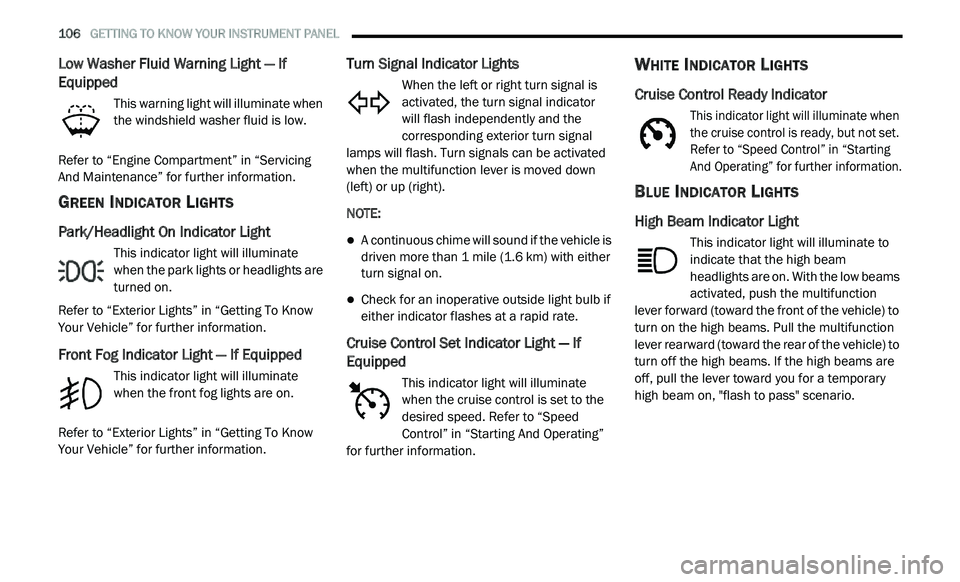
Turn Signal Indicator Lights
When the left or right turn signal is
activated, the turn signal indicator
will flash independently and the
c o
rresponding exterior turn signal
lamps will flash. Turn signals can be activated
when the multifunction lever is moved down
(left) or up (right).
NOTE:
A continuous chime will sound if the vehicle is
driven more than 1 mile (1.6 km) with either
t u
rn signal on.
Check for an inoperative outside light bulb if
either indicator flashes at a rapid rate.
Cruise Control Set Indicator Light — If
Equipped
This indicator light will illuminate
when the cruise control is set to the
d e
sired speed. Refer to “Speed
Control” in “Starting And Operating”
for further information.
WHITE INDICATOR LIGHTS
Cruise Control Ready Indicator
This indicator light will illuminate when
the cruise control is ready, but not set.
R e
fer to “Speed Control” in “Starting
And Operating” for further information.
BLUE INDICATOR LIGHTS
High Beam Indicator Light
This indicator light will illuminate to
indicate that the high beam
h e
adlights are on. With the low beams
activated, push the multifunction
lever forward (toward the front of the vehicle) to
turn on the high beams. Pull the multifunction
lever rearward (toward the rear of the vehicle) to
turn off the high beams. If the high beams are
off, pull the lever toward you for a temporary
high beam on, "flash to pass" scenario.
Page 120 of 396
118 SAFETY
Tire Pressure Monitoring Low Pressure
Warnings
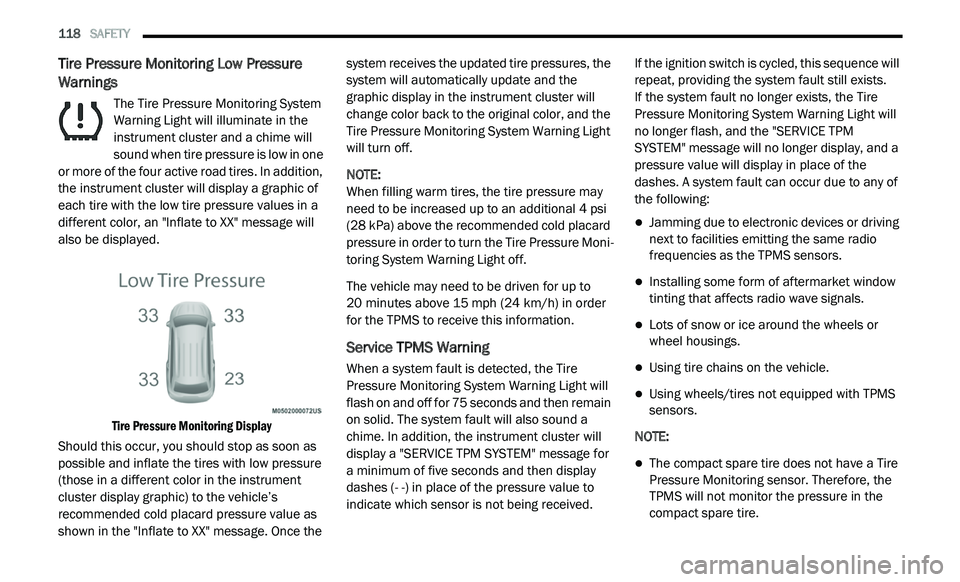
The Tire Pressure Monitoring System
Warning Light will illuminate in the
in
strument cluster and a chime will
sound when tire pressure is low in one
or more of the four active road tires. In addition,
the instrument cluster will display a graphic of
each tire with the low tire pressure values in a
different color, an "Inflate to XX" message will
also be displayed.
Tire Pressure Monitoring Display
Should this occur, you should stop as soon as
p o
ssible and inflate the tires with low pressure
(those in a different color in the instrument
cluster display graphic) to the vehicle’s
recommended cold placard pressure value as
shown in the "Inflate to XX" message. Once the system receives the updated tire pressures, the
system will automatically update and the
graphic display in the instrument cluster will
change color back to the original color, and the
Tire Pressure Monitoring System Warning Light
will turn off.
NOTE:
When filling warm tires, the tire pressure may
n e
ed to be increased up to an additional 4 psi
(28 kPa) above the recommended cold placard
pressure in order to turn the Tire Pressure Moni -
toring System Warning Light off.
The vehicle may need to be driven for up to
2 0
minutes above 15 mph (24 km/h) in order
f o
r the TPMS to receive this information.
Service TPMS Warning
When a system fault is detected, the Tire
Pressure Monitoring System Warning Light will
flash on and off for 75 seconds and then remain
on solid. The system fault will also sound a
chime. In addition, the instrument cluster will
display a "SERVICE TPM SYSTEM" message for
a minimum of five seconds and then display
dashes (- -) in place of the pressure value to
indicate which sensor is not being received. If the ignition switch is cycled, this sequence will
r
e
peat, providing the system fault still exists.
If the system fault no longer exists, the Tire
P r
essure Monitoring System Warning Light will
no longer flash, and the "SERVICE TPM
SYSTEM" message will no longer display, and a
pressure value will display in place of the
dashes. A system fault can occur due to any of
the following:
Jamming due to electronic devices or driving
next to facilities emitting the same radio
frequencies as the TPMS sensors.
Installing some form of aftermarket window
tinting that affects radio wave signals.
Lots of snow or ice around the wheels or
wheel housings.
Using tire chains on the vehicle.
Using wheels/tires not equipped with TPMS
sensors.
NOTE:
The compact spare tire does not have a Tire
Pressure Monitoring sensor. Therefore, the
TPMS will not monitor the pressure in the
compact spare tire.
Page 124 of 396
122 SAFETY
Enhanced Seat Belt Use Reminder System
(BeltAlert)
Driver and Passenger BeltAlert (if equipped)
BeltAlert is a feature intended to remind the
driver and outboard front seat passenger (if
e q
uipped with outboard front passenger seat
BeltAlert) to buckle their seat belts. The BeltAlert
feature is active whenever the ignition switch is in
the START or ON/RUN position.
Initial Indication
If the driver is unbuckled when the ignition
s w
itch is first in the START or ON/RUN position,
a chime will signal for a few seconds. If the
driver or outboard front seat passenger
(if equipped with outboard front passenger seat
B e
ltAlert) is unbuckled when the ignition switch
is first in the START or ON/RUN position the
Seat Belt Reminder Light will turn on and
remain on until both outboard front seat belts
are buckled. The outboard front passenger seat
BeltAlert is not active when an outboard front
passenger seat is unoccupied. BeltAlert Warning Sequence
The BeltAlert warning sequence is activated
w
h
en the vehicle is moving above a specified
vehicle speed range and the driver or outboard
front seat passenger is unbuckled (if equipped
with outboard front passenger seat BeltAlert)
(the outboard front passenger seat BeltAlert is
not active when the outboard front passenger
seat is unoccupied). The BeltAlert warning
sequence starts by blinking the Seat Belt
Reminder Light and sounding an intermittent
chime. Once the BeltAlert warning sequence
has completed, the Seat Belt Reminder Light
will remain on until the seat belts are buckled.
The BeltAlert warning sequence may repeat
based on vehicle speed until the driver and
occupied outboard front seat passenger seat
belts are buckled. The driver should instruct all
occupants to buckle their seat belts.
Change of Status
If the driver or outboard front seat passenger
(if equipped with outboard front passenger seat
B e
ltAlert) unbuckles their seat belt while the
vehicle is traveling, the BeltAlert warning
sequence will begin until the seat belts are
buckled again.
The outboard front passenger seat BeltAlert is
n
o
t active when the outboard front passenger
seat is unoccupied. BeltAlert may be triggered
when an animal or other items are placed on the
outboard front passenger seat or when the seat
is folded flat (if equipped). It is recommended
that pets be restrained in the rear seat
(if equipped) in pet harnesses or pet carriers that
ar
e secured by seat belts, and cargo is properly
stowed.
BeltAlert can be activated or deactivated by an
a u
thorized dealer. FCA US LLC does not
recommend deactivating BeltAlert.
NOTE:
If BeltAlert has been deactivated and the driver
or
outboard front seat passenger (if equipped
with outboard front passenger seat BeltAlert) is
unbuckled the Seat Belt Reminder Light will
turn on and remain on until the driver and
outboard front seat passenger seat belts are
buckled.
Lap/Shoulder Belts
All seating positions in your vehicle are
equipped with lap/shoulder belts.
Page 158 of 396
156 SAFETY
(Continued)
PERIODIC SAFETY CHECKS YOU SHOULD
M
AKE OUTSIDE THE VEHICLE
Tires
Examine tires for excessive tread wear and
uneven wear patterns. Check for stones, nails,
glass, or other objects lodged in the tread or
sidewall. Inspect the tread for cuts and cracks.
Inspect sidewalls for cuts, cracks, and bulges.
Check the wheel nuts for tightness. Check the
tires (including spare) for proper cold inflation
pressure.
Lights
Have someone observe the operation of brake
lights and exterior lights while you work the
controls. Check turn signal and high beam
indicator lights on the instrument panel.
Door Latches
Check for proper closing, latching, and locking.
Fluid Leaks
Check area under the vehicle after overnight
parking for fuel, coolant, oil, or other fluid leaks.
Also, if gasoline fumes are detected or if fuel, or
brake fluid leaks are suspected, the cause
should be located and corrected immediately.
ONLY use the driver’s side floor mat on the
driver’s side floor area. To check for inter -
ference, with the vehicle properly parked
w i
th the engine off, fully depress the accel -
erator, the brake, and the clutch pedal
(if present) to check for interference. If your
f l
oor mat interferes with the operation of
any pedal, or is not secure to the floor,
remove the floor mat from the vehicle and
place the floor mat in your trunk.
ONLY use the passenger’s side floor mat on
the passenger’s side floor area.
ALWAYS make sure objects cannot fall or
slide into the driver’s side floor area when
the vehicle is moving. Objects can become
trapped under accelerator, brake, or clutch
pedals and could cause a loss of vehicle
control.
WARNING! (Continued)
NEVER place any objects under the floor
mat (e.g., towels, keys, etc.). These objects
could change the position of the floor mat
and may cause interference with the accel -
erator, brake, or clutch pedals.
If the vehicle carpet has been removed and
re-installed, always properly attach carpet
to the floor and check the floor mat
fasteners are secure to the vehicle carpet.
Fully depress each pedal to check for inter -
ference with the accelerator, brake, or
c lu
tch pedals then re-install the floor mats.
It is recommended to only use mild soap
and water to clean your floor mats. After
cleaning, always check your floor mat has
been properly installed and is secured to
your vehicle using the floor mat fasteners
by lightly pulling mat.
WARNING! (Continued)
Page 186 of 396
184 STARTING AND OPERATING
Towing Requirements — Trailer Lights And
Wiring
Whenever you pull a trailer, regardless of the
trailer size, stoplights and turn signals on the
trailer are required for motoring safety.
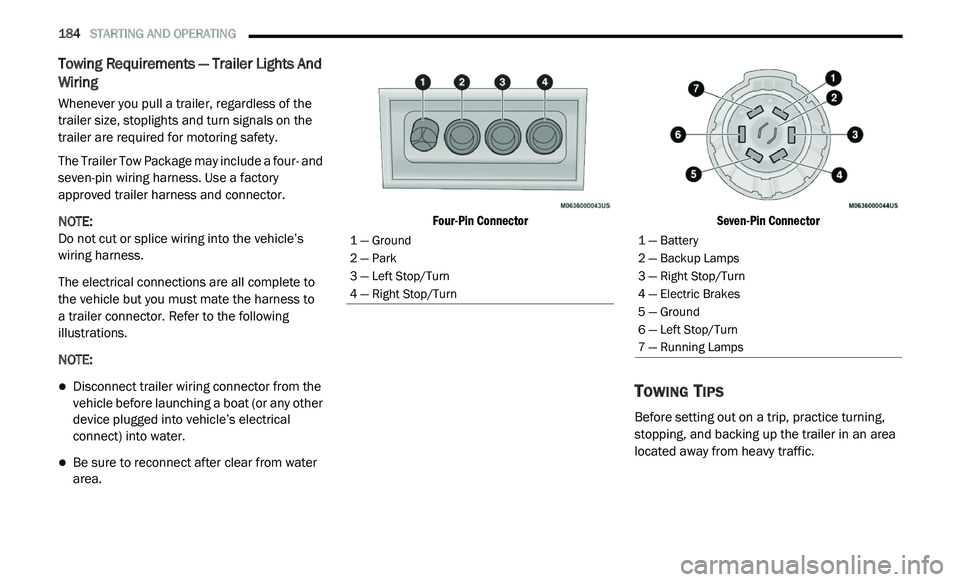
The Trailer Tow Package may include a four- and
se
ven-pin wiring harness. Use a factory
approved trailer harness and connector.
NOTE:
Do not cut or splice wiring into the vehicle’s
wi
ring harness.
The electrical connections are all complete to
t h
e vehicle but you must mate the harness to
a trailer connector. Refer to the following
i l
lustrations.
NOTE:
Disconnect trailer wiring connector from the
vehicle before launching a boat (or any other
device plugged into vehicle’s electrical
connect) into water.
Be sure to reconnect after clear from water
area.
Four-Pin Connector
Seven-Pin Connector
TOWING TIPS
Before setting out on a trip, practice turning,
stopping, and backing up the trailer in an area
located away from heavy traffic.
1 — Ground
2 — Park
3 — Left Stop/Turn
4 — Right Stop/Turn1 — Battery
2 — Backup Lamps
3 — Right Stop/Turn
4 — Electric Brakes
5 — Ground
6 — Left Stop/Turn
7 — Running Lamps
Page 191 of 396
189
IN CASE OF EMERGENCY
HAZARD WARNING FLASHERS
The Hazard Warning Flashers switch is located
on the switch bank just above the climate
controls.
Push the switch to turn on the Hazard
Warning Flashers. When the switch is
ac
tivated, all directional turn signals will flash on and off to warn oncoming traffic of
an emergency. Push the switch a second time to
turn off the Hazard Warning Flashers.
This is an emergency warning system and it
s
h
ould not be used when the vehicle is in
motion. Use it when your vehicle is disabled and
it is creating a safety hazard for other motorists. When you must leave the vehicle to seek
a
s
sistance, the Hazard Warning Flashers will
continue to operate even though the ignition is
placed in the OFF position.
NOTE:
With extended use, the Hazard Warning
F l
ashers may discharge the battery.
BULB REPLACEMENT
REPLACEMENT BULBS
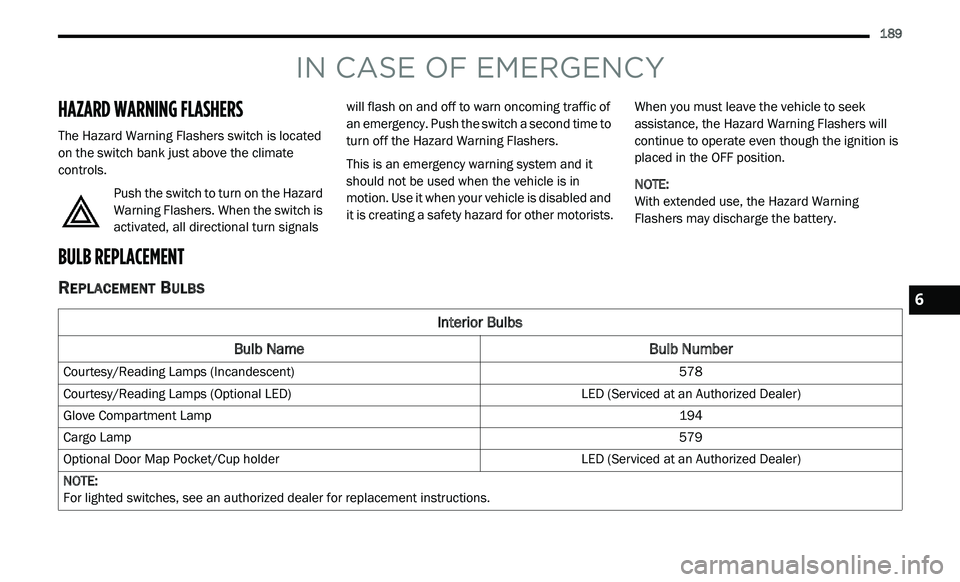
Interior Bulbs
Bulb Name Bulb Number
Courtesy/Reading Lamps (Incandescent) 578
Courtesy/Reading Lamps (Optional LED) LED (Serviced at an Authorized Dealer)
Glove Compartment Lamp 194
Cargo Lamp 579
Optional Door Map Pocket/Cup holder LED (Serviced at an Authorized Dealer)
NOTE:
For lighted switches, see an authorized dealer for replacement instructions.
6
Page 192 of 396
190 IN CASE OF EMERGENCY
Exterior Bulbs
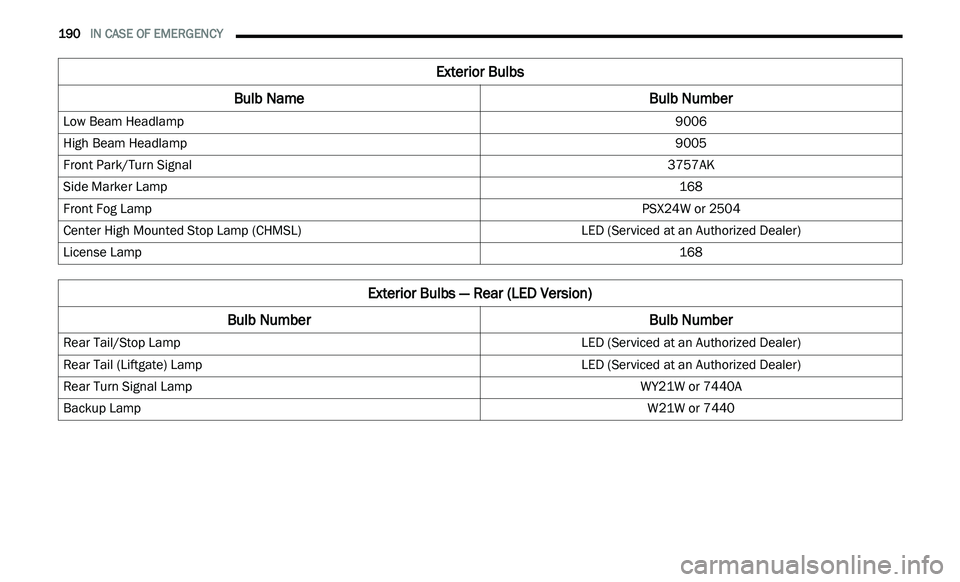
Bulb Name Bulb Number
Low Beam Headlamp 9006
High Beam Headlamp 9005
Front Park/Turn Signal 3757AK
Side Marker Lamp 168
Front Fog Lamp PSX24W or 2504
Center High Mounted Stop Lamp (CHMSL) LED (Serviced at an Authorized Dealer)
License Lamp 168
Exterior Bulbs — Rear (LED Version)
Bulb Number Bulb Number
Rear Tail/Stop Lamp LED (Serviced at an Authorized Dealer)
Rear Tail (Liftgate) Lamp LED (Serviced at an Authorized Dealer)
Rear Turn Signal Lamp WY21W or 7440A
Backup Lamp W21W or 7440
Page 193 of 396
IN CASE OF EMERGENCY 191
REPLACING EXTERIOR BULBS
NOTE:
Lens fogging can occur under certain atmo -
spheric conditions. This will usually clear as
a t
mospheric conditions change to allow the
condensation to change back into a vapor.
Turning the lamps on will usually accelerate the
clearing process.
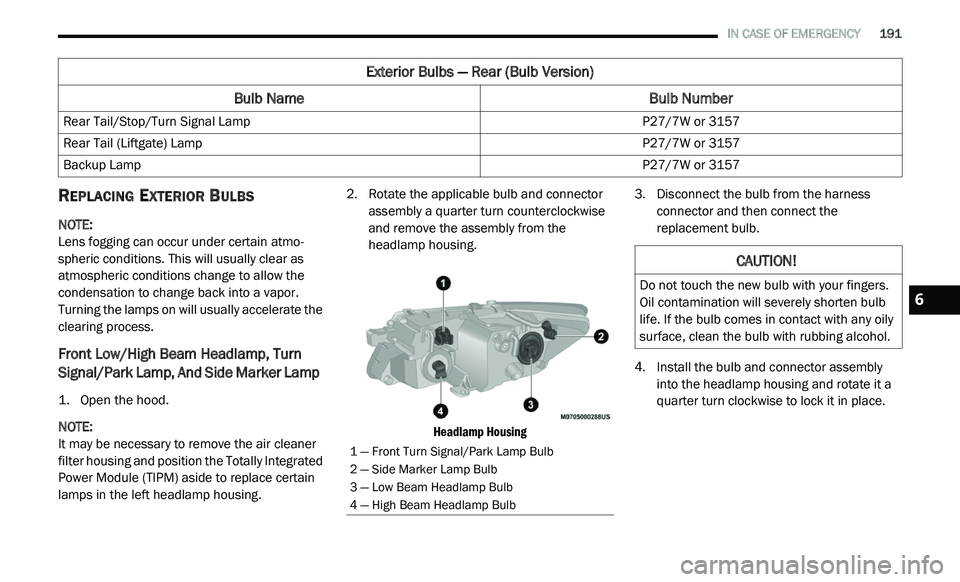
Front Low/High Beam Headlamp, Turn
Signal/Park Lamp, And Side Marker Lamp
1. Open the hood.
NOTE:
It may be necessary to remove the air cleaner
f i
lter housing and position the Totally Integrated
Power Module (TIPM) aside to replace certain
lamps in the left headlamp housing. 2. R
otate the applicable bulb and connector
a
ssembly a quarter turn counterclockwise
and remove the assembly from the
headlamp housing.
Headlamp Housing
3. Disconnect the bulb from the harness
c onnector and then connect the
replacement bulb.
4. I nstall the bulb and connector assembly
i
nto the headlamp housing and rotate it a
quarter turn clockwise to lock it in place.
Exterior Bulbs — Rear (Bulb Version)
Bulb Name Bulb Number
Rear Tail/Stop/Turn Signal Lamp P27/7W or 3157
Rear Tail (Liftgate) Lamp P27/7W or 3157
Backup Lamp P27/7W or 3157
1 — Front Turn Signal/Park Lamp Bulb
2 — Side Marker Lamp Bulb
3 — Low Beam Headlamp Bulb
4 — High Beam Headlamp Bulb
CAUTION!
Do not touch the new bulb with your fingers.
Oil contamination will severely shorten bulb
life. If the bulb comes in contact with any oily
surface, clean the bulb with rubbing alcohol.6
Page 194 of 396
192 IN CASE OF EMERGENCY
Front Fog Lamp
NOTE:
Turn the steering wheel to the right if replacing
t h
e left front fog lamp or to the left if replacing
the right front fog lamp to allow for easier
access to the front of the wheel well.
1. Remove the fasteners retaining the front l
ower wheel well access panel and remove
the access panel.
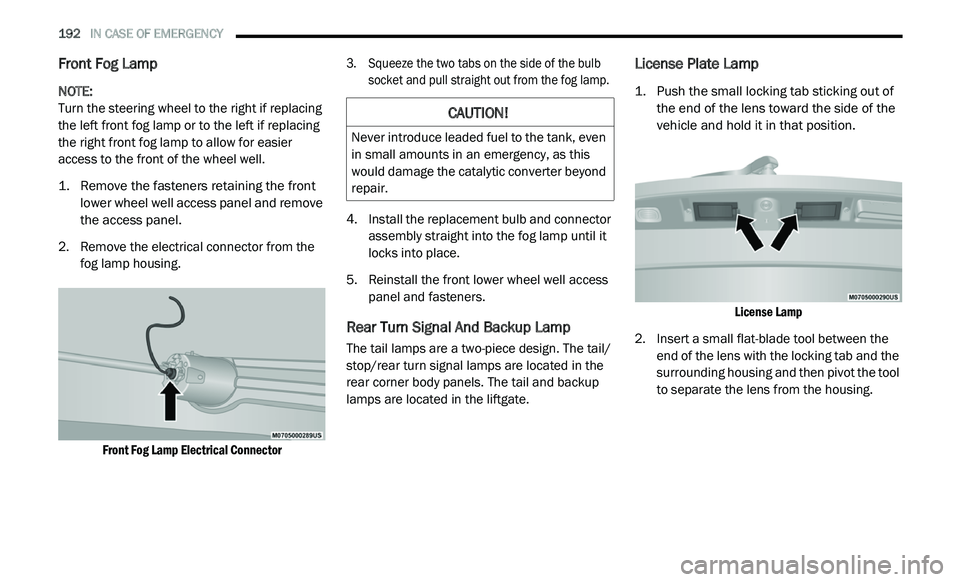
2. R emove the electrical connector from the
f
og lamp housing.
Front Fog Lamp Electrical Connector
3. S
queeze the two tabs on the side of the bulb
s
ocket and pull straight out from the fog lamp.
4. I nstall the replacement bulb and connector
a
ssembly straight into the fog lamp until it
locks into place.
5. R einstall the front lower wheel well access
p
anel and fasteners.
Rear Turn Signal And Backup Lamp
The tail lamps are a two-piece design. The tail/
stop/rear turn signal lamps are located in the
rear corner body panels. The tail and backup
lamps are located in the liftgate.
License Plate Lamp
1. Push the small locking tab sticking out of the end of the lens toward the side of the
vehicle and hold it in that position.
License Lamp
2. I nsert a small flat-blade tool between the
e
nd of the lens with the locking tab and the
surrounding housing and then pivot the tool
to separate the lens from the housing.
CAUTION!
Never introduce leaded fuel to the tank, even
in small amounts in an emergency, as this
would damage the catalytic converter beyond
repair.