ignition DODGE JOURNEY 2020 Owner's Manual
[x] Cancel search | Manufacturer: DODGE, Model Year: 2020, Model line: JOURNEY, Model: DODGE JOURNEY 2020Pages: 396, PDF Size: 25.53 MB
Page 74 of 396
72 GETTING TO KNOW YOUR VEHICLE
Outside Air Intake
Make sure the air intake, located directly in
front of the windshield, is free of obstructions
such as leaves. Leaves collected in the air
intake may reduce airflow, and if they enter
the plenum, they could plug the water drains.
In winter months, make sure the air intake is
c le
ar of ice, slush, and snow.
A/C Air Filter
The climate control system filters out dust and
pollen from the air. Refer to an authorized
dealer for filter replacement instructions.
Economy Mode
If ECONOMY mode is desired, push the A/C
button to turn off the LED indicator and the A/C
compressor. Rotate the temperature control
knob to the desired temperature. Also, make
sure to select only Panel, Bi-Level, or Floor
modes.
Operating Tips ChartWINDOWS
POWER WINDOWS
The window controls on the driver's door trim
panel control all of the door windows.
Power Window Switches
There are single window controls on each
p a
ssenger door trim panel, which operate the
passenger door windows. The window controls
will operate when the ignition is in the ON/RUN
or ACC position.
NOTE:
For vehicles equipped with Uconnect, the power
w i
ndow switches will remain active for up to
10 minutes after the ignition is placed in the
O F
F position. Opening either front door will
WEATHER CONTROL SETTINGS
Hot Weather
And Vehicle
Interior Is Very Hot Set the mode control to
,
on, and blower on high.
Roll down the windows for a m i
nute to flush out the hot
air. Adjust the controls as
needed to achieve comfort.
Warm Weather Turn
on and set the
mode control to the
position.
Cool Sunny Operate in position.
Cool & Humid Co
nditions Set the mode control to
and turn on to keep
windows clear.
Cold Weather Set the mode control to
th
e position. If
windshield fogging starts to o c
cur, move the control to
the position.
Page 75 of 396
GETTING TO KNOW YOUR VEHICLE 73
cancel this feature. The time is programmable.
Refer to “Uconnect Settings” in “Multimedia”
for further information.
Auto-Down Feature
The driver's power window switch has an
Auto-Down feature. Push the window switch
past the first detent, release, and the window
will go down automatically.
To open the window part way, push the window
sw
itch to the first detent and release it when
you want the window to stop.
To stop the window from going all the way down
d u
ring the Auto-Down operation, pull up on the
switch briefly.
Auto-Up Feature With Anti-Pinch Protection
On some models, the driver and front
passenger power window switches have an
Auto-Up feature. Pull the window switch up to
the second detent, release, and the window will
go up automatically.
To stop the window from going all the way up
du
ring the Auto-Up operation, push down on the
switch briefly.
To close the window part way, pull the window
s w
itch up to the first detent and release it when
you want the window to stop.
NOTE:
If the window runs into any obstacle during
Auto-Closure, it will reverse direction and
then go back down. Remove the obstacle and
use the window switch again to close the
window.
Any impact due to rough road conditions may
trigger the Auto-Reverse function unexpect -
edly during Auto-Closure. If this happens, pull
t h
e switch lightly to the first detent and hold
to close window manually.
Reset Auto-Up
Should the Auto-Up feature stop working, the
window may need to be reset. To reset Auto-Up:
1. M ake sure the door is fully closed.
2
. P ull the window switch up to close the
w
indow completely and continue to hold the
switch up for an additional two seconds
after the window is closed.
3. Push the window switch down firmly to the s
econd detent to open the window
completely and continue to hold the switch
down for an additional two seconds after
the window is fully open.
WARNING!
Never leave children unattended in a vehicle.
Do not leave the key fob in or near the vehicle or
i n
a location accessible to children, and do not
leave the ignition of a vehicle equipped with
Keyless Enter-N-Go in the ACC or ON/RUN mode.
Occupants, particularly unattended children,
can become entrapped by the windows while
o p
erating the power window switches. Such
entrapment may result in serious injury or death.
WARNING!
There is no anti-pinch protection when the
window is almost closed. To avoid personal
injury, be sure to clear your arms, hands,
fingers, and objects from the window path
before closing the window. Such entrapment
may result in serious injury.
2
Page 76 of 396
74 GETTING TO KNOW YOUR VEHICLE
Window Lockout Switch
The window lockout switch on the driver's door
trim panel allows you to disable the window
control on the rear passenger doors. To disable
the window controls, push and release the
window lockout button (setting it in the down
position). To enable the window controls, push
and release the window lockout button again
(setting it in the up position).
Window Lockout Switch
WIND BUFFETING
Wind buffeting can be described as the perception
of pressure on the ears or a helicopter-type sound in
the ears. Your vehicle may exhibit wind buffeting
with the windows down, or the sunroof (if equipped)
in certain open or partially open positions. This is a
normal occurrence and can be minimized. If the
buffeting occurs with the rear windows open, open
the front and rear windows together to minimize the
buffeting. If the buffeting occurs with the sunroof
open, adjust the sunroof opening to minimize the
buffeting or open any window.
POWER SUNROOF — IF EQUIPPED
The power sunroof switch is located between
the sun visors on the overhead console.
Power Sunroof Switch
WARNING!
Never leave children unattended in a
vehicle, or with access to an unlocked
vehicle. Never leave the key fob in or near
the vehicle, or in a location accessible to
children. Do not leave the ignition of a
vehicle equipped with Keyless Enter-N-Go
in the ACC or ON/RUN mode. Occupants,
particularly unattended children, can
become entrapped by the power sunroof
while operating the power sunroof switch.
Such entrapment may result in serious
injury or death.
In a collision, there is a greater risk of being
thrown from a vehicle with an open sunroof.
You could also be seriously injured or killed.
Always fasten your seat belt properly and
make sure all passengers are also properly
secured.
Do not allow small children to operate the
sunroof. Never allow your fingers, other
body parts, or any object, to project through
the sunroof opening. Injury may result.
Page 78 of 396
76 GETTING TO KNOW YOUR VEHICLE
IGNITION OFF OPERATION
The power sunroof switch will remain active for
up to approximately ten minutes after the
ignition is placed in the OFF position. Opening
either front door will cancel this feature.
NOTE:
Ignition Off time is programmable through the
U c
onnect System. Refer to “Uconnect Settings/
Customer Programmable Features” in “Multi -
media” for further information.
HOOD
OPENING
Two latches must be released to open the hood.
1. P ull the hood release lever located under
t
he left side of the instrument panel.
Hood Release
2. Outside of the vehicle, locate the safety l
atch lever near the center of the grille
between the grille and hood opening. Push
the safety latch lever to the left and raise
the hood.
Underhood Safety Latch
3. U
se the hood prop rod to secure the hood in
t
he open position. Place the upper end of
the prop rod in the hole on the underside of
the hood.
Hood Prop Rod
CLOSING
WARNING!
Be sure the hood is fully latched before
driving your vehicle. If the hood is not fully
latched, it could open when the vehicle is in
motion and block your vision. Failure to follow
this warning could result in serious injury or
death.
Page 82 of 396
80 GETTING TO KNOW YOUR VEHICLE
GARAGE DOOR OPENER — IF EQUIPPED
HomeLink® replaces up to three remote controls
(hand-held transmitters) that operate devices
such as garage door openers, motorized gates,
lighting or home security systems. The
HomeLink® unit operates off your vehicle’s
battery.
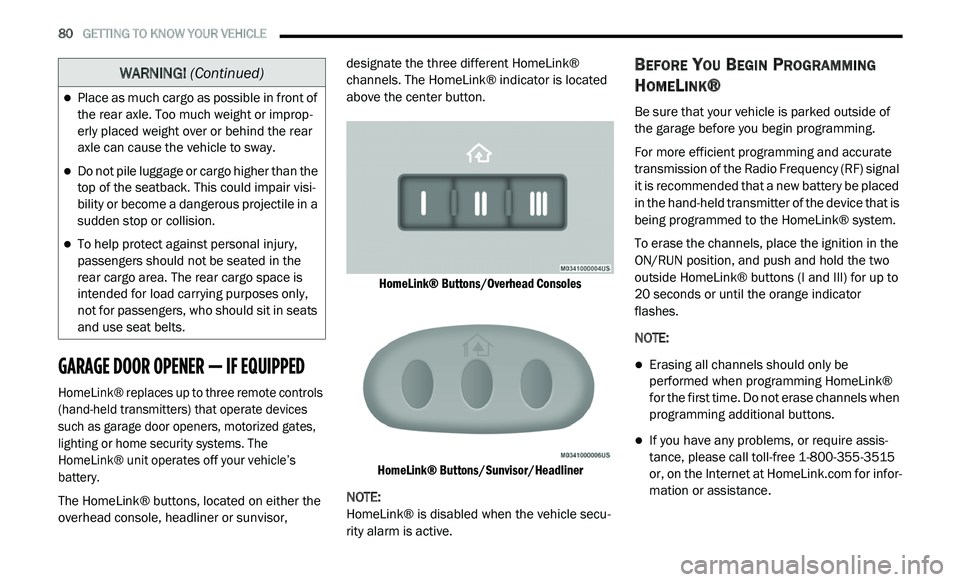
The HomeLink® buttons, located on either the
ov
erhead console, headliner or sunvisor, designate the three different HomeLink®
channels. The HomeLink® indicator is located
above the center button.
HomeLink® Buttons/Overhead Consoles
HomeLink® Buttons/Sunvisor/Headliner
NOTE:
HomeLink® is disabled when the vehicle secu -
rity alarm is active.
BEFORE YOU BEGIN PROGRAMMING
H
OMELINK®
Be sure that your vehicle is parked outside of
the garage before you begin programming.
For more efficient programming and accurate
t r
ansmission of the Radio Frequency (RF) signal
it is recommended that a new battery be placed
in the hand-held transmitter of the device that is
being programmed to the HomeLink® system.
To erase the channels, place the ignition in the
ON
/RUN position, and push and hold the two
outside HomeLink® buttons (I and III) for up to
20 seconds or until the orange indicator
flashes.
NOTE:
Erasing all channels should only be
performed when programming HomeLink®
for the first time. Do not erase channels when
programming additional buttons.
If you have any problems, or require assis -
tance, please call toll-free 1 -
800-355-3515
or, on the Internet at HomeLink.com for infor-
mation or assistance.
Place as much cargo as possible in front of
the rear axle. Too much weight or improp -
erly placed weight over or behind the rear
a x
le can cause the vehicle to sway.
Do not pile luggage or cargo higher than the
top of the seatback. This could impair visi-
bility or become a dangerous projectile in a
su
dden stop or collision.
To help protect against personal injury,
passengers should not be seated in the
rear cargo area. The rear cargo space is
intended for load carrying purposes only,
not for passengers, who should sit in seats
and use seat belts.
WARNING! (Continued)
Page 83 of 396
GETTING TO KNOW YOUR VEHICLE 81
Programming A Rolling Code
For programming garage door openers that
were manufactured after 1995:
These garage door openers can be identified by
th
e “LEARN” or “TRAIN” button located where
the hanging antenna is attached to the garage
door opener. It is NOT the button that is
normally used to open and close the door.
The name and color of the button may vary by
m a
nufacturer.
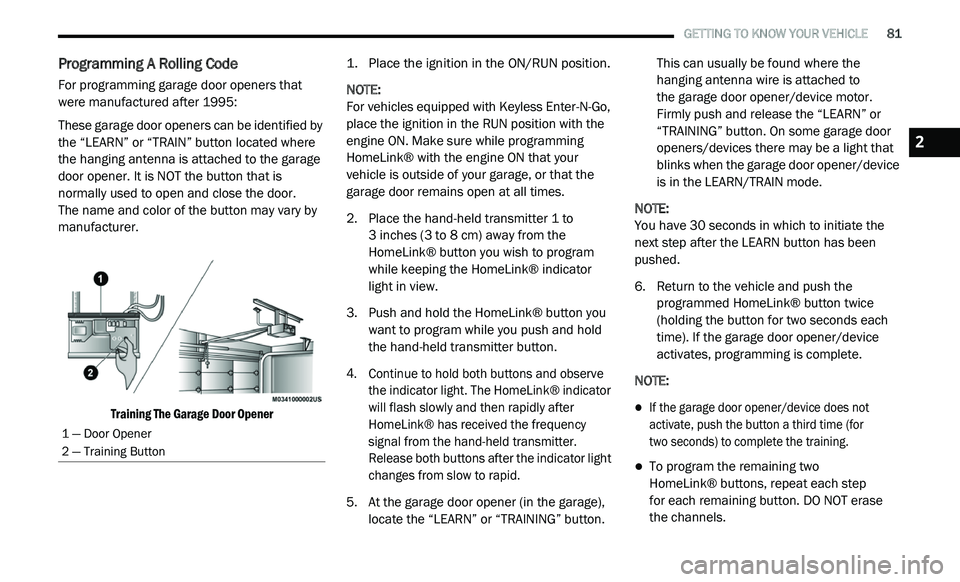
Training The Garage Door Opener
1. P
lace the ignition in the ON/RUN position.
N
OTE:
For vehicles equipped with Keyless Enter-N-Go,
p l
ace the ignition in the RUN position with the
engine ON. Make sure while programming
HomeLink® with the engine ON that your
vehicle is outside of your garage, or that the
garage door remains open at all times.
2. P lace the hand-held transmitter 1 to
3
inches (3 to 8 cm) away from the
H o
meLink® button you wish to program
while keeping the HomeLink® indicator
light in view.
3. Push and hold the HomeLink® button you w
ant to program while you push and hold
the hand-held transmitter button.
4. C ontinue to hold both buttons and observe
t
he indicator light. The HomeLink® indicator
will flash slowly and then rapidly after
HomeLink® has received the frequency
signal from the hand-held transmitter.
Release both buttons after the indicator light
changes from slow to rapid.
5. A t the garage door opener (in the garage),
l
ocate the “LEARN” or “TRAINING” button. This can usually be found where the
hanging antenna wire is attached to
the garage door opener/device motor.
F i
rmly push and release the “LEARN” or
“TRAINING” button. On some garage door
openers/devices there may be a light that
blinks when the garage door opener/device
is in the LEARN/TRAIN mode.
NOTE:
You have 30 seconds in which to initiate the
n e
xt step after the LEARN button has been
pushed.
6. R eturn to the vehicle and push the
p
rogrammed HomeLink® button twice
(holding the button for two seconds each
time). If the garage door opener/device
activates, programming is complete.
NOTE:
If the garage door opener/device does not
activate, push the button a third time (for
two seconds) to complete the training.
To program the remaining two
HomeLink® buttons, repeat each step
for each remaining button. DO NOT erase
the channels.
1 — Door Opener
2 — Training Button
2
Page 84 of 396
82 GETTING TO KNOW YOUR VEHICLE
Programming A Non-Rolling Code
For programming garage door openers
manufactured before 1995:
1. P lace the ignition in the ON/RUN position.
N
OTE:
For vehicles equipped with Keyless Enter-N-Go,
p l
ace the ignition in the RUN position with the
engine on. Make sure while programming
HomeLink® with the engine on that your vehicle
is outside of your garage, or that the garage
door remains open at all times.
2. P lace the hand-held transmitter 1 to 3
inches
(3 to 8 cm) away from the HomeLink® button
y o
u wish to program while keeping the
HomeLink® indicator light in view.
3. P ush and hold the HomeLink® button you
w
ant to program while you push and hold
the hand-held transmitter button.
4. C ontinue to hold both buttons and observe
t
he indicator light. The HomeLink®
indicator will flash slowly and then rapidly
after HomeLink® has received the
frequency signal from the hand-held
transmitter. Release both buttons after the
indicator light changes from slow to rapid. 5. P
ush and hold the programmed
H
omeLink® button and observe the
indicator light.
NOTE:
If the indicator light stays on constantly,
programming is complete and the garage
door/device should activate when the
HomeLink® button is pushed.
To program the two remaining HomeLink®
buttons, repeat each step for each remaining
button. DO NOT erase the channels.
CANADIAN/GATE OPERATOR
P
ROGRAMMING
For programming transmitters in Canada/
United States that require the transmitter
signals to “time-out” after several seconds of
transmission:
Canadian radio frequency laws require
t r
ansmitter signals to time-out (or quit) after
several seconds of transmission, which may not
be long enough for HomeLink® to pick up the
signal during programming. Similar to this
Canadian law, some U.S. gate operators are
designed to time-out in the same manner. It may be helpful to unplug the device during the
c
y
cling process to prevent possible overheating
of the garage door or gate motor.
1. P lace the ignition in the ON/RUN position.
N
OTE:
For vehicles equipped with Keyless Enter-N-Go,
p l
ace the ignition in the ON/RUN position with
the engine on. Make sure while programming
HomeLink® with the engine on that your vehicle
is outside of your garage, or that the garage
door remains open at all times.
2. P lace the hand-held transmitter 1 to
3
inches (3 to 8 cm) away from the
H o
meLink® button you wish to program
while keeping the HomeLink® indicator
light in view.
3. Continue to push and hold the HomeLink® b
utton while you push and release (“cycle”) your
hand-held transmitter every two seconds until
HomeLink® has successfully accepted the
frequency signal. The indicator light will flash
slowly and then rapidly when fully trained.
Page 89 of 396
GETTING TO KNOW YOUR VEHICLE 87
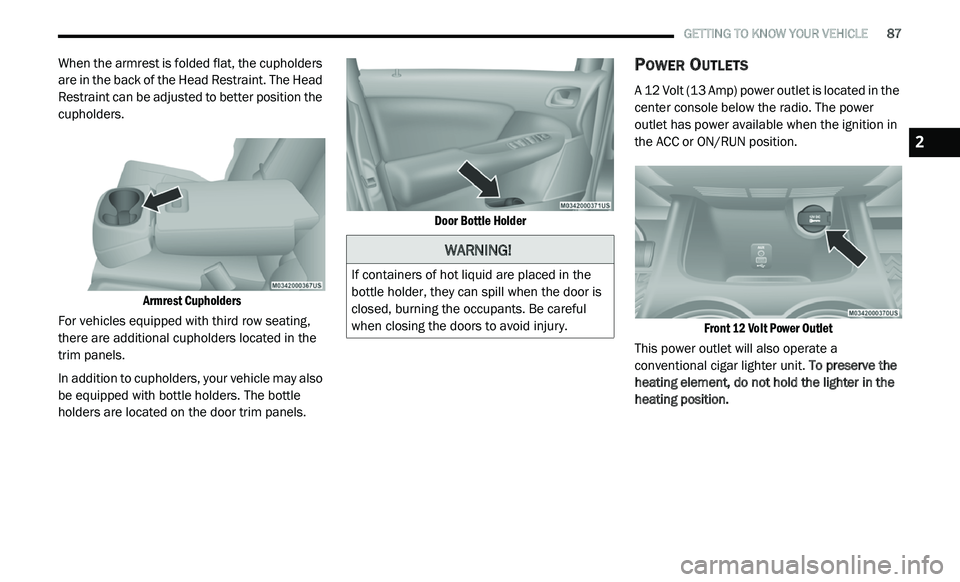
When the armrest is folded flat, the cupholders
are in the back of the Head Restraint. The Head
Restraint can be adjusted to better position the
cupholders.
Armrest Cupholders
For vehicles equipped with third row seating,
t h
ere are additional cupholders located in the
trim panels.
In addition to cupholders, your vehicle may also
b e
equipped with bottle holders. The bottle
holders are located on the door trim panels.
Door Bottle Holder
POWER OUTLETS
A 12 Volt (13 Amp) power outlet is located in the
center console below the radio. The power
outlet has power available when the ignition in
the ACC or ON/RUN position.
Front 12 Volt Power Outlet
This power outlet will also operate a
c o
nventional cigar lighter unit. To preserve the
heating element, do not hold the lighter in the
heating position.
WARNING!
If containers of hot liquid are placed in the
bottle holder, they can spill when the door is
closed, burning the occupants. Be careful
when closing the doors to avoid injury.
2
Page 90 of 396
88 GETTING TO KNOW YOUR VEHICLE
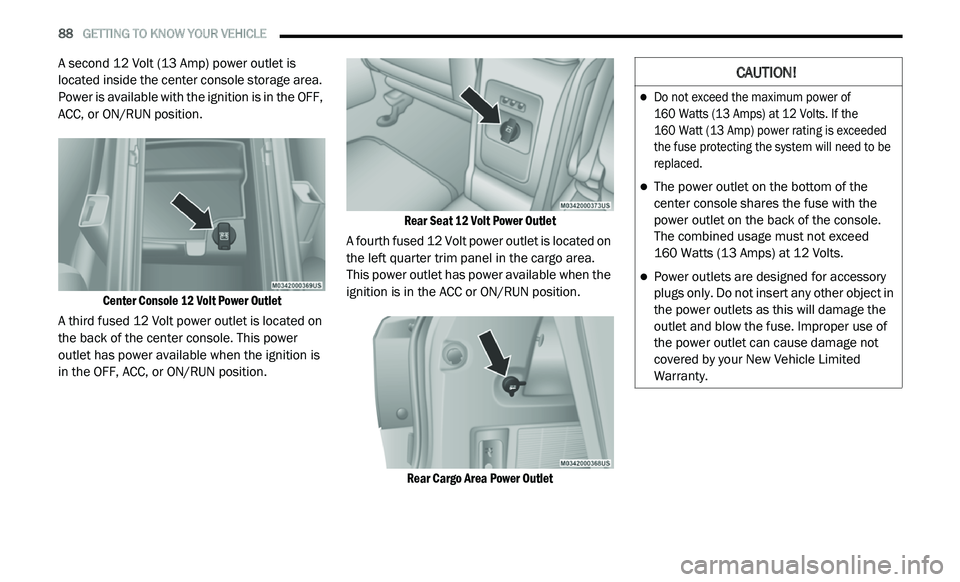
A second 12 Volt (13 Amp) power outlet is
located inside the center console storage area.
Power is available with the ignition is in the OFF,
ACC, or ON/RUN position.
Center Console 12 Volt Power Outlet
A third fused 12 Volt power outlet is located on
t h
e back of the center console. This power
outlet has power available when the ignition is
in the OFF, ACC, or ON/RUN position.
Rear Seat 12 Volt Power Outlet
A fourth fused 12 Volt power outlet is located on
t h
e left quarter trim panel in the cargo area.
This power outlet has power available when the
ignition is in the ACC or ON/RUN position.
Rear Cargo Area Power Outlet
CAUTION!
Do not exceed the maximum power of
160 Watts (13 Amps) at 12 Volts. If the
160 Watt (13 Amp) power rating is exceeded
t h
e fuse protecting the system will need to be
replaced.
The power outlet on the bottom of the
center console shares the fuse with the
power outlet on the back of the console.
The combined usage must not exceed
160 Watts (13 Amps) at 12 Volts.
Power outlets are designed for accessory
plugs only. Do not insert any other object in
the power outlets as this will damage the
outlet and blow the fuse. Improper use of
the power outlet can cause damage not
covered by your New Vehicle Limited
Warranty.
Page 96 of 396
94 GETTING TO KNOW YOUR INSTRUMENT PANEL
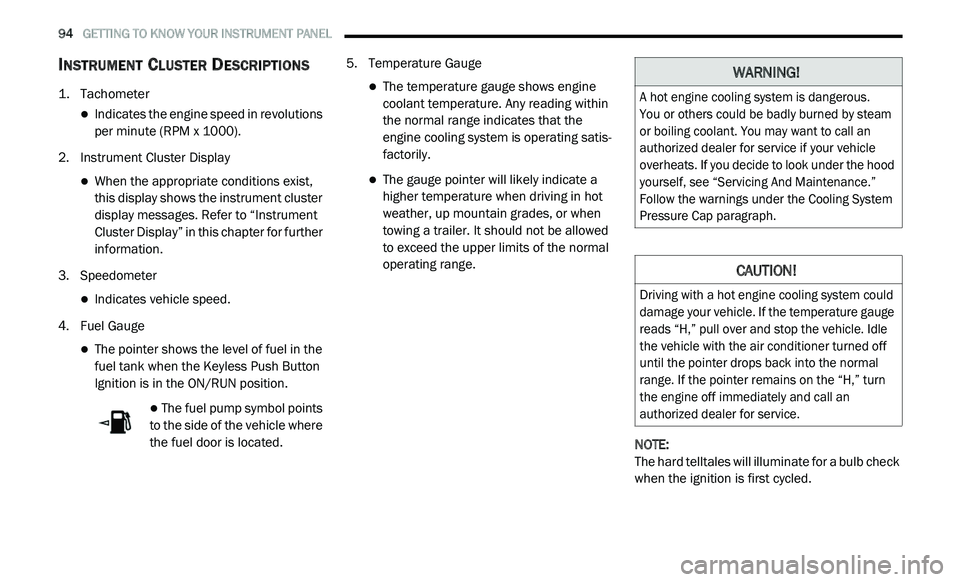
INSTRUMENT CLUSTER DESCRIPTIONS
1. Tachometer
Indicates the engine speed in revolutions
per minute (RPM x 1000).
2. I nstrument Cluster Display
When the appropriate conditions exist,
this display shows the instrument cluster
display messages. Refer to “Instrument
Cluster Display” in this chapter for further
information.
3. S peedometer
Indicates vehicle speed.
4. F uel Gauge
The pointer shows the level of fuel in the
fuel tank when the Keyless Push Button
Ignition is in the ON/RUN position.
The fuel pump symbol points
to the side of the vehicle where
t h
e fuel door is located. 5. T
emperature Gauge
The temperature gauge shows engine
coolant temperature. Any reading within
the normal range indicates that the
engine cooling system is operating satis
-
factorily.
The gauge pointer will likely indicate a
higher temperature when driving in hot
weather, up mountain grades, or when
towing a trailer. It should not be allowed
to exceed the upper limits of the normal
operating range.
NOTE:
The hard telltales will illuminate for a bulb check
w h
en the ignition is first cycled.
WARNING!
A hot engine cooling system is dangerous.
You or others could be badly burned by steam
o r
boiling coolant. You may want to call an
authorized dealer for service if your vehicle
overheats. If you decide to look under the hood
yourself, see “Servicing And Maintenance.”
Follow the warnings under the Cooling System
Pressure Cap paragraph.
CAUTION!
Driving with a hot engine cooling system could
damage your vehicle. If the temperature gauge
reads “H,” pull over and stop the vehicle. Idle
the vehicle with the air conditioner turned off
until the pointer drops back into the normal
range. If the pointer remains on the “H,” turn
the engine off immediately and call an
authorized dealer for service.