fuel DODGE JOURNEY 2020 Owner's Guide
[x] Cancel search | Manufacturer: DODGE, Model Year: 2020, Model line: JOURNEY, Model: DODGE JOURNEY 2020Pages: 396, PDF Size: 25.53 MB
Page 259 of 396
TECHNICAL SPECIFICATIONS 257
WHEEL AND TIRE TORQUE SPECIFICATIONS
Proper lug nut/bolt torque is very important to
ensure that the wheel is properly mounted to
the vehicle. Any time a wheel has been removed
and reinstalled on the vehicle, the lug nuts/
bolts should be torqued using a properly
calibrated torque wrench using a high quality six
sided (hex) deep wall socket.
TORQUE SPECIFICATIONS
**Use only authorized dealer recommended
lug nuts/bolts and clean or remove any dirt or
oil before tightening.
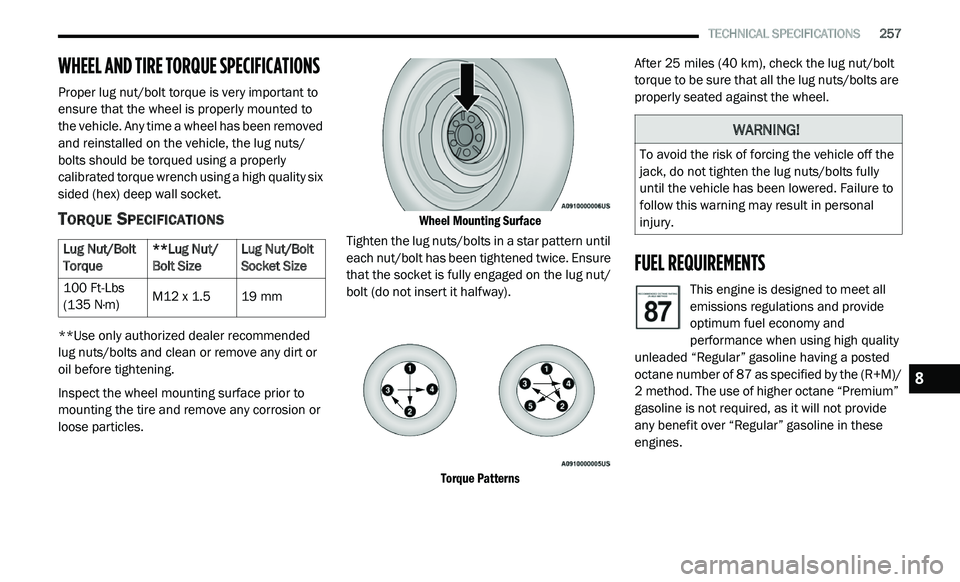
Inspect the wheel mounting surface prior to
mo
unting the tire and remove any corrosion or
loose particles.
Wheel Mounting Surface
Tighten the lug nuts/bolts in a star pattern until
ea
ch nut/bolt has been tightened twice. Ensure
that the socket is fully engaged on the lug nut/
bolt (do not insert it halfway).
Torque Patterns
After 25
miles (40 km), check the lug nut/bolt
t o
rque to be sure that all the lug nuts/bolts are
properly seated against the wheel.
FUEL REQUIREMENTS
This engine is designed to meet all
emissions regulations and provide
o p
timum fuel economy and
performance when using high quality
unleaded “Regular” gasoline having a posted
octane number of 87 as specified by the (R+M)/
2 method. The use of higher octane “Premium”
g a
soline is not required, as it will not provide
any benefit over “Regular” gasoline in these
engines.
Lug Nut/Bolt
T
o
rque **Lug Nut/
Bo
lt Size Lug Nut/Bolt
So
cket Size
100 Ft-Lbs
( 1
35 N·m) M12 x 1.5
19 mm
WARNING!
To avoid the risk of forcing the vehicle off the
jack, do not tighten the lug nuts/bolts fully
until the vehicle has been lowered. Failure to
follow this warning may result in personal
injury.
8
Page 260 of 396
258 TECHNICAL SPECIFICATIONS
While operating on gasoline with an octane
number of 87, hearing a light knocking sound
from the engine is not a cause for concern.
However, if the engine is heard making a heavy
knocking sound, see your dealer immediately.
Use of gasoline with an octane number lower
than 87 can cause engine failure and may void
or not be covered by the New Vehicle Limited
Warranty.
Poor quality gasoline can cause problems such
as
hard starting, stalling, and hesitations. If you
experience these symptoms, try another brand
of gasoline before considering service for the
vehicle.
REFORMULATED GASOLINE
Many areas of the country require the use of
cleaner burning gasoline referred to as
“Reformulated Gasoline”. Reformulated
gasoline contains oxygenates and are
specifically blended to reduce vehicle
emissions and improve air quality.
The use of reformulated gasoline is
r e
commended. Properly blended reformulated
gasoline will provide improved performance
and durability of engine and fuel system
components.
MATERIALS ADDED TO FUEL
Besides using unleaded gasoline with the
proper octane rating, gasolines that contain
detergents, corrosion and stability additives are
recommended. Using gasolines that have these
additives will help improve fuel economy,
reduce emissions, and maintain vehicle
performance.
Designated TOP TIER Detergent
Gasoline contains a higher level of
de
tergents to further aide in
minimizing engine and fuel system
deposits. When available, the usage of TOP
TIER Detergent Gasoline is recommended. Visit
www.toptiergas.com for a list of TOP TIER
Detergent Gasoline Retailers.
Indiscriminate use of fuel system cleaning
a g
ents should be avoided. Many of these
materials intended for gum and varnish
removal may contain active solvents or similar
ingredients. These can harm fuel system gasket
and diaphragm materials.
GASOLINE/OXYGENATE BLENDS
Some fuel suppliers blend unleaded gasoline
with oxygenates such as ethanol.
Problems that result from using gasoline
c o
ntaining more than 15% ethanol (E-15) or
gasoline containing methanol are not the
responsibility of the manufacturer and may void
or not be covered under New Vehicle Limited
Warranty.
CAUTION!
DO NOT use E-85, gasoline containing
methanol, or gasoline containing more than
15% ethanol (E-15). Use of these blends may
result in starting and driveability problems,
damage critical fuel system components,
cause emissions to exceed the applicable
standard, and/or cause the Malfunction
Indicator Light to illuminate. Please observe
pump labels as they should clearly
communicate if a fuel contains greater than
15% ethanol (E-15).
Page 261 of 396
TECHNICAL SPECIFICATIONS 259
(Continued)
DO NOT USE E-85 IN NON-FLEX FUEL
V
EHICLES
Non-Flex Fuel Vehicles (FFV) are compatible
with gasoline containing up to 15% ethanol
(E-15). Use of gasoline with higher ethanol
content may void the New Vehicle Limited
Warranty.
If a Non-FFV vehicle is inadvertently fueled with
E-
85 fuel, the engine will have some or all of
these symptoms:
Operate in a lean mode.
OBD II Malfunction Indicator Light on.
Poor engine performance.
Poor cold start and cold driveability.
Increased risk for fuel system component
corrosion.
CNG AND LP FUEL SYSTEM
M
ODIFICATIONS
Modifications that allow the engine to run on
Compressed Natural Gas (CNG) or Liquid
Propane (LP) may result in damage to the
engine, emissions, and fuel system
components. Problems that result from running
CNG or LP are not the responsibility of the
manufacturer and may void or not be covered
under the New Vehicle Limited Warranty.
MMT IN GASOLINE
Methylcyclopentadienyl Manganese Tricarbonyl
(MMT) is a manganese-containing metallic
additive that is blended into some gasoline to
increase octane. Gasoline blended with MMT
provides no performance advantage beyond
gasoline of the same octane number without
MMT. Gasoline blended with MMT reduces
spark plug life and reduces emissions system
performance in some vehicles. The
manufacturer recommends that gasoline
without MMT be used in your vehicle. The MMT content of gasoline may not be indicated on the
gasoline pump; therefore, you should ask your
gasoline retailer whether the gasoline contains
MMT. MMT is prohibited in Federal and
California reformulated gasoline.
FUEL SYSTEM CAUTIONS
CAUTION!
Follow these guidelines to maintain your
vehicle’s performance:
The use of leaded gasoline is prohibited by
Federal law. Using leaded gasoline can
impair engine performance and damage
the emissions control system.
An out-of-tune engine or certain fuel or igni -
tion malfunctions can cause the catalytic
c o
nverter to overheat. If you notice a
pungent burning odor or some light smoke,
your engine may be out of tune or malfunc -
tioning and may require immediate service.
C o
ntact an authorized dealer for service
assistance.
8
Page 262 of 396
260 TECHNICAL SPECIFICATIONS
(Continued)
NOTE:
Intentional tampering with the emissions
c o
ntrol system can result in civil penalties being
assessed against you.
CARBON MONOXIDE WARNINGS
The use of fuel additives, which are now
being sold as octane enhancers, is not
recommended. Most of these products
contain high concentrations of methanol.
Fuel system damage or vehicle perfor -
mance problems resulting from the use of
s u
ch fuels or additives is not the responsi -
bility of the manufacturer and may void or
n o
t be covered under the New Vehicle
Limited Warranty.
CAUTION! (Continued)
WARNING!
Carbon monoxide (CO) in exhaust gases is
deadly. Follow the precautions below to
prevent carbon monoxide poisoning:
Do not inhale exhaust gases. They contain
carbon monoxide, a colorless and odorless
gas, which can kill. Never run the engine in
a closed area, such as a garage, and never
sit in a parked vehicle with the engine
running for an extended period. If the
vehicle is stopped in an open area with the
engine running for more than a short
period, adjust the ventilation system to
force fresh, outside air into the vehicle.
Guard against carbon monoxide with
proper maintenance. Have the exhaust
system inspected every time the vehicle is
raised. Have any abnormal conditions
repaired promptly. Until repaired, drive with
all side windows fully open.
WARNING! (Continued)
Page 263 of 396
TECHNICAL SPECIFICATIONS 261
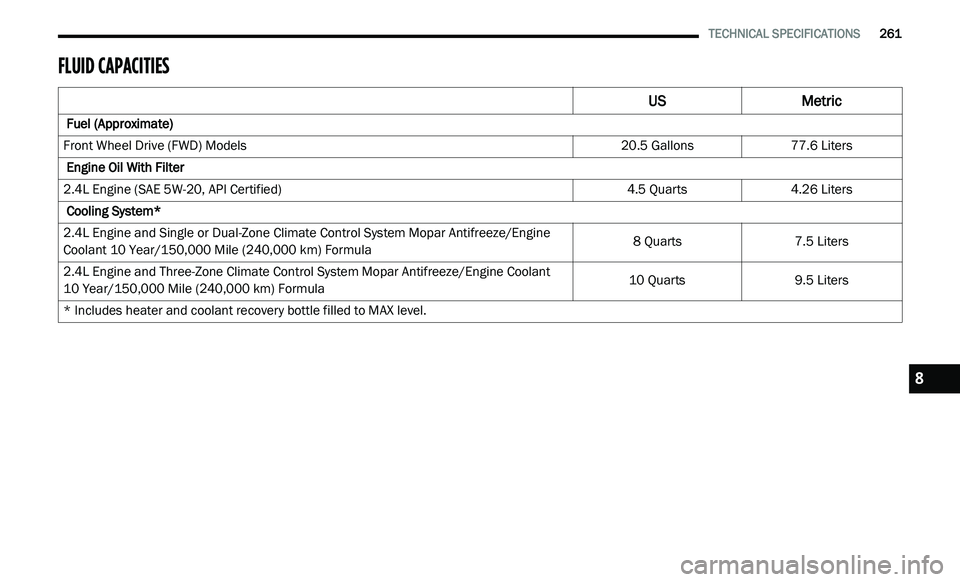
FLUID CAPACITIES
US Metric
Fuel (Approximate)
Front Wheel Drive (FWD) Models 20.5 Gallons77.6 Liters
Engine Oil With Filter
2.4L Engine (SAE 5W-20, API Certified) 4.5 Quarts4.26 Liters
Cooling System*
2.4L Engine and Single or Dual-Zone Climate Control System Mopar Antifreeze/Engine
C o
olant 10 Year/150,000 Mile (240,000 km) Formula 8 Quarts
7.5 Liters
2.4L Engine and Three-Zone Climate Control System Mopar Antifreeze/Engine Coolant
10 Year/150,000 Mile (240,000 km) Formula 10 Quarts
9.5 Liters
* Includes heater and coolant recovery bottle filled to MAX level.
8
Page 264 of 396
262 TECHNICAL SPECIFICATIONS
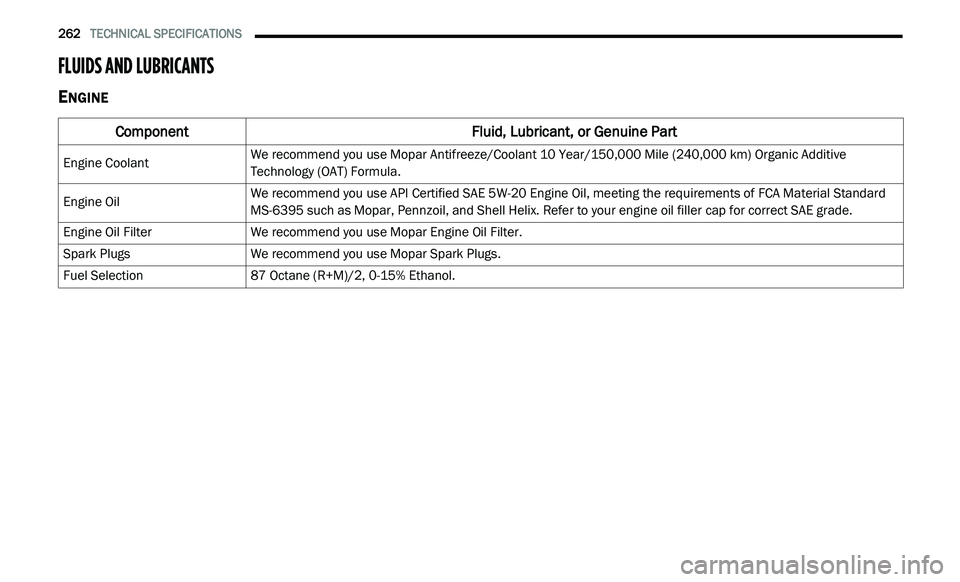
FLUIDS AND LUBRICANTS
ENGINE
Component Fluid, Lubricant, or Genuine Part
Engine CoolantWe recommend you use Mopar Antifreeze/Coolant 10 Year/150,000 Mile (240,000
km) Organic Additive
T e
chnology (OAT) Formula.
Engine Oil We recommend you use API Certified SAE 5W-20 Engine Oil, meeting the requirements of FCA Material Standard
M
S
-6395 such as Mopar, Pennzoil, and Shell Helix. Refer to your engine oil filler cap for correct SAE grade.
Engine Oil Filter We recommend you use Mopar Engine Oil Filter.
Spark Plugs We recommend you use Mopar Spark Plugs.
Fuel Selection 87 Octane (R+M)/2, 0-15% Ethanol.
Page 278 of 396
276 MULTIMEDIA
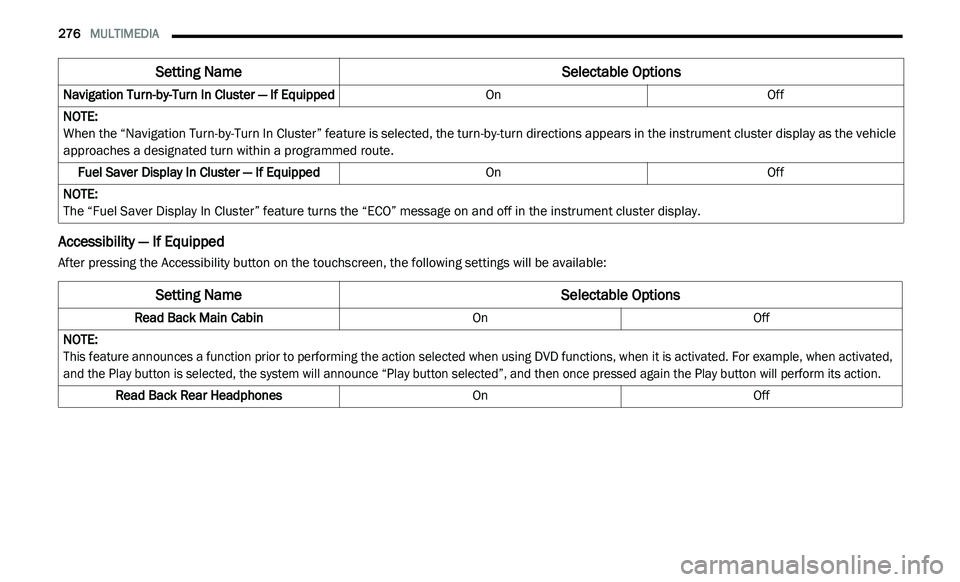
Accessibility — If Equipped
After pressing the Accessibility button on the touchscreen, the following settings will be available:Navigation Turn-by-Turn In Cluster — If Equipped
OnOff
NOTE:
When the “Navigation Turn-by-Turn In Cluster” feature is selected, the turn-by-turn directions appears in the instrument cluster display as the vehicle
a p
proaches a designated turn within a programmed route.
Fuel Saver Display In Cluster — If Equipped OnOff
NOTE:
The “Fuel Saver Display In Cluster” feature turns the “ECO” message on and off in the instrument cluster display.
Setting Name Selectable Options
Setting NameSelectable Options
Read Back Main CabinOnOff
NOTE:
This feature announces a function prior to performing the action selected when using DVD functions, when it is activated. For example, when activated,
a n
d the Play button is selected, the system will announce “Play button selected”, and then once pressed again the Play button will perform its action.
Read Back Rear Headphones OnOff
Page 351 of 396
MULTIMEDIA 349
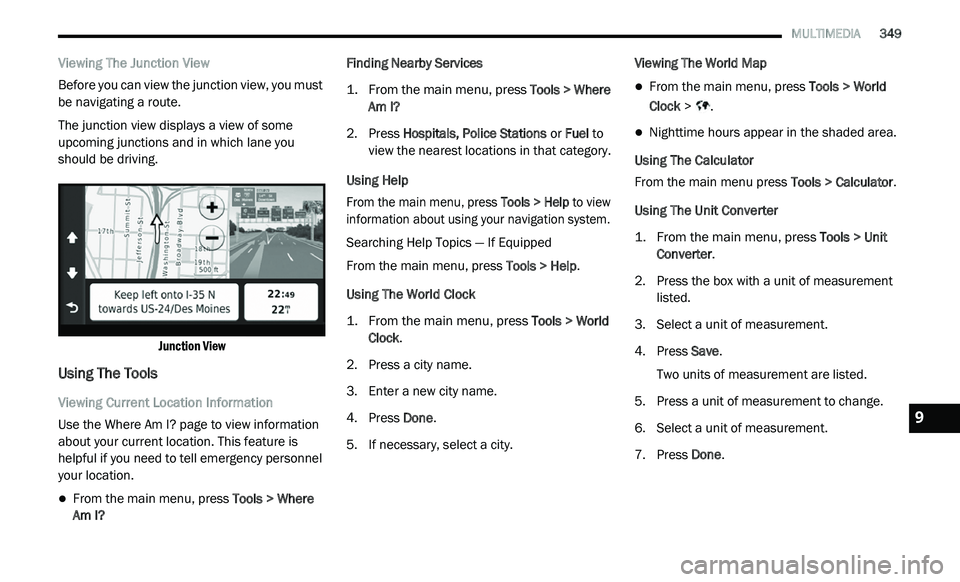
Viewing The Junction View
Before you can view the junction view, you must
be
navigating a route.
The junction view displays a view of some
u p
coming junctions and in which lane you
should be driving.
Junction View
Using The Tools
Viewing Current Location Information
Use the Where Am I? page to view information
ab
out your current location. This feature is
helpful if you need to tell emergency personnel
your location.
From the main menu, press Tools > Where
Am I? Finding Nearby Services
1. Fr
om the main menu, press
T
ools > Where
Am I?
2. P ress Hospitals, Police Stations
or Fuel to
view the nearest locations in that category.
Using Help
From the main menu, press To
ols > Help to view
information about using your navigation system.
Searching Help Topics — If Equipped
From the main menu, press To
ols > Help.
Using The World Clock
1. From the main menu, press
T
ools > World
Clock
.
2. P ress a city name.
3
. E nter a new city name.
4
. P ress Done .
5
. I f necessary, select a city. V
iewing The World Map
From the main menu, press
Tools > World
Clock > .
Nighttime hours appear in the shaded area.
Using The Calculator
From the main menu press T
o
ols > Calculator.
Using The Unit Converter
1. From the main menu, press
T
ools > Unit
Converter
.
2. P ress the box with a unit of measurement
l
isted.
3. S elect a unit of measurement.
4
. P ress Save .
T
wo units of measurement are listed.
5. Press a unit of measurement to change.
6
. S elect a unit of measurement.
7
. P ress Done .9
Page 357 of 396
MULTIMEDIA 355
SiriusXM® Travel Link brings a wealth of useful
information into your vehicle and right to your
fingertips:
Fuel Prices
Check detailed price information for fuel
stations near your current location.
Sort the list of closest fuel stations by price,
distance or alphabetically.
Route to selected fuel station.
Store a favorite fuel station for quick access
to pricing.
Movie Listings
Check which movies are playing at theaters
near your current location.
Sort the list of theaters by distance or alpha -
betically.
Show movie titles, start times, ratings, run
length, and summaries.
Store a favorite theater for quick access to
schedules. Ski Info
View ski and snowboarding conditions at ski
resorts.
Store a favorite location for quick access to
snow conditions.
Sports Scores
View scores and upcoming events for all
major sports.
Store your favorite teams for quick access to
the scores and schedules.
NOTE:
SiriusXM® Travel Link data services subscrip -
tion is separate from your SiriusXM® Satellite
R a
dio (audio) subscription.
SiriusXM® services require subscriptions, sold
s e
parately after the 12-month trial included
with the new vehicle purchase. If you decide to
continue your service at the end of your trial
subscription, the plan you choose will automatically renew and bill at then-current
rates until you call SiriusXM at 866-635-2349
to cancel.
See SiriusXM® Customer Agreement for
c
o
mplete terms for U.S. residents at
www.siriusxm.com , and Canadian residents at
www.siriusxm.ca . All fees and programming
subject to change. Our satellite service is
a v
ailable only to those at least 18 and older in
the 48 contiguous USA and D.C. Our Sirius
satellite service is also available in PR (with
coverage limitations). Our Internet radio service
is available throughout our satellite service area
and in AK and HI. © 2020 Sirius XM Radio Inc.
Sirius, XM and all related marks and logos are
trademarks of SiriusXM® Radio Inc.
Weather
View detailed current conditions at your
current location.
Check extended 12-hour and 5-day fore -
casts.
Store a favorite location for quick access to
weather conditions and forecasts.
CAUTION!
Neither SiriusXM nor FCA US LLC is
responsible for any errors in accuracies in the
SiriusXM data services or its use in vehicles.
9
Page 361 of 396
MULTIMEDIA 359
OR DAMAGES, DIRECT OR INDIRECT, WHICH MAY
RESULT FROM THE USE OR POSSESSION OF THE
GARMIN PRODUCTS; OR FOR ANY LOSS OF PROFIT,
REVENUE, CONTRACTS OR SAVINGS, OR ANY
OTHER DIRECT, INDIRECT, INCIDENTAL, SPECIAL
OR CONSEQUENTIAL DAMAGES ARISING OUT OF
YOUR USE OF OR INABILITY TO USE THE GARMIN
PRODUCTS, ANY DEFECT IN THE CONTENT OR
INFORMATION, OR THE BREACH OF THESE TERMS
OR CONDITIONS, WHETHER IN AN ACTION IN
CONTRACT OR TORT OR BASED ON A WARRANTY
AND WHETHER RESULTING FROM THE USE,
MISUSE, OR INABILITY TO USE THE GARMIN
PRODUCTS OR FROM DEFECTS OR ERRORS IN THE
APPLICATION, EVEN IF GARMIN OR ITS LICENSORS
HAVE BEEN ADVISED OF THE POSSIBILITY OF SUCH
DAMAGES. GARMIN’S AND ITS LICENSORS’ TOTAL
AGGREGATE LIABILITY WITH RESPECT TO ITS
OBLIGATIONS UNDER THIS LICENSE AGREEMENT
OR OTHERWISE WITH RESPECT TO THE
APPLICATION OR THE CONTENT SHALL NOT EXCEED
$1.00. Some States, Territories and Countries do
not allow certain liability exclusions or damages
limitations, so to that extent the above may not
apply to you. If you purchased your Application from
a third party application vendor, THE SOLE AND
MAXIMUM RESPONSIBILITY OF THE APPLICATION VENDOR IN THE EVENT OF A WARRANTY FAILURE IS
A REFUND OF THE APPLICATION PURCHASE PRICE.
ANY CONTENT OR MATERIAL DOWNLOADED OR
U
P
LOADED OR OTHERWISE OBTAINED
THROUGH THE SOFTWARE IS DONE AT YOUR
OWN DISCRETION AND RISK. YOU WILL BE
SOLELY RESPONSIBLE FOR ANY DAMAGE TO
YOUR ELECTRONIC COMMUNICATION DEVICE
OR ANY LOSS OF DATA THAT MAY RESULT
FROM THE DOWNLOAD OR UPLOAD OF ANY
SUCH CONTENT OR MATERIAL OR THE USE OF
THE SOFTWARE.
Predictive Routing
Your device may have a “predictive routing”
f e
ature called myTrends that identifies your
driving routines. If it does have this feature,
when your device predicts a route, it will display
your estimated time to destination and relevant
traffic information regarding the predicted
route. Information related to your driving
routines would be accessible to any other
person who uses your device. If you do not want
your device to predict your routes or display
information related to predicted routes, you
may turn off myTrends by accessing your
device’s Settings menu. Collection of Information
We may collect information relating to how
o f
ten you use the Garmin® Product or the
frequency with which certain applications and
features of the Garmin® Product are used.
This information would be collected
a n
onymously, in a way that does not personally
identify you. We may use this information to
detect broad user trends and to otherwise
enhance our products or applications. The use
of location-based services on the Garmin®
Product, which may include weather, movie
times, traffic information, fuel prices, or
information regarding local events, will cause
the physical location of your device to be
collected in order to provide you with such
location-based services. This location data is
collected anonymously in a form that does not
personally identify you. If you provide your
consent then Garmin® will collect and upload
information such as your location, speed, and
direction (known as “traffic probe data” or
“floating car data”) in order to enhance the
quality of the traffic data and other content
provided by Garmin® or other Content
providers. If you provide your consent, then
Garmin® may also share this data with or sell
this data to third parties. This data is shared
9