service DODGE JOURNEY 2020 Owner's Guide
[x] Cancel search | Manufacturer: DODGE, Model Year: 2020, Model line: JOURNEY, Model: DODGE JOURNEY 2020Pages: 396, PDF Size: 25.53 MB
Page 169 of 396
STARTING AND OPERATING 167
Transmission Limp Home Mode
Transmission function is monitored
electronically for abnormal conditions. If a
condition is detected that could result in
transmission damage, Transmission Limp
Home Mode is activated. In this mode, the
transmission remains in SECOND gear
regardless of which forward gear is selected.
PARK, REVERSE, and NEUTRAL will continue to
operate. The Malfunction Indicator Light (MIL)
may be illuminated. Limp Home Mode allows
the vehicle to be driven to an authorized dealer
for service without damaging the transmission.
In the event of a momentary problem, the
tr
ansmission can be reset to regain all forward
gears by performing the following steps:
1. S top the vehicle.
2
. S hift the transmission into PARK.
3
. T urn the ignition OFF.
4
. W ait approximately 10 seconds.
5
. R estart the engine.
6
. S hift into the desired gear range. If the
p
roblem is no longer detected, the
transmission will return to normal operation.
NOTE:
Even if the transmission can be reset, we
r e
commend that you visit an authorized dealer
at your earliest possible convenience. An autho -
rized dealer has diagnostic equipment to
a s
sess the condition of your transmission.
If the transmission cannot be reset, authorized
d e
aler service is required.
Overdrive Operation
The automatic transmission includes an
electronically controlled Overdrive (top gear).
The transmission will automatically shift into
Overdrive if the following conditions are
present:
The gear selector is in the DRIVE position.
The transmission fluid has reached an
adequate temperature.
The engine coolant has reached an adequate
temperature.
The vehicle speed is sufficiently high.
The driver is not heavily pressing the acceler -
ator.
Torque Converter Clutch
A feature designed to improve fuel economy
has been included in the automatic
transmission on your vehicle. A clutch within the
torque converter engages automatically at
calibrated speeds. This may result in a slightly
different feeling or response during normal
operation in the upper gears. When the vehicle
speed drops or during some accelerations, the
clutch automatically disengages.
NOTE:
The torque converter clutch will not engage until
t h
e transmission fluid and engine coolant are
warm (usually after 1 to 3 miles [2 to 5 km] of
d r
iving). Because the engine speed is higher
when the torque converter clutch is not
engaged, it may seem as if the transmission is
not shifting into Overdrive when cold. This is
normal. Using the AutoStick shift control, when
the transmission is sufficiently warm, will
demonstrate that the transmission is able to
shift into and out of Overdrive.
5
Page 170 of 396
168 STARTING AND OPERATING
POWER STEERING
The standard power steering system will give
you good vehicle response and increased ease
of maneuverability in tight spaces. The system
will provide mechanical steering capability if
power assist is lost.
If for some reason the power assist is
in
terrupted, it will still be possible to steer
your vehicle. Under these conditions, you will
o b
serve a substantial increase in steering
effort, especially at very low vehicle speeds
and during parking maneuvers.
NOTE:
Increased noise levels at the end of the
steering wheel travel are considered normal
and do not indicate that there is a problem
with the power steering system.
Upon initial start-up in cold weather, the
power steering pump may make noise for a
short amount of time. This is due to the cold,
thick fluid in the steering system. This noise
should be considered normal, and it does not
in any way damage the steering system.
POWER STEERING FLUID CHECK
Checking the power steering fluid level at a
defined service interval is not required. The fluid
should only be checked if a leak is suspected,
abnormal noises are apparent, and/or the
system is not functioning as anticipated.
Coordinate inspection efforts through an
authorized dealer. If necessary, add fluid to restore to the proper
in
dicated level. With a clean cloth, wipe any
spilled fluid from all surfaces. Refer to “Fluids
And Lubricants” in “Technical Specifications”
for the correct fluid type.
SPEED CONTROL — IF EQUIPPED
When engaged, the Speed Control takes over
accelerator operations at speeds greater than
25 mph (40 km/h).
The Speed Control buttons are located on the
r i
ght side of the steering wheel.
CAUTION!
Prolonged operation of the steering system at
the end of the steering wheel travel will
increase the steering fluid temperature and it
should be avoided when possible. Damage to
the power steering pump may occur.
WARNING!
Fluid level should be checked on a level
surface and with the engine off to prevent
injury from moving parts and to ensure
accurate fluid level reading. Do not overfill.
Use only manufacturer's recommended
power steering fluid.
CAUTION!
Do not use chemical flushes in your power
steering system as the chemicals can
damage your power steering components.
Such damage is not covered by the New
Vehicle Limited Warranty.
Page 175 of 396
STARTING AND OPERATING 173
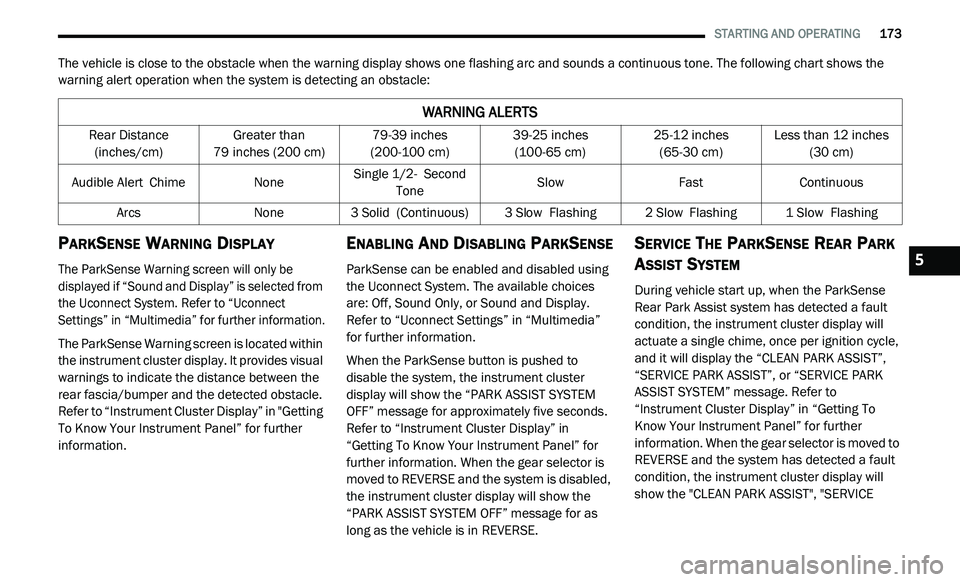
The vehicle is close to the obstacle when the warning display shows one flashing arc and sounds a continuous tone. The following chart shows the
warning alert operation when the system is detecting an obstacle:
PARKSENSE WARNING DISPLAY
The ParkSense Warning screen will only be
displayed if “Sound and Display” is selected from
the Uconnect System. Refer to “Uconnect
Settings” in “Multimedia” for further information.
The ParkSense Warning screen is located within
th
e instrument cluster display. It provides visual
warnings to indicate the distance between the
rear fascia/bumper and the detected obstacle.
Refer to “Instrument Cluster Display” in "Getting
To Know Your Instrument Panel” for further
information.
ENABLING AND DISABLING PARKSENSE
ParkSense can be enabled and disabled using
the Uconnect System. The available choices
are: Off, Sound Only, or Sound and Display.
Refer to “Uconnect Settings” in “Multimedia”
for further information.
When the ParkSense button is pushed to
di
sable the system, the instrument cluster
display will show the “PARK ASSIST SYSTEM
OFF” message for approximately five seconds.
Refer to “Instrument Cluster Display” in
“Getting To Know Your Instrument Panel” for
further information. When the gear selector is
moved to REVERSE and the system is disabled,
the instrument cluster display will show the
“PARK ASSIST SYSTEM OFF” message for as
long as the vehicle is in REVERSE.
SERVICE THE PARKSENSE REAR PARK
A
SSIST SYSTEM
During vehicle start up, when the ParkSense
Rear Park Assist system has detected a fault
condition, the instrument cluster display will
actuate a single chime, once per ignition cycle,
and it will display the “CLEAN PARK ASSIST”,
“SERVICE PARK ASSIST”, or “SERVICE PARK
ASSIST SYSTEM” message. Refer to
“Instrument Cluster Display” in “Getting To
Know Your Instrument Panel” for further
information. When the gear selector is moved to
REVERSE and the system has detected a fault
condition, the instrument cluster display will
show the "CLEAN PARK ASSIST", "SERVICE
WARNING ALERTS
Rear Distance
(inches/cm) Greater than
79
inches (200 cm) 79-39
inches
(2
00-100 cm) 39-25
inches
(1
00-65 cm) 25-12
inches
(6
5-30 cm) Less than 12
inches
(3
0 cm)
Audible Alert C
hime None Single 1/2-
S econd
Tone Slow
FastContinuous
Arcs None3 Solid (Continuous) 3
Slow Flashing2 Slow Flashing1 Slow Flashing
5
Page 176 of 396
174 STARTING AND OPERATING
(Continued)
PARK ASSIST", OR "SERVICE PARK ASSIST
SYSTEM" messages for as long as the vehicle is
in REVERSE. Under this condition, ParkSense
will not operate.
If “CLEAN PARK ASSIST” appears in the
in
strument cluster display, make sure the outer
surface and the underside of the rear fascia/
bumper are clean and clear of snow, ice, mud,
dirt or other obstruction. Then, cycle the
ignition. If the message continues to appear,
see an authorized dealer.
If “SERVICE PARK ASSIST” or “SERVICE PARK
A S
SIST SYSTEM” appears in the instrument
cluster display, see an authorized dealer.
CLEANING THE PARKSENSE SYSTEM
Clean the ParkSense sensors with water, car
wash soap and a soft cloth. Do not use rough or
hard cloths. Do not scratch or poke the sensors.
Otherwise, you could damage the sensors.
PARKSENSE SYSTEM USAGE
P
RECAUTIONS
NOTE:
Ensure that the rear bumper is free of snow, ice,
mud, dirt and debris to keep the ParkSense
system operating properly.
Jackhammers, large trucks, and other vibrations
could affect the performance of ParkSense.
When you turn ParkSense off, the instrument
cluster display will read “PARK ASSIST
SYSTEM OFF.” Furthermore, once you turn
ParkSense off, it remains off until you turn it
on again, even if you cycle the ignition key.
When you move the gear selector to the
REVERSE position and ParkSense is turned
off, the instrument cluster display will show
the “PARK ASSIST SYSTEM OFF” message for
as long as the vehicle is in REVERSE.
Clean the ParkSense sensors regularly,
taking care not to scratch or damage them.
The sensors must not be covered with ice,
snow, slush, mud, dirt or debris. Failure to do
so can result in the system not working prop -erly. The ParkSense system might not detect
a
n
obstacle behind the fascia/bumper, or it
could provide a false indication that an
obstacle is behind the fascia/bumper.
Ensure the ParkSense system is off if objects
such as bicycle carriers, trailer hitches, etc.,
are placed within 12 inches (30 cm) from the
r e
ar fascia/bumper. Failure to do so can
result in the system misinterpreting a close
object as a sensor problem, causing the
“SERVICE PARK ASSIST SYSTEM” message
to appear in the instrument cluster display.
WARNING!
Drivers must be careful when backing up
even when using ParkSense. Always check
carefully behind your vehicle, look behind
you, and be sure to check for pedestrians,
animals, other vehicles, obstructions, and
blind spots before backing up. You are
responsible for safety and must continue to
pay attention to your surroundings. Failure to
do so can result in serious injury or death.
Page 180 of 396
178 STARTING AND OPERATING
The bar code allows a computer scanner to read
the VIN.
GROSS VEHICLE WEIGHT RATING
(GVWR)
The GVWR is the total allowable weight of your
vehicle. This includes driver, passengers, and
cargo. The total load must be limited so that you
do not exceed the GVWR.
GROSS AXLE WEIGHT RATING (GAWR)
The GAWR is the maximum capacity of the front
and rear axles. Distribute the load over the front
and rear axles evenly. Make sure that you do
not exceed either front or rear GAWR.
OVERLOADING
The load carrying components (axle, springs,
tires, wheels, etc.) of your vehicle will provide
satisfactory service as long as you do not
exceed the GVWR and the front and rear GAWR.
The best way to figure out the total weight of your
v e
hicle is to weigh it when it is fully loaded and
ready for operation. Weigh it on a commercial
scale to ensure that it is not over the GVWR.
Figure out the weight on the front and rear of
t h
e vehicle separately. It is important that you
distribute the load evenly over the front and rear
axles.
Overloading can cause potential safety hazards
a n
d shorten useful service life. Heavier axles or
suspension components do not necessarily
increase the vehicle's GVWR.
LOADING
To load your vehicle properly, first figure out
its empty weight, axle-by-axle and side-by-side.
S t
ore heavier items down low and be sure you
distribute their weight as evenly as possible. Stow
all loose items securely before driving. If weighing
the loaded vehicle shows that you have exceeded
either GAWR, but the total load is within the
specified GVWR, you must redistribute the weight. Improper weight distribution can have an
adverse effect on the way your vehicle steers and
handles and the way the brakes operate.
TRAILER TOWING
In this section you will find safety tips and
information on limits to the type of towing you can
reasonably do with your vehicle. Before towing a
trailer, carefully review this information to tow
your load as efficiently and safely as possible.
To maintain the New Vehicle Limited Warranty
c
o
verage, follow the requirements and
recommendations in this manual concerning
vehicles used for trailer towing.
COMMON TOWING DEFINITIONS
The following trailer towing related definitions
will assist you in understanding the following
information:
Gross Vehicle Weight Rating (GVWR)
The GVWR is the total allowable weight of your
vehicle. This includes driver, passengers, cargo
and tongue weight. The total load must be
limited so that you do not exceed the GVWR.
Refer to “Vehicle Loading/Vehicle Certification
Label” in “Starting And Operating” for further
information.
WARNING!
Because the front wheels steer the vehicle, it
is important that you do not exceed the
maximum front or rear GAWR. A dangerous
driving condition can result if either rating is
exceeded. You could lose control of the
vehicle and have a collision.
Page 191 of 396
189
IN CASE OF EMERGENCY
HAZARD WARNING FLASHERS
The Hazard Warning Flashers switch is located
on the switch bank just above the climate
controls.
Push the switch to turn on the Hazard
Warning Flashers. When the switch is
ac
tivated, all directional turn signals will flash on and off to warn oncoming traffic of
an emergency. Push the switch a second time to
turn off the Hazard Warning Flashers.
This is an emergency warning system and it
s
h
ould not be used when the vehicle is in
motion. Use it when your vehicle is disabled and
it is creating a safety hazard for other motorists. When you must leave the vehicle to seek
a
s
sistance, the Hazard Warning Flashers will
continue to operate even though the ignition is
placed in the OFF position.
NOTE:
With extended use, the Hazard Warning
F l
ashers may discharge the battery.
BULB REPLACEMENT
REPLACEMENT BULBS
Interior Bulbs
Bulb Name Bulb Number
Courtesy/Reading Lamps (Incandescent) 578
Courtesy/Reading Lamps (Optional LED) LED (Serviced at an Authorized Dealer)
Glove Compartment Lamp 194
Cargo Lamp 579
Optional Door Map Pocket/Cup holder LED (Serviced at an Authorized Dealer)
NOTE:
For lighted switches, see an authorized dealer for replacement instructions.
6
Page 192 of 396
190 IN CASE OF EMERGENCY
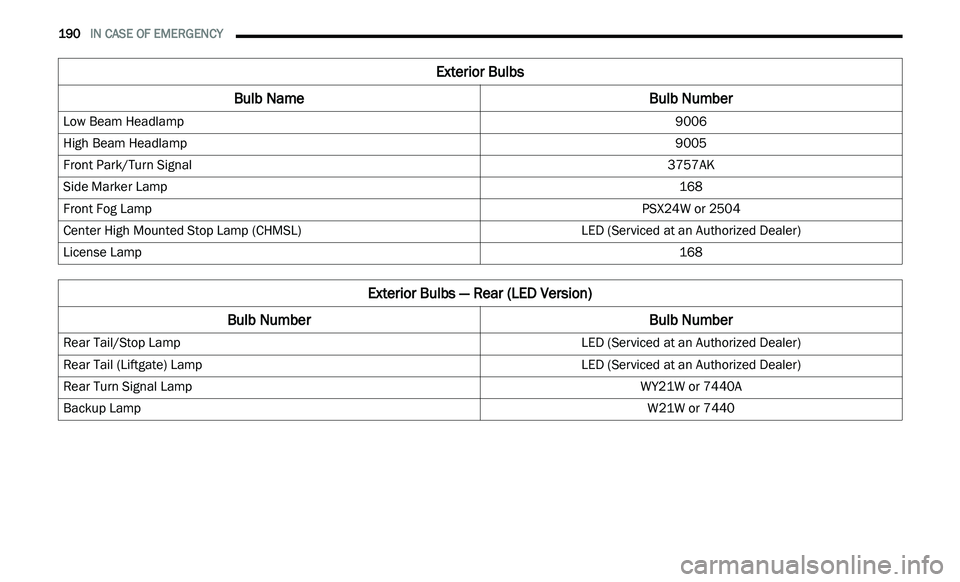
Exterior Bulbs
Bulb Name Bulb Number
Low Beam Headlamp 9006
High Beam Headlamp 9005
Front Park/Turn Signal 3757AK
Side Marker Lamp 168
Front Fog Lamp PSX24W or 2504
Center High Mounted Stop Lamp (CHMSL) LED (Serviced at an Authorized Dealer)
License Lamp 168
Exterior Bulbs — Rear (LED Version)
Bulb Number Bulb Number
Rear Tail/Stop Lamp LED (Serviced at an Authorized Dealer)
Rear Tail (Liftgate) Lamp LED (Serviced at an Authorized Dealer)
Rear Turn Signal Lamp WY21W or 7440A
Backup Lamp W21W or 7440
Page 195 of 396
IN CASE OF EMERGENCY 193
3. Hold the lens with one hand and rotate the
bulb's electrical connector a quarter turn
counterclockwise, with the other hand
separate the bulb and connector assembly
from the lens.
4. R emove the bulb from the connector socket
a
nd install the replacement bulb.
5. I nstall the bulb and connector assembly
i
nto the lens and rotate the connector a
quarter turn clockwise to lock it in place.
6. I nsert the end of the lens without the
l
ocking tab into the housing on the liftgate
and then push the opposite end of the lens
into the housing, making sure it locks into
the housing.
FUSESINTERIOR FUSES
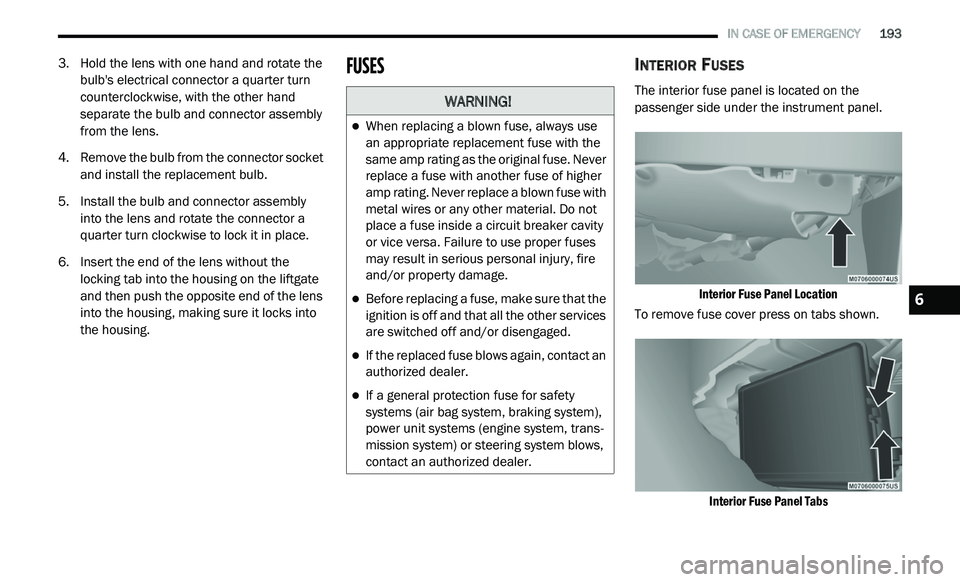
The interior fuse panel is located on the
passenger side under the instrument panel.
Interior Fuse Panel Location
To remove fuse cover press on tabs shown.
Interior Fuse Panel Tabs
WARNING!
When replacing a blown fuse, always use
an appropriate replacement fuse with the
same amp rating as the original fuse. Never
replace a fuse with another fuse of higher
amp rating. Never replace a blown fuse with
metal wires or any other material. Do not
place a fuse inside a circuit breaker cavity
or vice versa. Failure to use proper fuses
may result in serious personal injury, fire
and/or property damage.
Before replacing a fuse, make sure that the
ignition is off and that all the other services
are switched off and/or disengaged.
If the replaced fuse blows again, contact an
authorized dealer.
If a general protection fuse for safety
systems (air bag system, braking system),
power unit systems (engine system, trans -
mission system) or steering system blows,
c o
ntact an authorized dealer.
6
Page 201 of 396
IN CASE OF EMERGENCY 199
JACKING AND TIRE CHANGINGJACK LOCATION
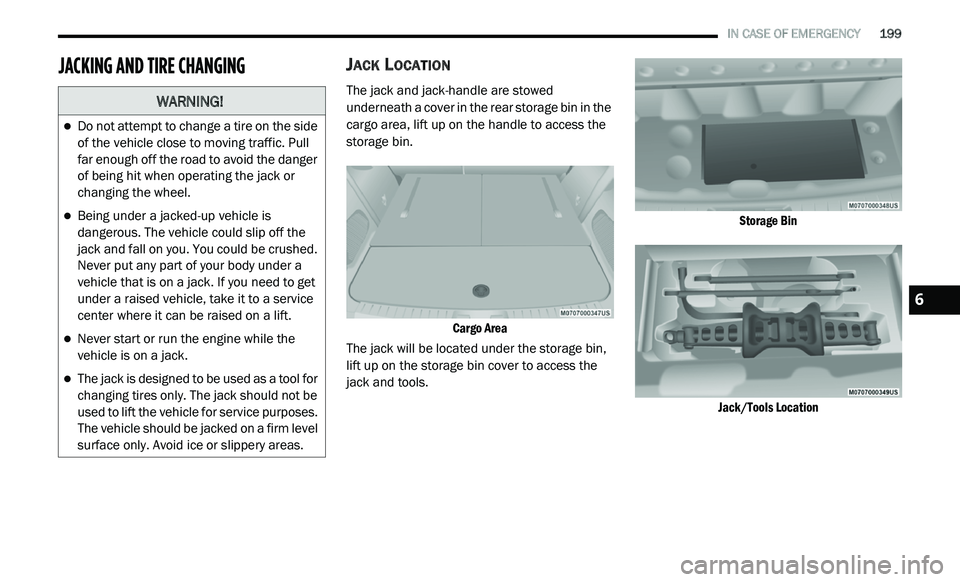
The jack and jack-handle are stowed
underneath a cover in the rear storage bin in the
cargo area, lift up on the handle to access the
storage bin.
Cargo Area
The jack will be located under the storage bin,
l i
ft up on the storage bin cover to access the
jack and tools.
Storage Bin
Jack/Tools Location
WARNING!
Do not attempt to change a tire on the side
of the vehicle close to moving traffic. Pull
far enough off the road to avoid the danger
of being hit when operating the jack or
changing the wheel.
Being under a jacked-up vehicle is
dangerous. The vehicle could slip off the
jack and fall on you. You could be crushed.
Never put any part of your body under a
vehicle that is on a jack. If you need to get
under a raised vehicle, take it to a service
center where it can be raised on a lift.
Never start or run the engine while the
vehicle is on a jack.
The jack is designed to be used as a tool for
changing tires only. The jack should not be
used to lift the vehicle for service purposes.
The vehicle should be jacked on a firm level
surface only. Avoid ice or slippery areas.
6
Page 204 of 396
202 IN CASE OF EMERGENCY
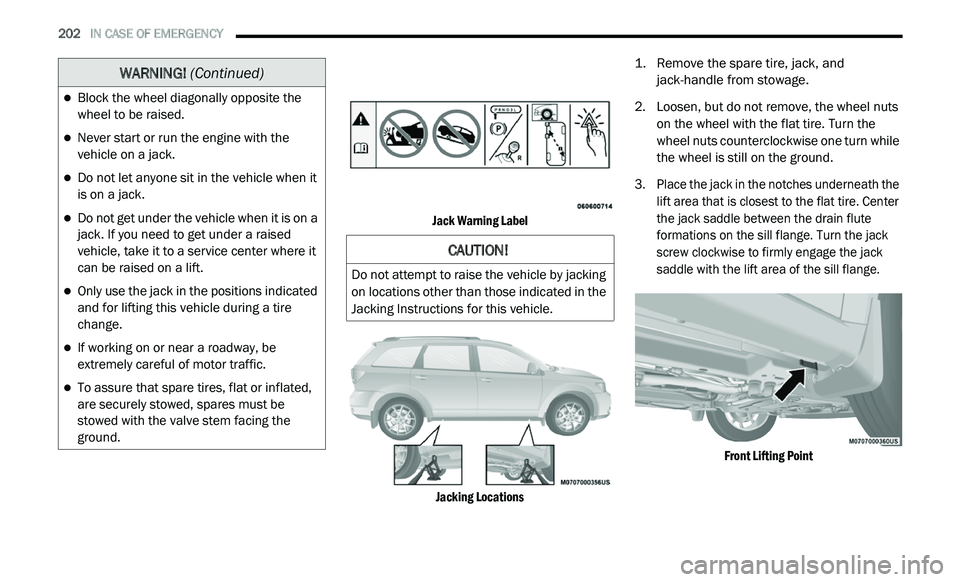
Jack Warning Label
Jacking Locations
1. R
emove the spare tire, jack, and
j
ack-handle from stowage.
2. Lo osen, but do not remove, the wheel nuts
o
n the wheel with the flat tire. Turn the
wheel nuts counterclockwise one turn while
the wheel is still on the ground.
3. Place the jack in the notches underneath the l
ift area that is closest to the flat tire. Center
the jack saddle between the drain flute
formations on the sill flange. Turn the jack
screw clockwise to firmly engage the jack
saddle with the lift area of the sill flange.
Front Lifting Point
Block the wheel diagonally opposite the
wheel to be raised.
Never start or run the engine with the
vehicle on a jack.
Do not let anyone sit in the vehicle when it
is on a jack.
Do not get under the vehicle when it is on a
jack. If you need to get under a raised
vehicle, take it to a service center where it
can be raised on a lift.
Only use the jack in the positions indicated
and for lifting this vehicle during a tire
change.
If working on or near a roadway, be
extremely careful of motor traffic.
To assure that spare tires, flat or inflated,
are securely stowed, spares must be
stowed with the valve stem facing the
ground.
WARNING! (Continued)
CAUTION!
Do not attempt to raise the vehicle by jacking
on locations other than those indicated in the
Jacking Instructions for this vehicle.