instrument panel DODGE JOURNEY 2020 Workshop Manual
[x] Cancel search | Manufacturer: DODGE, Model Year: 2020, Model line: JOURNEY, Model: DODGE JOURNEY 2020Pages: 396, PDF Size: 25.53 MB
Page 258 of 396
256
TECHNICAL SPECIFICATIONS
IDENTIFICATION DATA
VEHICLE IDENTIFICATION NUMBER
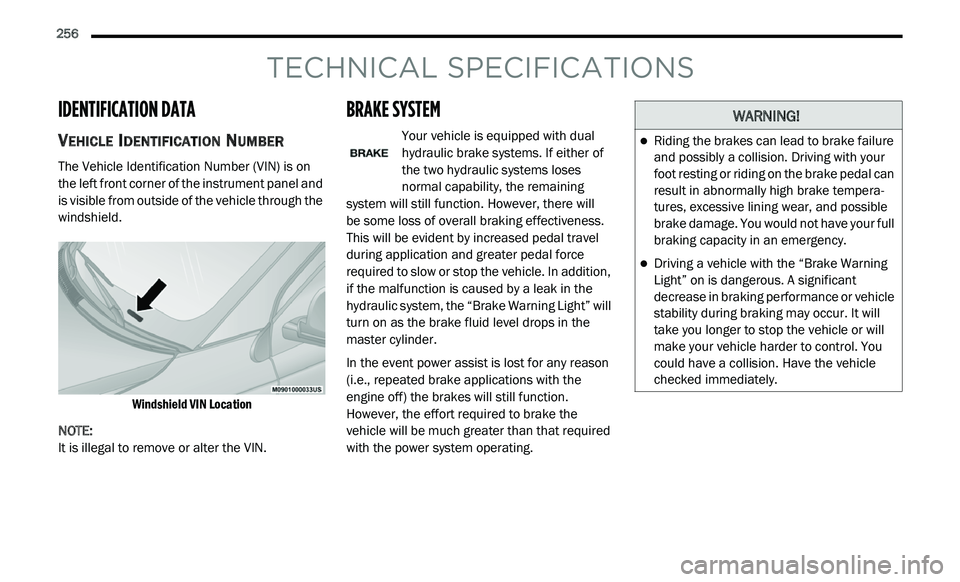
The Vehicle Identification Number (VIN) is on
the left front corner of the instrument panel and
is visible from outside of the vehicle through the
windshield.
Windshield VIN Location
NOTE:
It is illegal to remove or alter the VIN.
BRAKE SYSTEM
Your vehicle is equipped with dual
hydraulic brake systems. If either of
t h
e two hydraulic systems loses
normal capability, the remaining
system will still function. However, there will
be some loss of overall braking effectiveness.
T h
is will be evident by increased pedal travel
during application and greater pedal force
required to slow or stop the vehicle. In addition,
if the malfunction is caused by a leak in the
hydraulic system, the “Brake Warning Light” will
turn on as the brake fluid level drops in the
master cylinder.
In the event power assist is lost for any reason
( i
.e., repeated brake applications with the
engine off) the brakes will still function.
However, the effort required to brake the
vehicle will be much greater than that required
with the power system operating.
WARNING!
Riding the brakes can lead to brake failure
and possibly a collision. Driving with your
foot resting or riding on the brake pedal can
result in abnormally high brake tempera -
tures, excessive lining wear, and possible
b r
ake damage. You would not have your full
braking capacity in an emergency.
Driving a vehicle with the “Brake Warning
Light” on is dangerous. A significant
decrease in braking performance or vehicle
stability during braking may occur. It will
take you longer to stop the vehicle or will
make your vehicle harder to control. You
could have a collision. Have the vehicle
checked immediately.
Page 267 of 396
265
MULTIMEDIA
CYBERSECURITY
Your vehicle may be a connected vehicle and
may be equipped with both wired and wireless
networks. These networks allow your vehicle to
send and receive information. This information
allows systems and features in your vehicle to
function properly.
Your vehicle may be equipped with certain
se
curity features to reduce the risk of
unauthorized and unlawful access to vehicle
systems and wireless communications. Vehicle
software technology continues to evolve over
time and FCA US LLC, working with its suppliers,
evaluates and takes appropriate steps as
needed. Similar to a computer or other devices,
your vehicle may require software updates to
improve the usability and performance of your
systems or to reduce the potential risk of
unauthorized and unlawful access to your
vehicle systems.
The risk of unauthorized and unlawful access to
y o
ur vehicle systems may still exist, even if the
most recent version of vehicle software (such as
Uconnect software) is installed. NOTE:
FCA US LLC or your dealer may contact you
directly regarding software updates.
To help further improve vehicle security and
minimize the potential risk of a security
breach, vehicle owners should:
Routinely check
www.driveuconnect.com/
support/software-update.html
(US Resi-
dents) or
www.driveuconnect.ca
(Canadian
Residents) to learn about available Uconnect
s o
ftware updates.
Only connect and use trusted media
devices (e.g. personal mobile phones,
USBs, CDs).
Privacy of any wireless and wired
c o
mmunications cannot be assured.
Third parties may unlawfully intercept
i n
formation and private communications
without your consent. For further information,
refer to “Onboard Diagnostic System (OBD II)
Cybersecurity” in “Getting To Know Your
Instrument Panel”.
WARNING!
It is not possible to know or to predict all of
the possible outcomes if your vehicle’s
systems are breached. It may be possible
that vehicle systems, including safety
related systems, could be impaired or a
loss of vehicle control could occur that may
result in an accident involving serious injury
or death.
ONLY insert media (e.g., USB, SD card, or
CD) into your vehicle if it came from a
trusted source. Media of unknown origin
could possibly contain malicious software,
and if installed in your vehicle, it may
increase the possibility for vehicle systems
to be breached.
As always, if you experience unusual
vehicle behavior, take your vehicle to your
nearest authorized dealer immediately.9
Page 323 of 396
MULTIMEDIA 321
NOTE:
The vehicle radio unit is acting as the amplifier
f o
r audio output from the Auxiliary device.
Therefore if the volume control on the Auxiliary
device is set too low, there will be insufficient
audio signal for the radio unit to play the music
on the device.
Source
Press the Source button on the touchscreen to
s e
lect the desired audio source, Disc/USB/SD
Card/AUX/ or Bluetooth®. This screen will time
out after a few seconds and return to the main
radio screen if no selection is made.
Audio
Refer to “Audio” in “Radio Mode” for further
i n
formation on adjusting the audio settings.
SD Card Mode
Overview
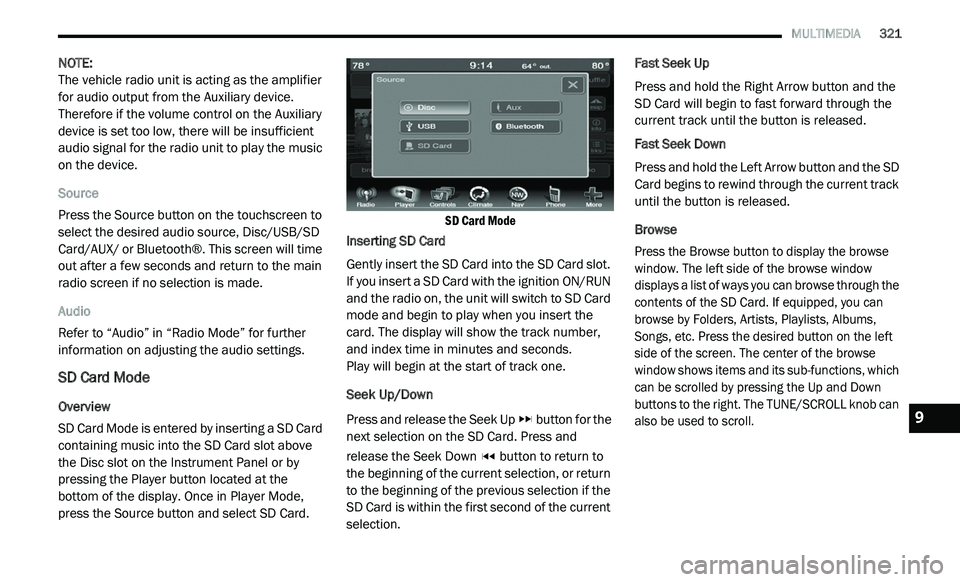
SD Card Mode is entered by inserting a SD Card
co
ntaining music into the SD Card slot above
the Disc slot on the Instrument Panel or by
pressing the Player button located at the
bottom of the display. Once in Player Mode,
press the Source button and select SD Card.
SD Card Mode
Inserting SD Card
Gently insert the SD Card into the SD Card slot.
I f
you insert a SD Card with the ignition ON/RUN
and the radio on, the unit will switch to SD Card
mode and begin to play when you insert the
card. The display will show the track number,
and index time in minutes and seconds.
Play will begin at the start of track one.
Seek Up/Down
Press and release the Seek Up button for the
next selection on the SD Card. Press and
r e
lease the Seek Down button to return to
the beginning of the current selection, or return
t o
the beginning of the previous selection if the
SD Card is within the first second of the current
selection. Fast Seek Up
Press and hold the Right Arrow button and the
S
D
Card will begin to fast forward through the
current track until the button is released.
Fast Seek Down
Press and hold the Left Arrow button and the SD
C a
rd begins to rewind through the current track
until the button is released.
Browse
Press the Browse button to display the browse
w i
ndow. The left side of the browse window
displays a list of ways you can browse through the
contents of the SD Card. If equipped, you can
browse by Folders, Artists, Playlists, Albums,
Songs, etc. Press the desired button on the left
side of the screen. The center of the browse
window shows items and its sub-functions, which
can be scrolled by pressing the Up and Down
buttons to the right. The TUNE/SCROLL knob can
also be used to scroll.
9
Page 366 of 396
364 MULTIMEDIA
The left-hand control is a rocker-type switch with
a push button in the center. The function of the
left-hand control is different depending on
which mode you are in.
The following describes the left-hand control
op
eration in each mode:
RADIO OPERATION
Pushing the top of the switch will “Seek” up for
the next listenable station and pushing the
bottom of the switch will “Seek” down for the
next listenable station.
The button located in the center of the left-hand
co
ntrol will tune to the next preset station that
you have programmed in the radio preset
button.
MEDIA MODE
Pushing the top of the switch once goes to the
next track on the selected media (AUX/USB/
Bluetooth®). Pushing the bottom of the switch
once goes to the beginning of the current track,
or to the beginning of the previous track if it is
within eight seconds after the current track
begins to play.
IPOD®/USB/MP3 CONTROL
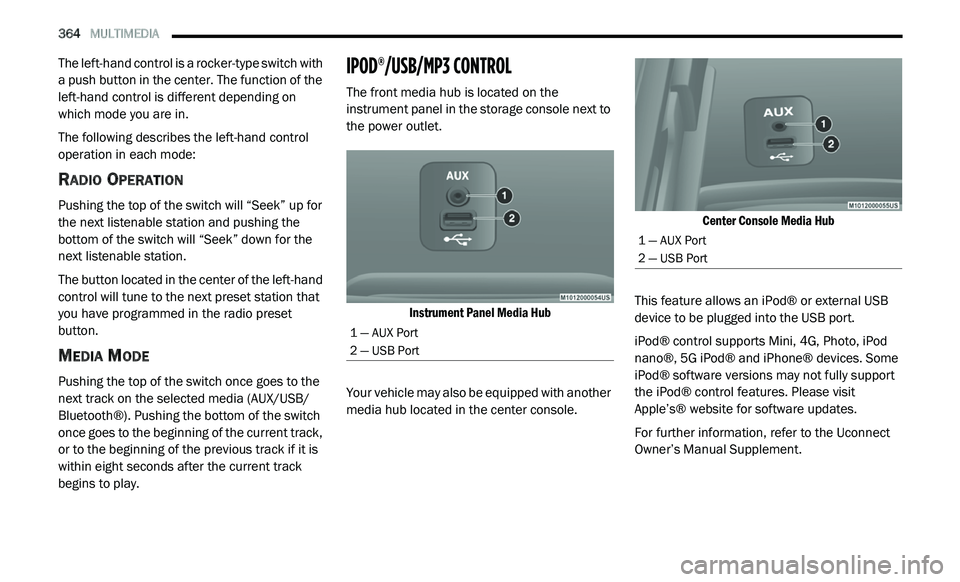
The front media hub is located on the
instrument panel in the storage console next to
the power outlet.
Instrument Panel Media Hub
Your vehicle may also be equipped with another
me
dia hub located in the center console.
Center Console Media Hub
This feature allows an iPod® or external USB
d e
vice to be plugged into the USB port.
iPod® control supports Mini, 4G, Photo, iPod
n a
no®, 5G iPod® and iPhone® devices. Some
iPod® software versions may not fully support
the iPod® control features. Please visit
Apple’s® website for software updates.
For further information, refer to the Uconnect
Ow
ner’s Manual Supplement.
1 — AUX Port
2 — USB Port
1 — AUX Port
2 — USB Port
Page 389 of 396
387
Fog Lights, Service.........................................192Fold-Flat Seats.................................................25Folding Rear Seats...................................26, 29Four-Way Hazard Flasher...............................189Freeing A Stuck Vehicle.................................211Fuel...............................................................257Additives...................................................258Clean Air....................................................258Ethanol......................................................258Gasoline....................................................257Materials Added........................................258Methanol...................................................258Octane Rating.................................257, 262Requirements...........................................257Specifications............................................262Tank Capacity............................................261Fueling...........................................................176Fuses.............................................................193
G
Garage Door Opener (HomeLink)....................80Gasoline, Clean Air........................................258Gasoline, Reformulated.................................258Gear Ranges..................................................163Gear Selector Override..................................210Glass Cleaning...............................................255Gross Axle Weight Rating.....................178, 179Gross Vehicle Weight Rating..........................178GVWR............................................................178
H
HazardDriving Through Flowing, Rising, Or Shallow St
anding Water....................................187Hazard Warning Flashers..............................189Head Restraints...............................................32HeadlightsAutomatic....................................................41Bulb Replacement....................................191Cleaning...................................................253Delay...........................................................41High Beam................................................191High Beam/Low Beam Select Switch..........41Lights On Reminder.....................................42On With Wipers............................................41Passing........................................................41Switch..........................................................40Time Delay...................................................41Heated Mirrors.................................................39Heated Seats...................................................31Heater, Engine Block....................................159
High Beam/Low Beam Select (Dimmer) Switch......41
Hill Start Assist..............................................114HitchesTrailer Towing...........................................180Holder, Coin.....................................................85Holder, Cup......................................................86HomeLink (Garage Door Opener).....................80Hood Prop........................................................76
Hood Release..................................................76
I
Ignition.............................................................12Switch..........................................................12Immobilizer (Sentry Key)..................................16Inside Rearview Mirror..............................36, 37Instrument Cluster...........................................94Descriptions..............................................106Display..................................................95, 96Engine Oil Reset..........................................96Instrument Panel Lens Cleaning...................254Interior Appearance Care..............................254Interior Fuses................................................193Interior Lights...................................................43Intermittent Wipers (Delay Wipers)..................45Introduction.......................................................7InverterPower...........................................................89iPod/USB/MP3 Control.................................364
J
Jack Location................................................199Jack Operation.....................................201, 234Jacking Instructions......................................201Jump Starting................................................206
11