steering DODGE NEON 1999 Service Repair Manual
[x] Cancel search | Manufacturer: DODGE, Model Year: 1999, Model line: NEON, Model: DODGE NEON 1999Pages: 1200, PDF Size: 35.29 MB
Page 940 of 1200
WARNING: WHEN HANDLING AN UNDEPLOYED
AIR BAG MODULE DURING SERVICING OF THE
STEERING COLUMN THE FOLLOWING PRECAU-
TIONS SHOULD BE OBSERVED. AT NO TIME
SHOULD ANY SOURCE OF ELECTRICITY BE PER-
MITTED NEAR THE INFLATOR ON THE BACK OF
THE AIR BAG MODULE. WHEN CARRYING A LIVE
MODULE, THE TRIM COVER SHOULD BE POINTED
AWAY FROM THE BODY TO MINIMIZE INJURY IF
MODULE ACCIDENTLY DEPLOYS. IF AIR BAG MOD-
ULE IS PLACED ON A BENCH OR OTHER SUR-
FACE, PLASTIC COVER SHOULD BE FACE UP TO
MINIMIZE MOVEMENT IN CASE OF ACCIDENTAL
DEPLOYMENT.
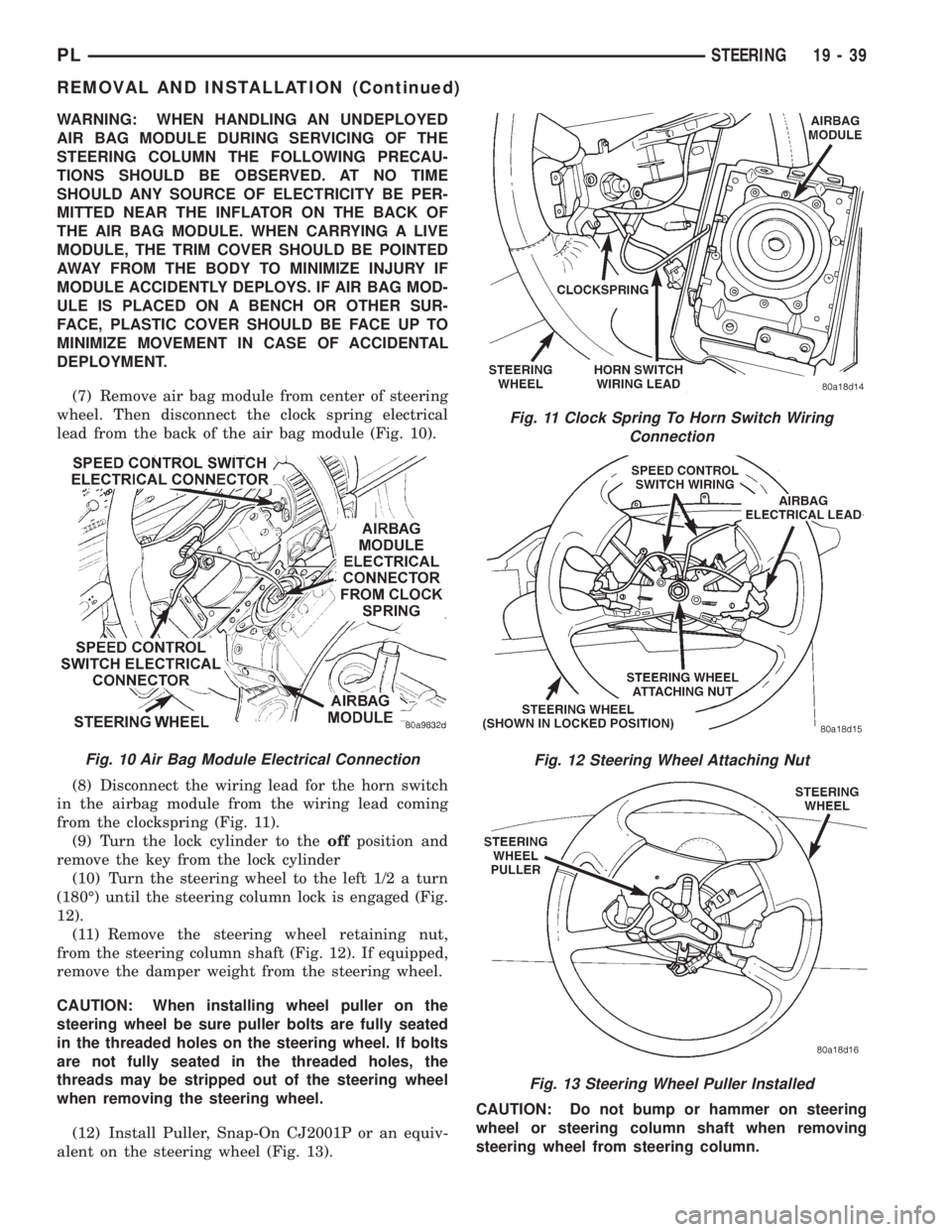
(7) Remove air bag module from center of steering
wheel. Then disconnect the clock spring electrical
lead from the back of the air bag module (Fig. 10).
(8) Disconnect the wiring lead for the horn switch
in the airbag module from the wiring lead coming
from the clockspring (Fig. 11).
(9) Turn the lock cylinder to theoffposition and
remove the key from the lock cylinder
(10) Turn the steering wheel to the left 1/2 a turn
(180É) until the steering column lock is engaged (Fig.
12).
(11) Remove the steering wheel retaining nut,
from the steering column shaft (Fig. 12). If equipped,
remove the damper weight from the steering wheel.
CAUTION: When installing wheel puller on the
steering wheel be sure puller bolts are fully seated
in the threaded holes on the steering wheel. If bolts
are not fully seated in the threaded holes, the
threads may be stripped out of the steering wheel
when removing the steering wheel.
(12) Install Puller, Snap-On CJ2001P or an equiv-
alent on the steering wheel (Fig. 13).CAUTION: Do not bump or hammer on steering
wheel or steering column shaft when removing
steering wheel from steering column.
Fig. 11 Clock Spring To Horn Switch Wiring
Connection
Fig. 12 Steering Wheel Attaching Nut
Fig. 13 Steering Wheel Puller Installed
Fig. 10 Air Bag Module Electrical Connection
PLSTEERING 19 - 39
REMOVAL AND INSTALLATION (Continued)
Page 941 of 1200
(13) Remove steering wheel assembly from steer-
ing column shaft using Puller, Special Tool C-3428-B
or equivalent.
(14) Remove key lock cylinder from steering col-
umn. Key lock cylinder is removed from steering col-
umn using the following procedure. Place the key
lock cylinder in the Run position. Then through the
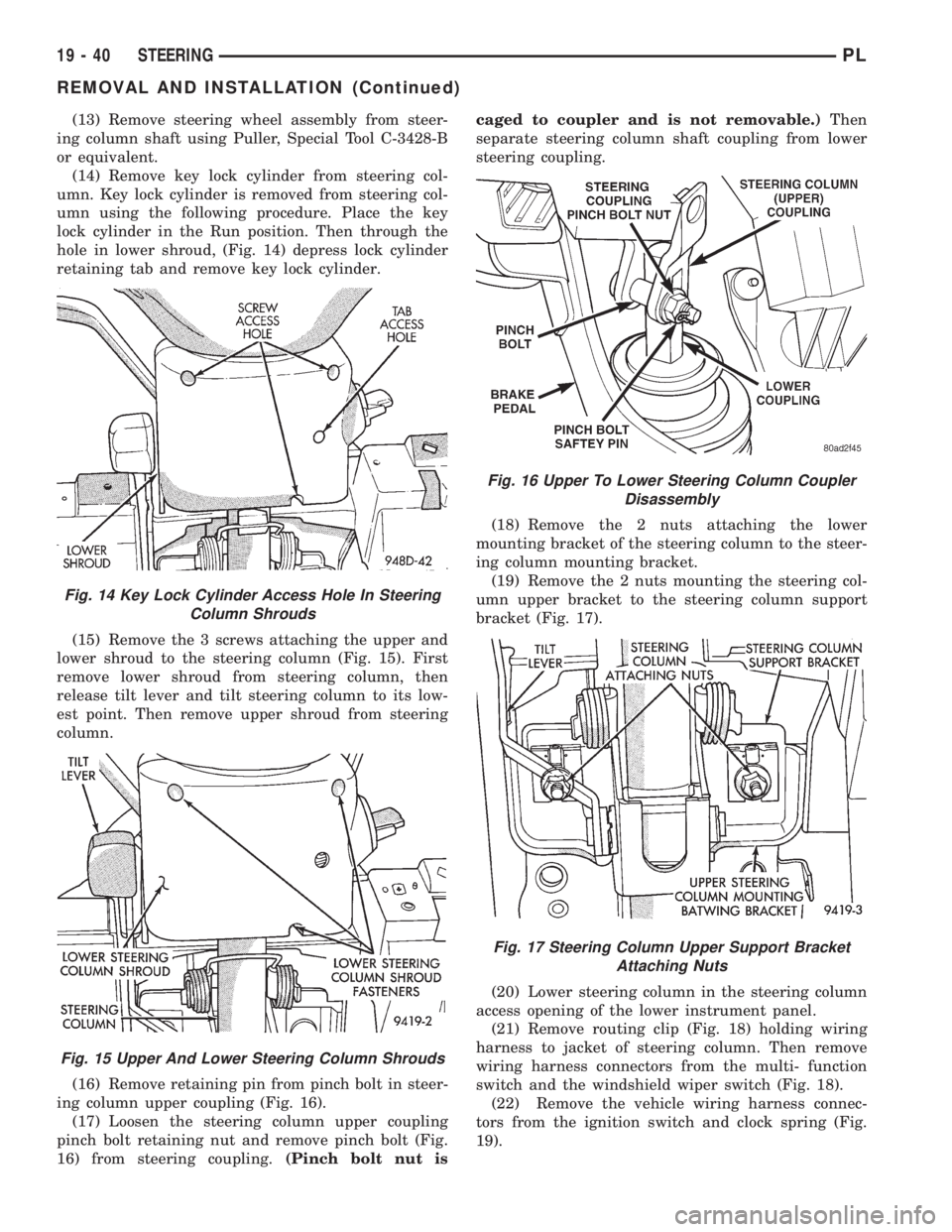
hole in lower shroud, (Fig. 14) depress lock cylinder
retaining tab and remove key lock cylinder.
(15) Remove the 3 screws attaching the upper and
lower shroud to the steering column (Fig. 15). First
remove lower shroud from steering column, then
release tilt lever and tilt steering column to its low-
est point. Then remove upper shroud from steering
column.
(16) Remove retaining pin from pinch bolt in steer-
ing column upper coupling (Fig. 16).
(17) Loosen the steering column upper coupling
pinch bolt retaining nut and remove pinch bolt (Fig.
16) from steering coupling.(Pinch bolt nut iscaged to coupler and is not removable.)Then
separate steering column shaft coupling from lower
steering coupling.
(18) Remove the 2 nuts attaching the lower
mounting bracket of the steering column to the steer-
ing column mounting bracket.
(19) Remove the 2 nuts mounting the steering col-
umn upper bracket to the steering column support
bracket (Fig. 17).
(20) Lower steering column in the steering column
access opening of the lower instrument panel.
(21) Remove routing clip (Fig. 18) holding wiring
harness to jacket of steering column. Then remove
wiring harness connectors from the multi- function
switch and the windshield wiper switch (Fig. 18).
(22) Remove the vehicle wiring harness connec-
tors from the ignition switch and clock spring (Fig.
19).
Fig. 14 Key Lock Cylinder Access Hole In Steering
Column Shrouds
Fig. 15 Upper And Lower Steering Column Shrouds
Fig. 16 Upper To Lower Steering Column Coupler
Disassembly
Fig. 17 Steering Column Upper Support Bracket
Attaching Nuts
19 - 40 STEERINGPL
REMOVAL AND INSTALLATION (Continued)
Page 942 of 1200
(23) Remove steering column from vehicle through
the drivers door of the passenger compartment. Use
care to avoid damaging the paint or interior trim.
INSTALL
(1) Install steering column into steering column
access opening in lower instrument panel.
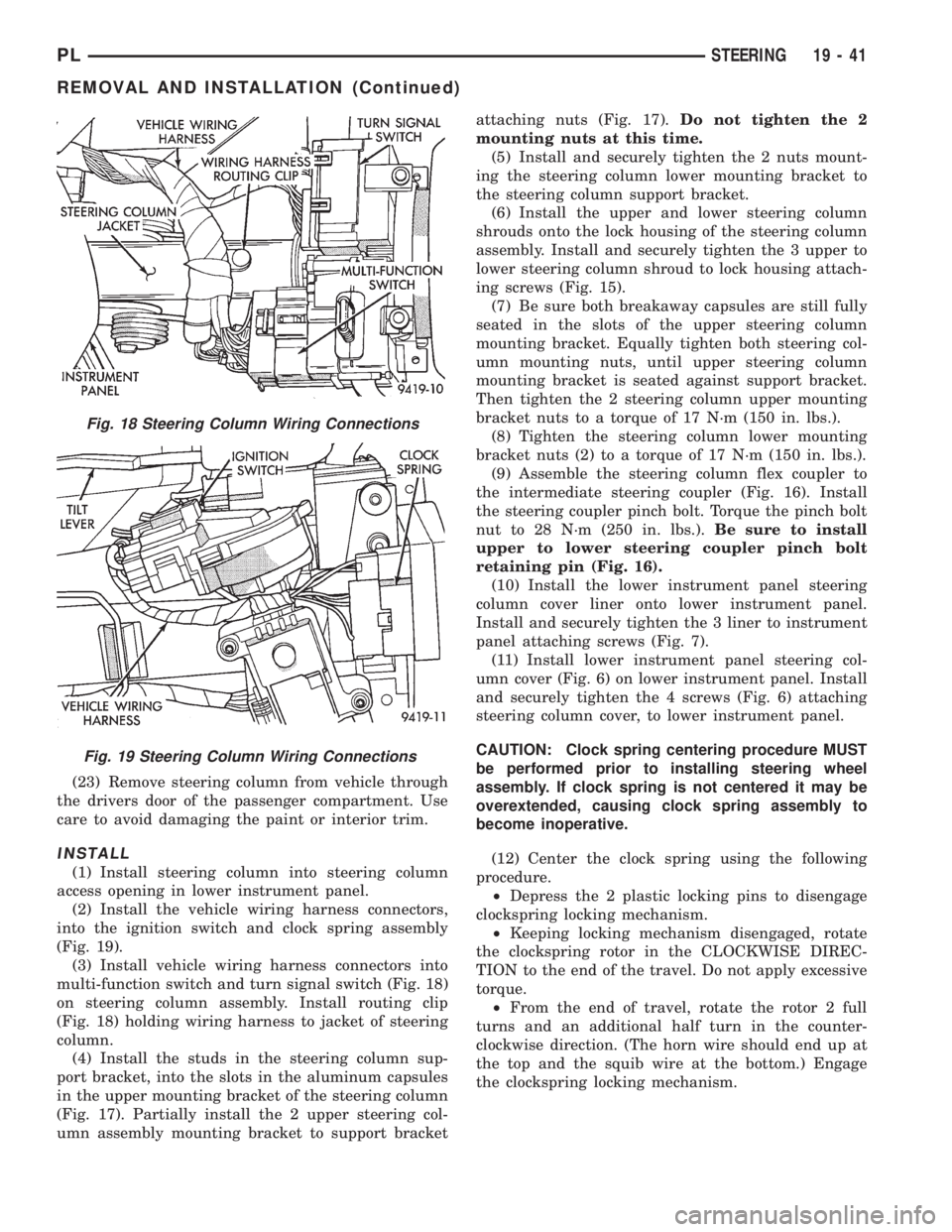
(2) Install the vehicle wiring harness connectors,
into the ignition switch and clock spring assembly
(Fig. 19).
(3) Install vehicle wiring harness connectors into
multi-function switch and turn signal switch (Fig. 18)
on steering column assembly. Install routing clip
(Fig. 18) holding wiring harness to jacket of steering
column.
(4) Install the studs in the steering column sup-
port bracket, into the slots in the aluminum capsules
in the upper mounting bracket of the steering column
(Fig. 17). Partially install the 2 upper steering col-
umn assembly mounting bracket to support bracketattaching nuts (Fig. 17).Do not tighten the 2
mounting nuts at this time.
(5) Install and securely tighten the 2 nuts mount-
ing the steering column lower mounting bracket to
the steering column support bracket.
(6) Install the upper and lower steering column
shrouds onto the lock housing of the steering column
assembly. Install and securely tighten the 3 upper to
lower steering column shroud to lock housing attach-
ing screws (Fig. 15).
(7) Be sure both breakaway capsules are still fully
seated in the slots of the upper steering column
mounting bracket. Equally tighten both steering col-
umn mounting nuts, until upper steering column
mounting bracket is seated against support bracket.
Then tighten the 2 steering column upper mounting
bracket nuts to a torque of 17 N´m (150 in. lbs.).
(8) Tighten the steering column lower mounting
bracket nuts (2) to a torque of 17 N´m (150 in. lbs.).
(9) Assemble the steering column flex coupler to
the intermediate steering coupler (Fig. 16). Install
the steering coupler pinch bolt. Torque the pinch bolt
nut to 28 N´m (250 in. lbs.).Be sure to install
upper to lower steering coupler pinch bolt
retaining pin (Fig. 16).
(10) Install the lower instrument panel steering
column cover liner onto lower instrument panel.
Install and securely tighten the 3 liner to instrument
panel attaching screws (Fig. 7).
(11) Install lower instrument panel steering col-
umn cover (Fig. 6) on lower instrument panel. Install
and securely tighten the 4 screws (Fig. 6) attaching
steering column cover, to lower instrument panel.
CAUTION: Clock spring centering procedure MUST
be performed prior to installing steering wheel
assembly. If clock spring is not centered it may be
overextended, causing clock spring assembly to
become inoperative.
(12) Center the clock spring using the following
procedure.
²Depress the 2 plastic locking pins to disengage
clockspring locking mechanism.
²Keeping locking mechanism disengaged, rotate
the clockspring rotor in the CLOCKWISE DIREC-
TION to the end of the travel. Do not apply excessive
torque.
²From the end of travel, rotate the rotor 2 full
turns and an additional half turn in the counter-
clockwise direction. (The horn wire should end up at
the top and the squib wire at the bottom.) Engage
the clockspring locking mechanism.
Fig. 18 Steering Column Wiring Connections
Fig. 19 Steering Column Wiring Connections
PLSTEERING 19 - 41
REMOVAL AND INSTALLATION (Continued)
Page 943 of 1200
CAUTION: Do not install steering wheel onto shaft
of steering column assembly by driving it onto the
shaft. Pull steering wheel down onto steering col-
umn shaft using ONLY the steering wheel retaining
nut.
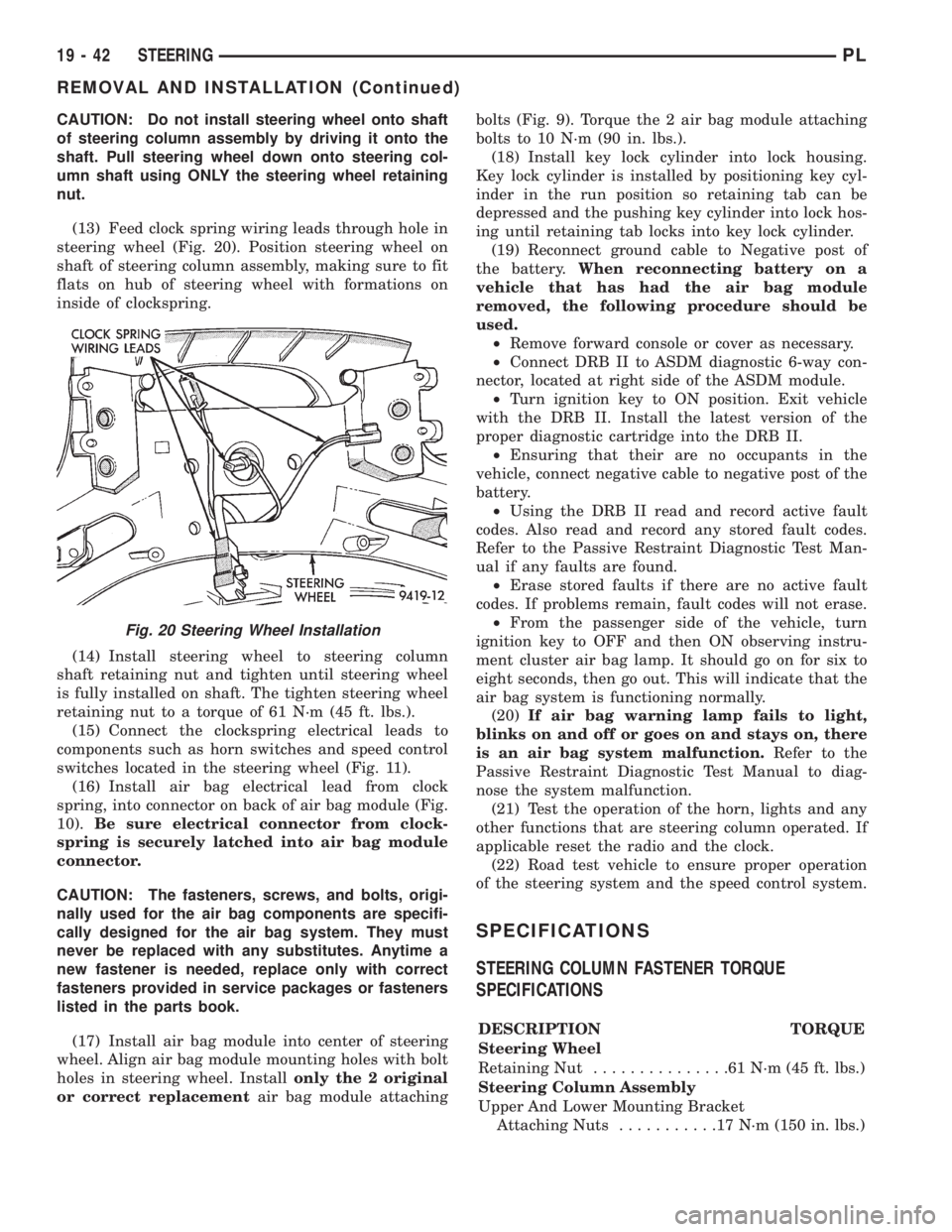
(13) Feed clock spring wiring leads through hole in
steering wheel (Fig. 20). Position steering wheel on
shaft of steering column assembly, making sure to fit
flats on hub of steering wheel with formations on
inside of clockspring.
(14) Install steering wheel to steering column
shaft retaining nut and tighten until steering wheel
is fully installed on shaft. The tighten steering wheel
retaining nut to a torque of 61 N´m (45 ft. lbs.).
(15) Connect the clockspring electrical leads to
components such as horn switches and speed control
switches located in the steering wheel (Fig. 11).
(16) Install air bag electrical lead from clock
spring, into connector on back of air bag module (Fig.
10).Be sure electrical connector from clock-
spring is securely latched into air bag module
connector.
CAUTION: The fasteners, screws, and bolts, origi-
nally used for the air bag components are specifi-
cally designed for the air bag system. They must
never be replaced with any substitutes. Anytime a
new fastener is needed, replace only with correct
fasteners provided in service packages or fasteners
listed in the parts book.
(17) Install air bag module into center of steering
wheel. Align air bag module mounting holes with bolt
holes in steering wheel. Installonly the 2 original
or correct replacementair bag module attachingbolts (Fig. 9). Torque the 2 air bag module attaching
bolts to 10 N´m (90 in. lbs.).
(18) Install key lock cylinder into lock housing.
Key lock cylinder is installed by positioning key cyl-
inder in the run position so retaining tab can be
depressed and the pushing key cylinder into lock hos-
ing until retaining tab locks into key lock cylinder.
(19) Reconnect ground cable to Negative post of
the battery.When reconnecting battery on a
vehicle that has had the air bag module
removed, the following procedure should be
used.
²Remove forward console or cover as necessary.
²Connect DRB II to ASDM diagnostic 6-way con-
nector, located at right side of the ASDM module.
²Turn ignition key to ON position. Exit vehicle
with the DRB II. Install the latest version of the
proper diagnostic cartridge into the DRB II.
²Ensuring that their are no occupants in the
vehicle, connect negative cable to negative post of the
battery.
²Using the DRB II read and record active fault
codes. Also read and record any stored fault codes.
Refer to the Passive Restraint Diagnostic Test Man-
ual if any faults are found.
²Erase stored faults if there are no active fault
codes. If problems remain, fault codes will not erase.
²From the passenger side of the vehicle, turn
ignition key to OFF and then ON observing instru-
ment cluster air bag lamp. It should go on for six to
eight seconds, then go out. This will indicate that the
air bag system is functioning normally.
(20)If air bag warning lamp fails to light,
blinks on and off or goes on and stays on, there
is an air bag system malfunction.Refer to the
Passive Restraint Diagnostic Test Manual to diag-
nose the system malfunction.
(21) Test the operation of the horn, lights and any
other functions that are steering column operated. If
applicable reset the radio and the clock.
(22) Road test vehicle to ensure proper operation
of the steering system and the speed control system.
SPECIFICATIONS
STEERING COLUMN FASTENER TORQUE
SPECIFICATIONS
DESCRIPTION TORQUE
Steering Wheel
Retaining Nut...............61N´m(45ft.lbs.)
Steering Column Assembly
Upper And Lower Mounting Bracket
Attaching Nuts...........17N´m(150 in. lbs.)
Fig. 20 Steering Wheel Installation
19 - 42 STEERINGPL
REMOVAL AND INSTALLATION (Continued)
Page 985 of 1200
the use of special dyes to aid in detecting fluid leaks.
The use of transmission sealers should be avoided,
since they may adversely affect seals.
DESCRIPTION AND OPERATION
TORQUE CONVERTER CLUTCH
A torque converter clutch is standard on all vehi-
cles. The torque converter clutch is activated only in
direct drive and is controlled by the engine electron-
ics. A solenoid on the valve body, is powered by the
powertrain control module to activate the torque con-
verter clutch.
HYDRAULIC CONTROL SYSTEM
The hydraulic control system makes the transaxle
fully automatic, and has four important functions to
perform. The components of any automatic control
system may be grouped into the following basic
groups:
²Pressure supply system
²Pressure regulating valves
²Flow control valves
²Clutches
²Band servos
Taking each of these basic groups or systems in
turn, the control system may be described as follows:
PRESSURE SUPPLY SYSTEM
The pressure supply system consists of an oil pump
driven by the engine through the torque converter.
The single pump furnishes pressure for all hydraulic
and lubrication requirements.Oil pump housing
assemblies are available with preselected pump
gears.
PRESSURE REGULATING VALVES
The pressure regulating valve controls line pres-
sure dependent on throttle opening. The governor
valve transmits regulated pressure to the valve body
(in conjunction with vehicle speed) to control upshift
and downshift.
The throttle valve transmits regulated pressure to
the transaxle (dependent on throttle position) to con-
trol upshift and downshift.
FLOW CONTROL VALVES
The manual valve provides the different transaxle
drive ranges selected by the vehicle operator.
The 1-2 shift valve automatically shifts the tran-
saxle from first to second or from second to first,
depending on the vehicle operation.
The 2-3 shift valve automatically shifts the tran-
saxle from second to third or from third to second
depending on the vehicle operation.The kickdown valve makes possible a forced down-
shift from third to second, second to first, or third to
first (depending on vehicle speed). This can be done
by depressing the accelerator pedal past the detent
feel near wide open throttle.
The shuttle valve has two separate functions and
performs each independently of the other. The first is
providing fast release of the kickdown band, and
smooth front clutch engagement when a lift-foot
upshift from second to third is made. The second
function is to regulate the application of the kick-
down servo and band when making third±to±second
kickdown.
The bypass valve provides for smooth application
of the kickdown band on 1-2 upshifts.
The torque converter clutch solenoid allows for the
electronic control of the torque converter clutch. It
also disengages the torque converter at closed throt-
tle. This is done during engine warm-up and part-
throttle acceleration.
The switch valve directs oil to apply the torque
converter clutch in one position. The switch valve
releases the torque converter clutch in the other posi-
tion.
CLUTCHES, BAND SERVOS, AND ACCUMULATOR
The front and rear clutch pistons, and both servo
pistons, are moved hydraulically to engage the
clutches and apply the bands. The pistons are
released by spring tension when hydraulic pressure
is released. On the 2-3 upshift, the kickdown servo
piston is released by spring tension and hydraulic
pressure.
The accumulator controls the hydraulic pressure
on the apply±side of the kickdown servo during the
1-2 upshift; thereby cushioning the kickdown band
application at any throttle position.
AUTOMATIC TRANSMISSION SHIFTER/IGNITION
INTERLOCK
The Shifter/Ignition Interlock, is a mechanical
cable operated system (Fig. 1). It interconnects the
automatic transmission floor±mounted shifter to the
steering column ignition switch. The interlock system
locks the floor±mounted shift lever into the PARK
position whenever the ignition switch is in the LOCK
or ACCESSORY position. When the key is in the
OFF or RUN position, the shifter is unlocked and
will move into any position. Also the interlock system
prevents the ignition switch from being turned to
LOCK or ACCESSORY position, unless shifter is in
the PARK position.
GEARSHIFT AND PARKING LOCK CONTROLS
The transaxle is controlled by alever typegear-
shift incorporated within the console. The control has
21 - 42 TRANSAXLEPL
GENERAL INFORMATION (Continued)
Page 1005 of 1200
(7) Pull cable up and out of the gearshift mecha-
nism.
(8) Remove the three screws along the bottom of
the lower steering column cover and screw on the left
outward face of cover.
(9) Grasp the cover and pull rearward until the
clips disengage.
(10) Remove two screws at the upper area of the
column liner and lower left corner.
(11) Remove steering column cover and steering
column cover liner.
(12) Lift up the top cover and cluster bezel until
the clips disengage and separate to provide clear-
ance.
(13) Insert a screwdriver into access hole in the
lower shroud. Depress the cylinder button while
rotating the cylinder with the key inserted between
the ON and START positions. This will disengage the
cylinder from the column.
(14) Pull out the key cylinder.
(15) Remove the three lower±to±upper shroud
attaching screws through the bottom of the lower
shroud.
(16) Separate the upper and lower shrouds.
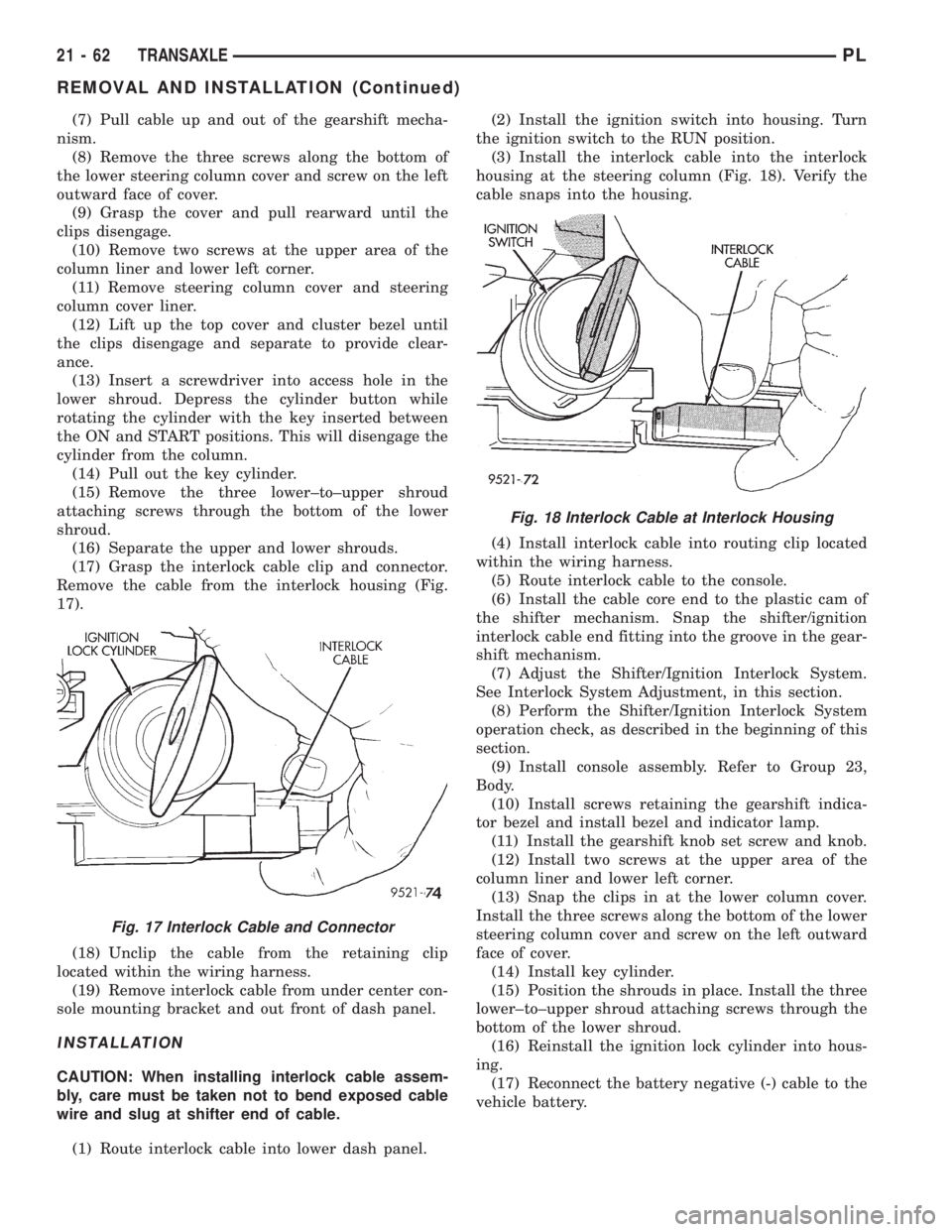
(17) Grasp the interlock cable clip and connector.
Remove the cable from the interlock housing (Fig.
17).
(18) Unclip the cable from the retaining clip
located within the wiring harness.
(19) Remove interlock cable from under center con-
sole mounting bracket and out front of dash panel.
INSTALLATION
CAUTION: When installing interlock cable assem-
bly, care must be taken not to bend exposed cable
wire and slug at shifter end of cable.
(1) Route interlock cable into lower dash panel.(2) Install the ignition switch into housing. Turn
the ignition switch to the RUN position.
(3) Install the interlock cable into the interlock
housing at the steering column (Fig. 18). Verify the
cable snaps into the housing.
(4) Install interlock cable into routing clip located
within the wiring harness.
(5) Route interlock cable to the console.
(6) Install the cable core end to the plastic cam of
the shifter mechanism. Snap the shifter/ignition
interlock cable end fitting into the groove in the gear-
shift mechanism.
(7) Adjust the Shifter/Ignition Interlock System.
See Interlock System Adjustment, in this section.
(8) Perform the Shifter/Ignition Interlock System
operation check, as described in the beginning of this
section.
(9) Install console assembly. Refer to Group 23,
Body.
(10) Install screws retaining the gearshift indica-
tor bezel and install bezel and indicator lamp.
(11) Install the gearshift knob set screw and knob.
(12) Install two screws at the upper area of the
column liner and lower left corner.
(13) Snap the clips in at the lower column cover.
Install the three screws along the bottom of the lower
steering column cover and screw on the left outward
face of cover.
(14) Install key cylinder.
(15) Position the shrouds in place. Install the three
lower±to±upper shroud attaching screws through the
bottom of the lower shroud.
(16) Reinstall the ignition lock cylinder into hous-
ing.
(17) Reconnect the battery negative (-) cable to the
vehicle battery.
Fig. 17 Interlock Cable and Connector
Fig. 18 Interlock Cable at Interlock Housing
21 - 62 TRANSAXLEPL
REMOVAL AND INSTALLATION (Continued)
Page 1006 of 1200
INTERLOCK SYSTEM ADJUSTMENT
If ignition switch cannot be turned to the LOCK
position, with shifter in PARK, an adjustment of the
Interlock System may be required. To adjust Shifter/
Ignition Interlock System, follow procedure listed
below.
(1) Disconnect and isolate, the battery negative (-)
cable from the vehicle battery.
(2) Remove console assembly. Refer to Group 23,
Body.
(3) Remove the gearshift knob set screw and knob.
(4) Remove the screws retaining the gearshift indi-
cator bezel and remove bezel and indicator lamp.
(5) Reinstall the gearshift knob.
(6) Place shifter in PARK.
(7) Turn ignition switch to the LOCK or ACCES-
SORY position. If cable has lost its adjustment, man-
ually position cable to get key into LOCK or
ACCESSORY position. Grasp slug on interlock cable
with needle nose pliers and pull back on cable. This
will allow the ignition switch to be turned to the
LOCK or ACCESSORY position.
(8) Check that the interlock cable slug is com-
pletely seated into the shifter interlock lever.
(9) Check that the ignition switch is still in the
LOCK or ACCESSORY position.
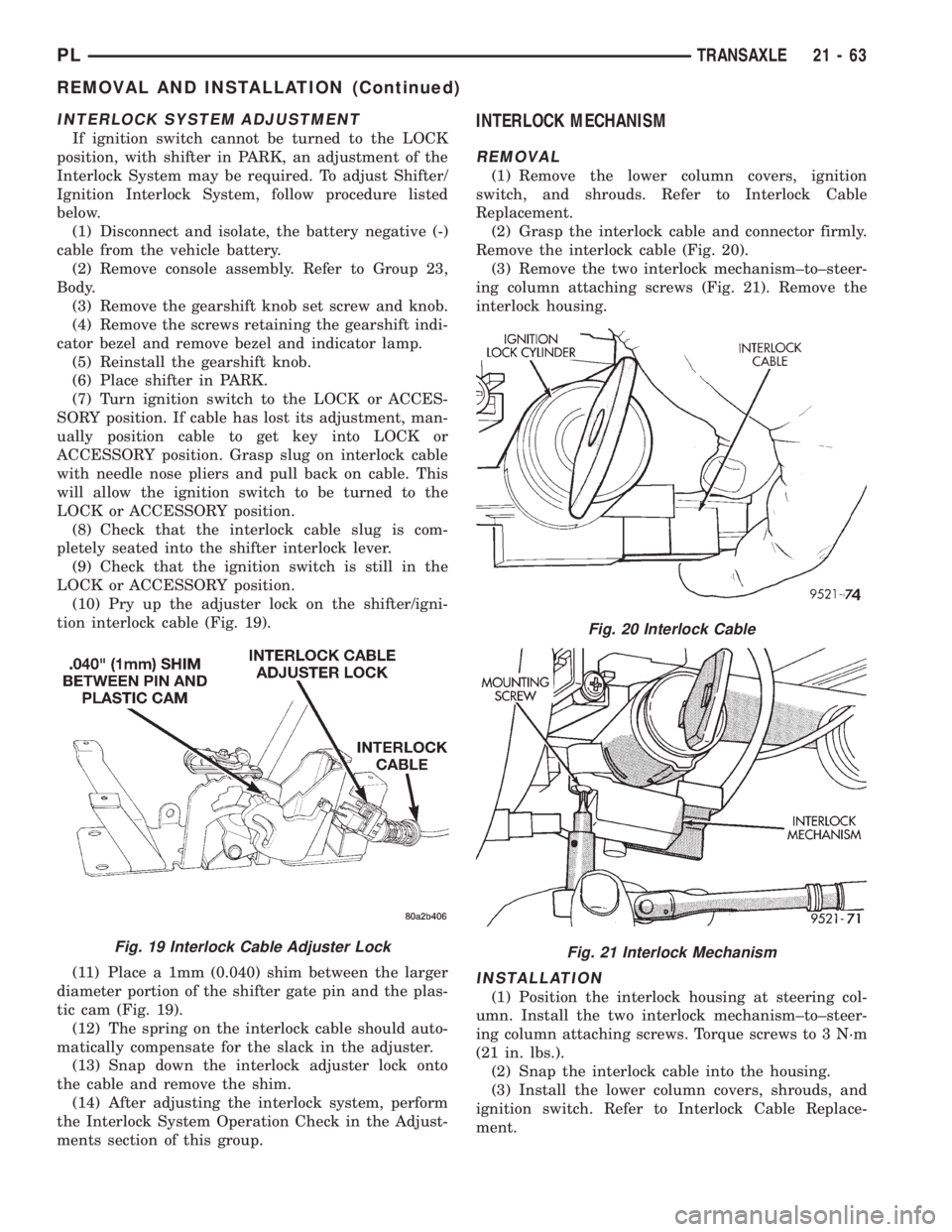
(10) Pry up the adjuster lock on the shifter/igni-
tion interlock cable (Fig. 19).
(11) Place a 1mm (0.040) shim between the larger
diameter portion of the shifter gate pin and the plas-
tic cam (Fig. 19).
(12) The spring on the interlock cable should auto-
matically compensate for the slack in the adjuster.
(13) Snap down the interlock adjuster lock onto
the cable and remove the shim.
(14) After adjusting the interlock system, perform
the Interlock System Operation Check in the Adjust-
ments section of this group.
INTERLOCK MECHANISM
REMOVAL
(1) Remove the lower column covers, ignition
switch, and shrouds. Refer to Interlock Cable
Replacement.
(2) Grasp the interlock cable and connector firmly.
Remove the interlock cable (Fig. 20).
(3) Remove the two interlock mechanism±to±steer-
ing column attaching screws (Fig. 21). Remove the
interlock housing.
INSTALLATION
(1) Position the interlock housing at steering col-
umn. Install the two interlock mechanism±to±steer-
ing column attaching screws. Torque screws to 3 N´m
(21 in. lbs.).
(2) Snap the interlock cable into the housing.
(3) Install the lower column covers, shrouds, and
ignition switch. Refer to Interlock Cable Replace-
ment.
Fig. 19 Interlock Cable Adjuster Lock
Fig. 20 Interlock Cable
Fig. 21 Interlock Mechanism
PLTRANSAXLE 21 - 63
REMOVAL AND INSTALLATION (Continued)
Page 1064 of 1200
TRANSAXLE
CONTENTS
page page
DESCRIPTION AND OPERATION
BRAKE TRANSMISSION SHIFT INTERLOCK
(BTSI) SYSTEM........................ 1
DIAGNOSIS AND TESTING
BRAKE TRANSMISSION SHIFT INTERLOCK
(BTSI) SYSTEM........................ 1REMOVAL AND INSTALLATION
BRAKE TRANSMISSION SHIFT INTERLOCK
(BTSI) CABLE ASSEMBLY................ 2
ADJUSTMENTS
BRAKE TRANSMISSION SHIFT INTERLOCK
(BTSI) SYSTEM ADJUSTMENT............ 4
DESCRIPTION AND OPERATION
BRAKE TRANSMISSION SHIFT INTERLOCK
(BTSI) SYSTEM
The Brake Transmission Shift Interlock (BTSI)
System, is a cable and solenoid operated system. It
interconnects the automatic transmission floor
mounted shifter to the steering column ignition
switch. The BTSI system locks the shifter into the
PARK position. The BTSI system is engaged when-
ever the ignition switch is in the LOCK or ACCES-
SORY position.
An additional electrically activated feature will
prevent shifting out of the PARK position unless the
brake pedal is depressed at least one-half an inch. A
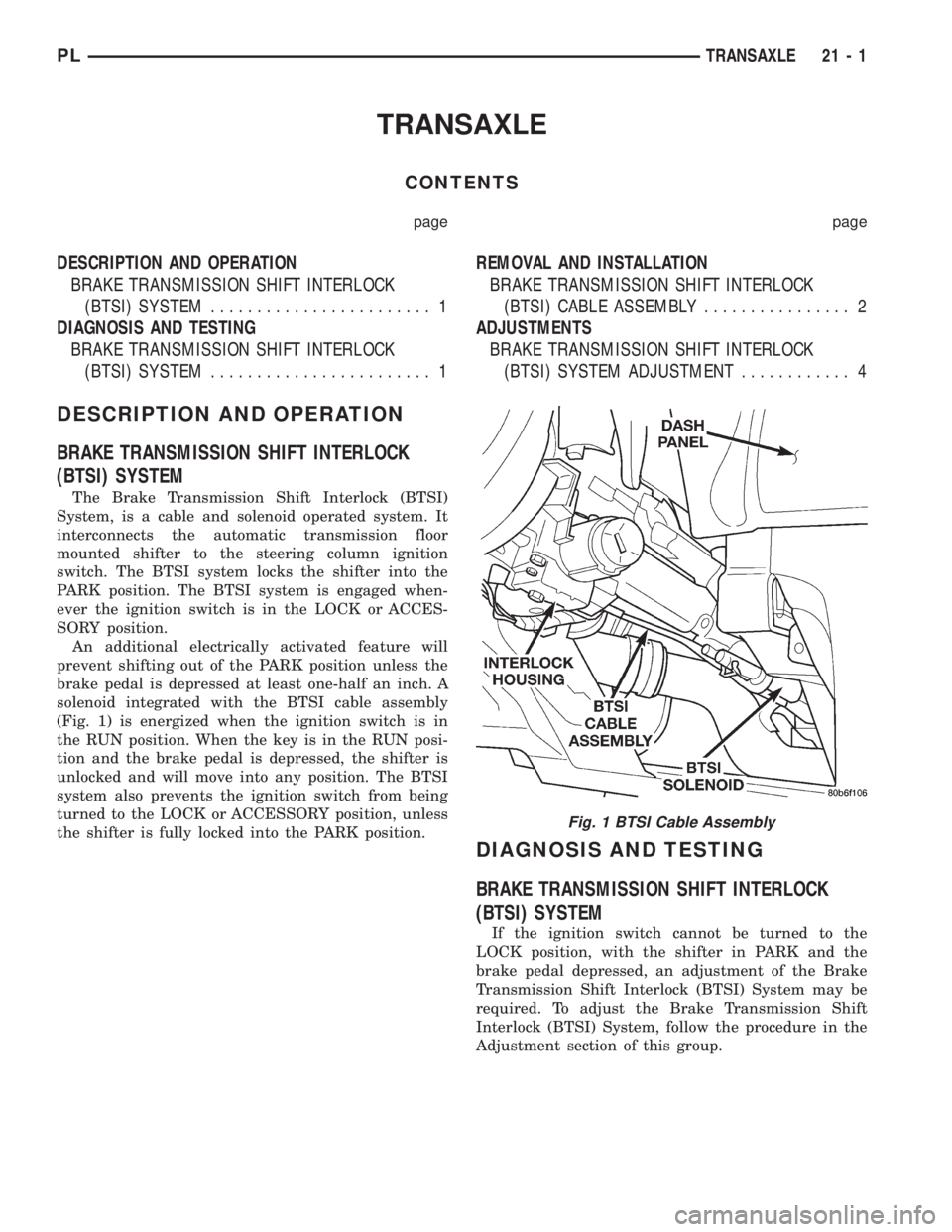
solenoid integrated with the BTSI cable assembly
(Fig. 1) is energized when the ignition switch is in
the RUN position. When the key is in the RUN posi-
tion and the brake pedal is depressed, the shifter is
unlocked and will move into any position. The BTSI
system also prevents the ignition switch from being
turned to the LOCK or ACCESSORY position, unless
the shifter is fully locked into the PARK position.
DIAGNOSIS AND TESTING
BRAKE TRANSMISSION SHIFT INTERLOCK
(BTSI) SYSTEM
If the ignition switch cannot be turned to the
LOCK position, with the shifter in PARK and the
brake pedal depressed, an adjustment of the Brake
Transmission Shift Interlock (BTSI) System may be
required. To adjust the Brake Transmission Shift
Interlock (BTSI) System, follow the procedure in the
Adjustment section of this group.
Fig. 1 BTSI Cable Assembly
PLTRANSAXLE 21 - 1
Page 1065 of 1200
REMOVAL AND INSTALLATION
BRAKE TRANSMISSION SHIFT INTERLOCK
(BTSI) CABLE ASSEMBLY
REMOVAL
(1) Disconnect and isolate, the battery negative (-)
cable from the vehicle battery.
(2) Remove console assembly. Refer to Group 23,
Body.
(3) Remove the gearshift knob set screw and knob.
(4) Remove the screws retaining the gearshift indi-
cator bezel and remove bezel and indicator lamp.
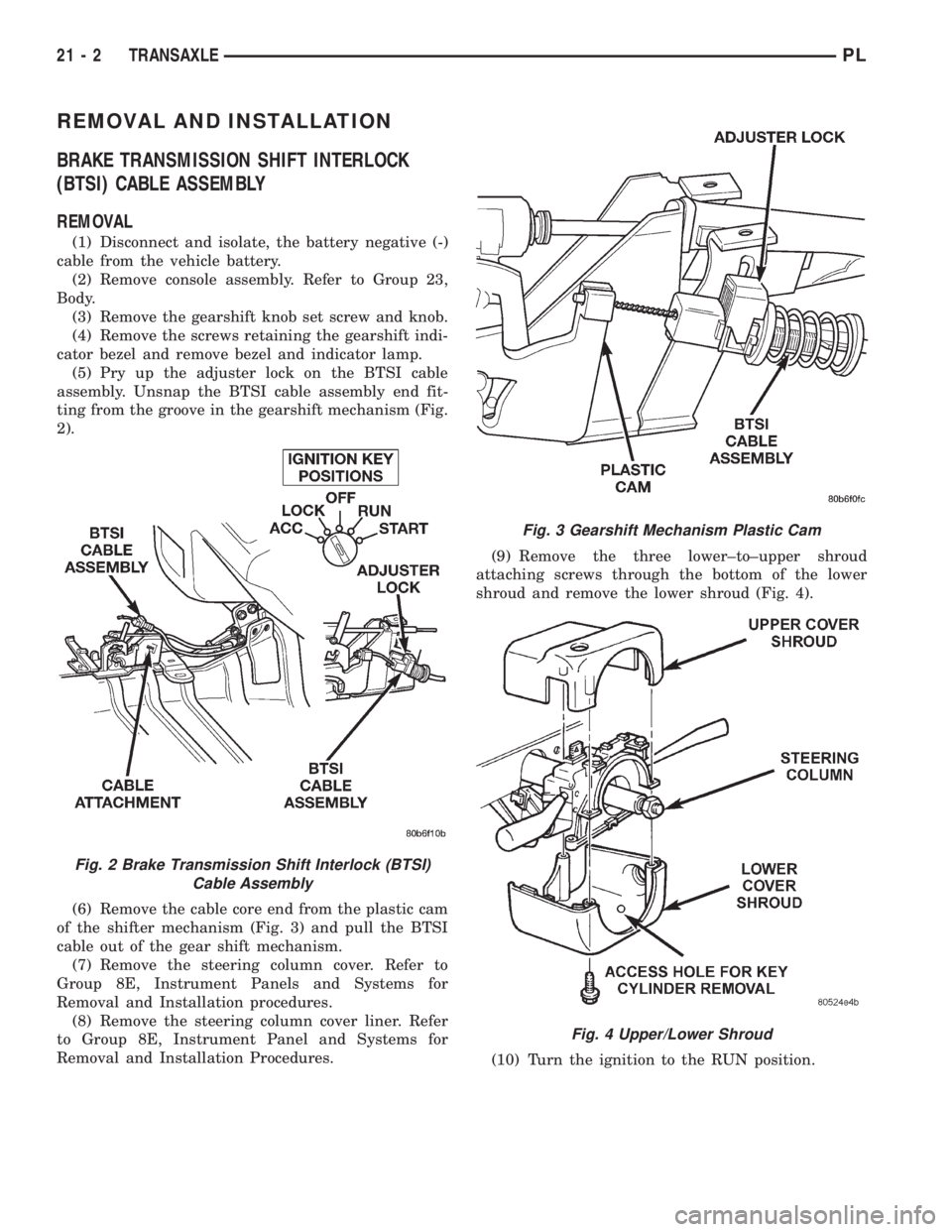
(5) Pry up the adjuster lock on the BTSI cable
assembly. Unsnap the BTSI cable assembly end fit-
ting from the groove in the gearshift mechanism (Fig.
2).
(6) Remove the cable core end from the plastic cam
of the shifter mechanism (Fig. 3) and pull the BTSI
cable out of the gear shift mechanism.
(7) Remove the steering column cover. Refer to
Group 8E, Instrument Panels and Systems for
Removal and Installation procedures.
(8) Remove the steering column cover liner. Refer
to Group 8E, Instrument Panel and Systems for
Removal and Installation Procedures.(9) Remove the three lower±to±upper shroud
attaching screws through the bottom of the lower
shroud and remove the lower shroud (Fig. 4).
(10) Turn the ignition to the RUN position.
Fig. 2 Brake Transmission Shift Interlock (BTSI)
Cable Assembly
Fig. 3 Gearshift Mechanism Plastic Cam
Fig. 4 Upper/Lower Shroud
21 - 2 TRANSAXLEPL
Page 1066 of 1200
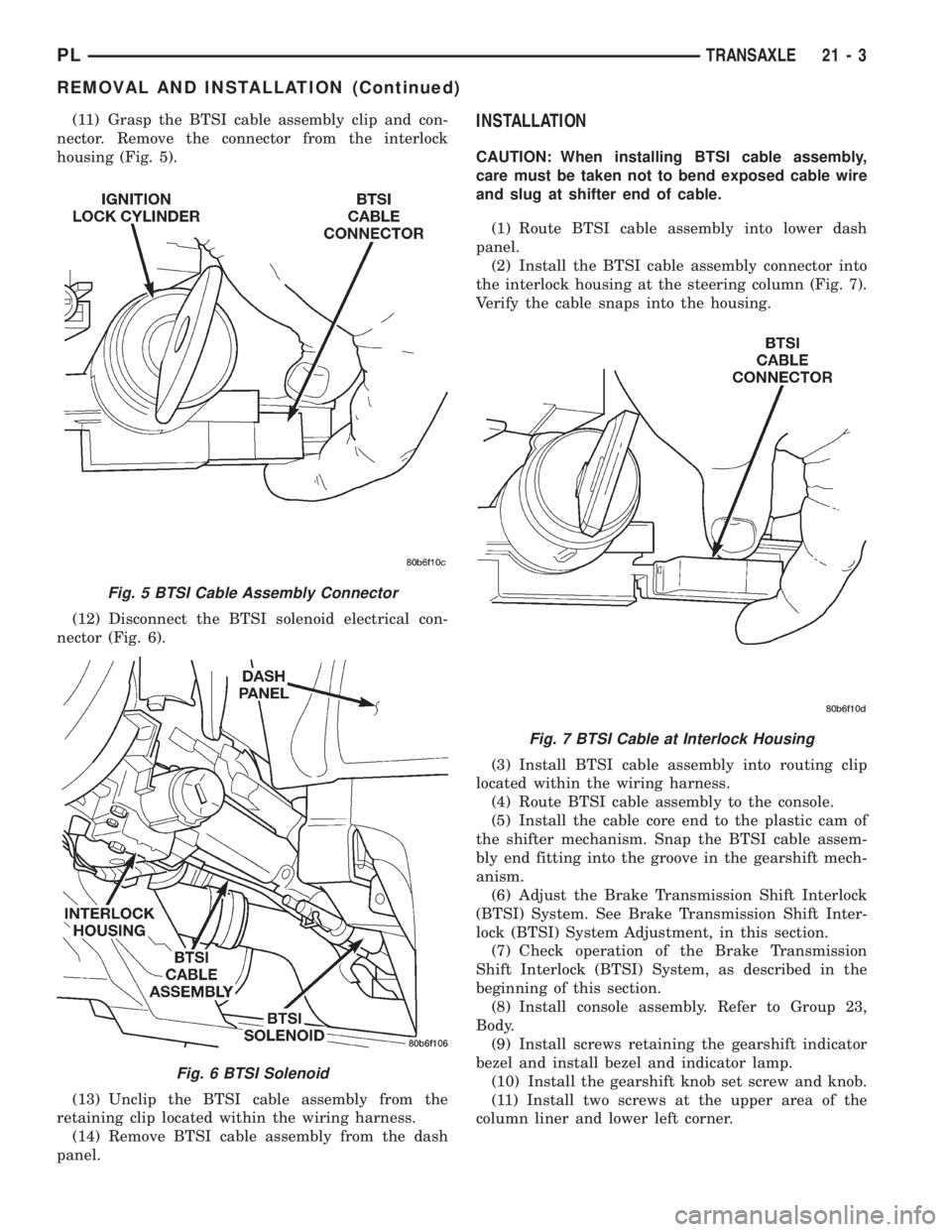
(11) Grasp the BTSI cable assembly clip and con-
nector. Remove the connector from the interlock
housing (Fig. 5).
(12) Disconnect the BTSI solenoid electrical con-
nector (Fig. 6).
(13) Unclip the BTSI cable assembly from the
retaining clip located within the wiring harness.
(14) Remove BTSI cable assembly from the dash
panel.INSTALLATION
CAUTION: When installing BTSI cable assembly,
care must be taken not to bend exposed cable wire
and slug at shifter end of cable.
(1) Route BTSI cable assembly into lower dash
panel.
(2) Install the BTSI cable assembly connector into
the interlock housing at the steering column (Fig. 7).
Verify the cable snaps into the housing.
(3) Install BTSI cable assembly into routing clip
located within the wiring harness.
(4) Route BTSI cable assembly to the console.
(5) Install the cable core end to the plastic cam of
the shifter mechanism. Snap the BTSI cable assem-
bly end fitting into the groove in the gearshift mech-
anism.
(6) Adjust the Brake Transmission Shift Interlock
(BTSI) System. See Brake Transmission Shift Inter-
lock (BTSI) System Adjustment, in this section.
(7) Check operation of the Brake Transmission
Shift Interlock (BTSI) System, as described in the
beginning of this section.
(8) Install console assembly. Refer to Group 23,
Body.
(9) Install screws retaining the gearshift indicator
bezel and install bezel and indicator lamp.
(10) Install the gearshift knob set screw and knob.
(11) Install two screws at the upper area of the
column liner and lower left corner.
Fig. 5 BTSI Cable Assembly Connector
Fig. 6 BTSI Solenoid
Fig. 7 BTSI Cable at Interlock Housing
PLTRANSAXLE 21 - 3
REMOVAL AND INSTALLATION (Continued)