cooling DODGE NEON 1999 Service Owner's Manual
[x] Cancel search | Manufacturer: DODGE, Model Year: 1999, Model line: NEON, Model: DODGE NEON 1999Pages: 1200, PDF Size: 35.29 MB
Page 213 of 1200
(5) Connect automatic transmission hoses, if
equipped. Tighten hose clamps to 4 N´m (35 in. lbs.).
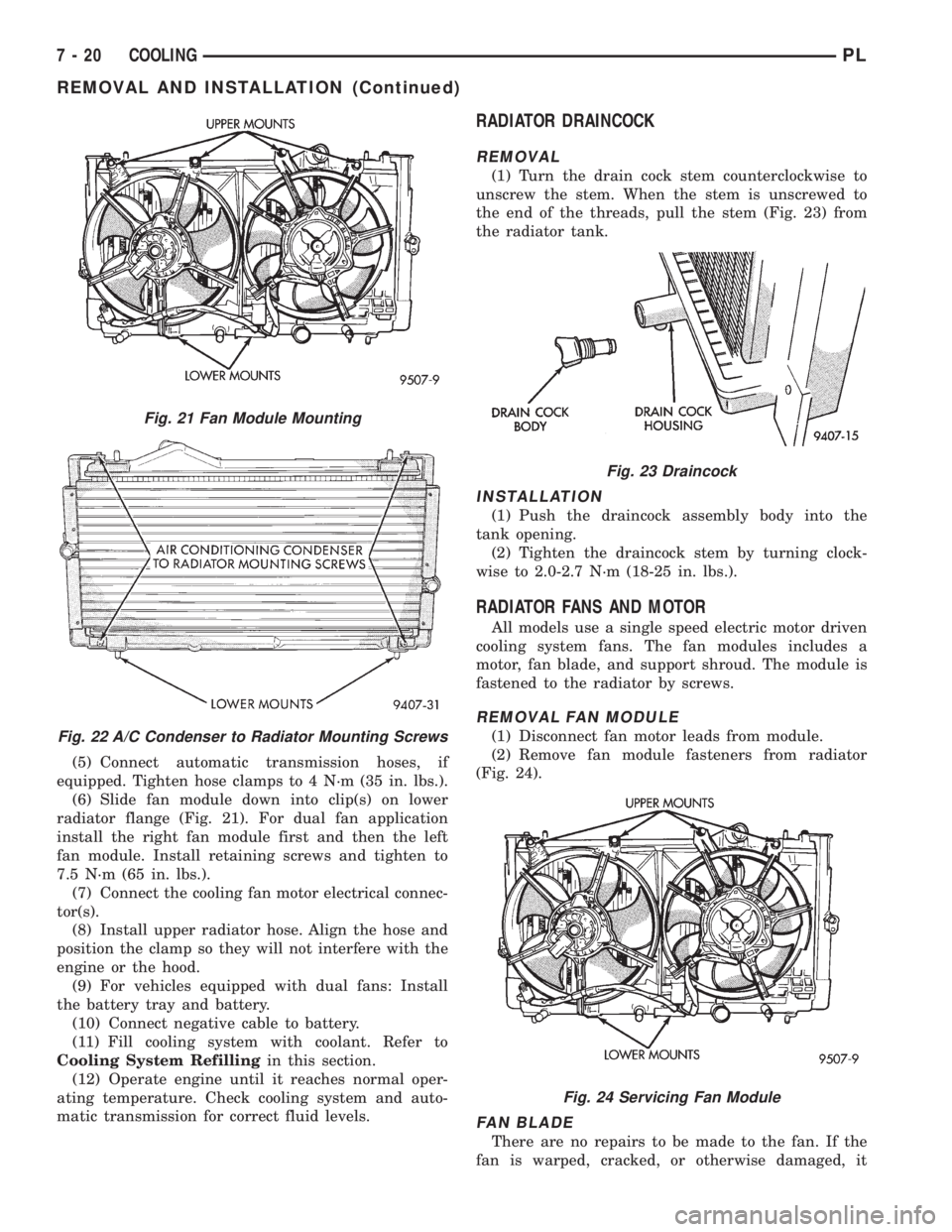
(6) Slide fan module down into clip(s) on lower
radiator flange (Fig. 21). For dual fan application
install the right fan module first and then the left
fan module. Install retaining screws and tighten to
7.5 N´m (65 in. lbs.).
(7) Connect the cooling fan motor electrical connec-
tor(s).
(8) Install upper radiator hose. Align the hose and
position the clamp so they will not interfere with the
engine or the hood.
(9) For vehicles equipped with dual fans: Install
the battery tray and battery.
(10) Connect negative cable to battery.
(11) Fill cooling system with coolant. Refer to
Cooling System Refillingin this section.
(12) Operate engine until it reaches normal oper-
ating temperature. Check cooling system and auto-
matic transmission for correct fluid levels.
RADIATOR DRAINCOCK
REMOVAL
(1) Turn the drain cock stem counterclockwise to
unscrew the stem. When the stem is unscrewed to
the end of the threads, pull the stem (Fig. 23) from
the radiator tank.
INSTALLATION
(1) Push the draincock assembly body into the
tank opening.
(2) Tighten the draincock stem by turning clock-
wise to 2.0-2.7 N´m (18-25 in. lbs.).
RADIATOR FANS AND MOTOR
All models use a single speed electric motor driven
cooling system fans. The fan modules includes a
motor, fan blade, and support shroud. The module is
fastened to the radiator by screws.
REMOVAL FAN MODULE
(1) Disconnect fan motor leads from module.
(2) Remove fan module fasteners from radiator
(Fig. 24).
FAN BLADE
There are no repairs to be made to the fan. If the
fan is warped, cracked, or otherwise damaged, it
Fig. 21 Fan Module Mounting
Fig. 22 A/C Condenser to Radiator Mounting Screws
Fig. 23 Draincock
Fig. 24 Servicing Fan Module
7 - 20 COOLINGPL
REMOVAL AND INSTALLATION (Continued)
Page 214 of 1200
must be replaced withonlythe recommended part
for adequate strength, performance and safety.
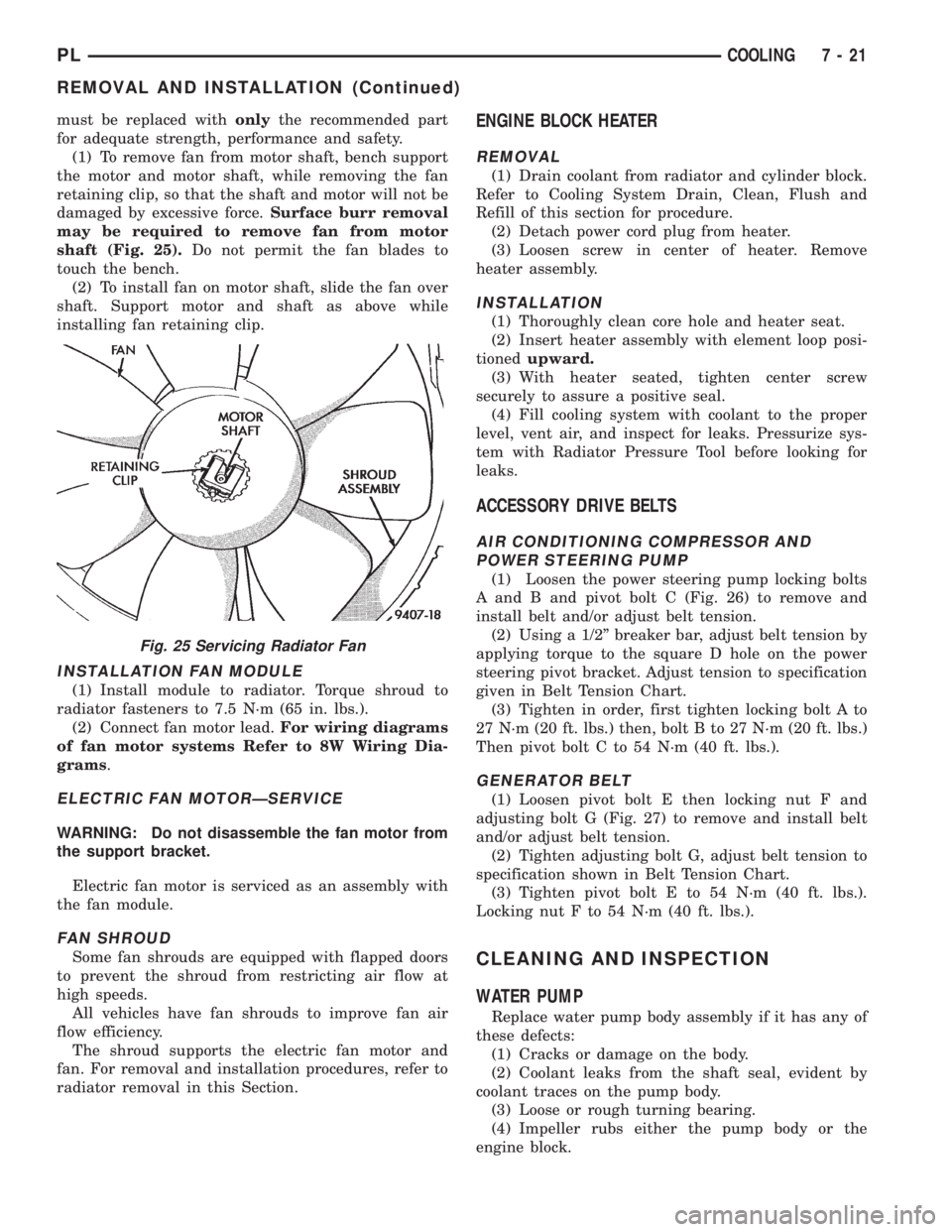
(1) To remove fan from motor shaft, bench support
the motor and motor shaft, while removing the fan
retaining clip, so that the shaft and motor will not be
damaged by excessive force.Surface burr removal
may be required to remove fan from motor
shaft (Fig. 25).Do not permit the fan blades to
touch the bench.
(2) To install fan on motor shaft, slide the fan over
shaft. Support motor and shaft as above while
installing fan retaining clip.
INSTALLATION FAN MODULE
(1) Install module to radiator. Torque shroud to
radiator fasteners to 7.5 N´m (65 in. lbs.).
(2) Connect fan motor lead.For wiring diagrams
of fan motor systems Refer to 8W Wiring Dia-
grams.
ELECTRIC FAN MOTORÐSERVICE
WARNING: Do not disassemble the fan motor from
the support bracket.
Electric fan motor is serviced as an assembly with
the fan module.
FAN SHROUD
Some fan shrouds are equipped with flapped doors
to prevent the shroud from restricting air flow at
high speeds.
All vehicles have fan shrouds to improve fan air
flow efficiency.
The shroud supports the electric fan motor and
fan. For removal and installation procedures, refer to
radiator removal in this Section.
ENGINE BLOCK HEATER
REMOVAL
(1) Drain coolant from radiator and cylinder block.
Refer to Cooling System Drain, Clean, Flush and
Refill of this section for procedure.
(2) Detach power cord plug from heater.
(3) Loosen screw in center of heater. Remove
heater assembly.
INSTALLATION
(1) Thoroughly clean core hole and heater seat.
(2) Insert heater assembly with element loop posi-
tionedupward.
(3) With heater seated, tighten center screw
securely to assure a positive seal.
(4) Fill cooling system with coolant to the proper
level, vent air, and inspect for leaks. Pressurize sys-
tem with Radiator Pressure Tool before looking for
leaks.
ACCESSORY DRIVE BELTS
AIR CONDITIONING COMPRESSOR AND
POWER STEERING PUMP
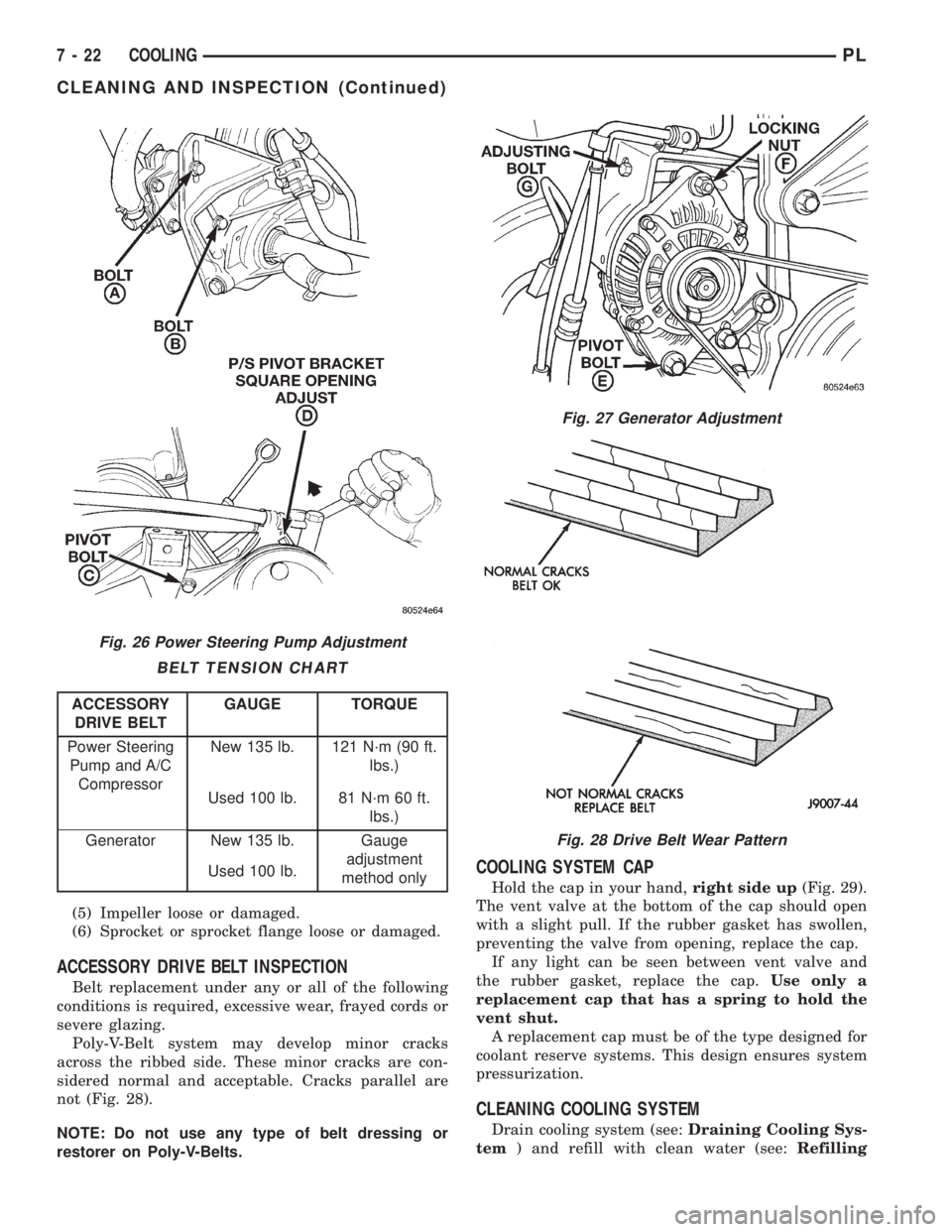
(1) Loosen the power steering pump locking bolts
A and B and pivot bolt C (Fig. 26) to remove and
install belt and/or adjust belt tension.
(2) Using a 1/2º breaker bar, adjust belt tension by
applying torque to the square D hole on the power
steering pivot bracket. Adjust tension to specification
given in Belt Tension Chart.
(3) Tighten in order, first tighten locking bolt A to
27 N´m (20 ft. lbs.) then, bolt B to 27 N´m (20 ft. lbs.)
Then pivot bolt C to 54 N´m (40 ft. lbs.).
GENERATOR BELT
(1) Loosen pivot bolt E then locking nut F and
adjusting bolt G (Fig. 27) to remove and install belt
and/or adjust belt tension.
(2) Tighten adjusting bolt G, adjust belt tension to
specification shown in Belt Tension Chart.
(3) Tighten pivot bolt E to 54 N´m (40 ft. lbs.).
Locking nut F to 54 N´m (40 ft. lbs.).
CLEANING AND INSPECTION
WATER PUMP
Replace water pump body assembly if it has any of
these defects:
(1) Cracks or damage on the body.
(2) Coolant leaks from the shaft seal, evident by
coolant traces on the pump body.
(3) Loose or rough turning bearing.
(4) Impeller rubs either the pump body or the
engine block.
Fig. 25 Servicing Radiator Fan
PLCOOLING 7 - 21
REMOVAL AND INSTALLATION (Continued)
Page 215 of 1200
(5) Impeller loose or damaged.
(6) Sprocket or sprocket flange loose or damaged.
ACCESSORY DRIVE BELT INSPECTION
Belt replacement under any or all of the following
conditions is required, excessive wear, frayed cords or
severe glazing.
Poly-V-Belt system may develop minor cracks
across the ribbed side. These minor cracks are con-
sidered normal and acceptable. Cracks parallel are
not (Fig. 28).
NOTE: Do not use any type of belt dressing or
restorer on Poly-V-Belts.
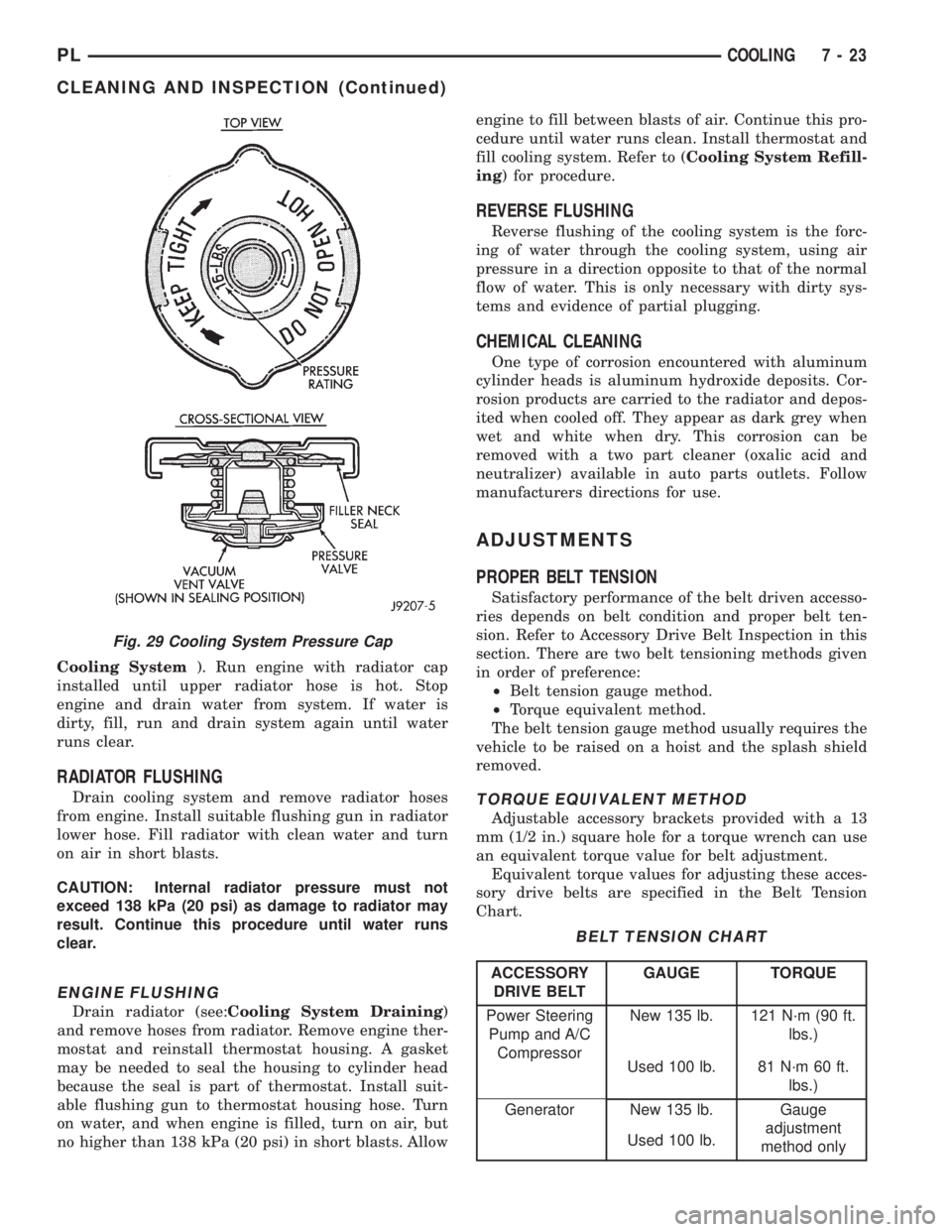
COOLING SYSTEM CAP
Hold the cap in your hand,right side up(Fig. 29).
The vent valve at the bottom of the cap should open
with a slight pull. If the rubber gasket has swollen,
preventing the valve from opening, replace the cap.
If any light can be seen between vent valve and
the rubber gasket, replace the cap.Use only a
replacement cap that has a spring to hold the
vent shut.
A replacement cap must be of the type designed for
coolant reserve systems. This design ensures system
pressurization.
CLEANING COOLING SYSTEM
Drain cooling system (see:Draining Cooling Sys-
tem) and refill with clean water (see:Refilling
Fig. 26 Power Steering Pump Adjustment
BELT TENSION CHART
ACCESSORY
DRIVE BELTGAUGE TORQUE
Power Steering
Pump and A/C
CompressorNew 135 lb. 121 N´m (90 ft.
lbs.)
Used 100 lb. 81 N´m 60 ft.
lbs.)
Generator New 135 lb. Gauge
adjustment
method only Used 100 lb.
Fig. 27 Generator Adjustment
Fig. 28 Drive Belt Wear Pattern
7 - 22 COOLINGPL
CLEANING AND INSPECTION (Continued)
Page 216 of 1200
Cooling System). Run engine with radiator cap
installed until upper radiator hose is hot. Stop
engine and drain water from system. If water is
dirty, fill, run and drain system again until water
runs clear.
RADIATOR FLUSHING
Drain cooling system and remove radiator hoses
from engine. Install suitable flushing gun in radiator
lower hose. Fill radiator with clean water and turn
on air in short blasts.
CAUTION: Internal radiator pressure must not
exceed 138 kPa (20 psi) as damage to radiator may
result. Continue this procedure until water runs
clear.
ENGINE FLUSHING
Drain radiator (see:Cooling System Draining)
and remove hoses from radiator. Remove engine ther-
mostat and reinstall thermostat housing. A gasket
may be needed to seal the housing to cylinder head
because the seal is part of thermostat. Install suit-
able flushing gun to thermostat housing hose. Turn
on water, and when engine is filled, turn on air, but
no higher than 138 kPa (20 psi) in short blasts. Allowengine to fill between blasts of air. Continue this pro-
cedure until water runs clean. Install thermostat and
fill cooling system. Refer to (Cooling System Refill-
ing) for procedure.
REVERSE FLUSHING
Reverse flushing of the cooling system is the forc-
ing of water through the cooling system, using air
pressure in a direction opposite to that of the normal
flow of water. This is only necessary with dirty sys-
tems and evidence of partial plugging.
CHEMICAL CLEANING
One type of corrosion encountered with aluminum
cylinder heads is aluminum hydroxide deposits. Cor-
rosion products are carried to the radiator and depos-
ited when cooled off. They appear as dark grey when
wet and white when dry. This corrosion can be
removed with a two part cleaner (oxalic acid and
neutralizer) available in auto parts outlets. Follow
manufacturers directions for use.
ADJUSTMENTS
PROPER BELT TENSION
Satisfactory performance of the belt driven accesso-
ries depends on belt condition and proper belt ten-
sion. Refer to Accessory Drive Belt Inspection in this
section. There are two belt tensioning methods given
in order of preference:
²Belt tension gauge method.
²Torque equivalent method.
The belt tension gauge method usually requires the
vehicle to be raised on a hoist and the splash shield
removed.
TORQUE EQUIVALENT METHOD
Adjustable accessory brackets provided with a 13
mm (1/2 in.) square hole for a torque wrench can use
an equivalent torque value for belt adjustment.
Equivalent torque values for adjusting these acces-
sory drive belts are specified in the Belt Tension
Chart.
Fig. 29 Cooling System Pressure Cap
BELT TENSION CHART
ACCESSORY
DRIVE BELTGAUGE TORQUE
Power Steering
Pump and A/C
CompressorNew 135 lb. 121 N´m (90 ft.
lbs.)
Used 100 lb. 81 N´m 60 ft.
lbs.)
Generator New 135 lb. Gauge
adjustment
method only Used 100 lb.
PLCOOLING 7 - 23
CLEANING AND INSPECTION (Continued)
Page 217 of 1200
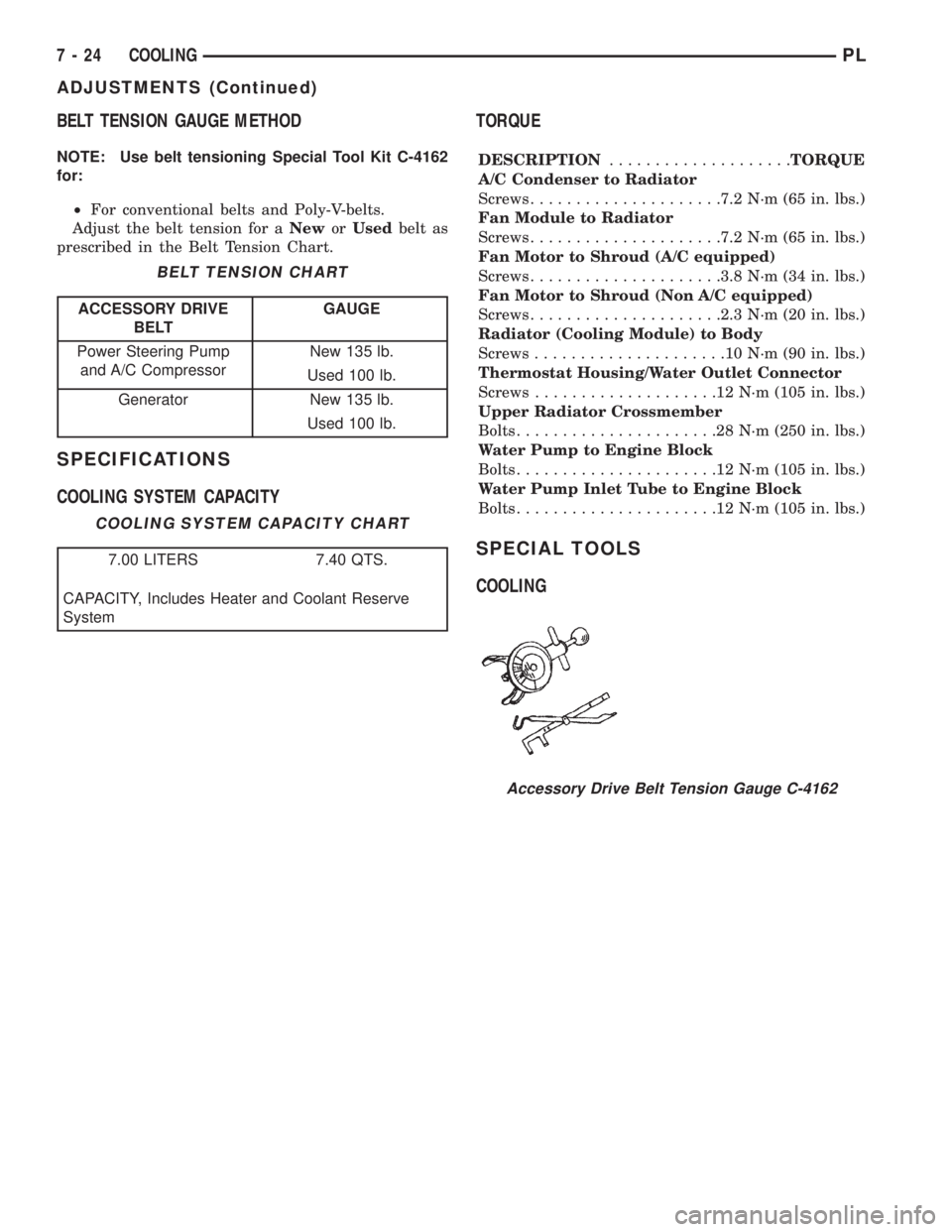
BELT TENSION GAUGE METHOD
NOTE: Use belt tensioning Special Tool Kit C-4162
for:
²For conventional belts and Poly-V-belts.
Adjust the belt tension for aNeworUsedbelt as
prescribed in the Belt Tension Chart.
SPECIFICATIONS
COOLING SYSTEM CAPACITYTORQUE
DESCRIPTION....................TORQUE
A/C Condenser to Radiator
Screws.....................7.2 N´m (65 in. lbs.)
Fan Module to Radiator
Screws.....................7.2 N´m (65 in. lbs.)
Fan Motor to Shroud (A/C equipped)
Screws.....................3.8 N´m (34 in. lbs.)
Fan Motor to Shroud (Non A/C equipped)
Screws.....................2.3 N´m (20 in. lbs.)
Radiator (Cooling Module) to Body
Screws.....................10N´m(90in.lbs.)
Thermostat Housing/Water Outlet Connector
Screws....................12N´m(105 in. lbs.)
Upper Radiator Crossmember
Bolts......................28N´m(250 in. lbs.)
Water Pump to Engine Block
Bolts......................12N´m(105 in. lbs.)
Water Pump Inlet Tube to Engine Block
Bolts......................12N´m(105 in. lbs.)
SPECIAL TOOLS
COOLING
BELT TENSION CHART
ACCESSORY DRIVE
BELTGAUGE
Power Steering Pump
and A/C CompressorNew 135 lb.
Used 100 lb.
Generator New 135 lb.
Used 100 lb.
COOLING SYSTEM CAPACITY CHART
7.00 LITERS 7.40 QTS.
CAPACITY, Includes Heater and Coolant Reserve
System
Accessory Drive Belt Tension Gauge C-4162
7 - 24 COOLINGPL
ADJUSTMENTS (Continued)
Page 238 of 1200
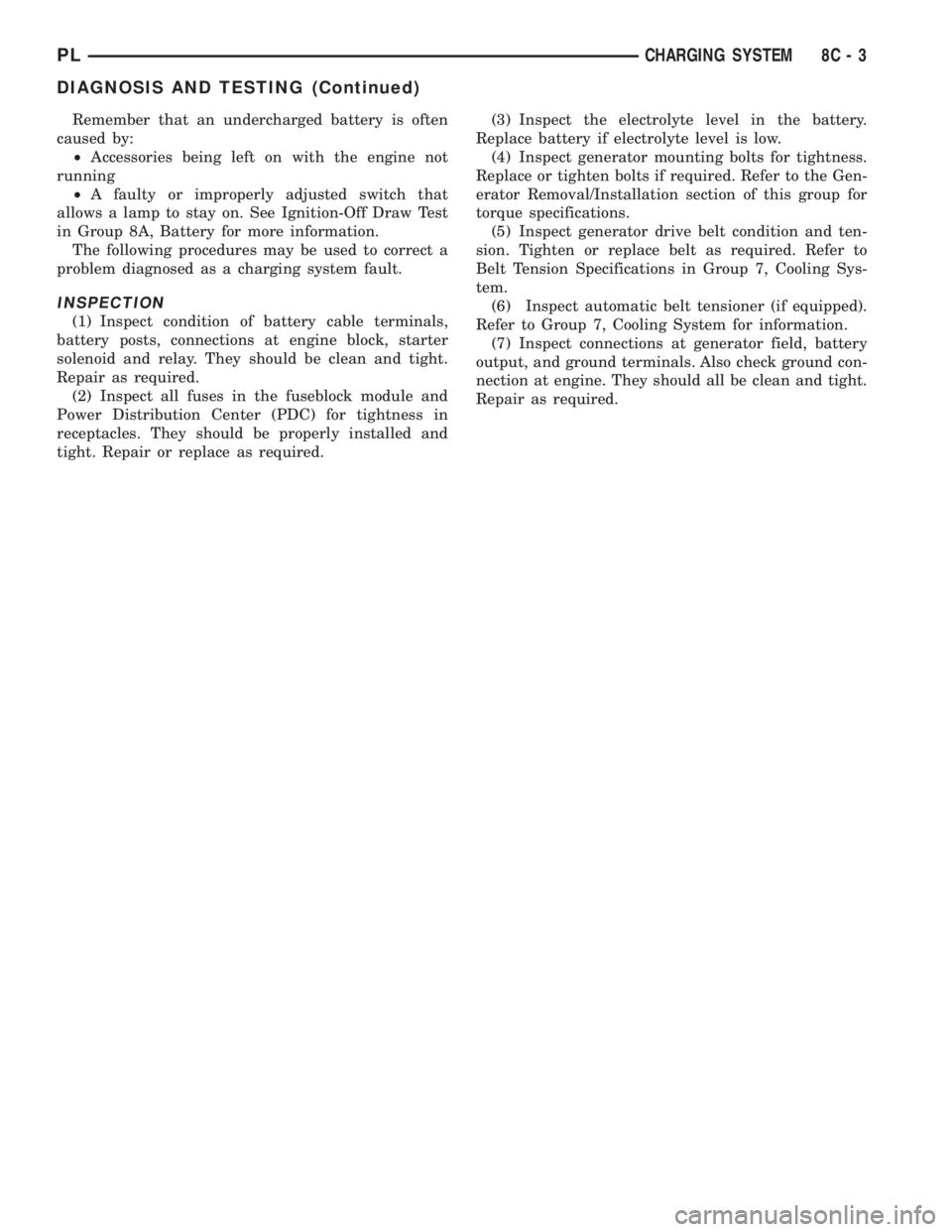
Remember that an undercharged battery is often
caused by:
²Accessories being left on with the engine not
running
²A faulty or improperly adjusted switch that
allows a lamp to stay on. See Ignition-Off Draw Test
in Group 8A, Battery for more information.
The following procedures may be used to correct a
problem diagnosed as a charging system fault.
INSPECTION
(1) Inspect condition of battery cable terminals,
battery posts, connections at engine block, starter
solenoid and relay. They should be clean and tight.
Repair as required.
(2) Inspect all fuses in the fuseblock module and
Power Distribution Center (PDC) for tightness in
receptacles. They should be properly installed and
tight. Repair or replace as required.(3) Inspect the electrolyte level in the battery.
Replace battery if electrolyte level is low.
(4) Inspect generator mounting bolts for tightness.
Replace or tighten bolts if required. Refer to the Gen-
erator Removal/Installation section of this group for
torque specifications.
(5) Inspect generator drive belt condition and ten-
sion. Tighten or replace belt as required. Refer to
Belt Tension Specifications in Group 7, Cooling Sys-
tem.
(6) Inspect automatic belt tensioner (if equipped).
Refer to Group 7, Cooling System for information.
(7) Inspect connections at generator field, battery
output, and ground terminals. Also check ground con-
nection at engine. They should all be clean and tight.
Repair as required.
PLCHARGING SYSTEM 8C - 3
DIAGNOSIS AND TESTING (Continued)
Page 243 of 1200
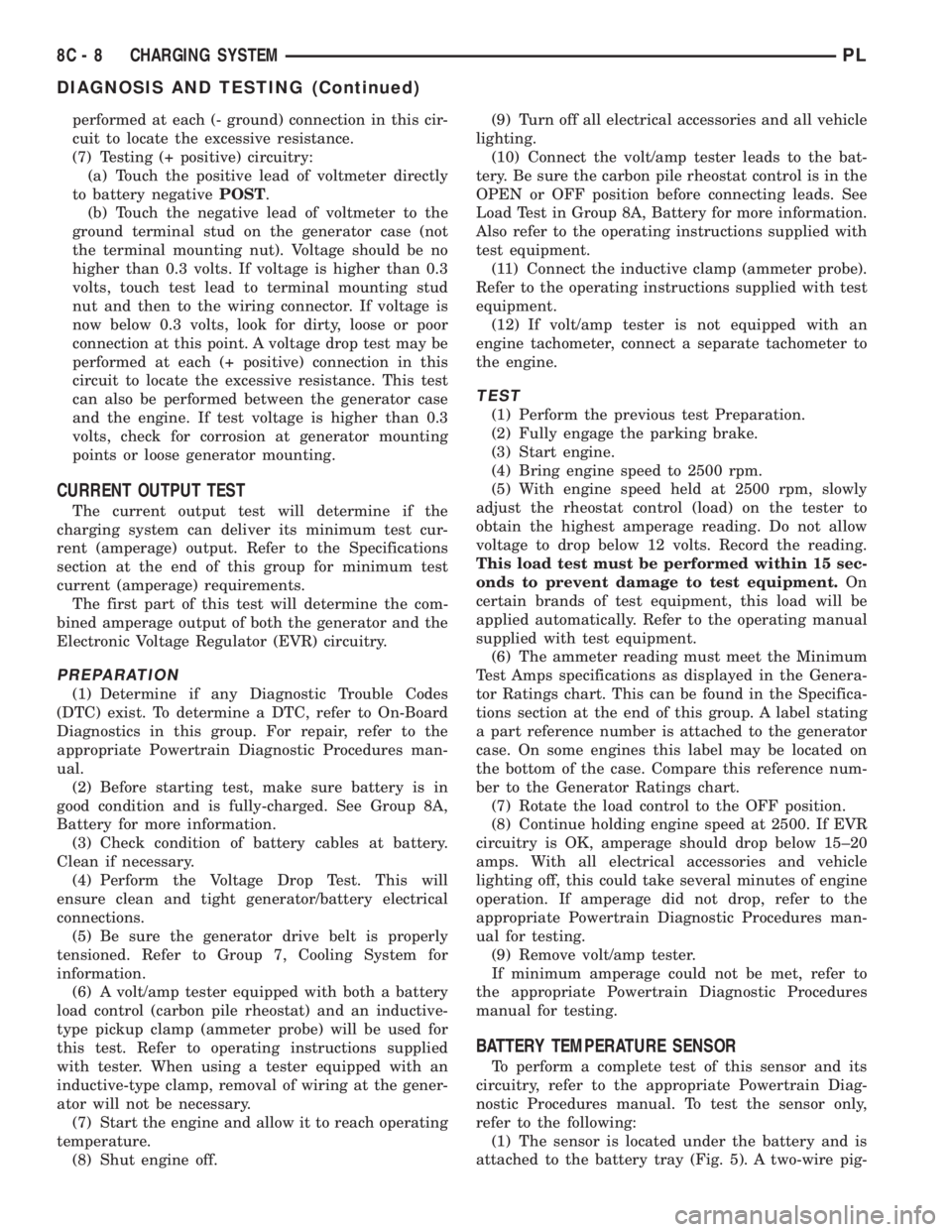
performed at each (- ground) connection in this cir-
cuit to locate the excessive resistance.
(7) Testing (+ positive) circuitry:
(a) Touch the positive lead of voltmeter directly
to battery negativePOST.
(b) Touch the negative lead of voltmeter to the
ground terminal stud on the generator case (not
the terminal mounting nut). Voltage should be no
higher than 0.3 volts. If voltage is higher than 0.3
volts, touch test lead to terminal mounting stud
nut and then to the wiring connector. If voltage is
now below 0.3 volts, look for dirty, loose or poor
connection at this point. A voltage drop test may be
performed at each (+ positive) connection in this
circuit to locate the excessive resistance. This test
can also be performed between the generator case
and the engine. If test voltage is higher than 0.3
volts, check for corrosion at generator mounting
points or loose generator mounting.
CURRENT OUTPUT TEST
The current output test will determine if the
charging system can deliver its minimum test cur-
rent (amperage) output. Refer to the Specifications
section at the end of this group for minimum test
current (amperage) requirements.
The first part of this test will determine the com-
bined amperage output of both the generator and the
Electronic Voltage Regulator (EVR) circuitry.
PREPARATION
(1) Determine if any Diagnostic Trouble Codes
(DTC) exist. To determine a DTC, refer to On-Board
Diagnostics in this group. For repair, refer to the
appropriate Powertrain Diagnostic Procedures man-
ual.
(2) Before starting test, make sure battery is in
good condition and is fully-charged. See Group 8A,
Battery for more information.
(3) Check condition of battery cables at battery.
Clean if necessary.
(4) Perform the Voltage Drop Test. This will
ensure clean and tight generator/battery electrical
connections.
(5) Be sure the generator drive belt is properly
tensioned. Refer to Group 7, Cooling System for
information.
(6) A volt/amp tester equipped with both a battery
load control (carbon pile rheostat) and an inductive-
type pickup clamp (ammeter probe) will be used for
this test. Refer to operating instructions supplied
with tester. When using a tester equipped with an
inductive-type clamp, removal of wiring at the gener-
ator will not be necessary.
(7) Start the engine and allow it to reach operating
temperature.
(8) Shut engine off.(9) Turn off all electrical accessories and all vehicle
lighting.
(10) Connect the volt/amp tester leads to the bat-
tery. Be sure the carbon pile rheostat control is in the
OPEN or OFF position before connecting leads. See
Load Test in Group 8A, Battery for more information.
Also refer to the operating instructions supplied with
test equipment.
(11) Connect the inductive clamp (ammeter probe).
Refer to the operating instructions supplied with test
equipment.
(12) If volt/amp tester is not equipped with an
engine tachometer, connect a separate tachometer to
the engine.
TEST
(1) Perform the previous test Preparation.
(2) Fully engage the parking brake.
(3) Start engine.
(4) Bring engine speed to 2500 rpm.
(5) With engine speed held at 2500 rpm, slowly
adjust the rheostat control (load) on the tester to
obtain the highest amperage reading. Do not allow
voltage to drop below 12 volts. Record the reading.
This load test must be performed within 15 sec-
onds to prevent damage to test equipment.On
certain brands of test equipment, this load will be
applied automatically. Refer to the operating manual
supplied with test equipment.
(6) The ammeter reading must meet the Minimum
Test Amps specifications as displayed in the Genera-
tor Ratings chart. This can be found in the Specifica-
tions section at the end of this group. A label stating
a part reference number is attached to the generator
case. On some engines this label may be located on
the bottom of the case. Compare this reference num-
ber to the Generator Ratings chart.
(7) Rotate the load control to the OFF position.
(8) Continue holding engine speed at 2500. If EVR
circuitry is OK, amperage should drop below 15±20
amps. With all electrical accessories and vehicle
lighting off, this could take several minutes of engine
operation. If amperage did not drop, refer to the
appropriate Powertrain Diagnostic Procedures man-
ual for testing.
(9) Remove volt/amp tester.
If minimum amperage could not be met, refer to
the appropriate Powertrain Diagnostic Procedures
manual for testing.
BATTERY TEMPERATURE SENSOR
To perform a complete test of this sensor and its
circuitry, refer to the appropriate Powertrain Diag-
nostic Procedures manual. To test the sensor only,
refer to the following:
(1) The sensor is located under the battery and is
attached to the battery tray (Fig. 5). A two-wire pig-
8C - 8 CHARGING SYSTEMPL
DIAGNOSIS AND TESTING (Continued)
Page 245 of 1200
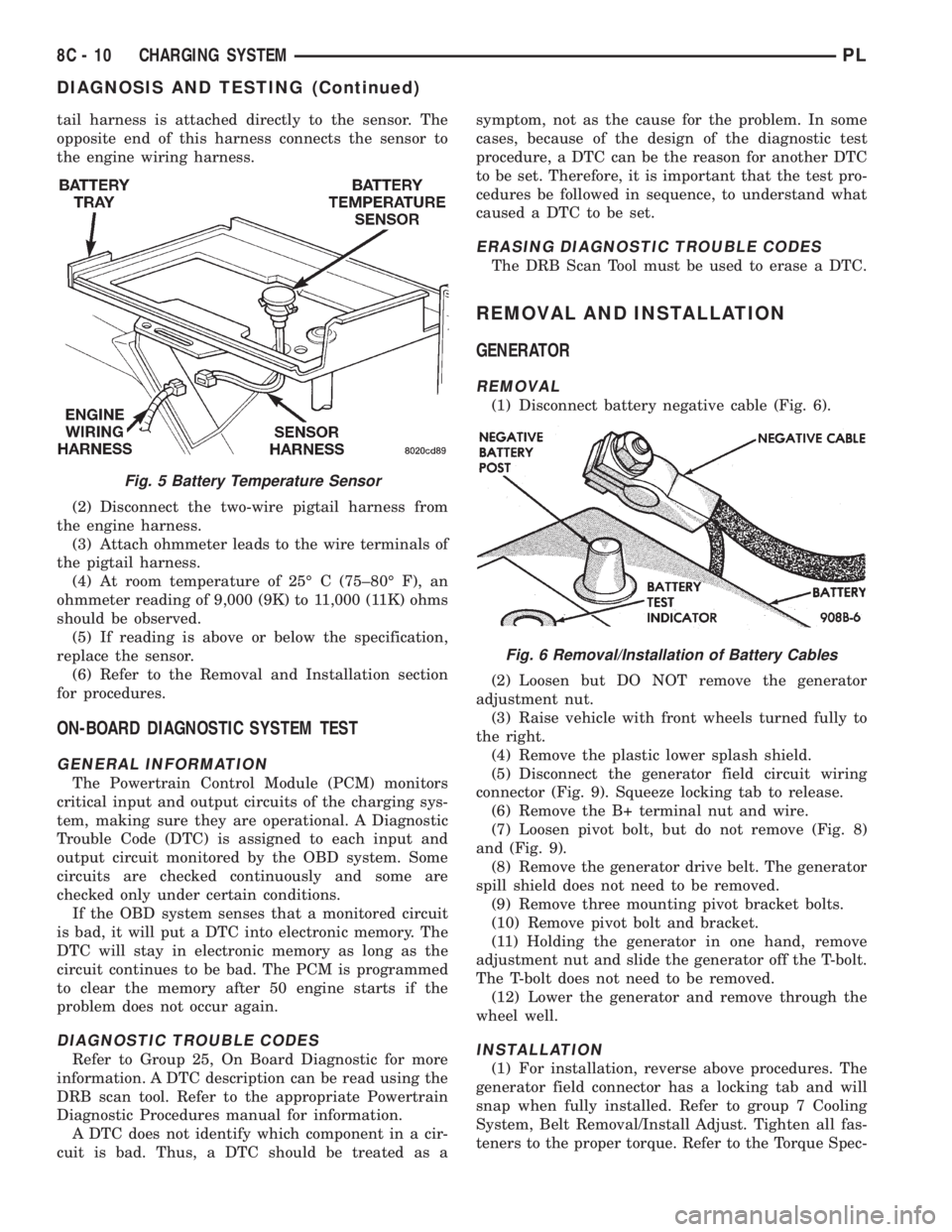
tail harness is attached directly to the sensor. The
opposite end of this harness connects the sensor to
the engine wiring harness.
(2) Disconnect the two-wire pigtail harness from
the engine harness.
(3) Attach ohmmeter leads to the wire terminals of
the pigtail harness.
(4) At room temperature of 25É C (75±80É F), an
ohmmeter reading of 9,000 (9K) to 11,000 (11K) ohms
should be observed.
(5) If reading is above or below the specification,
replace the sensor.
(6) Refer to the Removal and Installation section
for procedures.
ON-BOARD DIAGNOSTIC SYSTEM TEST
GENERAL INFORMATION
The Powertrain Control Module (PCM) monitors
critical input and output circuits of the charging sys-
tem, making sure they are operational. A Diagnostic
Trouble Code (DTC) is assigned to each input and
output circuit monitored by the OBD system. Some
circuits are checked continuously and some are
checked only under certain conditions.
If the OBD system senses that a monitored circuit
is bad, it will put a DTC into electronic memory. The
DTC will stay in electronic memory as long as the
circuit continues to be bad. The PCM is programmed
to clear the memory after 50 engine starts if the
problem does not occur again.
DIAGNOSTIC TROUBLE CODES
Refer to Group 25, On Board Diagnostic for more
information. A DTC description can be read using the
DRB scan tool. Refer to the appropriate Powertrain
Diagnostic Procedures manual for information.
A DTC does not identify which component in a cir-
cuit is bad. Thus, a DTC should be treated as asymptom, not as the cause for the problem. In some
cases, because of the design of the diagnostic test
procedure, a DTC can be the reason for another DTC
to be set. Therefore, it is important that the test pro-
cedures be followed in sequence, to understand what
caused a DTC to be set.
ERASING DIAGNOSTIC TROUBLE CODES
The DRB Scan Tool must be used to erase a DTC.
REMOVAL AND INSTALLATION
GENERATOR
REMOVAL
(1) Disconnect battery negative cable (Fig. 6).
(2) Loosen but DO NOT remove the generator
adjustment nut.
(3) Raise vehicle with front wheels turned fully to
the right.
(4) Remove the plastic lower splash shield.
(5) Disconnect the generator field circuit wiring
connector (Fig. 9). Squeeze locking tab to release.
(6) Remove the B+ terminal nut and wire.
(7) Loosen pivot bolt, but do not remove (Fig. 8)
and (Fig. 9).
(8) Remove the generator drive belt. The generator
spill shield does not need to be removed.
(9) Remove three mounting pivot bracket bolts.
(10) Remove pivot bolt and bracket.
(11) Holding the generator in one hand, remove
adjustment nut and slide the generator off the T-bolt.
The T-bolt does not need to be removed.
(12) Lower the generator and remove through the
wheel well.
INSTALLATION
(1) For installation, reverse above procedures. The
generator field connector has a locking tab and will
snap when fully installed. Refer to group 7 Cooling
System, Belt Removal/Install Adjust. Tighten all fas-
teners to the proper torque. Refer to the Torque Spec-
Fig. 5 Battery Temperature Sensor
Fig. 6 Removal/Installation of Battery Cables
8C - 10 CHARGING SYSTEMPL
DIAGNOSIS AND TESTING (Continued)
Page 261 of 1200
other operating conditions are causing engine over-
heating.
SPARK PLUG OVERHEATING
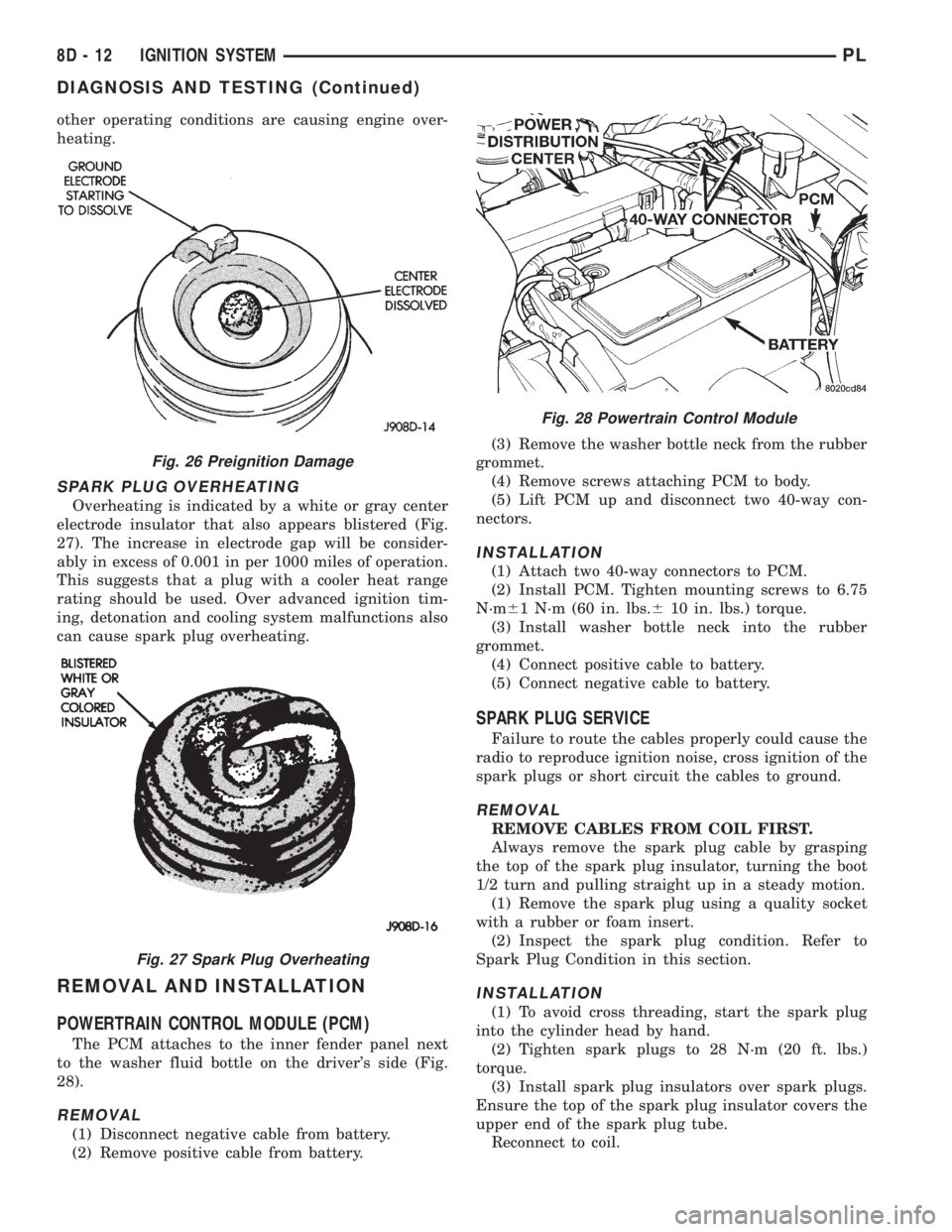
Overheating is indicated by a white or gray center
electrode insulator that also appears blistered (Fig.
27). The increase in electrode gap will be consider-
ably in excess of 0.001 in per 1000 miles of operation.
This suggests that a plug with a cooler heat range
rating should be used. Over advanced ignition tim-
ing, detonation and cooling system malfunctions also
can cause spark plug overheating.
REMOVAL AND INSTALLATION
POWERTRAIN CONTROL MODULE (PCM)
The PCM attaches to the inner fender panel next
to the washer fluid bottle on the driver's side (Fig.
28).
REMOVAL
(1) Disconnect negative cable from battery.
(2) Remove positive cable from battery.(3) Remove the washer bottle neck from the rubber
grommet.
(4) Remove screws attaching PCM to body.
(5) Lift PCM up and disconnect two 40-way con-
nectors.
INSTALLATION
(1) Attach two 40-way connectors to PCM.
(2) Install PCM. Tighten mounting screws to 6.75
N´m61 N´m (60 in. lbs.610 in. lbs.) torque.
(3) Install washer bottle neck into the rubber
grommet.
(4) Connect positive cable to battery.
(5) Connect negative cable to battery.
SPARK PLUG SERVICE
Failure to route the cables properly could cause the
radio to reproduce ignition noise, cross ignition of the
spark plugs or short circuit the cables to ground.
REMOVAL
REMOVE CABLES FROM COIL FIRST.
Always remove the spark plug cable by grasping
the top of the spark plug insulator, turning the boot
1/2 turn and pulling straight up in a steady motion.
(1) Remove the spark plug using a quality socket
with a rubber or foam insert.
(2) Inspect the spark plug condition. Refer to
Spark Plug Condition in this section.
INSTALLATION
(1) To avoid cross threading, start the spark plug
into the cylinder head by hand.
(2) Tighten spark plugs to 28 N´m (20 ft. lbs.)
torque.
(3) Install spark plug insulators over spark plugs.
Ensure the top of the spark plug insulator covers the
upper end of the spark plug tube.
Reconnect to coil.
Fig. 26 Preignition Damage
Fig. 27 Spark Plug Overheating
Fig. 28 Powertrain Control Module
8D - 12 IGNITION SYSTEMPL
DIAGNOSIS AND TESTING (Continued)
Page 264 of 1200
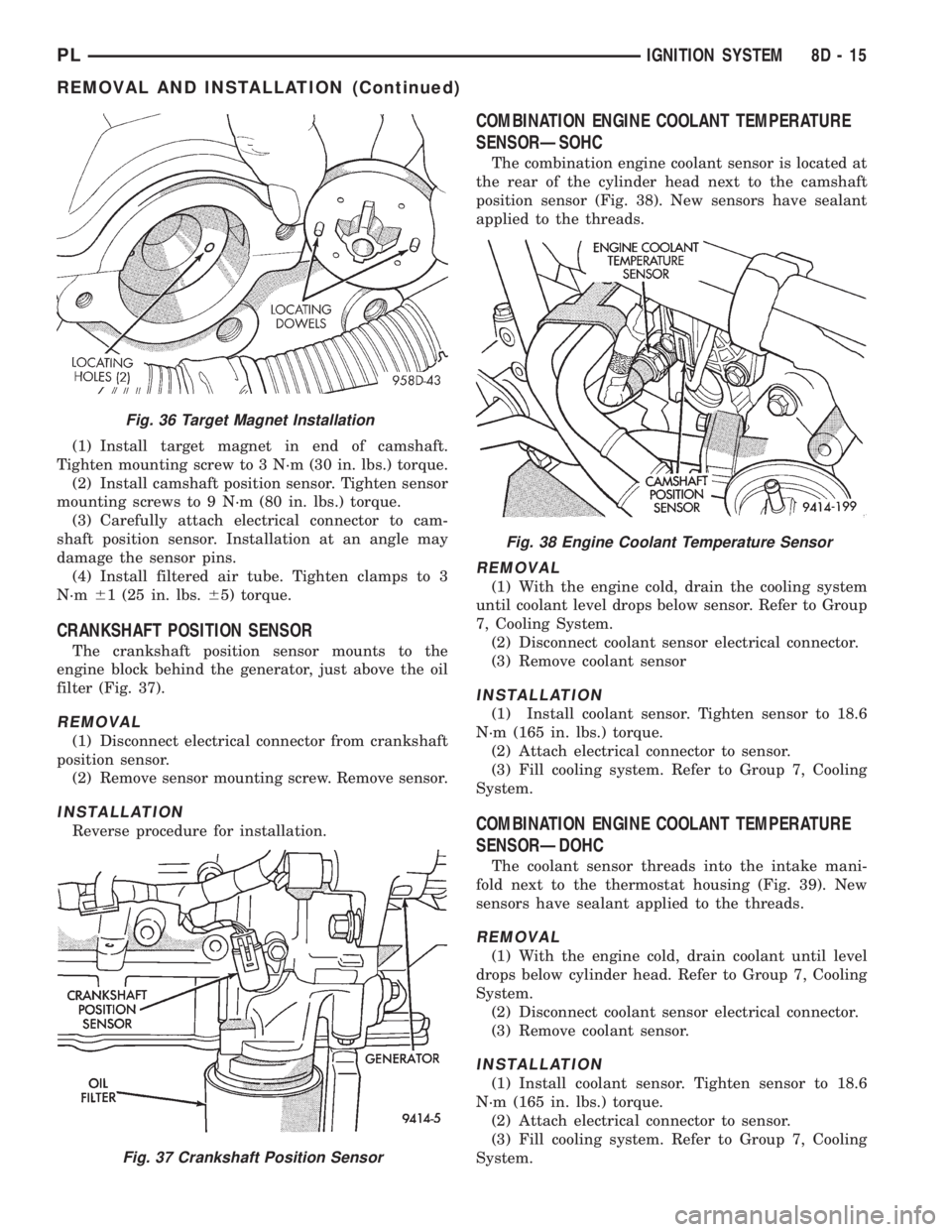
(1) Install target magnet in end of camshaft.
Tighten mounting screw to 3 N´m (30 in. lbs.) torque.
(2) Install camshaft position sensor. Tighten sensor
mounting screws to 9 N´m (80 in. lbs.) torque.
(3) Carefully attach electrical connector to cam-
shaft position sensor. Installation at an angle may
damage the sensor pins.
(4) Install filtered air tube. Tighten clamps to 3
N´m61 (25 in. lbs.65) torque.
CRANKSHAFT POSITION SENSOR
The crankshaft position sensor mounts to the
engine block behind the generator, just above the oil
filter (Fig. 37).
REMOVAL
(1) Disconnect electrical connector from crankshaft
position sensor.
(2) Remove sensor mounting screw. Remove sensor.
INSTALLATION
Reverse procedure for installation.
COMBINATION ENGINE COOLANT TEMPERATURE
SENSORÐSOHC
The combination engine coolant sensor is located at
the rear of the cylinder head next to the camshaft
position sensor (Fig. 38). New sensors have sealant
applied to the threads.
REMOVAL
(1) With the engine cold, drain the cooling system
until coolant level drops below sensor. Refer to Group
7, Cooling System.
(2) Disconnect coolant sensor electrical connector.
(3) Remove coolant sensor
INSTALLATION
(1) Install coolant sensor. Tighten sensor to 18.6
N´m (165 in. lbs.) torque.
(2) Attach electrical connector to sensor.
(3) Fill cooling system. Refer to Group 7, Cooling
System.
COMBINATION ENGINE COOLANT TEMPERATURE
SENSORÐDOHC
The coolant sensor threads into the intake mani-
fold next to the thermostat housing (Fig. 39). New
sensors have sealant applied to the threads.
REMOVAL
(1) With the engine cold, drain coolant until level
drops below cylinder head. Refer to Group 7, Cooling
System.
(2) Disconnect coolant sensor electrical connector.
(3) Remove coolant sensor.
INSTALLATION
(1) Install coolant sensor. Tighten sensor to 18.6
N´m (165 in. lbs.) torque.
(2) Attach electrical connector to sensor.
(3) Fill cooling system. Refer to Group 7, Cooling
System.
Fig. 36 Target Magnet Installation
Fig. 37 Crankshaft Position Sensor
Fig. 38 Engine Coolant Temperature Sensor
PLIGNITION SYSTEM 8D - 15
REMOVAL AND INSTALLATION (Continued)