battery DODGE NEON 1999 Service Service Manual
[x] Cancel search | Manufacturer: DODGE, Model Year: 1999, Model line: NEON, Model: DODGE NEON 1999Pages: 1200, PDF Size: 35.29 MB
Page 258 of 1200
ply circuit shorts to ground, neither sensor will pro-
duce a signal (output voltage to the PCM).
When the ignition key is turned and left in the On
position, the PCM automatically energizes the Auto
Shutdown (ASD) relay. However, the controller de-en-
ergizes the relay within one second because it has
not received a camshaft position sensor signal indi-
cating engine rotation.
During cranking, the ASD relay will not energize
until the PCM receives a camshaft position sensor
signal. Secondly, the ASD relay remains energized
only if the controller senses a crankshaft position
sensor signal immediately after detecting the cam-
shaft position sensor signal.
(1) Check battery voltage. Voltage should approxi-
mately 12.66 volts or higher to perform failure to
start test.
(2) Disconnect the harness connector from the coil
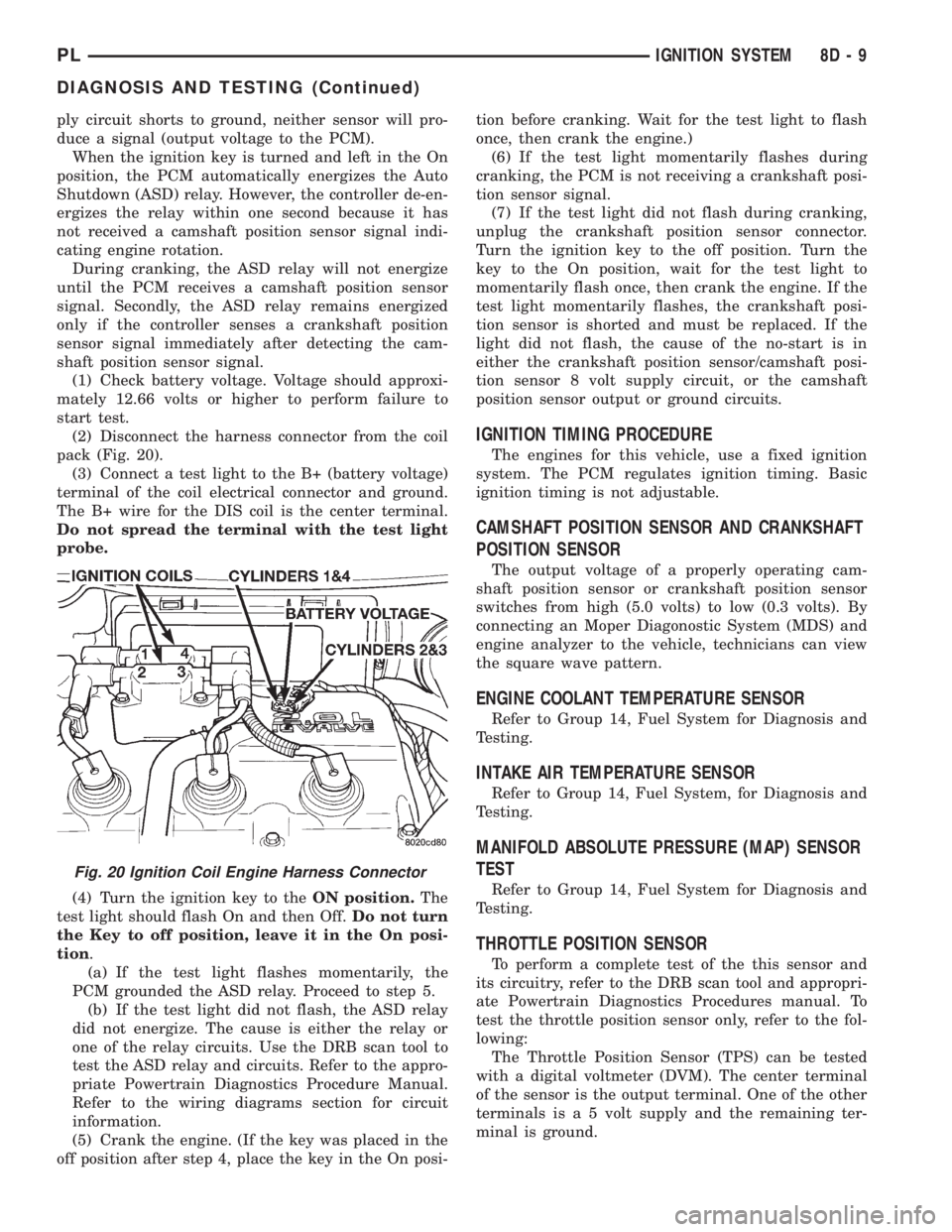
pack (Fig. 20).
(3) Connect a test light to the B+ (battery voltage)
terminal of the coil electrical connector and ground.
The B+ wire for the DIS coil is the center terminal.
Do not spread the terminal with the test light
probe.
(4) Turn the ignition key to theON position.The
test light should flash On and then Off.Do not turn
the Key to off position, leave it in the On posi-
tion.
(a) If the test light flashes momentarily, the
PCM grounded the ASD relay. Proceed to step 5.
(b) If the test light did not flash, the ASD relay
did not energize. The cause is either the relay or
one of the relay circuits. Use the DRB scan tool to
test the ASD relay and circuits. Refer to the appro-
priate Powertrain Diagnostics Procedure Manual.
Refer to the wiring diagrams section for circuit
information.
(5) Crank the engine. (If the key was placed in the
off position after step 4, place the key in the On posi-tion before cranking. Wait for the test light to flash
once, then crank the engine.)
(6) If the test light momentarily flashes during
cranking, the PCM is not receiving a crankshaft posi-
tion sensor signal.
(7) If the test light did not flash during cranking,
unplug the crankshaft position sensor connector.
Turn the ignition key to the off position. Turn the
key to the On position, wait for the test light to
momentarily flash once, then crank the engine. If the
test light momentarily flashes, the crankshaft posi-
tion sensor is shorted and must be replaced. If the
light did not flash, the cause of the no-start is in
either the crankshaft position sensor/camshaft posi-
tion sensor 8 volt supply circuit, or the camshaft
position sensor output or ground circuits.
IGNITION TIMING PROCEDURE
The engines for this vehicle, use a fixed ignition
system. The PCM regulates ignition timing. Basic
ignition timing is not adjustable.
CAMSHAFT POSITION SENSOR AND CRANKSHAFT
POSITION SENSOR
The output voltage of a properly operating cam-
shaft position sensor or crankshaft position sensor
switches from high (5.0 volts) to low (0.3 volts). By
connecting an Moper Diagonostic System (MDS) and
engine analyzer to the vehicle, technicians can view
the square wave pattern.
ENGINE COOLANT TEMPERATURE SENSOR
Refer to Group 14, Fuel System for Diagnosis and
Testing.
INTAKE AIR TEMPERATURE SENSOR
Refer to Group 14, Fuel System, for Diagnosis and
Testing.
MANIFOLD ABSOLUTE PRESSURE (MAP) SENSOR
TEST
Refer to Group 14, Fuel System for Diagnosis and
Testing.
THROTTLE POSITION SENSOR
To perform a complete test of the this sensor and
its circuitry, refer to the DRB scan tool and appropri-
ate Powertrain Diagnostics Procedures manual. To
test the throttle position sensor only, refer to the fol-
lowing:
The Throttle Position Sensor (TPS) can be tested
with a digital voltmeter (DVM). The center terminal
of the sensor is the output terminal. One of the other
terminals is a 5 volt supply and the remaining ter-
minal is ground.
Fig. 20 Ignition Coil Engine Harness Connector
PLIGNITION SYSTEM 8D - 9
DIAGNOSIS AND TESTING (Continued)
Page 261 of 1200
other operating conditions are causing engine over-
heating.
SPARK PLUG OVERHEATING
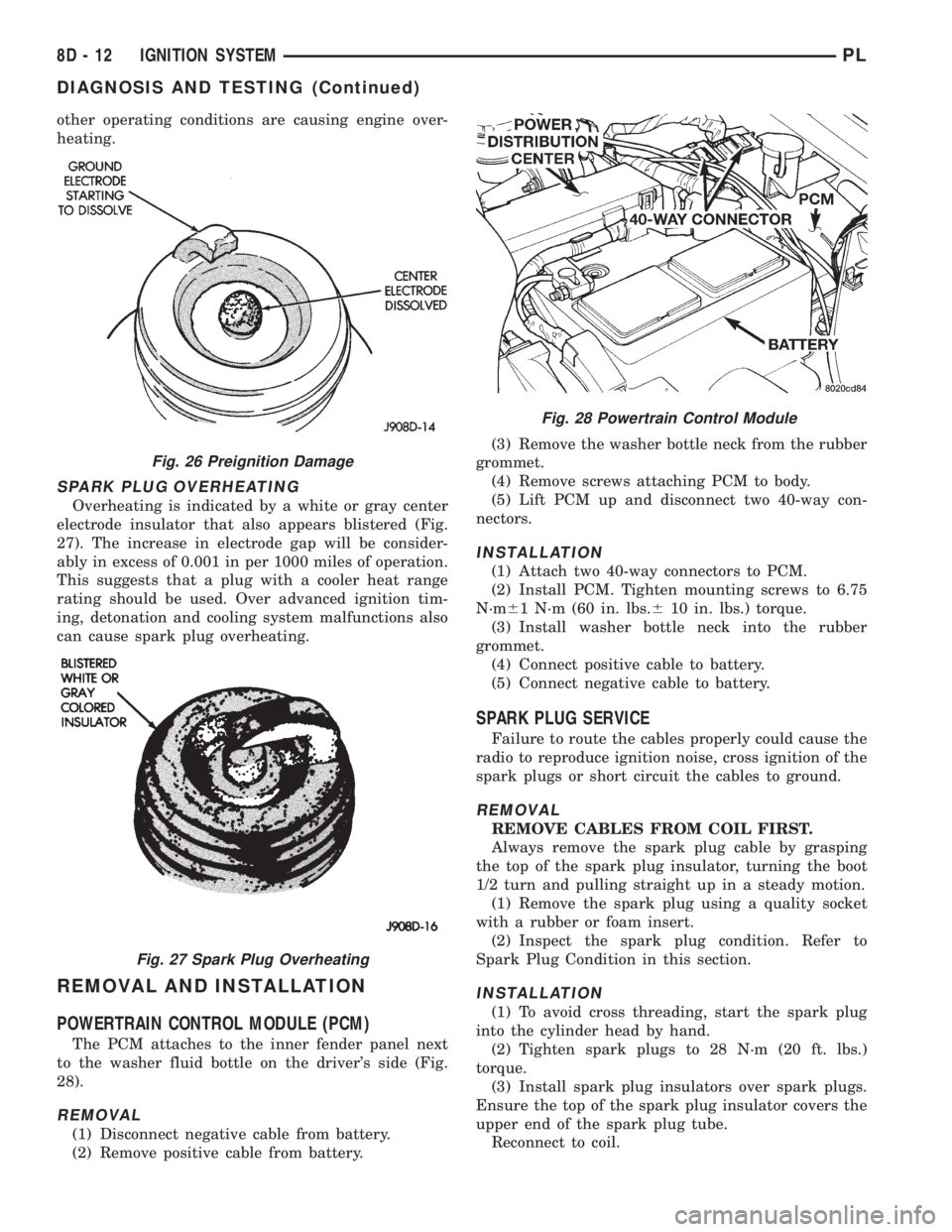
Overheating is indicated by a white or gray center
electrode insulator that also appears blistered (Fig.
27). The increase in electrode gap will be consider-
ably in excess of 0.001 in per 1000 miles of operation.
This suggests that a plug with a cooler heat range
rating should be used. Over advanced ignition tim-
ing, detonation and cooling system malfunctions also
can cause spark plug overheating.
REMOVAL AND INSTALLATION
POWERTRAIN CONTROL MODULE (PCM)
The PCM attaches to the inner fender panel next
to the washer fluid bottle on the driver's side (Fig.
28).
REMOVAL
(1) Disconnect negative cable from battery.
(2) Remove positive cable from battery.(3) Remove the washer bottle neck from the rubber
grommet.
(4) Remove screws attaching PCM to body.
(5) Lift PCM up and disconnect two 40-way con-
nectors.
INSTALLATION
(1) Attach two 40-way connectors to PCM.
(2) Install PCM. Tighten mounting screws to 6.75
N´m61 N´m (60 in. lbs.610 in. lbs.) torque.
(3) Install washer bottle neck into the rubber
grommet.
(4) Connect positive cable to battery.
(5) Connect negative cable to battery.
SPARK PLUG SERVICE
Failure to route the cables properly could cause the
radio to reproduce ignition noise, cross ignition of the
spark plugs or short circuit the cables to ground.
REMOVAL
REMOVE CABLES FROM COIL FIRST.
Always remove the spark plug cable by grasping
the top of the spark plug insulator, turning the boot
1/2 turn and pulling straight up in a steady motion.
(1) Remove the spark plug using a quality socket
with a rubber or foam insert.
(2) Inspect the spark plug condition. Refer to
Spark Plug Condition in this section.
INSTALLATION
(1) To avoid cross threading, start the spark plug
into the cylinder head by hand.
(2) Tighten spark plugs to 28 N´m (20 ft. lbs.)
torque.
(3) Install spark plug insulators over spark plugs.
Ensure the top of the spark plug insulator covers the
upper end of the spark plug tube.
Reconnect to coil.
Fig. 26 Preignition Damage
Fig. 27 Spark Plug Overheating
Fig. 28 Powertrain Control Module
8D - 12 IGNITION SYSTEMPL
DIAGNOSIS AND TESTING (Continued)
Page 262 of 1200
SPARK PLUG CABLE SERVICE
Failure to route the cables properly could cause the
radio to reproduce ignition noise, cross ignition of the
spark plugs or short circuit the cables to ground.
REMOVAL
Remove spark plug cable from coil frist.
Always remove the spark plug cable by grasping
the top of the spark plug insulator, turning the boot
1/2 turn and pulling straight up in a steady motion.
INSTALLATION
Install spark plug insulators over spark plugs.
Ensure the top of the spark plug insulator covers the
upper end of the spark plug tube.The connect the
other end to coil pack. OnSOHCengines, be sure
that dual plastic clip holds #1,#2 cables off of valve
cover and that PCV hose plastic clip holds #3 cable
away from metal PCV clamp and edge of air duct. On
DOHC, be sure that the plastic clip on PCV hose is
positioned so that cable clip is beneath hose, and that
#1 cable is snapped into this clip to protect it from
metal PCV clamp.
SPARK PLUG TUBES
The spark plugs tubes are pressed into the cylinder
head. Sealant is applied to the end of the tube before
installation. For engine information, refer to Group
9, Engines.
IGNITION COIL
SOHC/DOHC
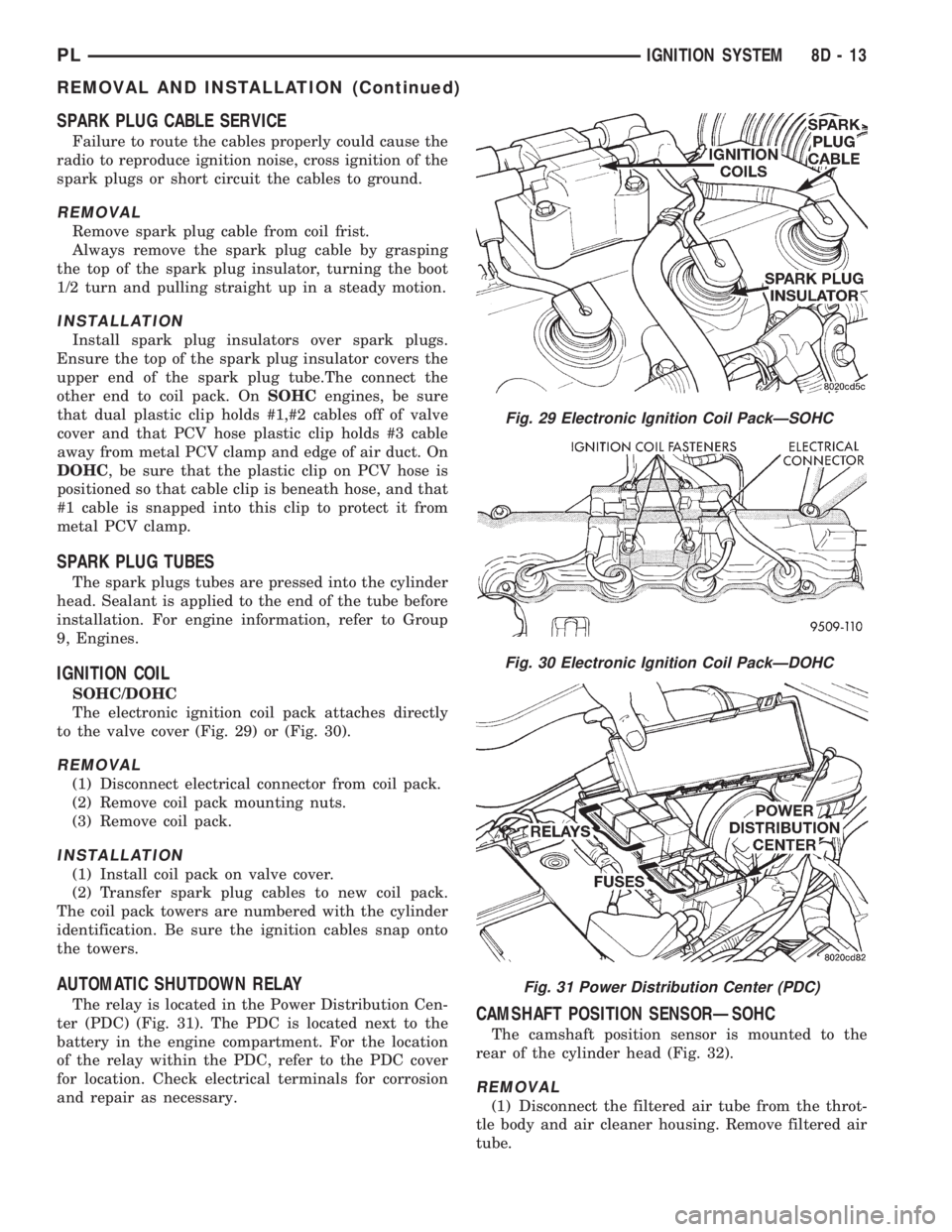
The electronic ignition coil pack attaches directly
to the valve cover (Fig. 29) or (Fig. 30).
REMOVAL
(1) Disconnect electrical connector from coil pack.
(2) Remove coil pack mounting nuts.
(3) Remove coil pack.
INSTALLATION
(1) Install coil pack on valve cover.
(2) Transfer spark plug cables to new coil pack.
The coil pack towers are numbered with the cylinder
identification. Be sure the ignition cables snap onto
the towers.
AUTOMATIC SHUTDOWN RELAY
The relay is located in the Power Distribution Cen-
ter (PDC) (Fig. 31). The PDC is located next to the
battery in the engine compartment. For the location
of the relay within the PDC, refer to the PDC cover
for location. Check electrical terminals for corrosion
and repair as necessary.CAMSHAFT POSITION SENSORÐSOHC
The camshaft position sensor is mounted to the
rear of the cylinder head (Fig. 32).
REMOVAL
(1) Disconnect the filtered air tube from the throt-
tle body and air cleaner housing. Remove filtered air
tube.
Fig. 29 Electronic Ignition Coil PackÐSOHC
Fig. 30 Electronic Ignition Coil PackÐDOHC
Fig. 31 Power Distribution Center (PDC)
PLIGNITION SYSTEM 8D - 13
REMOVAL AND INSTALLATION (Continued)
Page 265 of 1200
MAP/IAT SENSORÐSOHC
Refer to Group 14, Fuel Injection Section for
Removal/Installation.
MAP/IAT SENSORÐDOHC
Refer to Group 14, Fuel Injection Section for
Removal/Installation..
THROTTLE POSITION SENSOR
Refer to Group 14, Fuel Injection Section, for
Removal/Installation.
IGNITION SWITCH
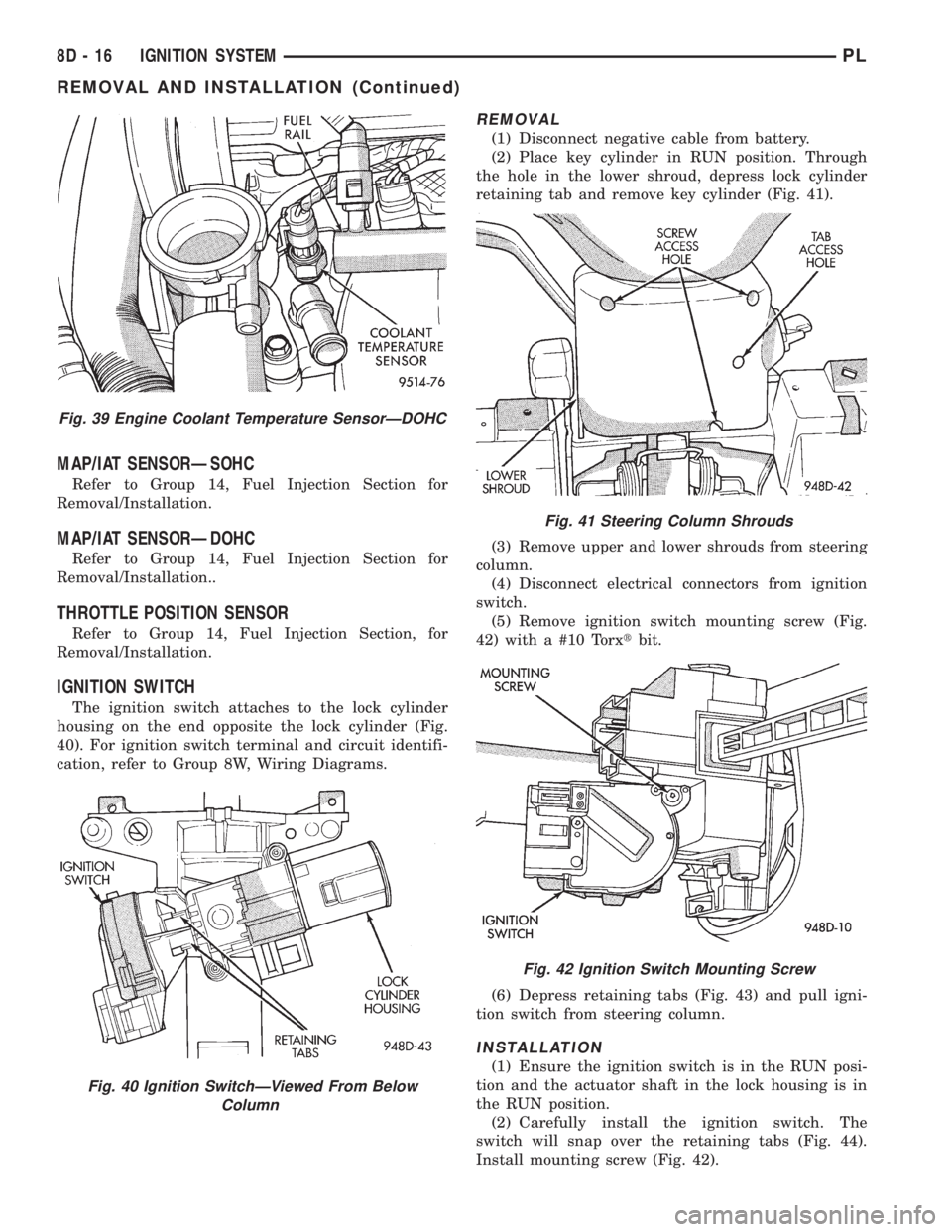
The ignition switch attaches to the lock cylinder
housing on the end opposite the lock cylinder (Fig.
40). For ignition switch terminal and circuit identifi-
cation, refer to Group 8W, Wiring Diagrams.
REMOVAL
(1) Disconnect negative cable from battery.
(2) Place key cylinder in RUN position. Through
the hole in the lower shroud, depress lock cylinder
retaining tab and remove key cylinder (Fig. 41).
(3) Remove upper and lower shrouds from steering
column.
(4) Disconnect electrical connectors from ignition
switch.
(5) Remove ignition switch mounting screw (Fig.
42) with a #10 Torxtbit.
(6) Depress retaining tabs (Fig. 43) and pull igni-
tion switch from steering column.
INSTALLATION
(1) Ensure the ignition switch is in the RUN posi-
tion and the actuator shaft in the lock housing is in
the RUN position.
(2) Carefully install the ignition switch. The
switch will snap over the retaining tabs (Fig. 44).
Install mounting screw (Fig. 42).
Fig. 39 Engine Coolant Temperature SensorÐDOHC
Fig. 40 Ignition SwitchÐViewed From Below
Column
Fig. 41 Steering Column Shrouds
Fig. 42 Ignition Switch Mounting Screw
8D - 16 IGNITION SYSTEMPL
REMOVAL AND INSTALLATION (Continued)
Page 266 of 1200
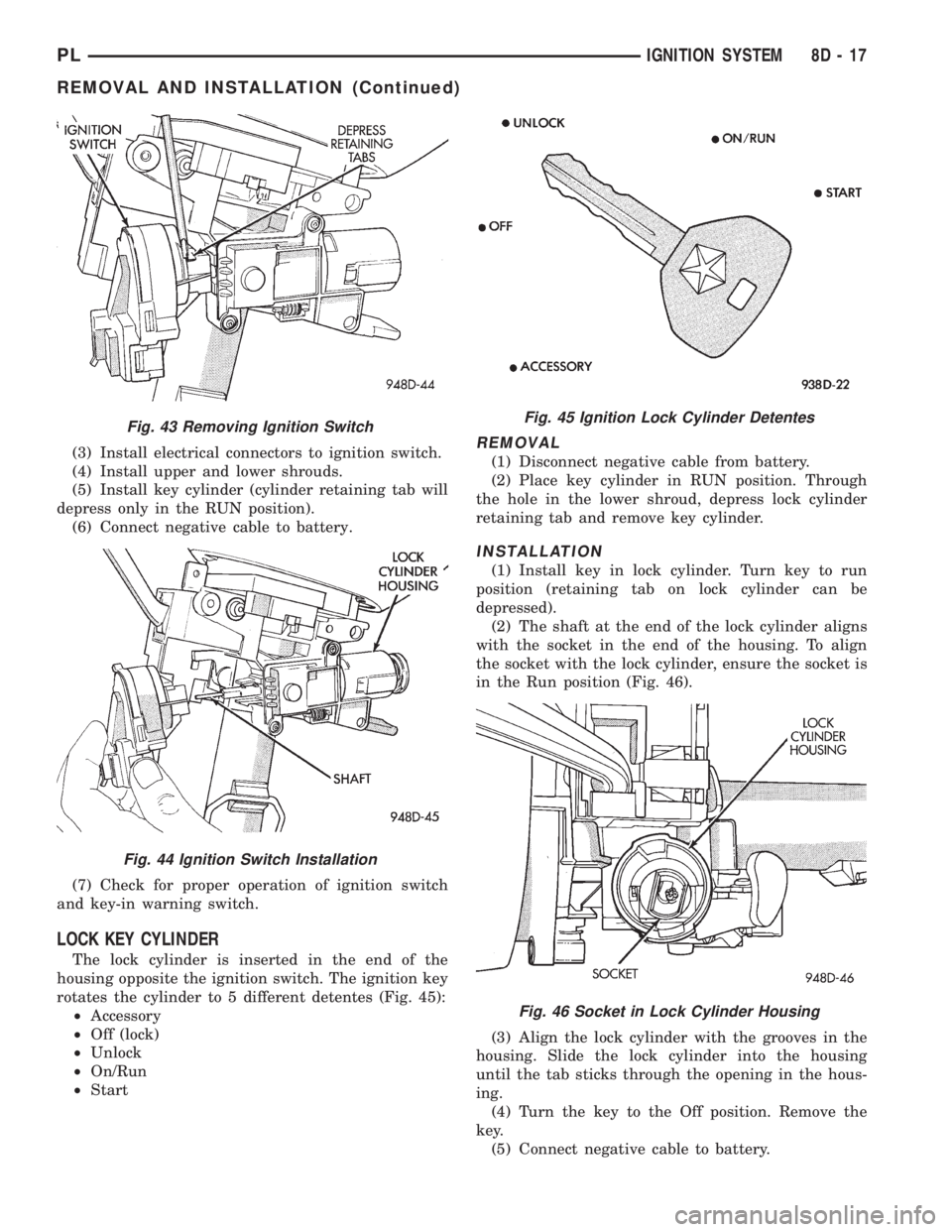
(3) Install electrical connectors to ignition switch.
(4) Install upper and lower shrouds.
(5) Install key cylinder (cylinder retaining tab will
depress only in the RUN position).
(6) Connect negative cable to battery.
(7) Check for proper operation of ignition switch
and key-in warning switch.
LOCK KEY CYLINDER
The lock cylinder is inserted in the end of the
housing opposite the ignition switch. The ignition key
rotates the cylinder to 5 different detentes (Fig. 45):
²Accessory
²Off (lock)
²Unlock
²On/Run
²Start
REMOVAL
(1) Disconnect negative cable from battery.
(2) Place key cylinder in RUN position. Through
the hole in the lower shroud, depress lock cylinder
retaining tab and remove key cylinder.
INSTALLATION
(1) Install key in lock cylinder. Turn key to run
position (retaining tab on lock cylinder can be
depressed).
(2) The shaft at the end of the lock cylinder aligns
with the socket in the end of the housing. To align
the socket with the lock cylinder, ensure the socket is
in the Run position (Fig. 46).
(3) Align the lock cylinder with the grooves in the
housing. Slide the lock cylinder into the housing
until the tab sticks through the opening in the hous-
ing.
(4) Turn the key to the Off position. Remove the
key.
(5) Connect negative cable to battery.
Fig. 43 Removing Ignition Switch
Fig. 44 Ignition Switch Installation
Fig. 45 Ignition Lock Cylinder Detentes
Fig. 46 Socket in Lock Cylinder Housing
PLIGNITION SYSTEM 8D - 17
REMOVAL AND INSTALLATION (Continued)
Page 271 of 1200
When the ignition switch is in the OFF position, or
when the radio frequency is being displayed, time
keeping is accurately maintained.
The procedure for setting the clock varies slightly
with each radio. The correct procedure is described in
the individual radio operating instructions. Refer to
the Owner's Manual supplied with the vehicle.
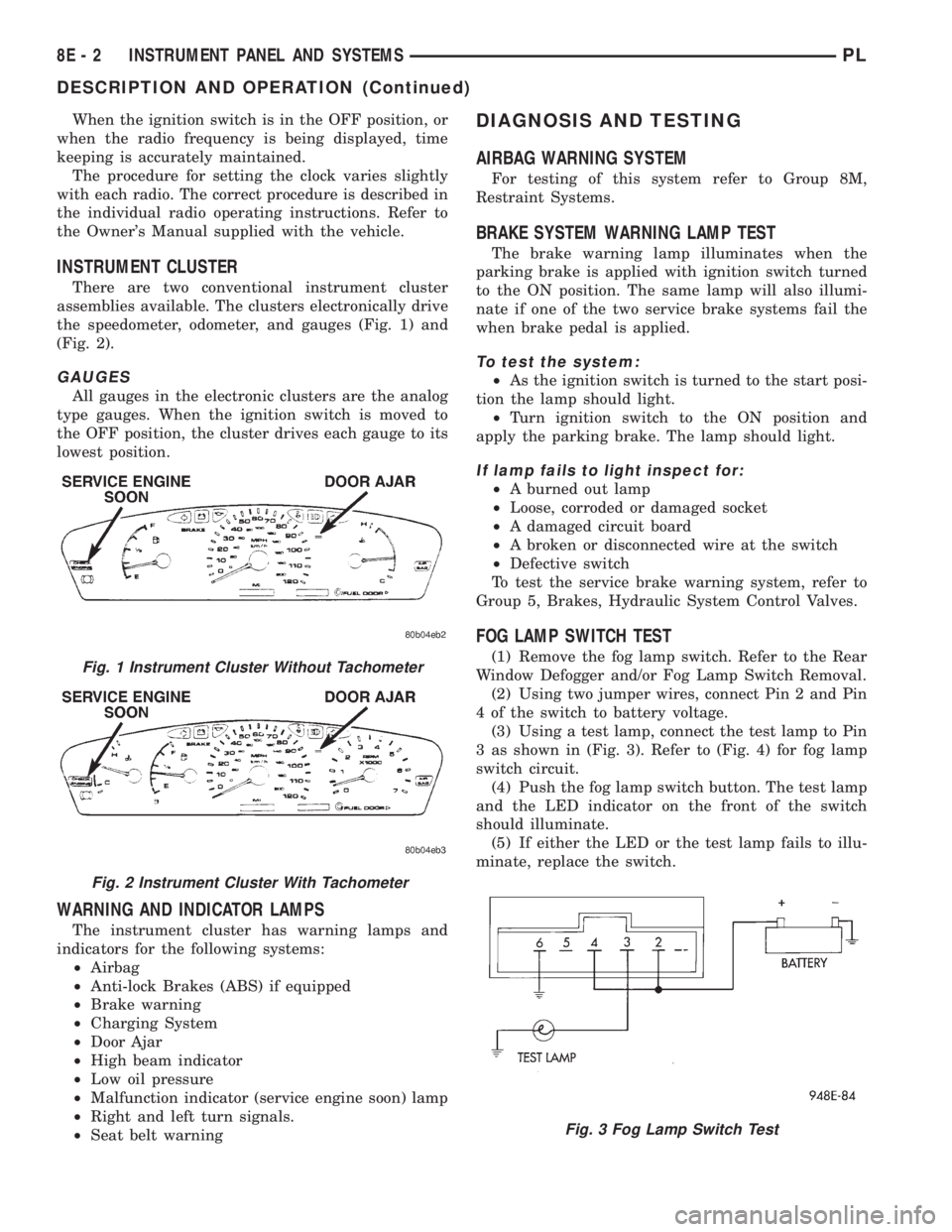
INSTRUMENT CLUSTER
There are two conventional instrument cluster
assemblies available. The clusters electronically drive
the speedometer, odometer, and gauges (Fig. 1) and
(Fig. 2).
GAUGES
All gauges in the electronic clusters are the analog
type gauges. When the ignition switch is moved to
the OFF position, the cluster drives each gauge to its
lowest position.
WARNING AND INDICATOR LAMPS
The instrument cluster has warning lamps and
indicators for the following systems:
²Airbag
²Anti-lock Brakes (ABS) if equipped
²Brake warning
²Charging System
²Door Ajar
²High beam indicator
²Low oil pressure
²Malfunction indicator (service engine soon) lamp
²Right and left turn signals.
²Seat belt warning
DIAGNOSIS AND TESTING
AIRBAG WARNING SYSTEM
For testing of this system refer to Group 8M,
Restraint Systems.
BRAKE SYSTEM WARNING LAMP TEST
The brake warning lamp illuminates when the
parking brake is applied with ignition switch turned
to the ON position. The same lamp will also illumi-
nate if one of the two service brake systems fail the
when brake pedal is applied.
To test the system:
²As the ignition switch is turned to the start posi-
tion the lamp should light.
²Turn ignition switch to the ON position and
apply the parking brake. The lamp should light.
If lamp fails to light inspect for:
²A burned out lamp
²Loose, corroded or damaged socket
²A damaged circuit board
²A broken or disconnected wire at the switch
²Defective switch
To test the service brake warning system, refer to
Group 5, Brakes, Hydraulic System Control Valves.
FOG LAMP SWITCH TEST
(1) Remove the fog lamp switch. Refer to the Rear
Window Defogger and/or Fog Lamp Switch Removal.
(2) Using two jumper wires, connect Pin 2 and Pin
4 of the switch to battery voltage.
(3) Using a test lamp, connect the test lamp to Pin
3 as shown in (Fig. 3). Refer to (Fig. 4) for fog lamp
switch circuit.
(4) Push the fog lamp switch button. The test lamp
and the LED indicator on the front of the switch
should illuminate.
(5) If either the LED or the test lamp fails to illu-
minate, replace the switch.Fig. 1 Instrument Cluster Without Tachometer
Fig. 2 Instrument Cluster With Tachometer
Fig. 3 Fog Lamp Switch Test
8E - 2 INSTRUMENT PANEL AND SYSTEMSPL
DESCRIPTION AND OPERATION (Continued)
Page 273 of 1200
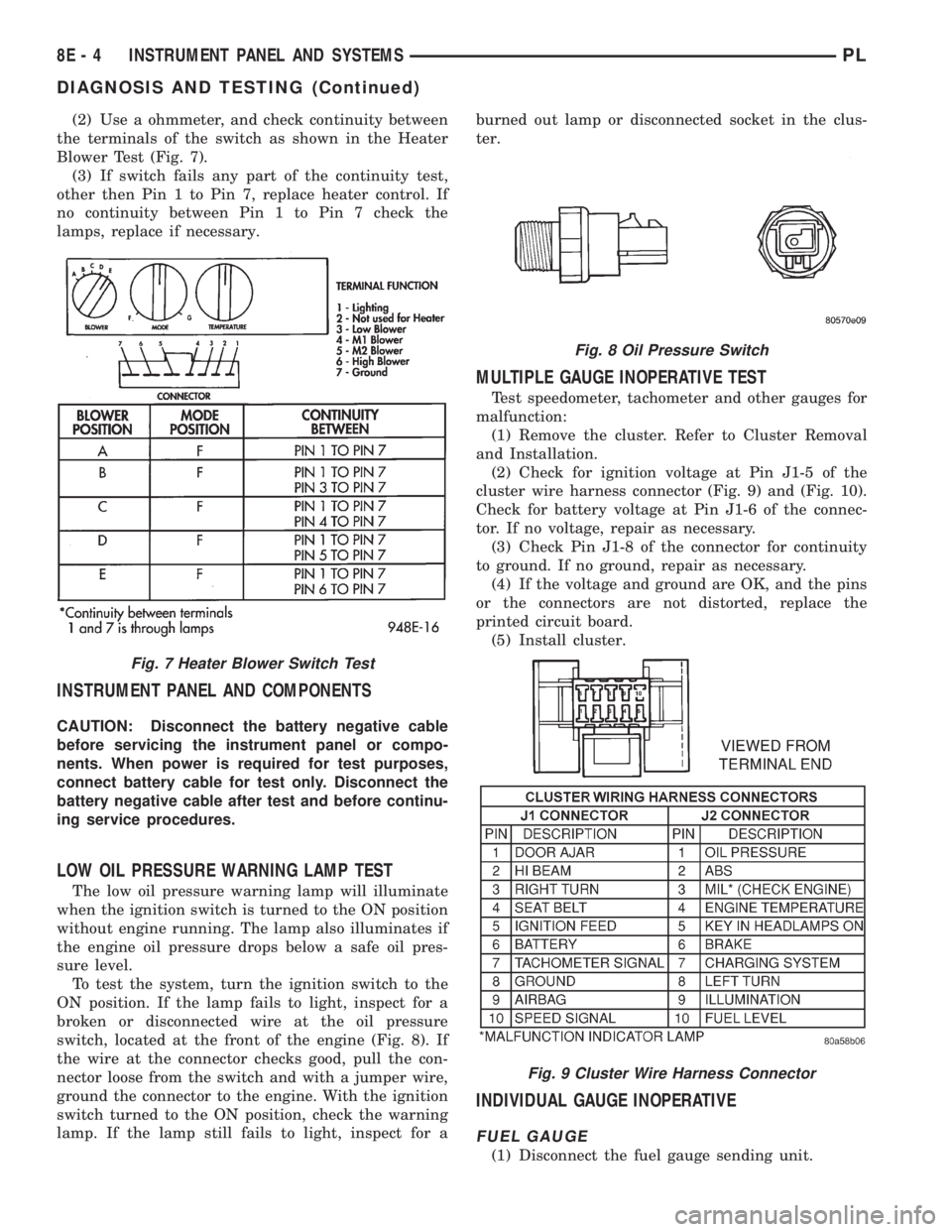
(2) Use a ohmmeter, and check continuity between
the terminals of the switch as shown in the Heater
Blower Test (Fig. 7).
(3) If switch fails any part of the continuity test,
other then Pin 1 to Pin 7, replace heater control. If
no continuity between Pin 1 to Pin 7 check the
lamps, replace if necessary.
INSTRUMENT PANEL AND COMPONENTS
CAUTION: Disconnect the battery negative cable
before servicing the instrument panel or compo-
nents. When power is required for test purposes,
connect battery cable for test only. Disconnect the
battery negative cable after test and before continu-
ing service procedures.
LOW OIL PRESSURE WARNING LAMP TEST
The low oil pressure warning lamp will illuminate
when the ignition switch is turned to the ON position
without engine running. The lamp also illuminates if
the engine oil pressure drops below a safe oil pres-
sure level.
To test the system, turn the ignition switch to the
ON position. If the lamp fails to light, inspect for a
broken or disconnected wire at the oil pressure
switch, located at the front of the engine (Fig. 8). If
the wire at the connector checks good, pull the con-
nector loose from the switch and with a jumper wire,
ground the connector to the engine. With the ignition
switch turned to the ON position, check the warning
lamp. If the lamp still fails to light, inspect for aburned out lamp or disconnected socket in the clus-
ter.
MULTIPLE GAUGE INOPERATIVE TEST
Test speedometer, tachometer and other gauges for
malfunction:
(1) Remove the cluster. Refer to Cluster Removal
and Installation.
(2) Check for ignition voltage at Pin J1-5 of the
cluster wire harness connector (Fig. 9) and (Fig. 10).
Check for battery voltage at Pin J1-6 of the connec-
tor. If no voltage, repair as necessary.
(3) Check Pin J1-8 of the connector for continuity
to ground. If no ground, repair as necessary.
(4) If the voltage and ground are OK, and the pins
or the connectors are not distorted, replace the
printed circuit board.
(5) Install cluster.
INDIVIDUAL GAUGE INOPERATIVE
FUEL GAUGE
(1) Disconnect the fuel gauge sending unit.
Fig. 7 Heater Blower Switch Test
Fig. 8 Oil Pressure Switch
Fig. 9 Cluster Wire Harness Connector
8E - 4 INSTRUMENT PANEL AND SYSTEMSPL
DIAGNOSIS AND TESTING (Continued)
Page 274 of 1200
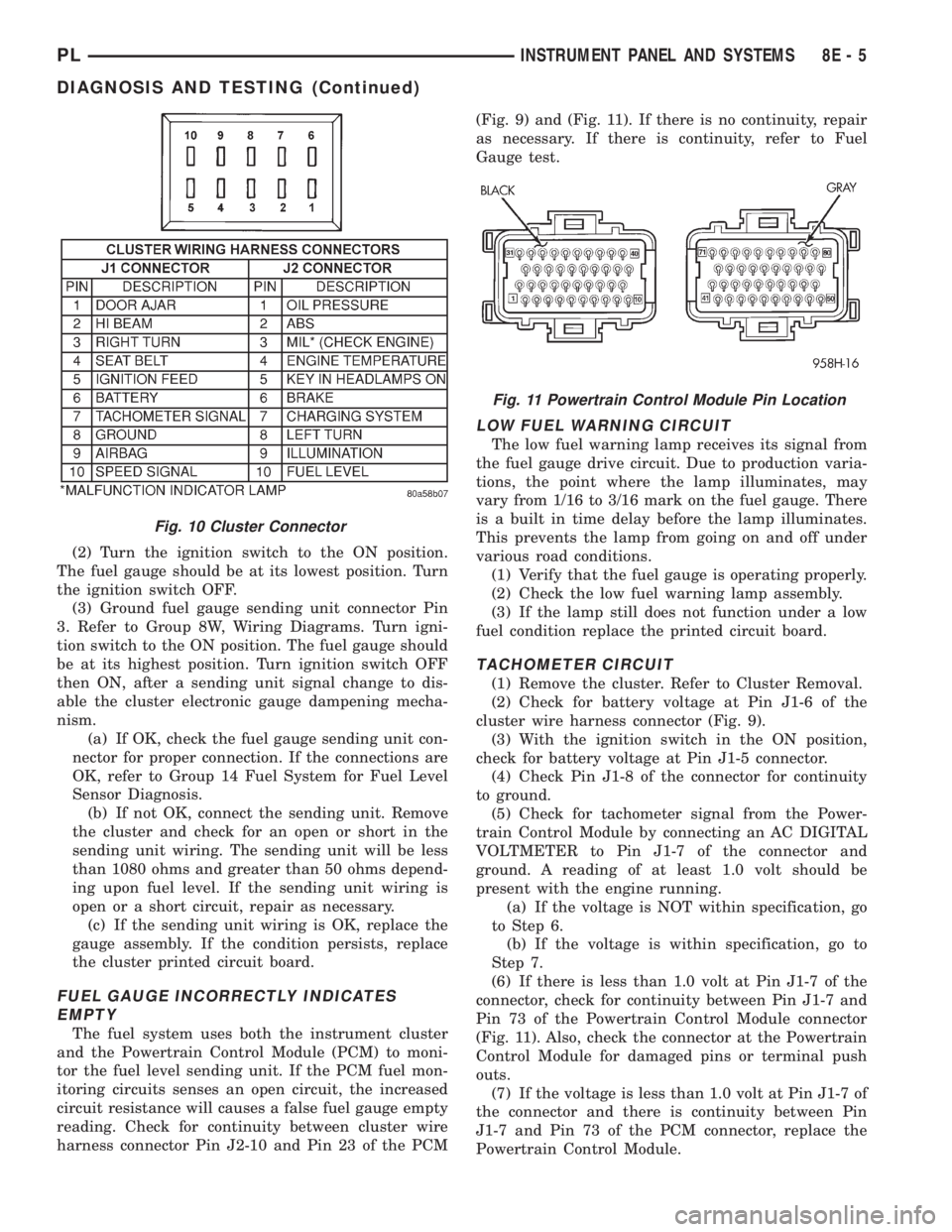
(2) Turn the ignition switch to the ON position.
The fuel gauge should be at its lowest position. Turn
the ignition switch OFF.
(3) Ground fuel gauge sending unit connector Pin
3. Refer to Group 8W, Wiring Diagrams. Turn igni-
tion switch to the ON position. The fuel gauge should
be at its highest position. Turn ignition switch OFF
then ON, after a sending unit signal change to dis-
able the cluster electronic gauge dampening mecha-
nism.
(a) If OK, check the fuel gauge sending unit con-
nector for proper connection. If the connections are
OK, refer to Group 14 Fuel System for Fuel Level
Sensor Diagnosis.
(b) If not OK, connect the sending unit. Remove
the cluster and check for an open or short in the
sending unit wiring. The sending unit will be less
than 1080 ohms and greater than 50 ohms depend-
ing upon fuel level. If the sending unit wiring is
open or a short circuit, repair as necessary.
(c) If the sending unit wiring is OK, replace the
gauge assembly. If the condition persists, replace
the cluster printed circuit board.
FUEL GAUGE INCORRECTLY INDICATES
EMPTY
The fuel system uses both the instrument cluster
and the Powertrain Control Module (PCM) to moni-
tor the fuel level sending unit. If the PCM fuel mon-
itoring circuits senses an open circuit, the increased
circuit resistance will causes a false fuel gauge empty
reading. Check for continuity between cluster wire
harness connector Pin J2-10 and Pin 23 of the PCM(Fig. 9) and (Fig. 11). If there is no continuity, repair
as necessary. If there is continuity, refer to Fuel
Gauge test.
LOW FUEL WARNING CIRCUIT
The low fuel warning lamp receives its signal from
the fuel gauge drive circuit. Due to production varia-
tions, the point where the lamp illuminates, may
vary from 1/16 to 3/16 mark on the fuel gauge. There
is a built in time delay before the lamp illuminates.
This prevents the lamp from going on and off under
various road conditions.
(1) Verify that the fuel gauge is operating properly.
(2) Check the low fuel warning lamp assembly.
(3) If the lamp still does not function under a low
fuel condition replace the printed circuit board.
TACHOMETER CIRCUIT
(1) Remove the cluster. Refer to Cluster Removal.
(2) Check for battery voltage at Pin J1-6 of the
cluster wire harness connector (Fig. 9).
(3) With the ignition switch in the ON position,
check for battery voltage at Pin J1-5 connector.
(4) Check Pin J1-8 of the connector for continuity
to ground.
(5) Check for tachometer signal from the Power-
train Control Module by connecting an AC DIGITAL
VOLTMETER to Pin J1-7 of the connector and
ground. A reading of at least 1.0 volt should be
present with the engine running.
(a) If the voltage is NOT within specification, go
to Step 6.
(b) If the voltage is within specification, go to
Step 7.
(6) If there is less than 1.0 volt at Pin J1-7 of the
connector, check for continuity between Pin J1-7 and
Pin 73 of the Powertrain Control Module connector
(Fig. 11). Also, check the connector at the Powertrain
Control Module for damaged pins or terminal push
outs.
(7) If the voltage is less than 1.0 volt at Pin J1-7 of
the connector and there is continuity between Pin
J1-7 and Pin 73 of the PCM connector, replace the
Powertrain Control Module.
Fig. 10 Cluster Connector
Fig. 11 Powertrain Control Module Pin Location
PLINSTRUMENT PANEL AND SYSTEMS 8E - 5
DIAGNOSIS AND TESTING (Continued)
Page 276 of 1200
(3) Press the cigar lighter receptacle from the
mounting ring by pushing it rearward from the back
side of the panel. Considerable force may be required
to disengage the receptacle. Remove the mounting
ring from the panel and discard. A new ring should
be used upon reinstallation to assure retention.
INSTALLATION
For installation, reverse the above procedures.
CLUSTER
CAUTION: Cluster MUST be stored in a face up posi-
tion or damage will occur to the gauge operation.
REMOVAL
(1) Disconnect the battery to ensure no DTCs are
generated.
(2) Remove the instrument panel top cover and
cluster bezel.
(3) Remove the four screws attaching cluster hous-
ing to the base panel.
(4) Pull the cluster rearward to disconnect from
base panel.
(5) Remove the cluster assembly.
INSTALLATION
For installation, reverse the above procedures.
CLUSTER LAMP
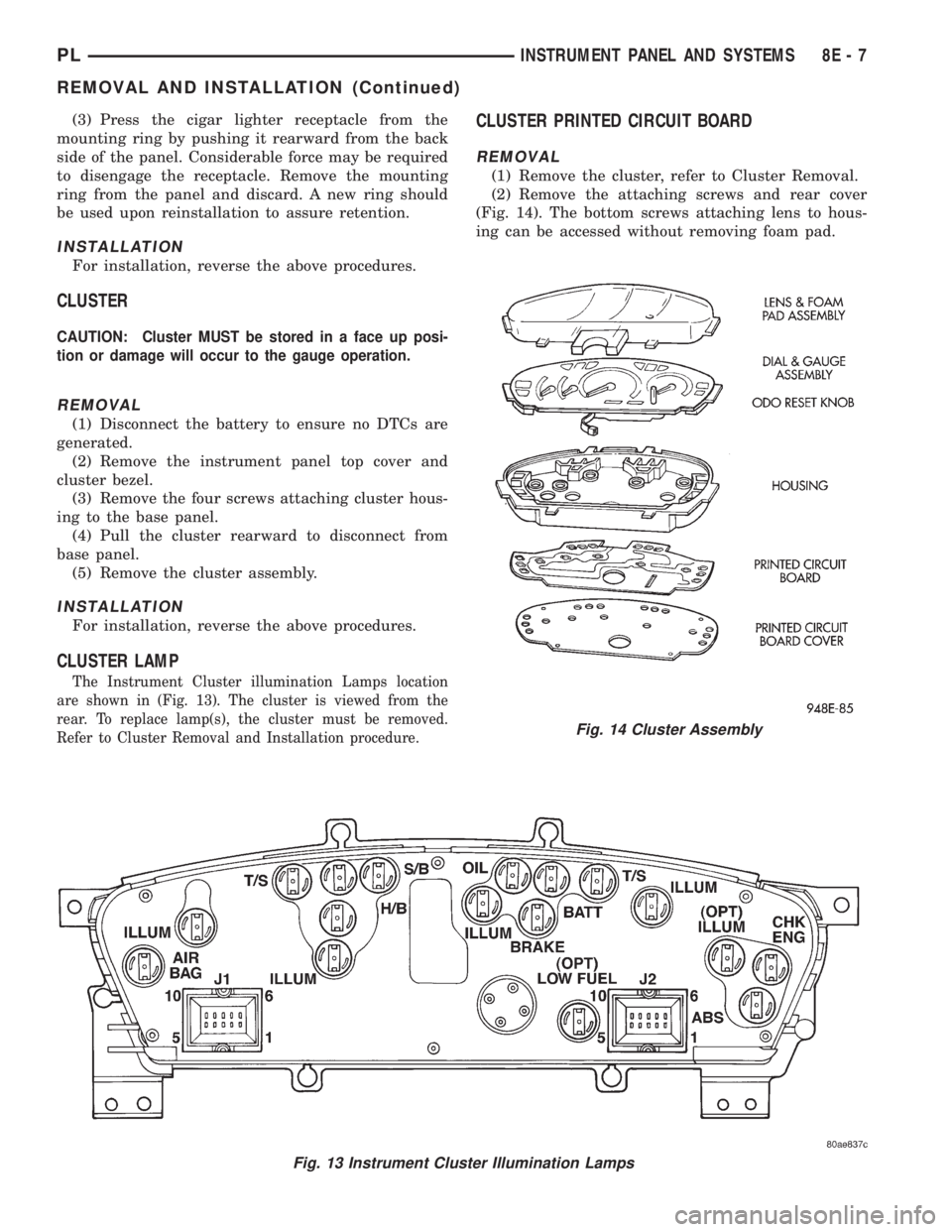
The Instrument Cluster illumination Lamps location
are shown in (Fig. 13). The cluster is viewed from the
rear. To replace lamp(s), the cluster must be removed.
Refer to Cluster Removal and Installation procedure.
CLUSTER PRINTED CIRCUIT BOARD
REMOVAL
(1) Remove the cluster, refer to Cluster Removal.
(2) Remove the attaching screws and rear cover
(Fig. 14). The bottom screws attaching lens to hous-
ing can be accessed without removing foam pad.
Fig. 13 Instrument Cluster Illumination Lamps
Fig. 14 Cluster Assembly
PLINSTRUMENT PANEL AND SYSTEMS 8E - 7
REMOVAL AND INSTALLATION (Continued)
Page 277 of 1200
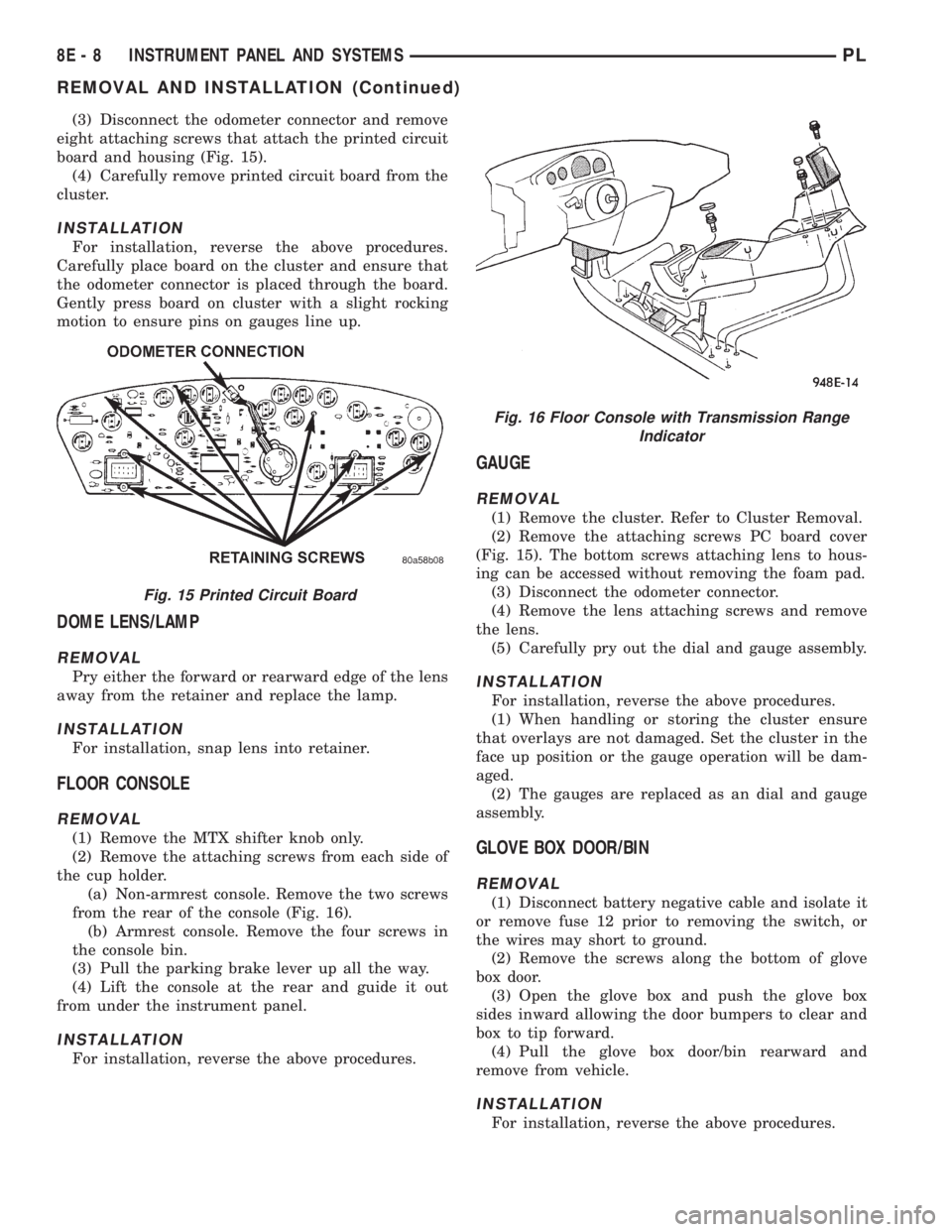
(3) Disconnect the odometer connector and remove
eight attaching screws that attach the printed circuit
board and housing (Fig. 15).
(4) Carefully remove printed circuit board from the
cluster.
INSTALLATION
For installation, reverse the above procedures.
Carefully place board on the cluster and ensure that
the odometer connector is placed through the board.
Gently press board on cluster with a slight rocking
motion to ensure pins on gauges line up.
DOME LENS/LAMP
REMOVAL
Pry either the forward or rearward edge of the lens
away from the retainer and replace the lamp.
INSTALLATION
For installation, snap lens into retainer.
FLOOR CONSOLE
REMOVAL
(1) Remove the MTX shifter knob only.
(2) Remove the attaching screws from each side of
the cup holder.
(a) Non-armrest console. Remove the two screws
from the rear of the console (Fig. 16).
(b) Armrest console. Remove the four screws in
the console bin.
(3) Pull the parking brake lever up all the way.
(4) Lift the console at the rear and guide it out
from under the instrument panel.
INSTALLATION
For installation, reverse the above procedures.
GAUGE
REMOVAL
(1) Remove the cluster. Refer to Cluster Removal.
(2) Remove the attaching screws PC board cover
(Fig. 15). The bottom screws attaching lens to hous-
ing can be accessed without removing the foam pad.
(3) Disconnect the odometer connector.
(4) Remove the lens attaching screws and remove
the lens.
(5) Carefully pry out the dial and gauge assembly.
INSTALLATION
For installation, reverse the above procedures.
(1) When handling or storing the cluster ensure
that overlays are not damaged. Set the cluster in the
face up position or the gauge operation will be dam-
aged.
(2) The gauges are replaced as an dial and gauge
assembly.
GLOVE BOX DOOR/BIN
REMOVAL
(1) Disconnect battery negative cable and isolate it
or remove fuse 12 prior to removing the switch, or
the wires may short to ground.
(2) Remove the screws along the bottom of glove
box door.
(3) Open the glove box and push the glove box
sides inward allowing the door bumpers to clear and
box to tip forward.
(4) Pull the glove box door/bin rearward and
remove from vehicle.
INSTALLATION
For installation, reverse the above procedures.
Fig. 15 Printed Circuit Board
Fig. 16 Floor Console with Transmission Range
Indicator
8E - 8 INSTRUMENT PANEL AND SYSTEMSPL
REMOVAL AND INSTALLATION (Continued)