electrical DODGE NEON 2000 Service Owners Manual
[x] Cancel search | Manufacturer: DODGE, Model Year: 2000, Model line: NEON, Model: DODGE NEON 2000Pages: 1285, PDF Size: 29.42 MB
Page 864 of 1285
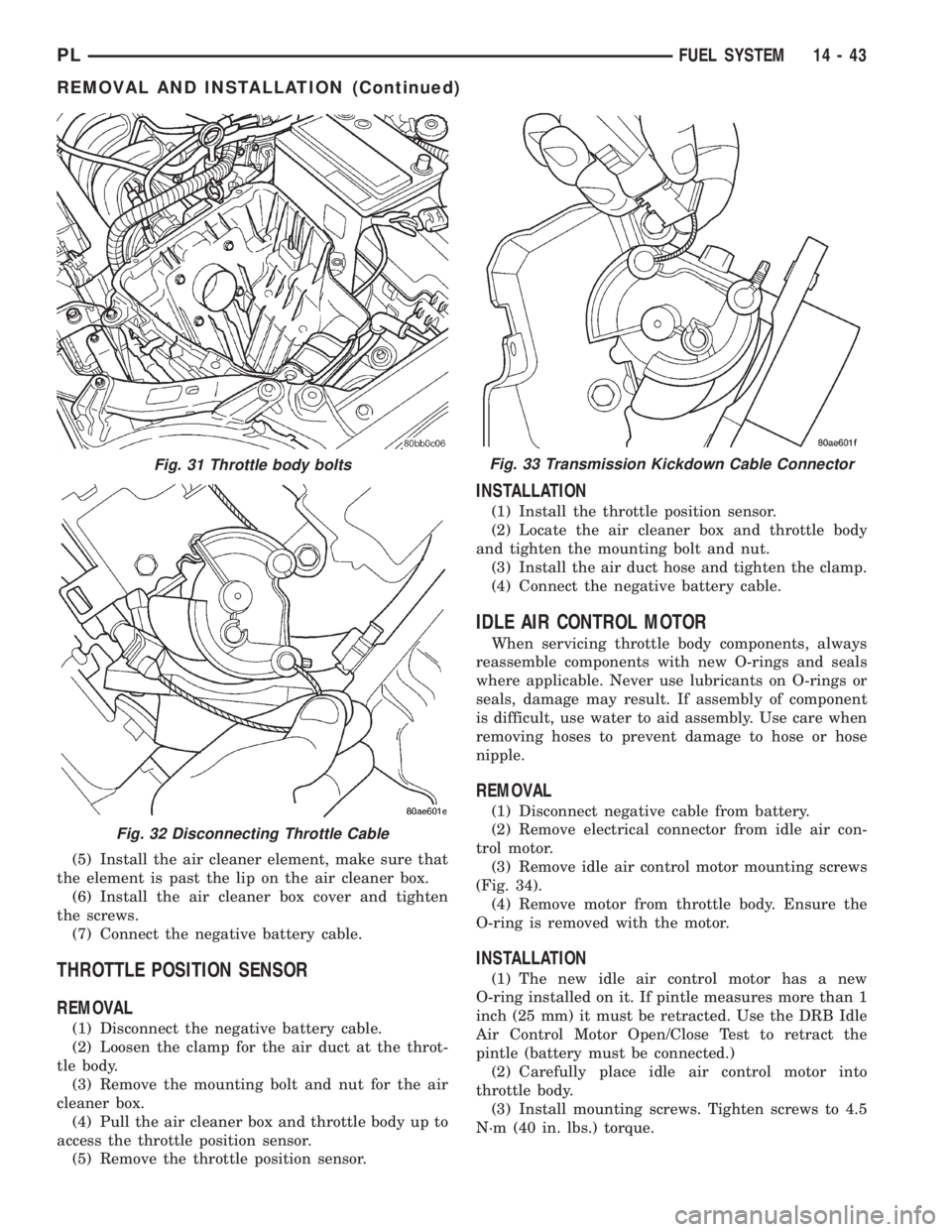
(5) Install the air cleaner element, make sure that
the element is past the lip on the air cleaner box.
(6) Install the air cleaner box cover and tighten
the screws.
(7) Connect the negative battery cable.
THROTTLE POSITION SENSOR
REMOVAL
(1) Disconnect the negative battery cable.
(2) Loosen the clamp for the air duct at the throt-
tle body.
(3) Remove the mounting bolt and nut for the air
cleaner box.
(4) Pull the air cleaner box and throttle body up to
access the throttle position sensor.
(5) Remove the throttle position sensor.
INSTALLATION
(1) Install the throttle position sensor.
(2) Locate the air cleaner box and throttle body
and tighten the mounting bolt and nut.
(3) Install the air duct hose and tighten the clamp.
(4) Connect the negative battery cable.
IDLE AIR CONTROL MOTOR
When servicing throttle body components, always
reassemble components with new O-rings and seals
where applicable. Never use lubricants on O-rings or
seals, damage may result. If assembly of component
is difficult, use water to aid assembly. Use care when
removing hoses to prevent damage to hose or hose
nipple.
REMOVAL
(1) Disconnect negative cable from battery.
(2) Remove electrical connector from idle air con-
trol motor.
(3) Remove idle air control motor mounting screws
(Fig. 34).
(4) Remove motor from throttle body. Ensure the
O-ring is removed with the motor.
INSTALLATION
(1) The new idle air control motor has a new
O-ring installed on it. If pintle measures more than 1
inch (25 mm) it must be retracted. Use the DRB Idle
Air Control Motor Open/Close Test to retract the
pintle (battery must be connected.)
(2) Carefully place idle air control motor into
throttle body.
(3) Install mounting screws. Tighten screws to 4.5
N´m (40 in. lbs.) torque.
Fig. 31 Throttle body bolts
Fig. 32 Disconnecting Throttle Cable
Fig. 33 Transmission Kickdown Cable Connector
PLFUEL SYSTEM 14 - 43
REMOVAL AND INSTALLATION (Continued)
Page 865 of 1285
(4) Connect electrical connector to idle air control
motor.
(5) Connect negative cable to battery.
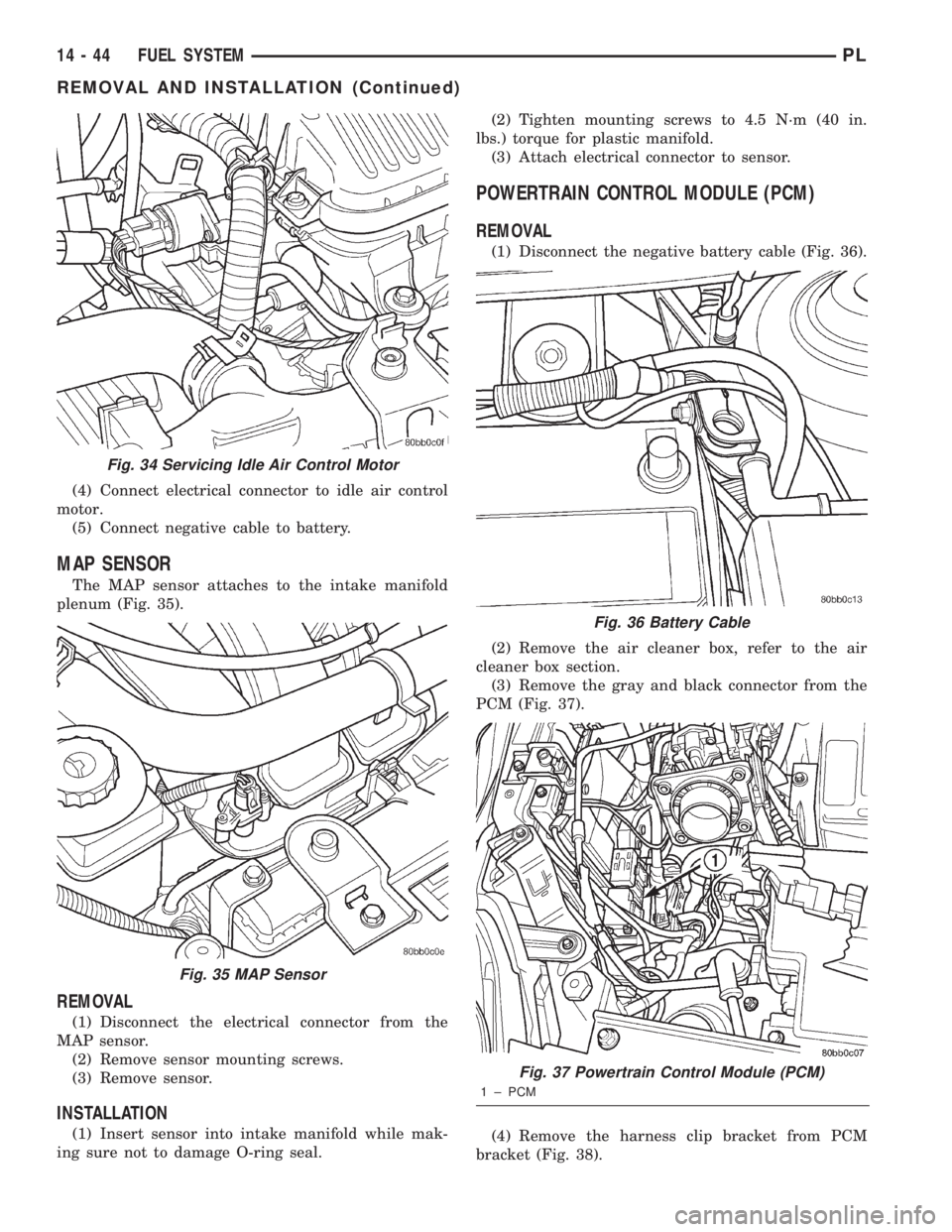
MAP SENSOR
The MAP sensor attaches to the intake manifold
plenum (Fig. 35).
REMOVAL
(1) Disconnect the electrical connector from the
MAP sensor.
(2) Remove sensor mounting screws.
(3) Remove sensor.
INSTALLATION
(1) Insert sensor into intake manifold while mak-
ing sure not to damage O-ring seal.(2) Tighten mounting screws to 4.5 N´m (40 in.
lbs.) torque for plastic manifold.
(3) Attach electrical connector to sensor.
POWERTRAIN CONTROL MODULE (PCM)
REMOVAL
(1) Disconnect the negative battery cable (Fig. 36).
(2) Remove the air cleaner box, refer to the air
cleaner box section.
(3) Remove the gray and black connector from the
PCM (Fig. 37).
(4) Remove the harness clip bracket from PCM
bracket (Fig. 38).
Fig. 34 Servicing Idle Air Control Motor
Fig. 35 MAP Sensor
Fig. 36 Battery Cable
Fig. 37 Powertrain Control Module (PCM)
1 ± PCM
14 - 44 FUEL SYSTEMPL
REMOVAL AND INSTALLATION (Continued)
Page 867 of 1285
INSTALLATION
New sensors have compound on the threads and do
not require an additional coating.
(1) Install sensor using an oxygen sensor crow foot
wrench such as Snap-On tool YA8875 or equivalent
(Fig. 41). Tighten the sensor to 28 N´m (20 ft. lbs.)
torque.
(2) Plug sensor connector.
(3) Lower vehicle.
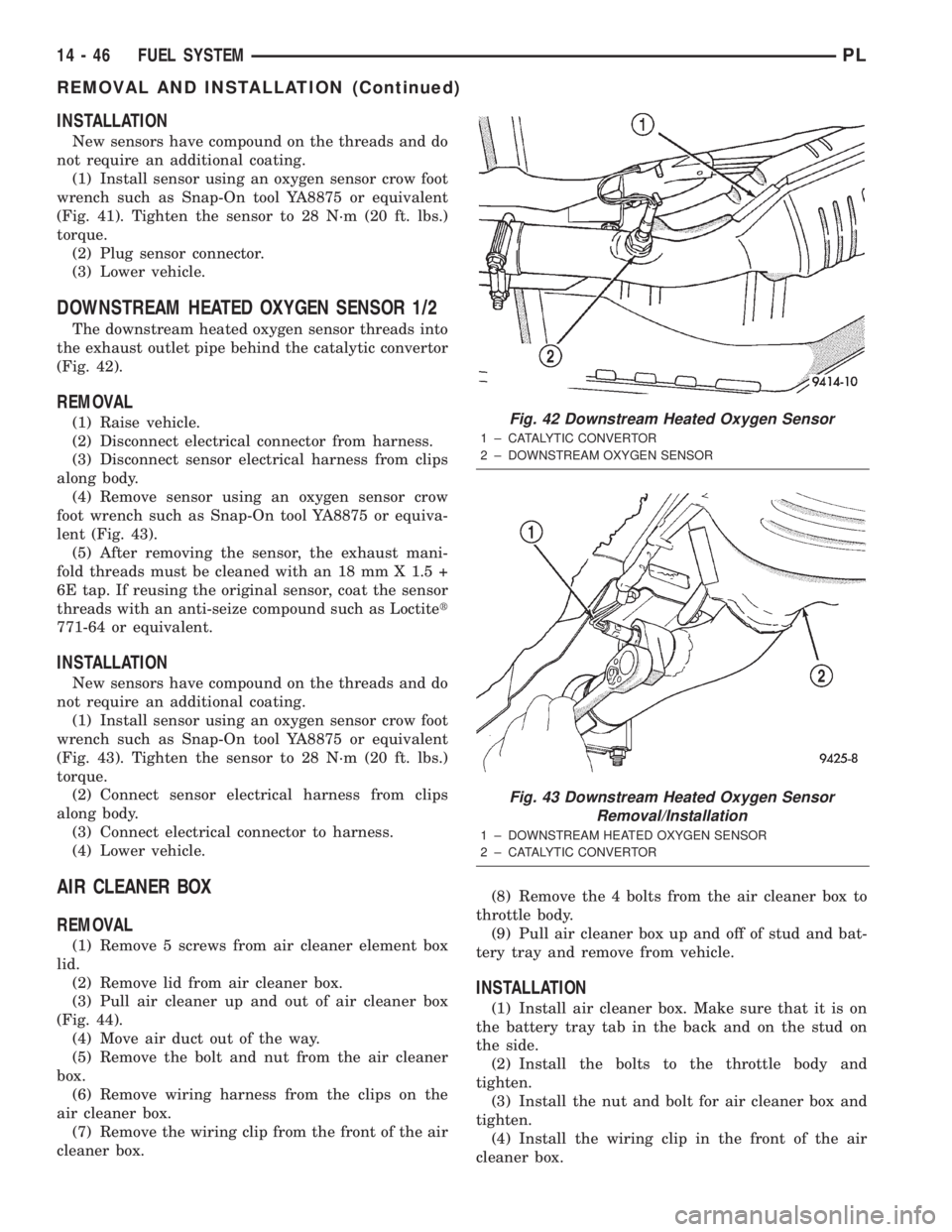
DOWNSTREAM HEATED OXYGEN SENSOR 1/2
The downstream heated oxygen sensor threads into
the exhaust outlet pipe behind the catalytic convertor
(Fig. 42).
REMOVAL
(1) Raise vehicle.
(2) Disconnect electrical connector from harness.
(3) Disconnect sensor electrical harness from clips
along body.
(4) Remove sensor using an oxygen sensor crow
foot wrench such as Snap-On tool YA8875 or equiva-
lent (Fig. 43).
(5) After removing the sensor, the exhaust mani-
fold threads must be cleaned with an 18 mm X 1.5 +
6E tap. If reusing the original sensor, coat the sensor
threads with an anti-seize compound such as Loctitet
771-64 or equivalent.
INSTALLATION
New sensors have compound on the threads and do
not require an additional coating.
(1) Install sensor using an oxygen sensor crow foot
wrench such as Snap-On tool YA8875 or equivalent
(Fig. 43). Tighten the sensor to 28 N´m (20 ft. lbs.)
torque.
(2) Connect sensor electrical harness from clips
along body.
(3) Connect electrical connector to harness.
(4) Lower vehicle.
AIR CLEANER BOX
REMOVAL
(1) Remove 5 screws from air cleaner element box
lid.
(2) Remove lid from air cleaner box.
(3) Pull air cleaner up and out of air cleaner box
(Fig. 44).
(4) Move air duct out of the way.
(5) Remove the bolt and nut from the air cleaner
box.
(6) Remove wiring harness from the clips on the
air cleaner box.
(7) Remove the wiring clip from the front of the air
cleaner box.(8) Remove the 4 bolts from the air cleaner box to
throttle body.
(9) Pull air cleaner box up and off of stud and bat-
tery tray and remove from vehicle.
INSTALLATION
(1) Install air cleaner box. Make sure that it is on
the battery tray tab in the back and on the stud on
the side.
(2) Install the bolts to the throttle body and
tighten.
(3) Install the nut and bolt for air cleaner box and
tighten.
(4) Install the wiring clip in the front of the air
cleaner box.
Fig. 42 Downstream Heated Oxygen Sensor
1 ± CATALYTIC CONVERTOR
2 ± DOWNSTREAM OXYGEN SENSOR
Fig. 43 Downstream Heated Oxygen Sensor
Removal/Installation
1 ± DOWNSTREAM HEATED OXYGEN SENSOR
2 ± CATALYTIC CONVERTOR
14 - 46 FUEL SYSTEMPL
REMOVAL AND INSTALLATION (Continued)
Page 868 of 1285
(5) Install the wiring harness into the clips on the
side of the air cleaner box.
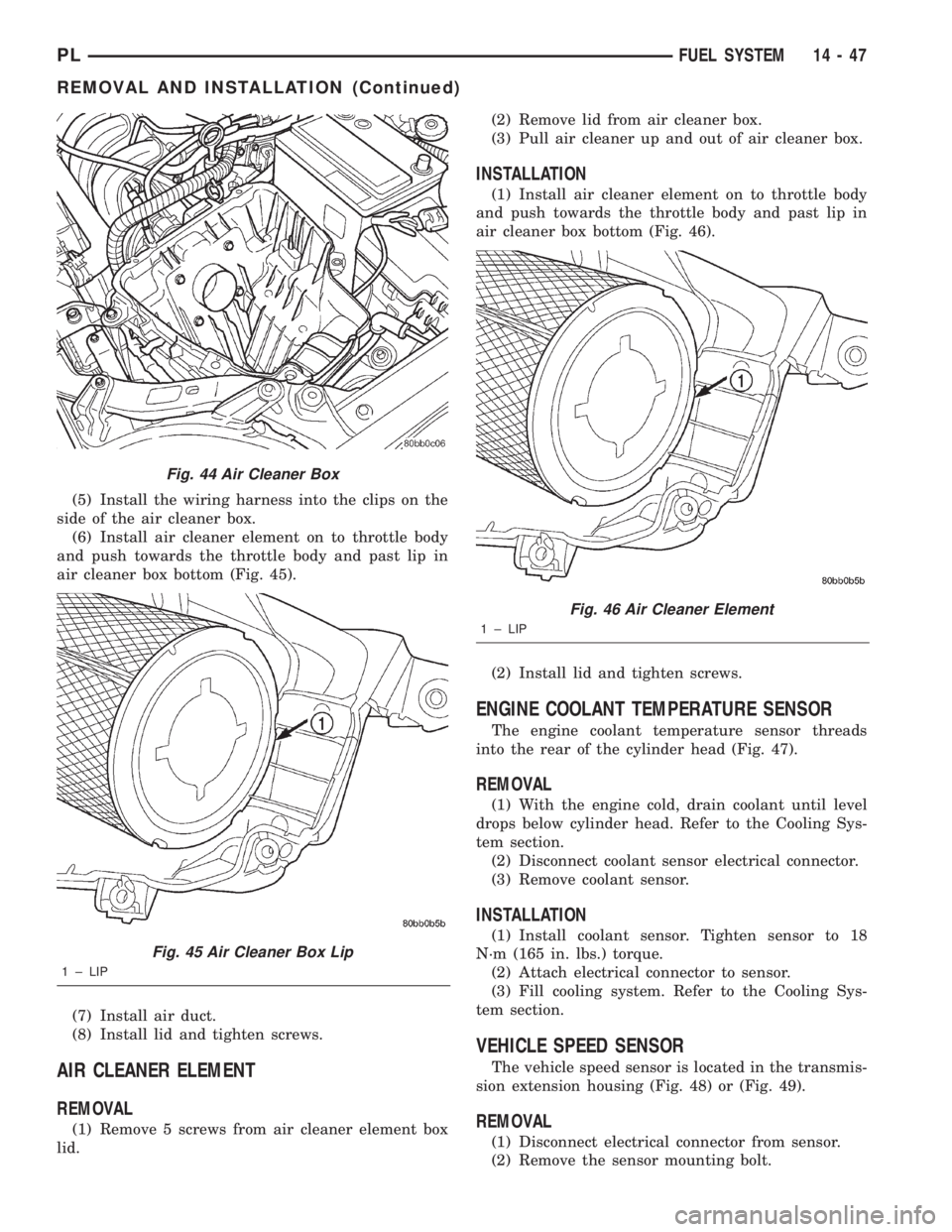
(6) Install air cleaner element on to throttle body
and push towards the throttle body and past lip in
air cleaner box bottom (Fig. 45).
(7) Install air duct.
(8) Install lid and tighten screws.
AIR CLEANER ELEMENT
REMOVAL
(1) Remove 5 screws from air cleaner element box
lid.(2) Remove lid from air cleaner box.
(3) Pull air cleaner up and out of air cleaner box.
INSTALLATION
(1) Install air cleaner element on to throttle body
and push towards the throttle body and past lip in
air cleaner box bottom (Fig. 46).
(2) Install lid and tighten screws.
ENGINE COOLANT TEMPERATURE SENSOR
The engine coolant temperature sensor threads
into the rear of the cylinder head (Fig. 47).
REMOVAL
(1) With the engine cold, drain coolant until level
drops below cylinder head. Refer to the Cooling Sys-
tem section.
(2) Disconnect coolant sensor electrical connector.
(3) Remove coolant sensor.
INSTALLATION
(1) Install coolant sensor. Tighten sensor to 18
N´m (165 in. lbs.) torque.
(2) Attach electrical connector to sensor.
(3) Fill cooling system. Refer to the Cooling Sys-
tem section.
VEHICLE SPEED SENSOR
The vehicle speed sensor is located in the transmis-
sion extension housing (Fig. 48) or (Fig. 49).
REMOVAL
(1) Disconnect electrical connector from sensor.
(2) Remove the sensor mounting bolt.
Fig. 44 Air Cleaner Box
Fig. 45 Air Cleaner Box Lip
1 ± LIP
Fig. 46 Air Cleaner Element
1 ± LIP
PLFUEL SYSTEM 14 - 47
REMOVAL AND INSTALLATION (Continued)
Page 869 of 1285
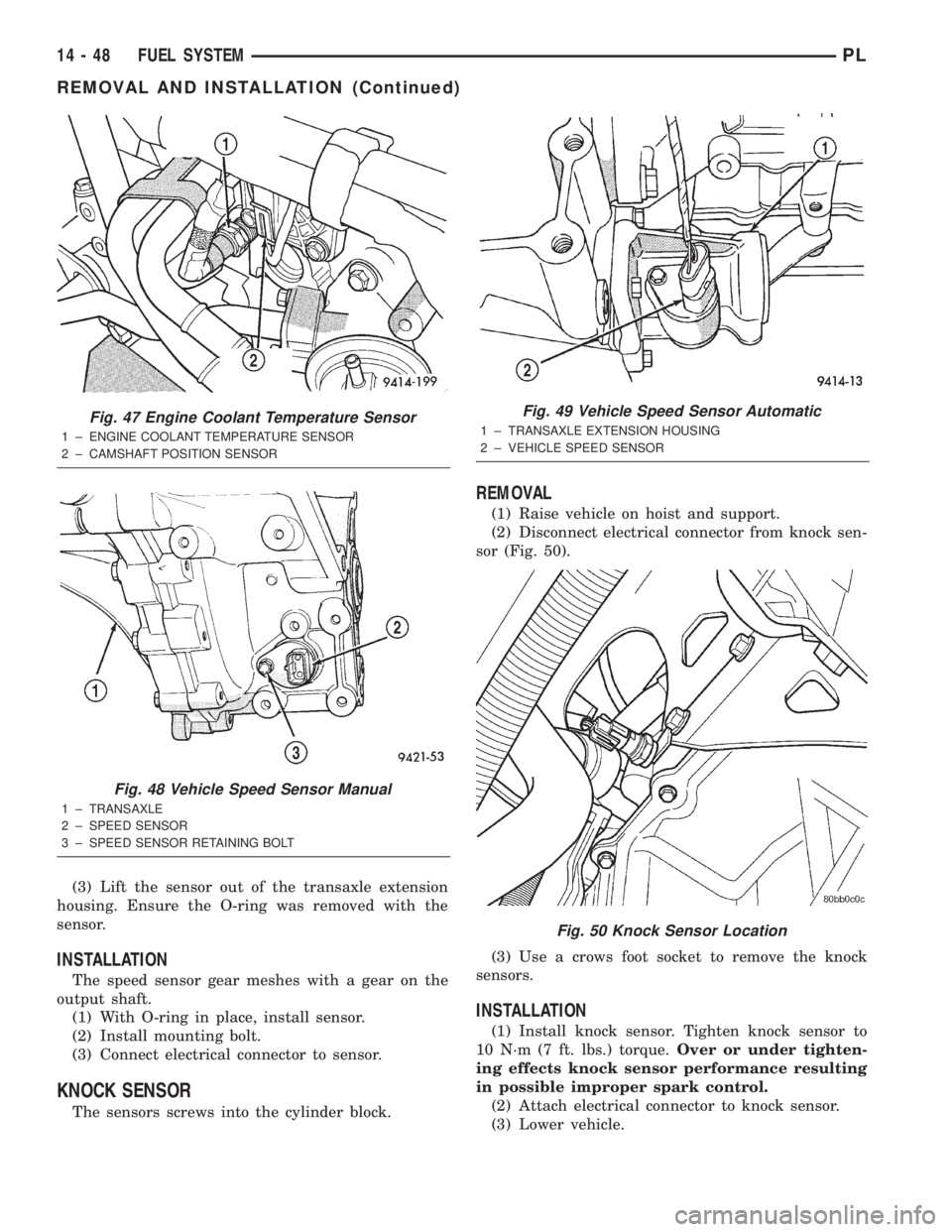
(3) Lift the sensor out of the transaxle extension
housing. Ensure the O-ring was removed with the
sensor.
INSTALLATION
The speed sensor gear meshes with a gear on the
output shaft.
(1) With O-ring in place, install sensor.
(2) Install mounting bolt.
(3) Connect electrical connector to sensor.
KNOCK SENSOR
The sensors screws into the cylinder block.
REMOVAL
(1) Raise vehicle on hoist and support.
(2) Disconnect electrical connector from knock sen-
sor (Fig. 50).
(3) Use a crows foot socket to remove the knock
sensors.
INSTALLATION
(1) Install knock sensor. Tighten knock sensor to
10 N´m (7 ft. lbs.) torque.Over or under tighten-
ing effects knock sensor performance resulting
in possible improper spark control.
(2) Attach electrical connector to knock sensor.
(3) Lower vehicle.
Fig. 47 Engine Coolant Temperature Sensor
1 ± ENGINE COOLANT TEMPERATURE SENSOR
2 ± CAMSHAFT POSITION SENSOR
Fig. 48 Vehicle Speed Sensor Manual
1 ± TRANSAXLE
2 ± SPEED SENSOR
3 ± SPEED SENSOR RETAINING BOLT
Fig. 49 Vehicle Speed Sensor Automatic
1 ± TRANSAXLE EXTENSION HOUSING
2 ± VEHICLE SPEED SENSOR
Fig. 50 Knock Sensor Location
14 - 48 FUEL SYSTEMPL
REMOVAL AND INSTALLATION (Continued)
Page 885 of 1285
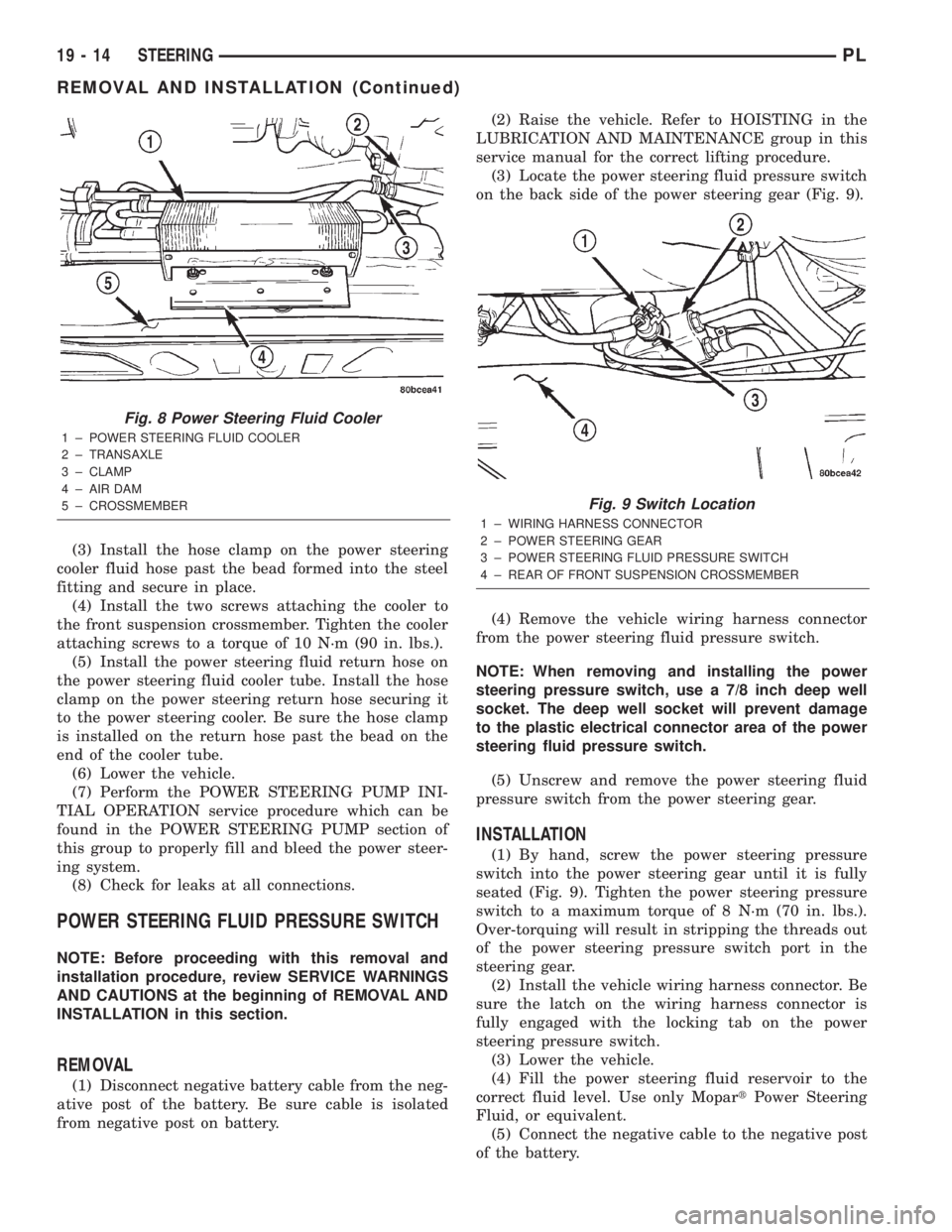
(3) Install the hose clamp on the power steering
cooler fluid hose past the bead formed into the steel
fitting and secure in place.
(4) Install the two screws attaching the cooler to
the front suspension crossmember. Tighten the cooler
attaching screws to a torque of 10 N´m (90 in. lbs.).
(5) Install the power steering fluid return hose on
the power steering fluid cooler tube. Install the hose
clamp on the power steering return hose securing it
to the power steering cooler. Be sure the hose clamp
is installed on the return hose past the bead on the
end of the cooler tube.
(6) Lower the vehicle.
(7) Perform the POWER STEERING PUMP INI-
TIAL OPERATION service procedure which can be
found in the POWER STEERING PUMP section of
this group to properly fill and bleed the power steer-
ing system.
(8) Check for leaks at all connections.
POWER STEERING FLUID PRESSURE SWITCH
NOTE: Before proceeding with this removal and
installation procedure, review SERVICE WARNINGS
AND CAUTIONS at the beginning of REMOVAL AND
INSTALLATION in this section.
REMOVAL
(1) Disconnect negative battery cable from the neg-
ative post of the battery. Be sure cable is isolated
from negative post on battery.(2) Raise the vehicle. Refer to HOISTING in the
LUBRICATION AND MAINTENANCE group in this
service manual for the correct lifting procedure.
(3) Locate the power steering fluid pressure switch
on the back side of the power steering gear (Fig. 9).
(4) Remove the vehicle wiring harness connector
from the power steering fluid pressure switch.
NOTE: When removing and installing the power
steering pressure switch, use a 7/8 inch deep well
socket. The deep well socket will prevent damage
to the plastic electrical connector area of the power
steering fluid pressure switch.
(5) Unscrew and remove the power steering fluid
pressure switch from the power steering gear.
INSTALLATION
(1) By hand, screw the power steering pressure
switch into the power steering gear until it is fully
seated (Fig. 9). Tighten the power steering pressure
switch to a maximum torque of 8 N´m (70 in. lbs.).
Over-torquing will result in stripping the threads out
of the power steering pressure switch port in the
steering gear.
(2) Install the vehicle wiring harness connector. Be
sure the latch on the wiring harness connector is
fully engaged with the locking tab on the power
steering pressure switch.
(3) Lower the vehicle.
(4) Fill the power steering fluid reservoir to the
correct fluid level. Use only MopartPower Steering
Fluid, or equivalent.
(5) Connect the negative cable to the negative post
of the battery.
Fig. 8 Power Steering Fluid Cooler
1 ± POWER STEERING FLUID COOLER
2 ± TRANSAXLE
3 ± CLAMP
4 ± AIR DAM
5 ± CROSSMEMBER
Fig. 9 Switch Location
1 ± WIRING HARNESS CONNECTOR
2 ± POWER STEERING GEAR
3 ± POWER STEERING FLUID PRESSURE SWITCH
4 ± REAR OF FRONT SUSPENSION CROSSMEMBER
19 - 14 STEERINGPL
REMOVAL AND INSTALLATION (Continued)
Page 902 of 1285
NOTE: Do not tighten the coupling pinch bolt any-
time the vehicle is not at curb riding height. It may
cause unwanted conditions within the steering col-
umn if the vehicle is suspended in any manner
when the pinch bolt is tightened.
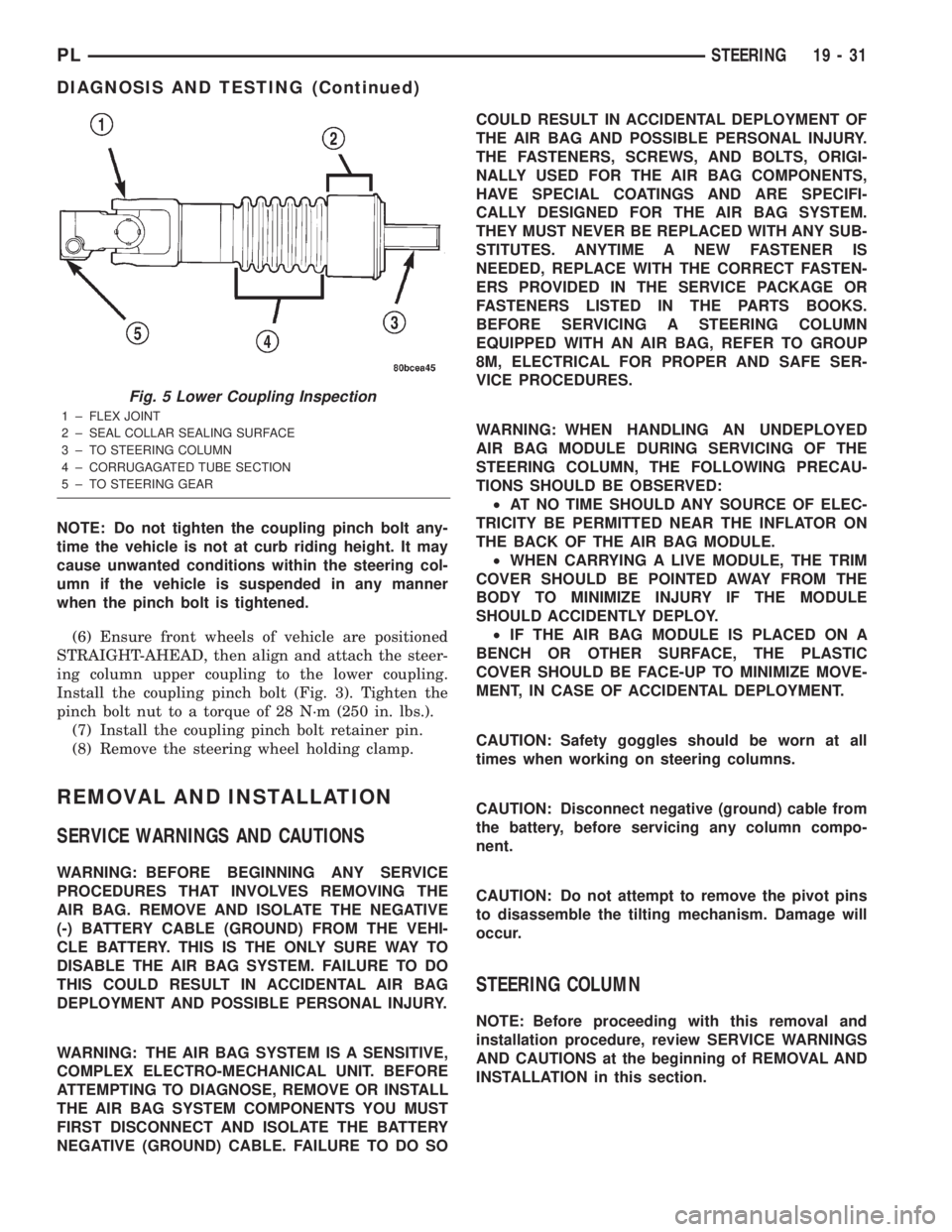
(6) Ensure front wheels of vehicle are positioned
STRAIGHT-AHEAD, then align and attach the steer-
ing column upper coupling to the lower coupling.
Install the coupling pinch bolt (Fig. 3). Tighten the
pinch bolt nut to a torque of 28 N´m (250 in. lbs.).
(7) Install the coupling pinch bolt retainer pin.
(8) Remove the steering wheel holding clamp.
REMOVAL AND INSTALLATION
SERVICE WARNINGS AND CAUTIONS
WARNING: BEFORE BEGINNING ANY SERVICE
PROCEDURES THAT INVOLVES REMOVING THE
AIR BAG. REMOVE AND ISOLATE THE NEGATIVE
(-) BATTERY CABLE (GROUND) FROM THE VEHI-
CLE BATTERY. THIS IS THE ONLY SURE WAY TO
DISABLE THE AIR BAG SYSTEM. FAILURE TO DO
THIS COULD RESULT IN ACCIDENTAL AIR BAG
DEPLOYMENT AND POSSIBLE PERSONAL INJURY.
WARNING: THE AIR BAG SYSTEM IS A SENSITIVE,
COMPLEX ELECTRO-MECHANICAL UNIT. BEFORE
ATTEMPTING TO DIAGNOSE, REMOVE OR INSTALL
THE AIR BAG SYSTEM COMPONENTS YOU MUST
FIRST DISCONNECT AND ISOLATE THE BATTERY
NEGATIVE (GROUND) CABLE. FAILURE TO DO SOCOULD RESULT IN ACCIDENTAL DEPLOYMENT OF
THE AIR BAG AND POSSIBLE PERSONAL INJURY.
THE FASTENERS, SCREWS, AND BOLTS, ORIGI-
NALLY USED FOR THE AIR BAG COMPONENTS,
HAVE SPECIAL COATINGS AND ARE SPECIFI-
CALLY DESIGNED FOR THE AIR BAG SYSTEM.
THEY MUST NEVER BE REPLACED WITH ANY SUB-
STITUTES. ANYTIME A NEW FASTENER IS
NEEDED, REPLACE WITH THE CORRECT FASTEN-
ERS PROVIDED IN THE SERVICE PACKAGE OR
FASTENERS LISTED IN THE PARTS BOOKS.
BEFORE SERVICING A STEERING COLUMN
EQUIPPED WITH AN AIR BAG, REFER TO GROUP
8M, ELECTRICAL FOR PROPER AND SAFE SER-
VICE PROCEDURES.
WARNING: WHEN HANDLING AN UNDEPLOYED
AIR BAG MODULE DURING SERVICING OF THE
STEERING COLUMN, THE FOLLOWING PRECAU-
TIONS SHOULD BE OBSERVED:
²AT NO TIME SHOULD ANY SOURCE OF ELEC-
TRICITY BE PERMITTED NEAR THE INFLATOR ON
THE BACK OF THE AIR BAG MODULE.
²WHEN CARRYING A LIVE MODULE, THE TRIM
COVER SHOULD BE POINTED AWAY FROM THE
BODY TO MINIMIZE INJURY IF THE MODULE
SHOULD ACCIDENTLY DEPLOY.
²IF THE AIR BAG MODULE IS PLACED ON A
BENCH OR OTHER SURFACE, THE PLASTIC
COVER SHOULD BE FACE-UP TO MINIMIZE MOVE-
MENT, IN CASE OF ACCIDENTAL DEPLOYMENT.
CAUTION: Safety goggles should be worn at all
times when working on steering columns.
CAUTION: Disconnect negative (ground) cable from
the battery, before servicing any column compo-
nent.
CAUTION: Do not attempt to remove the pivot pins
to disassemble the tilting mechanism. Damage will
occur.
STEERING COLUMN
NOTE: Before proceeding with this removal and
installation procedure, review SERVICE WARNINGS
AND CAUTIONS at the beginning of REMOVAL AND
INSTALLATION in this section.
Fig. 5 Lower Coupling Inspection
1 ± FLEX JOINT
2 ± SEAL COLLAR SEALING SURFACE
3 ± TO STEERING COLUMN
4 ± CORRUGAGATED TUBE SECTION
5 ± TO STEERING GEAR
PLSTEERING 19 - 31
DIAGNOSIS AND TESTING (Continued)
Page 903 of 1285
REMOVAL
(1) Disconnect the negative (-) cable from the bat-
tery and isolate the cable.
(2) Before beginning removal of the steering col-
umn, be sure the front wheels of vehicle are in the
STRAIGHT-AHEAD position.
(3) Remove the screw securing the left end of the
top cover to the instrument panel. It is located just
above the left instrument panel end cap.
(4) Starting on the driver's end, push upward on
the instrument panel top cover, disengaging its
retainer clips along the face of the instrument panel.
Disengage just enough clips to allow access to the
upper ends of the instrument cluster bezel.
(5) Disengage the clips along the outer edge of the
instrument cluster bezel and remove the bezel from
the vehicle.
(6) Remove the two screws along the bottom of the
steering column cover that mounts below the steering
column on the instrument panel. Disengage the clips
on the upper end of the steering column cover and
remove the cover by pulling it straight away from the
instrument panel.
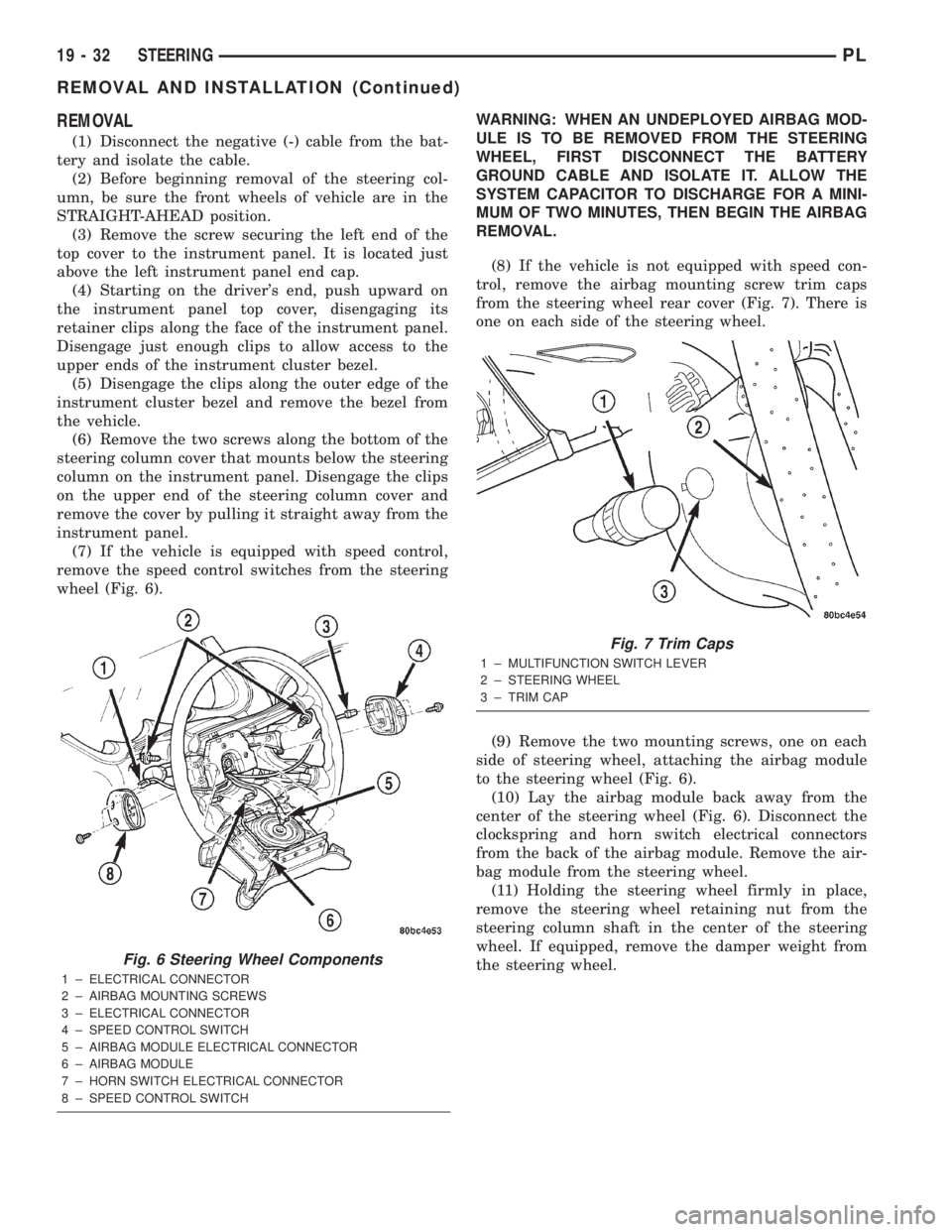
(7) If the vehicle is equipped with speed control,
remove the speed control switches from the steering
wheel (Fig. 6).WARNING: WHEN AN UNDEPLOYED AIRBAG MOD-
ULE IS TO BE REMOVED FROM THE STEERING
WHEEL, FIRST DISCONNECT THE BATTERY
GROUND CABLE AND ISOLATE IT. ALLOW THE
SYSTEM CAPACITOR TO DISCHARGE FOR A MINI-
MUM OF TWO MINUTES, THEN BEGIN THE AIRBAG
REMOVAL.
(8) If the vehicle is not equipped with speed con-
trol, remove the airbag mounting screw trim caps
from the steering wheel rear cover (Fig. 7). There is
one on each side of the steering wheel.
(9) Remove the two mounting screws, one on each
side of steering wheel, attaching the airbag module
to the steering wheel (Fig. 6).
(10) Lay the airbag module back away from the
center of the steering wheel (Fig. 6). Disconnect the
clockspring and horn switch electrical connectors
from the back of the airbag module. Remove the air-
bag module from the steering wheel.
(11) Holding the steering wheel firmly in place,
remove the steering wheel retaining nut from the
steering column shaft in the center of the steering
wheel. If equipped, remove the damper weight from
the steering wheel.
Fig. 6 Steering Wheel Components
1 ± ELECTRICAL CONNECTOR
2 ± AIRBAG MOUNTING SCREWS
3 ± ELECTRICAL CONNECTOR
4 ± SPEED CONTROL SWITCH
5 ± AIRBAG MODULE ELECTRICAL CONNECTOR
6 ± AIRBAG MODULE
7 ± HORN SWITCH ELECTRICAL CONNECTOR
8 ± SPEED CONTROL SWITCH
Fig. 7 Trim Caps
1 ± MULTIFUNCTION SWITCH LEVER
2 ± STEERING WHEEL
3 ± TRIM CAP
19 - 32 STEERINGPL
REMOVAL AND INSTALLATION (Continued)
Page 905 of 1285
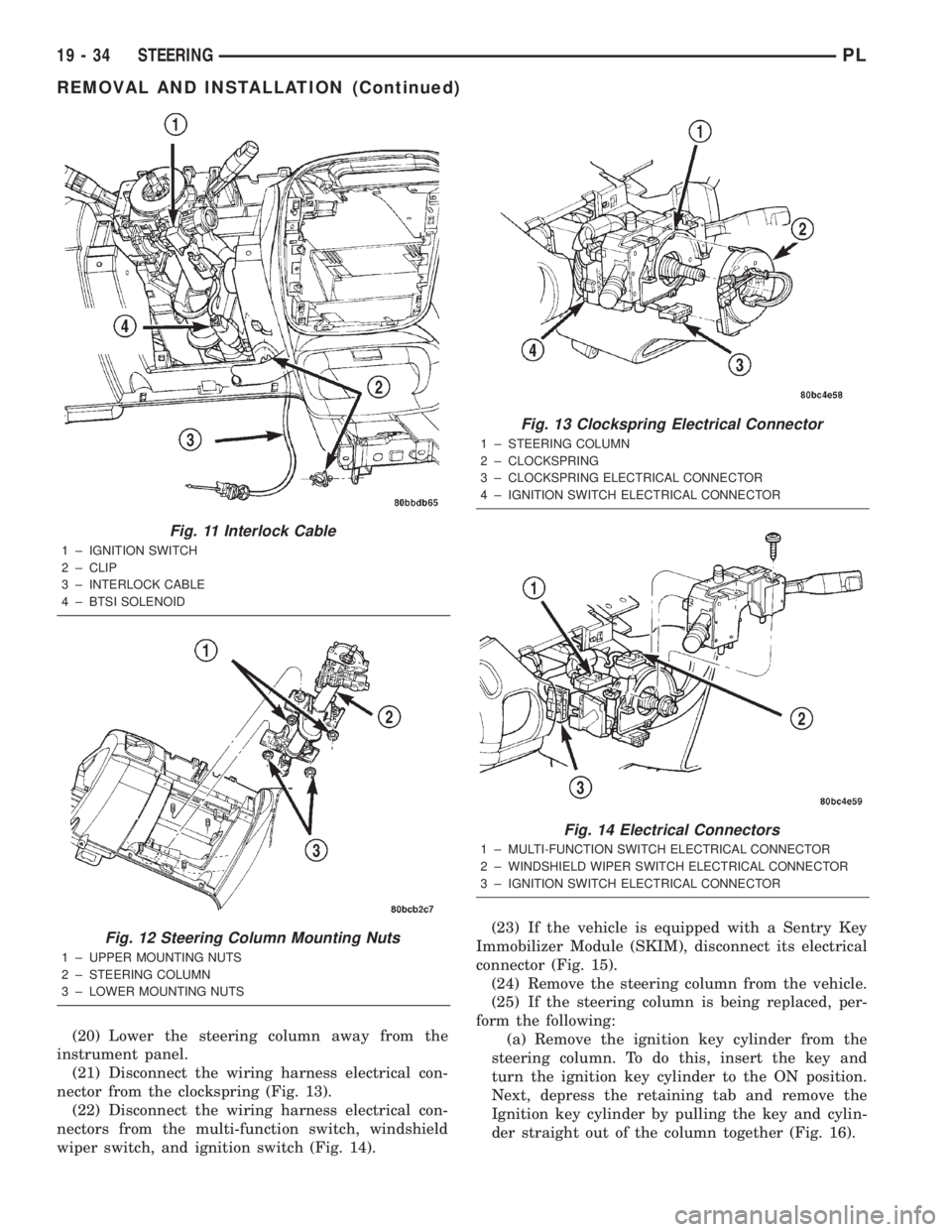
(20) Lower the steering column away from the
instrument panel.
(21) Disconnect the wiring harness electrical con-
nector from the clockspring (Fig. 13).
(22) Disconnect the wiring harness electrical con-
nectors from the multi-function switch, windshield
wiper switch, and ignition switch (Fig. 14).(23) If the vehicle is equipped with a Sentry Key
Immobilizer Module (SKIM), disconnect its electrical
connector (Fig. 15).
(24) Remove the steering column from the vehicle.
(25) If the steering column is being replaced, per-
form the following:
(a) Remove the ignition key cylinder from the
steering column. To do this, insert the key and
turn the ignition key cylinder to the ON position.
Next, depress the retaining tab and remove the
Ignition key cylinder by pulling the key and cylin-
der straight out of the column together (Fig. 16).
Fig. 11 Interlock Cable
1 ± IGNITION SWITCH
2 ± CLIP
3 ± INTERLOCK CABLE
4 ± BTSI SOLENOID
Fig. 12 Steering Column Mounting Nuts
1 ± UPPER MOUNTING NUTS
2 ± STEERING COLUMN
3 ± LOWER MOUNTING NUTS
Fig. 13 Clockspring Electrical Connector
1 ± STEERING COLUMN
2 ± CLOCKSPRING
3 ± CLOCKSPRING ELECTRICAL CONNECTOR
4 ± IGNITION SWITCH ELECTRICAL CONNECTOR
Fig. 14 Electrical Connectors
1 ± MULTI-FUNCTION SWITCH ELECTRICAL CONNECTOR
2 ± WINDSHIELD WIPER SWITCH ELECTRICAL CONNECTOR
3 ± IGNITION SWITCH ELECTRICAL CONNECTOR
19 - 34 STEERINGPL
REMOVAL AND INSTALLATION (Continued)
Page 906 of 1285
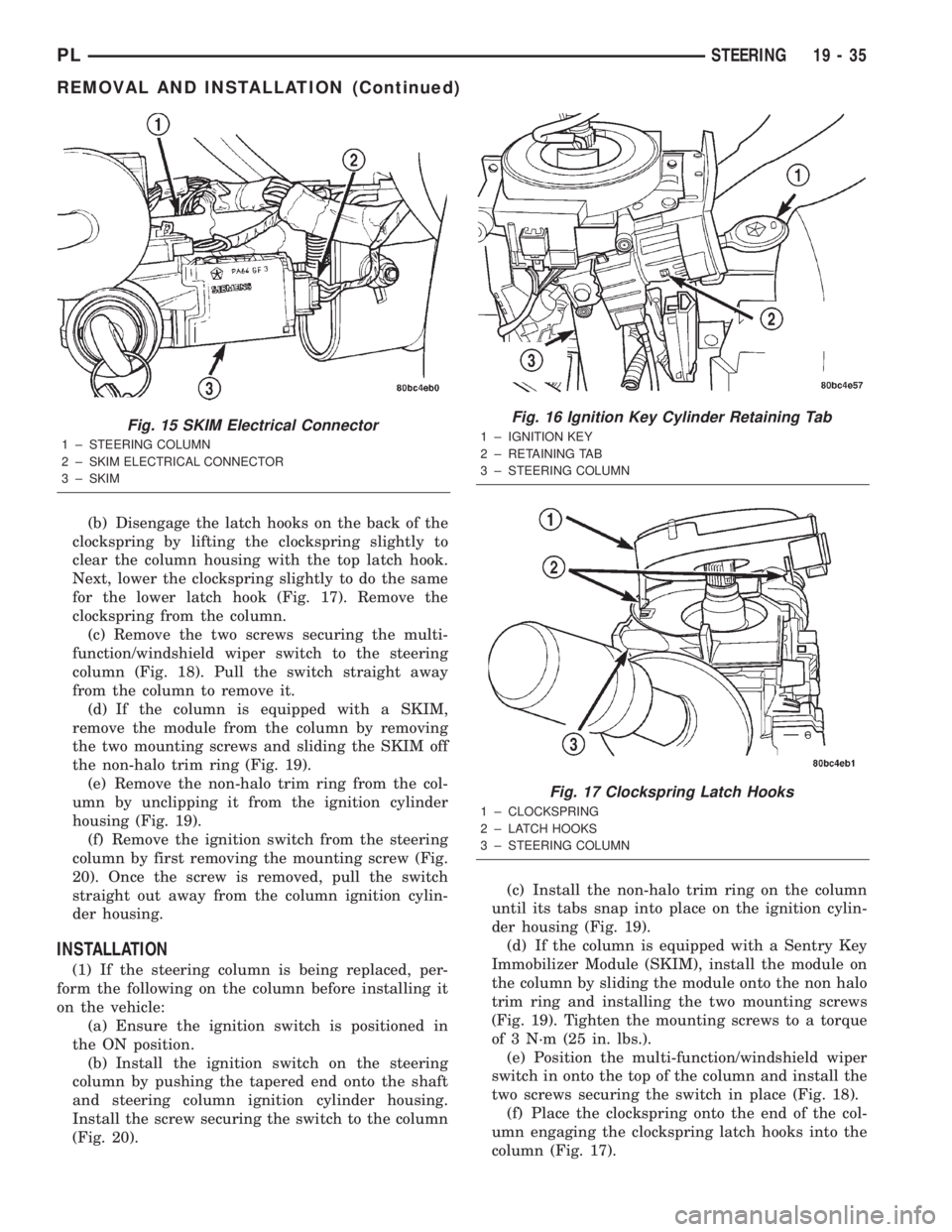
(b) Disengage the latch hooks on the back of the
clockspring by lifting the clockspring slightly to
clear the column housing with the top latch hook.
Next, lower the clockspring slightly to do the same
for the lower latch hook (Fig. 17). Remove the
clockspring from the column.
(c) Remove the two screws securing the multi-
function/windshield wiper switch to the steering
column (Fig. 18). Pull the switch straight away
from the column to remove it.
(d) If the column is equipped with a SKIM,
remove the module from the column by removing
the two mounting screws and sliding the SKIM off
the non-halo trim ring (Fig. 19).
(e) Remove the non-halo trim ring from the col-
umn by unclipping it from the ignition cylinder
housing (Fig. 19).
(f) Remove the ignition switch from the steering
column by first removing the mounting screw (Fig.
20). Once the screw is removed, pull the switch
straight out away from the column ignition cylin-
der housing.
INSTALLATION
(1) If the steering column is being replaced, per-
form the following on the column before installing it
on the vehicle:
(a) Ensure the ignition switch is positioned in
the ON position.
(b) Install the ignition switch on the steering
column by pushing the tapered end onto the shaft
and steering column ignition cylinder housing.
Install the screw securing the switch to the column
(Fig. 20).(c) Install the non-halo trim ring on the column
until its tabs snap into place on the ignition cylin-
der housing (Fig. 19).
(d) If the column is equipped with a Sentry Key
Immobilizer Module (SKIM), install the module on
the column by sliding the module onto the non halo
trim ring and installing the two mounting screws
(Fig. 19). Tighten the mounting screws to a torque
of 3 N´m (25 in. lbs.).
(e) Position the multi-function/windshield wiper
switch in onto the top of the column and install the
two screws securing the switch in place (Fig. 18).
(f) Place the clockspring onto the end of the col-
umn engaging the clockspring latch hooks into the
column (Fig. 17).
Fig. 15 SKIM Electrical Connector
1 ± STEERING COLUMN
2 ± SKIM ELECTRICAL CONNECTOR
3 ± SKIM
Fig. 16 Ignition Key Cylinder Retaining Tab
1 ± IGNITION KEY
2 ± RETAINING TAB
3 ± STEERING COLUMN
Fig. 17 Clockspring Latch Hooks
1 ± CLOCKSPRING
2 ± LATCH HOOKS
3 ± STEERING COLUMN
PLSTEERING 19 - 35
REMOVAL AND INSTALLATION (Continued)