lock DODGE NEON 2000 Service Repair Manual
[x] Cancel search | Manufacturer: DODGE, Model Year: 2000, Model line: NEON, Model: DODGE NEON 2000Pages: 1285, PDF Size: 29.42 MB
Page 376 of 1285
(4) Turn the ignition switch to the ON position.
Check for battery voltage at the fused ignition switch
output (run/start) circuit cavity of the SKIM wire
harness connector. If OK, use a DRB IIItscan tool
and the proper Body Diagnostic Procedures Manual
to complete the diagnosis of the SKIS. If not OK,
repair the open circuit to the fuse in the fuse block as
required.
VEHICLE THEFT/SECURITY SYSTEM (VTSS)
To diagnose the Vehicle Theft/Security System
(VTSS), use a DRB IIItscan tool and the proper
Body Diagnostic Procedures Manual.
SERVICE PROCEDURES
SENTRY KEY IMMOBILIZER SYSTEM
INITIALIZATION
The Sentry Key Immobilizer System (SKIS) initial-
ization should be performed following a Sentry Key
Immobilizer Module (SKIM) replacement.
It can be summarized by the following:
(1) Obtain the vehicles unique PIN number
assigned to it's original SKIM from the vehicle
owner, the vehicle's invoice or from Daimler-
Chrysler's Customer Center.
(2) With the DRB IIItscan tool, select ªTheft
Alarm,º ªSKIM,º Miscellaneous.º Select ªSKIM Mod-ule Replacedº function and the DRB llltwill prompt
you through the following steps.
(3) Enter secured access mode using the unique
four digit PIN number.
(4) Program the vehicle's VIN number into the
SKIM's memory.
(5) Program the country code into the SKIM's
memory (U. S.).
(6) Transfer the vehicle's unique Secret Key data
from the PCM. This process will require the SKIM to
be insecured access mode. The PIN number must
be entered into the DRB IIItbefore the SKIM will
entersecured access mode. Oncesecured access
modeis active, the SKIM will remain in that mode
for 60 seconds.
(7) Program all customer keys into the SKIM's
memory. This required that the SKIM be insecured
access modeThe SKIM will immediately exit
secured access modeafter each key is pro-
grammed.
NOTE: SECURED ACCESS MODE is not required to
query the programmed status of the key.
NOTE: If a PCM is replaced, the unique ªSecret
Keyº data must be transferred from the SKIM to the
PCM. This procedure requires the SKIM to be
placed in SECURED ACCESS MODE using the four
digit PIN code.
SENTRY KEY IMMOBILIZER SYSTEM
TRANSPONDER PROGRAMMING
Three programmed Sentry Key transponders are
included with the Sentry Key Immobilizer System
(SKIS) when it is shipped from the factory. The Sen-
try Key Immobilizer Module (SKIM) can be pro-
grammed to recognize up to five additional
transponders, for a total of eight Sentry Keys. The
following ªCustomer Learnº programming procedure
for the programming of additional transponders
requires access to at least two of the valid Sentry
Keys. If two valid Sentry Keys are not available, Sen-
try Key programming will require the use of a DRB
IIItscan tool.
CUSTOMER LEARN PROGRAMMING
(1) Obtain the additional Sentry Key transponder
blank(s) that are to be programmed for the vehicle.
Cut the additional Sentry Key transponder blanks to
match the ignition lock cylinder mechanical key
codes.
(2) Insert one of the two valid Sentry Key tran-
sponders into the ignition switch and turn the igni-
tion switch to the ON position.
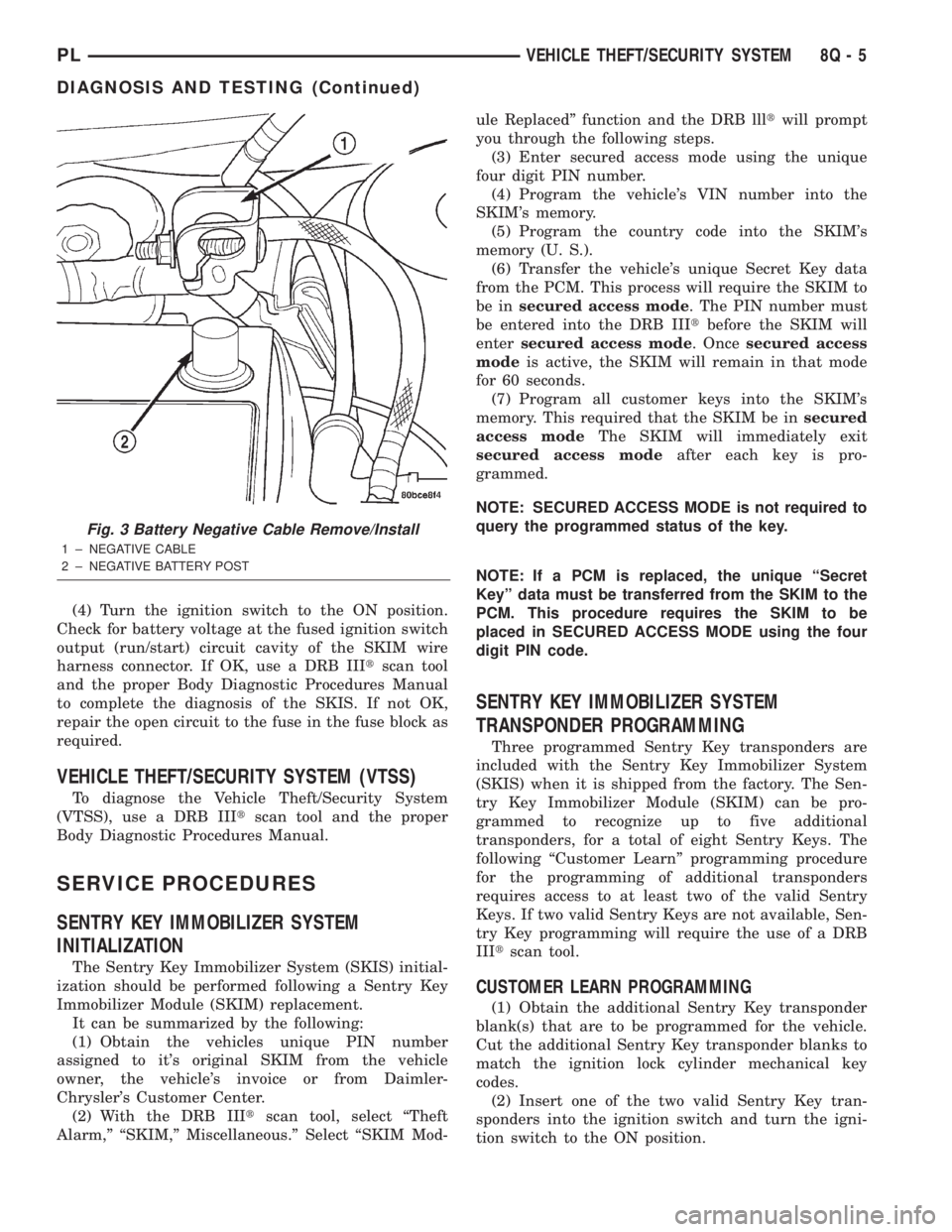
Fig. 3 Battery Negative Cable Remove/Install
1 ± NEGATIVE CABLE
2 ± NEGATIVE BATTERY POST
PLVEHICLE THEFT/SECURITY SYSTEM 8Q - 5
DIAGNOSIS AND TESTING (Continued)
Page 377 of 1285
(3) After the ignition switch has been in the ON
position for about three seconds, but no more than
fifteen seconds, cycle the ignition switch back to the
OFF position. Replace the first valid Sentry Key in
the ignition lock cylinder with the second valid Sen-
try Key and turn the ignition switch back to the ON
position. Both operations must be performed within
15 seconds.
(4) About ten seconds after the completion of Step
3, the VTSS indicator LED will start to flash and a
single audible chime tone will sound to indicate that
the system has entered the ªCustomer Learnº pro-
gramming mode.
(5) Within about fifty seconds of entering the ªCus-
tomer Learnº programming mode, turn the ignition
switch to the OFF position, replace the valid Sentry
Key with a blank Sentry Key transponder, and turn
the ignition switch back to the ON position.
(6) About ten seconds after the completion of Step
5, a single audible chime tone will sound and the
VTSS indicator LED will stop flashing and stay on
solid for about three seconds to indicate that the
blank Sentry Key transponder has been successfully
programmed. The SKIS will immediately return to
normal system operation following exit from the
ªCustomer Learnº programming mode.
(7) Go back to Step 2 and repeat this process for
each additional Sentry Key transponder blank to be
programmed.
If any of the above steps is not completed in the
proper sequence, or within the allotted time, the
SKIS will automatically exit the ªCustomer Learnº
programming mode. The SKIS will also automatically
exit the ªCustomer Learnº programming mode if it
sees a non-blank Sentry Key transponder when it
should see a blank, if it has already programmed
eight valid Sentry Keys, or if the ignition switch is
turned to the OFF position for more than about fifty
seconds.
PROGRAMMING BLANK SENTRY KEY
TRANSPONDERS WITH A DRB lllTSCAN TOOL
When programming a blank Sentry Key transpon-
der, the key blank must first be cut to match the
ignition lock cylinder. It will also be necessary to
enter the vehicle's four digit PIN code into the DRB
IIItscan tool to enter the Sentry Key Immobilizer
Module's (SKIM's) secured access mode.
NOTE: Once a Sentry Key is programmed to a par-
ticular vehicle, it cannot be transferred to another
vehicle.
Insert the blank key into the ignition and turn it to
the RUN position. Using the DRB IIItscan tool,
select ªTheft Alarm,º then ªSKIM,º then ªMiscella-
neous.º Select ªProgram New Key.º Enter the fourdigit PIN code using the DRB IIIt. When program-
ming is completed, the SKIM will exit secured access
mode and display the status of the key. One of five
different status messages may be displayed as fol-
lows:
²ªProgramming Successfulº is displayed if SKIM
Sentry Key programming succeeds.
²ªLearned Key in Ignitionº is displayed if the key
in the ignition has already been programmed into
that vehicle's SKIM.
²ª8 Keys Already Learned (At The Maximum)
Programming Not Doneº is displayed if eight keys
have already been programmed into the SKIM. In
this case, if a new key needs to be added due to a
lost or defective key, the ªErase All Keysº function
(requires entering secured access mode) has to be
performed. Then the customer is seven keys plus the
new key MUST be reprogrammed into the SKIM.
²ªProgramming Not Attemptedº is displayed after
an ªErase All Keysº function is executed.
²ªProgramming Key Failedº is displayed if fur-
ther diagnosis is required.
²To learn additional keys, turn the ignition OFF,
remove the learned key, and insert the next new
blank key. Turn ignition to the RUN position and re-
enter the secured access mode function and repeat
the ªProgram New Keyº procedure outlined above.
SWITCHING OPERATING MODES/
CONFIGURING A NEW MODULE
To switch operating modes or to configure a new
module, a DRB IIItscan tool must be used.
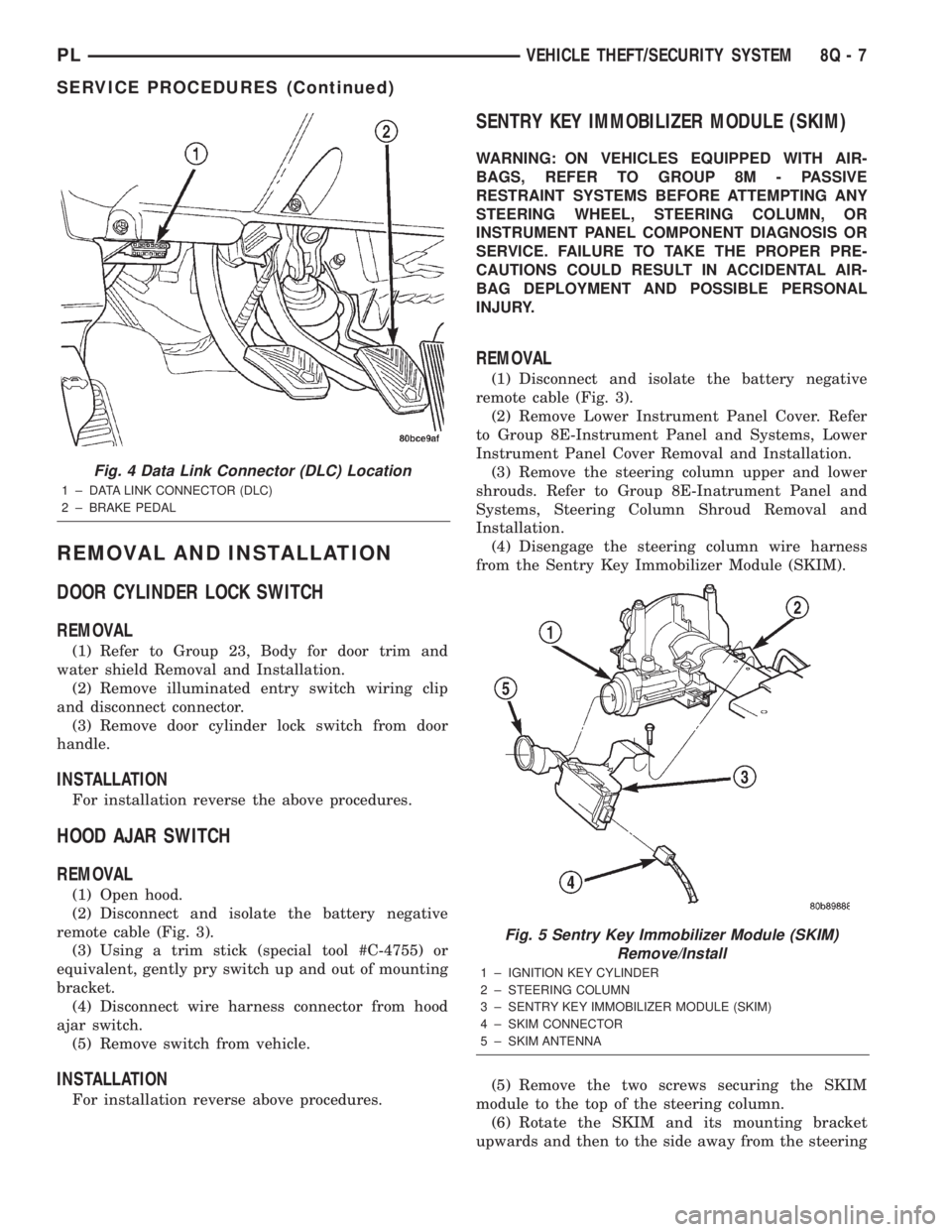
(1) Hook up the DRB IIItscan tool to the Data
Link Connector (DLC) (Fig. 4).
(2) With the key in the ignition, turn the key to
the RUN position.
(3) After the DRB IIItscan tool initialization, per-
form the following:
(a) Select ªTheft Alarm.º
(b) Select ªVTSS.º
(c) Select ªMiscellaneous.º
(4) Once in the ªMiscellaneousº screen:
(a) If you wish to configure a new module, select
ªConfigure Module.º
(b) If you wish to put the module into customer
usage mode, select ªEnable VTSS.º
(c) If you wish to put the module into dealer lot
mode, select ªDealer Lot.º
8Q - 6 VEHICLE THEFT/SECURITY SYSTEMPL
SERVICE PROCEDURES (Continued)
Page 378 of 1285
REMOVAL AND INSTALLATION
DOOR CYLINDER LOCK SWITCH
REMOVAL
(1) Refer to Group 23, Body for door trim and
water shield Removal and Installation.
(2) Remove illuminated entry switch wiring clip
and disconnect connector.
(3) Remove door cylinder lock switch from door
handle.
INSTALLATION
For installation reverse the above procedures.
HOOD AJAR SWITCH
REMOVAL
(1) Open hood.
(2) Disconnect and isolate the battery negative
remote cable (Fig. 3).
(3) Using a trim stick (special tool #C-4755) or
equivalent, gently pry switch up and out of mounting
bracket.
(4) Disconnect wire harness connector from hood
ajar switch.
(5) Remove switch from vehicle.
INSTALLATION
For installation reverse above procedures.
SENTRY KEY IMMOBILIZER MODULE (SKIM)
WARNING: ON VEHICLES EQUIPPED WITH AIR-
BAGS, REFER TO GROUP 8M - PASSIVE
RESTRAINT SYSTEMS BEFORE ATTEMPTING ANY
STEERING WHEEL, STEERING COLUMN, OR
INSTRUMENT PANEL COMPONENT DIAGNOSIS OR
SERVICE. FAILURE TO TAKE THE PROPER PRE-
CAUTIONS COULD RESULT IN ACCIDENTAL AIR-
BAG DEPLOYMENT AND POSSIBLE PERSONAL
INJURY.
REMOVAL
(1) Disconnect and isolate the battery negative
remote cable (Fig. 3).
(2) Remove Lower Instrument Panel Cover. Refer
to Group 8E-Instrument Panel and Systems, Lower
Instrument Panel Cover Removal and Installation.
(3) Remove the steering column upper and lower
shrouds. Refer to Group 8E-Inatrument Panel and
Systems, Steering Column Shroud Removal and
Installation.
(4) Disengage the steering column wire harness
from the Sentry Key Immobilizer Module (SKIM).
(5) Remove the two screws securing the SKIM
module to the top of the steering column.
(6) Rotate the SKIM and its mounting bracket
upwards and then to the side away from the steering
Fig. 4 Data Link Connector (DLC) Location
1 ± DATA LINK CONNECTOR (DLC)
2 ± BRAKE PEDAL
Fig. 5 Sentry Key Immobilizer Module (SKIM)
Remove/Install
1 ± IGNITION KEY CYLINDER
2 ± STEERING COLUMN
3 ± SENTRY KEY IMMOBILIZER MODULE (SKIM)
4 ± SKIM CONNECTOR
5 ± SKIM ANTENNA
PLVEHICLE THEFT/SECURITY SYSTEM 8Q - 7
SERVICE PROCEDURES (Continued)
Page 379 of 1285
column to slide the SKIM antenna ring from around
the ignition switch lock cylinder housing.
(7) Remove the SKIM from the vehicle.
INSTALLATION
(1) For installation, reverse the above procedures.
(2) If the SKIM is replaced with a new unit, a
DRB IIItscan tool MUST be used to initialize the
new SKIM and to program at least two Sentry Key
transponders. Refer to Sentry Key Immobilizer Mod-
ule Initialization in this section.
VEHICLE THEFT/SECURITY SYSTEM DECK LID
SECURITY (KNOCK OUT) SWITCH
The Vehicle Theft Security System (VTSS) Deck
Lid Security (Knock Out) Switch is mounted to the
back of the deck lid lock cylinder.
REMOVAL
(1) Open deck lid.
(2) Disconnect wire connector to switch.
(3) Remove the spring clip retainer.
(4) Pull switch off of deck lid lock cylinder and
remove from vehicle.
INSTALLATION
For installation, reverse the above procedures.
8Q - 8 VEHICLE THEFT/SECURITY SYSTEMPL
REMOVAL AND INSTALLATION (Continued)
Page 380 of 1285
POWER WINDOWS
TABLE OF CONTENTS
page page
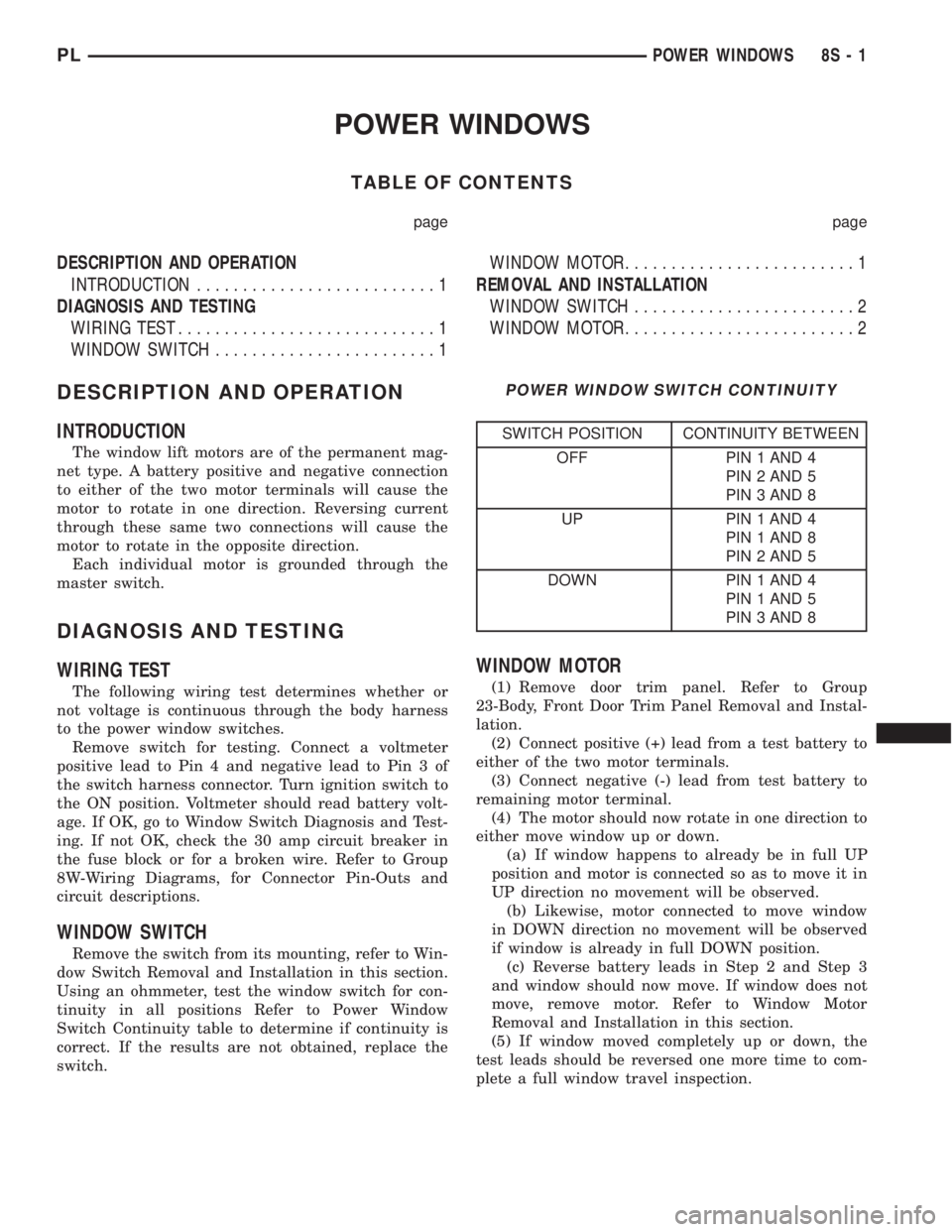
DESCRIPTION AND OPERATION
INTRODUCTION..........................1
DIAGNOSIS AND TESTING
WIRING TEST............................1
WINDOW SWITCH........................1WINDOW MOTOR.........................1
REMOVAL AND INSTALLATION
WINDOW SWITCH........................2
WINDOW MOTOR.........................2
DESCRIPTION AND OPERATION
INTRODUCTION
The window lift motors are of the permanent mag-
net type. A battery positive and negative connection
to either of the two motor terminals will cause the
motor to rotate in one direction. Reversing current
through these same two connections will cause the
motor to rotate in the opposite direction.
Each individual motor is grounded through the
master switch.
DIAGNOSIS AND TESTING
WIRING TEST
The following wiring test determines whether or
not voltage is continuous through the body harness
to the power window switches.
Remove switch for testing. Connect a voltmeter
positive lead to Pin 4 and negative lead to Pin 3 of
the switch harness connector. Turn ignition switch to
the ON position. Voltmeter should read battery volt-
age. If OK, go to Window Switch Diagnosis and Test-
ing. If not OK, check the 30 amp circuit breaker in
the fuse block or for a broken wire. Refer to Group
8W-Wiring Diagrams, for Connector Pin-Outs and
circuit descriptions.
WINDOW SWITCH
Remove the switch from its mounting, refer to Win-
dow Switch Removal and Installation in this section.
Using an ohmmeter, test the window switch for con-
tinuity in all positions Refer to Power Window
Switch Continuity table to determine if continuity is
correct. If the results are not obtained, replace the
switch.
WINDOW MOTOR
(1) Remove door trim panel. Refer to Group
23-Body, Front Door Trim Panel Removal and Instal-
lation.
(2) Connect positive (+) lead from a test battery to
either of the two motor terminals.
(3) Connect negative (-) lead from test battery to
remaining motor terminal.
(4) The motor should now rotate in one direction to
either move window up or down.
(a) If window happens to already be in full UP
position and motor is connected so as to move it in
UP direction no movement will be observed.
(b) Likewise, motor connected to move window
in DOWN direction no movement will be observed
if window is already in full DOWN position.
(c) Reverse battery leads in Step 2 and Step 3
and window should now move. If window does not
move, remove motor. Refer to Window Motor
Removal and Installation in this section.
(5) If window moved completely up or down, the
test leads should be reversed one more time to com-
plete a full window travel inspection.
POWER WINDOW SWITCH CONTINUITY
SWITCH POSITION CONTINUITY BETWEEN
OFF PIN 1 AND 4
PIN 2 AND 5
PIN 3 AND 8
UP PIN 1 AND 4
PIN 1 AND 8
PIN 2 AND 5
DOWN PIN 1 AND 4
PIN 1 AND 5
PIN 3 AND 8
PLPOWER WINDOWS 8S - 1
Page 383 of 1285
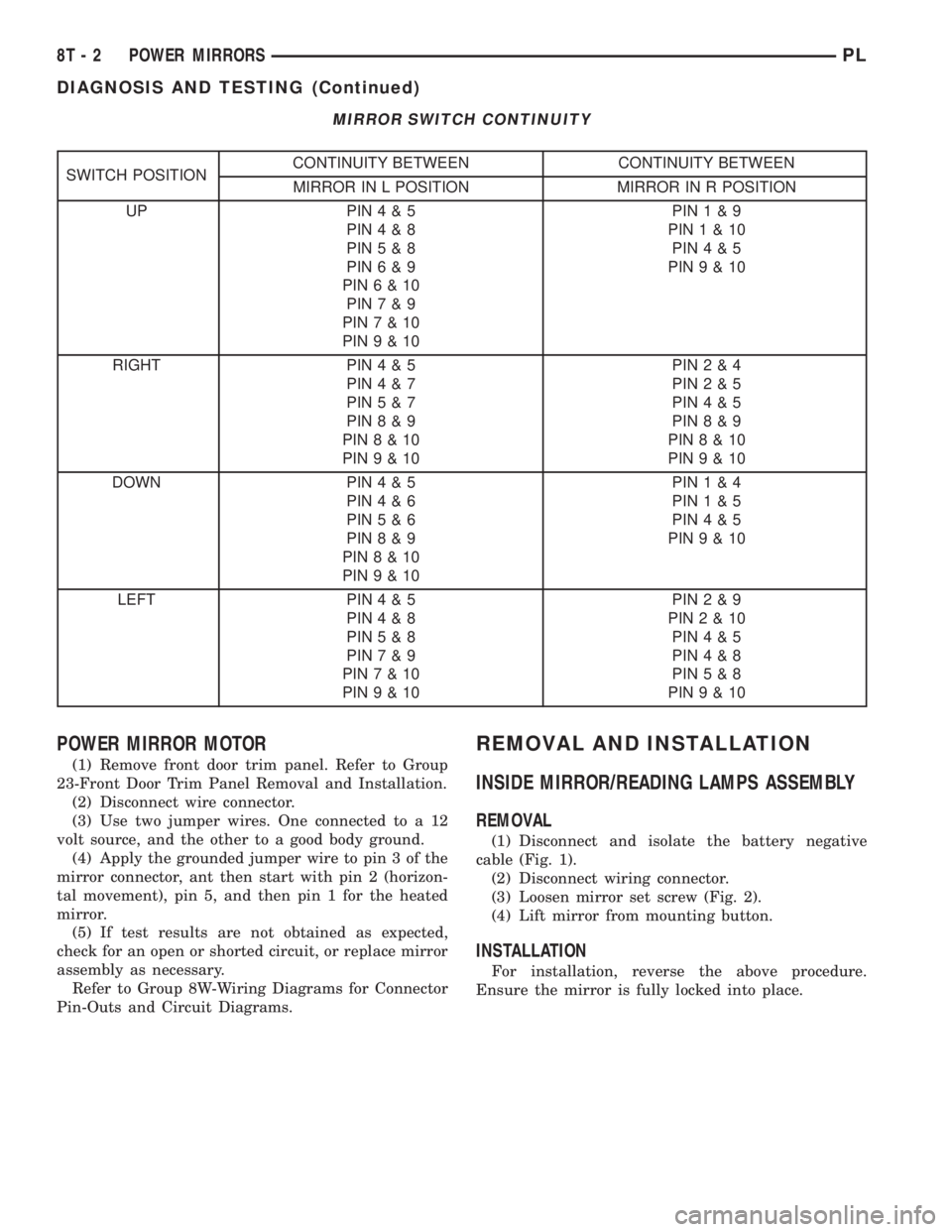
MIRROR SWITCH CONTINUITY
SWITCH POSITIONCONTINUITY BETWEEN CONTINUITY BETWEEN
MIRROR IN L POSITION MIRROR IN R POSITION
UP PIN4&5
PIN4&8
PIN5&8
PIN6&9
PIN6&10
PIN7&9
PIN7&10
PIN9&10PIN1&9
PIN1&10
PIN4&5
PIN9&10
RIGHT PIN4&5
PIN4&7
PIN5&7
PIN8&9
PIN8&10
PIN9&10PIN2&4
PIN2&5
PIN4&5
PIN8&9
PIN8&10
PIN9&10
DOWN PIN4&5
PIN4&6
PIN5&6
PIN8&9
PIN8&10
PIN9&10PIN1&4
PIN1&5
PIN4&5
PIN9&10
LEFT PIN4&5
PIN4&8
PIN5&8
PIN7&9
PIN7&10
PIN9&10PIN2&9
PIN2&10
PIN4&5
PIN4&8
PIN5&8
PIN9&10
POWER MIRROR MOTOR
(1) Remove front door trim panel. Refer to Group
23-Front Door Trim Panel Removal and Installation.
(2) Disconnect wire connector.
(3) Use two jumper wires. One connected to a 12
volt source, and the other to a good body ground.
(4) Apply the grounded jumper wire to pin 3 of the
mirror connector, ant then start with pin 2 (horizon-
tal movement), pin 5, and then pin 1 for the heated
mirror.
(5) If test results are not obtained as expected,
check for an open or shorted circuit, or replace mirror
assembly as necessary.
Refer to Group 8W-Wiring Diagrams for Connector
Pin-Outs and Circuit Diagrams.
REMOVAL AND INSTALLATION
INSIDE MIRROR/READING LAMPS ASSEMBLY
REMOVAL
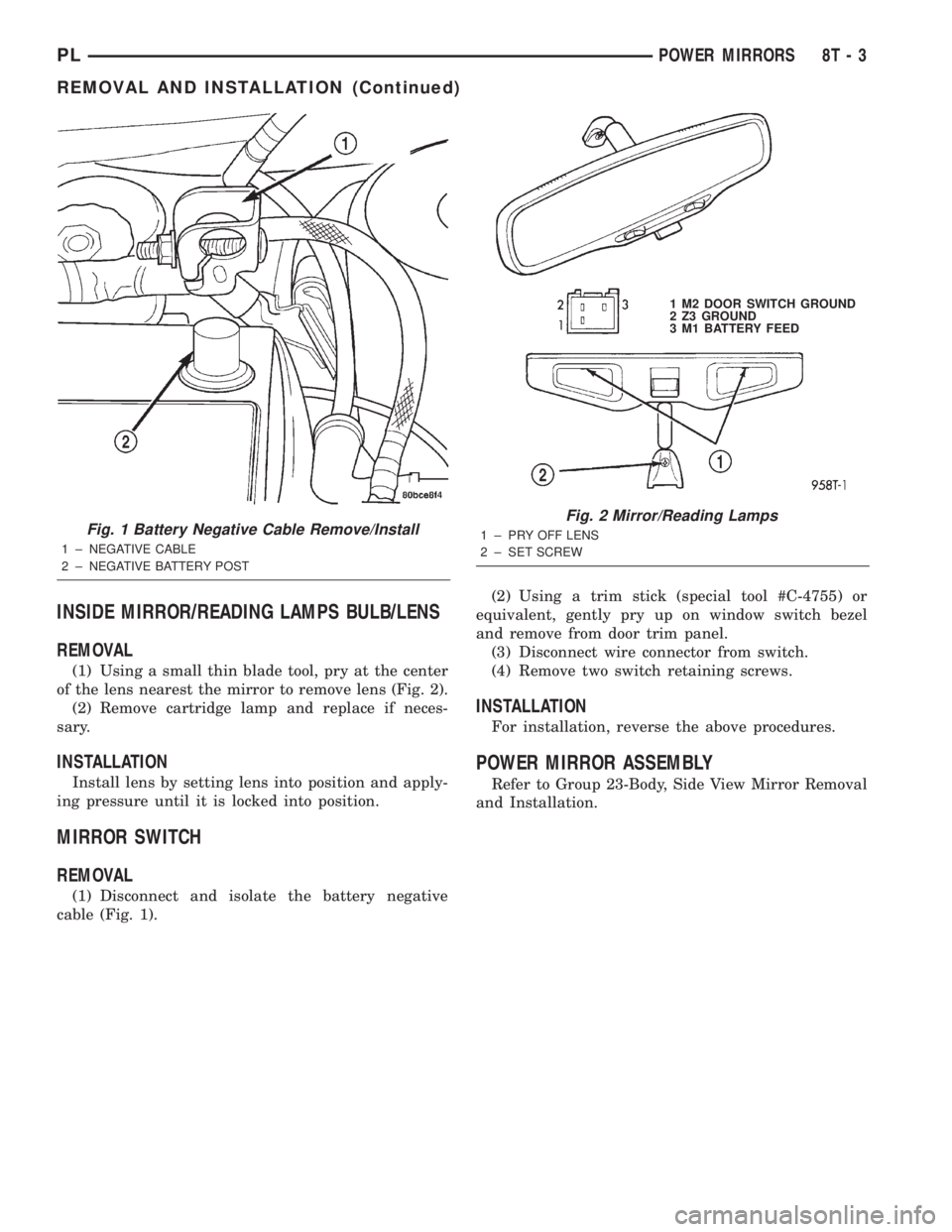
(1) Disconnect and isolate the battery negative
cable (Fig. 1).
(2) Disconnect wiring connector.
(3) Loosen mirror set screw (Fig. 2).
(4) Lift mirror from mounting button.
INSTALLATION
For installation, reverse the above procedure.
Ensure the mirror is fully locked into place.
8T - 2 POWER MIRRORSPL
DIAGNOSIS AND TESTING (Continued)
Page 384 of 1285
INSIDE MIRROR/READING LAMPS BULB/LENS
REMOVAL
(1) Using a small thin blade tool, pry at the center
of the lens nearest the mirror to remove lens (Fig. 2).
(2) Remove cartridge lamp and replace if neces-
sary.
INSTALLATION
Install lens by setting lens into position and apply-
ing pressure until it is locked into position.
MIRROR SWITCH
REMOVAL
(1) Disconnect and isolate the battery negative
cable (Fig. 1).(2) Using a trim stick (special tool #C-4755) or
equivalent, gently pry up on window switch bezel
and remove from door trim panel.
(3) Disconnect wire connector from switch.
(4) Remove two switch retaining screws.
INSTALLATION
For installation, reverse the above procedures.
POWER MIRROR ASSEMBLY
Refer to Group 23-Body, Side View Mirror Removal
and Installation.
Fig. 1 Battery Negative Cable Remove/Install
1 ± NEGATIVE CABLE
2 ± NEGATIVE BATTERY POST
Fig. 2 Mirror/Reading Lamps
1 ± PRY OFF LENS
2 ± SET SCREW1 M2 DOOR SWITCH GROUND
2 Z3 GROUND
3 M1 BATTERY FEED
PLPOWER MIRRORS 8T - 3
REMOVAL AND INSTALLATION (Continued)
Page 392 of 1285
WIRING DIAGRAMS
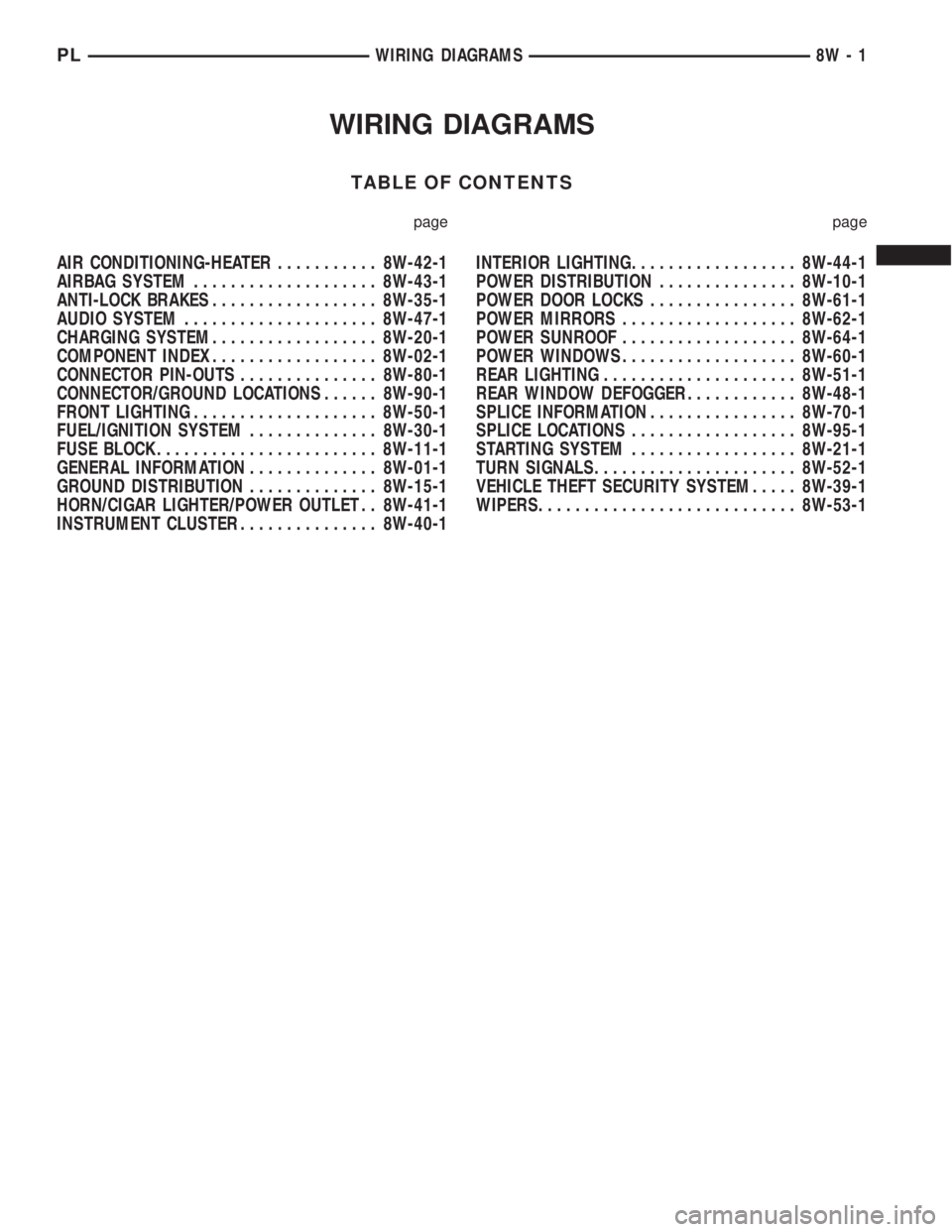
TABLE OF CONTENTS
page page
AIR CONDITIONING-HEATER........... 8W-42-1
AIRBAG SYSTEM.................... 8W-43-1
ANTI-LOCK BRAKES.................. 8W-35-1
AUDIO SYSTEM..................... 8W-47-1
CHARGING SYSTEM.................. 8W-20-1
COMPONENT INDEX.................. 8W-02-1
CONNECTOR PIN-OUTS............... 8W-80-1
CONNECTOR/GROUND LOCATIONS...... 8W-90-1
FRONT LIGHTING.................... 8W-50-1
FUEL/IGNITION SYSTEM.............. 8W-30-1
FUSE BLOCK........................ 8W-11-1
GENERAL INFORMATION.............. 8W-01-1
GROUND DISTRIBUTION.............. 8W-15-1
HORN/CIGAR LIGHTER/POWER OUTLET . . 8W-41-1
INSTRUMENT CLUSTER............... 8W-40-1INTERIOR LIGHTING.................. 8W-44-1
POWER DISTRIBUTION............... 8W-10-1
POWER DOOR LOCKS................ 8W-61-1
POWER MIRRORS................... 8W-62-1
POWER SUNROOF................... 8W-64-1
POWER WINDOWS................... 8W-60-1
REAR LIGHTING..................... 8W-51-1
REAR WINDOW DEFOGGER............ 8W-48-1
SPLICE INFORMATION................ 8W-70-1
SPLICE LOCATIONS.................. 8W-95-1
STARTING SYSTEM.................. 8W-21-1
TURN SIGNALS...................... 8W-52-1
VEHICLE THEFT SECURITY SYSTEM..... 8W-39-1
WIPERS............................ 8W-53-1
PLWIRING DIAGRAMS 8W - 1
Page 402 of 1285
²Connectors are fully seated
²Spread terminals, or terminal push out
²Terminals in the wiring assembly are fully
seated into the connector/component and locked in
position
²Dirt or corrosion on the terminals. Any amount
of corrosion or dirt could cause an intermittent prob-
lem
²Damaged connector/component casing exposing
the item to dirt and moisture
²Wire insulation that has rubbed through causing
a short to ground
²Some or all of the wiring strands broken inside
of the insulation covering
²Wiring broken inside of the insulation.
TROUBLESHOOTING TESTS
Before beginning any tests on a vehicles electrical
system use the Wiring Diagrams and study the cir-
cuit. Also refer to the Troubleshooting Wiring Prob-
lems in this section.
TESTING FOR VOLTAGE POTENTIAL
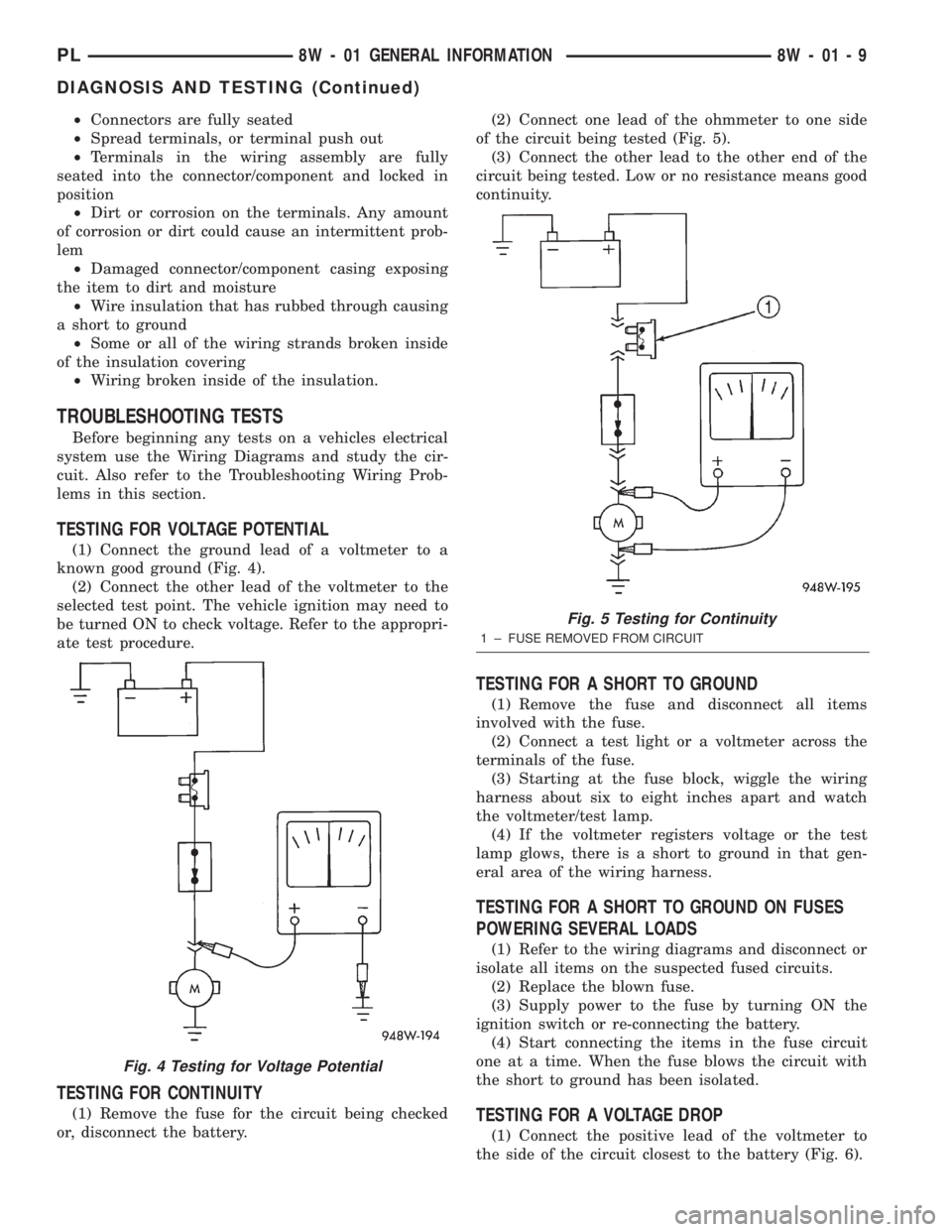
(1) Connect the ground lead of a voltmeter to a
known good ground (Fig. 4).
(2) Connect the other lead of the voltmeter to the
selected test point. The vehicle ignition may need to
be turned ON to check voltage. Refer to the appropri-
ate test procedure.
TESTING FOR CONTINUITY
(1) Remove the fuse for the circuit being checked
or, disconnect the battery.(2) Connect one lead of the ohmmeter to one side
of the circuit being tested (Fig. 5).
(3) Connect the other lead to the other end of the
circuit being tested. Low or no resistance means good
continuity.
TESTING FOR A SHORT TO GROUND
(1) Remove the fuse and disconnect all items
involved with the fuse.
(2) Connect a test light or a voltmeter across the
terminals of the fuse.
(3) Starting at the fuse block, wiggle the wiring
harness about six to eight inches apart and watch
the voltmeter/test lamp.
(4) If the voltmeter registers voltage or the test
lamp glows, there is a short to ground in that gen-
eral area of the wiring harness.
TESTING FOR A SHORT TO GROUND ON FUSES
POWERING SEVERAL LOADS
(1) Refer to the wiring diagrams and disconnect or
isolate all items on the suspected fused circuits.
(2) Replace the blown fuse.
(3) Supply power to the fuse by turning ON the
ignition switch or re-connecting the battery.
(4) Start connecting the items in the fuse circuit
one at a time. When the fuse blows the circuit with
the short to ground has been isolated.
TESTING FOR A VOLTAGE DROP
(1) Connect the positive lead of the voltmeter to
the side of the circuit closest to the battery (Fig. 6).
Fig. 4 Testing for Voltage Potential
Fig. 5 Testing for Continuity
1 ± FUSE REMOVED FROM CIRCUIT
PL8W - 01 GENERAL INFORMATION 8W - 01 - 9
DIAGNOSIS AND TESTING (Continued)
Page 404 of 1285
TERMINAL/CONNECTOR REPAIR-MOLEX
CONNECTORS
(1) Disconnect battery.
(2) Disconnect the connector from its mating half/
component.
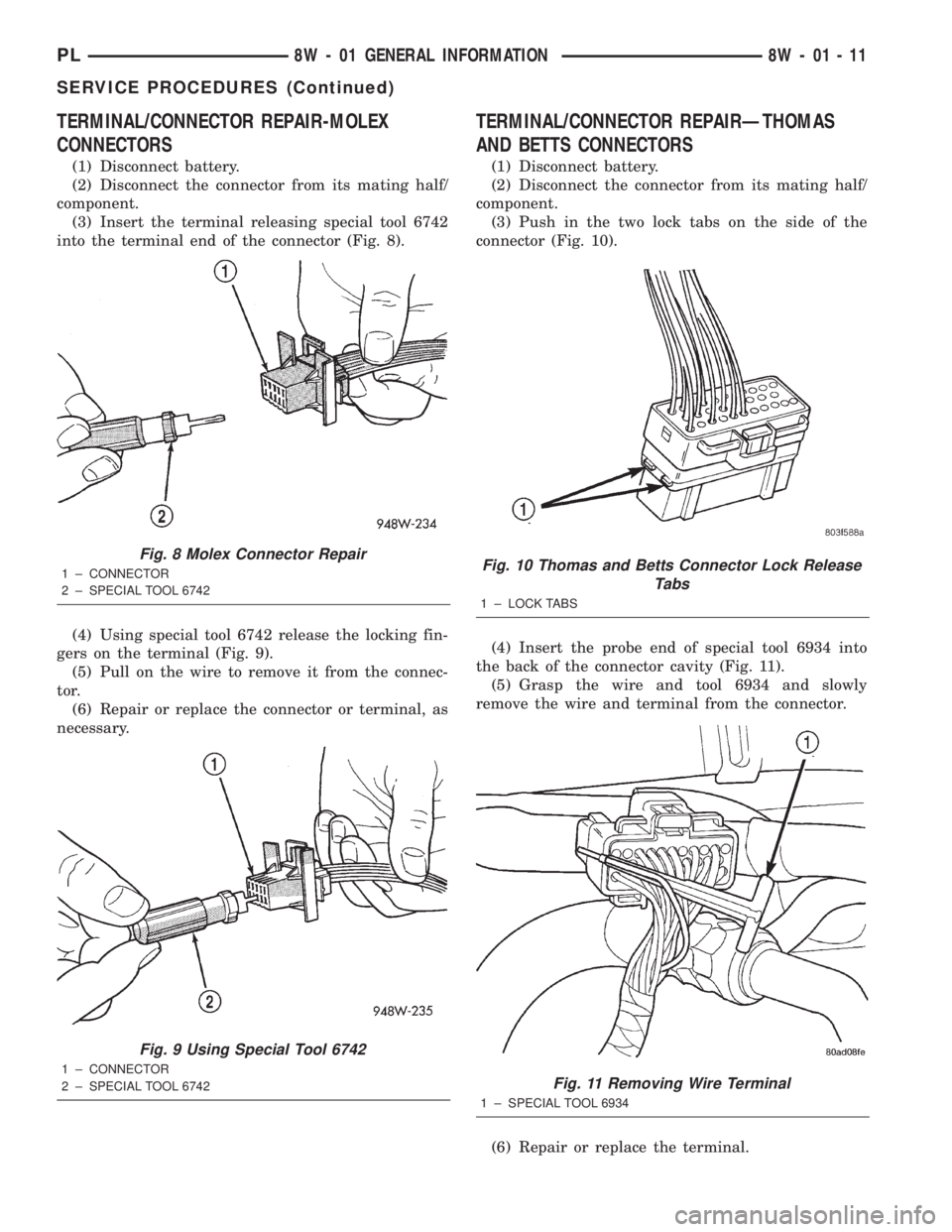
(3) Insert the terminal releasing special tool 6742
into the terminal end of the connector (Fig. 8).
(4) Using special tool 6742 release the locking fin-
gers on the terminal (Fig. 9).
(5) Pull on the wire to remove it from the connec-
tor.
(6) Repair or replace the connector or terminal, as
necessary.
TERMINAL/CONNECTOR REPAIRÐTHOMAS
AND BETTS CONNECTORS
(1) Disconnect battery.
(2) Disconnect the connector from its mating half/
component.
(3) Push in the two lock tabs on the side of the
connector (Fig. 10).
(4) Insert the probe end of special tool 6934 into
the back of the connector cavity (Fig. 11).
(5) Grasp the wire and tool 6934 and slowly
remove the wire and terminal from the connector.
(6) Repair or replace the terminal.
Fig. 8 Molex Connector Repair
1 ± CONNECTOR
2 ± SPECIAL TOOL 6742
Fig. 9 Using Special Tool 6742
1 ± CONNECTOR
2 ± SPECIAL TOOL 6742
Fig. 10 Thomas and Betts Connector Lock Release
Tabs
1 ± LOCK TABS
Fig. 11 Removing Wire Terminal
1 ± SPECIAL TOOL 6934
PL8W - 01 GENERAL INFORMATION 8W - 01 - 11
SERVICE PROCEDURES (Continued)