ECU DODGE NEON 2000 Service User Guide
[x] Cancel search | Manufacturer: DODGE, Model Year: 2000, Model line: NEON, Model: DODGE NEON 2000Pages: 1285, PDF Size: 29.42 MB
Page 53 of 1285
²Place the link center sleeve and bushings
between the eye in the end of the stabilizer bar and
the link mounting bracket on the strut.
²Start the stabilizer bar link bolt with bushing
from the top, down through the stabilizer bar, inner
link bushings and sleeve, and strut link mounting
bracket.
²Install a lower bushing, then the nut. Do not
tighten the nut at this time.
(8) If the vehicle is equipped with the antilock
brake system (ABS), install the screw securing the
ABS wheel speed sensor bracket to the rear of the
strut assembly (Fig. 6). Tighten the mounting screw
to a torque of 13 N´m (120 in. lbs.).
(9) If the vehicle is equipped with rear drum
brakes, install the screw securing the brake hose
bracket to the rear of the strut assembly (Fig. 5).
Tighten the screw to a torque of 31 N´m (275 in. lbs.).
(10) Install the tire and wheel assembly on vehicle.
Tighten the wheel mounting stud nuts in proper
sequence until all nuts are torqued to half specifica-
tion. Repeat the tightening sequence, this time, to
full specified torque of 135 N´m (100 ft. lbs.).
(11) Lower the vehicle to ground level.
(12) Tighten the stabilizer bar link nut to a torque
of 23 N´m (200 in. lbs.).
(13) Set the rear toe on the vehicle to the required
specification if necessary. Refer to WHEEL ALIGN-
MENT in this service manual group.
KNUCKLE (REAR)
NOTE: Before proceeding with this procedure,
review SERVICE WARNINGS AND CAUTIONS at the
beginning of REMOVAL AND INSTALLATION in this
section.
REMOVAL
(1) Raise the vehicle. Refer to HOISTING in the
LUBRICATION AND MAINTENANCE group for the
proper lifting procedure.
(2) Remove the rear wheel and tire assembly from
the vehicle.
(3) If the vehicle is equipped with rear drum
brakes, remove the screw securing the brake hose
bracket to the rear of the strut assembly (Fig. 5).
(4) If the vehicle is equipped with the antilock
brake system (ABS), remove the screw securing the
ABS wheel speed sensor bracket to the rear of the
strut assembly (Fig. 6).
(5) If the vehicle is equipped with rear drum
brakes, remove any retainer clips from the wheel
mounting studs, then pull the brake drum off the
hub and bearing.
(6) If the vehicle is equipped with rear disc brakes
(Fig. 7), perform the following:²Remove the two guide pin bolts securing the
front disc brake caliper to the steering knuckle.
²Remove the disc brake caliper from the knuckle
and brake rotor.
²Hang the caliper out of the way using a wire
hanger or cord. Do not support the caliper by letting
it hang by the hydraulic hose.
²Remove any retainer clips from the wheel
mounting studs, then pull the brake rotor off the hub
and bearing.
(7) Remove the dust cap from the hub and bearing
assembly (Fig. 7).
(8) Remove the retaining nut, then the hub and
bearing from the knuckle's spindle (Fig. 7).
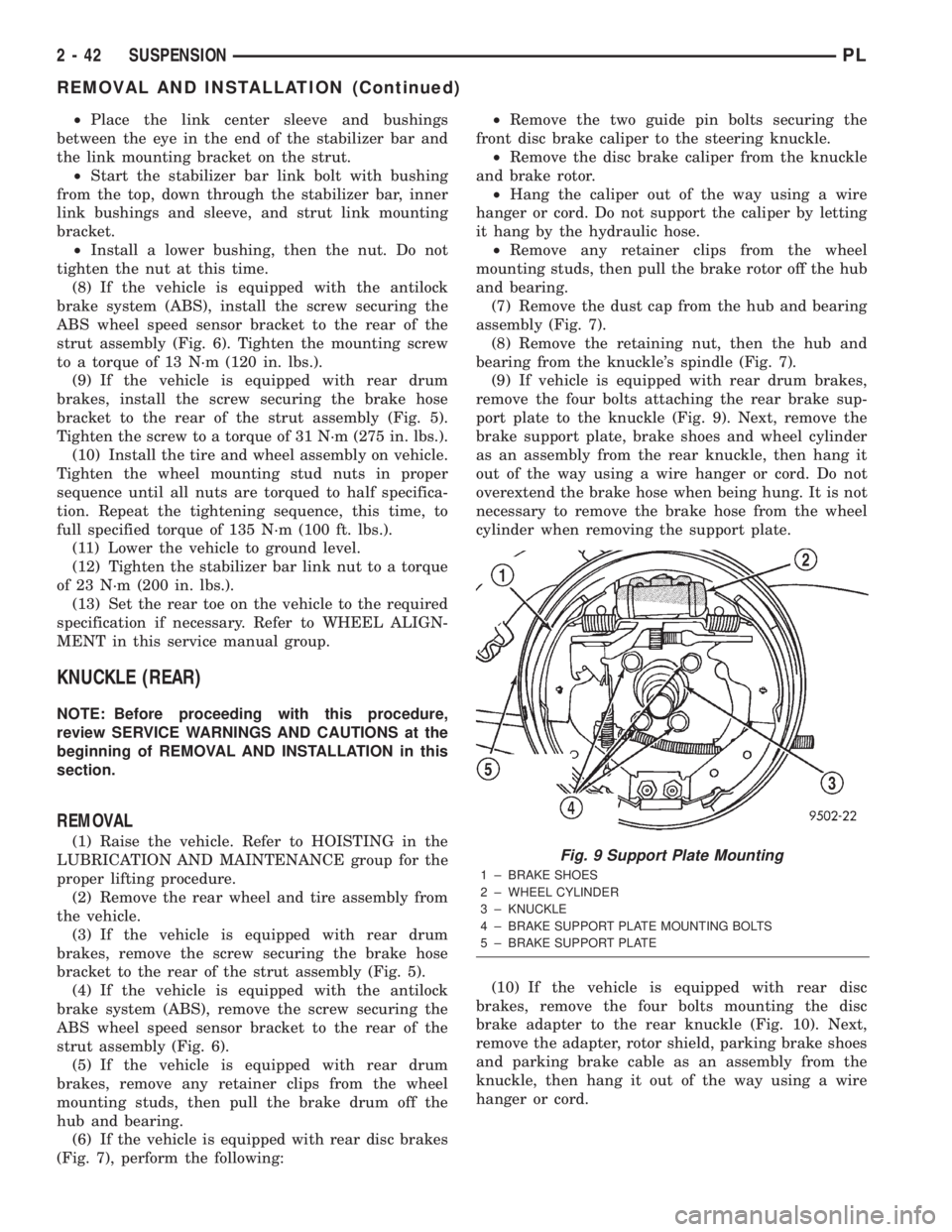
(9) If vehicle is equipped with rear drum brakes,
remove the four bolts attaching the rear brake sup-
port plate to the knuckle (Fig. 9). Next, remove the
brake support plate, brake shoes and wheel cylinder
as an assembly from the rear knuckle, then hang it
out of the way using a wire hanger or cord. Do not
overextend the brake hose when being hung. It is not
necessary to remove the brake hose from the wheel
cylinder when removing the support plate.
(10) If the vehicle is equipped with rear disc
brakes, remove the four bolts mounting the disc
brake adapter to the rear knuckle (Fig. 10). Next,
remove the adapter, rotor shield, parking brake shoes
and parking brake cable as an assembly from the
knuckle, then hang it out of the way using a wire
hanger or cord.Fig. 9 Support Plate Mounting
1 ± BRAKE SHOES
2 ± WHEEL CYLINDER
3 ± KNUCKLE
4 ± BRAKE SUPPORT PLATE MOUNTING BOLTS
5 ± BRAKE SUPPORT PLATE
2 - 42 SUSPENSIONPL
REMOVAL AND INSTALLATION (Continued)
Page 55 of 1285
the front side. Install the nut, but do not completely
tighten it at this time. The nut will need to be tight-
ened when the vehicle is at curb height.
(4) Install the rear bayonet bushing on the tension
strut. Be sure the stepped area of the bushing is
squarely seated into the hole in the knuckle.
(5) Install the rear tension strut retainer, then the
nut. To completely install the nut, place a wrench on
the flat formed into the tension strut and tighten the
nut (Fig. 12). Tighten the nut to a torque of 95 N´m
(70 ft. lbs.).
(6) If vehicle is equipped with rear drum brakes,
install the brake support plate on the knuckle and
attach it using it's four mounting bolts (Fig. 9).
Tighten the mounting bolts to a torque of 75 N´m (55
ft. lbs.).
(7) If the vehicle is equipped with rear disc brakes,
install the disc brake adapter on the knuckle and
attach it using it's four mounting bolts (Fig. 10).
Tighten the mounting bolts to a torque of 75 N´m (55
ft. lbs.).
(8) Install the hub and bearing on the knuckle's
spindle, then install a new retaining nut (Fig. 7). Do
not reuse the original nut. Tighten the nut to a
torque of 217 N´m (160 ft. lbs.).
(9) Install the dust cap on the end of the hub and
bearing (Fig. 7).
(10) If the vehicle is equipped with rear disc
brakes (Fig. 7), install the brake rotor and disc brake
caliper on the knuckle. Install the two guide pin bolts
securing the front disc brake caliper to the steering
knuckle. Tighten the guide pin bolts to a torque of 22
N´m (192 in. lbs.).
(11) If the vehicle is equipped with rear drum
brakes, install the screw securing the brake hose
bracket to the rear of the strut assembly (Fig. 5).
Tighten the screw to a torque of 31 N´m (275 in. lbs.).
(12) If the vehicle is equipped with the antilock
brake system (ABS), install the screw securing the
ABS wheel speed sensor bracket to the rear of the
strut assembly (Fig. 6). Tighten the mounting screw
to a torque of 13 N´m (120 in. lbs.).
(13) Install the tire and wheel assembly. Tighten
the wheel mounting nuts in proper sequence until all
nuts are torqued to half specification. Repeat the
tightening sequence, this time, to full specified
torque of 135 N´m (100 ft. lbs.).
(14) Lower the vehicle to ground level.
(15) Tighten the lateral arm-to-knuckle mounting
bolt nut to a torque of 95 N´m (70 ft. lbs.).
(16) Set the rear toe on the vehicle to the required
specification if necessary. Refer to WHEEL ALIGN-
MENT in this service manual group.HUB AND BEARING (REAR)
NOTE: Before proceeding with this procedure,
review SERVICE WARNINGS AND CAUTIONS at the
beginning of REMOVAL AND INSTALLATION in this
section.
REMOVAL
(1) Raise the vehicle. Refer to HOISTING in the
LUBRICATION AND MAINTENANCE group for the
proper lifting procedure.
(2) Remove the rear wheel and tire assembly from
the vehicle.
(3) If the vehicle is equipped with rear drum
brakes, remove any retainer clips from the wheel
mounting studs, then pull the brake drum off the
hub and bearing.
(4) If the vehicle is equipped with rear disc brakes
(Fig. 7), perform the following:
²Remove the two guide pin bolts securing the
front disc brake caliper to the steering knuckle.
²Remove the disc brake caliper from the knuckle
and brake rotor.
²Hang the caliper out of the way using a wire
hanger or cord. Do not support the caliper by letting
it hang by the hydraulic hose.
²Remove any retainer clips from the wheel
mounting studs, then pull the brake rotor off the hub
and bearing.
(5) Remove the dust cap from the hub and bearing
assembly (Fig. 7).
(6) Remove the retaining nut, then the hub and
bearing from the knuckle's spindle (Fig. 7).
INSTALLATION
(1) Install the hub and bearing on the knuckle's
spindle, then install a new retaining nut (Fig. 7). Do
not reuse the original nut. Tighten the nut to a
torque of 217 N´m (160 ft. lbs.).
(2) Install the dust cap on the end of the hub and
bearing (Fig. 7).
(3) If the vehicle is equipped with rear disc brakes
(Fig. 7), install the brake rotor and disc brake caliper
on the knuckle. Install the two guide pin bolts secur-
ing the front disc brake caliper to the steering
knuckle. Tighten the guide pin bolts to a torque of 22
N´m (192 in. lbs.).
(4) Install the tire and wheel assembly. Tighten
the wheel mounting nuts in proper sequence until all
nuts are torqued to half specification. Repeat the
tightening sequence, this time, to full specified
torque of 135 N´m (100 ft. lbs.).
(5) Lower the vehicle to ground level.
2 - 44 SUSPENSIONPL
REMOVAL AND INSTALLATION (Continued)
Page 57 of 1285
(10) With suspension at curb height, tighten the
lateral arm mounting bolt nut at the crossmember to
88 N´m (65 ft. lbs.).
(11) Set the rear toe on the vehicle to the required
specification as necessary. Refer to WHEEL ALIGN-
MENT in this service manual group.
TENSION STRUT
NOTE: Before proceeding with this procedure,
review SERVICE WARNINGS AND CAUTIONS at the
beginning of REMOVAL AND INSTALLATION in this
section.
REMOVAL
(1) Raise the vehicle. Refer to HOISTING in the
LUBRICATION AND MAINTENANCE group for the
proper lifting procedure.
(2) Remove the rear wheel and tire assembly from
the vehicle.
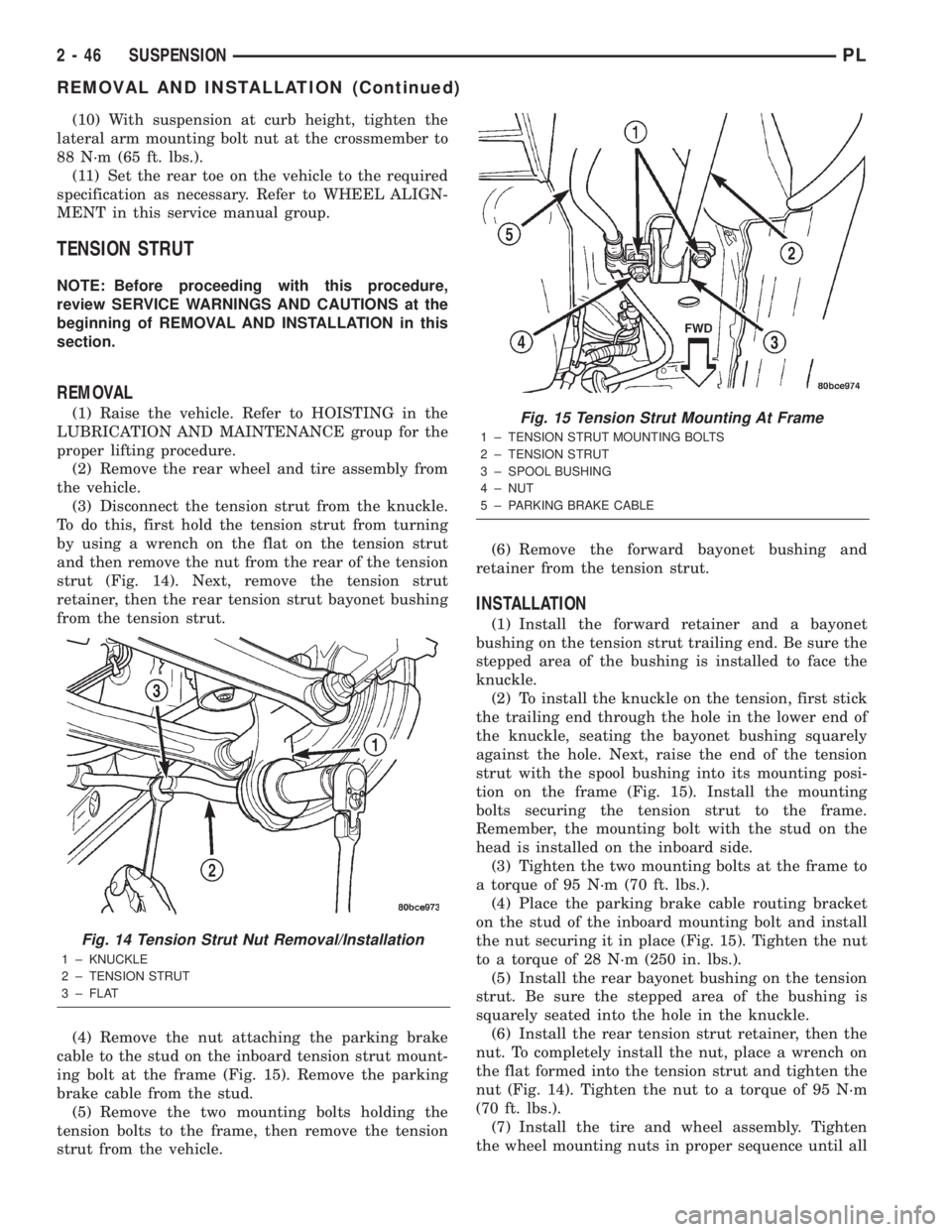
(3) Disconnect the tension strut from the knuckle.
To do this, first hold the tension strut from turning
by using a wrench on the flat on the tension strut
and then remove the nut from the rear of the tension
strut (Fig. 14). Next, remove the tension strut
retainer, then the rear tension strut bayonet bushing
from the tension strut.
(4) Remove the nut attaching the parking brake
cable to the stud on the inboard tension strut mount-
ing bolt at the frame (Fig. 15). Remove the parking
brake cable from the stud.
(5) Remove the two mounting bolts holding the
tension bolts to the frame, then remove the tension
strut from the vehicle.(6) Remove the forward bayonet bushing and
retainer from the tension strut.
INSTALLATION
(1) Install the forward retainer and a bayonet
bushing on the tension strut trailing end. Be sure the
stepped area of the bushing is installed to face the
knuckle.
(2) To install the knuckle on the tension, first stick
the trailing end through the hole in the lower end of
the knuckle, seating the bayonet bushing squarely
against the hole. Next, raise the end of the tension
strut with the spool bushing into its mounting posi-
tion on the frame (Fig. 15). Install the mounting
bolts securing the tension strut to the frame.
Remember, the mounting bolt with the stud on the
head is installed on the inboard side.
(3) Tighten the two mounting bolts at the frame to
a torque of 95 N´m (70 ft. lbs.).
(4) Place the parking brake cable routing bracket
on the stud of the inboard mounting bolt and install
the nut securing it in place (Fig. 15). Tighten the nut
to a torque of 28 N´m (250 in. lbs.).
(5) Install the rear bayonet bushing on the tension
strut. Be sure the stepped area of the bushing is
squarely seated into the hole in the knuckle.
(6) Install the rear tension strut retainer, then the
nut. To completely install the nut, place a wrench on
the flat formed into the tension strut and tighten the
nut (Fig. 14). Tighten the nut to a torque of 95 N´m
(70 ft. lbs.).
(7) Install the tire and wheel assembly. Tighten
the wheel mounting nuts in proper sequence until all
Fig. 14 Tension Strut Nut Removal/Installation
1 ± KNUCKLE
2 ± TENSION STRUT
3 ± FLAT
Fig. 15 Tension Strut Mounting At Frame
1 ± TENSION STRUT MOUNTING BOLTS
2 ± TENSION STRUT
3 ± SPOOL BUSHING
4 ± NUT
5 ± PARKING BRAKE CABLE
2 - 46 SUSPENSIONPL
REMOVAL AND INSTALLATION (Continued)
Page 58 of 1285
nuts are torqued to half specification. Repeat the
tightening sequence, this time, to full specified
torque of 135 N´m (100 ft. lbs.).
(8) Lower the vehicle to ground level.
(9) Set the rear toe on the vehicle to the required
specification if necessary. Refer to WHEEL ALIGN-
MENT in this service manual group.
STABILIZER BAR (REAR)
NOTE: Before proceeding with this procedure,
review SERVICE WARNINGS AND CAUTIONS at the
beginning of REMOVAL AND INSTALLATION in this
section.
REMOVAL
(1) Raise the vehicle. Refer to HOISTING in the
LUBRICATION AND MAINTENANCE group for the
proper lifting procedure.
(2) Remove both rear wheel and tire assemblies
from the vehicle.
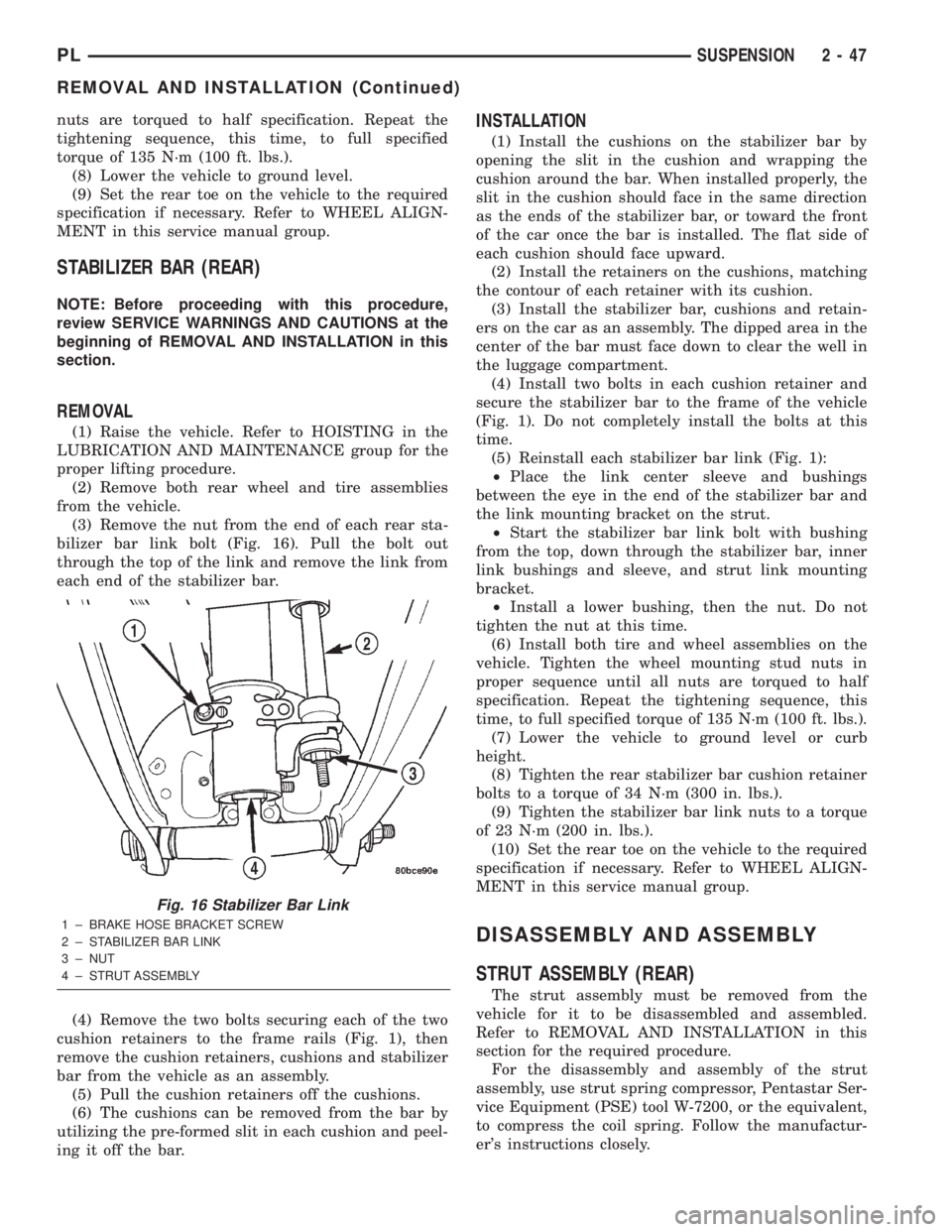
(3) Remove the nut from the end of each rear sta-
bilizer bar link bolt (Fig. 16). Pull the bolt out
through the top of the link and remove the link from
each end of the stabilizer bar.
(4) Remove the two bolts securing each of the two
cushion retainers to the frame rails (Fig. 1), then
remove the cushion retainers, cushions and stabilizer
bar from the vehicle as an assembly.
(5) Pull the cushion retainers off the cushions.
(6) The cushions can be removed from the bar by
utilizing the pre-formed slit in each cushion and peel-
ing it off the bar.
INSTALLATION
(1) Install the cushions on the stabilizer bar by
opening the slit in the cushion and wrapping the
cushion around the bar. When installed properly, the
slit in the cushion should face in the same direction
as the ends of the stabilizer bar, or toward the front
of the car once the bar is installed. The flat side of
each cushion should face upward.
(2) Install the retainers on the cushions, matching
the contour of each retainer with its cushion.
(3) Install the stabilizer bar, cushions and retain-
ers on the car as an assembly. The dipped area in the
center of the bar must face down to clear the well in
the luggage compartment.
(4) Install two bolts in each cushion retainer and
secure the stabilizer bar to the frame of the vehicle
(Fig. 1). Do not completely install the bolts at this
time.
(5) Reinstall each stabilizer bar link (Fig. 1):
²Place the link center sleeve and bushings
between the eye in the end of the stabilizer bar and
the link mounting bracket on the strut.
²Start the stabilizer bar link bolt with bushing
from the top, down through the stabilizer bar, inner
link bushings and sleeve, and strut link mounting
bracket.
²Install a lower bushing, then the nut. Do not
tighten the nut at this time.
(6) Install both tire and wheel assemblies on the
vehicle. Tighten the wheel mounting stud nuts in
proper sequence until all nuts are torqued to half
specification. Repeat the tightening sequence, this
time, to full specified torque of 135 N´m (100 ft. lbs.).
(7) Lower the vehicle to ground level or curb
height.
(8) Tighten the rear stabilizer bar cushion retainer
bolts to a torque of 34 N´m (300 in. lbs.).
(9) Tighten the stabilizer bar link nuts to a torque
of 23 N´m (200 in. lbs.).
(10) Set the rear toe on the vehicle to the required
specification if necessary. Refer to WHEEL ALIGN-
MENT in this service manual group.
DISASSEMBLY AND ASSEMBLY
STRUT ASSEMBLY (REAR)
The strut assembly must be removed from the
vehicle for it to be disassembled and assembled.
Refer to REMOVAL AND INSTALLATION in this
section for the required procedure.
For the disassembly and assembly of the strut
assembly, use strut spring compressor, Pentastar Ser-
vice Equipment (PSE) tool W-7200, or the equivalent,
to compress the coil spring. Follow the manufactur-
er's instructions closely.
Fig. 16 Stabilizer Bar Link
1 ± BRAKE HOSE BRACKET SCREW
2 ± STABILIZER BAR LINK
3 ± NUT
4 ± STRUT ASSEMBLY
PLSUSPENSION 2 - 47
REMOVAL AND INSTALLATION (Continued)
Page 64 of 1285
SHUDDER OR VIBRATION DURING ACCELERATION
(1) A worn or damaged driveshaft inner tripod
joint.
(2) A sticking tripod joint spider assembly (inner
tripod joint only).
(3) Improper wheel alignment. See Wheel Align-
ment in this group for alignment checking and set-
ting procedures and specifications.
VIBRATION AT HIGHWAY SPEEDS
(1) Foreign material (mud, etc.) packed on the
backside of the wheel(s).
(2) Out of balance front tires or wheels. See Group
22, Wheels And Tires for the required balancing pro-
cedure.
(3) Improper tire and/or wheel runout. See Group
22, Wheels And Tires for the required runout check-
ing procedure.
REMOVAL AND INSTALLATION
DRIVESHAFTS
CAUTION: Boot sealing is vital to retain special
lubricants and to prevent foreign contaminants
from entering the C/V joint. Mishandling, such as
allowing the assemblies to dangle unsupported, or
pulling or pushing the ends can cut boots or dam-
age C/V joints. During removal and installation pro-
cedures, always support both ends of the driveshaft
to prevent damage.
REMOVAL
CAUTION: The driveshaft, when installed, acts as a
bolt and secures the front hub/bearing assembly. If
vehicle is to be supported or moved on its wheels
with a driveshaft removed, install a PROPER±SIZED
BOLT AND NUT through front hub. Tighten bolt and
nut to 203 N´m (150 ft. lbs.). This will ensure that
the hub bearing cannot loosen.
(1) Disconnect battery negative cable.
(2) Place transaxle in gated park.
(3) Raise vehicle on hoist.
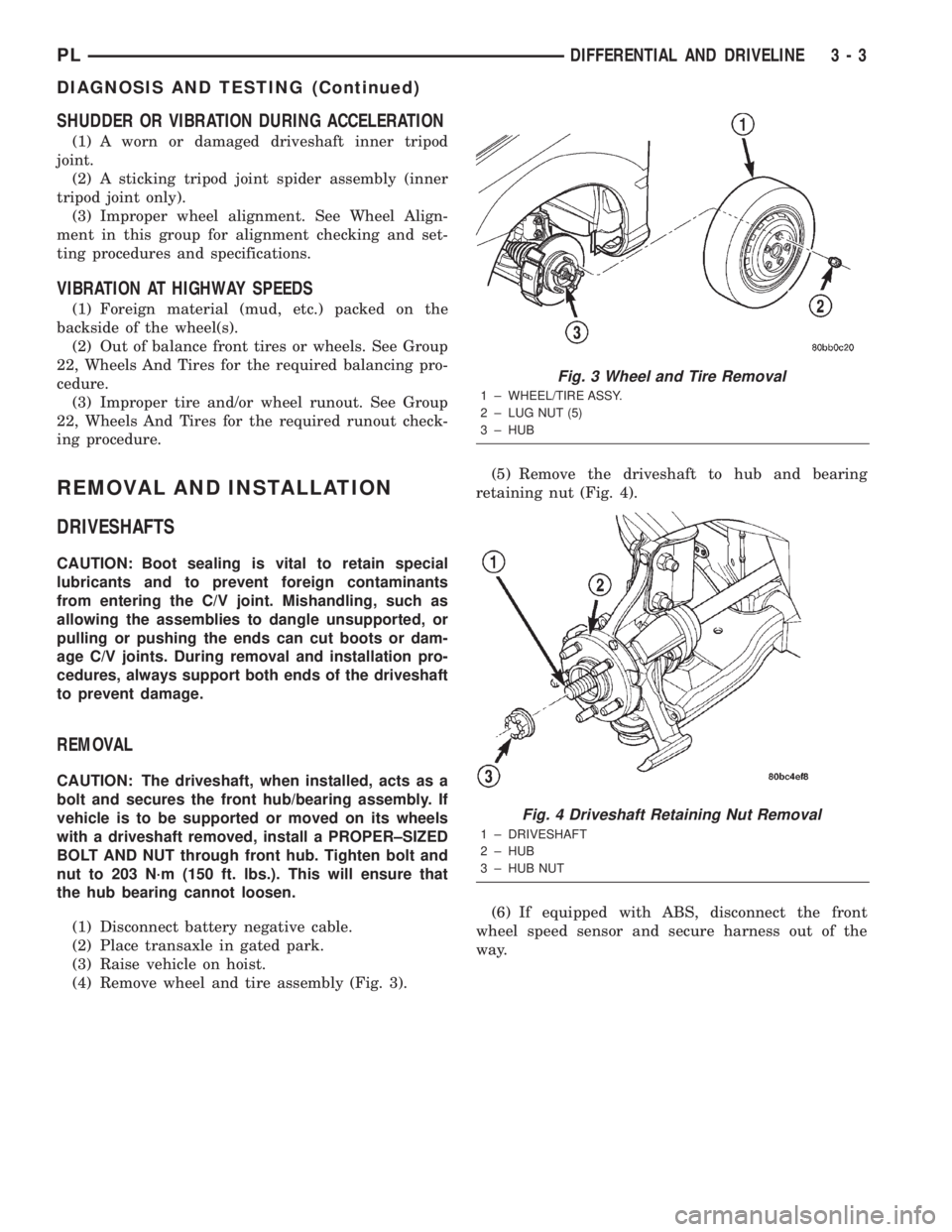
(4) Remove wheel and tire assembly (Fig. 3).(5) Remove the driveshaft to hub and bearing
retaining nut (Fig. 4).
(6) If equipped with ABS, disconnect the front
wheel speed sensor and secure harness out of the
way.
Fig. 3 Wheel and Tire Removal
1 ± WHEEL/TIRE ASSY.
2 ± LUG NUT (5)
3 ± HUB
Fig. 4 Driveshaft Retaining Nut Removal
1 ± DRIVESHAFT
2 ± HUB
3 ± HUB NUT
PLDIFFERENTIAL AND DRIVELINE 3 - 3
DIAGNOSIS AND TESTING (Continued)
Page 65 of 1285
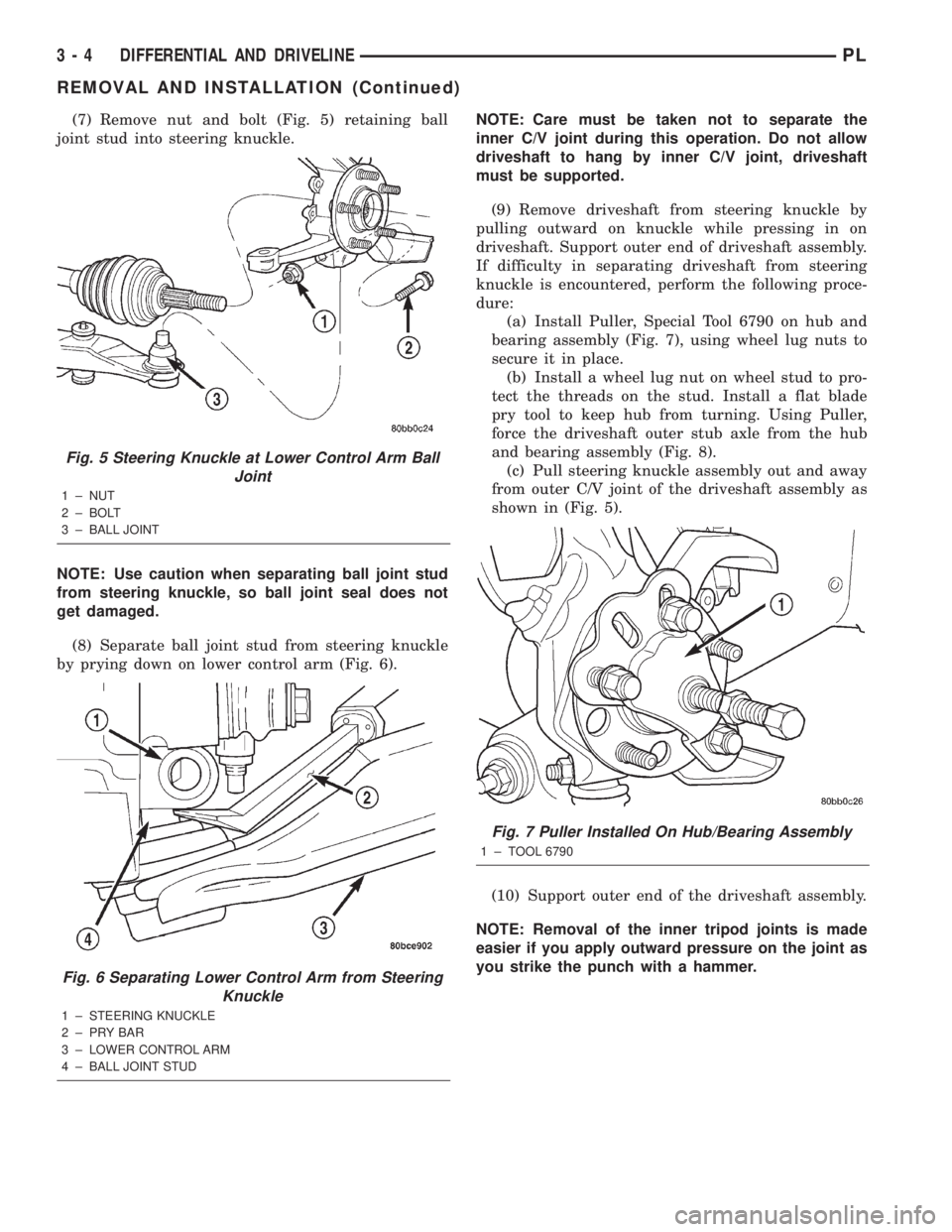
(7) Remove nut and bolt (Fig. 5) retaining ball
joint stud into steering knuckle.
NOTE: Use caution when separating ball joint stud
from steering knuckle, so ball joint seal does not
get damaged.
(8) Separate ball joint stud from steering knuckle
by prying down on lower control arm (Fig. 6).NOTE: Care must be taken not to separate the
inner C/V joint during this operation. Do not allow
driveshaft to hang by inner C/V joint, driveshaft
must be supported.
(9) Remove driveshaft from steering knuckle by
pulling outward on knuckle while pressing in on
driveshaft. Support outer end of driveshaft assembly.
If difficulty in separating driveshaft from steering
knuckle is encountered, perform the following proce-
dure:
(a) Install Puller, Special Tool 6790 on hub and
bearing assembly (Fig. 7), using wheel lug nuts to
secure it in place.
(b) Install a wheel lug nut on wheel stud to pro-
tect the threads on the stud. Install a flat blade
pry tool to keep hub from turning. Using Puller,
force the driveshaft outer stub axle from the hub
and bearing assembly (Fig. 8).
(c) Pull steering knuckle assembly out and away
from outer C/V joint of the driveshaft assembly as
shown in (Fig. 5).
(10) Support outer end of the driveshaft assembly.
NOTE: Removal of the inner tripod joints is made
easier if you apply outward pressure on the joint as
you strike the punch with a hammer.
Fig. 5 Steering Knuckle at Lower Control Arm Ball
Joint
1 ± NUT
2 ± BOLT
3 ± BALL JOINT
Fig. 6 Separating Lower Control Arm from Steering
Knuckle
1 ± STEERING KNUCKLE
2±PRYBAR
3 ± LOWER CONTROL ARM
4 ± BALL JOINT STUD
Fig. 7 Puller Installed On Hub/Bearing Assembly
1 ± TOOL 6790
3 - 4 DIFFERENTIAL AND DRIVELINEPL
REMOVAL AND INSTALLATION (Continued)
Page 67 of 1285
CAUTION: The driveshaft, when installed, acts as a
bolt and secures the front hub/bearing assembly. If
vehicle is to be supported or moved on its wheels
with a driveshaft removed, install a PROPER±SIZED
BOLT AND NUT through front hub. Tighten bolt and
nut to 203 N´m (150 ft. lbs.). This will ensure that
the hub bearing cannot loosen.
INSTALLATION
(1) Thoroughly clean spline and oil seal sealing
surface, on tripod joint. Lightly lubricate oil seal
sealing surface on tripod joint with fresh clean trans-
mission lubricant.
(2) Holding driveshaft assembly by tripod joint and
interconnecting shaft, install tripod joint into tran-
saxle side gear as far as possible by hand.
(3) Carefully align tripod joint with transaxle side
gears. Then grasp driveshaft interconnecting shaft
and push tripod joint into transaxle side gear until
fully seated.Test that snap ring is fully engaged
with side gear by attempting to remove tripod
joint from transaxle by hand. If snap ring is
fully engaged with side gear, tripod joint will
not be removable by hand.
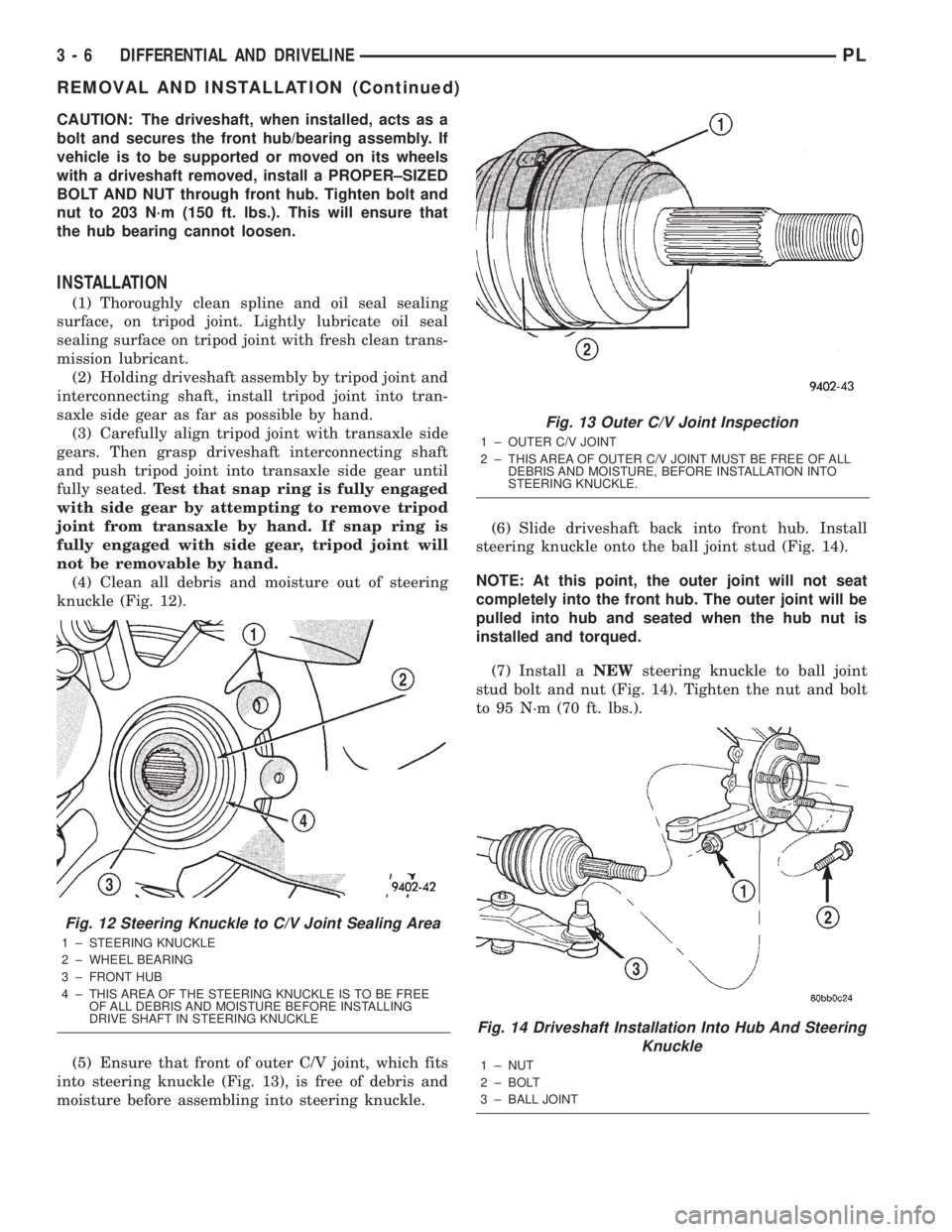
(4) Clean all debris and moisture out of steering
knuckle (Fig. 12).
(5) Ensure that front of outer C/V joint, which fits
into steering knuckle (Fig. 13), is free of debris and
moisture before assembling into steering knuckle.(6) Slide driveshaft back into front hub. Install
steering knuckle onto the ball joint stud (Fig. 14).
NOTE: At this point, the outer joint will not seat
completely into the front hub. The outer joint will be
pulled into hub and seated when the hub nut is
installed and torqued.
(7) Install aNEWsteering knuckle to ball joint
stud bolt and nut (Fig. 14). Tighten the nut and bolt
to 95 N´m (70 ft. lbs.).
Fig. 12 Steering Knuckle to C/V Joint Sealing Area
1 ± STEERING KNUCKLE
2 ± WHEEL BEARING
3 ± FRONT HUB
4 ± THIS AREA OF THE STEERING KNUCKLE IS TO BE FREE
OF ALL DEBRIS AND MOISTURE BEFORE INSTALLING
DRIVE SHAFT IN STEERING KNUCKLE
Fig. 13 Outer C/V Joint Inspection
1 ± OUTER C/V JOINT
2 ± THIS AREA OF OUTER C/V JOINT MUST BE FREE OF ALL
DEBRIS AND MOISTURE, BEFORE INSTALLATION INTO
STEERING KNUCKLE.
Fig. 14 Driveshaft Installation Into Hub And Steering
Knuckle
1 ± NUT
2 ± BOLT
3 ± BALL JOINT
3 - 6 DIFFERENTIAL AND DRIVELINEPL
REMOVAL AND INSTALLATION (Continued)
Page 103 of 1285
BRAKE PEDAL
NOTE: Before proceeding with this procedure,
review SERVICE WARNINGS AND CAUTIONS at the
beginning of REMOVAL AND INSTALLATION in this
section.
WITH AUTOMATIC TRANSAXLE
REMOVAL
(1) Disconnect and isolate the battery negative
cable from its post on the battery.
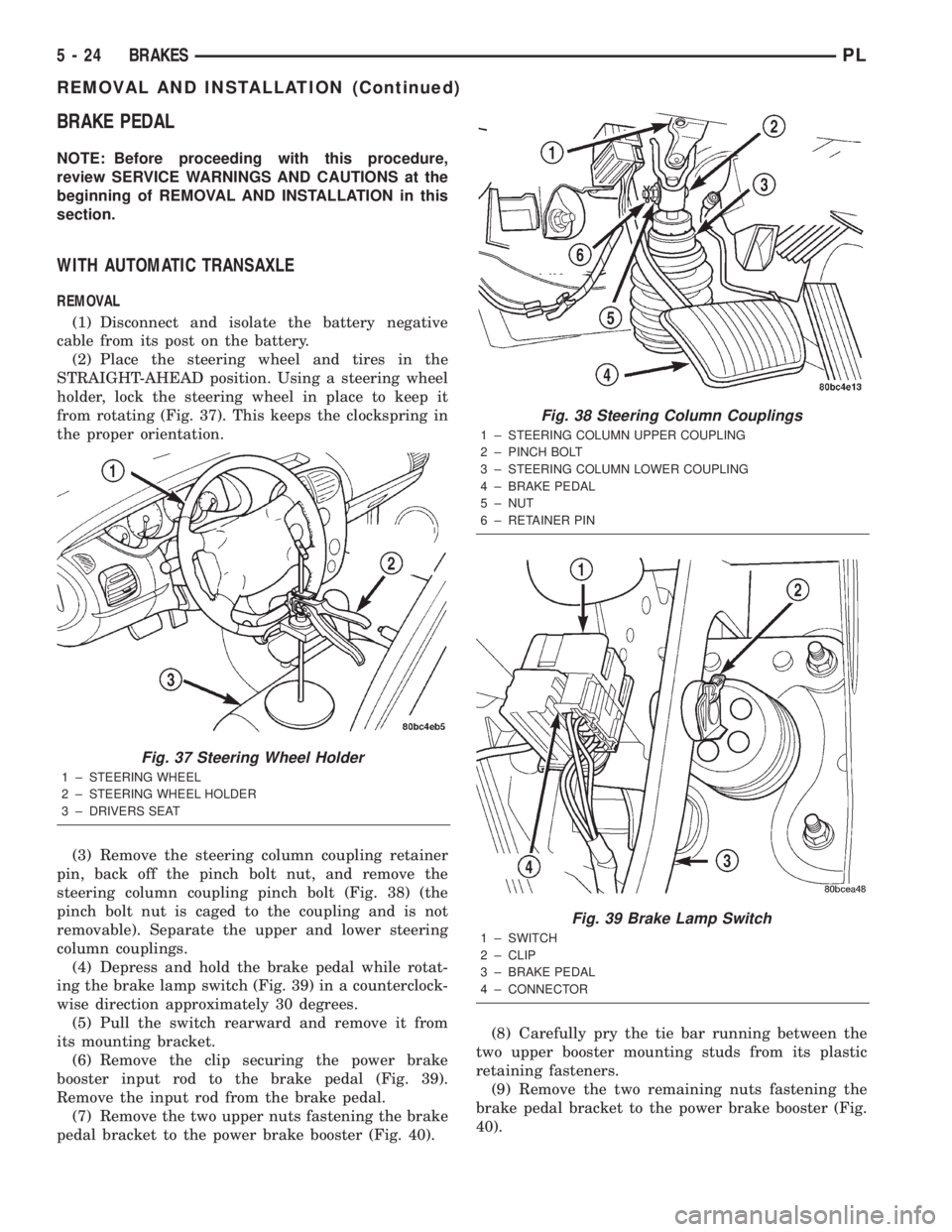
(2) Place the steering wheel and tires in the
STRAIGHT-AHEAD position. Using a steering wheel
holder, lock the steering wheel in place to keep it
from rotating (Fig. 37). This keeps the clockspring in
the proper orientation.
(3) Remove the steering column coupling retainer
pin, back off the pinch bolt nut, and remove the
steering column coupling pinch bolt (Fig. 38) (the
pinch bolt nut is caged to the coupling and is not
removable). Separate the upper and lower steering
column couplings.
(4) Depress and hold the brake pedal while rotat-
ing the brake lamp switch (Fig. 39) in a counterclock-
wise direction approximately 30 degrees.
(5) Pull the switch rearward and remove it from
its mounting bracket.
(6) Remove the clip securing the power brake
booster input rod to the brake pedal (Fig. 39).
Remove the input rod from the brake pedal.
(7) Remove the two upper nuts fastening the brake
pedal bracket to the power brake booster (Fig. 40).(8) Carefully pry the tie bar running between the
two upper booster mounting studs from its plastic
retaining fasteners.
(9) Remove the two remaining nuts fastening the
brake pedal bracket to the power brake booster (Fig.
40).
Fig. 37 Steering Wheel Holder
1 ± STEERING WHEEL
2 ± STEERING WHEEL HOLDER
3 ± DRIVERS SEAT
Fig. 38 Steering Column Couplings
1 ± STEERING COLUMN UPPER COUPLING
2 ± PINCH BOLT
3 ± STEERING COLUMN LOWER COUPLING
4 ± BRAKE PEDAL
5 ± NUT
6 ± RETAINER PIN
Fig. 39 Brake Lamp Switch
1 ± SWITCH
2 ± CLIP
3 ± BRAKE PEDAL
4 ± CONNECTOR
5 - 24 BRAKESPL
REMOVAL AND INSTALLATION (Continued)
Page 105 of 1285
(16) Reconnect the steering column lower coupling
to the steering column upper coupling (Fig. 38).
Install the coupling pinch bolt an tighten the pinch
bolt nut to a torque of 28 N´m (250 in. lbs.). Install
the pinch bolt retainer pin.
(17) Remove the steering wheel holder (Fig. 37).
(18) While looking under the instrument panel at
the lower coupling, rotate the steering wheel back-
and-forth to verify that the lower coupling does not
squeak against the dash-to-coupling seal.
(19) Reconnect the battery negative terminal.
(20) Check the stop lamps to verify they are oper-
ating properly and not staying on when the pedal is
in the released position.
(21) Road test the vehicle to ensure proper opera-
tion of the brakes.
WITH MANUAL TRANSAXLE
REMOVAL
(1) Remove the instrument panel. Refer to the
INSTRUMENT PANELS AND SYSTEMS group in
this service manual for the required procedure.
(2) Depress and hold the brake pedal while rotat-
ing the brake lamp switch (Fig. 39) in a counterclock-
wise direction approximately 30 degrees.
(3) Pull the switch rearward and remove it from
its mounting bracket.
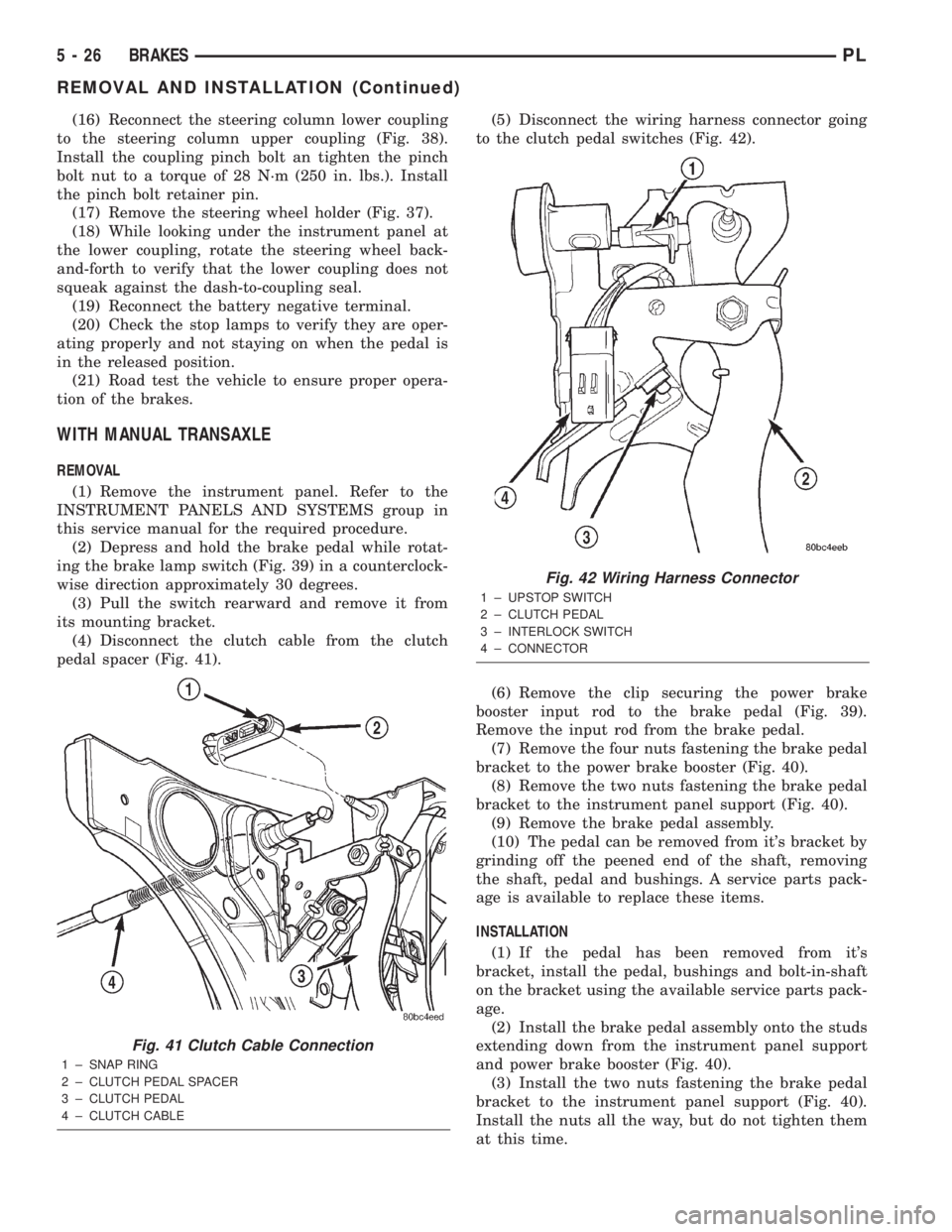
(4) Disconnect the clutch cable from the clutch
pedal spacer (Fig. 41).(5) Disconnect the wiring harness connector going
to the clutch pedal switches (Fig. 42).
(6) Remove the clip securing the power brake
booster input rod to the brake pedal (Fig. 39).
Remove the input rod from the brake pedal.
(7) Remove the four nuts fastening the brake pedal
bracket to the power brake booster (Fig. 40).
(8) Remove the two nuts fastening the brake pedal
bracket to the instrument panel support (Fig. 40).
(9) Remove the brake pedal assembly.
(10) The pedal can be removed from it's bracket by
grinding off the peened end of the shaft, removing
the shaft, pedal and bushings. A service parts pack-
age is available to replace these items.
INSTALLATION
(1) If the pedal has been removed from it's
bracket, install the pedal, bushings and bolt-in-shaft
on the bracket using the available service parts pack-
age.
(2) Install the brake pedal assembly onto the studs
extending down from the instrument panel support
and power brake booster (Fig. 40).
(3) Install the two nuts fastening the brake pedal
bracket to the instrument panel support (Fig. 40).
Install the nuts all the way, but do not tighten them
at this time.
Fig. 41 Clutch Cable Connection
1 ± SNAP RING
2 ± CLUTCH PEDAL SPACER
3 ± CLUTCH PEDAL
4 ± CLUTCH CABLE
Fig. 42 Wiring Harness Connector
1 ± UPSTOP SWITCH
2 ± CLUTCH PEDAL
3 ± INTERLOCK SWITCH
4 ± CONNECTOR
5 - 26 BRAKESPL
REMOVAL AND INSTALLATION (Continued)
Page 107 of 1285
(4) Gently pull back on the brake pedal until the
pedal stops moving. This will ratchet the switch
plunger backward to the correct adjustment position.
(5) Check the stop lamps to verify they are operat-
ing properly and not staying on when the pedal is in
the released position.
MASTER CYLINDER
NOTE: Before proceeding with this procedure,
review SERVICE WARNINGS AND CAUTIONS at the
beginning of REMOVAL AND INSTALLATION in this
section.
REMOVAL
CAUTION: The vacuum in the power brake booster
must be pumped down before removing the master
cylinder to prevent the booster from sucking in any
contamination. This can be done by pumping the
brake pedal while the engine is not running until a
firm brake pedal is achieved.
(1) With the engine not running, pump the brake
pedal 4-5 strokes until the pedal feel is firm.
(2) Disconnect the negative (ground) cable from
the battery and isolate the cable.
(3) Disconnect the positive cable from the battery,
then remove the battery from the battery tray. There
is one nut securing the clamp on the backside of the
battery holding it in place.
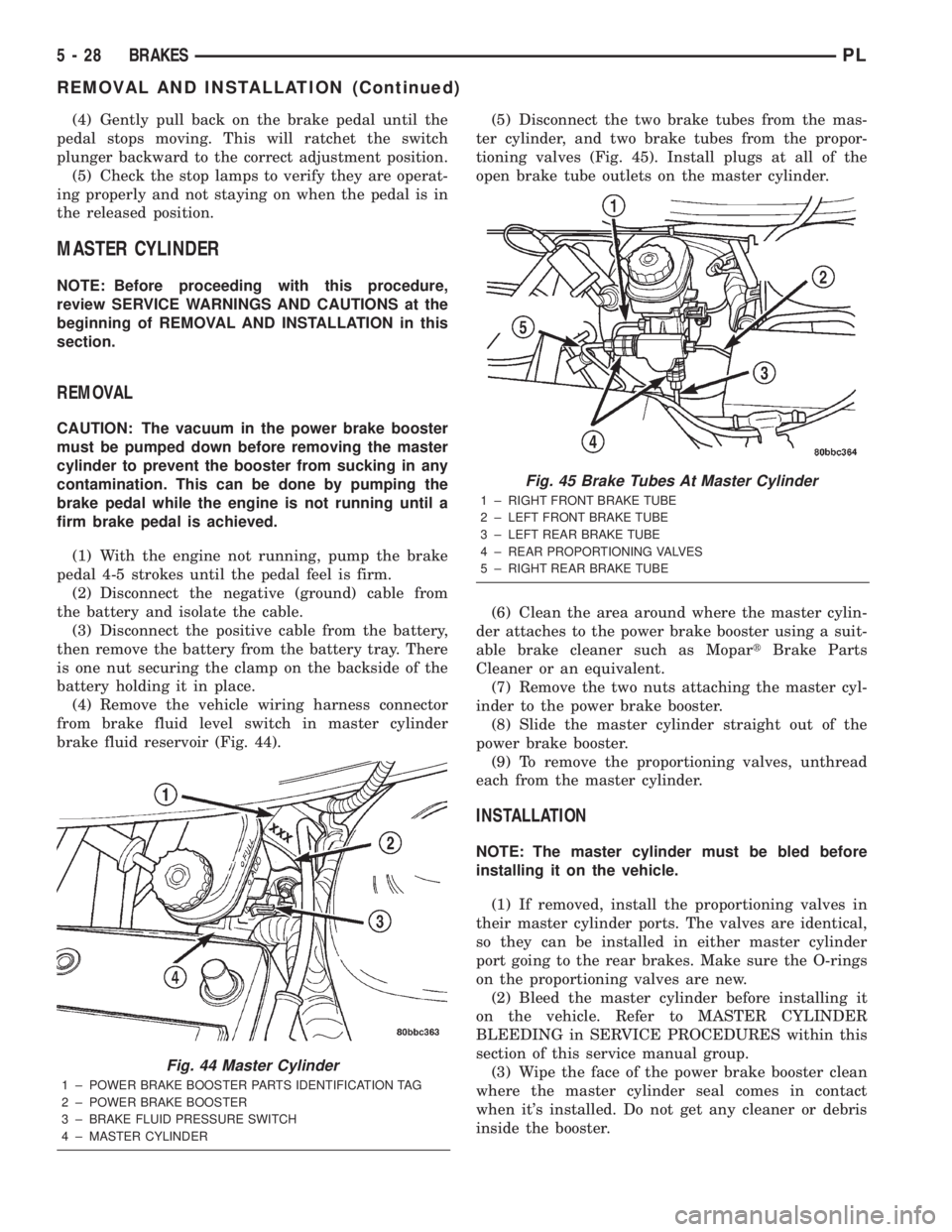
(4) Remove the vehicle wiring harness connector
from brake fluid level switch in master cylinder
brake fluid reservoir (Fig. 44).(5) Disconnect the two brake tubes from the mas-
ter cylinder, and two brake tubes from the propor-
tioning valves (Fig. 45). Install plugs at all of the
open brake tube outlets on the master cylinder.
(6) Clean the area around where the master cylin-
der attaches to the power brake booster using a suit-
able brake cleaner such as MopartBrake Parts
Cleaner or an equivalent.
(7) Remove the two nuts attaching the master cyl-
inder to the power brake booster.
(8) Slide the master cylinder straight out of the
power brake booster.
(9) To remove the proportioning valves, unthread
each from the master cylinder.
INSTALLATION
NOTE: The master cylinder must be bled before
installing it on the vehicle.
(1) If removed, install the proportioning valves in
their master cylinder ports. The valves are identical,
so they can be installed in either master cylinder
port going to the rear brakes. Make sure the O-rings
on the proportioning valves are new.
(2) Bleed the master cylinder before installing it
on the vehicle. Refer to MASTER CYLINDER
BLEEDING in SERVICE PROCEDURES within this
section of this service manual group.
(3) Wipe the face of the power brake booster clean
where the master cylinder seal comes in contact
when it's installed. Do not get any cleaner or debris
inside the booster.
Fig. 44 Master Cylinder
1 ± POWER BRAKE BOOSTER PARTS IDENTIFICATION TAG
2 ± POWER BRAKE BOOSTER
3 ± BRAKE FLUID PRESSURE SWITCH
4 ± MASTER CYLINDER
Fig. 45 Brake Tubes At Master Cylinder
1 ± RIGHT FRONT BRAKE TUBE
2 ± LEFT FRONT BRAKE TUBE
3 ± LEFT REAR BRAKE TUBE
4 ± REAR PROPORTIONING VALVES
5 ± RIGHT REAR BRAKE TUBE
5 - 28 BRAKESPL
REMOVAL AND INSTALLATION (Continued)