battery replacement DODGE NEON 2000 Service User Guide
[x] Cancel search | Manufacturer: DODGE, Model Year: 2000, Model line: NEON, Model: DODGE NEON 2000Pages: 1285, PDF Size: 29.42 MB
Page 391 of 1285
NO FASTEN SEAT BELT LAMP WHEN IGNITION
SWITCH IS ON
(1) Check for battery feed at cluster harness con-
nector Pin 21.
(2) Check for ignition feed at cluster harness con-
nector Pin 15. Repair as necessary.
NO TONE WHEN HEADLAMPS ARE ON AND
DRIVERS DOOR IS OPEN
(1) Check left door jamb switch for good ground
when drivers door is open.
(2) Check for ground at Pin 10.
(3) Check for battery feed at cluster harness con-
nector Pin 21.
(4) Check for NO voltage at Pin 14. Ignition volt-
age must not be present for the chime to work.
(5) Check headlamp switch.
NO TONE WHEN KEY IS LEFT IN IGNITION AND
DRIVERS DOOR IS OPEN
(1) Check for continuity to ground at Pin 23 of the
cluster harness connector. If OK, go to Step 3. If not
OK, repair as necessary.
(2) Using voltmeter, check for battery feed at Pin
21 of the cluster harness connector. Check for NO
ignition feed at Pin 15 of the cluster harness connec-
tor. If OK, go to Step 3. If not OK, repair as neces-
sary.
(3) Open driver's door and ensure the ignition key
is in the OFF or ACC position. Check for continuity
to ground at Pin 10 of the cluster harness connector.
If ground OK, replace cluster printed circuit board. If
no ground, check key-in switch or door switch wiring
and repair as necessary.
CHIMES CONTINUE WHEN HEADLAMPS ARE
TURNED OFF AND/OR KEY IS REMOVED FROM
IGNITION
Check for ground at Pin 10. If grounded the chime
should activate. Make sure the door is closed, key isin ignition and parking lamps are OFF. If ground is
still present check door switch, key in switch, head-
lamp switch and repair as necessary.
REMOVAL AND INSTALLATION
CHIME
The functions previously performed by the chime
module are now part of the smart cluster. There is no
servicable part of the instrument cluster chime func-
tion. Replacement of the instrument cluster is neces-
sary. Refer to Group 8E-Instrument Panel and
Systems, Instrument Cluster Removal and Installa-
tion.
SEAT BELT BUCKLE
Refer to Group 23-Body, Front Seat Belt Buckle
Removal and Installation.
HEADLAMP SWITCH
Refer to Group 8J-Turn Signal and Hazard Warn-
ing Systems, Multi-Function Switch Removal and
Installation.
KEY-IN SWITCH
The Key-in switch is built into the ignition switch
assembly. Should the Key-in switch require service,
the ignition switch assembly must be replaced. Refer
to Group 8D-Ignition System, Ignition Switch
Removal and Installation.
8U - 2 CHIME WARNING/REMINDER SYSTEMPL
DIAGNOSIS AND TESTING (Continued)
Page 405 of 1285
(7) Install the wire and terminal in the connector.
Fully seat the terminal in the connector.
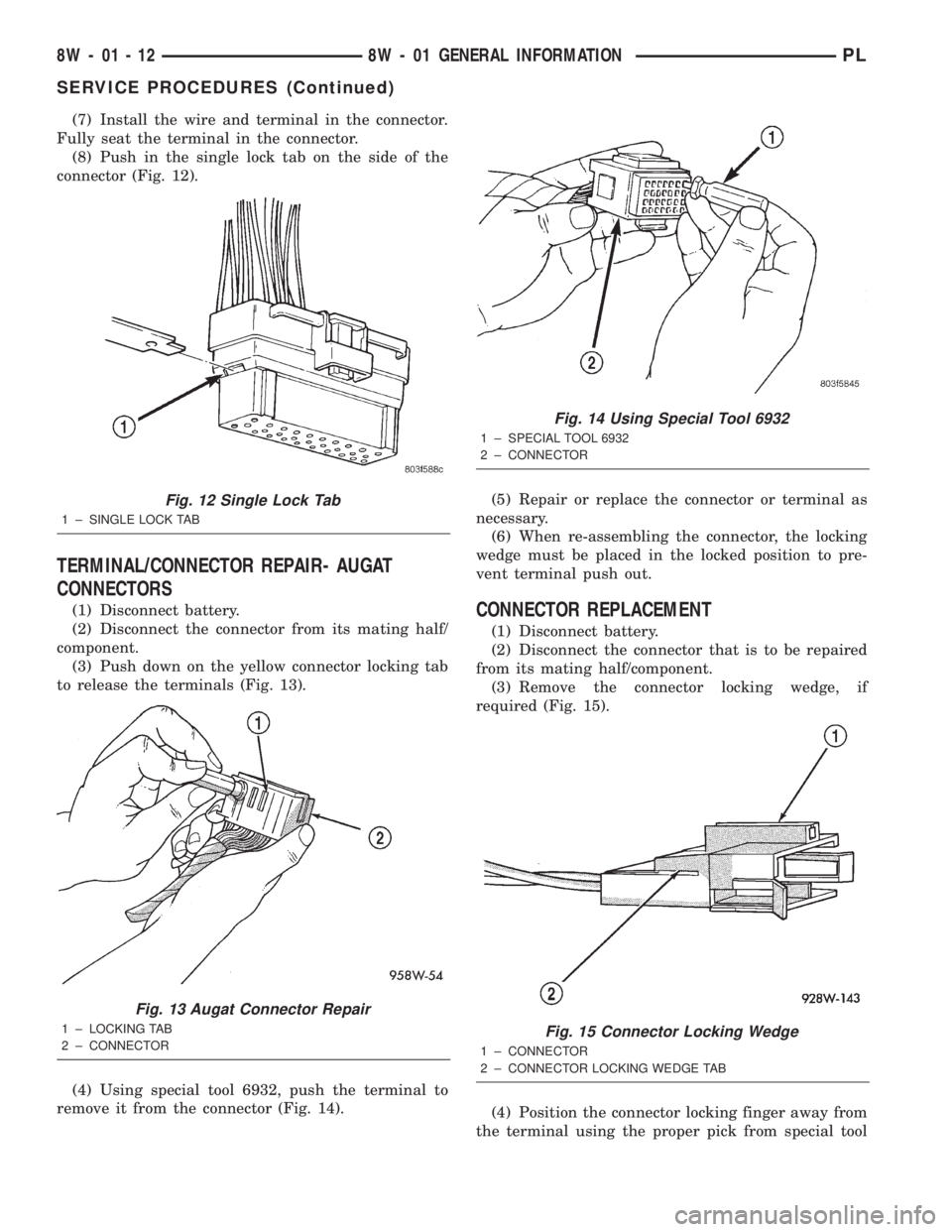
(8) Push in the single lock tab on the side of the
connector (Fig. 12).
TERMINAL/CONNECTOR REPAIR- AUGAT
CONNECTORS
(1) Disconnect battery.
(2) Disconnect the connector from its mating half/
component.
(3) Push down on the yellow connector locking tab
to release the terminals (Fig. 13).
(4) Using special tool 6932, push the terminal to
remove it from the connector (Fig. 14).(5) Repair or replace the connector or terminal as
necessary.
(6) When re-assembling the connector, the locking
wedge must be placed in the locked position to pre-
vent terminal push out.CONNECTOR REPLACEMENT
(1) Disconnect battery.
(2) Disconnect the connector that is to be repaired
from its mating half/component.
(3) Remove the connector locking wedge, if
required (Fig. 15).
(4) Position the connector locking finger away from
the terminal using the proper pick from special tool
Fig. 12 Single Lock Tab
1 ± SINGLE LOCK TAB
Fig. 13 Augat Connector Repair
1 ± LOCKING TAB
2 ± CONNECTOR
Fig. 14 Using Special Tool 6932
1 ± SPECIAL TOOL 6932
2 ± CONNECTOR
Fig. 15 Connector Locking Wedge
1 ± CONNECTOR
2 ± CONNECTOR LOCKING WEDGE TAB
8W - 01 - 12 8W - 01 GENERAL INFORMATIONPL
SERVICE PROCEDURES (Continued)
Page 406 of 1285
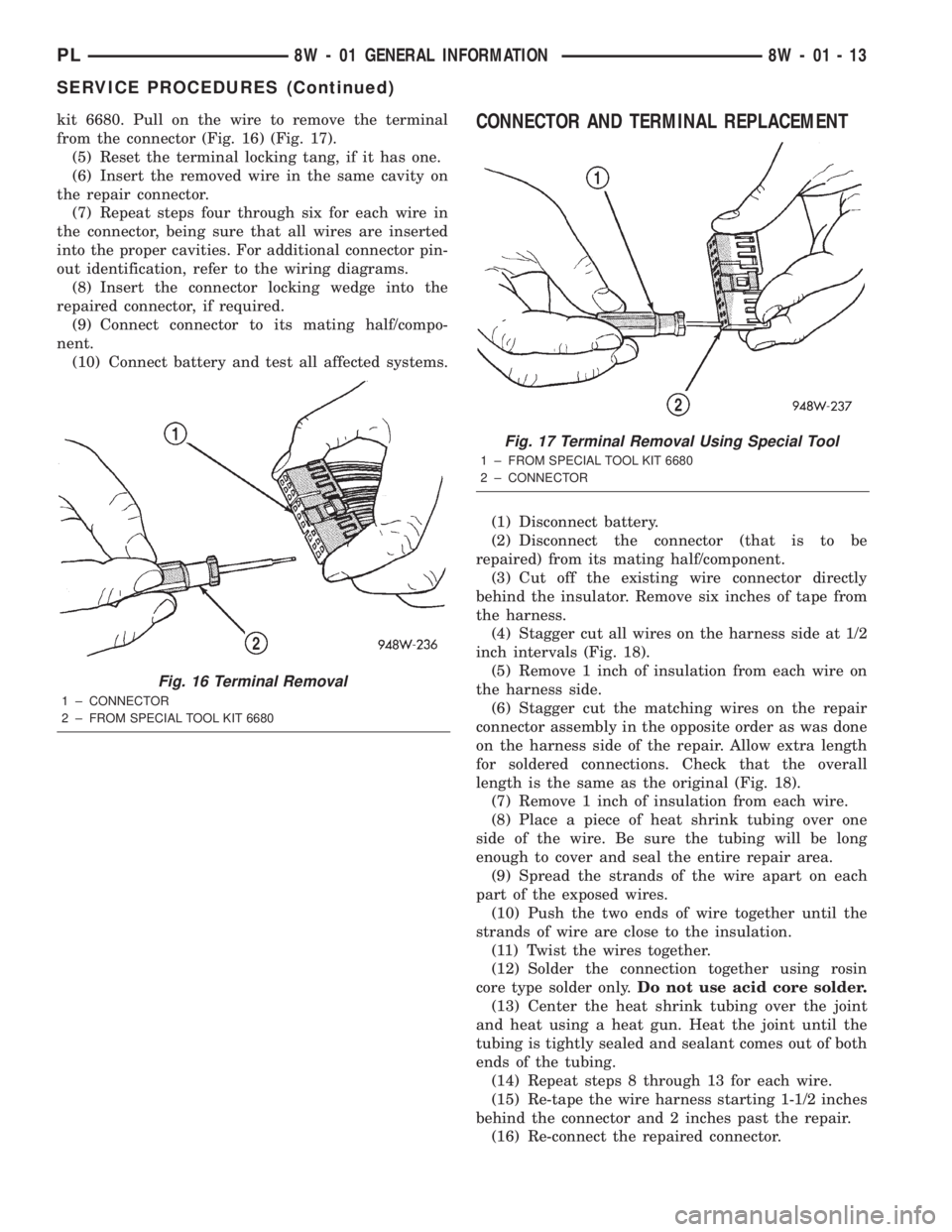
kit 6680. Pull on the wire to remove the terminal
from the connector (Fig. 16) (Fig. 17).
(5) Reset the terminal locking tang, if it has one.
(6) Insert the removed wire in the same cavity on
the repair connector.
(7) Repeat steps four through six for each wire in
the connector, being sure that all wires are inserted
into the proper cavities. For additional connector pin-
out identification, refer to the wiring diagrams.
(8) Insert the connector locking wedge into the
repaired connector, if required.
(9) Connect connector to its mating half/compo-
nent.
(10) Connect battery and test all affected systems.CONNECTOR AND TERMINAL REPLACEMENT
(1) Disconnect battery.
(2) Disconnect the connector (that is to be
repaired) from its mating half/component.
(3) Cut off the existing wire connector directly
behind the insulator. Remove six inches of tape from
the harness.
(4) Stagger cut all wires on the harness side at 1/2
inch intervals (Fig. 18).
(5) Remove 1 inch of insulation from each wire on
the harness side.
(6) Stagger cut the matching wires on the repair
connector assembly in the opposite order as was done
on the harness side of the repair. Allow extra length
for soldered connections. Check that the overall
length is the same as the original (Fig. 18).
(7) Remove 1 inch of insulation from each wire.
(8) Place a piece of heat shrink tubing over one
side of the wire. Be sure the tubing will be long
enough to cover and seal the entire repair area.
(9) Spread the strands of the wire apart on each
part of the exposed wires.
(10) Push the two ends of wire together until the
strands of wire are close to the insulation.
(11) Twist the wires together.
(12) Solder the connection together using rosin
core type solder only.Do not use acid core solder.
(13) Center the heat shrink tubing over the joint
and heat using a heat gun. Heat the joint until the
tubing is tightly sealed and sealant comes out of both
ends of the tubing.
(14) Repeat steps 8 through 13 for each wire.
(15) Re-tape the wire harness starting 1-1/2 inches
behind the connector and 2 inches past the repair.
(16) Re-connect the repaired connector.
Fig. 16 Terminal Removal
1 ± CONNECTOR
2 ± FROM SPECIAL TOOL KIT 6680
Fig. 17 Terminal Removal Using Special Tool
1 ± FROM SPECIAL TOOL KIT 6680
2 ± CONNECTOR
PL8W - 01 GENERAL INFORMATION 8W - 01 - 13
SERVICE PROCEDURES (Continued)
Page 407 of 1285
(17) Connect the battery, and test all affected sys-
tems.
TERMINAL REPLACEMENT
(1) Disconnect battery.
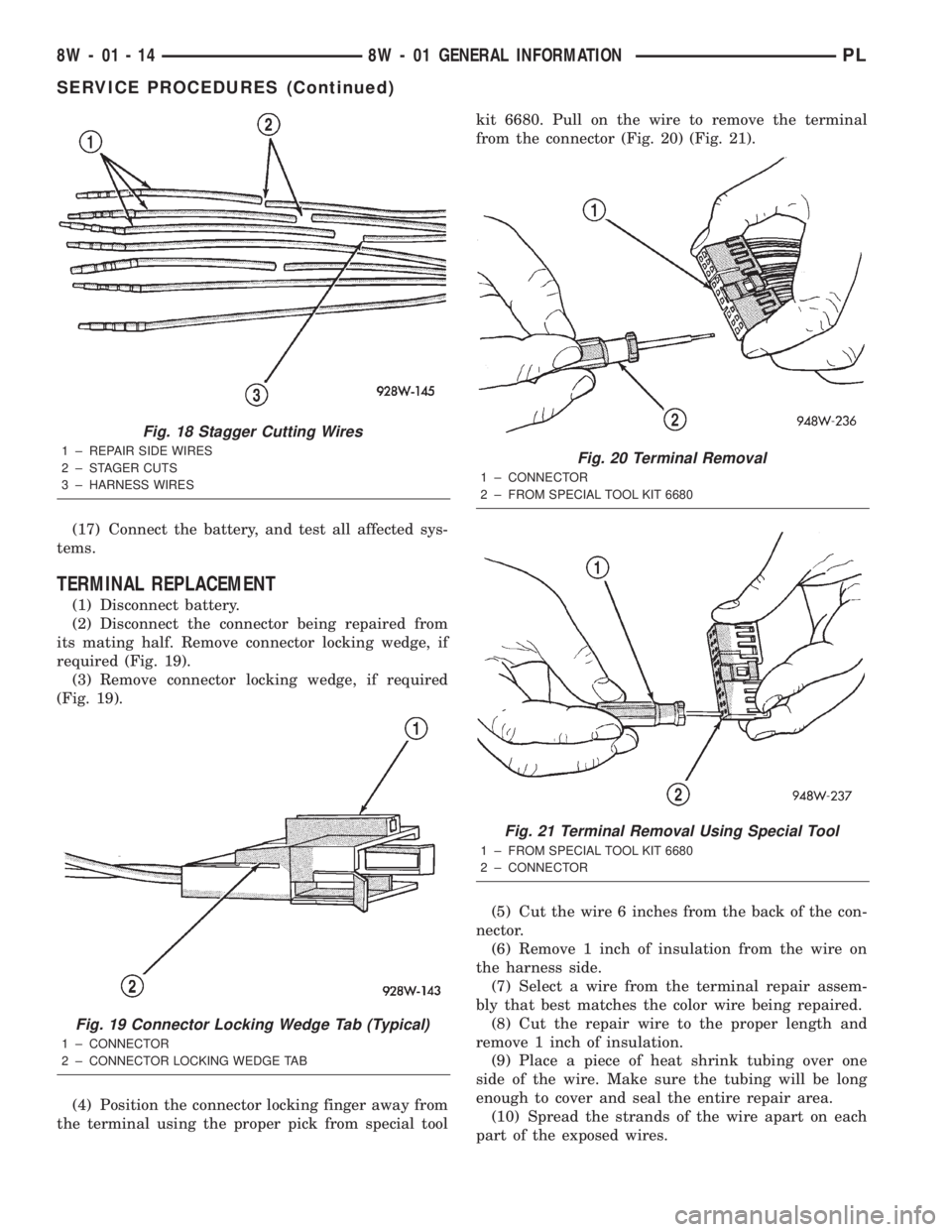
(2) Disconnect the connector being repaired from
its mating half. Remove connector locking wedge, if
required (Fig. 19).
(3) Remove connector locking wedge, if required
(Fig. 19).
(4) Position the connector locking finger away from
the terminal using the proper pick from special toolkit 6680. Pull on the wire to remove the terminal
from the connector (Fig. 20) (Fig. 21).
(5) Cut the wire 6 inches from the back of the con-
nector.
(6) Remove 1 inch of insulation from the wire on
the harness side.
(7) Select a wire from the terminal repair assem-
bly that best matches the color wire being repaired.
(8) Cut the repair wire to the proper length and
remove 1 inch of insulation.
(9) Place a piece of heat shrink tubing over one
side of the wire. Make sure the tubing will be long
enough to cover and seal the entire repair area.
(10) Spread the strands of the wire apart on each
part of the exposed wires.
Fig. 18 Stagger Cutting Wires
1 ± REPAIR SIDE WIRES
2 ± STAGER CUTS
3 ± HARNESS WIRES
Fig. 19 Connector Locking Wedge Tab (Typical)
1 ± CONNECTOR
2 ± CONNECTOR LOCKING WEDGE TAB
Fig. 20 Terminal Removal
1 ± CONNECTOR
2 ± FROM SPECIAL TOOL KIT 6680
Fig. 21 Terminal Removal Using Special Tool
1 ± FROM SPECIAL TOOL KIT 6680
2 ± CONNECTOR
8W - 01 - 14 8W - 01 GENERAL INFORMATIONPL
SERVICE PROCEDURES (Continued)
Page 408 of 1285
(11) Push the two ends of wire together until the
strands of wire are close to the insulation.
(12) Twist the wires together.
(13) Solder the connection together using rosin
core type solder only.Do not use acid core solder.
(14) Center the heat shrink tubing over the joint
and heat using a heat gun. Heat the joint until the
tubing is tightly sealed and sealant comes out of both
ends of the tubing.
(15) Insert the repaired wire into the connector.
(16) Install the connector locking wedge, if
required, and reconnect the connector to its mating
half/component.
(17) Re-tape the wire harness starting 1-1/2 inches
behind the connector and 2 inches past the repair.
(18) Connect battery, and test all affected systems.
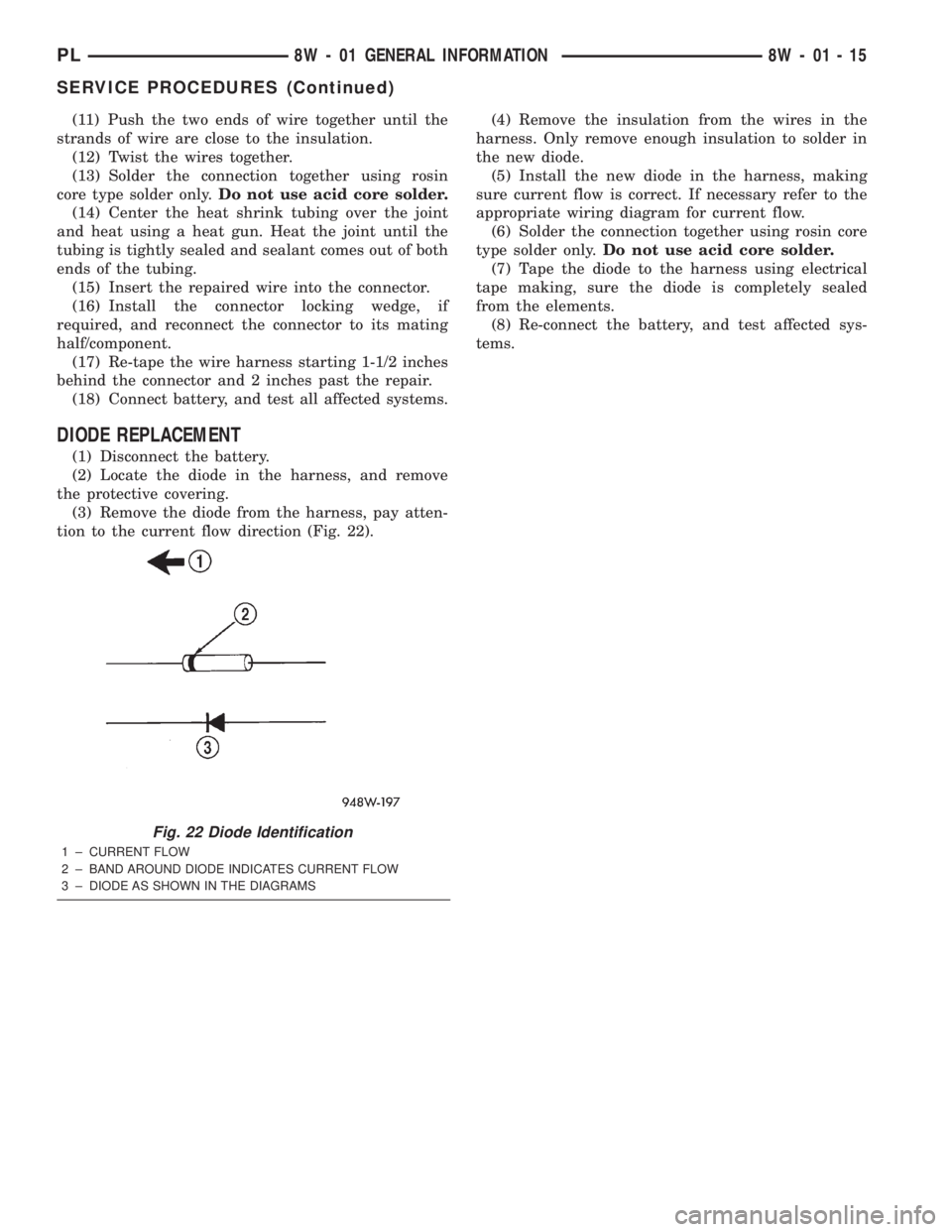
DIODE REPLACEMENT
(1) Disconnect the battery.
(2) Locate the diode in the harness, and remove
the protective covering.
(3) Remove the diode from the harness, pay atten-
tion to the current flow direction (Fig. 22).(4) Remove the insulation from the wires in the
harness. Only remove enough insulation to solder in
the new diode.
(5) Install the new diode in the harness, making
sure current flow is correct. If necessary refer to the
appropriate wiring diagram for current flow.
(6) Solder the connection together using rosin core
type solder only.Do not use acid core solder.
(7) Tape the diode to the harness using electrical
tape making, sure the diode is completely sealed
from the elements.
(8) Re-connect the battery, and test affected sys-
tems.
Fig. 22 Diode Identification
1 ± CURRENT FLOW
2 ± BAND AROUND DIODE INDICATES CURRENT FLOW
3 ± DIODE AS SHOWN IN THE DIAGRAMS
PL8W - 01 GENERAL INFORMATION 8W - 01 - 15
SERVICE PROCEDURES (Continued)
Page 733 of 1285
make sure the dye is thoroughly mixed as indicated
with a bright yellow color under a black light.
(3) Using a black light, inspect the entire engine
for fluorescent dye, particularly at the suspected area
of oil leak. If the oil leak is found and identified,
repair per service manual instructions.
(4) If dye is not observed, drive the vehicle at var-
ious speeds for approximately 24 km (15 miles), and
repeat inspection.
(5)If the oil leak source is not positively
identified at this time, proceed with the air leak
detection test method as follows:
²Disconnect the fresh air hose (makeup air) at
the cylinder head cover and plug or cap the nipple on
the cover.
²Remove the PCV valve hose from the cylinder
head cover. Cap or plug the PCV valve nipple on the
cover.
²Attach an air hose with pressure gauge and reg-
ulator to the dipstick tube.
CAUTION: Do not subject the engine assembly to
more than 20.6 kpa (3 PSI) of test pressure.
²Gradually apply air pressure from 1 psi to 2.5
psi maximum while applying soapy water at the sus-
pected source. Adjust the regulator to the suitable
test pressure that provides the best bubbles which
will pinpoint the leak source. If the oil leak is
detected and identified, repair per service manual
procedures.
²If the leakage occurs at the crankshaft rear oil
seal area, refer to the section, Inspection for Rear
Seal Area Leak.
(6) If no leaks are detected, turn off the air supply.
Remove the air hose, all plugs, and caps. Install the
PCV valve and CCV hose. Proceed to next step.
(7) Clean the oil off the suspect oil leak area using
a suitable solvent. Drive the vehicle at various
speeds approximately 24 km (15 miles). Inspect the
engine for signs of an oil leak by using a black light.
INSPECTION FOR REAR SEAL AREA LEAKS
Since it is sometimes difficult to determine the
source of an oil leak in the rear seal area of theengine, a more involved inspection is necessary. The
following steps should be followed to help pinpoint
the source of the leak.
If the leakage occurs at the crankshaft rear oil seal
area:
(1) Disconnect the battery.
(2) Raise the vehicle.
(3) Remove torque converter or clutch housing
cover and inspect rear of block for evidence of oil.
Use a black light to check for the oil leak. If a leak is
present in this area remove transmission for further
inspection.
(a) Circular spray pattern generally indicates
seal leakage or crankshaft damage.
(b) Where leakage tends to run straight down,
possible causes are a porous block, oil galley cup
plug, bedplate to cylinder block mating surfaces
and seal bore. See proper repair procedures for
these items.
(4) If no leaks are detected, pressurized the crank-
case as previously described.
CAUTION: Do not exceed 20.6 kPa (3 psi).
(5) If the leak is not detected, very slowly turn the
crankshaft and watch for leakage. If a leak is
detected between the crankshaft and seal while
slowly turning the crankshaft, it is possible the
crankshaft seal surface is damaged. The seal area on
the crankshaft could have minor nicks or scratches
that can be polished out with emery cloth.
CAUTION: Use extreme caution when crankshaft
polishing is necessary to remove minor nicks and
scratches. The crankshaft seal flange is especially
machined to complement the function of the rear oil
seal.
(6) For bubbles that remain steady with shaft
rotation, no further inspection can be done until dis-
assembled.
(7) After the oil leak root cause and appropriate
corrective action have been identified, refer to Crank-
shaft Oil SealÐRear for proper replacement proce-
dures.
9 - 10 ENGINEPL
DIAGNOSIS AND TESTING (Continued)
Page 754 of 1285
(7) Connect CCV hose on cylinder head cover port.
(8) Raise vehicle.
(9) Install new flex joint to manifold flange gasket.
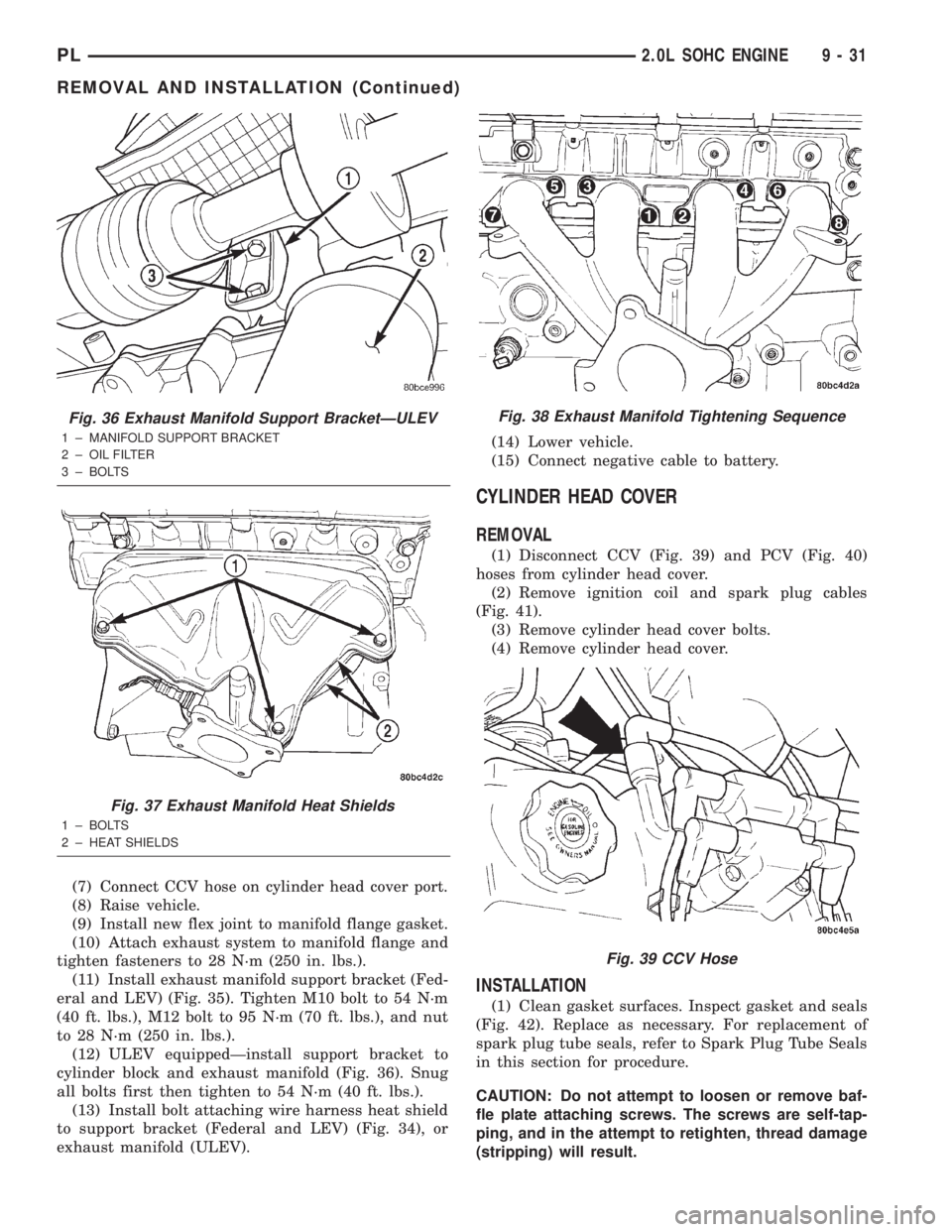
(10) Attach exhaust system to manifold flange and
tighten fasteners to 28 N´m (250 in. lbs.).
(11) Install exhaust manifold support bracket (Fed-
eral and LEV) (Fig. 35). Tighten M10 bolt to 54 N´m
(40 ft. lbs.), M12 bolt to 95 N´m (70 ft. lbs.), and nut
to 28 N´m (250 in. lbs.).
(12) ULEV equippedÐinstall support bracket to
cylinder block and exhaust manifold (Fig. 36). Snug
all bolts first then tighten to 54 N´m (40 ft. lbs.).
(13) Install bolt attaching wire harness heat shield
to support bracket (Federal and LEV) (Fig. 34), or
exhaust manifold (ULEV).(14) Lower vehicle.
(15) Connect negative cable to battery.
CYLINDER HEAD COVER
REMOVAL
(1) Disconnect CCV (Fig. 39) and PCV (Fig. 40)
hoses from cylinder head cover.
(2) Remove ignition coil and spark plug cables
(Fig. 41).
(3) Remove cylinder head cover bolts.
(4) Remove cylinder head cover.
INSTALLATION
(1) Clean gasket surfaces. Inspect gasket and seals
(Fig. 42). Replace as necessary. For replacement of
spark plug tube seals, refer to Spark Plug Tube Seals
in this section for procedure.
CAUTION: Do not attempt to loosen or remove baf-
fle plate attaching screws. The screws are self-tap-
ping, and in the attempt to retighten, thread damage
(stripping) will result.
Fig. 36 Exhaust Manifold Support BracketÐULEV
1 ± MANIFOLD SUPPORT BRACKET
2 ± OIL FILTER
3 ± BOLTS
Fig. 37 Exhaust Manifold Heat Shields
1 ± BOLTS
2 ± HEAT SHIELDS
Fig. 38 Exhaust Manifold Tightening Sequence
Fig. 39 CCV Hose
PL2.0L SOHC ENGINE 9 - 31
REMOVAL AND INSTALLATION (Continued)
Page 922 of 1285
(a) Connect the accelerator and speed control (if
equipped) cables to the air cleaner/throttle body
assy.
(b) Install assy into position, making sure the
air cleaner locating slot is engaged to the battery
bracket tab, and tighten fasteners to 14 N´m (120
in. lbs.) torque.
(c) Verify throttle body duct is fully seated to
intake manifold and tighten clamp to 5 N´m (40 in.
lbs.) torque.(d) Connect the Throttle Position Sensor (TPS)
and Idle Air Control (IAC) connectors.
(e) Connect proportional purge solenoid (PPS)
and crankcase vent hose from throttle body.
(17) Connect battery negative cable.
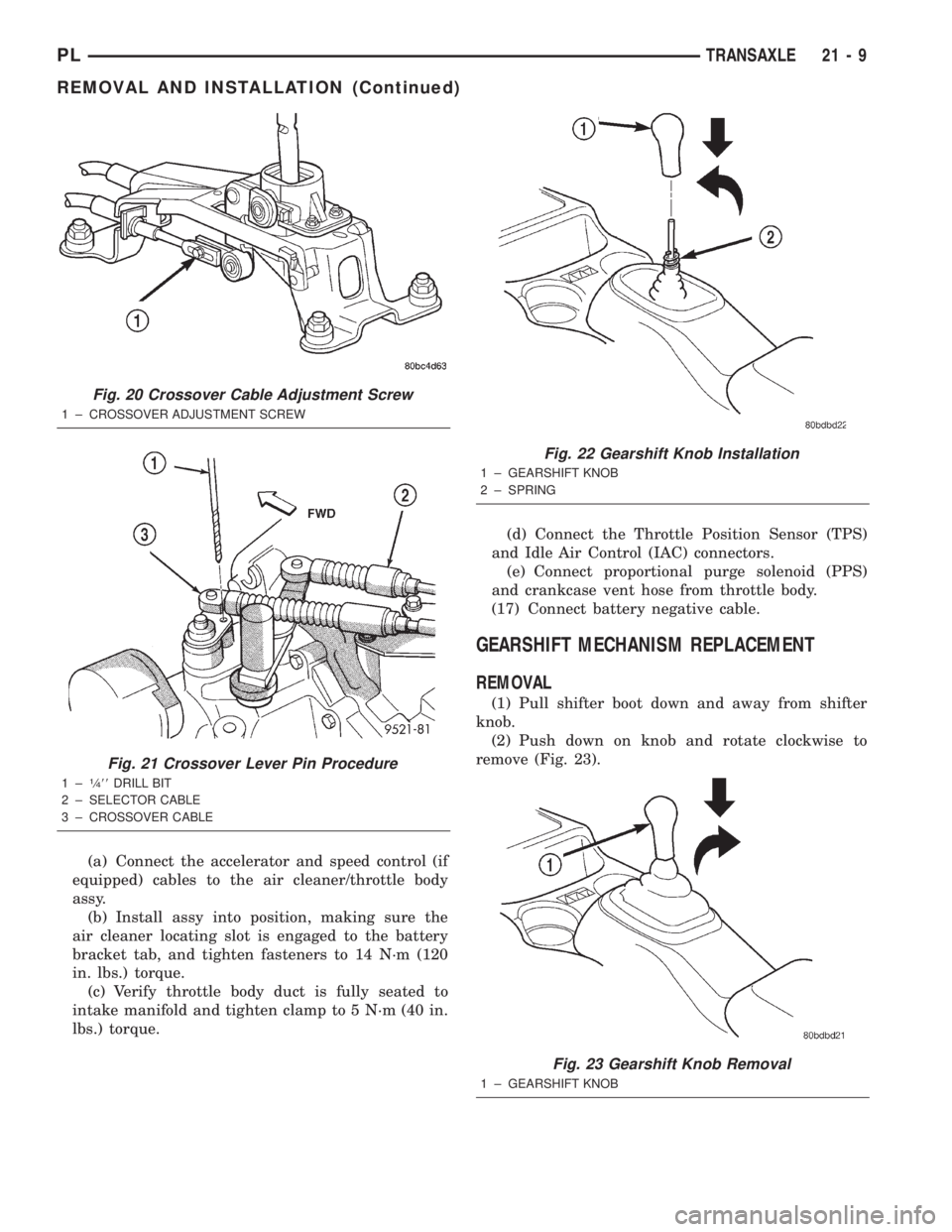
GEARSHIFT MECHANISM REPLACEMENT
REMOVAL
(1) Pull shifter boot down and away from shifter
knob.
(2) Push down on knob and rotate clockwise to
remove (Fig. 23).
Fig. 20 Crossover Cable Adjustment Screw
1 ± CROSSOVER ADJUSTMENT SCREW
Fig. 21 Crossover Lever Pin Procedure
1±1¤488DRILL BIT
2 ± SELECTOR CABLE
3 ± CROSSOVER CABLE
Fig. 22 Gearshift Knob Installation
1 ± GEARSHIFT KNOB
2 ± SPRING
Fig. 23 Gearshift Knob Removal
1 ± GEARSHIFT KNOB
PLTRANSAXLE 21 - 9
REMOVAL AND INSTALLATION (Continued)
Page 929 of 1285
(23) Carefully lower engine and transaxle on screw
jack until proper removal clearance is obtained.
(24) Obtain a helper to assist in holding transaxle
while removing transaxle-to-engine mounting bolts
(Fig. 44).(25) Remove transaxle from vehicle (Fig. 44).
(26) If installing a new or replacement transaxle,
remove the upper mount as shown in (Fig. 45), trans-
fer to the replacement unit and torque all bolts to 68
N´m (50 ft. lbs.) torque.
INSTALLATION
(1) Install clutch module onto input shaft. Install
transaxle into position.
(2) Install transaxle-to-engine mounting bolts (Fig.
44) and tighten to 95 N´m (70 ft. lbs.) torque.
(3) Raise engine and transaxle with screw jack
until through hole in upper mount aligns with hole
in mount bracket. Install mount bolt and tighten to
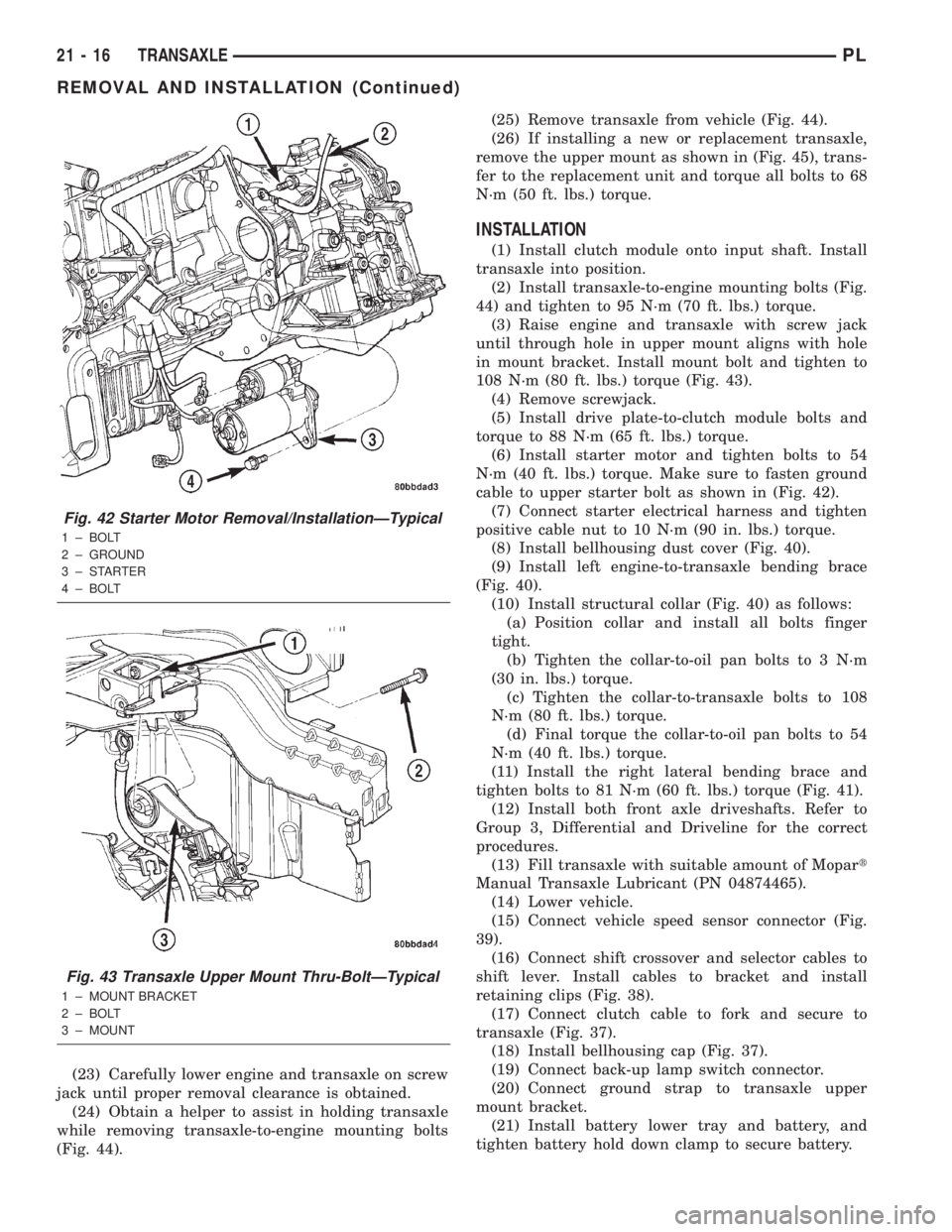
108 N´m (80 ft. lbs.) torque (Fig. 43).
(4) Remove screwjack.
(5) Install drive plate-to-clutch module bolts and
torque to 88 N´m (65 ft. lbs.) torque.
(6) Install starter motor and tighten bolts to 54
N´m (40 ft. lbs.) torque. Make sure to fasten ground
cable to upper starter bolt as shown in (Fig. 42).
(7) Connect starter electrical harness and tighten
positive cable nut to 10 N´m (90 in. lbs.) torque.
(8) Install bellhousing dust cover (Fig. 40).
(9) Install left engine-to-transaxle bending brace
(Fig. 40).
(10) Install structural collar (Fig. 40) as follows:
(a) Position collar and install all bolts finger
tight.
(b) Tighten the collar-to-oil pan bolts to 3 N´m
(30 in. lbs.) torque.
(c) Tighten the collar-to-transaxle bolts to 108
N´m (80 ft. lbs.) torque.
(d) Final torque the collar-to-oil pan bolts to 54
N´m (40 ft. lbs.) torque.
(11) Install the right lateral bending brace and
tighten bolts to 81 N´m (60 ft. lbs.) torque (Fig. 41).
(12) Install both front axle driveshafts. Refer to
Group 3, Differential and Driveline for the correct
procedures.
(13) Fill transaxle with suitable amount of Mopart
Manual Transaxle Lubricant (PN 04874465).
(14) Lower vehicle.
(15) Connect vehicle speed sensor connector (Fig.
39).
(16) Connect shift crossover and selector cables to
shift lever. Install cables to bracket and install
retaining clips (Fig. 38).
(17) Connect clutch cable to fork and secure to
transaxle (Fig. 37).
(18) Install bellhousing cap (Fig. 37).
(19) Connect back-up lamp switch connector.
(20) Connect ground strap to transaxle upper
mount bracket.
(21) Install battery lower tray and battery, and
tighten battery hold down clamp to secure battery.
Fig. 42 Starter Motor Removal/InstallationÐTypical
1 ± BOLT
2 ± GROUND
3±STARTER
4 ± BOLT
Fig. 43 Transaxle Upper Mount Thru-BoltÐTypical
1 ± MOUNT BRACKET
2 ± BOLT
3 ± MOUNT
21 - 16 TRANSAXLEPL
REMOVAL AND INSTALLATION (Continued)
Page 1253 of 1285
BLOWER MOTOR RESISTOR
CAUTION: Stay clear of the blower motor and resis-
tor block (Hot). Do not operate the blower motor
with the resistor block removed.
REMOVAL
(1) Remove windshield wipers.
(2) Remove cowl top screen.
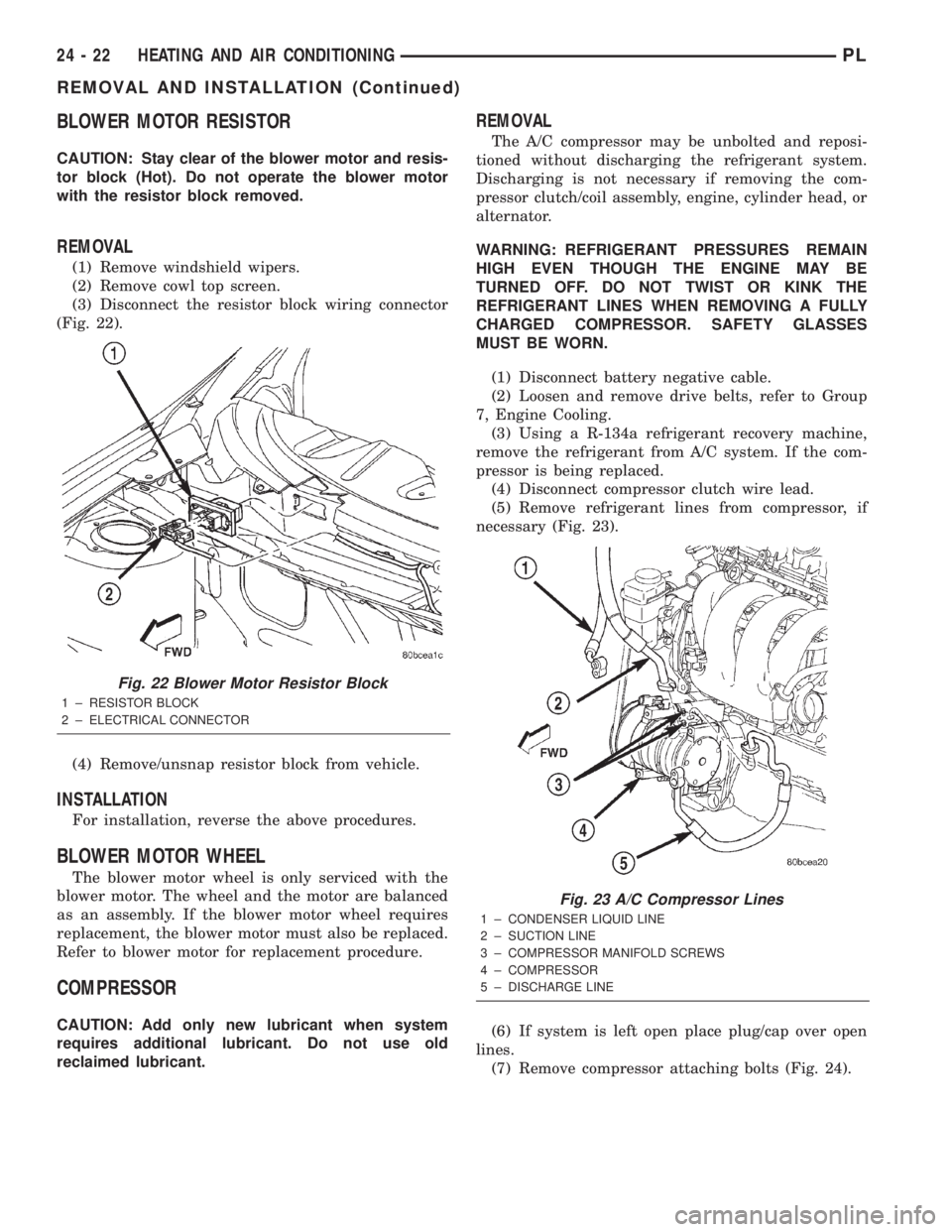
(3) Disconnect the resistor block wiring connector
(Fig. 22).
(4) Remove/unsnap resistor block from vehicle.
INSTALLATION
For installation, reverse the above procedures.
BLOWER MOTOR WHEEL
The blower motor wheel is only serviced with the
blower motor. The wheel and the motor are balanced
as an assembly. If the blower motor wheel requires
replacement, the blower motor must also be replaced.
Refer to blower motor for replacement procedure.
COMPRESSOR
CAUTION: Add only new lubricant when system
requires additional lubricant. Do not use old
reclaimed lubricant.
REMOVAL
The A/C compressor may be unbolted and reposi-
tioned without discharging the refrigerant system.
Discharging is not necessary if removing the com-
pressor clutch/coil assembly, engine, cylinder head, or
alternator.
WARNING: REFRIGERANT PRESSURES REMAIN
HIGH EVEN THOUGH THE ENGINE MAY BE
TURNED OFF. DO NOT TWIST OR KINK THE
REFRIGERANT LINES WHEN REMOVING A FULLY
CHARGED COMPRESSOR. SAFETY GLASSES
MUST BE WORN.
(1) Disconnect battery negative cable.
(2) Loosen and remove drive belts, refer to Group
7, Engine Cooling.
(3) Using a R-134a refrigerant recovery machine,
remove the refrigerant from A/C system. If the com-
pressor is being replaced.
(4) Disconnect compressor clutch wire lead.
(5) Remove refrigerant lines from compressor, if
necessary (Fig. 23).
(6) If system is left open place plug/cap over open
lines.
(7) Remove compressor attaching bolts (Fig. 24).
Fig. 22 Blower Motor Resistor Block
1 ± RESISTOR BLOCK
2 ± ELECTRICAL CONNECTOR
Fig. 23 A/C Compressor Lines
1 ± CONDENSER LIQUID LINE
2 ± SUCTION LINE
3 ± COMPRESSOR MANIFOLD SCREWS
4 ± COMPRESSOR
5 ± DISCHARGE LINE
24 - 22 HEATING AND AIR CONDITIONINGPL
REMOVAL AND INSTALLATION (Continued)