Y case DODGE RAM 1500 1998 2.G Manual Online
[x] Cancel search | Manufacturer: DODGE, Model Year: 1998, Model line: RAM 1500, Model: DODGE RAM 1500 1998 2.GPages: 2627
Page 213 of 2627
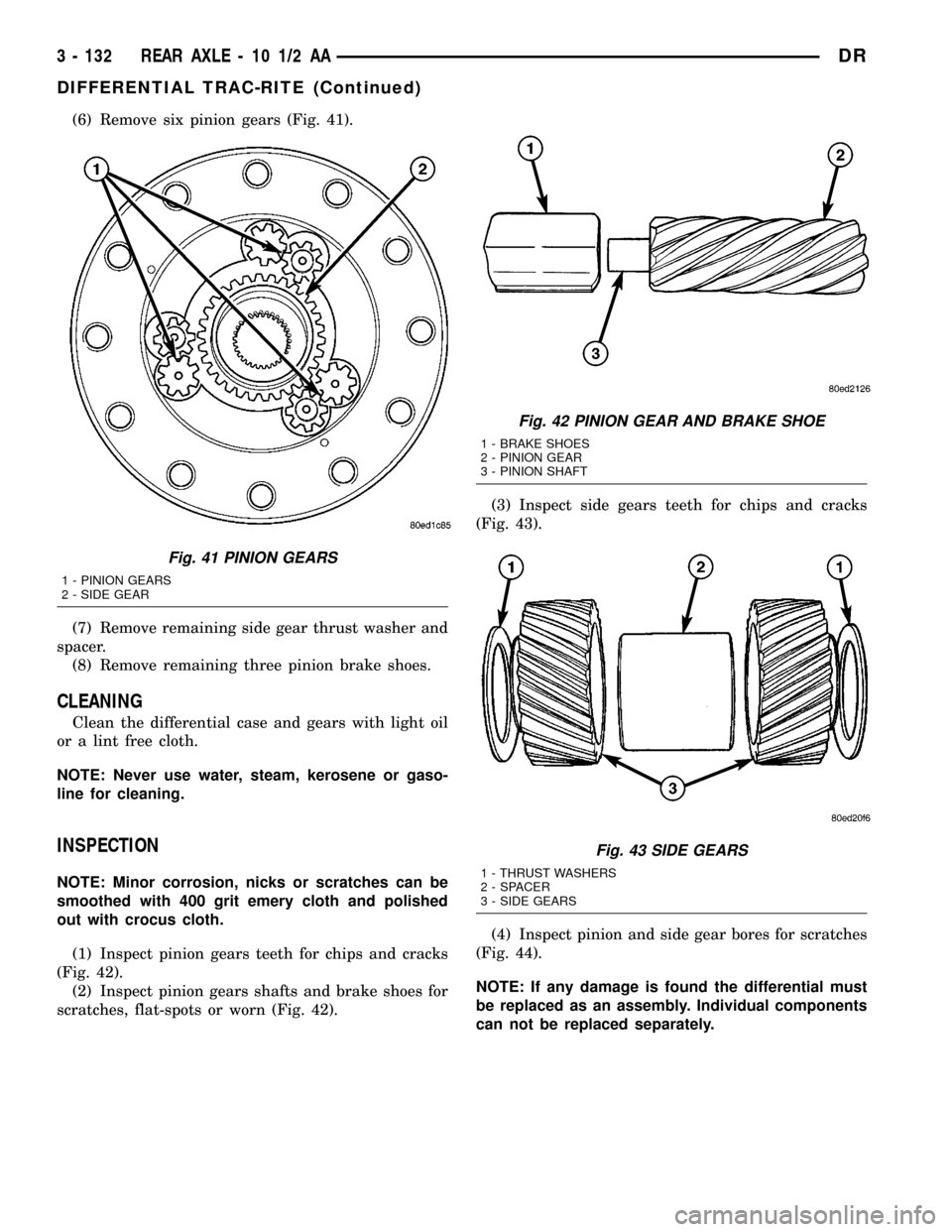
(6) Remove six pinion gears (Fig. 41).
(7) Remove remaining side gear thrust washer and
spacer.
(8) Remove remaining three pinion brake shoes.
CLEANING
Clean the differential case and gears with light oil
or a lint free cloth.
NOTE: Never use water, steam, kerosene or gaso-
line for cleaning.
INSPECTION
NOTE: Minor corrosion, nicks or scratches can be
smoothed with 400 grit emery cloth and polished
out with crocus cloth.
(1) Inspect pinion gears teeth for chips and cracks
(Fig. 42).
(2) Inspect pinion gears shafts and brake shoes for
scratches, flat-spots or worn (Fig. 42).(3) Inspect side gears teeth for chips and cracks
(Fig. 43).
(4) Inspect pinion and side gear bores for scratches
(Fig. 44).
NOTE: If any damage is found the differential must
be replaced as an assembly. Individual components
can not be replaced separately.
Fig. 41 PINION GEARS
1 - PINION GEARS
2 - SIDE GEAR
Fig. 42 PINION GEAR AND BRAKE SHOE
1 - BRAKE SHOES
2 - PINION GEAR
3 - PINION SHAFT
Fig. 43 SIDE GEARS
1 - THRUST WASHERS
2 - SPACER
3 - SIDE GEARS
3 - 132 REAR AXLE - 10 1/2 AADR
DIFFERENTIAL TRAC-RITE (Continued)
Page 214 of 2627
ASSEMBLY
NOTE: Install all component in their original loca-
tions.
(1) Lubricate all gears and differential bores with
differential lubricant.
(2) Install one set of pinion brake shoes into the
case bores.
NOTE: Brake shoes can be installed upside down,
but if install wrong pinion gear will not fit.
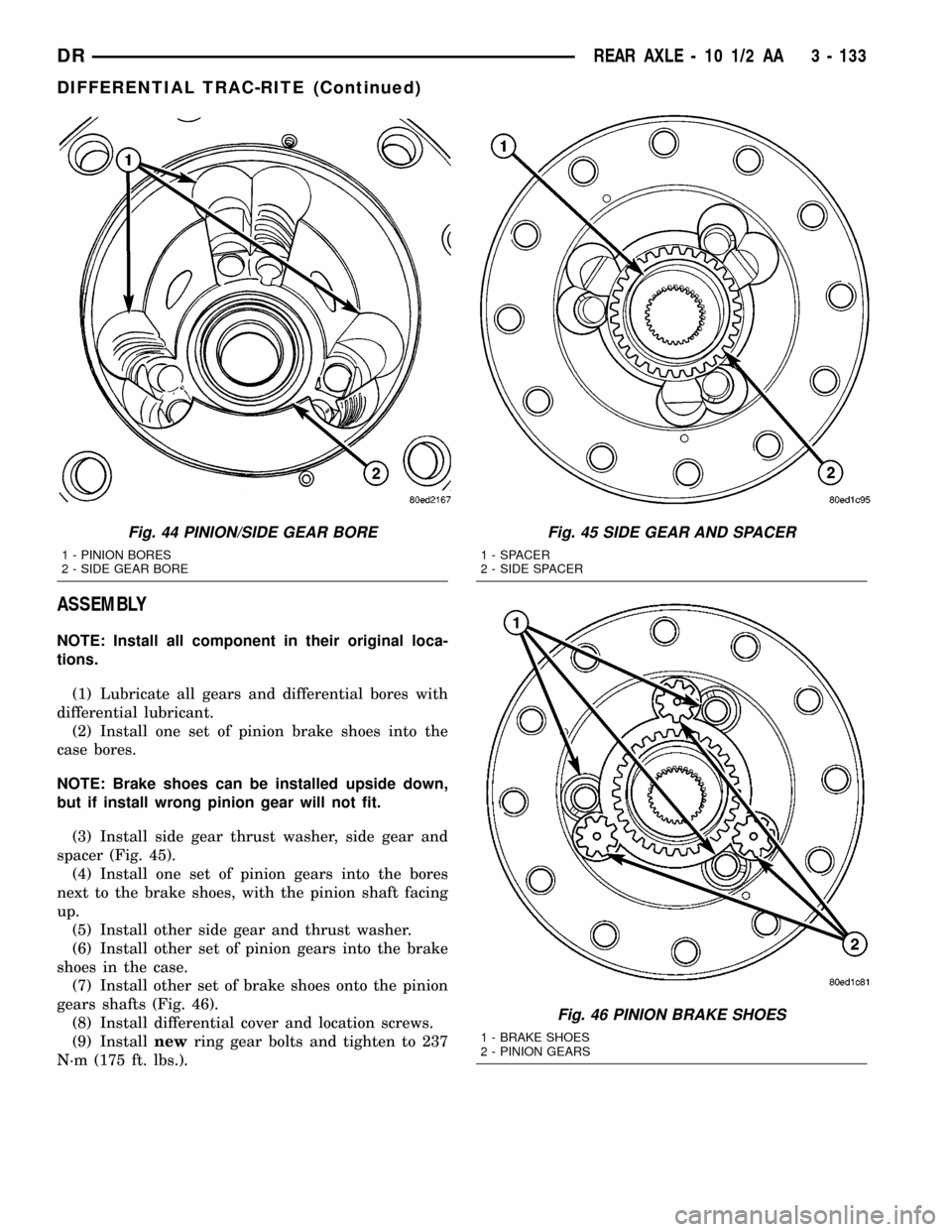
(3) Install side gear thrust washer, side gear and
spacer (Fig. 45).
(4) Install one set of pinion gears into the bores
next to the brake shoes, with the pinion shaft facing
up.
(5) Install other side gear and thrust washer.
(6) Install other set of pinion gears into the brake
shoes in the case.
(7) Install other set of brake shoes onto the pinion
gears shafts (Fig. 46).
(8) Install differential cover and location screws.
(9) Installnewring gear bolts and tighten to 237
N´m (175 ft. lbs.).
Fig. 44 PINION/SIDE GEAR BORE
1 - PINION BORES
2 - SIDE GEAR BORE
Fig. 45 SIDE GEAR AND SPACER
1 - SPACER
2 - SIDE SPACER
Fig. 46 PINION BRAKE SHOES
1 - BRAKE SHOES
2 - PINION GEARS
DRREAR AXLE - 10 1/2 AA 3 - 133
DIFFERENTIAL TRAC-RITE (Continued)
Page 215 of 2627
DIFFERENTIAL CASE
BEARINGS
REMOVAL
(1) Remove differential case from the housing.
(2) Install Plug 8888 into the end of the case.
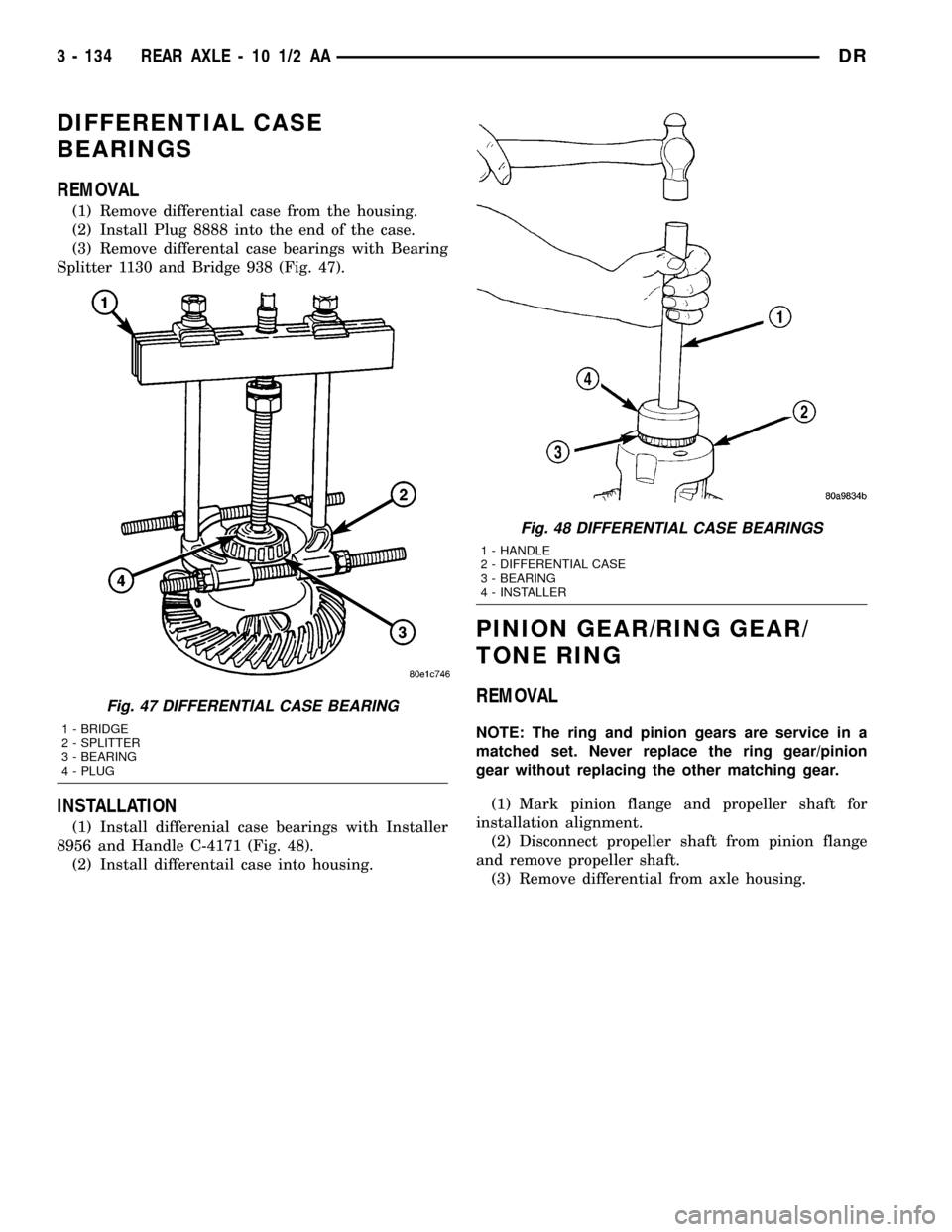
(3) Remove differental case bearings with Bearing
Splitter 1130 and Bridge 938 (Fig. 47).
INSTALLATION
(1) Install differenial case bearings with Installer
8956 and Handle C-4171 (Fig. 48).
(2) Install differentail case into housing.
PINION GEAR/RING GEAR/
TONE RING
REMOVAL
NOTE: The ring and pinion gears are service in a
matched set. Never replace the ring gear/pinion
gear without replacing the other matching gear.
(1) Mark pinion flange and propeller shaft for
installation alignment.
(2) Disconnect propeller shaft from pinion flange
and remove propeller shaft.
(3) Remove differential from axle housing.
Fig. 47 DIFFERENTIAL CASE BEARING
1 - BRIDGE
2 - SPLITTER
3 - BEARING
4 - PLUG
Fig. 48 DIFFERENTIAL CASE BEARINGS
1 - HANDLE
2 - DIFFERENTIAL CASE
3 - BEARING
4 - INSTALLER
3 - 134 REAR AXLE - 10 1/2 AADR
Page 216 of 2627
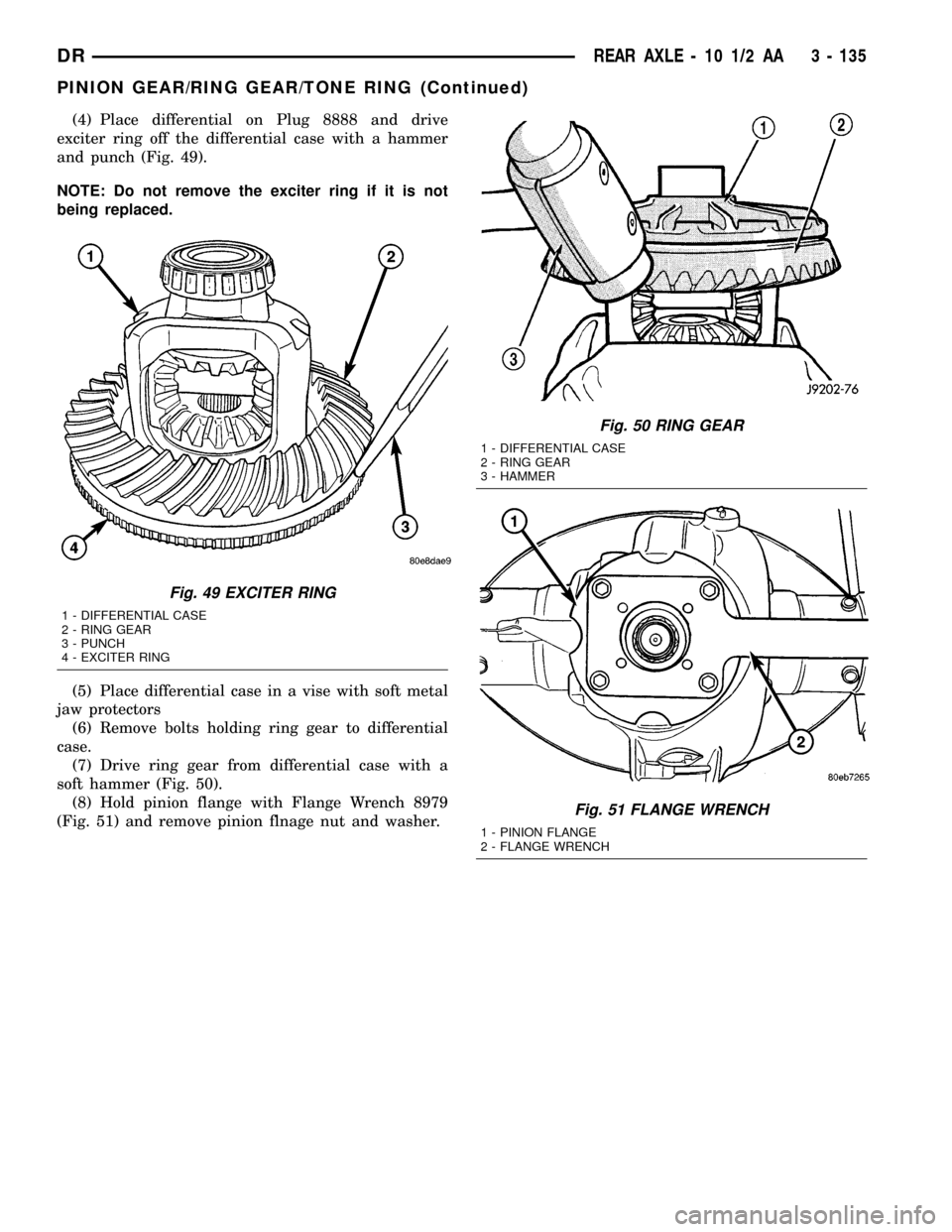
(4) Place differential on Plug 8888 and drive
exciter ring off the differential case with a hammer
and punch (Fig. 49).
NOTE: Do not remove the exciter ring if it is not
being replaced.
(5) Place differential case in a vise with soft metal
jaw protectors
(6) Remove bolts holding ring gear to differential
case.
(7) Drive ring gear from differential case with a
soft hammer (Fig. 50).
(8) Hold pinion flange with Flange Wrench 8979
(Fig. 51) and remove pinion flnage nut and washer.
Fig. 49 EXCITER RING
1 - DIFFERENTIAL CASE
2 - RING GEAR
3 - PUNCH
4 - EXCITER RING
Fig. 50 RING GEAR
1 - DIFFERENTIAL CASE
2 - RING GEAR
3 - HAMMER
Fig. 51 FLANGE WRENCH
1 - PINION FLANGE
2 - FLANGE WRENCH
DRREAR AXLE - 10 1/2 AA 3 - 135
PINION GEAR/RING GEAR/TONE RING (Continued)
Page 220 of 2627
(13) Rotate pinion several times to seat bearings.
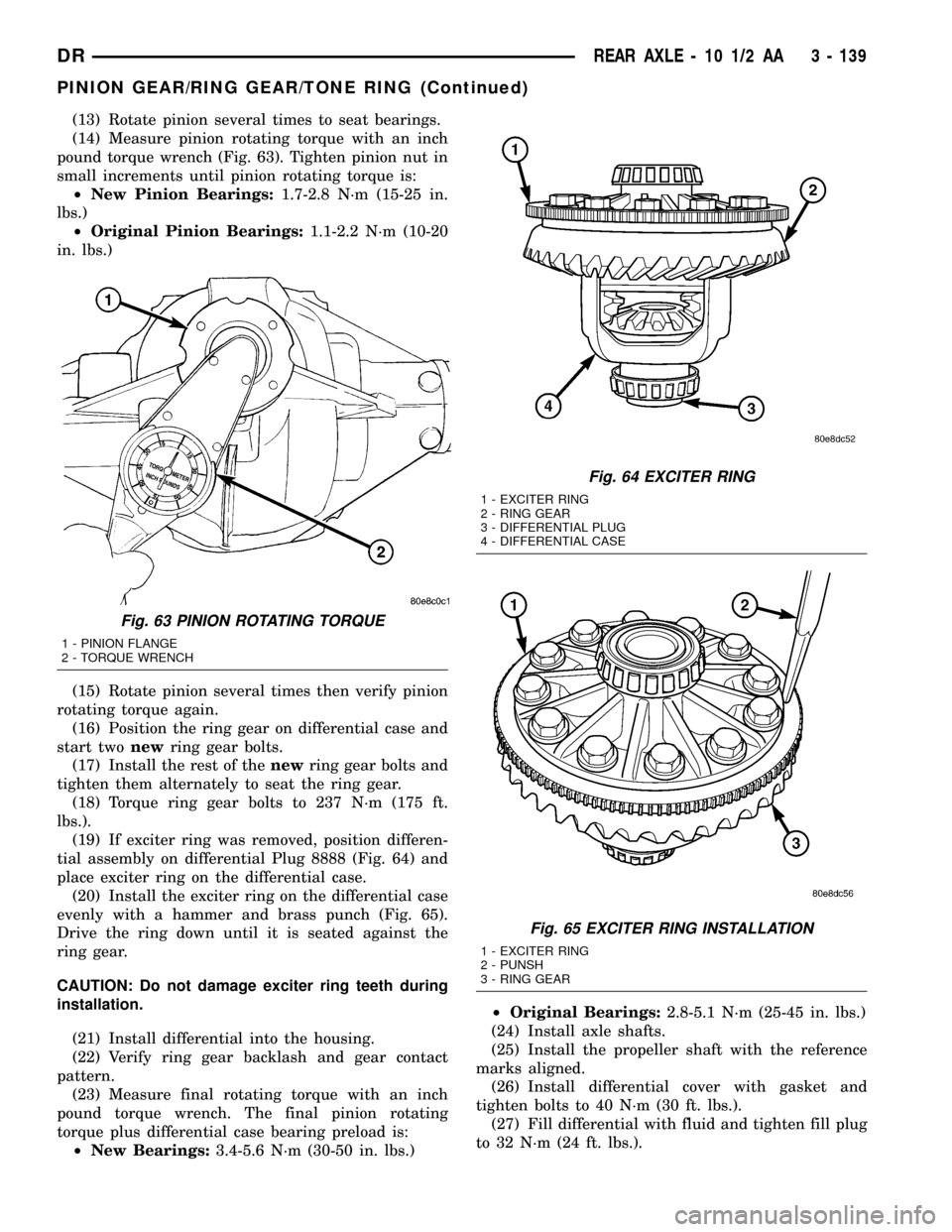
(14) Measure pinion rotating torque with an inch
pound torque wrench (Fig. 63). Tighten pinion nut in
small increments until pinion rotating torque is:
²New Pinion Bearings:1.7-2.8 N´m (15-25 in.
lbs.)
²Original Pinion Bearings:1.1-2.2 N´m (10-20
in. lbs.)
(15) Rotate pinion several times then verify pinion
rotating torque again.
(16) Position the ring gear on differential case and
start twonewring gear bolts.
(17) Install the rest of thenewring gear bolts and
tighten them alternately to seat the ring gear.
(18) Torque ring gear bolts to 237 N´m (175 ft.
lbs.).
(19) If exciter ring was removed, position differen-
tial assembly on differential Plug 8888 (Fig. 64) and
place exciter ring on the differential case.
(20) Install the exciter ring on the differential case
evenly with a hammer and brass punch (Fig. 65).
Drive the ring down until it is seated against the
ring gear.
CAUTION: Do not damage exciter ring teeth during
installation.
(21) Install differential into the housing.
(22) Verify ring gear backlash and gear contact
pattern.
(23) Measure final rotating torque with an inch
pound torque wrench. The final pinion rotating
torque plus differential case bearing preload is:
²New Bearings:3.4-5.6 N´m (30-50 in. lbs.)²Original Bearings:2.8-5.1 N´m (25-45 in. lbs.)
(24) Install axle shafts.
(25) Install the propeller shaft with the reference
marks aligned.
(26) Install differential cover with gasket and
tighten bolts to 40 N´m (30 ft. lbs.).
(27) Fill differential with fluid and tighten fill plug
to 32 N´m (24 ft. lbs.).
Fig. 63 PINION ROTATING TORQUE
1 - PINION FLANGE
2 - TORQUE WRENCH
Fig. 64 EXCITER RING
1 - EXCITER RING
2 - RING GEAR
3 - DIFFERENTIAL PLUG
4 - DIFFERENTIAL CASE
Fig. 65 EXCITER RING INSTALLATION
1 - EXCITER RING
2 - PUNSH
3 - RING GEAR
DRREAR AXLE - 10 1/2 AA 3 - 139
PINION GEAR/RING GEAR/TONE RING (Continued)
Page 221 of 2627
REAR AXLE - 11 1/2 AA
TABLE OF CONTENTS
page page
REAR AXLE - 11 1/2 AA
DIAGNOSIS AND TESTING...............140
REMOVAL............................143
INSTALLATION........................144
ADJUSTMENTS.......................144
SPECIFICATIONS......................148
SPECIAL TOOLS.......................148
AXLE SHAFTS
REMOVAL............................152
INSTALLATION........................152
AXLE BEARINGS
REMOVAL............................152
INSTALLATION........................153
PINION SEAL
REMOVAL............................153
INSTALLATION........................154
DIFFERENTIAL
REMOVAL............................155DISASSEMBLY........................155
ASSEMBLY...........................156
INSTALLATION........................157
DIFFERENTIAL TRAC-RITE
DESCRIPTION........................158
OPERATION..........................158
DISASSEMBLY........................158
CLEANING...........................160
INSPECTION.........................160
ASSEMBLY...........................161
DIFFERENTIAL CASE BEARINGS
REMOVAL............................161
INSTALLATION........................161
PINION GEAR/RING GEAR/TONE RING
REMOVAL............................162
INSTALLATION........................164
REAR AXLE - 11 1/2 AA
DIAGNOSIS AND TESTING
GEAR NOISE
Axle gear noise can be caused by insufficient lubri-
cant, incorrect backlash, incorrect pinion depth, tooth
contact, worn/damaged gears, or the carrier housing
not having the proper offset and squareness.
Gear noise usually happens at a specific speed
range. The noise can also occur during a specific type
of driving condition. These conditions are accelera-
tion, deceleration, coast, or constant load.
When road testing, first warm-up the axle fluid by
driving the vehicle at least 5 miles and then acceler-
ate the vehicle to the speed range where the noise is
the greatest. Shift out-of-gear and coast through the
peak-noise range. If the noise stops or changes
greatly check for:
²Insufficient lubricant.
²Incorrect ring gear backlash.
²Gear damage.
Differential side gears and pinions can be checked
by turning the vehicle. The side gears are loaded dur-
ing turns. They usually do not cause noise during
straight-ahead driving when the gears are unloaded.
A worn pinion shaft can also cause a snapping or a
knocking noise.
BEARING NOISE
The axle shaft, differential and pinion bearings can
all produce noise when worn or damaged. Bearing
noise can be either a whining, or a growling sound.
Pinion bearingshave a constant-pitch noise. This
noise changes only with vehicle speed. Pinion bearing
noise will be higher pitched because it rotates at a
faster rate. Drive the vehicle and load the differen-
tial. If bearing noise occurs, the rear pinion bearing
is the source of the noise. If the bearing noise is
heard during a coast, the front pinion bearing is the
source.
Differential bearingsusually produce a low pitch
noise. Differential bearing noise is similar to pinion
bearing noise. The pitch of differential bearing noise
is also constant and varies only with vehicle speed.
Axle shaft bearingsproduce noise and vibration
when worn or damaged. The noise generally changes
when the bearings are loaded. Road test the vehicle.
Turn the vehicle sharply to the left and to the right.
This will load the bearings and change the noise
level. Where axle bearing damage is slight, the noise
is usually not noticeable at speeds above 30 mph.
LOW SPEED KNOCK
Low speed knock is generally caused by:
²Worn U-joint(s).
²Worn side gear thrust washers.
²Worn pinion shaft bore.
3 - 140 REAR AXLE - 11 1/2 AADR
Page 222 of 2627
VIBRATION
Vibration at the rear of the vehicle is usually
caused by:
²Damaged drive shaft.
²Missing drive shaft balance weight(s).
²Worn or out-of-balance wheels.
²Loose wheel lug nuts.
²Worn U-joint(s).
²Loose/broken springs.
²Damaged axle shaft bearing(s).
²Loose pinion gear nut.
²Excessive pinion yoke run out.
²Bent axle shaft(s).
Check for loose or damaged front-end components
or engine/transmission mounts. These components
can contribute to what appears to be a rear end
vibration. Do not overlook engine accessories, brack-
ets and drive belts.
NOTE: All driveline components should be exam-
ined before starting any repair.
DRIVELINE SNAP
A snap or clunk noise when the vehicle is shifted
into gear (or the clutch engaged), can be caused by:
²High engine idle speed.
²Transmission shift operation.
²Loose engine/transmission/transfer case mounts.
²Worn U-joints.
²Loose spring mounts.
²Loose pinion gear nut and yoke.
²Excessive ring gear backlash.
²Excessive side gear to case clearance.
The source of a snap or a clunk noise can be deter-
mined with the assistance of a helper. Raise the vehi-
cle on a hoist with the wheels free to rotate. Instruct
the helper to shift the transmission into gear and lis-
ten for the noise. A mechanics stethoscope is helpful
in isolating the source of a noise.
DIAGNOSTIC CHART
Condition Possible Causes Correction
Wheel Noise 1. Wheel loose. 1. Tighten loose nuts.
2. Faulty, brinelled wheel bearing. 2. Replace bearing.
Axle Shaft Noise 1. Misaligned axle tube. 1. Inspect axle tube alignment.
Correct as necessary.
2. Bent or sprung axle shaft. 2. Inspect and correct as necessary.
Axle Shaft Broke 1. Misaligned axle tube. 1. Replace the broken shaft after
correcting tube mis-alignment.
2 Vehicle overloaded. 2. Replace broken shaft and avoid
excessive weight on vehicle.
3. Erratic clutch operation. 3. Replace broken shaft and avoid or
correct erratic clutch operation.
4. Grabbing clutch. 4. Replace broken shaft and inspect
and repair clutch as necessary.
DRREAR AXLE - 11 1/2 AA 3 - 141
REAR AXLE - 11 1/2 AA (Continued)
Page 223 of 2627
Condition Possible Causes Correction
Differential Cracked 1. Improper adjustment of the
differential bearings.1. Replace case and inspect gears
and bearings for further damage. Set
differential bearing pre-load properly.
2. Excessive ring gear backlash. 2. Replace case and inspect gears
and bearings for further damage. Set
ring gear backlash properly.
3. Vehicle overloaded. 3. Replace case and inspect gears
and bearings for further damage.
Avoid excessive vehicle weight.
4. Erratic clutch operation. 4. Replace case and inspect gears
and bearings for further damage.
Avoid erratic use of clutch.
Differential Gears Scored 1. Insufficient lubrication. 1. Replace scored gears. Fill
differential with the correct fluid type
and quantity.
2. Improper grade of lubricant. 2. Replace scored gears. Fill
differential with the correct fluid type
and quantity.
3. Excessive spinning of one
wheel/tire.3. Replace scored gears. Inspect all
gears, pinion bores, and shaft for
damage. Service as necessary.
Loss Of Lubricant 1. Lubricant level too high. 1. Drain lubricant to the correct level.
2. Worn axle shaft seals. 2. Replace seals.
3. Cracked differential housing. 3. Repair as necessary.
4. Worn pinion seal. 4. Replace seal.
5. Worn/scored yoke. 5. Replace yoke and seal.
6. Axle cover not properly sealed. 6. Remove, clean, and re-seal cover.
Axle Overheating 1. Lubricant level low. 1. Fill differential to correct level.
2. Improper grade of lubricant. 2. Fill differential with the correct fluid
type and quantity.
3. Bearing pre-loads too high. 3. Re-adjust bearing pre-loads.
4. Insufficient ring gear backlash. 4. Re-adjust ring gear backlash.
Gear Teeth Broke 1. Overloading. 1. Replace gears. Examine other
gears and bearings for possible
damage.
2. Erratic clutch operation. 2. Replace gears and examine the
remaining parts for damage. Avoid
erratic clutch operation.
3. Ice-spotted pavement. 3. Replace gears and examine
remaining parts for damage.
4. Improper adjustments. 4. Replace gears and examine
remaining parts for damage. Ensure
ring gear backlash is correct.
3 - 142 REAR AXLE - 11 1/2 AADR
REAR AXLE - 11 1/2 AA (Continued)
Page 226 of 2627
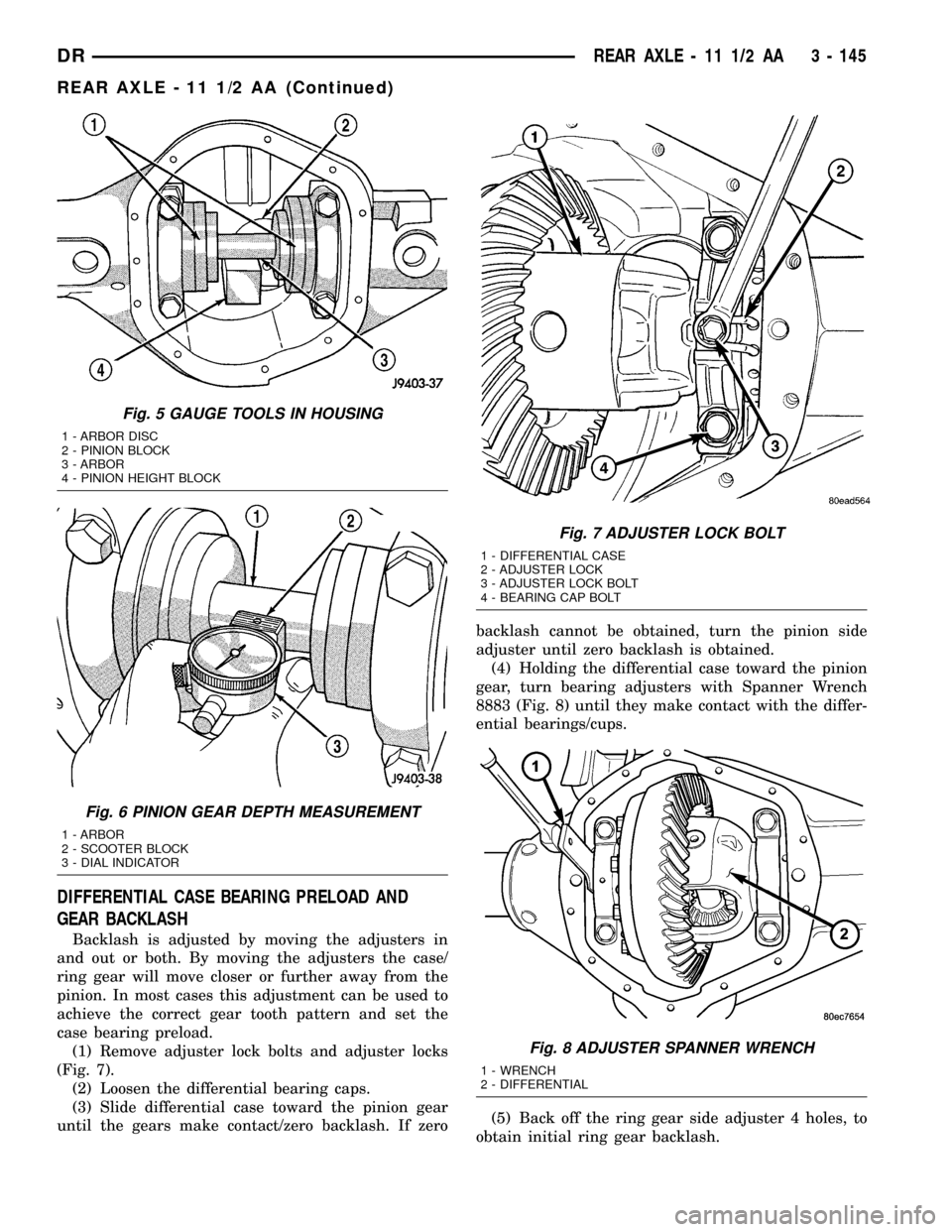
DIFFERENTIAL CASE BEARING PRELOAD AND
GEAR BACKLASH
Backlash is adjusted by moving the adjusters in
and out or both. By moving the adjusters the case/
ring gear will move closer or further away from the
pinion. In most cases this adjustment can be used to
achieve the correct gear tooth pattern and set the
case bearing preload.
(1) Remove adjuster lock bolts and adjuster locks
(Fig. 7).
(2) Loosen the differential bearing caps.
(3) Slide differential case toward the pinion gear
until the gears make contact/zero backlash. If zerobacklash cannot be obtained, turn the pinion side
adjuster until zero backlash is obtained.
(4) Holding the differential case toward the pinion
gear, turn bearing adjusters with Spanner Wrench
8883 (Fig. 8) until they make contact with the differ-
ential bearings/cups.
(5) Back off the ring gear side adjuster 4 holes, to
obtain initial ring gear backlash.
Fig. 5 GAUGE TOOLS IN HOUSING
1 - ARBOR DISC
2 - PINION BLOCK
3 - ARBOR
4 - PINION HEIGHT BLOCK
Fig. 6 PINION GEAR DEPTH MEASUREMENT
1 - ARBOR
2 - SCOOTER BLOCK
3 - DIAL INDICATOR
Fig. 7 ADJUSTER LOCK BOLT
1 - DIFFERENTIAL CASE
2 - ADJUSTER LOCK
3 - ADJUSTER LOCK BOLT
4 - BEARING CAP BOLT
Fig. 8 ADJUSTER SPANNER WRENCH
1 - WRENCH
2 - DIFFERENTIAL
DRREAR AXLE - 11 1/2 AA 3 - 145
REAR AXLE - 11 1/2 AA (Continued)
Page 227 of 2627
(6) Install ring gear side adjuster lock and bolt. Do
not tighten adjuster lock bolt at this time.
(7) Tighten pinion gear side adjuster firmly
against the differential case bearing cup.
(8) Rotate the pinion several times to seat the def-
erential bearings.
(9) Loosen pinion gear side adjuster until it is no
longer in contact with the bearing cup, then tighten
it until it makes contact.
(10) Tighten pinion gear side adjuster an addi-
tional:
²New Bearings:6 Adjuster Holes
²Original Bearings:4 Adjuster Holes
(11) Install pinion gear side adjuster lock and bolt.
Do not tighten adjuster lock bolt at this time.
(12) Tighten bearing cap bolts to 115 N´m (85 ft.
lbs.).
(13) Tighten adjuster lock bolts to 33 N´m (24 ft.
lbs.).
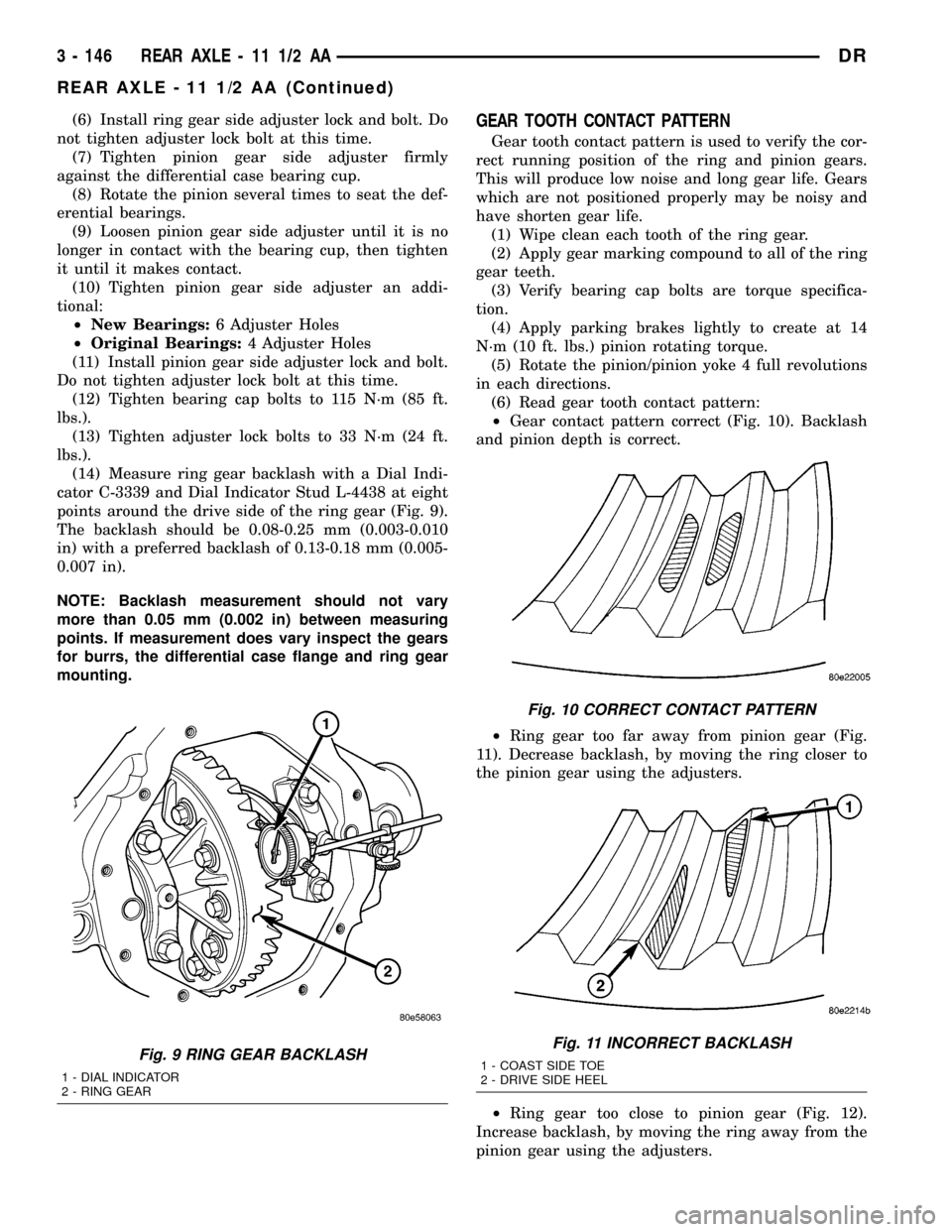
(14) Measure ring gear backlash with a Dial Indi-
cator C-3339 and Dial Indicator Stud L-4438 at eight
points around the drive side of the ring gear (Fig. 9).
The backlash should be 0.08-0.25 mm (0.003-0.010
in) with a preferred backlash of 0.13-0.18 mm (0.005-
0.007 in).
NOTE: Backlash measurement should not vary
more than 0.05 mm (0.002 in) between measuring
points. If measurement does vary inspect the gears
for burrs, the differential case flange and ring gear
mounting.GEAR TOOTH CONTACT PATTERN
Gear tooth contact pattern is used to verify the cor-
rect running position of the ring and pinion gears.
This will produce low noise and long gear life. Gears
which are not positioned properly may be noisy and
have shorten gear life.
(1) Wipe clean each tooth of the ring gear.
(2) Apply gear marking compound to all of the ring
gear teeth.
(3) Verify bearing cap bolts are torque specifica-
tion.
(4) Apply parking brakes lightly to create at 14
N´m (10 ft. lbs.) pinion rotating torque.
(5) Rotate the pinion/pinion yoke 4 full revolutions
in each directions.
(6) Read gear tooth contact pattern:
²Gear contact pattern correct (Fig. 10). Backlash
and pinion depth is correct.
²Ring gear too far away from pinion gear (Fig.
11). Decrease backlash, by moving the ring closer to
the pinion gear using the adjusters.
²Ring gear too close to pinion gear (Fig. 12).
Increase backlash, by moving the ring away from the
pinion gear using the adjusters.
Fig. 9 RING GEAR BACKLASH
1 - DIAL INDICATOR
2 - RING GEAR
Fig. 10 CORRECT CONTACT PATTERN
Fig. 11 INCORRECT BACKLASH
1 - COAST SIDE TOE
2 - DRIVE SIDE HEEL
3 - 146 REAR AXLE - 11 1/2 AADR
REAR AXLE - 11 1/2 AA (Continued)