wheel DODGE RAM 2001 Service Repair Manual
[x] Cancel search | Manufacturer: DODGE, Model Year: 2001, Model line: RAM, Model: DODGE RAM 2001Pages: 2889, PDF Size: 68.07 MB
Page 305 of 2889
Discard the brake springs and retainer components
if worn, distorted or collapsed. Also replace the
springs if a brake drag condition had occurred. Over-
heating will distort and weaken the springs.
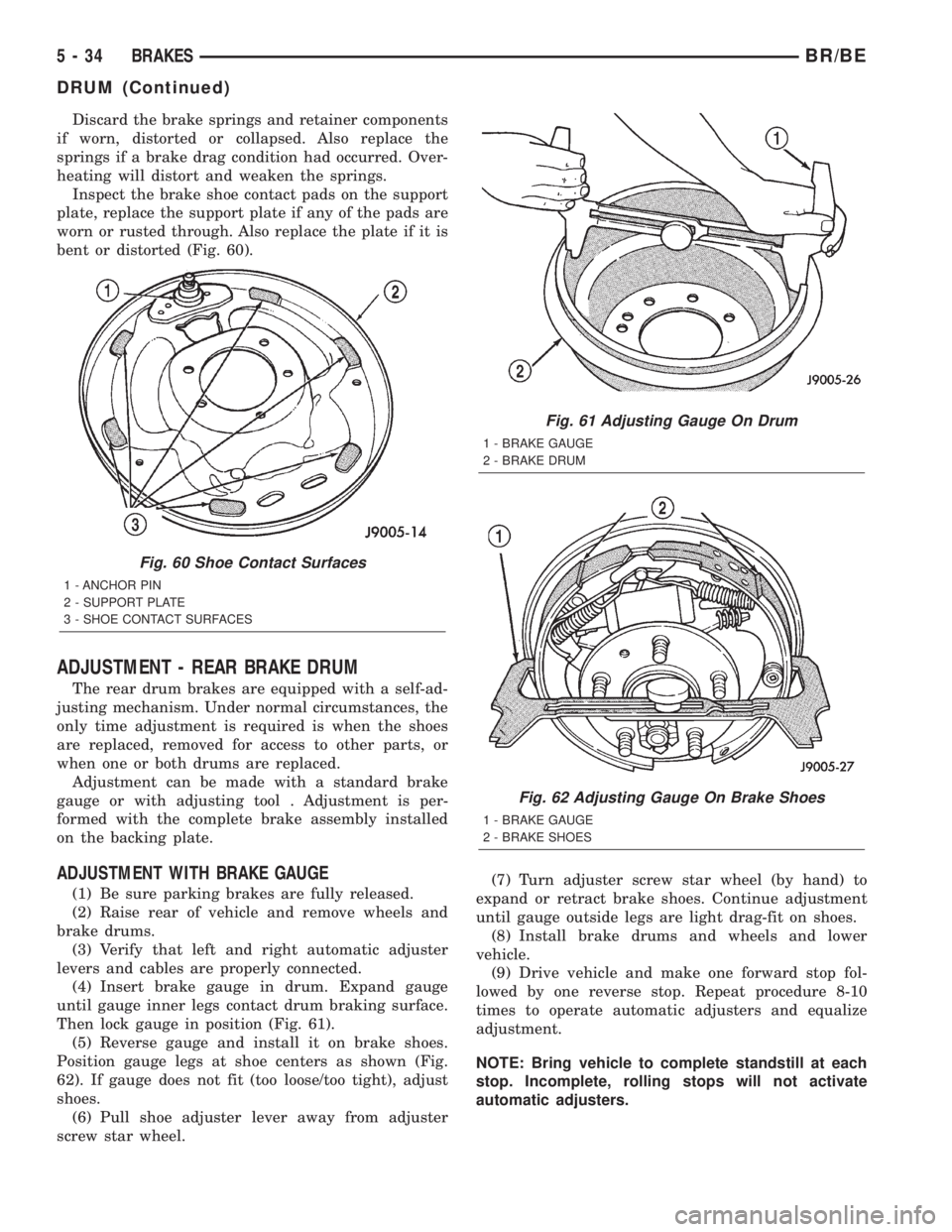
Inspect the brake shoe contact pads on the support
plate, replace the support plate if any of the pads are
worn or rusted through. Also replace the plate if it is
bent or distorted (Fig. 60).
ADJUSTMENT - REAR BRAKE DRUM
The rear drum brakes are equipped with a self-ad-
justing mechanism. Under normal circumstances, the
only time adjustment is required is when the shoes
are replaced, removed for access to other parts, or
when one or both drums are replaced.
Adjustment can be made with a standard brake
gauge or with adjusting tool . Adjustment is per-
formed with the complete brake assembly installed
on the backing plate.
ADJUSTMENT WITH BRAKE GAUGE
(1) Be sure parking brakes are fully released.
(2) Raise rear of vehicle and remove wheels and
brake drums.
(3) Verify that left and right automatic adjuster
levers and cables are properly connected.
(4) Insert brake gauge in drum. Expand gauge
until gauge inner legs contact drum braking surface.
Then lock gauge in position (Fig. 61).
(5) Reverse gauge and install it on brake shoes.
Position gauge legs at shoe centers as shown (Fig.
62). If gauge does not fit (too loose/too tight), adjust
shoes.
(6) Pull shoe adjuster lever away from adjuster
screw star wheel.(7) Turn adjuster screw star wheel (by hand) to
expand or retract brake shoes. Continue adjustment
until gauge outside legs are light drag-fit on shoes.
(8) Install brake drums and wheels and lower
vehicle.
(9) Drive vehicle and make one forward stop fol-
lowed by one reverse stop. Repeat procedure 8-10
times to operate automatic adjusters and equalize
adjustment.
NOTE: Bring vehicle to complete standstill at each
stop. Incomplete, rolling stops will not activate
automatic adjusters.
Fig. 60 Shoe Contact Surfaces
1 - ANCHOR PIN
2 - SUPPORT PLATE
3 - SHOE CONTACT SURFACES
Fig. 61 Adjusting Gauge On Drum
1 - BRAKE GAUGE
2 - BRAKE DRUM
Fig. 62 Adjusting Gauge On Brake Shoes
1 - BRAKE GAUGE
2 - BRAKE SHOES
5 - 34 BRAKESBR/BE
DRUM (Continued)
Page 306 of 2889
ADJUSTMENT WITH ADJUSTING TOOL
(1) Be sure parking brake lever is fully released.
(2) Raise vehicle so rear wheels can be rotated
freely.
(3) Remove plug from each access hole in brake
support plates.
(4) Loosen parking brake cable adjustment nut
until there is slack in front cable.
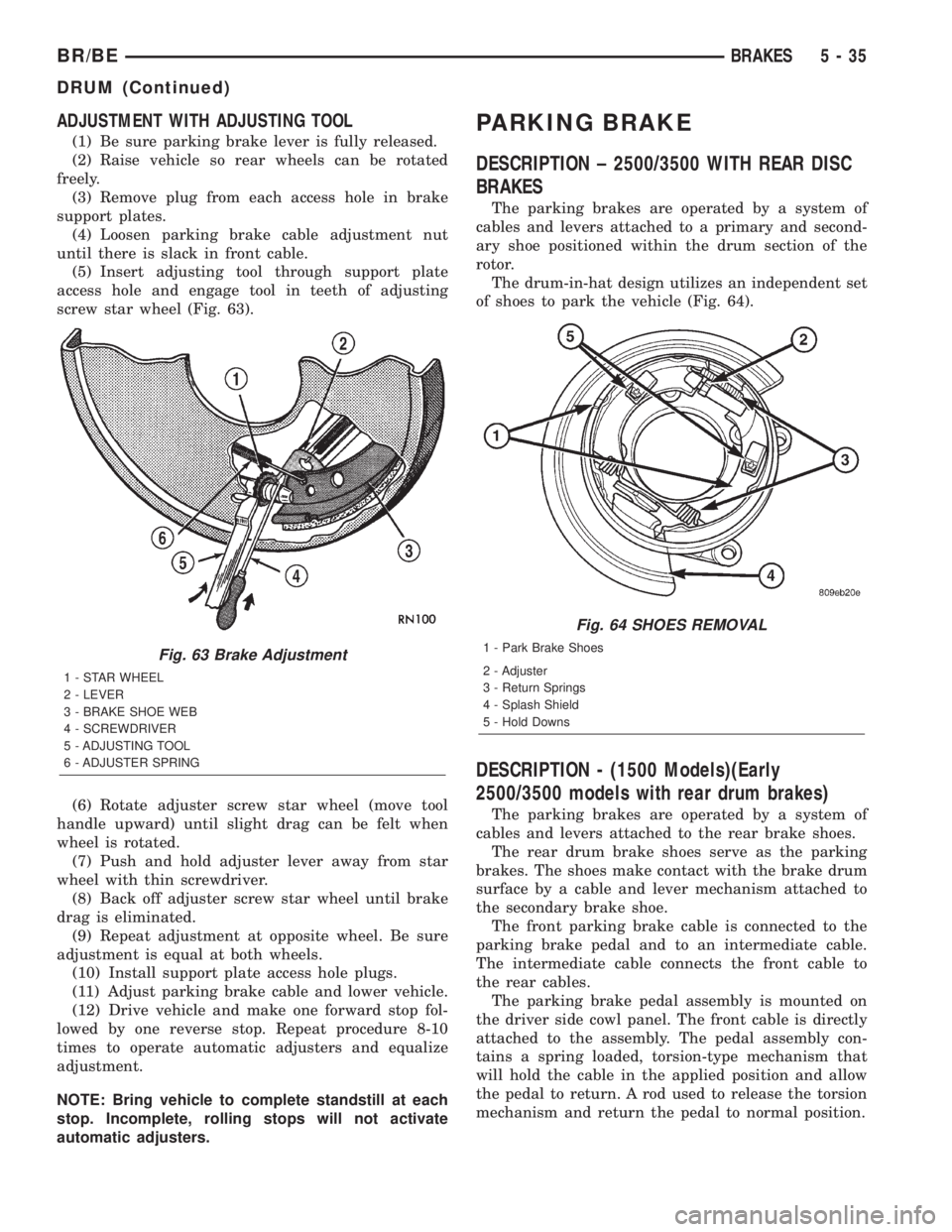
(5) Insert adjusting tool through support plate
access hole and engage tool in teeth of adjusting
screw star wheel (Fig. 63).
(6) Rotate adjuster screw star wheel (move tool
handle upward) until slight drag can be felt when
wheel is rotated.
(7) Push and hold adjuster lever away from star
wheel with thin screwdriver.
(8) Back off adjuster screw star wheel until brake
drag is eliminated.
(9) Repeat adjustment at opposite wheel. Be sure
adjustment is equal at both wheels.
(10) Install support plate access hole plugs.
(11) Adjust parking brake cable and lower vehicle.
(12) Drive vehicle and make one forward stop fol-
lowed by one reverse stop. Repeat procedure 8-10
times to operate automatic adjusters and equalize
adjustment.
NOTE: Bring vehicle to complete standstill at each
stop. Incomplete, rolling stops will not activate
automatic adjusters.
PARKING BRAKE
DESCRIPTION ± 2500/3500 WITH REAR DISC
BRAKES
The parking brakes are operated by a system of
cables and levers attached to a primary and second-
ary shoe positioned within the drum section of the
rotor.
The drum-in-hat design utilizes an independent set
of shoes to park the vehicle (Fig. 64).
DESCRIPTION - (1500 Models)(Early
2500/3500 models with rear drum brakes)
The parking brakes are operated by a system of
cables and levers attached to the rear brake shoes.
The rear drum brake shoes serve as the parking
brakes. The shoes make contact with the brake drum
surface by a cable and lever mechanism attached to
the secondary brake shoe.
The front parking brake cable is connected to the
parking brake pedal and to an intermediate cable.
The intermediate cable connects the front cable to
the rear cables.
The parking brake pedal assembly is mounted on
the driver side cowl panel. The front cable is directly
attached to the assembly. The pedal assembly con-
tains a spring loaded, torsion-type mechanism that
will hold the cable in the applied position and allow
the pedal to return. A rod used to release the torsion
mechanism and return the pedal to normal position.
Fig. 63 Brake Adjustment
1 - STAR WHEEL
2 - LEVER
3 - BRAKE SHOE WEB
4 - SCREWDRIVER
5 - ADJUSTING TOOL
6 - ADJUSTER SPRING
Fig. 64 SHOES REMOVAL
1 - Park Brake Shoes
2 - Adjuster
3 - Return Springs
4 - Splash Shield
5 - Hold Downs
BR/BEBRAKES 5 - 35
DRUM (Continued)
Page 309 of 2889
(4) Remove the rear cables from the cable connec-
tors.
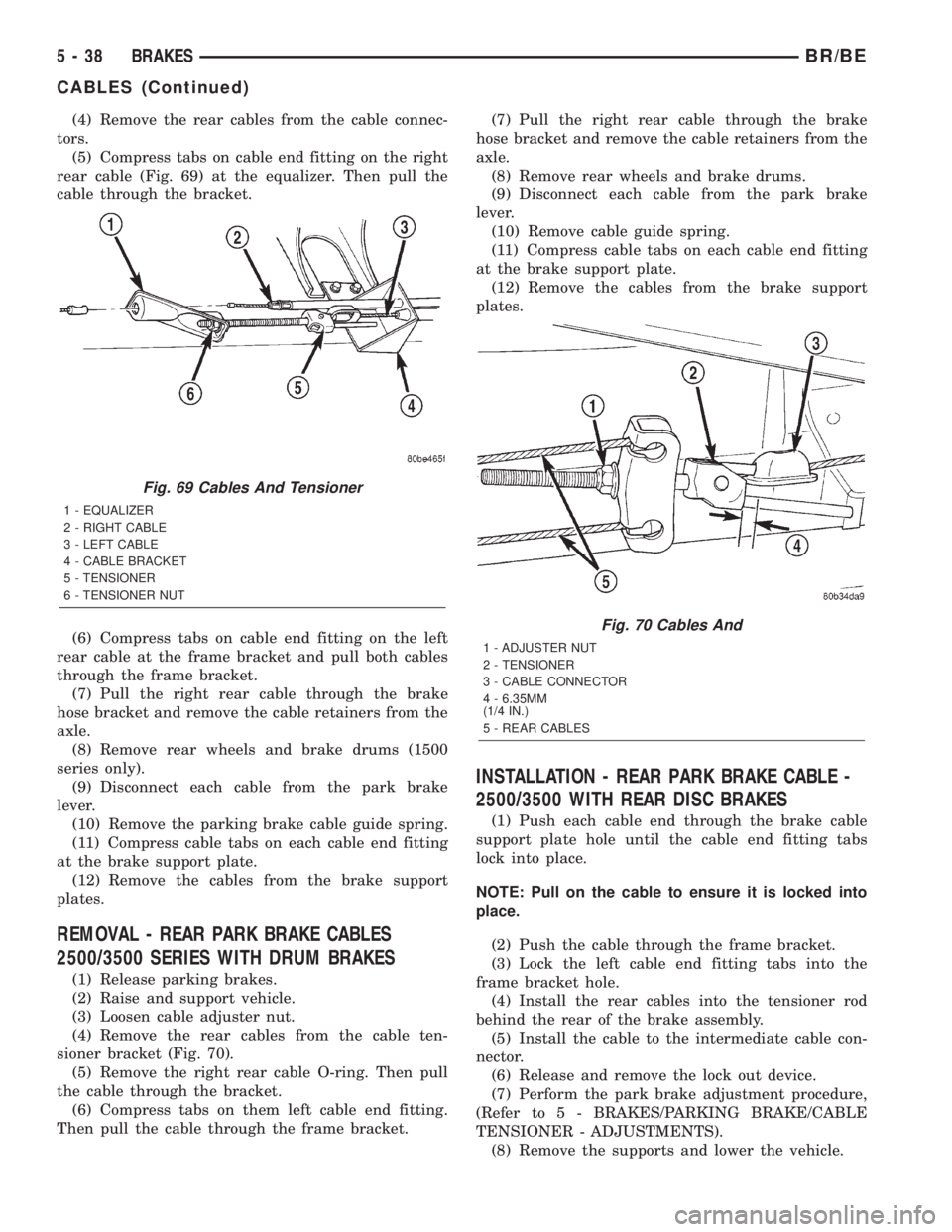
(5) Compress tabs on cable end fitting on the right
rear cable (Fig. 69) at the equalizer. Then pull the
cable through the bracket.
(6) Compress tabs on cable end fitting on the left
rear cable at the frame bracket and pull both cables
through the frame bracket.
(7) Pull the right rear cable through the brake
hose bracket and remove the cable retainers from the
axle.
(8) Remove rear wheels and brake drums (1500
series only).
(9) Disconnect each cable from the park brake
lever.
(10) Remove the parking brake cable guide spring.
(11) Compress cable tabs on each cable end fitting
at the brake support plate.
(12) Remove the cables from the brake support
plates.
REMOVAL - REAR PARK BRAKE CABLES
2500/3500 SERIES WITH DRUM BRAKES
(1) Release parking brakes.
(2) Raise and support vehicle.
(3) Loosen cable adjuster nut.
(4) Remove the rear cables from the cable ten-
sioner bracket (Fig. 70).
(5) Remove the right rear cable O-ring. Then pull
the cable through the bracket.
(6) Compress tabs on them left cable end fitting.
Then pull the cable through the frame bracket.(7) Pull the right rear cable through the brake
hose bracket and remove the cable retainers from the
axle.
(8) Remove rear wheels and brake drums.
(9) Disconnect each cable from the park brake
lever.
(10) Remove cable guide spring.
(11) Compress cable tabs on each cable end fitting
at the brake support plate.
(12) Remove the cables from the brake support
plates.
INSTALLATION - REAR PARK BRAKE CABLE -
2500/3500 WITH REAR DISC BRAKES
(1) Push each cable end through the brake cable
support plate hole until the cable end fitting tabs
lock into place.
NOTE: Pull on the cable to ensure it is locked into
place.
(2) Push the cable through the frame bracket.
(3) Lock the left cable end fitting tabs into the
frame bracket hole.
(4) Install the rear cables into the tensioner rod
behind the rear of the brake assembly.
(5) Install the cable to the intermediate cable con-
nector.
(6) Release and remove the lock out device.
(7) Perform the park brake adjustment procedure,
(Refer to 5 - BRAKES/PARKING BRAKE/CABLE
TENSIONER - ADJUSTMENTS).
(8) Remove the supports and lower the vehicle.
Fig. 69 Cables And Tensioner
1 - EQUALIZER
2 - RIGHT CABLE
3 - LEFT CABLE
4 - CABLE BRACKET
5 - TENSIONER
6 - TENSIONER NUT
Fig. 70 Cables And
1 - ADJUSTER NUT
2 - TENSIONER
3 - CABLE CONNECTOR
4 - 6.35MM
(1/4 IN.)
5 - REAR CABLES
5 - 38 BRAKESBR/BE
CABLES (Continued)
Page 310 of 2889
INSTALLATION - FRONT PARKING BRAKE
CABLE
(1) From inside the vehicle, insert the cable end
fitting into the hole in the pedal assembly.
(2) Seat the cable retainer in the pedal assembly.
(3) Engage the cable ball end in clevis on the pedal
assembly.
(4) Route the cable along the top of the wheel well
and clip in place.
(5) Route the cable through the floorpan and
install the body grommet.
(6) Place the carpet down and install the left cowl
trim and sill plate.
(7) Raise and support the vehicle.
(8) Route the cable through the underbody bracket
and seat the cable housing retainer in the bracket.
(9) Connect the cable to the cable connector.
(10) Perform the park brake adjustment proce-
dure, (Refer to 5 - BRAKES/PARKING BRAKE/CA-
BLE TENSIONER - ADJUSTMENTS).
(11) Lower the vehicle.
INSTALLATION - REAR PARK BRAKE CABLES -
1500 SERIES
(1) Install the parking brake cable guide spring.
(2) Install the brake drums.
(3) Pull back on the cable. Then push the cable
through the brake support plate hole to engage the
cable in the park brake lever.
NOTE: Pull on the cable end to ensure it is attached
to the park brake lever.
(4) Push each cable end through the brake support
plate hole until the cable end fitting tabs lock into
place.
NOTE: Pull on the cable to ensure it is locked into
place.
(5) Install the right cable retainers on the axle.
Route the right cable through the hole in the brake
hose bracket.
(6) Push both cables through the frame bracket.
NOTE: The right cable must be installed in the top
hole of the bracket.(7) Lock the left cable end fitting tabs into the
frame bracket lower hole.
(8) Install the right rear cable into the tensioner
cable bracket and lock the cable end fitting tabs into
place.
(9) Install the cables onto the cable connectors.
(10) Install the wheel and tire assemblies, (Refer
to 22 - TIRES/WHEELS/WHEELS - STANDARD
PROCEDURE).
(11) Perform the park brake adjustment procedure,
(Refer to 5 - BRAKES/PARKING BRAKE/CABLE
TENSIONER - ADJUSTMENTS).
(12) Remove the supports and lower the vehicle.
INSTALLATION - REAR PARK BRAKE CABLE
2500/3500 SERIES WITH DRUM BRAKES
(1) Install cable guide spring.
(2) Install the brake drums.
(3) Pull back on the cable. Then push the cable
through the brake support plate hole to engage the
cable in the park brake lever.
NOTE: Pull on the cable end to ensure it is attached
to the park brake lever.
(4) Push each cable housing through the brake
support plate hole until the cable end fitting tabs
lock into place.
NOTE: Pull on the cable housing to ensure it is
locked into place.
(5) Install the right cable retainers on the axle.
The push the right cable through the hole in the
brake hose bracket.
(6) Push both cables through the frame bracket.
Push the left cable until the cable end fitting tabs
lock into place. Install the O-ring on the right cable.
NOTE: The right cable must be installed in the top
hole of the bracket and left cable in the bottom
hole.
(7) Install the cables onto the cable tensioner
bracket and install the cables into the cable connec-
tors.
(8) Install the wheel and tire assemblies.
(9) Perform park brake adjustment procedure.
(10) Remove supports and lower vehicle.
BR/BEBRAKES 5 - 39
CABLES (Continued)
Page 311 of 2889
CABLE TENSIONER
ADJUSTMENT
NOTE: Tensioner adjustment is only necessary
when the tensioner, or a cable has been replaced or
disconnected for service. When adjustment is nec-
essary, perform adjustment only as described in the
following procedure. This is necessary to avoid
faulty park brake operation.
(1) Raise the vehicle.
(2) Back off the cable tensioner adjusting nut to
create slack in the cables.
(3) Remove the rear wheel/tire assemblies. Then
remove the brake drums.
(4) Verify the brakes are in good condition and
operating properly.
(5) Verify the park brake cables operate freely and
are not binding, or seized.
(6) Check the rear brake shoe adjustment with
standard brake gauge.
(7) Install the drums and verify that the drums
rotate freely without drag.
(8) Install the wheel/tire assemblies, (Refer to 22 -
TIRES/WHEELS/WHEELS - STANDARD PROCE-
DURE).
(9) Lower the vehicle enough for access to the park
brake foot pedal. Then fully apply the park brakes.
NOTE: Leave park brakes applied until adjustment
is complete.
(10) Raise the vehicle again.
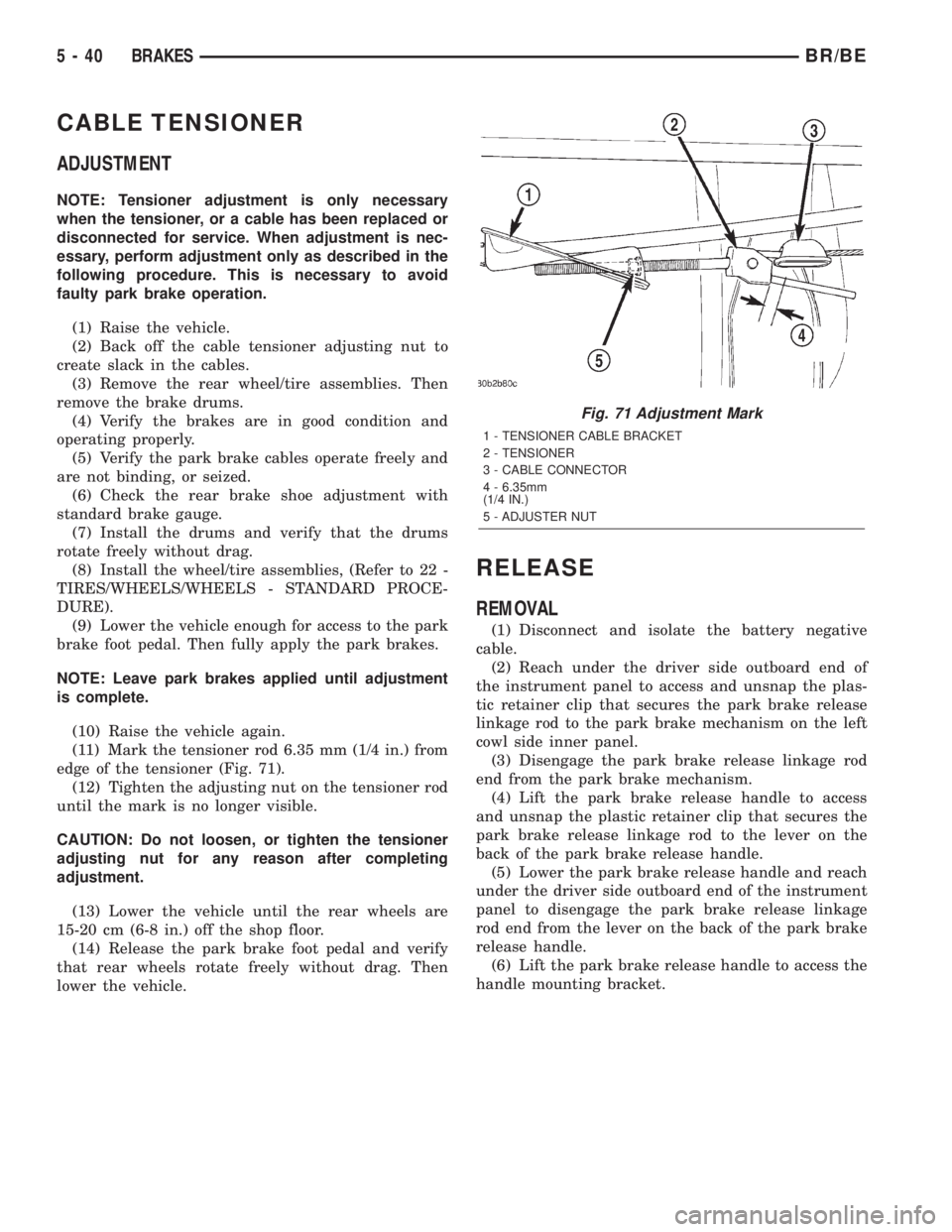
(11) Mark the tensioner rod 6.35 mm (1/4 in.) from
edge of the tensioner (Fig. 71).
(12) Tighten the adjusting nut on the tensioner rod
until the mark is no longer visible.
CAUTION: Do not loosen, or tighten the tensioner
adjusting nut for any reason after completing
adjustment.
(13) Lower the vehicle until the rear wheels are
15-20 cm (6-8 in.) off the shop floor.
(14) Release the park brake foot pedal and verify
that rear wheels rotate freely without drag. Then
lower the vehicle.
RELEASE
REMOVAL
(1) Disconnect and isolate the battery negative
cable.
(2) Reach under the driver side outboard end of
the instrument panel to access and unsnap the plas-
tic retainer clip that secures the park brake release
linkage rod to the park brake mechanism on the left
cowl side inner panel.
(3) Disengage the park brake release linkage rod
end from the park brake mechanism.
(4) Lift the park brake release handle to access
and unsnap the plastic retainer clip that secures the
park brake release linkage rod to the lever on the
back of the park brake release handle.
(5) Lower the park brake release handle and reach
under the driver side outboard end of the instrument
panel to disengage the park brake release linkage
rod end from the lever on the back of the park brake
release handle.
(6) Lift the park brake release handle to access the
handle mounting bracket.
Fig. 71 Adjustment Mark
1 - TENSIONER CABLE BRACKET
2 - TENSIONER
3 - CABLE CONNECTOR
4 - 6.35mm
(1/4 IN.)
5 - ADJUSTER NUT
5 - 40 BRAKESBR/BE
Page 312 of 2889
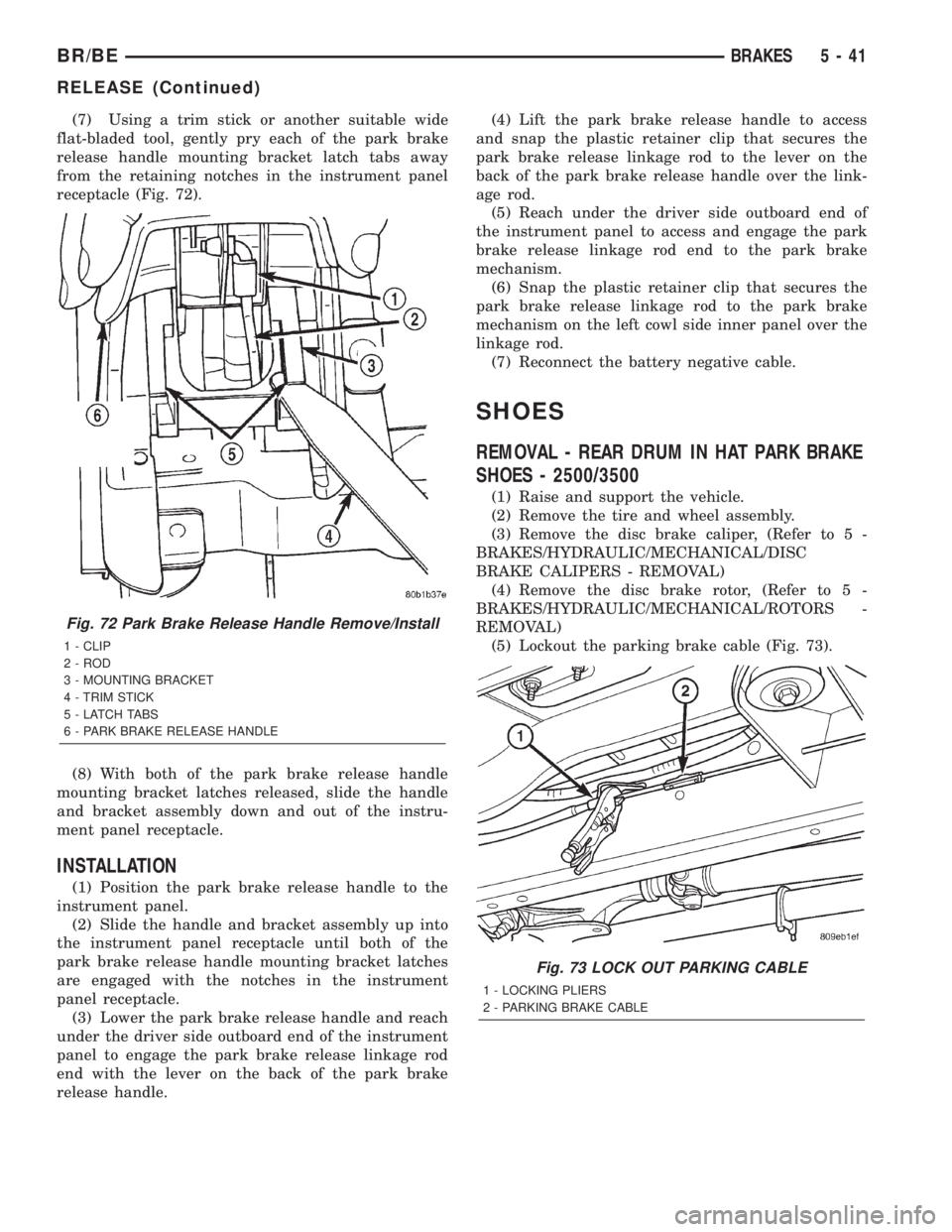
(7) Using a trim stick or another suitable wide
flat-bladed tool, gently pry each of the park brake
release handle mounting bracket latch tabs away
from the retaining notches in the instrument panel
receptacle (Fig. 72).
(8) With both of the park brake release handle
mounting bracket latches released, slide the handle
and bracket assembly down and out of the instru-
ment panel receptacle.
INSTALLATION
(1) Position the park brake release handle to the
instrument panel.
(2) Slide the handle and bracket assembly up into
the instrument panel receptacle until both of the
park brake release handle mounting bracket latches
are engaged with the notches in the instrument
panel receptacle.
(3) Lower the park brake release handle and reach
under the driver side outboard end of the instrument
panel to engage the park brake release linkage rod
end with the lever on the back of the park brake
release handle.(4) Lift the park brake release handle to access
and snap the plastic retainer clip that secures the
park brake release linkage rod to the lever on the
back of the park brake release handle over the link-
age rod.
(5) Reach under the driver side outboard end of
the instrument panel to access and engage the park
brake release linkage rod end to the park brake
mechanism.
(6) Snap the plastic retainer clip that secures the
park brake release linkage rod to the park brake
mechanism on the left cowl side inner panel over the
linkage rod.
(7) Reconnect the battery negative cable.
SHOES
REMOVAL - REAR DRUM IN HAT PARK BRAKE
SHOES - 2500/3500
(1) Raise and support the vehicle.
(2) Remove the tire and wheel assembly.
(3) Remove the disc brake caliper, (Refer to 5 -
BRAKES/HYDRAULIC/MECHANICAL/DISC
BRAKE CALIPERS - REMOVAL)
(4) Remove the disc brake rotor, (Refer to 5 -
BRAKES/HYDRAULIC/MECHANICAL/ROTORS -
REMOVAL)
(5) Lockout the parking brake cable (Fig. 73).
Fig. 72 Park Brake Release Handle Remove/Install
1 - CLIP
2 - ROD
3 - MOUNTING BRACKET
4 - TRIM STICK
5 - LATCH TABS
6 - PARK BRAKE RELEASE HANDLE
Fig. 73 LOCK OUT PARKING CABLE
1 - LOCKING PLIERS
2 - PARKING BRAKE CABLE
BR/BEBRAKES 5 - 41
RELEASE (Continued)
Page 313 of 2889
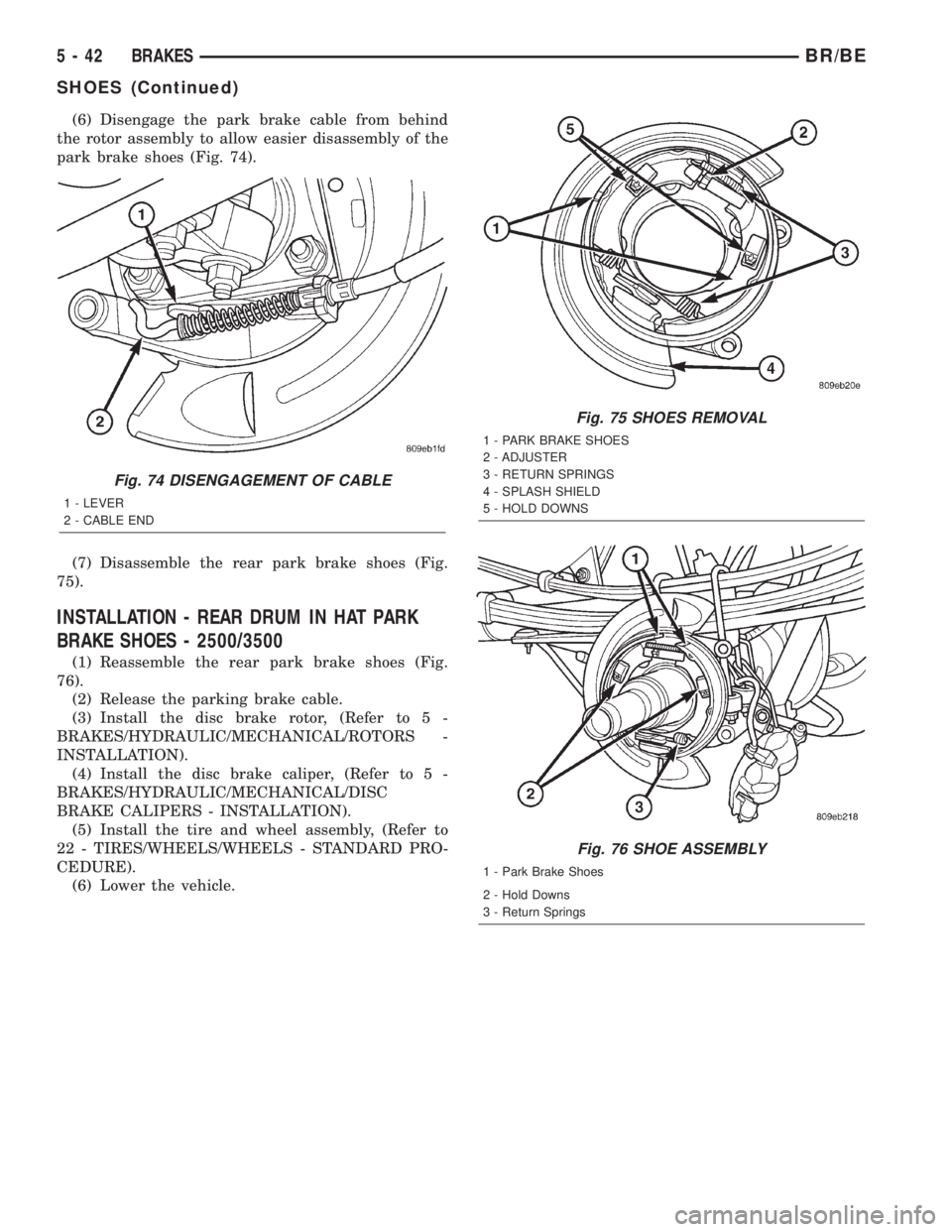
(6) Disengage the park brake cable from behind
the rotor assembly to allow easier disassembly of the
park brake shoes (Fig. 74).
(7) Disassemble the rear park brake shoes (Fig.
75).
INSTALLATION - REAR DRUM IN HAT PARK
BRAKE SHOES - 2500/3500
(1) Reassemble the rear park brake shoes (Fig.
76).
(2) Release the parking brake cable.
(3) Install the disc brake rotor, (Refer to 5 -
BRAKES/HYDRAULIC/MECHANICAL/ROTORS -
INSTALLATION).
(4) Install the disc brake caliper, (Refer to 5 -
BRAKES/HYDRAULIC/MECHANICAL/DISC
BRAKE CALIPERS - INSTALLATION).
(5) Install the tire and wheel assembly, (Refer to
22 - TIRES/WHEELS/WHEELS - STANDARD PRO-
CEDURE).
(6) Lower the vehicle.
Fig. 74 DISENGAGEMENT OF CABLE
1 - LEVER
2 - CABLE END
Fig. 75 SHOES REMOVAL
1 - PARK BRAKE SHOES
2 - ADJUSTER
3 - RETURN SPRINGS
4 - SPLASH SHIELD
5 - HOLD DOWNS
Fig. 76 SHOE ASSEMBLY
1 - Park Brake Shoes
2 - Hold Downs
3 - Return Springs
5 - 42 BRAKESBR/BE
SHOES (Continued)
Page 314 of 2889
CLUTCH
TABLE OF CONTENTS
page page
CLUTCH
DESCRIPTION............................1
OPERATION.............................1
WARNING...............................2
DIAGNOSIS AND TESTING..................2
CLUTCH...............................2
SPECIFICATIONS.........................7
CLUTCH DISC
DESCRIPTION............................7
OPERATION.............................8
REMOVAL...............................8
INSTALLATION............................9
CLUTCH HOUSING
DIAGNOSIS AND TESTING.................11
CLUTCH HOUSING.....................11
REMOVAL..............................13
INSTALLATION...........................13
CLUTCH RELEASE BEARING
DESCRIPTION...........................14
OPERATION.............................14
REMOVAL..............................15
INSTALLATION...........................15
PRESSURE PLATE
DESCRIPTION...........................15OPERATION.............................16
FLYWHEEL
DESCRIPTION...........................16
OPERATION.............................16
DIAGNOSIS AND TESTING.................17
FLYWHEEL............................17
DISASSEMBLY...........................17
ASSEMBLY.............................17
PILOT BEARING
DESCRIPTION...........................17
OPERATION.............................18
REMOVAL..............................18
INSTALLATION...........................18
CLUTCH PEDAL
REMOVAL..............................18
INSTALLATION...........................19
LINKAGE
DESCRIPTION...........................19
OPERATION.............................20
REMOVAL..............................20
INSTALLATION...........................20
CLUTCH PEDAL POSITION SWITCH
DESCRIPTION...........................22
OPERATION.............................22
CLUTCH
DESCRIPTION
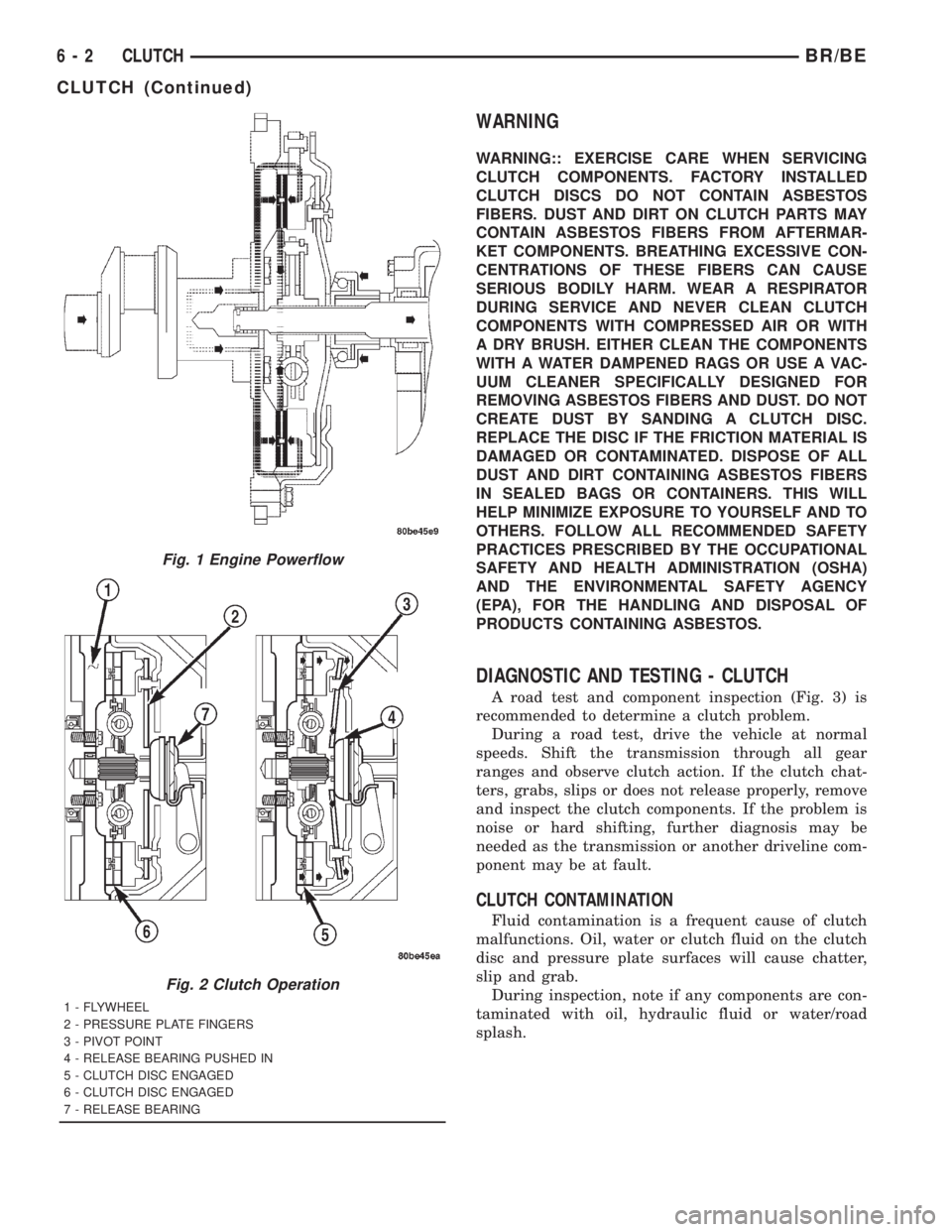
The clutch mechanism consists of a flywheel, a sin-
gle, dry-type disc, and a diaphragm style clutch cover
(Fig. 1). A hydraulic linkage is used to operate the
clutch release bearing and fork. The flywheel is
bolted to the rear flange of the crankshaft. The
clutch pressure plate is bolted to the flywheel with
the clutch disc located between these two compo-
nents. The clutch system provides the mechanical,
but still easily detachable, link between the engine
and the transmission. The system is designed to
ensure that the full torque output of the engine is
transfered to the transmission while isolating the
transmission from the engine firing pulses to mini-
mize concerns such as gear rattle.
OPERATION
Leverage, clamping force, and friction are what
make the clutch work. The disc serves as the friction
element and a diaphragm spring and pressure plate
provide the clamping force. The clutch pedal, hydrau-
lic linkage, release lever and bearing provide the
leverage.
The clutch master cylinder push rod is connected
to the clutch pedal. When the clutch pedal is
depressed, the slave cylinder is operated by the
clutch master cylinder mounted on the dash panel.
The release fork is actuated by the hydraulic slave
cylinder mounted on the transmission housing. The
release bearing is operated by a release fork pivoting
on a ball stud mounted in the transmission housing.
The release bearing then depresses the pressure
plate spring fingers, thereby releasing pressure on
the clutch disc and allowing the engine crankshaft to
spin independently of the transmission input shaft
(Fig. 2).
BR/BECLUTCH 6 - 1
Page 315 of 2889
WARNING
WARNING:: EXERCISE CARE WHEN SERVICING
CLUTCH COMPONENTS. FACTORY INSTALLED
CLUTCH DISCS DO NOT CONTAIN ASBESTOS
FIBERS. DUST AND DIRT ON CLUTCH PARTS MAY
CONTAIN ASBESTOS FIBERS FROM AFTERMAR-
KET COMPONENTS. BREATHING EXCESSIVE CON-
CENTRATIONS OF THESE FIBERS CAN CAUSE
SERIOUS BODILY HARM. WEAR A RESPIRATOR
DURING SERVICE AND NEVER CLEAN CLUTCH
COMPONENTS WITH COMPRESSED AIR OR WITH
A DRY BRUSH. EITHER CLEAN THE COMPONENTS
WITH A WATER DAMPENED RAGS OR USE A VAC-
UUM CLEANER SPECIFICALLY DESIGNED FOR
REMOVING ASBESTOS FIBERS AND DUST. DO NOT
CREATE DUST BY SANDING A CLUTCH DISC.
REPLACE THE DISC IF THE FRICTION MATERIAL IS
DAMAGED OR CONTAMINATED. DISPOSE OF ALL
DUST AND DIRT CONTAINING ASBESTOS FIBERS
IN SEALED BAGS OR CONTAINERS. THIS WILL
HELP MINIMIZE EXPOSURE TO YOURSELF AND TO
OTHERS. FOLLOW ALL RECOMMENDED SAFETY
PRACTICES PRESCRIBED BY THE OCCUPATIONAL
SAFETY AND HEALTH ADMINISTRATION (OSHA)
AND THE ENVIRONMENTAL SAFETY AGENCY
(EPA), FOR THE HANDLING AND DISPOSAL OF
PRODUCTS CONTAINING ASBESTOS.
DIAGNOSTIC AND TESTING - CLUTCH
A road test and component inspection (Fig. 3) is
recommended to determine a clutch problem.
During a road test, drive the vehicle at normal
speeds. Shift the transmission through all gear
ranges and observe clutch action. If the clutch chat-
ters, grabs, slips or does not release properly, remove
and inspect the clutch components. If the problem is
noise or hard shifting, further diagnosis may be
needed as the transmission or another driveline com-
ponent may be at fault.
CLUTCH CONTAMINATION
Fluid contamination is a frequent cause of clutch
malfunctions. Oil, water or clutch fluid on the clutch
disc and pressure plate surfaces will cause chatter,
slip and grab.
During inspection, note if any components are con-
taminated with oil, hydraulic fluid or water/road
splash.
Fig. 1 Engine Powerflow
Fig. 2 Clutch Operation
1 - FLYWHEEL
2 - PRESSURE PLATE FINGERS
3 - PIVOT POINT
4 - RELEASE BEARING PUSHED IN
5 - CLUTCH DISC ENGAGED
6 - CLUTCH DISC ENGAGED
7 - RELEASE BEARING
6 - 2 CLUTCHBR/BE
CLUTCH (Continued)
Page 317 of 2889
Oil contamination indicates a leak at either the
rear main seal or transmission input shaft. Oil leak-
age produces a residue of oil on the housing interior
and on the clutch cover and flywheel. Heat buildup
caused by slippage between the cover, disc and fly-
wheel, can sometimes bake the oil residue onto the
components. The glaze-like residue ranges in color
from amber to black.
Road splash contamination means dirt/water is
entering the clutch housing due to loose bolts, hous-
ing cracks or through hydraulic line openings. Driv-
ing through deep water puddles can force water/road
splash into the housing through such openings.
Clutch fluid leaks are usually from damaged slave
cylinder push rod seals.
IMPROPER RELEASE OR CLUTCH ENGAGEMENT
Clutch release or engagement problems are caused
by wear or damage to one or more clutch compo-
nents. A visual inspection of the release components
will usually reveal the problem part.
Release problems can result in hard shifting and
noise. Items to look for are: leaks at the clutch cylin-
ders and interconnecting line; loose slave cylinder
bolts; worn/loose release fork and pivot stud; dam-
aged release bearing; and a worn clutch disc, or pres-
sure plate.
Normal condensation in vehicles that are stored or
out of service for long periods of time can generate
enough corrosion to make the disc stick to the fly-
wheel, or pressure plate. If this condition is experi-
enced, correction only requires that the disc be
loosened manually through the inspection plate open-
ing.
Engagement problems usually result in slip, chat-
ter/shudder, and noisy operation. The primary causes
are clutch disc contamination; clutch disc wear; mis-
alignment, or distortion; flywheel damage; or a com-
bination of the foregoing. A visual inspection is
required to determine the part actually causing the
problem.
CLUTCH MISALIGNMENT
Clutch components must be in proper alignment
with the crankshaft and transmission input shaft.
Misalignment caused by excessive runout or warpage
of any clutch component will cause grab, chatter and
improper clutch release.
CLUTCH COVER AND DISC RUNOUT
Check the clutch disc before installation. Axial
(face) runout of anewdisc should not exceed 0.50
mm (0.020 in.). Measure runout about 6 mm (1/4 in.)
from the outer edge of the disc facing. Obtain
another disc if runout is excessive.Check condition of the clutch before installation. A
warped cover or diaphragm spring will cause grab
and incomplete release or engagement. Be careful
when handling the cover and disc. Impact can distort
the cover, diaphragm spring, release fingers and the
hub of the clutch disc.
Use an alignment tool when positioning the disc on
the flywheel. The tool prevents accidental misalign-
ment which could result in cover distortion and disc
damage.
A frequent cause of clutch cover distortion (and con-
sequent misalignment) is improper bolt tightening.
CLUTCH FLYWHEEL RUNOUT
Check flywheel runout whenever misalignment is
suspected. Flywheel runout should not exceed 0.08
mm (0.003 in.). Measure runout at the outer edge of
the flywheel face with a dial indicator. Mount the
indicator on the rear face of the engine block.
Common causes of runout are:
²heat warpage
²improper machining
²incorrect bolt tightening
²improper seating on crankshaft flange shoulder
²foreign material on crankshaft flange
Flywheel machining is not recommended. The fly-
wheel clutch surface is machined to a unique contour
and machining will negate this feature. However,
minor flywheel scoring can be cleaned up by hand with
180 grit emery, or with surface grinding equipment.
Remove only enough material to reduce scoring
(approximately 0.001 - 0.003 in.). Heavy stock removal
isnot recommended.
Replace the flywheel if scoring
is severe and deeper than 0.076 mm (0.003 in.).
Excessive stock removal can result in flywheel crack-
ing or warpage after installation; it can also weaken
the flywheel and interfere with proper clutch release.
Clean the crankshaft flange before mounting the
flywheel. Dirt and grease on the flange surface may
cock the flywheel causing excessive runout. Use new
bolts when remounting a flywheel and secure the
bolts with MopartLock And Seal. Tighten flywheel
bolts to specified torque only. Overtightening can dis-
tort the flywheel hub causing runout.
DIAGNOSIS CHART
The clutch inspection chart (Fig. 3) outlines items to
be checked before and during clutch installation. Use
the chart as a check list to help avoid overlooking
potential problem sources during service operations.
The diagnosis charts describe common clutch prob-
lems, causes and correction. Fault conditions are listed
at the top of each chart. Conditions, causes and correc-
tive action are outlined in the indicated columns.
The charts are provided as a convenient reference
when diagnosing faulty clutch operation.
6 - 4 CLUTCHBR/BE
CLUTCH (Continued)