body control DODGE RAM 2001 Service Service Manual
[x] Cancel search | Manufacturer: DODGE, Model Year: 2001, Model line: RAM, Model: DODGE RAM 2001Pages: 2889, PDF Size: 68.07 MB
Page 631 of 2889
DOOR AJAR SWITCH
DESCRIPTION
The door ajar switches are mounted to the door
hinge pillars. The switches close a path to ground for
the Central Timer Module (CTM) when a door is
opened, and open the ground path when a door is
closed.
The door ajar switches cannot be repaired and, if
faulty or damaged, they must be replaced.
DIAGNOSIS AND TESTING - DOOR AJAR
SWITCH
For circuit descriptions and diagrams, refer to the
appropriate wiring information. The wiring informa-tion includes wiring diagrams, proper wire and con-
nector repair procedures, details of wire harness
routing and retention, connector pin-out information
and location views for the various wire harness con-
nectors, splices and grounds.
WARNING: ON VEHICLES EQUIPPED WITH AIR-
BAGS, REFER TO ELECTRICAL, RESTRAINTS
BEFORE ATTEMPTING ANY STEERING WHEEL,
STEERING COLUMN, OR INSTRUMENT PANEL
COMPONENT DIAGNOSIS OR SERVICE. FAILURE
TO TAKE THE PROPER PRECAUTIONS COULD
RESULT IN ACCIDENTAL AIRBAG DEPLOYMENT
AND POSSIBLE PERSONAL INJURY.
(1) Rotate the headlamp switch knob counterclock-
wise to ensure that the dome lamps are not switched
off. Open the driver door and note whether the inte-
rior lamps light. They should light. If OK, (Refer to 8
- ELECTRICAL/LAMPS/LIGHTING - EXTERIOR/
HEADLAMP SWITCH - DIAGNOSIS AND TEST-
ING). If not OK, go to Step 2.
(2) Disconnect and isolate the battery negative
cable. Unplug the driver door ajar switch from its
wire harness connector. Check for continuity between
the ground circuit cavity of the driver door ajar
switch wire harness connector and a good ground.
There should be continuity. If OK, go to Step 3. If not
OK, repair the circuit to ground as required.
(3) Check for continuity between the door ajar
switch ground circuit terminal and each of the other
two terminals of the driver door ajar switch. There
should be continuity with the switch plunger
released, and no continuity with the switch plunger
depressed. If OK, go to Step 4. If not OK, replace the
faulty switch.
(4) Remove the Central Timer Module (CTM) from
its mounting bracket to access the CTM wire harness
connectors (Refer to 8 - ELECTRICAL/ELECTRONIC
CONTROL MODULES/BODY CONTROL/CENTRAL
TIMER MODUL - REMOVAL). Unplug the 14-way
CTM wire harness connector. Check for continuity
between the driver door switch sense circuit cavity of
the 14-way CTM wire harness connector and a good
ground. There should be no continuity. If OK, go to
Step 5. If not OK, repair the short circuit as
required.
(5) Check for continuity between the driver door
switch sense circuit cavities of the 14-way CTM wire
harness connector and the driver door ajar switch
wire harness connector. There should be continuity. If
OK, (Refer to 8 - ELECTRICAL/LAMPS/LIGHTING -
EXTERIOR/HEADLAMP SWITCH - DIAGNOSIS
AND TESTING) If not OK, repair the open circuit as
required.
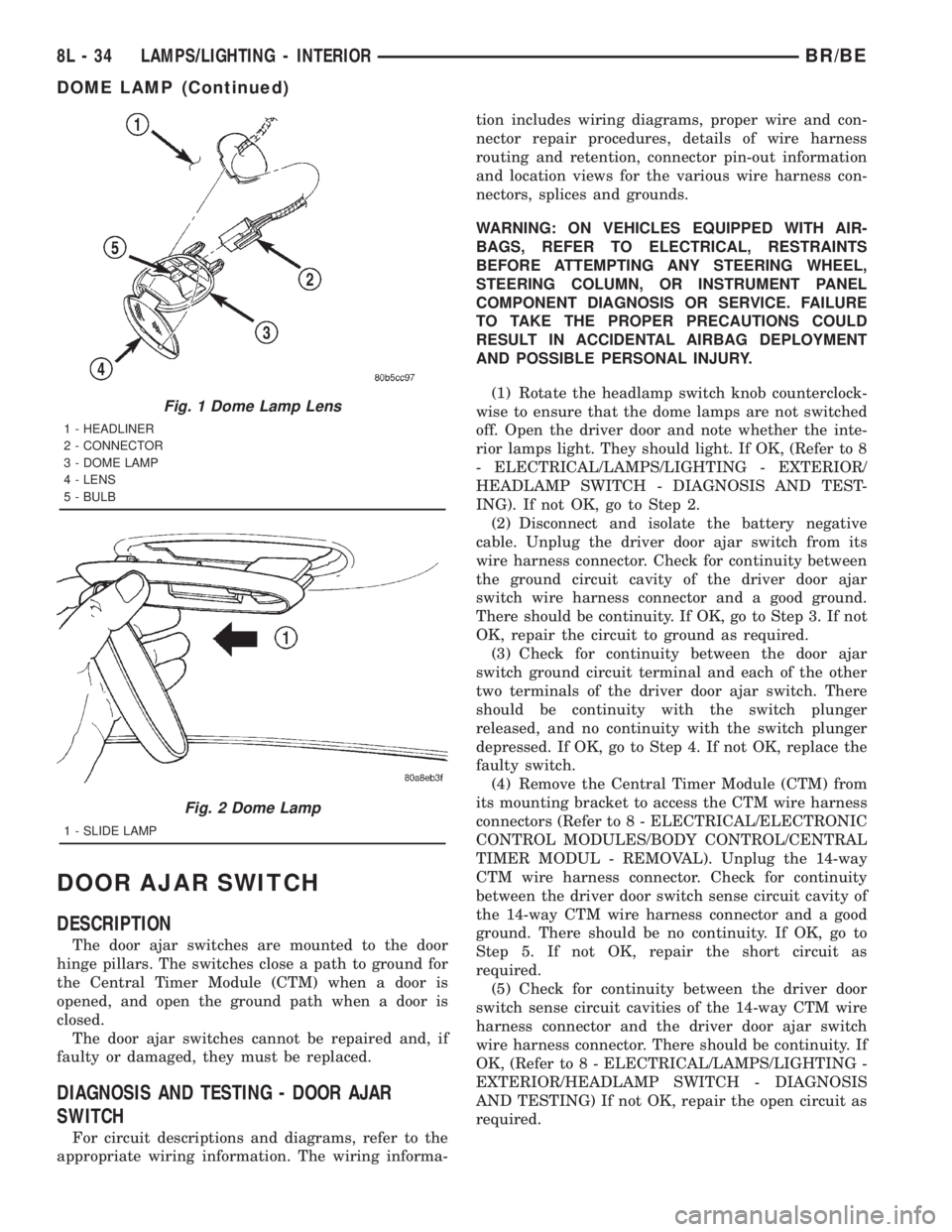
Fig. 1 Dome Lamp Lens
1 - HEADLINER
2 - CONNECTOR
3 - DOME LAMP
4 - LENS
5 - BULB
Fig. 2 Dome Lamp
1 - SLIDE LAMP
8L - 34 LAMPS/LIGHTING - INTERIORBR/BE
DOME LAMP (Continued)
Page 652 of 2889
OPERATION - POWER LOCK SYSTEM
All versions of the power lock system allow both
doors to be locked or unlocked electrically by operat-
ing the power lock switch on either front door trim
panel. On vehicles that are also equipped with the
optional Remote Keyless Entry (RKE) system, both
doors may also be locked or unlocked using a key in
either front door lock cylinder, or by using the RKE
transmitter. On vehicles with the RKE system, if cer-
tain features have been electronically enabled, the
locks may also be operated automatically by the
high-line or premium Central Timer Module (CTM)
based upon various other inputs. Those features and
their inputs are:
²Automatic Door Lock- If enabled, the high-
line/premium CTM will automatically lock the doors
when it receives a message from the Powertrain Con-
trol Module (PCM) indicating that the vehicle speed
is about 24 kilometers-per-hour (15 miles-per-hour)
or greater. The CTM also monitors the door ajar
switches, and will not activate the automatic door
lock feature until both doors have been closed for at
least five seconds. If this feature is enabled and a
door is opened after the vehicle is moving, the CTM
will also lock the doors five seconds after both doors
are closed.
²Central Locking- Vehicles equipped with a
high-line/premium CTM also have a resistor-multi-
plexed door cylinder lock switch mounted to the back
of the door lock cylinder within each front door. The
CTM continually monitors the input from these
switches to provide the central locking/unlocking fea-
ture. The CTM will automatically lock or unlock both
front doors when either front door is locked or
unlocked using a key.
²Door Lock Inhibit- The high-line/premium
CTM receives inputs from the key-in ignition switch,
the headlamp switch, and the door ajar switches. The
logic within the CTM allows it to monitor these
inputs to provide a door lock inhibit feature. The
door lock inhibit feature prevents the power lock sys-
tem from being energized with a power lock switch
input if the driver door is open with the headlamps
on or the key still in the ignition switch. However,
the locks can still be operated with the manual door
lock button or with a key in the door lock cylinder,
and the power locks will still operate using the RKE
transmitter while the driver door is open with the
headlamps on or a key in the ignition.
²Enhanced Accident Response- If enabled,
the high-line/premium CTM provides an enhanced
accident response feature. This feature uses elec-
tronic message inputs received by the CTM from the
Airbag Control Module (ACM) to determine when an
airbag has been deployed. The CTM also monitors
the state of the power lock system and the vehiclespeed messages from the PCM in order to provide
this feature. If the airbag has been deployed and the
vehicle has stopped moving, the CTM will automati-
cally unlock the doors, prevent the doors from being
locked, and turn on the courtesy lamps inside the
vehicle. Of course, these responses are dependent
upon a functional battery and electrical circuitry fol-
lowing the impact.
All versions of the power lock system operate on
battery current received through a fused B(+) circuit
from a fuse in the Junction Block (JB) so that the
system remains functional, regardless of the ignition
switch position. Also, in both versions of the power
lock system, each power lock switch receives battery
current independent of the other. In vehicles with the
base version of the power lock system, the driver side
power lock switch receives ground through the body
wire harness. A single wire take out of the body wire
harness with an eyelet terminal connector is secured
by a ground screw to the lower left B-pillar (regular
cab, extended cab) or lower left quarter inner panel
(quad cab). The passenger side power lock switch
receives ground through the driver side power lock
switch in the base version of the power lock system.
The base version power lock switches direct the
appropriate battery current and ground feeds to the
power lock motors. In the power lock system for vehi-
cles with the RKE system, the power lock switches
direct a battery current Lock or Unlock request sig-
nal to the high-line or premium CTM, and the CTM
energizes internal relays to direct the appropriate
battery current and ground feeds to the power lock
motors.
OPERATION - REMOTE KEYLESS ENTRY
SYSTEM
On vehicles with the Remote Keyless Entry (RKE)
system, the power locks can be operated remotely
using the RKE transmitter. If the vehicle is so
equipped, the RKE transmitter also arms and dis-
arms the factory-installed Vehicle Theft Security Sys-
tem (VTSS). Three small, recessed buttons on the
outside of the transmitter case labelled Lock, Unlock,
and Panic allow the user to choose the function that
is desired. The RKE transmitter then sends the
appropriate Radio Frequency (RF) signal. An RF
receiver that is integral to the high-line or premium
version of the Central Timer Module (CTM) receives
the transmitted signal, then uses its internal elec-
tronic programming to determine whether the
received signal is valid and what function has been
requested. If the signal is valid, the CTM provides
the programmed features.
Besides operating the power lock system and arm-
ing or disarming the VTSS, the RKE system also
controls the following features:
BR/BEPOWER LOCKS 8N - 3
POWER LOCKS (Continued)
Page 655 of 2889
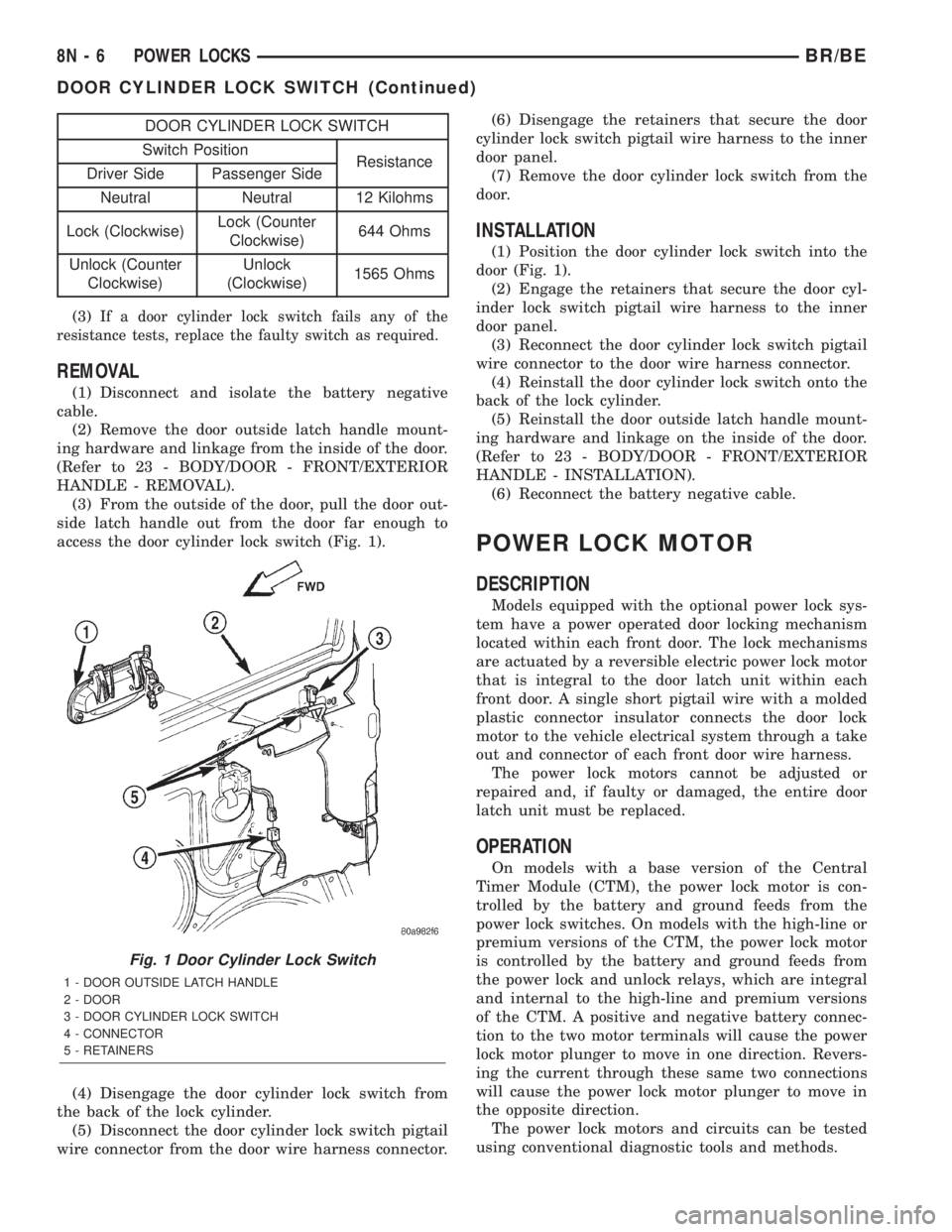
DOOR CYLINDER LOCK SWITCH
Switch Position
Resistance
Driver Side Passenger Side
Neutral Neutral 12 Kilohms
Lock (Clockwise)Lock (Counter
Clockwise)644 Ohms
Unlock (Counter
Clockwise)Unlock
(Clockwise)1565 Ohms
(3)
If a door cylinder lock switch fails any of the
resistance tests, replace the faulty switch as required.
REMOVAL
(1) Disconnect and isolate the battery negative
cable.
(2) Remove the door outside latch handle mount-
ing hardware and linkage from the inside of the door.
(Refer to 23 - BODY/DOOR - FRONT/EXTERIOR
HANDLE - REMOVAL).
(3) From the outside of the door, pull the door out-
side latch handle out from the door far enough to
access the door cylinder lock switch (Fig. 1).
(4) Disengage the door cylinder lock switch from
the back of the lock cylinder.
(5) Disconnect the door cylinder lock switch pigtail
wire connector from the door wire harness connector.(6) Disengage the retainers that secure the door
cylinder lock switch pigtail wire harness to the inner
door panel.
(7) Remove the door cylinder lock switch from the
door.
INSTALLATION
(1) Position the door cylinder lock switch into the
door (Fig. 1).
(2) Engage the retainers that secure the door cyl-
inder lock switch pigtail wire harness to the inner
door panel.
(3) Reconnect the door cylinder lock switch pigtail
wire connector to the door wire harness connector.
(4) Reinstall the door cylinder lock switch onto the
back of the lock cylinder.
(5) Reinstall the door outside latch handle mount-
ing hardware and linkage on the inside of the door.
(Refer to 23 - BODY/DOOR - FRONT/EXTERIOR
HANDLE - INSTALLATION).
(6) Reconnect the battery negative cable.
POWER LOCK MOTOR
DESCRIPTION
Models equipped with the optional power lock sys-
tem have a power operated door locking mechanism
located within each front door. The lock mechanisms
are actuated by a reversible electric power lock motor
that is integral to the door latch unit within each
front door. A single short pigtail wire with a molded
plastic connector insulator connects the door lock
motor to the vehicle electrical system through a take
out and connector of each front door wire harness.
The power lock motors cannot be adjusted or
repaired and, if faulty or damaged, the entire door
latch unit must be replaced.
OPERATION
On models with a base version of the Central
Timer Module (CTM), the power lock motor is con-
trolled by the battery and ground feeds from the
power lock switches. On models with the high-line or
premium versions of the CTM, the power lock motor
is controlled by the battery and ground feeds from
the power lock and unlock relays, which are integral
and internal to the high-line and premium versions
of the CTM. A positive and negative battery connec-
tion to the two motor terminals will cause the power
lock motor plunger to move in one direction. Revers-
ing the current through these same two connections
will cause the power lock motor plunger to move in
the opposite direction.
The power lock motors and circuits can be tested
using conventional diagnostic tools and methods.
Fig. 1 Door Cylinder Lock Switch
1 - DOOR OUTSIDE LATCH HANDLE
2 - DOOR
3 - DOOR CYLINDER LOCK SWITCH
4 - CONNECTOR
5 - RETAINERS
8N - 6 POWER LOCKSBR/BE
DOOR CYLINDER LOCK SWITCH (Continued)
Page 662 of 2889
(3) Remove the nut that secures the power mirror
switch to the driver side front door trim panel.
(4) Remove the trim panel from the inside of the
driver side front door. (Refer to 23 - BODY/DOOR -
FRONT/TRIM PANEL - REMOVAL) for the proce-
dures.
(5) Pull the trim panel away from the inner door
far enough to access the power mirror switch wire
harness connector.
(6) Unplug the power mirror switch wire harness
connector.
(7) Remove the power mirror switch from the back
of the door trim panel.
INSTALLATION
(1) Insert the power mirror switch to the back of
the door trim panel.
(2) Connect the power mirror switch to the har-
ness connector.
(3) Install the trim panel to the inside of the
driver side door. (Refer to 23 - BODY/DOOR -
FRONT/TRIM PANEL - INSTALLATION).
(4) Install the nut that secures the power mirror
switch to the driver side front door.
(5) Push the control knob on to the power mirror
switch.
(6) Connect the battery negative cable.
SIDEVIEW MIRROR
DESCRIPTION
Each power mirror head contains two electric
motors, two drive mechanisms, and the mirror glass.
One motor and drive controls mirror up-and-down
movement, and the other controls right-and-left
movement.
OPERATION
The power mirrors in vehicles equipped with the
available heated mirror system option also include an
electric heating grid located behind the mirror glass.
This heating grid is energized by the heated mirror
relay in the heater and air conditioner control only
when the ignition switch is in the On position, and
the heated mirror system is turned on. (Refer to 8 -
ELECTRICAL/HEATED MIRRORS - DESCRIP-
TION) for more information.
The power mirror assembly cannot be repaired. If
any component of the power mirror unit is faulty or
damaged, the entire assembly must be replaced.
DIAGNOSIS AND TESTING - SIDEVIEW
MIRROR
For circuit descriptions and diagrams, refer to the
appropriate wiring information. The wiring informa-
tion includes wiring diagrams, proper wire and con-
nector repair procedures, details of wire harness
routing and retention, connector pin-out information
and location views for the various wire harness con-
nectors, splices and grounds.
(1) Check the fuses in the Power Distribution Cen-
ter (PDC) and the junction block. If OK, go to Step 2.
If not OK, repair the shorted circuit or component as
required and replace the faulty fuse(s).
(2) Check for battery voltage at the fuse in the
junction block. If OK, go to Step 3. If not OK, repair
the open circuit to the PDC as required.
(3) Disconnect and isolate the battery negative
cable. Remove the driver side door trim panel and
unplug the wire harness connector from the power
mirror switch. Connect the battery negative cable.
Check for battery voltage at the fused B(+) circuit
cavity in the door wire harness half of the power mir-
ror switch wire harness connector. If OK, go to Step
4. If not OK, repair the open circuit to the junction
block as required.
BR/BEPOWER MIRRORS 8N - 13
POWER MIRROR SWITCH (Continued)
Page 666 of 2889
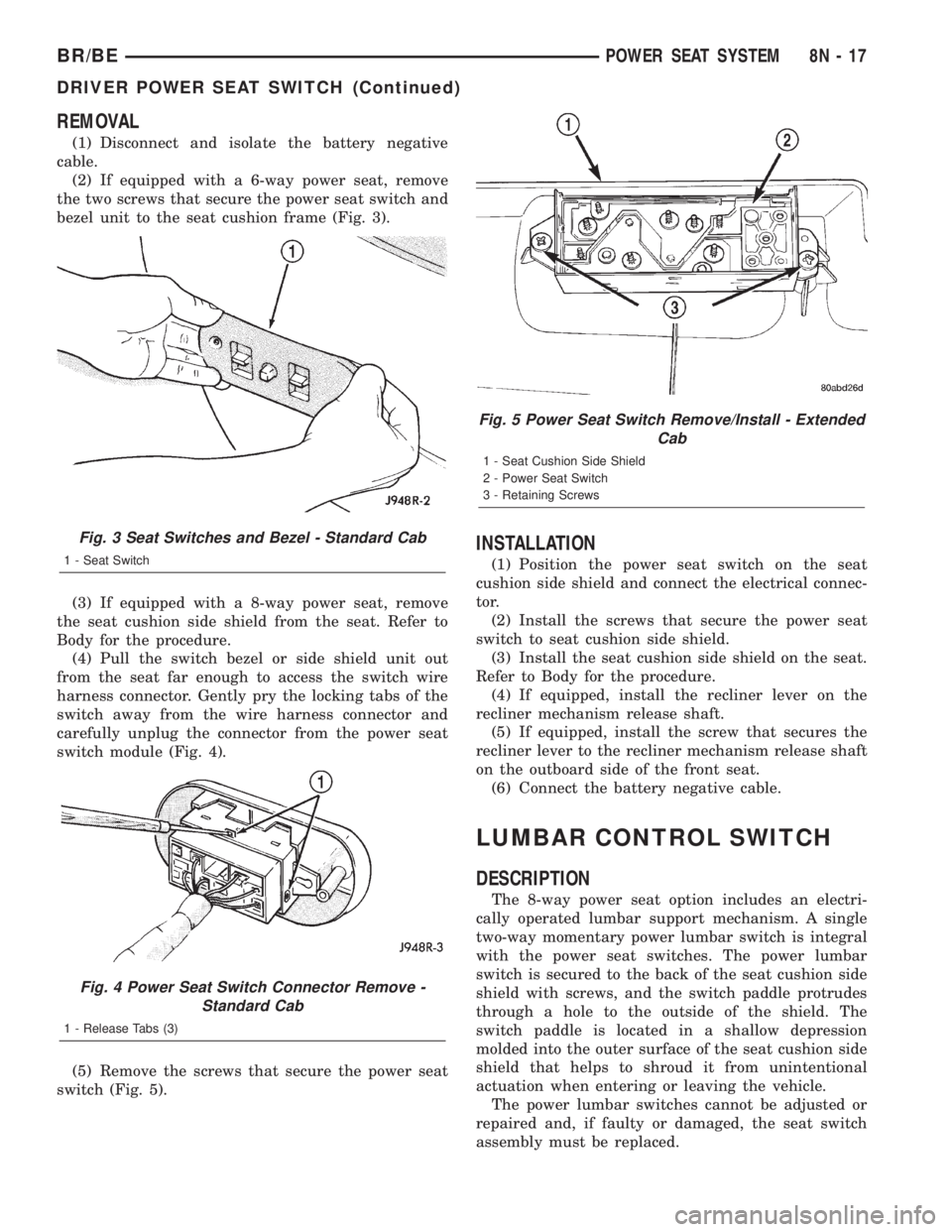
REMOVAL
(1) Disconnect and isolate the battery negative
cable.
(2) If equipped with a 6-way power seat, remove
the two screws that secure the power seat switch and
bezel unit to the seat cushion frame (Fig. 3).
(3) If equipped with a 8-way power seat, remove
the seat cushion side shield from the seat. Refer to
Body for the procedure.
(4) Pull the switch bezel or side shield unit out
from the seat far enough to access the switch wire
harness connector. Gently pry the locking tabs of the
switch away from the wire harness connector and
carefully unplug the connector from the power seat
switch module (Fig. 4).
(5) Remove the screws that secure the power seat
switch (Fig. 5).
INSTALLATION
(1) Position the power seat switch on the seat
cushion side shield and connect the electrical connec-
tor.
(2) Install the screws that secure the power seat
switch to seat cushion side shield.
(3) Install the seat cushion side shield on the seat.
Refer to Body for the procedure.
(4) If equipped, install the recliner lever on the
recliner mechanism release shaft.
(5) If equipped, install the screw that secures the
recliner lever to the recliner mechanism release shaft
on the outboard side of the front seat.
(6) Connect the battery negative cable.
LUMBAR CONTROL SWITCH
DESCRIPTION
The 8-way power seat option includes an electri-
cally operated lumbar support mechanism. A single
two-way momentary power lumbar switch is integral
with the power seat switches. The power lumbar
switch is secured to the back of the seat cushion side
shield with screws, and the switch paddle protrudes
through a hole to the outside of the shield. The
switch paddle is located in a shallow depression
molded into the outer surface of the seat cushion side
shield that helps to shroud it from unintentional
actuation when entering or leaving the vehicle.
The power lumbar switches cannot be adjusted or
repaired and, if faulty or damaged, the seat switch
assembly must be replaced.
Fig. 3 Seat Switches and Bezel - Standard Cab
1 - Seat Switch
Fig. 4 Power Seat Switch Connector Remove -
Standard Cab
1 - Release Tabs (3)
Fig. 5 Power Seat Switch Remove/Install - Extended
Cab
1 - Seat Cushion Side Shield
2 - Power Seat Switch
3 - Retaining Screws
BR/BEPOWER SEAT SYSTEM 8N - 17
DRIVER POWER SEAT SWITCH (Continued)
Page 667 of 2889
OPERATION
When the power lumbar switch paddle is actuated,
a battery feed and a ground path are applied through
the switch contacts to the power lumbar adjuster
motor. The motor operates to move the lumbar
adjuster through its drive unit in the selected direc-
tion until the switch is released, or until the travel
limit of the adjuster is reached. When the switch is
moved in the opposite direction, the battery feed and
ground path to the motor are reversed through the
switch contacts. This causes the motor to run in the
opposite direction.
The power lumbar switch should not be held
applied in either direction after the adjuster has
reached its travel limit. The power lumbar adjuster
motor contains a self-resetting circuit breaker to pro-
tect it from overload. However, consecutive or fre-
quent resetting of the circuit breaker must not be
allowed to continue, or the motor may be damaged.
REMOVAL
The power lumbar switch is integral with the other
power seat switches. Refer to the appropriate driver
or passenger power front seat switch removal and/or
installation procedure.
LUMBAR MOTOR
DESCRIPTION
The 8-way power seat option includes an electri-
cally operated lumbar support mechanism. The only
visible evidence of this option is the separate power
lumbar switch control paddle that is located on the
outboard seat cushion side shield, next to the other
power seat switch control knobs. The power lumbar
adjuster and motor are concealed beneath the seat
back trim cover and padding, where they are secured
to a molded plastic back panel and to the seat back
frame.
The power lumbar adjuster cannot be repaired, and
is serviced only as a unit with the seat back frame. If
the power lumbar adjuster or the seat back frame
are damaged or faulty, the entire seat back frame
unit must be replaced. Refer toBucket Seat Back
in Body for the seat back frame service procedures.
OPERATION
The power lumbar adjuster mechanism includes a
reversible electric motor that is secured to the
inboard side of the seat back panel and is connected
to a worm-drive gearbox. The motor and gearbox
operate the lumbar adjuster mechanism in the center
of the seat back by extending and retracting a cable
that actuates a lever. The action of this lever com-
presses or relaxes a grid of flexible slats. The morethis grid is compressed, the more the slats bow out-
ward against the center of the seat back padding,
providing additional lumbar support.
DIAGNOSIS & TESTING - POWER LUMBAR
ADJUSTER
Actuate the power lumbar switch to move the
power lumbar adjuster in each direction. The power
lumbar adjuster should move in both directions. It
should be noted that the power lumber adjuster nor-
mally operates very quietly and exhibits little visible
movement. If the power lumbar adjuster fails to oper-
ate in only one direction, move the adjuster a short
distance in the opposite direction and test again to be
certain that the adjuster is not at its travel limit. If
the power lumbar adjuster still fails to operate in
only one direction, refer toPower Lumbar Switch
in the Diagnosis and Testing section of this group. If
the power lumbar adjuster fails to operate in either
direction, perform the following tests. For complete
circuit diagrams, refer toPower Seatin Wiring Dia-
grams.
(1) Check the power seat circuit breaker in the
junction block. If OK, go to Step 2. If not OK, replace
the faulty power seat circuit breaker.
(2) Check for battery voltage at the power seat cir-
cuit breaker in the junction block. If OK, go to Step
3. If not OK, repair the open fused B(+) circuit to the
fuse in the Power Distribution Center as required.
(3) Remove the outboard seat cushion side shield
from the seat. Disconnect the seat wire harness con-
nector from the power lumbar switch connector
receptacle. Check for battery voltage at the fused
B(+) circuit cavity of the power seat wire harness
connector for the power lumbar switch. If OK, go to
Step 4. If not OK, repair the open fused B(+) circuit
to the power seat circuit breaker in the junction
block as required.
(4) Check for continuity between the ground cir-
cuit cavity of the power seat wire harness connector
for the power lumbar switch and a good ground.
There should be continuity. If OK, go to Step 5. If not
OK, repair the open ground circuit to ground as
required.
(5) Test the power lumbar switch. Refer toPower
Lumbar Switchin the Diagnosis and Testing sec-
tion of this group. If the switch tests OK, test the cir-
cuits of the power seat wire harness between the
power lumbar adjuster motor and the power lumbar
switch for shorts or opens. If the circuits check OK,
replace the faulty seat back frame assembly. If the
circuits are not OK, repair the power seat wire har-
ness as required.
8N - 18 POWER SEAT SYSTEMBR/BE
LUMBAR CONTROL SWITCH (Continued)
Page 669 of 2889
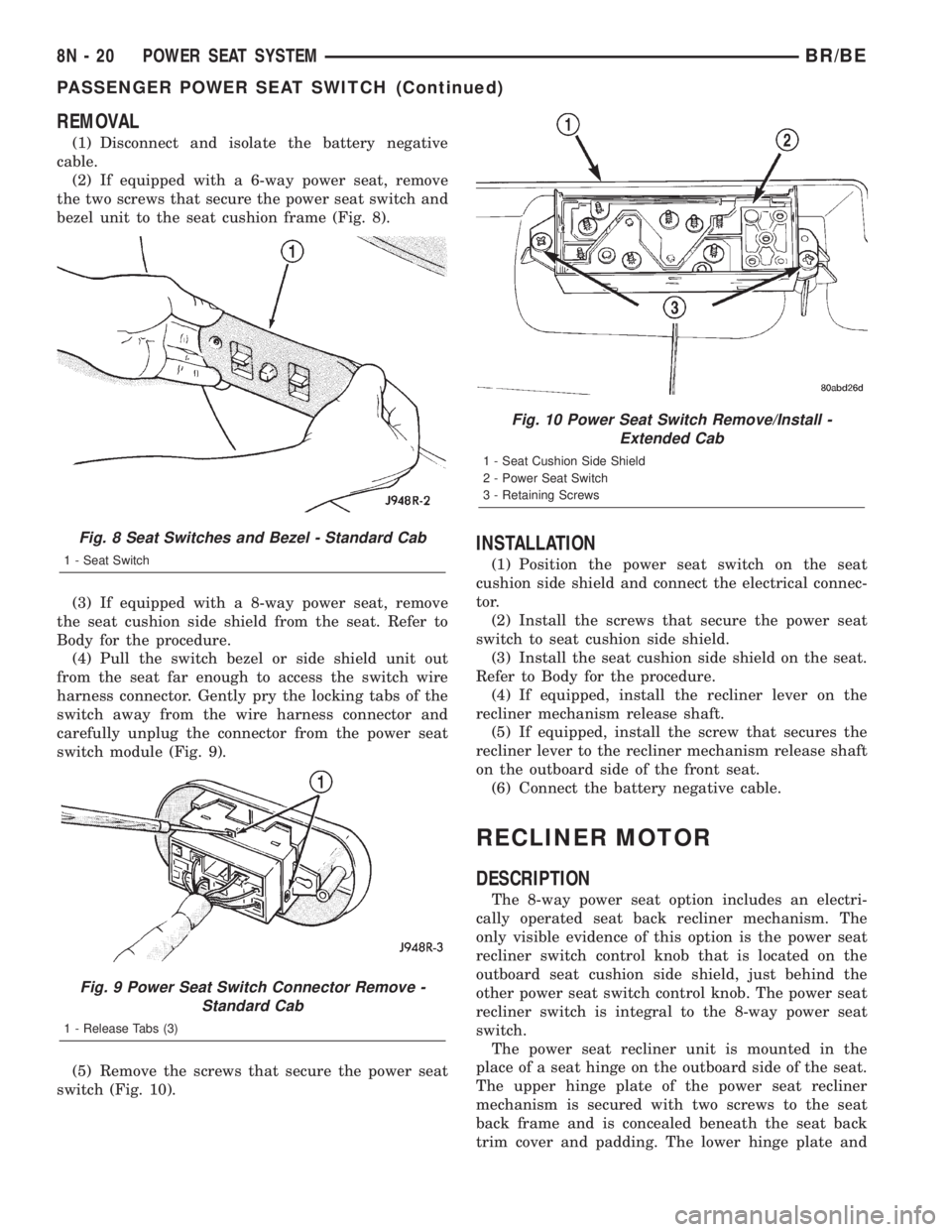
REMOVAL
(1) Disconnect and isolate the battery negative
cable.
(2) If equipped with a 6-way power seat, remove
the two screws that secure the power seat switch and
bezel unit to the seat cushion frame (Fig. 8).
(3) If equipped with a 8-way power seat, remove
the seat cushion side shield from the seat. Refer to
Body for the procedure.
(4) Pull the switch bezel or side shield unit out
from the seat far enough to access the switch wire
harness connector. Gently pry the locking tabs of the
switch away from the wire harness connector and
carefully unplug the connector from the power seat
switch module (Fig. 9).
(5) Remove the screws that secure the power seat
switch (Fig. 10).
INSTALLATION
(1) Position the power seat switch on the seat
cushion side shield and connect the electrical connec-
tor.
(2) Install the screws that secure the power seat
switch to seat cushion side shield.
(3) Install the seat cushion side shield on the seat.
Refer to Body for the procedure.
(4) If equipped, install the recliner lever on the
recliner mechanism release shaft.
(5) If equipped, install the screw that secures the
recliner lever to the recliner mechanism release shaft
on the outboard side of the front seat.
(6) Connect the battery negative cable.
RECLINER MOTOR
DESCRIPTION
The 8-way power seat option includes an electri-
cally operated seat back recliner mechanism. The
only visible evidence of this option is the power seat
recliner switch control knob that is located on the
outboard seat cushion side shield, just behind the
other power seat switch control knob. The power seat
recliner switch is integral to the 8-way power seat
switch.
The power seat recliner unit is mounted in the
place of a seat hinge on the outboard side of the seat.
The upper hinge plate of the power seat recliner
mechanism is secured with two screws to the seat
back frame and is concealed beneath the seat back
trim cover and padding. The lower hinge plate and
Fig. 8 Seat Switches and Bezel - Standard Cab
1 - Seat Switch
Fig. 9 Power Seat Switch Connector Remove -
Standard Cab
1 - Release Tabs (3)
Fig. 10 Power Seat Switch Remove/Install -
Extended Cab
1 - Seat Cushion Side Shield
2 - Power Seat Switch
3 - Retaining Screws
8N - 20 POWER SEAT SYSTEMBR/BE
PASSENGER POWER SEAT SWITCH (Continued)
Page 673 of 2889
vehicle with the inoperative window. Unplug the wire
harness connector from the switch and bezel unit.
(2) Connect the battery negative cable. Turn the
ignition switch to the On position. Check for battery
voltage at the fused ignition switch output (run) cir-
cuit cavity in the body half of the switch and bezel
unit wire harness connector. If OK, and the inopera-
tive power window is on the driver side, go to Step 4.
If OK, and the inoperative power window is on the
passenger side, go to Step 3. If not OK, repair the
open circuit to the junction block as required.
(3) Disconnect and isolate the battery negative
cable. Check for continuity between each of the two
master window switch right up/down control circuit
cavities in the body half of the passenger side switch
and bezel unit wire harness connector and a good
ground. In each case, there should be continuity. If
OK, go to Step 4. If not OK, repair the open circuit to
the driver side switch and bezel unit as required.
(4) Test the power window switch continuity.
(Refer to 8 - ELECTRICAL/POWER WINDOWS/
POWER WINDOW SWITCH - DIAGNOSIS AND
TESTING). If OK, go to Step 5. If not OK, replace
the faulty power window and lock switch and bezel
unit.
(5) Refer to the appropriate wiring information.
The wiring information includes wiring diagrams,
proper wire and connector repair procedures, details
of wire harness routing and retention, connector pin-
out information and location views for the various
wire harness connectors, splices and grounds. Check
the continuity in each circuit between the inoperative
power window and lock switch and bezel unit wire
harness connector cavities and the corresponding
power window motor wire harness connector cavities.
If OK, (Refer to 8 - ELECTRICAL/POWER WIN-
DOWS/WINDOW MOTOR - DIAGNOSIS AND TEST-
ING). If not OK, repair the open circuit(s) as
required.
NOTE: The passenger side power window switch
receives the ground feed for operating the passen-
ger side power window motor through the driver
side power window switch and wire harness con-
nector.
POWER WINDOW SWITCH
DESCRIPTION
The power windows are controlled by two-way
switches integral to the power window and lock
switch and bezel unit on the trim panel of each front
door. A second power window switch in the driver
side switch and bezel unit allows the driver to control
the passenger side window. A Light-Emitting Diode(LED) in the paddle of each switch is illuminated
whenever the ignition switch is in the On position.
OPERATION
The power window switch for the driver side front
door has an Auto label on it. This switch has a sec-
ond detent position beyond the normal Down position
that provides an automatic one-touch window down
feature. This feature is controlled by an electronic
circuit and a relay that are integral to the driver side
front door power window and lock switch unit.
The power window switches control the battery
and ground feeds to the power window motors. The
passenger side power window switch receives a
ground feed through the driver side power window
switch for operating the passenger side power win-
dow motor.
The power window and lock switch and bezel unit
cannot be repaired and, if faulty or damaged, the
entire switch and bezel unit must be replaced.
DIAGNOSIS AND TESTING - POWER WINDOW
SWITCH
The auto down feature of the driver side power
window switch is controlled by an electronic circuit
within the switch unit. The auto down circuitry is
activated when the driver side power window switch
is moved to the second detent in the Down direction.
The outputs from the auto down circuitry are carried
through the same switch pins that provide the nor-
mal down function. The auto down circuit cannot be
tested. If the driver side power window switch conti-
nuity tests are passed, but the auto down feature is
inoperative, replace the faulty driver side power win-
dow switch unit.
The Light-Emitting Diode (LED) illumination
lamps for all of the power window and lock switch
and bezel unit switch paddles receive battery current
through the power window circuit breaker in the
junction block. If all of the LEDs are inoperative in
either or both power window and lock switch and
bezel units and the power windows are inoperative,
perform the diagnosis for Power Window System in
this group. If the power windows operate, but any or
all of the LEDs are inoperative, the power window
and lock switch and bezel unit with the inoperative
LED(s) is faulty and must be replaced. For circuit
descriptions and diagrams, refer to the appropriate
wiring information. The wiring information includes
wiring diagrams, proper wire and connector repair
procedures, details of wire harness routing and
retention, connector pin-out information and location
views for the various wire harness connectors, splices
and grounds.
8N - 24 POWER WINDOWSBR/BE
POWER WINDOWS (Continued)
Page 679 of 2889
DIAGNOSIS AND TESTING - AIRBAG SYSTEM
Proper diagnosis and testing of the airbag system
components, the PCI data bus, the data bus message
inputs to and outputs from the ElectroMechanical
Instrument Cluster (EMIC) or the Airbag Control
Module (ACM), as well as the retrieval or erasure of
a Diagnostic Trouble Code (DTC) from the ACM
requires the use of a DRBIIItscan tool. Refer to the
appropriate diagnostic information.
WARNING: ON VEHICLES EQUIPPED WITH AIR-
BAGS, DISABLE THE AIRBAG SYSTEM BEFORE
ATTEMPTING ANY STEERING WHEEL, STEERING
COLUMN, OR INSTRUMENT PANEL COMPONENT
DIAGNOSIS OR SERVICE. DISCONNECT AND ISO-
LATE THE BATTERY NEGATIVE (GROUND) CABLE,
THEN WAIT TWO MINUTES FOR THE AIRBAG SYS-
TEM CAPACITOR TO DISCHARGE BEFORE PER-
FORMING FURTHER DIAGNOSIS OR SERVICE. THIS
IS THE ONLY SURE WAY TO DISABLE THE AIRBAG
SYSTEM. FAILURE TO TAKE THE PROPER PRE-
CAUTIONS COULD RESULT IN ACCIDENTAL AIR-
BAG DEPLOYMENT AND POSSIBLE PERSONAL
INJURY.
STANDARD PROCEDURE - HANDLING
NON-DEPLOYED AIRBAGS
At no time should any source of electricity be per-
mitted near the inflator on the back of a non-de-
ployed airbag. When carrying a non-deployed airbag,
the trim cover or airbag cushion side of the unit
should be pointed away from the body to minimize
injury in the event of an accidental deployment. If
the airbag unit is placed on a bench or any other sur-
face, the trim cover or airbag cushion side of the unit
should be face up to minimize movement in the event
of an accidental deployment. In addition, the airbag
system should be disarmed whenever any steering
wheel, steering column, or instrument panel compo-
nents require diagnosis or service. Failure to observe
this warning could result in accidental airbag deploy-
ment and possible personal injury.
All damaged or faulty and non-deployed driver or
passenger airbags which are replaced on vehicles are
to be returned. If an airbag unit is faulty or damaged
and non-deployed, refer to the parts return list in the
current DaimlerChrysler Corporation Warranty Poli-
cies and Procedures manual for the proper handling
and disposal procedures.
AIRBAG STORAGE
An airbag must be stored in its original, special
container until it is used for service. Also, it must be
stored in a clean, dry environment; away from
sources of extreme heat, sparks, and high electricalenergy. Always place or store any airbag on a surface
with its trim cover or airbag cushion side facing up,
to minimize movement in case of an accidental
deployment.
STANDARD PROCEDURE - SERVICE AFTER AN
AIRBAG DEPLOYMENT
Any vehicle which is to be returned to use follow-
ing an airbag deployment, must have both airbags,
the driver airbag trim cover, the clockspring, and the
steering column assembly replaced. These compo-
nents are not intended for reuse and will be damaged
or weakened as a result of an airbag deployment,
which may or may not be obvious during a visual
inspection. Other vehicle components should be
closely inspected, but are to be replaced only as
required by the extent of the visible damage
incurred.
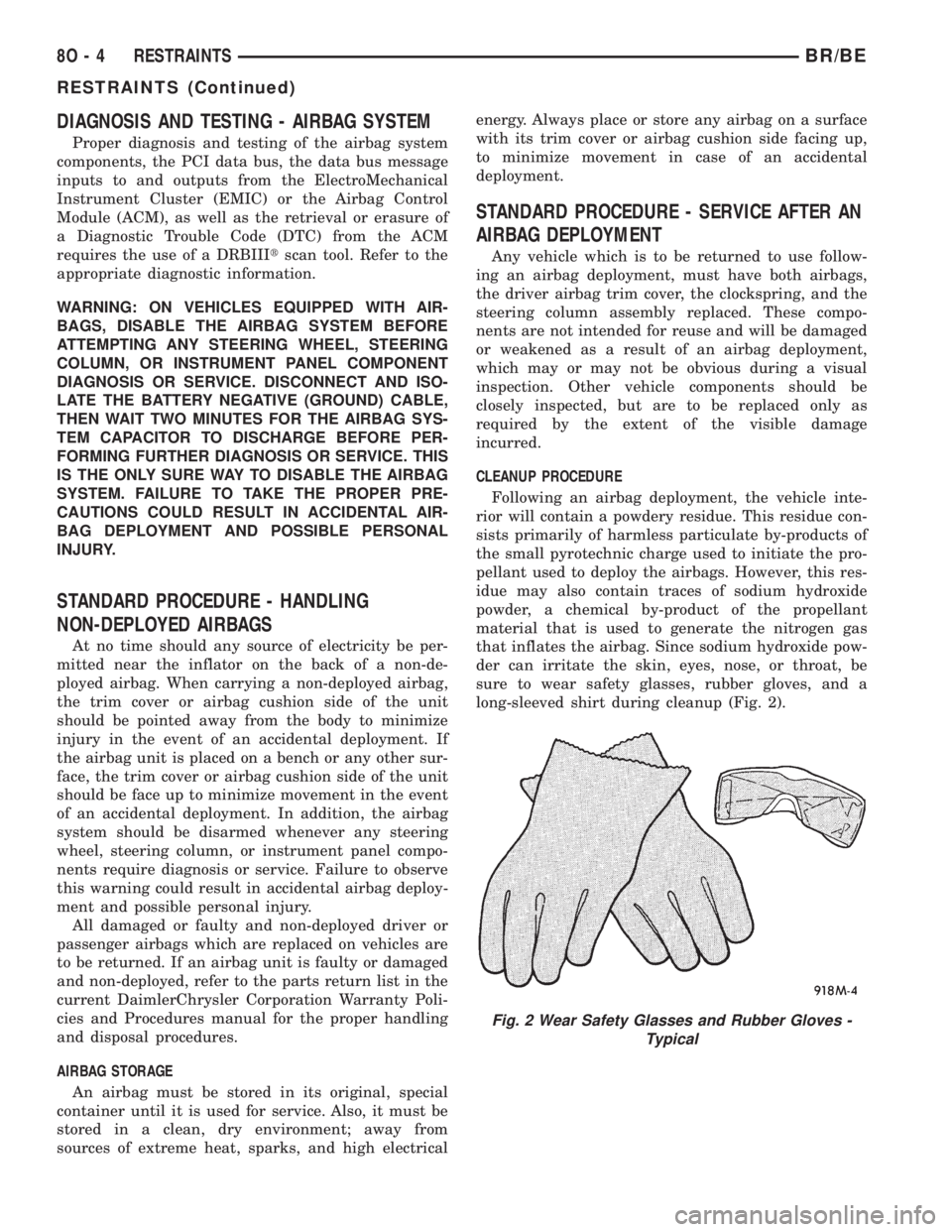
CLEANUP PROCEDURE
Following an airbag deployment, the vehicle inte-
rior will contain a powdery residue. This residue con-
sists primarily of harmless particulate by-products of
the small pyrotechnic charge used to initiate the pro-
pellant used to deploy the airbags. However, this res-
idue may also contain traces of sodium hydroxide
powder, a chemical by-product of the propellant
material that is used to generate the nitrogen gas
that inflates the airbag. Since sodium hydroxide pow-
der can irritate the skin, eyes, nose, or throat, be
sure to wear safety glasses, rubber gloves, and a
long-sleeved shirt during cleanup (Fig. 2).
Fig. 2 Wear Safety Glasses and Rubber Gloves -
Typical
8O - 4 RESTRAINTSBR/BE
RESTRAINTS (Continued)
Page 682 of 2889
the need for an airbag deployment by detecting
impact energy of a lesser magnitude than that of the
electronic impact sensor, and must be closed in order
for the airbags to deploy. The impact sensor and saf-
ing sensor are calibrated for the specific vehicle, and
are only serviced as a unit with the ACM.
REMOVAL
WARNING: DISABLE THE AIRBAG SYSTEM
BEFORE ATTEMPTING ANY STEERING WHEEL,
STEERING COLUMN, OR INSTRUMENT PANEL
COMPONENT DIAGNOSIS OR SERVICE. DISCON-
NECT AND ISOLATE THE BATTERY NEGATIVE
(GROUND) CABLE, THEN WAIT TWO MINUTES FOR
THE AIRBAG SYSTEM CAPACITOR TO DISCHARGE
BEFORE PERFORMING FURTHER DIAGNOSIS OR
SERVICE. THIS IS THE ONLY SURE WAY TO DIS-
ABLE THE AIRBAG SYSTEM. FAILURE TO TAKE
THE PROPER PRECAUTIONS COULD RESULT IN
ACCIDENTAL AIRBAG DEPLOYMENT AND POSSI-
BLE PERSONAL INJURY.
WARNING: THE AIRBAG CONTROL MODULE CON-
TAINS THE IMPACT SENSOR, WHICH ENABLES
THE SYSTEM TO DEPLOY THE AIRBAGS. NEVER
STRIKE OR KICK THE AIRBAG CONTROL MODULE,
AS IT CAN DAMAGE THE IMPACT SENSOR OR
AFFECT ITS CALIBRATION. IF AN AIRBAG CON-
TROL MODULE IS ACCIDENTALLY DROPPED DUR-
ING SERVICE, THE MODULE MUST BE SCRAPPED
AND REPLACED WITH A NEW UNIT. FAILURE TO
OBSERVE THIS WARNING COULD RESULT IN ACCI-
DENTAL, INCOMPLETE, OR IMPROPER AIRBAG
DEPLOYMENT AND POSSIBLE OCCUPANT INJU-
RIES.
(1) Disconnect and isolate the battery negative
cable. If either of the airbags has not been deployed,
wait two minutes for the system capacitor to dis-
charge before further service.
(2) If the vehicle is equipped with a manual trans-
mission, remove the center floor console from the
floor panel transmission tunnel. (Refer to 23 - BODY/
INTERIOR/CENTER CONSOLE - REMOVAL).
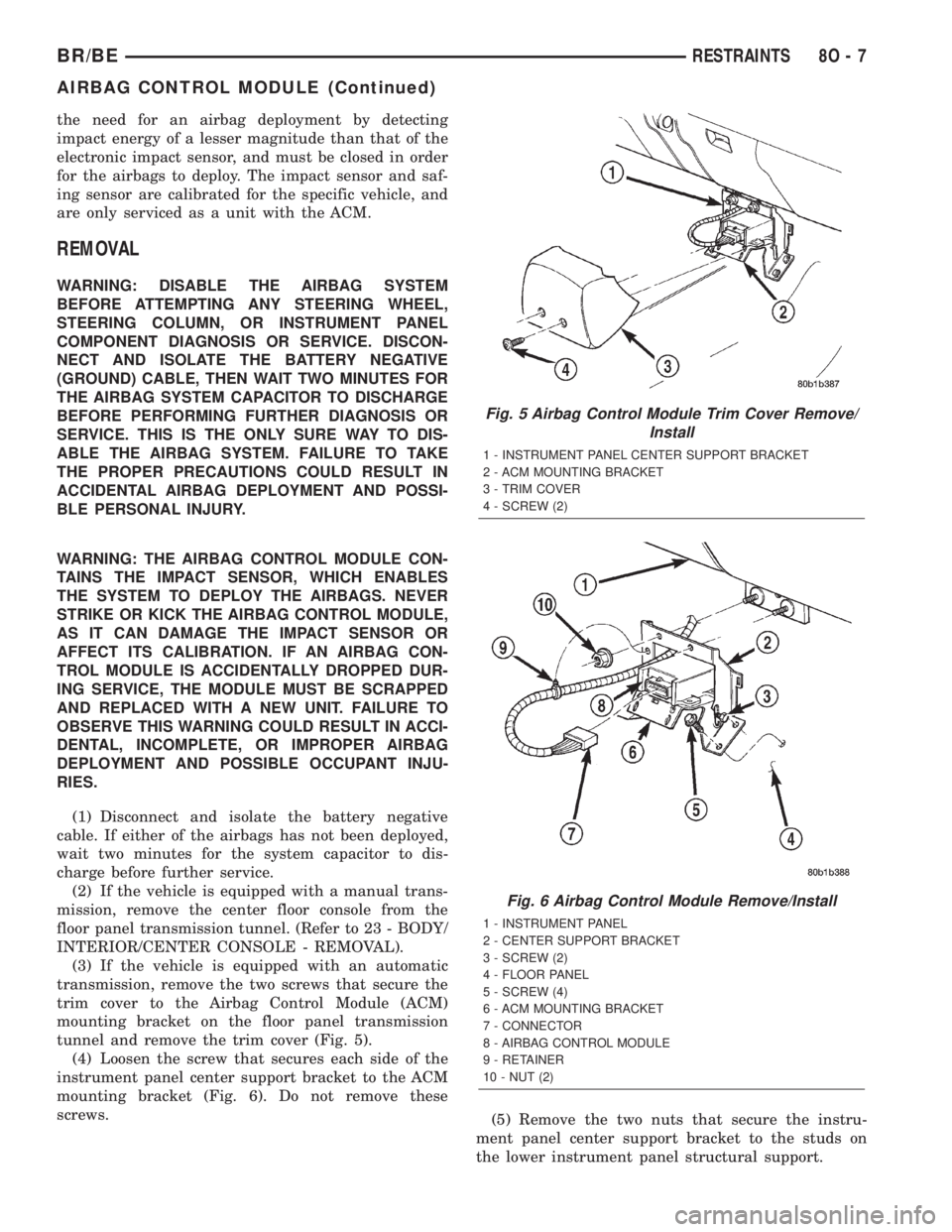
(3) If the vehicle is equipped with an automatic
transmission, remove the two screws that secure the
trim cover to the Airbag Control Module (ACM)
mounting bracket on the floor panel transmission
tunnel and remove the trim cover (Fig. 5).
(4) Loosen the screw that secures each side of the
instrument panel center support bracket to the ACM
mounting bracket (Fig. 6). Do not remove these
screws.
(5) Remove the two nuts that secure the instru-
ment panel center support bracket to the studs on
the lower instrument panel structural support.
Fig. 5 Airbag Control Module Trim Cover Remove/
Install
1 - INSTRUMENT PANEL CENTER SUPPORT BRACKET
2 - ACM MOUNTING BRACKET
3 - TRIM COVER
4 - SCREW (2)
Fig. 6 Airbag Control Module Remove/Install
1 - INSTRUMENT PANEL
2 - CENTER SUPPORT BRACKET
3 - SCREW (2)
4 - FLOOR PANEL
5 - SCREW (4)
6 - ACM MOUNTING BRACKET
7 - CONNECTOR
8 - AIRBAG CONTROL MODULE
9 - RETAINER
10 - NUT (2)
BR/BERESTRAINTS 8O - 7
AIRBAG CONTROL MODULE (Continued)