body control DODGE RAM 2001 Service Owner's Guide
[x] Cancel search | Manufacturer: DODGE, Model Year: 2001, Model line: RAM, Model: DODGE RAM 2001Pages: 2889, PDF Size: 68.07 MB
Page 530 of 2889
Clusterin the index of this service manual for the
proper cluster illumination lamps diagnosis and test-
ing procedures. If the problem being diagnosed
involves inoperative heated seat switch indicator
lamps and the heated seat elements do not heat,
refer to Step 4. If the problem being diagnosed
involves inoperative heated seat switch indicator
lamps and the heated seat elements do heat, go to
Step 8. If the problem being diagnosed involves a
heated seat switch indicator lamp that remains illu-
minated after the heated seat has been turned Off,
refer toHeated Seat Modulein Electronic Control
Modules for the location of the proper heated seat
module diagnosis and testing procedures. Also refer
to the Body Diagnostic Manual for additional diagno-
sis and testing procedures.
(2) Disconnect and isolate the battery negative
cable. Remove the heated seat switch and bezel unit
from the instrument panel. Disconnect the instru-
ment panel wire harness connector from the connec-
tor receptacle on the back of the heated seat switch
to be tested. Check for continuity between the ground
circuit cavity of the instrument panel wire harness
connector for the heated seat switch and a good
ground. There should be continuity. If OK, go to Step
3. If not OK, repair the open ground circuit to ground
as required.
(3) Reconnect the battery negative cable. Turn the
park lamps on with the headlamp switch. Rotate the
panel lamps dimmer thumbwheel on the headlamp
switch upward to just before the interior lamps
detent. Check for battery voltage at the fused panel
lamps dimmer switch signal circuit cavity of the
instrument panel wire harness connector for the
heated seat switch. If OK, replace the faulty heated
seat switch. If not OK, repair the open fused panel
lamps dimmer switch signal circuit to the fuse in the
Junction Block (JB) as required.
(4) Check the fused ignition switch output (run)
fuse in the Junction Block (JB). If OK, go to Step 5.
If not OK, repair the shorted circuit or component as
required and replace the faulty fuse.
(5) Turn the ignition switch to the On position.
Check for battery voltage at the fused ignition switch
output (run) fuse in the JB. If OK, go to Step 6. If
not OK, repair the open fused ignition switch output
(run) circuit to the ignition switch as required.
(6) Disconnect and isolate the battery negative
cable. Remove the heated seat switch and bezel unit
from the instrument panel. Disconnect the instru-
ment panel wire harness connector from the connec-
tor receptacle on the back of the heated seat switch
to be tested. Reconnect the battery negative cable.
Turn the ignition switch to the On position. Check
for battery voltage at the fused ignition switch out-
put (run) circuit cavity of the instrument panel wireharness connector for the heated seat switch. If OK,
go to Step 7. If not OK, repair the open fused ignition
switch output (run) circuit to the JB fuse as required.
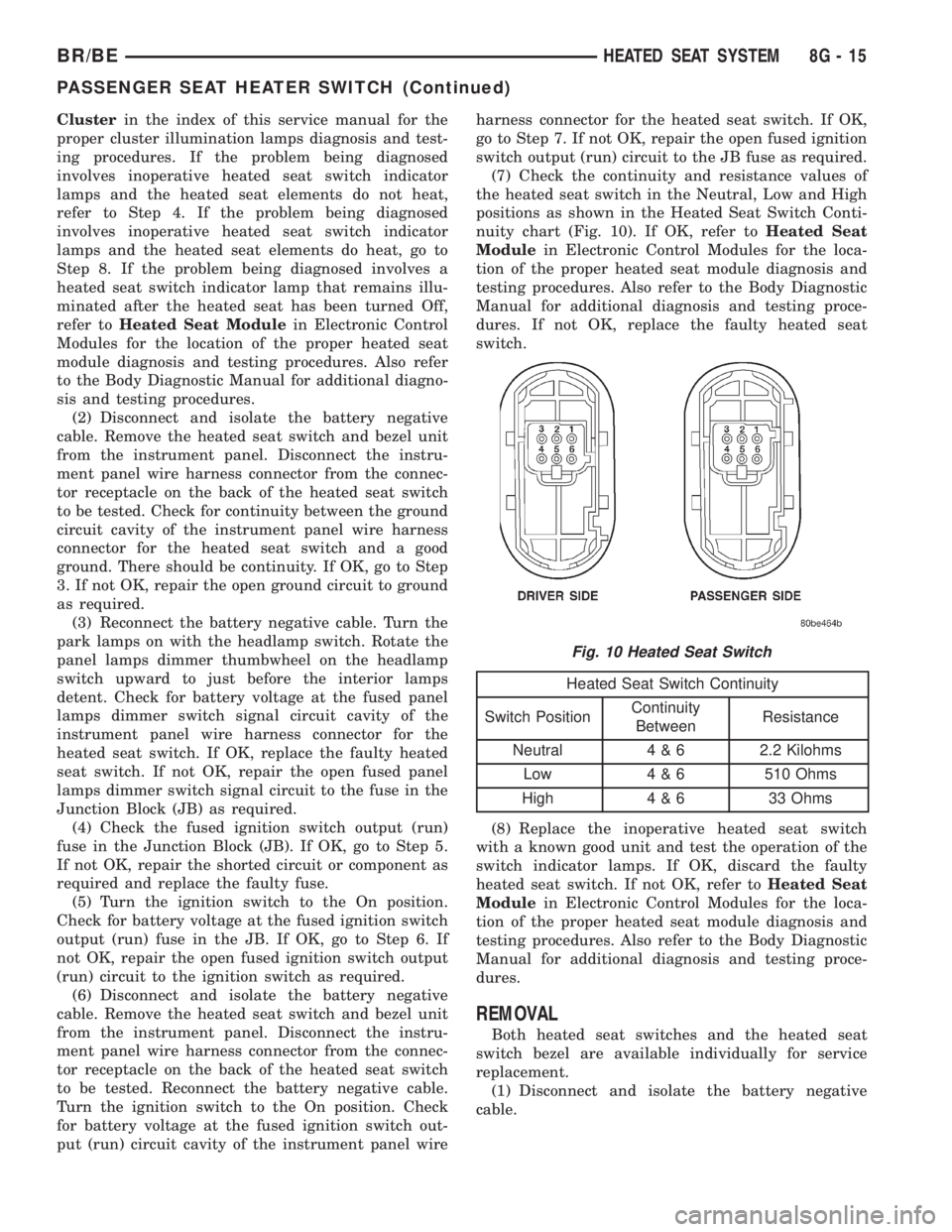
(7) Check the continuity and resistance values of
the heated seat switch in the Neutral, Low and High
positions as shown in the Heated Seat Switch Conti-
nuity chart (Fig. 10). If OK, refer toHeated Seat
Modulein Electronic Control Modules for the loca-
tion of the proper heated seat module diagnosis and
testing procedures. Also refer to the Body Diagnostic
Manual for additional diagnosis and testing proce-
dures. If not OK, replace the faulty heated seat
switch.
Heated Seat Switch Continuity
Switch PositionContinuity
BetweenResistance
Neutral 4 & 6 2.2 Kilohms
Low 4 & 6 510 Ohms
High 4 & 6 33 Ohms
(8) Replace the inoperative heated seat switch
with a known good unit and test the operation of the
switch indicator lamps. If OK, discard the faulty
heated seat switch. If not OK, refer toHeated Seat
Modulein Electronic Control Modules for the loca-
tion of the proper heated seat module diagnosis and
testing procedures. Also refer to the Body Diagnostic
Manual for additional diagnosis and testing proce-
dures.
REMOVAL
Both heated seat switches and the heated seat
switch bezel are available individually for service
replacement.
(1) Disconnect and isolate the battery negative
cable.
Fig. 10 Heated Seat Switch
BR/BEHEATED SEAT SYSTEM 8G - 15
PASSENGER SEAT HEATER SWITCH (Continued)
Page 532 of 2889
HORN
TABLE OF CONTENTS
page page
HORN
DESCRIPTION............................1
OPERATION.............................1
HORN
DESCRIPTION............................2
OPERATION.............................2
DIAGNOSIS AND TESTING..................2
HORN................................2
REMOVAL...............................2
INSTALLATION............................3
HORN RELAY
DESCRIPTION............................3OPERATION.............................3
DIAGNOSIS AND TESTING..................3
HORN RELAY..........................3
REMOVAL...............................4
INSTALLATION............................4
HORN SWITCH
DESCRIPTION............................4
OPERATION.............................5
DIAGNOSIS AND TESTING..................5
HORN SWITCH.........................5
REMOVAL...............................5
HORN
DESCRIPTION
An electric horn system is standard factory-in-
stalled equipment on this model. Two horn systems
are offered on this model. The standard equipment
horn system features a single low-note electromag-
netic horn unit, while the optional dual horn system
features one low-note horn unit and one high-note
horn unit. Both horn systems use a non-switched
source of battery current so that the system will
remain functional, regardless of the ignition switch
position. The horn system includes the following com-
ponents:
²Clockspring
²High-line or premium Central Timer Module
(CTM)
²Horn(s)
²Horn relay
²Horn switch
(Refer to 8 - ELECTRICAL/RESTRAINTS/CLOCK-
SPRING - DESCRIPTION) for more information on
this component. (Refer to 8 - ELECTRICAL/ELEC-
TRONIC CONTROL MODULES/BODY CONTROL/
CENTRAL TIMER MODUL - DESCRIPTION) for
more information on this component. Refer to the
appropriate wiring information. The wiring informa-
tion includes wiring diagrams, proper wire and con-
nector repair procedures, details of wire harness
routing and retention, connector pin-out information
and location views for the various wire harness con-
nectors, splices and grounds. Following are general
descriptions of the remaining major components in
the horn system.
OPERATION
Each horn system is activated by a horn switch
concealed beneath the driver side airbag module trim
cover in the center of the steering wheel. Depressing
the center of the driver side airbag module trim cover
closes the horn switch. Closing the horn switch acti-
vates the horn relay. The activated horn relay then
switches the battery current needed to energize the
horn(s).
Refer to the owner's manual in the vehicle glove
box for more information on the features, use and
operation of the horn system.
CENTRAL TIMER MODULE
The high-line or premium Central Timer Module
(CTM) can also operate the horn system. A high-line
CTM is used on high-line versions of this vehicle. A
premium CTM is used on vehicles equipped with the
optional heated seats. The CTM combines the func-
tions of a chime/buzzer module, an intermittent wipe
module, an illuminated entry module, a remote key-
less entry module, and a vehicle theft security sys-
tem module in a single unit.
The high-line or premium CTM also controls and
integrates many of the additional electronic functions
and features included on models with this option.
The horn relay is one of the hard wired outputs of
the CTM. The high-line or premium CTM is pro-
grammed to energize or de-energize the horn relay in
response to certain inputs from the Vehicle Theft
Security System (VTSS) and/or the Remote Keyless
Entry (RKE) system.
(Refer to 8 - ELECTRICAL/ELECTRONIC CON-
TROL MODULES/BODY CONTROL/CENTRAL
TIMER MODUL - DESCRIPTION) for more informa-
BR/BEHORN 8H - 1
Page 568 of 2889
completion of the test, if the ignition switch is turned
to the Off position during the test, or if a vehicle
speed message indicating that the vehicle is moving
is received from the PCM on the CCD data bus dur-
ing the test.
(10) Go back to Step 1 to repeat the test, if
required.
CHIME WARNING REQUEST DIAGNOSIS
Before performing this test, complete the testing of
the seat belt switch and the Central Timer Module
(CTM). (Refer to 8 - ELECTRICAL/RESTRAINTS/
SEAT BELT SWITCH - DIAGNOSIS AND TESTING)
and (Refer to 8 - ELECTRICAL/ELECTRONIC CON-
TROL MODULES/BODY CONTROL/CENTRAL
TIMER MODULE - DIAGNOSIS AND TESTING).
The diagnosis found here consists of confirming the
viability of the hard wired tone request circuit
between the instrument cluster and the Central
Timer Module (CTM). For diagnosis of the CCD data
bus and the data bus message inputs that cause the
instrument cluster to issue a request for chime ser-
vice, a DRBIIItscan tool is required. Refer to the
appropriate diagnostic information.
WARNING: ON VEHICLES EQUIPPED WITH AIR-
BAGS, DISABLE THE AIRBAG SYSTEM BEFORE
ATTEMPTING ANY STEERING WHEEL, STEERING
COLUMN, OR INSTRUMENT PANEL COMPONENT
DIAGNOSIS OR SERVICE. DISCONNECT AND ISO-
LATE THE BATTERY NEGATIVE (GROUND) CABLE,
THEN WAIT TWO MINUTES FOR THE AIRBAG SYS-
TEM CAPACITOR TO DISCHARGE BEFORE PER-
FORMING FURTHER DIAGNOSIS OR SERVICE. THIS
IS THE ONLY SURE WAY TO DISABLE THE AIRBAG
SYSTEM. FAILURE TO TAKE THE PROPER PRE-
CAUTIONS COULD RESULT IN ACCIDENTAL AIR-
BAG DEPLOYMENT AND POSSIBLE PERSONAL
INJURY.
(1) Disconnect and isolate the battery negative
cable. Remove the instrument cluster from the
instrument panel. Move the CTM away from its
mounting bracket far enough to access the instru-
ment panel wire harness connector(s) for the CTM.
Disconnect the instrument panel wire harness con-
nector (Connector C1) from the CTM connector recep-
tacle.
(2) Check for continuity between the tone request
circuit cavity of the instrument panel wire harness
connector (Connector C2) for the instrument cluster
and a good ground. There should be no continuity. If
OK, go to Step 3. If not OK, repair the shorted tone
request circuit between the instrument cluster and
the CTM as required.
(3) Check for continuity between the tone request
circuit cavities of the instrument panel wire harnessconnector (Connector C2) for the instrument cluster
and the instrument panel wire harness connector
(Connector C1) for the CTM. There should be conti-
nuity. If OK, replace the faulty instrument cluster. If
not OK, repair the open tone request circuit between
the instrument cluster and the CTM as required.
CLUSTER ILLUMINATION DIAGNOSIS
The diagnosis found here addresses an inoperative
instrument cluster illumination lamp condition. If
the problem being diagnosed is a single inoperative
illumination lamp, be certain that the bulb and bulb
holder unit are properly installed in the instrument
cluster electronic circuit board. If no installation
problems are found replace the faulty bulb and bulb
holder unit. If all of the cluster illumination lamps
are inoperative and the problem being diagnosed
includes inoperative exterior lighting controlled by
the headlamp switch, that system needs to be
repaired first. (Refer to 8 - ELECTRICAL/LAMPS/
LIGHTING - EXTERIOR/HEADLAMP - DIAGNOSIS
AND TESTING). If no exterior lighting system prob-
lems are found, the following procedure will help
locate a short or open in the cluster illumination
lamp circuit. If the problem being diagnosed involves
a lack of dimming control for the odometer/trip odom-
eter Vacuum Fluorescent Display (VFD), but all of
the other cluster illumination lamps can be dimmed,
test and repair the day brightness circuit between
the instrument cluster and the headlamp switch as
required. Refer to the appropriate wiring informa-
tion. The wiring information includes wiring dia-
grams, proper wire and connector repair procedures,
details of wire harness routing and retention, connec-
tor pin-out information and location views for the
various wire harness connectors, splices and grounds.
WARNING: ON VEHICLES EQUIPPED WITH AIR-
BAGS, DISABLE THE AIRBAG SYSTEM BEFORE
ATTEMPTING ANY STEERING WHEEL, STEERING
COLUMN, OR INSTRUMENT PANEL COMPONENT
DIAGNOSIS OR SERVICE. DISCONNECT AND ISO-
LATE THE BATTERY NEGATIVE (GROUND) CABLE,
THEN WAIT TWO MINUTES FOR THE AIRBAG SYS-
TEM CAPACITOR TO DISCHARGE BEFORE PER-
FORMING FURTHER DIAGNOSIS OR SERVICE. THIS
IS THE ONLY SURE WAY TO DISABLE THE AIRBAG
SYSTEM. FAILURE TO TAKE THE PROPER PRE-
CAUTIONS COULD RESULT IN ACCIDENTAL AIR-
BAG DEPLOYMENT AND POSSIBLE PERSONAL
INJURY.
(1) Check the instrument panel dimmer fuse (Fuse
5 - 5 ampere) in the Junction Block (JB). If OK, go to
Step 2. If not OK, repair the shorted circuit or com-
ponent as required and replace the faulty fuse.
BR/BEINSTRUMENT CLUSTER 8J - 9
INSTRUMENT CLUSTER (Continued)
Page 573 of 2889
INSTALLATION
WARNING: ON VEHICLES EQUIPPED WITH AIR-
BAGS, DISABLE THE AIRBAG SYSTEM BEFORE
ATTEMPTING ANY STEERING WHEEL, STEERING
COLUMN, OR INSTRUMENT PANEL COMPONENT
DIAGNOSIS OR SERVICE. DISCONNECT AND ISO-
LATE THE BATTERY NEGATIVE (GROUND) CABLE,
THEN WAIT TWO MINUTES FOR THE AIRBAG SYS-
TEM CAPACITOR TO DISCHARGE BEFORE PER-
FORMING FURTHER DIAGNOSIS OR SERVICE. THIS
IS THE ONLY SURE WAY TO DISABLE THE AIRBAG
SYSTEM. FAILURE TO TAKE THE PROPER PRE-
CAUTIONS COULD RESULT IN ACCIDENTAL AIR-
BAG DEPLOYMENT AND POSSIBLE PERSONAL
INJURY.
(1) Position the instrument cluster to the instru-
ment panel.
(2) If the vehicle is equipped with an automatic
transmission, position the gear selector indicator onto
the back of the cluster housing (Fig. 3).
(3) If the vehicle is equipped with an automatic
transmission, install and tighten the two screws that
secure the gear selector indicator mechanism to the
back of the cluster housing. Tighten the screws to 2.2
N´m (20 in. lbs.).
(4) Align the instrument cluster with the cluster
opening in the instrument panel and push the cluster
firmly and evenly into place. The instrument panel
wire harness has two self-docking connectors that
will be automatically aligned with, and connected to
the instrument cluster connector receptacles when
the cluster is properly installed in the instrument
panel.
(5) Install and tighten the four screws that secure
the instrument cluster to the instrument panel (Fig.
2). Tighten the screws to 2.2 N´m (20 in. lbs.).
(6) Reinstall the cluster bezel onto the instrument
panel. (Refer to 23 - BODY/INSTRUMENT PANEL/
CLUSTER BEZEL - INSTALLATION).
(7) If the vehicle is equipped with an automatic
transmission, confirm proper operation of the gear
selector indicator. Calibrate the indicator, if required.
(Refer to 19 - STEERING/COLUMN - INSTALLA-
TION).
(8) Reconnect the battery negative cable.
NOTE: Some of the indicators in this instrument
cluster are either programmable (upshift indicator)
or automatically configured (cruise, overdrive-off,
and transmission overtemp indicators) when the
cluster is connected to the vehicle electrical sys-
tem. This feature allows those indicator lamps to be
enabled or disabled for compatibility with certain
optional equipment. If a new instrument cluster is
being installed, use a DRBIIITscan tool to programthe instrument cluster with the proper vehicle
equipment option setting to enable and/or disable
the upshift indicator lamp. Refer to the appropriate
diagnostic information.
ABS INDICATOR
DESCRIPTION
An Antilock Brake System (ABS) indicator is stan-
dard equipment on all instrument clusters. This indi-
cator serves both the standard equipment Rear
Wheel Anti-Lock (RWAL) and optional equipment
4-Wheel Anti-Lock (4WAL) brake systems. The ABS
indicator is located near the lower edge of the instru-
ment cluster overlay, to the left of center. The ABS
indicator consists of a stencilled cutout of the Inter-
national Control and Display Symbol icon for ªFail-
ure of Anti-lock Braking Systemº in the opaque layer
of the instrument cluster overlay. The dark outer
layer of the overlay prevents the indicator from being
clearly visible when it is not illuminated. An amber
lens behind the cutout in the opaque layer of the
overlay causes the icon to appear in amber through
the translucent outer layer of the overlay when it is
illuminated from behind by a Light Emitting Diode
(LED) soldered onto the instrument cluster electronic
circuit board. The ABS indicator is serviced as a unit
with the instrument cluster.
OPERATION
The ABS indicator gives an indication to the vehi-
cle operator when the ABS system is faulty or inop-
erative. This indicator is controlled by a transistor on
the instrument cluster circuit board based upon clus-
ter programming and electronic messages received by
the cluster from the Controller Antilock Brake (CAB)
over the Chrysler Collision Detection (CCD) data bus.
The ABS indicator Light Emitting Diode (LED)
receives battery current on the instrument cluster
electronic circuit board through the fused ignition
switch output (st-run) circuit whenever the ignition
switch is in the On or Start positions; therefore, the
LED will always be off when the ignition switch is in
any position except On or Start. The LED only illu-
minates when it is provided a path to ground by the
instrument cluster transistor. The instrument cluster
will turn on the ABS indicator for the following rea-
sons:
²Bulb Test- Each time the ignition switch is
turned to the On position the ABS indicator is illu-
minated by the cluster for about two seconds as a
bulb test.
²ABS Lamp-On Message- Each time the clus-
ter receives a lamp-on message from the CAB, the
8J - 14 INSTRUMENT CLUSTERBR/BE
INSTRUMENT CLUSTER (Continued)
Page 610 of 2889
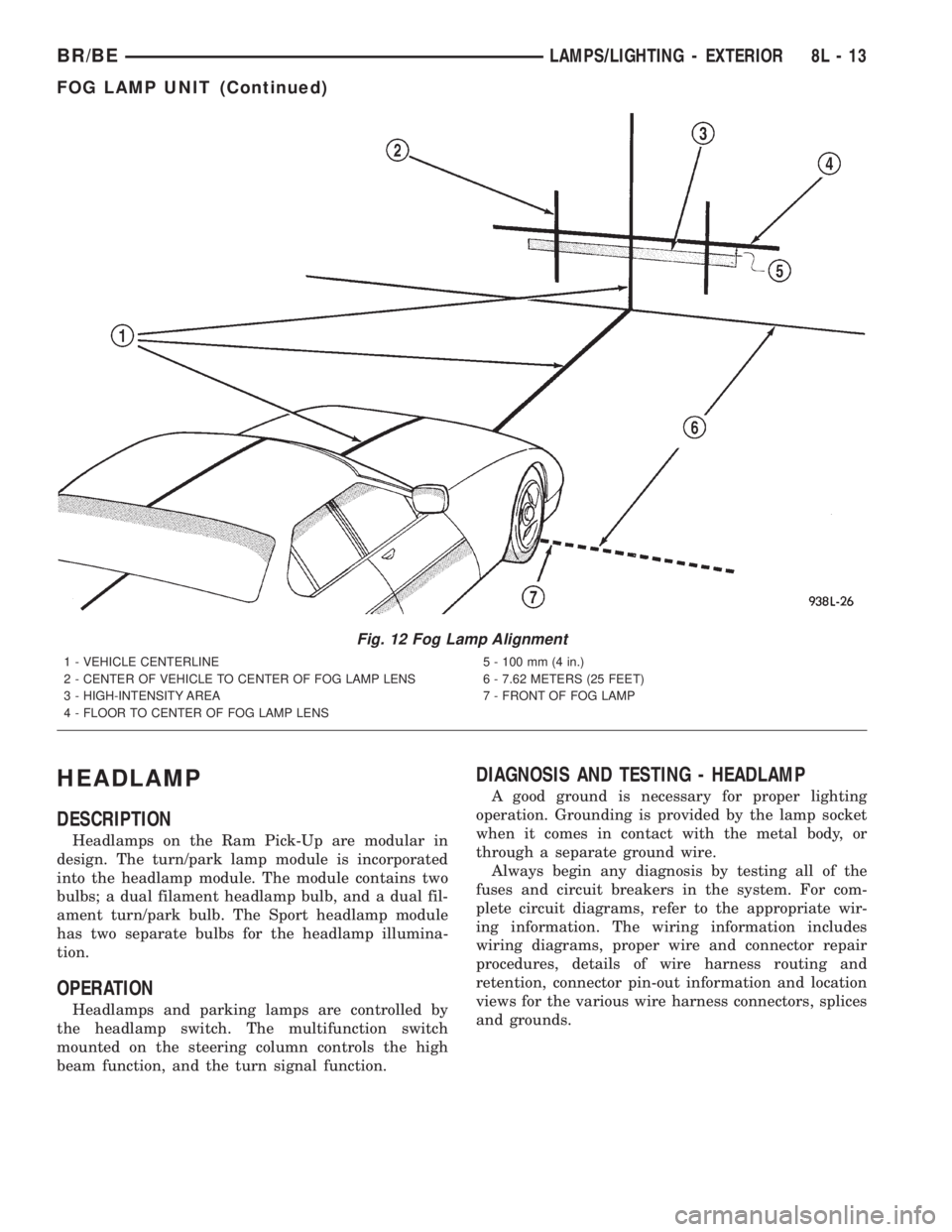
HEADLAMP
DESCRIPTION
Headlamps on the Ram Pick-Up are modular in
design. The turn/park lamp module is incorporated
into the headlamp module. The module contains two
bulbs; a dual filament headlamp bulb, and a dual fil-
ament turn/park bulb. The Sport headlamp module
has two separate bulbs for the headlamp illumina-
tion.
OPERATION
Headlamps and parking lamps are controlled by
the headlamp switch. The multifunction switch
mounted on the steering column controls the high
beam function, and the turn signal function.
DIAGNOSIS AND TESTING - HEADLAMP
A good ground is necessary for proper lighting
operation. Grounding is provided by the lamp socket
when it comes in contact with the metal body, or
through a separate ground wire.
Always begin any diagnosis by testing all of the
fuses and circuit breakers in the system. For com-
plete circuit diagrams, refer to the appropriate wir-
ing information. The wiring information includes
wiring diagrams, proper wire and connector repair
procedures, details of wire harness routing and
retention, connector pin-out information and location
views for the various wire harness connectors, splices
and grounds.
Fig. 12 Fog Lamp Alignment
1 - VEHICLE CENTERLINE
2 - CENTER OF VEHICLE TO CENTER OF FOG LAMP LENS
3 - HIGH-INTENSITY AREA
4 - FLOOR TO CENTER OF FOG LAMP LENS5 - 100 mm (4 in.)
6 - 7.62 METERS (25 FEET)
7 - FRONT OF FOG LAMP
BR/BELAMPS/LIGHTING - EXTERIOR 8L - 13
FOG LAMP UNIT (Continued)
Page 616 of 2889
(1) Disconnect and isolate the battery negative
cable. Remove the headlamp switch from the instru-
ment panel. (Refer to 8 - ELECTRICAL/LAMPS/
LIGHTING - EXTERIOR/HEADLAMP SWITCH -
REMOVAL) for the procedures. Unplug the headlamp
switch wire harness connectors. Check for continuity
between the left door jamb switch sense circuit cavity
of the headlamp switch wire harness connector and a
good ground. There should be continuity with the
driver door open, and no continuity with the driver
door closed. If OK, go to Step 2. If not OK, repair the
circuit to the driver door jamb switch as required.
(2) Remove the Central Timer Module (CTM) from
its mounting bracket to access the CTM wire harness
connectors. (Refer to 8 - ELECTRICAL/ELEC-
TRONIC CONTROL MODULES/BODY CONTROL/
CENTRAL TIMER MODUL - REMOVAL) for the
procedures. Unplug the 14-way CTM wire harness
connector. Remove the key from the ignition lock cyl-
inder. Check for continuity between the key-in igni-
tion switch sense circuit cavity of the 14-way CTM
wire harness connector and a good ground. There
should be no continuity. If OK, go to Step 3. If not
OK, repair the short circuit as required.
(3) Check for continuity between the key-in igni-
tion switch sense circuit cavities of the 14-way CTM
wire harness connector and the headlamp switch
wire harness connector. There should be continuity. If
OK, go to Step 4. If not OK, repair the open circuit
as required.
(4) Check for continuity between the left front door
jamb switch sense circuit terminal and the key-in
ignition switch sense circuit terminal of the head-
lamp switch. There should be no continuity with the
switch in the Off position, and continuity with the
switch in the park or head lamps On position. If
OK,(Refer to 8 - ELECTRICAL/ELECTRONIC CON-
TROL MODULES/BODY CONTROL/CENTRAL
TIMER MODUL - DIAGNOSIS AND TESTING) If
not OK, replace the faulty headlamp switch.
REMOVAL
WARNING: ON VEHICLES EQUIPPED WITH AIR-
BAGS, DISABLE THE AIRBAG SYSTEM BEFORE
ATTEMPTING ANY STEERING WHEEL, STEERING
COLUMN, OR INSTRUMENT PANEL COMPONENT
DIAGNOSIS OR SERVICE. DISCONNECT AND ISO-
LATE THE BATTERY NEGATIVE (GROUND) CABLE,
THEN WAIT TWO MINUTES FOR THE AIRBAG SYS-
TEM CAPACITOR TO DISCHARGE BEFORE PER-
FORMING FURTHER DIAGNOSIS OR SERVICE. THIS
IS THE ONLY SURE WAY TO DISABLE THE AIRBAG
SYSTEM. FAILURE TO TAKE THE PROPER PRE-
CAUTIONS COULD RESULT IN ACCIDENTAL AIR-BAG DEPLOYMENT AND POSSIBLE PERSONAL
INJURY.
(1) Disconnect and isolate the battery negative
cable.
(2) Remove the cluster bezel from the instrument
panel. (Refer to 23 - BODY/INSTRUMENT PANEL/
CLUSTER BEZEL - REMOVAL).
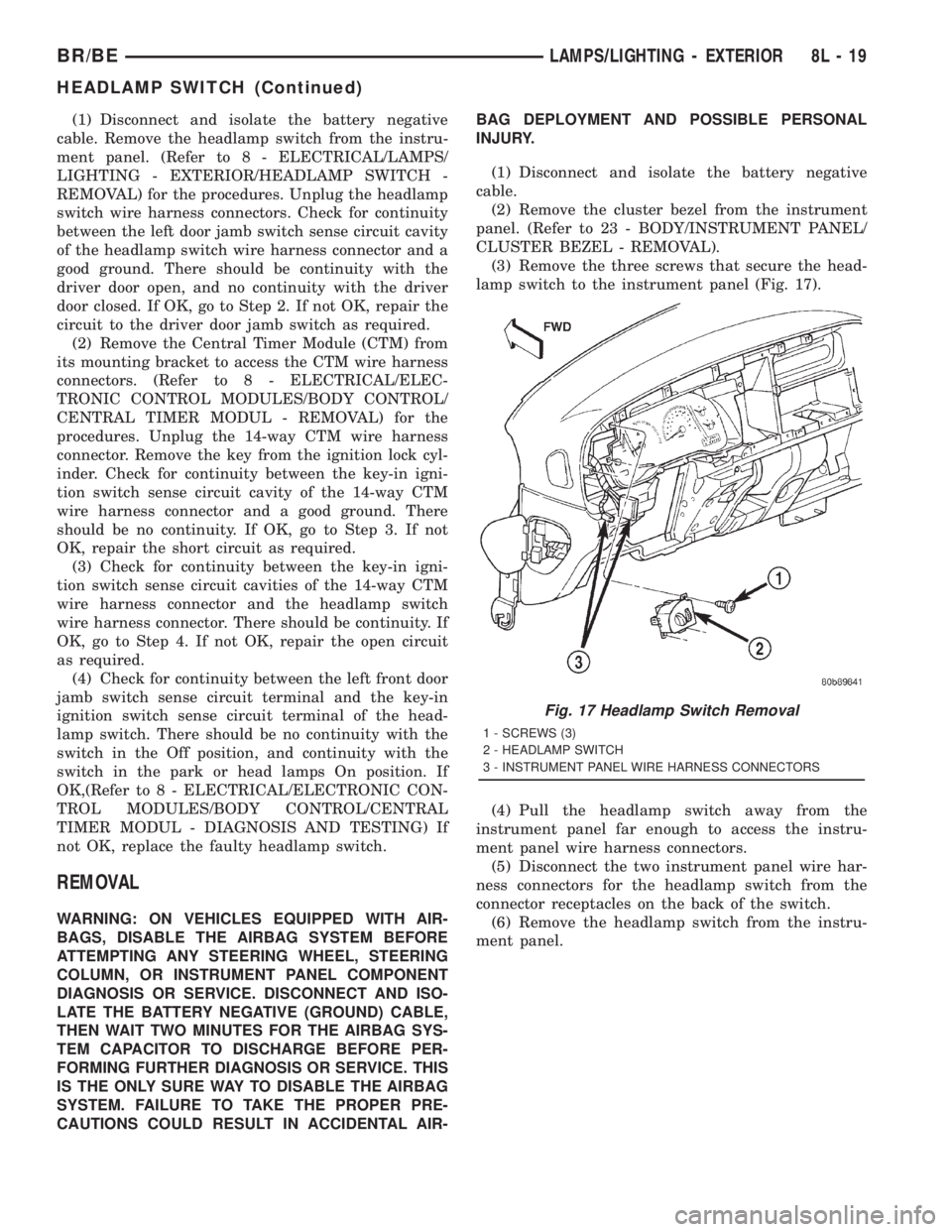
(3) Remove the three screws that secure the head-
lamp switch to the instrument panel (Fig. 17).
(4) Pull the headlamp switch away from the
instrument panel far enough to access the instru-
ment panel wire harness connectors.
(5) Disconnect the two instrument panel wire har-
ness connectors for the headlamp switch from the
connector receptacles on the back of the switch.
(6) Remove the headlamp switch from the instru-
ment panel.
Fig. 17 Headlamp Switch Removal
1 - SCREWS (3)
2 - HEADLAMP SWITCH
3 - INSTRUMENT PANEL WIRE HARNESS CONNECTORS
BR/BELAMPS/LIGHTING - EXTERIOR 8L - 19
HEADLAMP SWITCH (Continued)
Page 620 of 2889
(1) Disconnect and isolate the battery negative
cable.
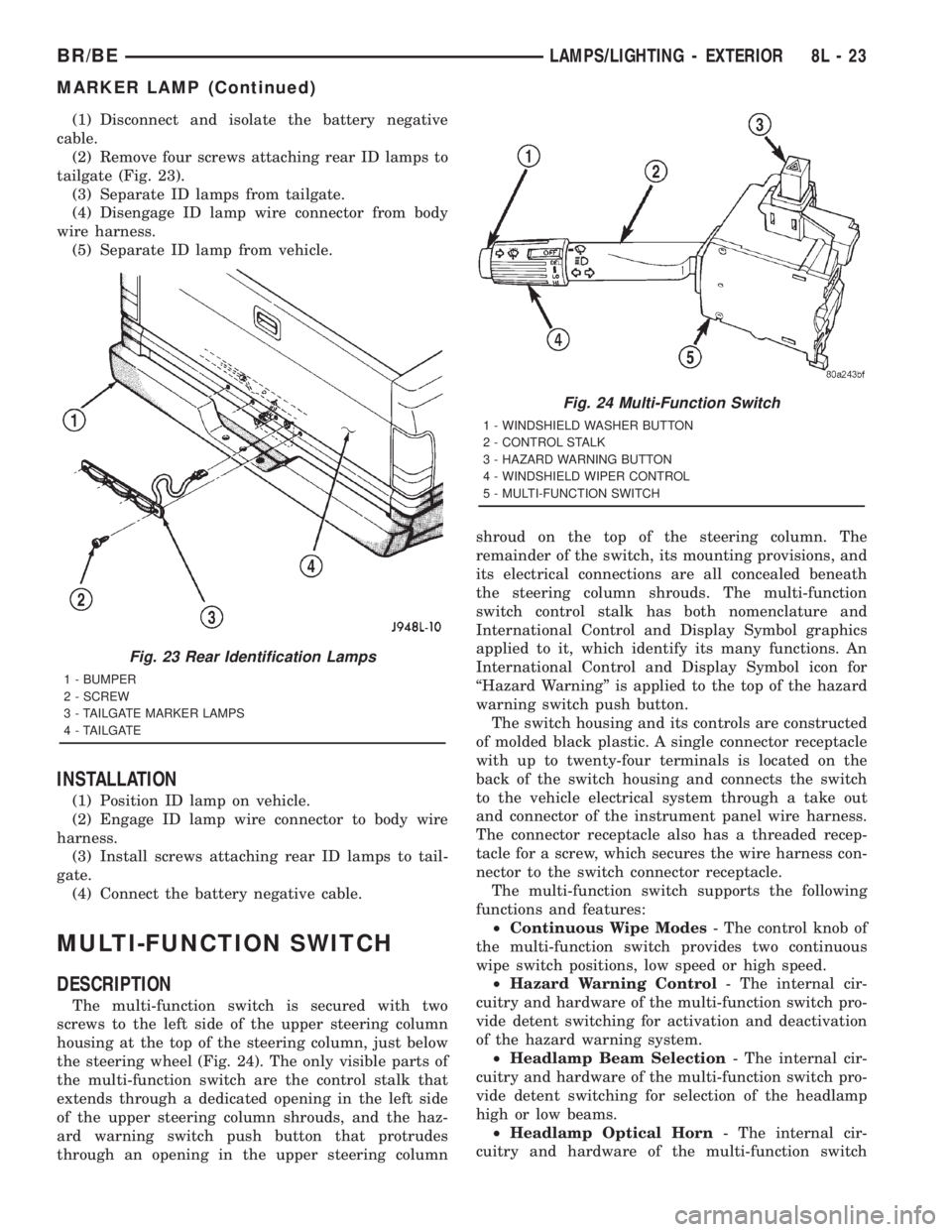
(2) Remove four screws attaching rear ID lamps to
tailgate (Fig. 23).
(3) Separate ID lamps from tailgate.
(4) Disengage ID lamp wire connector from body
wire harness.
(5) Separate ID lamp from vehicle.
INSTALLATION
(1) Position ID lamp on vehicle.
(2) Engage ID lamp wire connector to body wire
harness.
(3) Install screws attaching rear ID lamps to tail-
gate.
(4) Connect the battery negative cable.
MULTI-FUNCTION SWITCH
DESCRIPTION
The multi-function switch is secured with two
screws to the left side of the upper steering column
housing at the top of the steering column, just below
the steering wheel (Fig. 24). The only visible parts of
the multi-function switch are the control stalk that
extends through a dedicated opening in the left side
of the upper steering column shrouds, and the haz-
ard warning switch push button that protrudes
through an opening in the upper steering columnshroud on the top of the steering column. The
remainder of the switch, its mounting provisions, and
its electrical connections are all concealed beneath
the steering column shrouds. The multi-function
switch control stalk has both nomenclature and
International Control and Display Symbol graphics
applied to it, which identify its many functions. An
International Control and Display Symbol icon for
ªHazard Warningº is applied to the top of the hazard
warning switch push button.
The switch housing and its controls are constructed
of molded black plastic. A single connector receptacle
with up to twenty-four terminals is located on the
back of the switch housing and connects the switch
to the vehicle electrical system through a take out
and connector of the instrument panel wire harness.
The connector receptacle also has a threaded recep-
tacle for a screw, which secures the wire harness con-
nector to the switch connector receptacle.
The multi-function switch supports the following
functions and features:
²Continuous Wipe Modes- The control knob of
the multi-function switch provides two continuous
wipe switch positions, low speed or high speed.
²Hazard Warning Control- The internal cir-
cuitry and hardware of the multi-function switch pro-
vide detent switching for activation and deactivation
of the hazard warning system.
²Headlamp Beam Selection- The internal cir-
cuitry and hardware of the multi-function switch pro-
vide detent switching for selection of the headlamp
high or low beams.
²Headlamp Optical Horn- The internal cir-
cuitry and hardware of the multi-function switch
Fig. 23 Rear Identification Lamps
1 - BUMPER
2 - SCREW
3 - TAILGATE MARKER LAMPS
4 - TAILGATE
Fig. 24 Multi-Function Switch
1 - WINDSHIELD WASHER BUTTON
2 - CONTROL STALK
3 - HAZARD WARNING BUTTON
4 - WINDSHIELD WIPER CONTROL
5 - MULTI-FUNCTION SWITCH
BR/BELAMPS/LIGHTING - EXTERIOR 8L - 23
MARKER LAMP (Continued)
Page 626 of 2889
INSTALLATION
(1) Position retainer on rear fender.
(2) Install screws attaching lamp retainer to rear
fender.
(3) Engage lamp bulb socket to lamp.
(4) Position and press ID lamp in retainer.
(5) Connect the battery negative cable.
PARK/TURN SIGNAL LAMP
REMOVAL
(1) Disconnect and isolate the battery negative
cable.
(2) Remove park and turn signal lamp.
(3) Rotate bulb socket 1/4 turn counterclockwise
and pull turn signal lamp socket from back of lamp.
(4) Pull park and turn signal lamp bulb from
socket.
INSTALLATION
(1) Install park and turn signal lamp bulb in
socket.
(2) Install park and turn signal lamp socket into
back of lamp.
(3) Install park/turn signal lamp.
(4) Connect the battery negative cable.
PARK/TURN SIGNAL LAMP
UNIT
REMOVAL
(1) Disconnect and isolate the battery negative
cable.
(2) Remove screw attaching the park lamp to
headlamp module.
(3) Grasp lamp and pull forward to disengage clip
attaching park/turn lamp to headlamp module.
(4) Separate park lamp headlamp module.
(5) Rotate park/turn signal socket 1/4 turn
counter-clockwise and remove from back of lamp.
(6) Remove side marker socket from back of lamp.
(7) Separate park/turn signal lamp from vehicle.
INSTALLATION
(1) Install side marker socket from back of lamp.
(2) Install park/turn signal socket in back of lamp.
(3) Install park/turn signal lamp in vehicle.
(4) Install screw attaching the park lamp to head-
lamp module.
(5) Connect the battery negative cable.
TAIL LAMP
DESCRIPTION
There are two types of tail lamp modules used on
the Ram Truck. One type is integrated into the
pick-up bed, The other is a bracket mounted module
used on the Ram Truck Cab and Chassis. The Cab
and Chassis module is made up of a housing, lens,
and two bulbs. This type of module has license plate
illumination built into the lens. The integrated pick
up module contains a housing, lens, and two bulbs. A
dual filament bulb is used for tail, stop, and turn sig-
nal operations. A separate bulb is used for back-up
illumination.
OPERATION
Tail lamp functions are controlled by the headlamp
switch. Turn signal operations are controlled by the
multifunction switch. Stop lamp functions are con-
trolled by the stoplamp switch. The back-up lamps
are controlled by the back-up lamp switch on the
transmission.
REMOVAL
CHASSIS CAB
(1) Disconnect and isolate the battery negative
cable.
(2) Remove screws holding tail lamp lens to lamp
body.
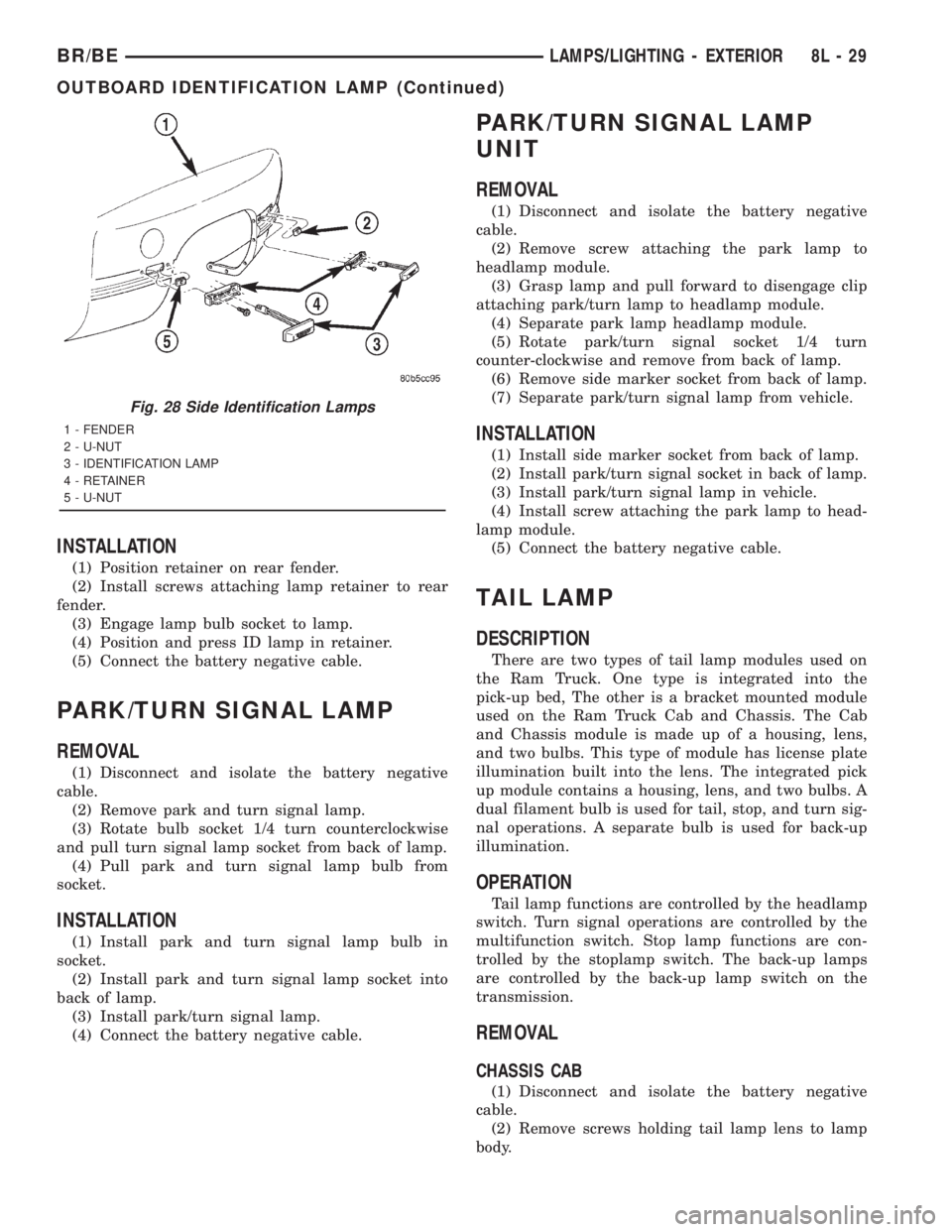
Fig. 28 Side Identification Lamps
1 - FENDER
2 - U-NUT
3 - IDENTIFICATION LAMP
4 - RETAINER
5 - U-NUT
BR/BELAMPS/LIGHTING - EXTERIOR 8L - 29
OUTBOARD IDENTIFICATION LAMP (Continued)
Page 627 of 2889
(3) Separate lens from lamp.
(4) Grasp bulb, push in slightly and rotate 1/2 turn
counter-clockwise.
PICKUP
(1) Disconnect and isolate the battery negative
cable.
(2) Remove screws from tail lamp.
(3) Grasp lamp, firmly pull lamp rearward to dis-
engage retaining studs.
(4) Remove socket from tail lamp.
(5) Separate tail lamp from cargo box.
(6) Pull bulb from socket.
INSTALLATION
CHASSIS CAB
(1) Install bulb in socket.
(2) Install lamp lens.
(3) Connect the battery negative cable.
PICKUP
(1) Install bulb in socket.
(2) Install socket in tail lamp.
(3) Position tail lamp in cargo box, engage retain-
ing studs and install screws.
(4) Connect the battery negative cable.
TAIL LAMP UNIT
REMOVAL
CAB CHASSIS
(1) Disconnect and isolate the battery negative
cable.
(2) Remove nuts attaching tail lamp to mounting
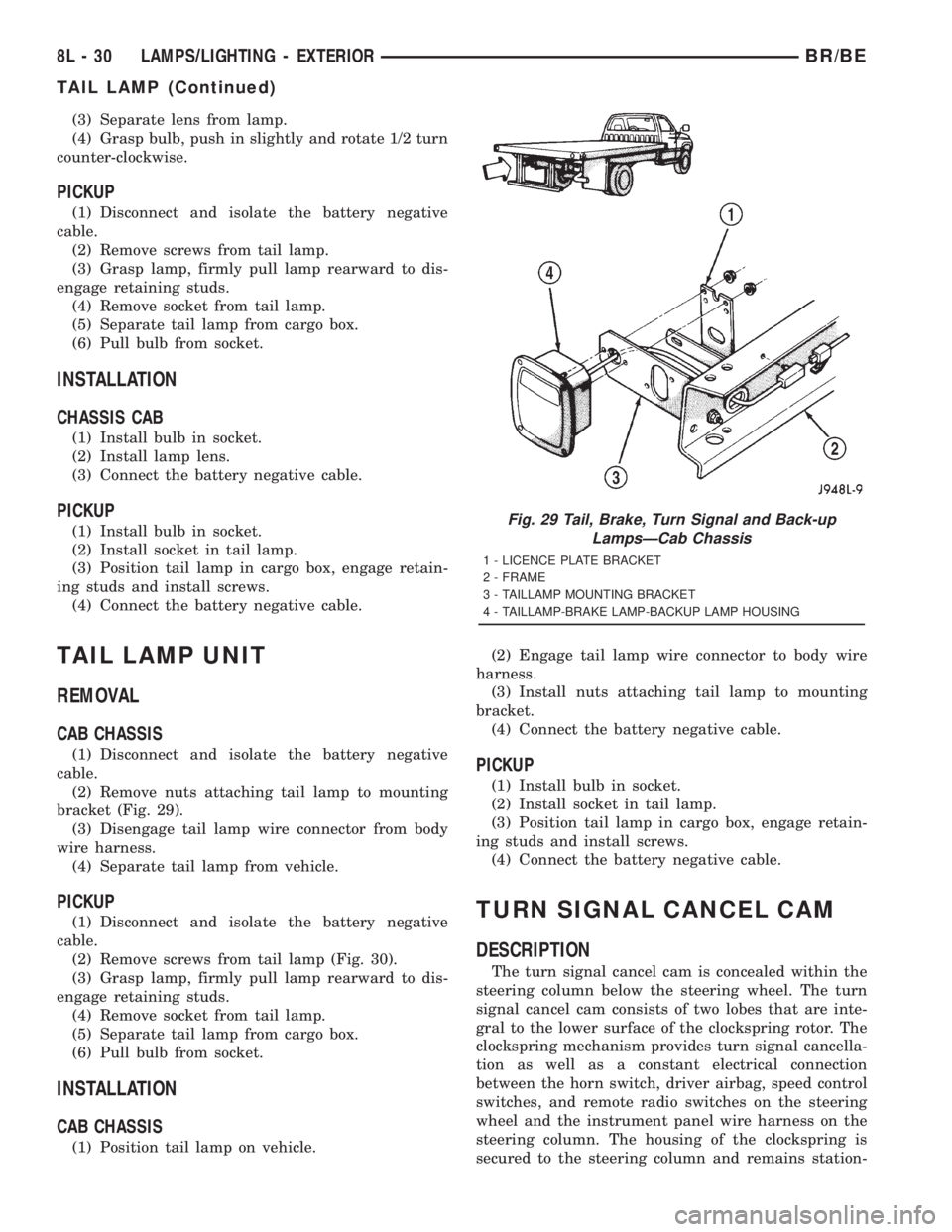
bracket (Fig. 29).
(3) Disengage tail lamp wire connector from body
wire harness.
(4) Separate tail lamp from vehicle.
PICKUP
(1) Disconnect and isolate the battery negative
cable.
(2) Remove screws from tail lamp (Fig. 30).
(3) Grasp lamp, firmly pull lamp rearward to dis-
engage retaining studs.
(4) Remove socket from tail lamp.
(5) Separate tail lamp from cargo box.
(6) Pull bulb from socket.
INSTALLATION
CAB CHASSIS
(1) Position tail lamp on vehicle.(2) Engage tail lamp wire connector to body wire
harness.
(3) Install nuts attaching tail lamp to mounting
bracket.
(4) Connect the battery negative cable.
PICKUP
(1) Install bulb in socket.
(2) Install socket in tail lamp.
(3) Position tail lamp in cargo box, engage retain-
ing studs and install screws.
(4) Connect the battery negative cable.
TURN SIGNAL CANCEL CAM
DESCRIPTION
The turn signal cancel cam is concealed within the
steering column below the steering wheel. The turn
signal cancel cam consists of two lobes that are inte-
gral to the lower surface of the clockspring rotor. The
clockspring mechanism provides turn signal cancella-
tion as well as a constant electrical connection
between the horn switch, driver airbag, speed control
switches, and remote radio switches on the steering
wheel and the instrument panel wire harness on the
steering column. The housing of the clockspring is
secured to the steering column and remains station-
Fig. 29 Tail, Brake, Turn Signal and Back-up
LampsÐCab Chassis
1 - LICENCE PLATE BRACKET
2 - FRAME
3 - TAILLAMP MOUNTING BRACKET
4 - TAILLAMP-BRAKE LAMP-BACKUP LAMP HOUSING
8L - 30 LAMPS/LIGHTING - EXTERIORBR/BE
TAIL LAMP (Continued)
Page 630 of 2889
LAMPS/LIGHTING - INTERIOR
TABLE OF CONTENTS
page page
LAMPS/LIGHTING - INTERIOR
SPECIFICATIONS........................33
DOME LAMP
REMOVAL..............................33
INSTALLATION...........................33
DOOR AJAR SWITCH
DESCRIPTION...........................34
DIAGNOSIS AND TESTING.................34
DOOR AJAR SWITCH....................34
REMOVAL..............................35
INSTALLATION...........................35GLOVE BOX LAMP AND SWITCH
REMOVAL..............................35
INSTALLATION...........................35
READING LAMP
DESCRIPTION...........................36
OPERATION.............................36
REMOVAL..............................36
INSTALLATION...........................36
VANITY LAMP
REMOVAL..............................37
INSTALLATION...........................37
LAMPS/LIGHTING - INTERIOR
SPECIFICATIONS
INTERIOR LAMPS
LAMP BULB
A/C HEATER CONTROL 158
ASH RECEIVER 161
CIGAR LIGHTER 161
HEADLAMP SWITCH 158
HEATER CONTROL 158
INSTRUMENT CLUSTER PC194
RADIO ASC
AIRBAG HIGH LINE PC194
AIRBAG LOW LINE PC74
ANTI-LOCK BRAKE PC74
BATTERY VOLTAGE PC194
BRAKE WARNING PC194
CHECK ENGINE PC74
ENGINE OIL PRESSURE PC74
FOUR WHEEL DRIVE PC194
HIGH BEAM PC194
LOW FUEL PC194
LOW WASHER FLUID PC74
MAINTENANCE
REQUIREDPC74
MESSAGE CENTER PC194
SEAT BELT PC74
LAMP BULB
TURN SIGNAL PC194
UPSHIFT PC74
DOME 1004
GLOVE COMPARTMENT 1891
VANITY MIRROR LAMP P/N 6501966
DOME LAMP
REMOVAL
(1) Using a small flat blade, pry the left side (driv-
er's side) of the dome lamp lens downward from
dome lamp.
(2) Allow the lens to hang down (Fig. 1) , this will
disengage the right side of the lamp (passenger's
side) from the headliner.
(3) Pull the right side of the lamp down and slide
the lamp to the right (Fig. 2) .
(4) Separate the lamp from the headliner.
(5) Disengage dome lamp wire connector from body
wire harness.
(6) Separate dome lamp from vehicle.
INSTALLATION
(1) Position dome lamp at headliner.
(2) Connect dome lamp wire connector to body
wire harness.
(3) Position the left side of the lamp in the head-
liner opening and slide lamp to the left.
(4) Push the right side of the lamp in the head-
liner opening and push the lamp lens up into the
lamp to secure.
BR/BELAMPS/LIGHTING - INTERIOR 8L - 33