ECU DODGE RAM 2002 Service Repair Manual
[x] Cancel search | Manufacturer: DODGE, Model Year: 2002, Model line: RAM, Model: DODGE RAM 2002Pages: 2255, PDF Size: 62.07 MB
Page 1479 of 2255
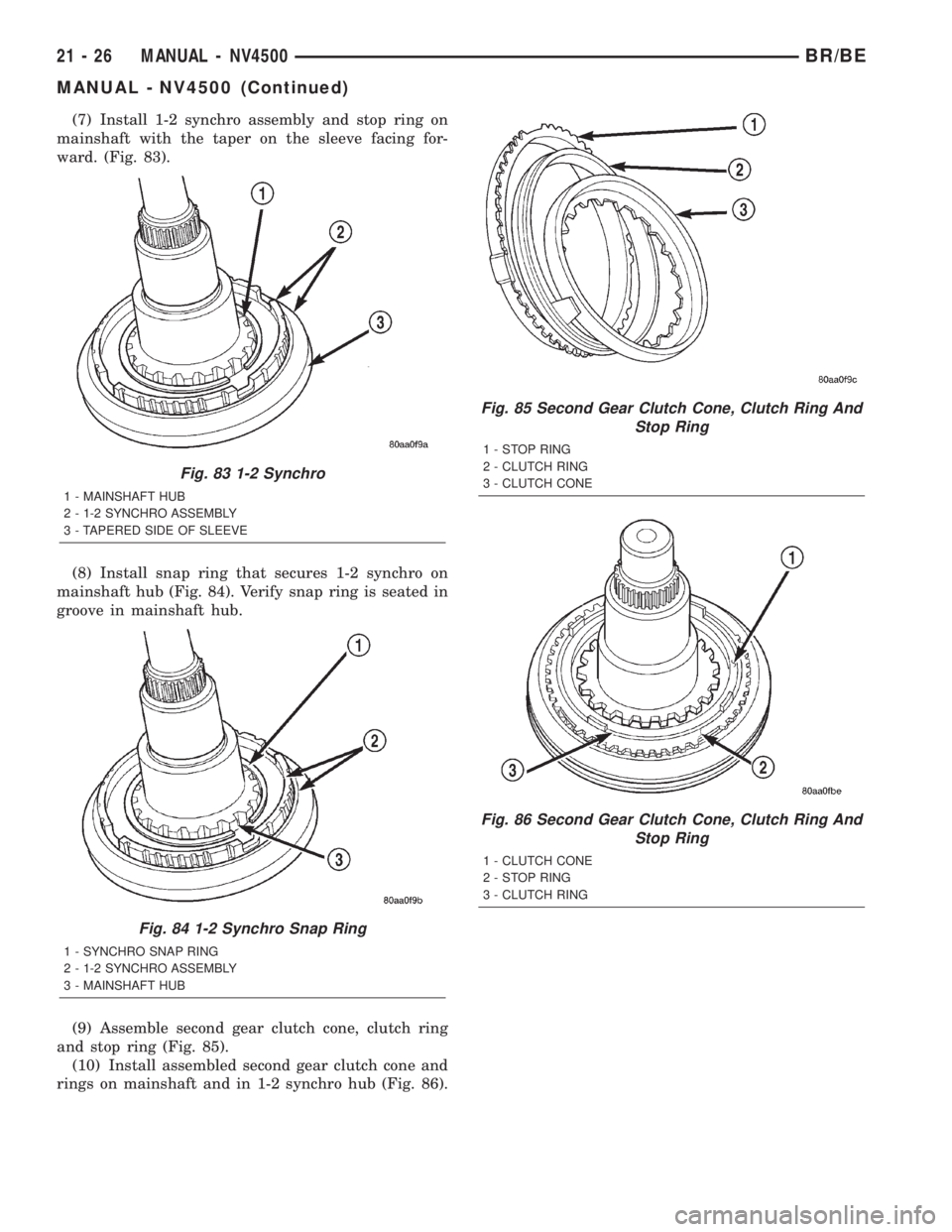
(7) Install 1-2 synchro assembly and stop ring on
mainshaft with the taper on the sleeve facing for-
ward. (Fig. 83).
(8) Install snap ring that secures 1-2 synchro on
mainshaft hub (Fig. 84). Verify snap ring is seated in
groove in mainshaft hub.
(9) Assemble second gear clutch cone, clutch ring
and stop ring (Fig. 85).
(10) Install assembled second gear clutch cone and
rings on mainshaft and in 1-2 synchro hub (Fig. 86).
Fig. 83 1-2 Synchro
1 - MAINSHAFT HUB
2 - 1-2 SYNCHRO ASSEMBLY
3 - TAPERED SIDE OF SLEEVE
Fig. 84 1-2 Synchro Snap Ring
1 - SYNCHRO SNAP RING
2 - 1-2 SYNCHRO ASSEMBLY
3 - MAINSHAFT HUB
Fig. 85 Second Gear Clutch Cone, Clutch Ring And
Stop Ring
1 - STOP RING
2 - CLUTCH RING
3 - CLUTCH CONE
Fig. 86 Second Gear Clutch Cone, Clutch Ring And
Stop Ring
1 - CLUTCH CONE
2 - STOP RING
3 - CLUTCH RING
21 - 26 MANUAL - NV4500BR/BE
MANUAL - NV4500 (Continued)
Page 1480 of 2255
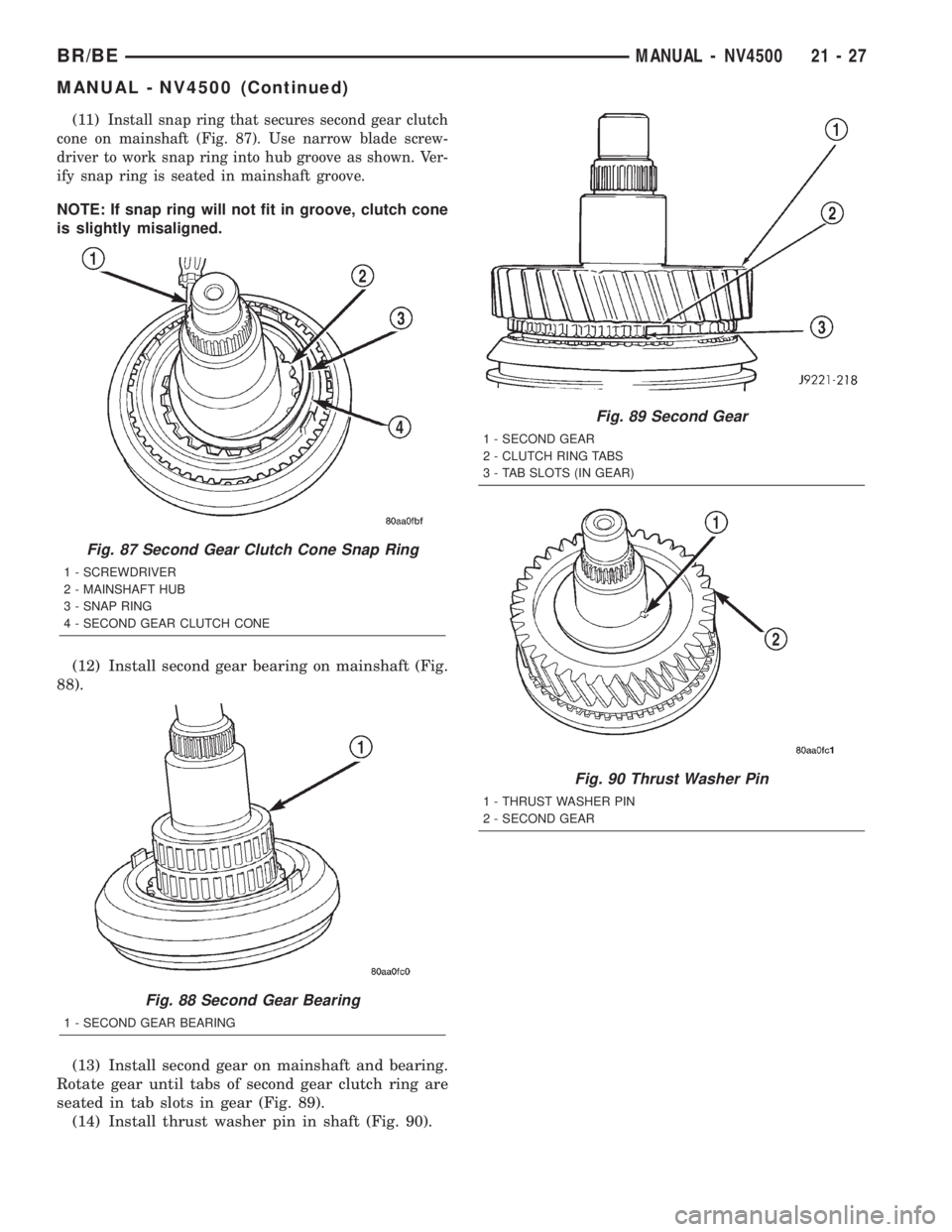
(11)Install snap ring that secures second gear clutch
cone on mainshaft (Fig. 87). Use narrow blade screw-
driver to work snap ring into hub groove as shown. Ver-
ify snap ring is seated in mainshaft groove.
NOTE: If snap ring will not fit in groove, clutch cone
is slightly misaligned.
(12) Install second gear bearing on mainshaft (Fig.
88).
(13) Install second gear on mainshaft and bearing.
Rotate gear until tabs of second gear clutch ring are
seated in tab slots in gear (Fig. 89).
(14) Install thrust washer pin in shaft (Fig. 90).
Fig. 87 Second Gear Clutch Cone Snap Ring
1 - SCREWDRIVER
2 - MAINSHAFT HUB
3 - SNAP RING
4 - SECOND GEAR CLUTCH CONE
Fig. 88 Second Gear Bearing
1 - SECOND GEAR BEARING
Fig. 89 Second Gear
1 - SECOND GEAR
2 - CLUTCH RING TABS
3 - TAB SLOTS (IN GEAR)
Fig. 90 Thrust Washer Pin
1 - THRUST WASHER PIN
2 - SECOND GEAR
BR/BEMANUAL - NV4500 21 - 27
MANUAL - NV4500 (Continued)
Page 1486 of 2255
MAINSHAFT END PLAY
(1) Install mainshaft rear bearing cup in case and
over bearing. Tap bearing cup into place with plastic
mallet.
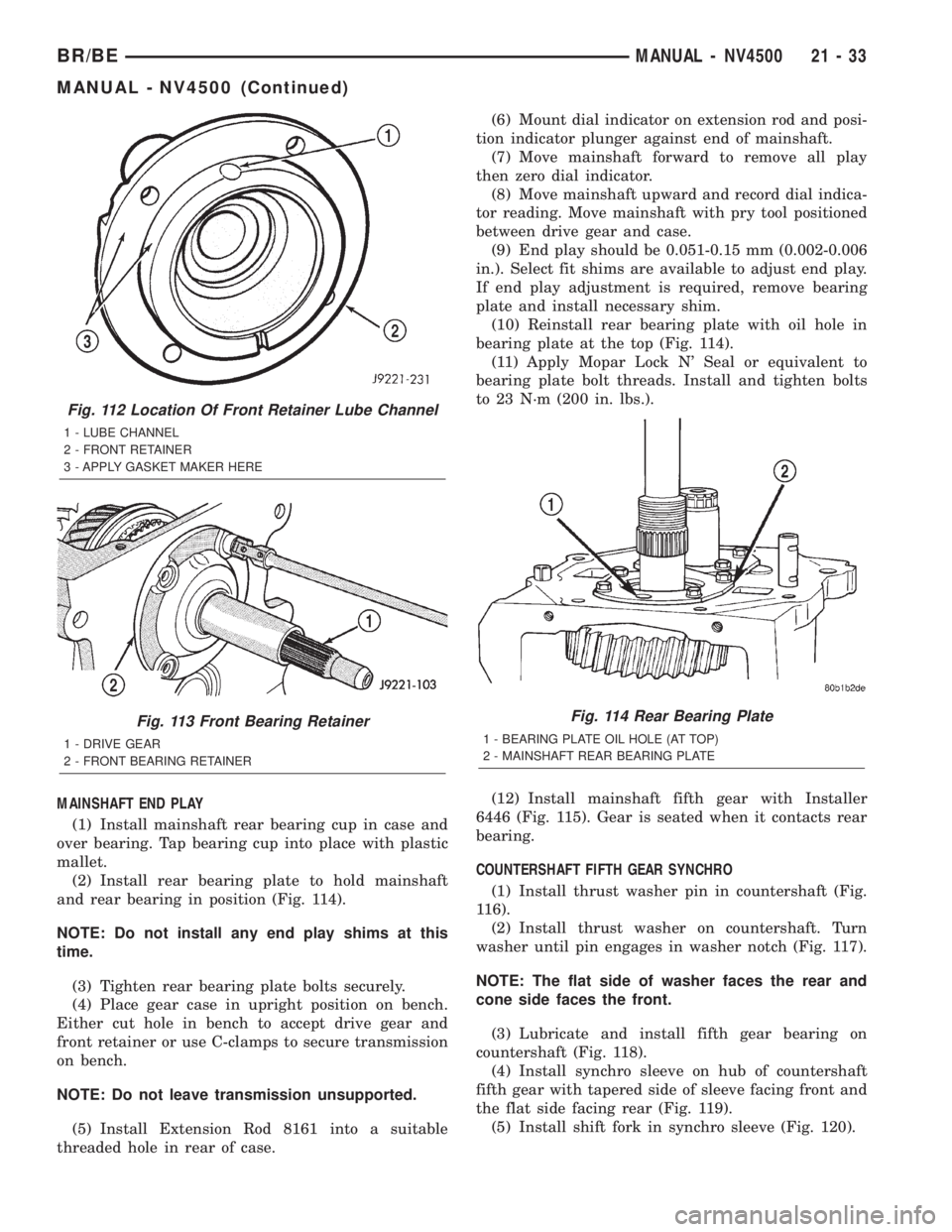
(2) Install rear bearing plate to hold mainshaft
and rear bearing in position (Fig. 114).
NOTE: Do not install any end play shims at this
time.
(3) Tighten rear bearing plate bolts securely.
(4) Place gear case in upright position on bench.
Either cut hole in bench to accept drive gear and
front retainer or use C-clamps to secure transmission
on bench.
NOTE: Do not leave transmission unsupported.
(5) Install Extension Rod 8161 into a suitable
threaded hole in rear of case.(6) Mount dial indicator on extension rod and posi-
tion indicator plunger against end of mainshaft.
(7) Move mainshaft forward to remove all play
then zero dial indicator.
(8) Move mainshaft upward and record dial indica-
tor reading. Move mainshaft with pry tool positioned
between drive gear and case.
(9) End play should be 0.051-0.15 mm (0.002-0.006
in.). Select fit shims are available to adjust end play.
If end play adjustment is required, remove bearing
plate and install necessary shim.
(10) Reinstall rear bearing plate with oil hole in
bearing plate at the top (Fig. 114).
(11) Apply Mopar Lock N' Seal or equivalent to
bearing plate bolt threads. Install and tighten bolts
to 23 N´m (200 in. lbs.).
(12) Install mainshaft fifth gear with Installer
6446 (Fig. 115). Gear is seated when it contacts rear
bearing.
COUNTERSHAFT FIFTH GEAR SYNCHRO
(1) Install thrust washer pin in countershaft (Fig.
116).
(2) Install thrust washer on countershaft. Turn
washer until pin engages in washer notch (Fig. 117).
NOTE: The flat side of washer faces the rear and
cone side faces the front.
(3) Lubricate and install fifth gear bearing on
countershaft (Fig. 118).
(4) Install synchro sleeve on hub of countershaft
fifth gear with tapered side of sleeve facing front and
the flat side facing rear (Fig. 119).
(5) Install shift fork in synchro sleeve (Fig. 120).
Fig. 112 Location Of Front Retainer Lube Channel
1 - LUBE CHANNEL
2 - FRONT RETAINER
3 - APPLY GASKET MAKER HERE
Fig. 113 Front Bearing Retainer
1 - DRIVE GEAR
2 - FRONT BEARING RETAINER
Fig. 114 Rear Bearing Plate
1 - BEARING PLATE OIL HOLE (AT TOP)
2 - MAINSHAFT REAR BEARING PLATE
BR/BEMANUAL - NV4500 21 - 33
MANUAL - NV4500 (Continued)
Page 1490 of 2255
INSTALLATION
NOTE: If a new transmission is being installed, use
all components supplied with the new transmission.
For example, if a new shift tower is supplied with
the new transmission, do not re-use the original
shift tower.
(1) Apply light coat of Mopar high temperature
bearing grease or equivalent to contact surfaces of
the following components:
²input shaft splines.
²release bearing slide surface of front retainer.
²release bearing bore.
²release fork.
²release fork ball stud.
²propeller shaft slip yoke.
(2) Apply sealer to threads of bottom PTO cover
bolt and install bolt in case.
(3) Mount transmission on jack and position trans-
mission under vehicle.
(4) Raise transmission until input shaft is centered
in release bearing and clutch disc hub.
(5) Move transmission forward and start input
shaft in release bearing, clutch disc and pilot bush-
ing.
(6) Work transmission forward until seated against
clutch housing. Do not allow transmission to remain
unsupported after input shaft has entered clutch
disc.
(7) Install and tighten transmission-to-clutch hous-
ing bolts to 108 N´m (80 ft. lbs.).
(8) Install transmission mount on transmission or
rear crossmember.
(9) Install rear crossmember.
(10) Remove transmission jack and engine support
fixture.
(11) Position transmission harness wires in clips
on shift cover.
(12) Install clutch slave cylinder and install slave
cylinder shield, if equipped.
(13) Connect speed sensor and backup light switch
wires.
TWO WHEEL DRIVE
(1) Fill transmission with recommended lubricant.
Correct fill level is bottom edge of fill plug hole.
(2) Align and install propeller shaft.
(3) Lower vehicle.
(4) Clean the mating surfaces of shift tower, isola-
tor plate and shift cover with suitable wax and
grease remover.
(5) Apply Mopar Gasket Maker or equivalent to
the sealing surface of the shift cover. Do not over
apply sealant.(6) Install the isolator plate onto the shift cover,
metal side down.
(7) Install the shift tower onto the isolator plate.
No sealant is necessary between the shift tower and
the isolator plate.
(8) Verify that the shift tower, isolator plate and
the shift tower bushings are properly aligned.
(9) Install the bolts to hold the shift tower to the
isolator plate and the shift cover. Tighten the shift
tower bolts to 10.2±11.25 N´m (7.5±8.3 ft. lbs.).
(10) Install the shift lever extension onto the shift
tower and lever assembly.
(11) Install shift boot and bezel.
(12) Connect battery negative cable.
FOUR WHEEL DRIVE
(1) Install transfer case shift mechanism on trans-
mission.
(2) Install transfer case on transmission jack.
Secure transfer case to jack with safety chains.
(3) Raise jack and align transfer case input gear
with transmission mainshaft.
(4) Move transfer case forward and seat it on
adapter.
(5) Install and tighten transfer case attaching
nuts. Tighten nuts to 41-47 N´m (30-35 ft. lbs.) if
case has 3/8 studs or 30-41 N´m (22-30 ft. lbs.) if case
has 5/16 studs.
(6) Install transfer case shift mechanism to side of
transfer case.
(7) Connect transfer case shift lever to range lever
on transfer case.
(8) Align and connect propeller shafts.
(9) Fill transmission with required lubricant.
Check lubricant level in transfer case and add lubri-
cant if necessary.
(10) Install transfer case skid plate, if equipped
and crossmember. Tighten attaching bolts/nuts to 41
N´m (30 ft. lbs.).
(11) Install exhaust system components.
(12) Lower vehicle.
(13) Clean the mating surfaces of shift tower, iso-
lator plate and shift cover with suitable wax and
grease remover.
(14) Apply Mopar Gasket Maker or equivalent to
the sealing surface of the shift cover. Do not over
apply sealant.
(15) Install the isolator plate onto the shift cover,
metal side down.
(16) Install the shift tower onto the isolator plate.
No sealant is necessary between the shift tower and
the isolator plate.
(17) Verify that the shift tower, isolator plate and
the shift tower bushings are properly aligned.
BR/BEMANUAL - NV4500 21 - 37
MANUAL - NV4500 (Continued)
Page 1497 of 2255
(3) Clean all chips from shift cover and plug bores.
Then clean plug bores with solvent and dry with
clean shop towel.
INSTALLATION
EXPANSION PLUG
(1) Apply small bead of Mopar silicone sealer or
equivalent to outer edge of each new plug.
(2) Position each plug in bore and tap into place
with hammer and punch or socket.
FIFTH-REVERSE SHIFT FORK PADS
(1) Align pad locating tab.
(2) Snap pads into place and verify locating tabs
are locked-in.
SHIFT COVER
(1) Clean mating surfaces of shift cover and gear
case with wax and grease remover.(2) Apply a small amount of Mopar silicone sealer
or equivalent to sealing surface of shift cover.
CAUTION: Do not over-apply an excesive amount
sealer. Excess can squeezed into gear case and
could block lubricant feed holes in time.
(3) Lubricate synchro sleeves with CastroltSyn-
torq gear lubricant or equivalent. Then apply light
coat of petroleum jelly to shift fork contact surfaces.
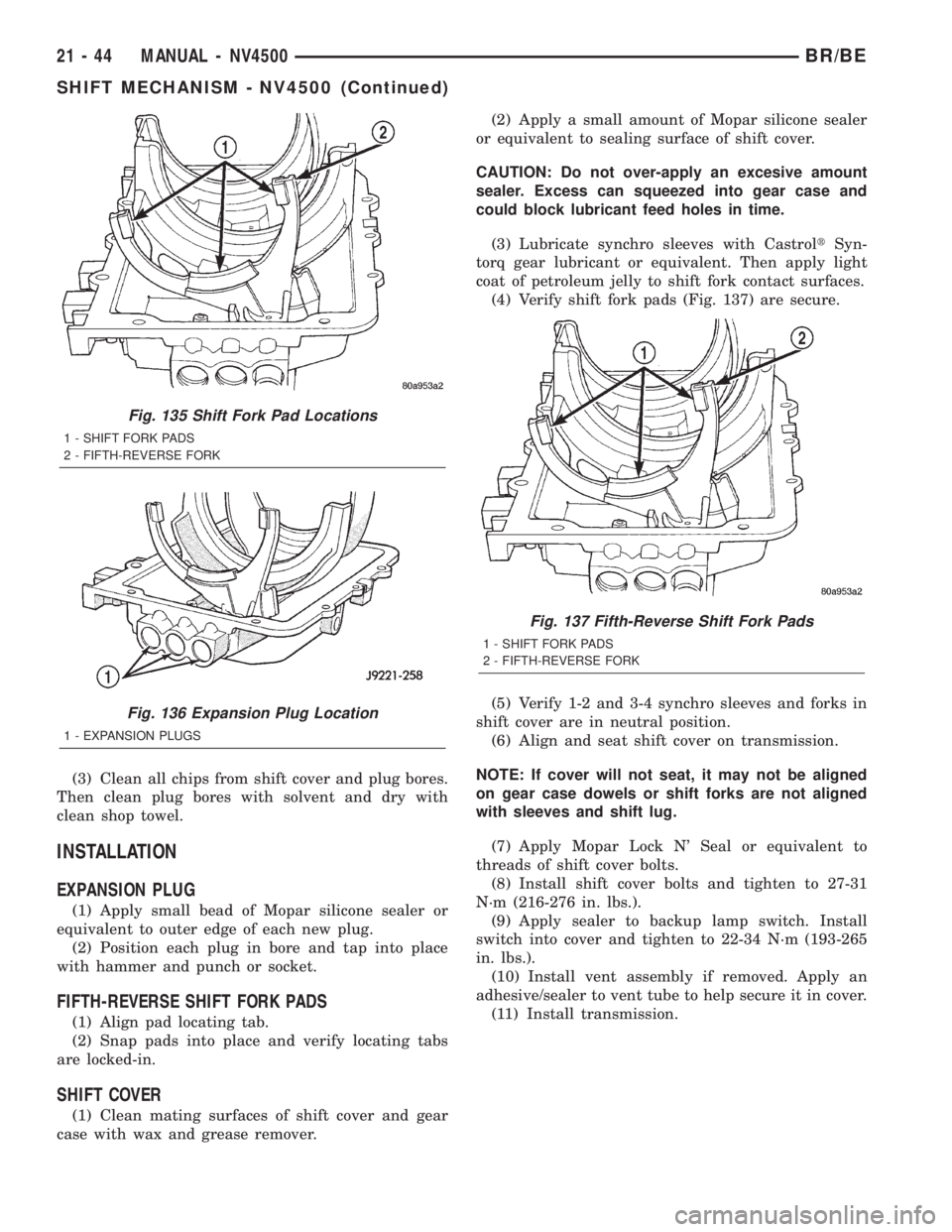
(4) Verify shift fork pads (Fig. 137) are secure.
(5) Verify 1-2 and 3-4 synchro sleeves and forks in
shift cover are in neutral position.
(6) Align and seat shift cover on transmission.
NOTE: If cover will not seat, it may not be aligned
on gear case dowels or shift forks are not aligned
with sleeves and shift lug.
(7) Apply Mopar Lock N' Seal or equivalent to
threads of shift cover bolts.
(8) Install shift cover bolts and tighten to 27-31
N´m (216-276 in. lbs.).
(9) Apply sealer to backup lamp switch. Install
switch into cover and tighten to 22-34 N´m (193-265
in. lbs.).
(10) Install vent assembly if removed. Apply an
adhesive/sealer to vent tube to help secure it in cover.
(11) Install transmission.
Fig. 135 Shift Fork Pad Locations
1 - SHIFT FORK PADS
2 - FIFTH-REVERSE FORK
Fig. 136 Expansion Plug Location
1 - EXPANSION PLUGS
Fig. 137 Fifth-Reverse Shift Fork Pads
1 - SHIFT FORK PADS
2 - FIFTH-REVERSE FORK
21 - 44 MANUAL - NV4500BR/BE
SHIFT MECHANISM - NV4500 (Continued)
Page 1502 of 2255
TRANSMISSION NOISE
Most manual transmissions make some noise dur-
ing normal operation. Rotating gears generate a mild
whine that is audible, but generally only at extreme
speeds. Severe highly audible transmission noise is
generally the initial indicator of a lubricant problem.
Insufficient, improper or contaminated lubricant
will promote rapid wear of gears, synchros, shift
rails, forks and bearings. The overheating caused by
a lubricant problem, can also lead to gear breakage.
REMOVAL
NOTE: Use a heavy duty scissors style transmis-
sion jack for remove of the transmission.
(1) Disconnect battery negative cable.
(2) Shift transmission into Neutral.
(3) Remove screws attaching shift boot to floorpan.
Then slide boot upward on the shift lever.
(4) Remove the bolts holding the shift tower to the
isolator plate and transmission gear case.
(5) Remove the shift tower and isolator plate from
the transmission gear case.
(6) Raise and support vehicle.
(7) Remove skid plate, if equipped.
(8) Mark propeller shaft/shafts and axle yokes for
installation reference.
(9) Remove propeller shaft.
(10) Disconnect and remove exhaust system as
necessary.
(11) Disconnect wires at backup light switch.
(12) Support engine with adjustable safety stand
and wood block.
(13) If transmission is to be disassembled for
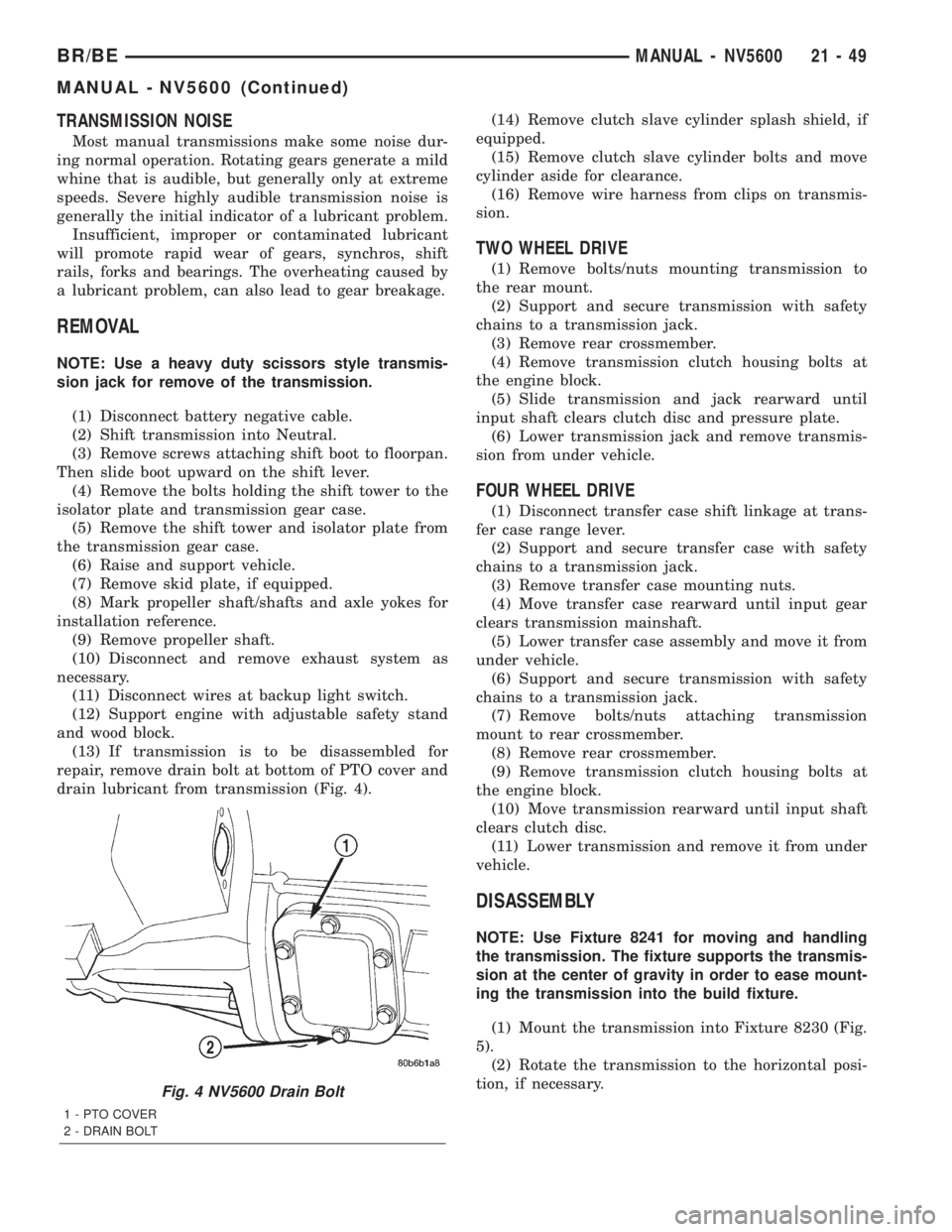
repair, remove drain bolt at bottom of PTO cover and
drain lubricant from transmission (Fig. 4).(14) Remove clutch slave cylinder splash shield, if
equipped.
(15) Remove clutch slave cylinder bolts and move
cylinder aside for clearance.
(16) Remove wire harness from clips on transmis-
sion.
TWO WHEEL DRIVE
(1) Remove bolts/nuts mounting transmission to
the rear mount.
(2) Support and secure transmission with safety
chains to a transmission jack.
(3) Remove rear crossmember.
(4) Remove transmission clutch housing bolts at
the engine block.
(5) Slide transmission and jack rearward until
input shaft clears clutch disc and pressure plate.
(6) Lower transmission jack and remove transmis-
sion from under vehicle.
FOUR WHEEL DRIVE
(1) Disconnect transfer case shift linkage at trans-
fer case range lever.
(2) Support and secure transfer case with safety
chains to a transmission jack.
(3) Remove transfer case mounting nuts.
(4) Move transfer case rearward until input gear
clears transmission mainshaft.
(5) Lower transfer case assembly and move it from
under vehicle.
(6) Support and secure transmission with safety
chains to a transmission jack.
(7) Remove bolts/nuts attaching transmission
mount to rear crossmember.
(8) Remove rear crossmember.
(9) Remove transmission clutch housing bolts at
the engine block.
(10) Move transmission rearward until input shaft
clears clutch disc.
(11) Lower transmission and remove it from under
vehicle.
DISASSEMBLY
NOTE: Use Fixture 8241 for moving and handling
the transmission. The fixture supports the transmis-
sion at the center of gravity in order to ease mount-
ing the transmission into the build fixture.
(1) Mount the transmission into Fixture 8230 (Fig.
5).
(2) Rotate the transmission to the horizontal posi-
tion, if necessary.
Fig. 4 NV5600 Drain Bolt
1 - PTO COVER
2 - DRAIN BOLT
BR/BEMANUAL - NV5600 21 - 49
MANUAL - NV5600 (Continued)
Page 1507 of 2255
NOTE: If necessary heat the sleeve slightly with a
heat gun. Do not use a torch to heat the sleeve or
damage to the output shaft may occur.
(11) Remove roll-pin securing the reverse shift fork
to the reverse shift rail with a 6mm (7/32 inch)
punch and hammer.
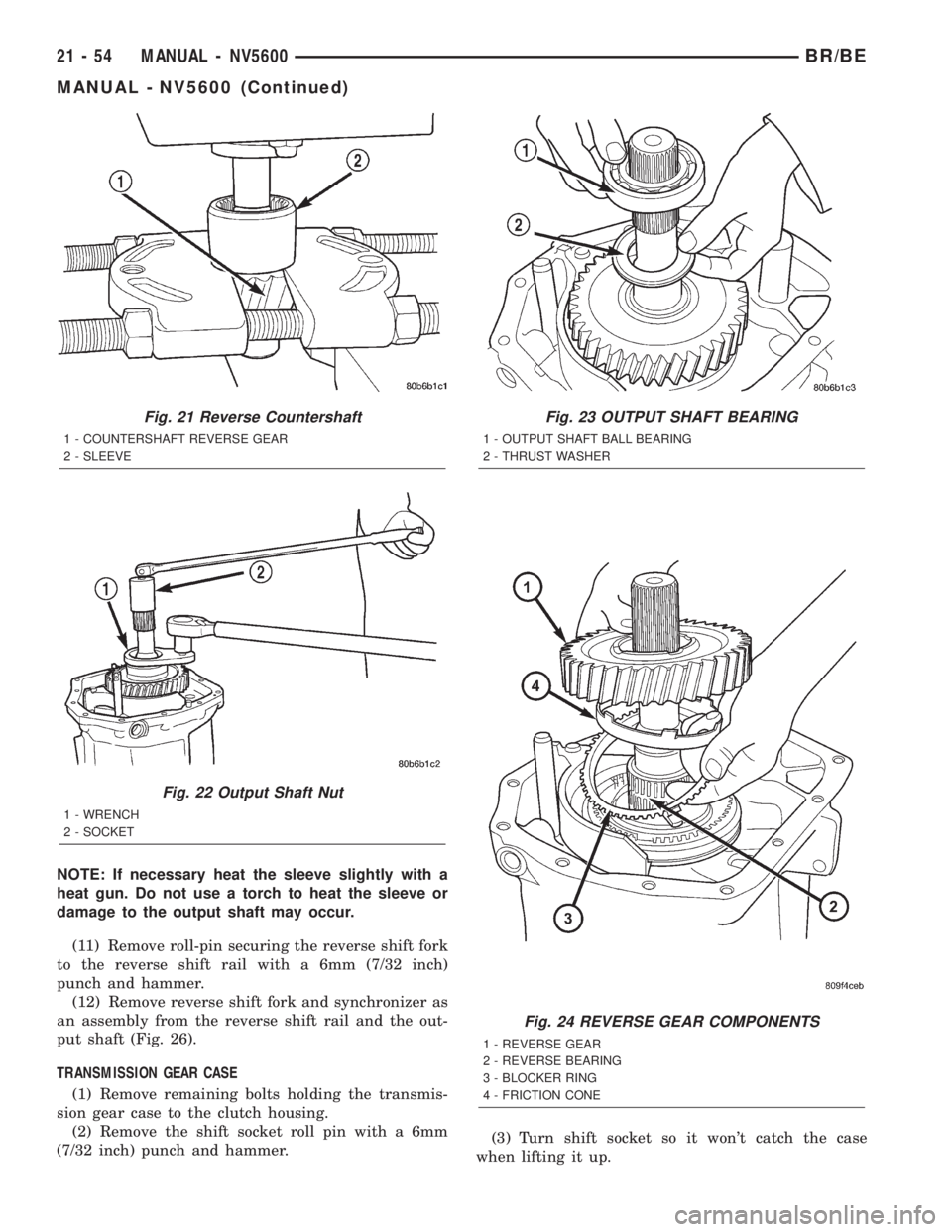
(12) Remove reverse shift fork and synchronizer as
an assembly from the reverse shift rail and the out-
put shaft (Fig. 26).
TRANSMISSION GEAR CASE
(1) Remove remaining bolts holding the transmis-
sion gear case to the clutch housing.
(2) Remove the shift socket roll pin with a 6mm
(7/32 inch) punch and hammer.(3) Turn shift socket so it won't catch the case
when lifting it up.
Fig. 21 Reverse Countershaft
1 - COUNTERSHAFT REVERSE GEAR
2 - SLEEVE
Fig. 22 Output Shaft Nut
1 - WRENCH
2 - SOCKET
Fig. 23 OUTPUT SHAFT BEARING
1 - OUTPUT SHAFT BALL BEARING
2 - THRUST WASHER
Fig. 24 REVERSE GEAR COMPONENTS
1 - REVERSE GEAR
2 - REVERSE BEARING
3 - BLOCKER RING
4 - FRICTION CONE
21 - 54 MANUAL - NV5600BR/BE
MANUAL - NV5600 (Continued)
Page 1528 of 2255
(7) Install input shaft oil guide with C-3972-A and
Handle C-4171.
(8) Apply sealer to the input shaft retainer and
install retainer onto the clutch housing. Install bolts
and tighten to 28 N´m (20 ft.lbs.).
REVERSE GEAR
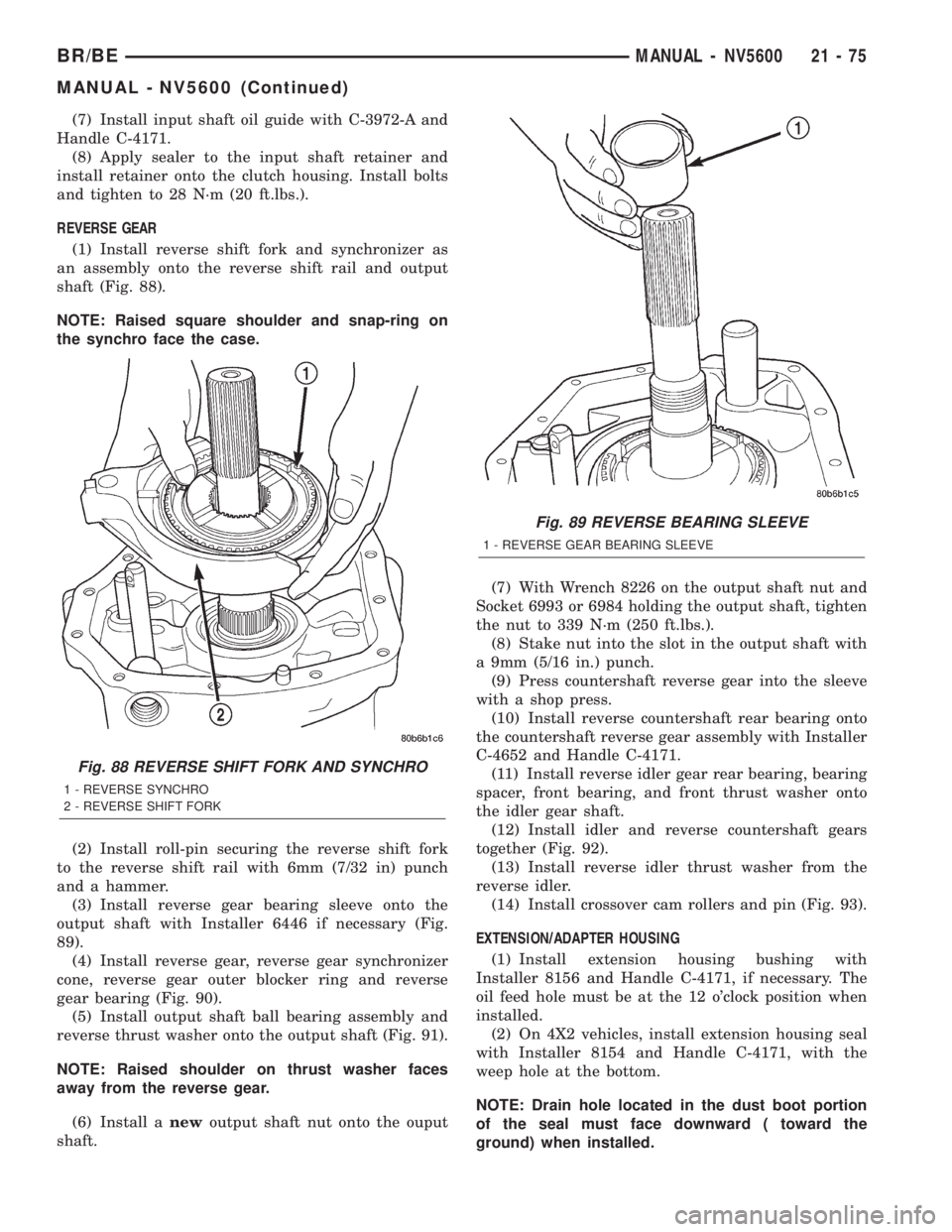
(1) Install reverse shift fork and synchronizer as
an assembly onto the reverse shift rail and output
shaft (Fig. 88).
NOTE: Raised square shoulder and snap-ring on
the synchro face the case.
(2) Install roll-pin securing the reverse shift fork
to the reverse shift rail with 6mm (7/32 in) punch
and a hammer.
(3) Install reverse gear bearing sleeve onto the
output shaft with Installer 6446 if necessary (Fig.
89).
(4) Install reverse gear, reverse gear synchronizer
cone, reverse gear outer blocker ring and reverse
gear bearing (Fig. 90).
(5) Install output shaft ball bearing assembly and
reverse thrust washer onto the output shaft (Fig. 91).
NOTE: Raised shoulder on thrust washer faces
away from the reverse gear.
(6) Install anewoutput shaft nut onto the ouput
shaft.(7) With Wrench 8226 on the output shaft nut and
Socket 6993 or 6984 holding the output shaft, tighten
the nut to 339 N´m (250 ft.lbs.).
(8) Stake nut into the slot in the output shaft with
a 9mm (5/16 in.) punch.
(9) Press countershaft reverse gear into the sleeve
with a shop press.
(10) Install reverse countershaft rear bearing onto
the countershaft reverse gear assembly with Installer
C-4652 and Handle C-4171.
(11) Install reverse idler gear rear bearing, bearing
spacer, front bearing, and front thrust washer onto
the idler gear shaft.
(12) Install idler and reverse countershaft gears
together (Fig. 92).
(13) Install reverse idler thrust washer from the
reverse idler.
(14) Install crossover cam rollers and pin (Fig. 93).
EXTENSION/ADAPTER HOUSING
(1) Install extension housing bushing with
Installer 8156 and Handle C-4171, if necessary. The
oil feed hole must be at the 12 o'clock position when
installed.
(2) On 4X2 vehicles, install extension housing seal
with Installer 8154 and Handle C-4171, with the
weep hole at the bottom.
NOTE: Drain hole located in the dust boot portion
of the seal must face downward ( toward the
ground) when installed.
Fig. 88 REVERSE SHIFT FORK AND SYNCHRO
1 - REVERSE SYNCHRO
2 - REVERSE SHIFT FORK
Fig. 89 REVERSE BEARING SLEEVE
1 - REVERSE GEAR BEARING SLEEVE
BR/BEMANUAL - NV5600 21 - 75
MANUAL - NV5600 (Continued)
Page 1531 of 2255
(24) Install shift tower onto the transmission case
and tighten bolts to 9 N´m (7 ft.lbs.).
INSTALLATION
NOTE: If installing a new transmission, use all com-
ponents supplied with the transmission. If a new
shift tower is supplied with the new transmission,
do not re-use the original shift tower.
(1) Apply a light coat of Mopar high temperature
bearing grease or equivalent to contact surfaces of
following components:
²input shaft splines.
²release bearing slide surface of front retainer.
²release bearing bore.
²release fork.
²release fork ball stud.
²propeller shaft slip yoke.
(2) Apply sealer to threads of bottom PTO cover
bolt and install bolt in case.
(3) Mount transmission on jack and position trans-
mission under vehicle.
(4) Raise transmission until input shaft is centered
in clutch disc hub.
(5) Move transmission forward and start input
shaft in clutch disc and pilot bushing/bearing.
(6) Work transmission forward until seated against
engine block. Do not allow transmission to remain
unsupported after input shaft has entered clutch
disc.
(7) Install and tighten transmission-to-engine
block bolts.
(8) Install clutch slave cylinder.
(9) Connect backup light switch wires.
(10) Position transmission harness wires in clips
on transmission.(11) Install transmission mount on transmission or
rear crossmember.
(12) Install rear crossmember.
(13) Remove transmission jack and engine support
fixture.
(14) Fill transmission with required lubricant (Fig.
98). Check lubricant level in transfer case if
equipped.
TWO WHEEL DRIVE
(1) Install propeller shaft with referece marks
aligned.
(2) Install exhaust system components.
(3) Remove support and lower vehicle.
(4) Shift transmission into third gear.
(5) Clean the mating surfaces of shift tower and
isolator plate with suitable wax and grease remover.
(6) Apply Mopar Gasket Maker or equivalent to
sealing surface of the transmission case. Do not over
apply sealant.
(7) Install isolator plate onto the transmission case
metal side down.
(8) Install shift tower onto the isolator plate. No
sealant is necessary between the shift tower and top
of isolator plate.
(9) Verify shift tower, isolator plate and the shift
socket are properly aligned.
(10) Install bolts to hold the shift tower to the iso-
lator plate and the transmission case. Tighten bolts
to 10.2±11.25 N´m (7.5±8.3 ft. lbs.).
(11) Install shift boot and bezel.
(12) Connect battery negative cable.
FOUR WHEEL DRIVE
(1) Install and secure transfer case on the trans-
mission jack.
(2) Raise and align transfer case input gear with
transmission mainshaft.
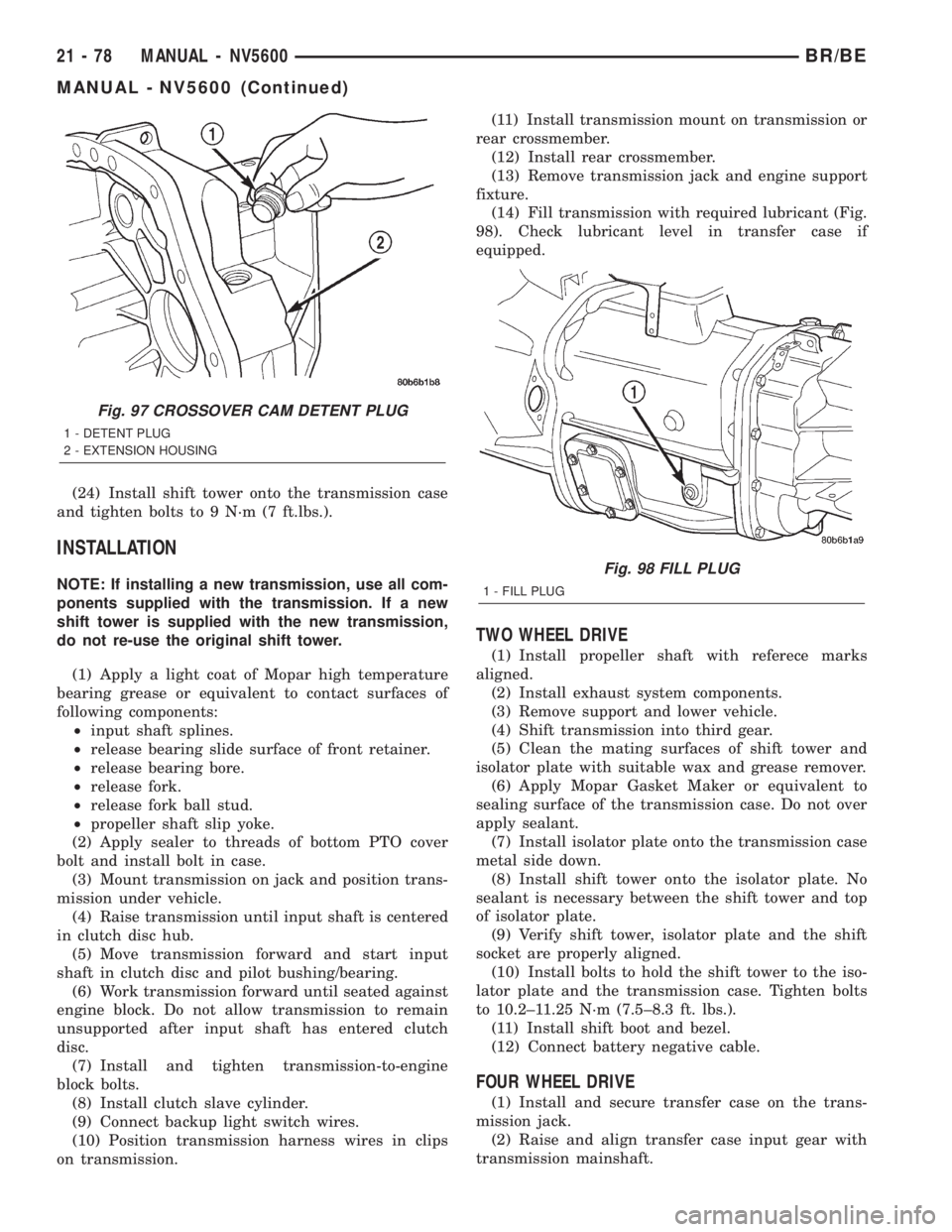
Fig. 97 CROSSOVER CAM DETENT PLUG
1 - DETENT PLUG
2 - EXTENSION HOUSING
Fig. 98 FILL PLUG
1 - FILL PLUG
21 - 78 MANUAL - NV5600BR/BE
MANUAL - NV5600 (Continued)
Page 1553 of 2255
Test Six - Transmission In Overdrive Fourth Gear
This test checks line pressure at the overdrive
clutch in fourth gear range. Use 300 psi Test Gauge
C-3293-SP for this test. The test should be performed
on the road or on a chassis dyno.
(1) Remove tachometer; it is not needed for this
test.
(2) Move 300 psi Gauge to overdrive clutch pres-
sure test port. Then remove other gauge and reinstall
test port plug.
(3) Lower vehicle.
(4) Turn OD switch on.
(5) Secure test gauge so it can be viewed from
drivers seat.
(6) Start engine and shift into D range.
(7) Increase vehicle speed gradually until 3-4 shift
occurs and note gauge pressure.
(8) Pressure should be 469-496 kPa (68-72 psi)
with closed throttle and increase to 620-827 kPa (90-
120 psi) at 1/2 to 3/4 throttle. Note that pressure can
increase to around 896 kPa (130 psi) at full throttle.
(9) Return to shop or move vehicle off chassis
dyno.
PRESSURE TEST ANALYSIS CHART
TEST CONDITION INDICATION
Line pressure OK during
any one testPump and regulator
valve OK
Line pressure OK in R
but low in D, 2, 1Leakage in rear clutch
area (seal rings, clutch
seals)
Pressure low in D Fourth
Gear RangeOverdrive clutch piston
seal, or check ball
problem
Pressure OK in 1, 2 but
low in D3 and RLeakage in front clutch
area
Pressure OK in 2 but low
in R and 1Leakage in rear servo
Front servo pressure in 2 Leakage in servo; broken
servo ring or cracked
servo piston
Pressure low in all
positionsClogged filter, stuck
regulator valve, worn or
faulty pump, low oil level
Governor pressure too
high at idle speedGovernor pressure
solenoid valve system
fault. Refer to diagnostic
book.
Governor pressure low at
all mph figuresFaulty governor pressure
solenoid, transmission
control module, or
governor pressure
sensor
TEST CONDITION INDICATION
Lubrication pressure low
at all throttle positionsClogged fluid cooler or
lines, seal rings leaking,
worn pump bushings,
pump, clutch retainer, or
clogged filter.
Line pressure high Output shaft plugged,
sticky regulator valve
Line pressure low Sticky regulator valve,
clogged filter, worn pump
DIAGNOSIS AND TESTING - AIR TESTING
TRANSMISSION CLUTCH AND BAND
OPERATION
Air-pressure testing can be used to check transmis-
sion front/rear clutch and band operation. The test
can be conducted with the transmission either in the
vehicle or on the work bench, as a final check, after
overhaul.
Air-pressure testing requires that the oil pan and
valve body be removed from the transmission. The
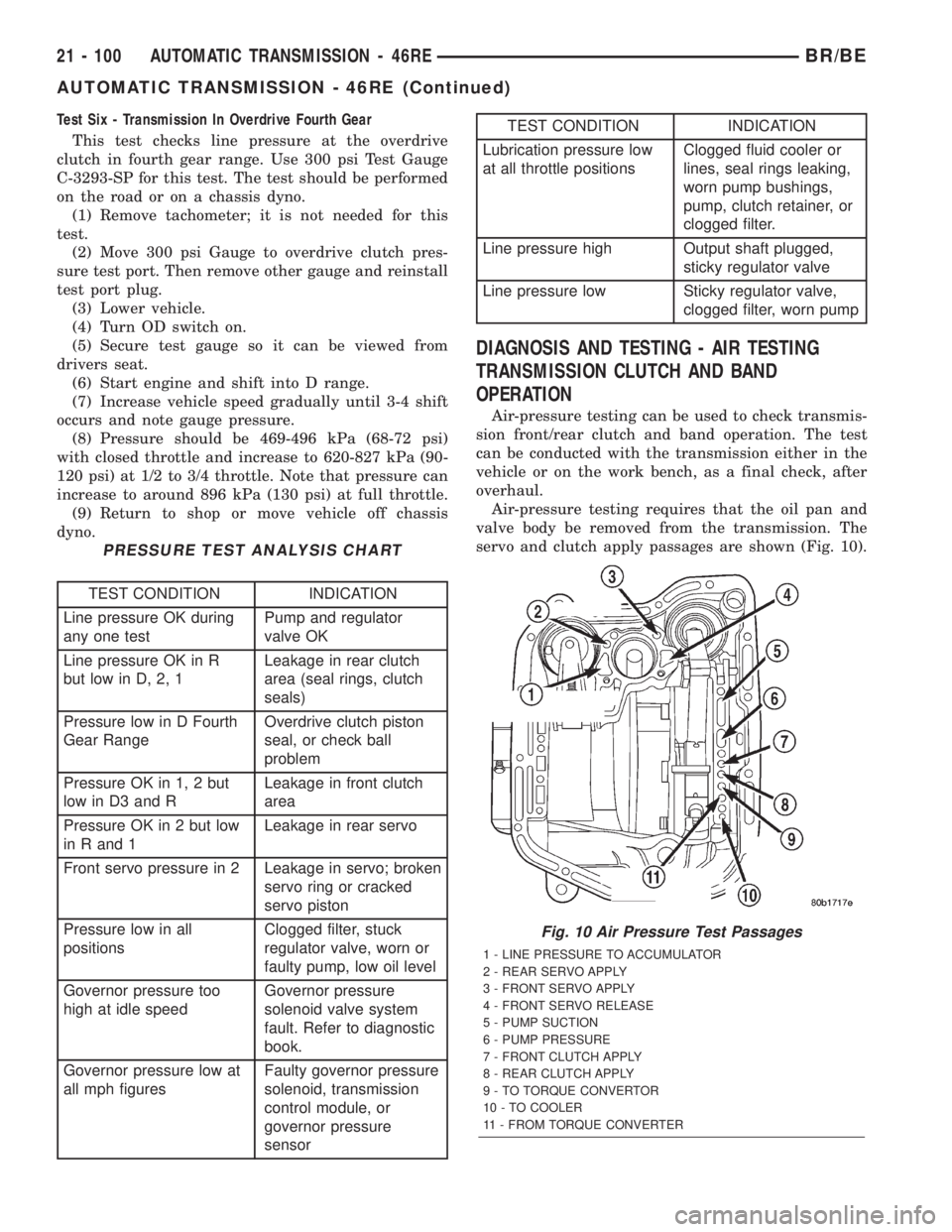
servo and clutch apply passages are shown (Fig. 10).
Fig. 10 Air Pressure Test Passages
1 - LINE PRESSURE TO ACCUMULATOR
2 - REAR SERVO APPLY
3 - FRONT SERVO APPLY
4 - FRONT SERVO RELEASE
5 - PUMP SUCTION
6 - PUMP PRESSURE
7 - FRONT CLUTCH APPLY
8 - REAR CLUTCH APPLY
9 - TO TORQUE CONVERTOR
10 - TO COOLER
11 - FROM TORQUE CONVERTER
21 - 100 AUTOMATIC TRANSMISSION - 46REBR/BE
AUTOMATIC TRANSMISSION - 46RE (Continued)