ECU DODGE RAM 2002 Service Repair Manual
[x] Cancel search | Manufacturer: DODGE, Model Year: 2002, Model line: RAM, Model: DODGE RAM 2002Pages: 2255, PDF Size: 62.07 MB
Page 1378 of 2255
CAUTION: The high-pressure fuel lines must be
clamped securely in place in the holders. The lines
cannot contact each other or other components. Do
not attempt to weld high-pressure fuel lines or to
repair lines that are damaged. Only use the recom-
mended lines when replacement of high-pressure
fuel line is necessary.
REMOVAL
High-pressure lines are used between the fuel
injection pump and the fuel injectors only. All high-
pressure fuel lines are of the same length and inside
diameter. Correct high-pressure fuel line usage and
installation is critical to smooth engine operation.
CAUTION: Refer to Cleaning Fuel System Parts.
(1) Disconnect both negative battery cables from
both batteries. Cover and isolate ends of cables.
(2) Thoroughly clean fuel lines at cylinder head
and injection pump ends.
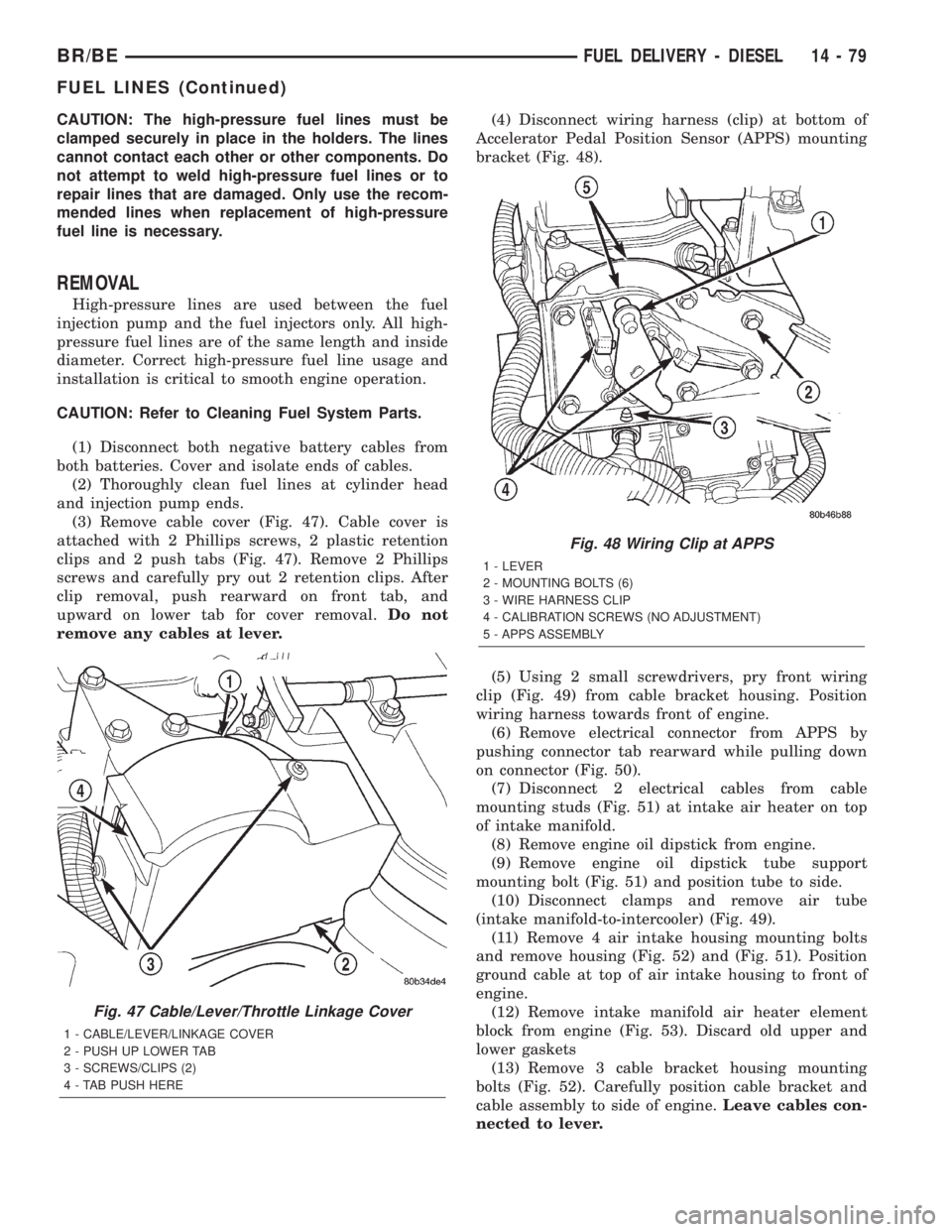
(3) Remove cable cover (Fig. 47). Cable cover is
attached with 2 Phillips screws, 2 plastic retention
clips and 2 push tabs (Fig. 47). Remove 2 Phillips
screws and carefully pry out 2 retention clips. After
clip removal, push rearward on front tab, and
upward on lower tab for cover removal.Do not
remove any cables at lever.(4) Disconnect wiring harness (clip) at bottom of
Accelerator Pedal Position Sensor (APPS) mounting
bracket (Fig. 48).
(5) Using 2 small screwdrivers, pry front wiring
clip (Fig. 49) from cable bracket housing. Position
wiring harness towards front of engine.
(6) Remove electrical connector from APPS by
pushing connector tab rearward while pulling down
on connector (Fig. 50).
(7) Disconnect 2 electrical cables from cable
mounting studs (Fig. 51) at intake air heater on top
of intake manifold.
(8) Remove engine oil dipstick from engine.
(9) Remove engine oil dipstick tube support
mounting bolt (Fig. 51) and position tube to side.
(10) Disconnect clamps and remove air tube
(intake manifold-to-intercooler) (Fig. 49).
(11) Remove 4 air intake housing mounting bolts
and remove housing (Fig. 52) and (Fig. 51). Position
ground cable at top of air intake housing to front of
engine.
(12) Remove intake manifold air heater element
block from engine (Fig. 53). Discard old upper and
lower gaskets
(13) Remove 3 cable bracket housing mounting
bolts (Fig. 52). Carefully position cable bracket and
cable assembly to side of engine.Leave cables con-
nected to lever.
Fig. 47 Cable/Lever/Throttle Linkage Cover
1 - CABLE/LEVER/LINKAGE COVER
2 - PUSH UP LOWER TAB
3 - SCREWS/CLIPS (2)
4 - TAB PUSH HERE
Fig. 48 Wiring Clip at APPS
1 - LEVER
2 - MOUNTING BOLTS (6)
3 - WIRE HARNESS CLIP
4 - CALIBRATION SCREWS (NO ADJUSTMENT)
5 - APPS ASSEMBLY
BR/BEFUEL DELIVERY - DIESEL 14 - 79
FUEL LINES (Continued)
Page 1396 of 2255
(1) Disconnect both negative battery cables at both
batteries.
(2) Remove cable cover (Fig. 6). Cable cover is
attached with 2 Phillips screws, 2 plastic retention
clips and 2 push tabs (Fig. 6). Remove 2 Phillips
screws and carefully pry out 2 retention clips. After
clip removal, push rearward on front tab, and
upward on lower tab for cover removal.
(3) Using finger pressure only, disconnect end of
speed control servo cable from throttle lever pin by
pulling forward on connector while holding lever
rearward (Fig. 7).DO NOT try to pull connector
off perpendicular to lever pin. Connector will
be broken.
(4) Using two small screwdrivers, pry throttle
cable connector socket from throttle lever ball (Fig.
7).Be very careful not to bend throttle lever
arm.
(5) Disconnect transmission control cable at lever
arm (if equipped). Refer to 21, Transmission.
(6) Squeeze pinch tabs on speed control cable (Fig.
7) and pull cable rearward to remove from cable
mounting bracket.
(7) Squeeze pinch tabs on throttle cable (Fig. 7)
and pull cable rearward to remove from cable mount-
ing bracket.
(8) If equipped with an automatic transmission,
refer to 21, Transmission for transmission control
cable removal procedures.
(9) Disconnect wiring harness clip (Fig. 8) at bot-
tom of bracket.
(10) Remove 6 mounting bolts (Fig. 8) and par-
tially remove APPS assembly from engine. After
assembly is partially removed, disconnect electrical
connector from bottom of sensor by pushing on con-
nector tab (Fig. 9).
(11) Remove APPS assembly from engine.
INSTALLATION
The APPS is serviced (replaced) as one assembly
including the lever, brackets and sensor. The APPS is
calibrated to its mounting bracket. The APPS assem-
bly is located at left-front of engine below plastic
cable/lever/linkage cover (Fig. 6) .
(1) Snap electrical connector into bottom of sensor.
(2) Position APPS assembly to engine and install 6
bolts. Tighten bolts to 12 N´m (105 in. lbs.) torque.
(3) Connect wiring harness clip (Fig. 8) at bottom
of bracket.
(4) If equipped with an automatic transmission,
refer to Group 21, Transmission for transmission con-
trol cable installation procedures.
(5) Install speed control cable into mounting
bracket. Be sure pinch tabs (Fig. 7) have secured
cable.(6) Install throttle cable into mounting bracket. Be
sure pinch tabs (Fig. 7) have secured cable.
(7) Connect throttle cable at lever (snaps on).
(8) Connect speed control cable to lever by pushing
cable connector rearward onto lever pin while hold-
ing lever forward.
(9) Install cable cover.
(10) Connect both negative battery cables to both
batteries.
(11)ECM Calibration:Turn key to ON position.
Without starting engine, slowly press throttle pedal
to floor and then slowly release. This step must be
done (one time) to ensure accelerator pedal position
sensor calibration has been learned by ECM. If not
done, possible DTC's may be set.
(12) Use DRB scan tool to erase any DTC's from
ECM/PCM.
FUEL INJECTOR
DESCRIPTION
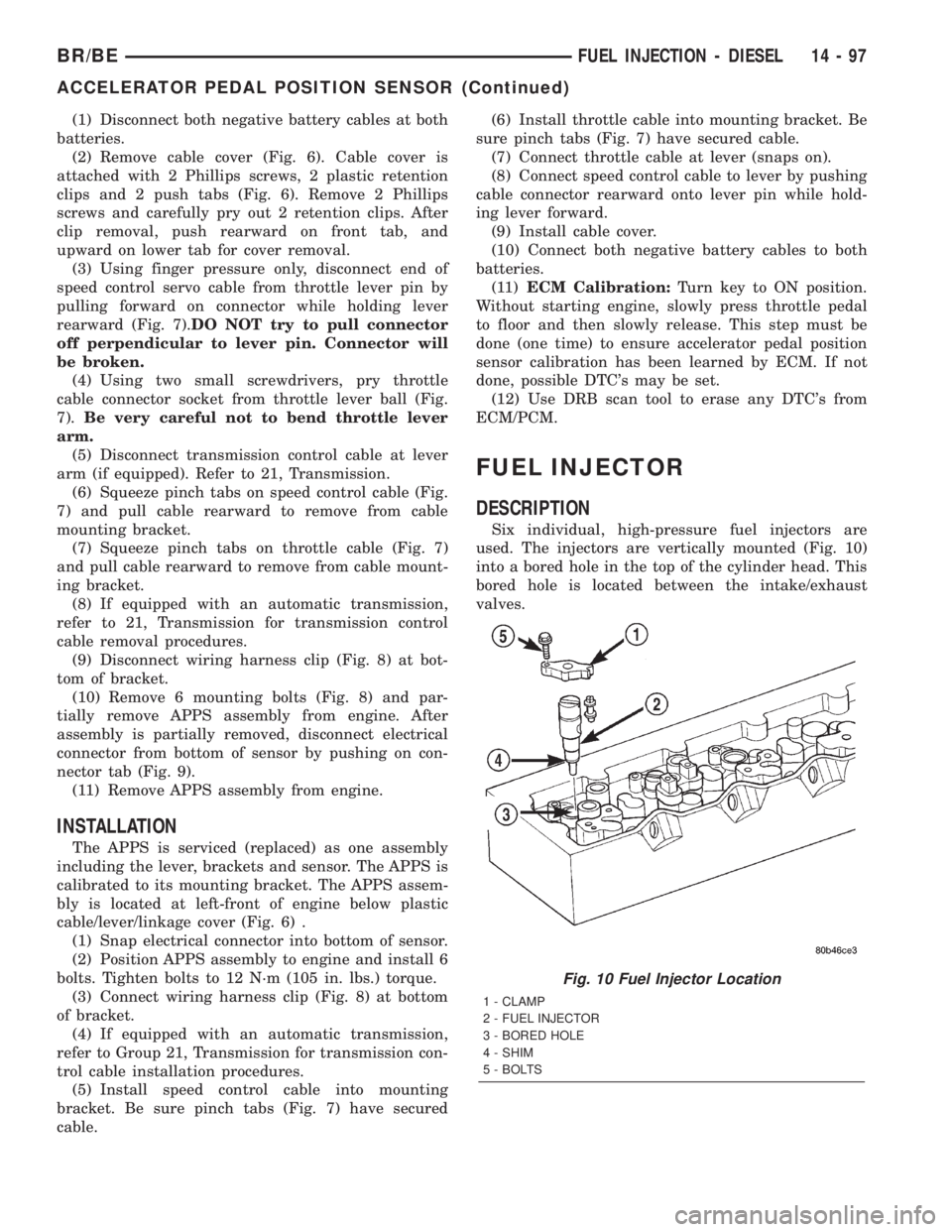
Six individual, high-pressure fuel injectors are
used. The injectors are vertically mounted (Fig. 10)
into a bored hole in the top of the cylinder head. This
bored hole is located between the intake/exhaust
valves.
Fig. 10 Fuel Injector Location
1 - CLAMP
2 - FUEL INJECTOR
3 - BORED HOLE
4 - SHIM
5 - BOLTS
BR/BEFUEL INJECTION - DIESEL 14 - 97
ACCELERATOR PEDAL POSITION SENSOR (Continued)
Page 1409 of 2255
INSTALLATION
(1) Install cable through mounting hole on cable
mounting bracket (Fig. 37). Cable snaps into bracket.
Be sure 2 pinch tabs are secure.
(2) Using large pliers, connect cable end socket to
throttle lever ball (snaps on).
(3) Install remaining cable housing end into and
through dash panel opening (snaps into position).
The two plastic pinch tabs should lock cable to dash
panel.
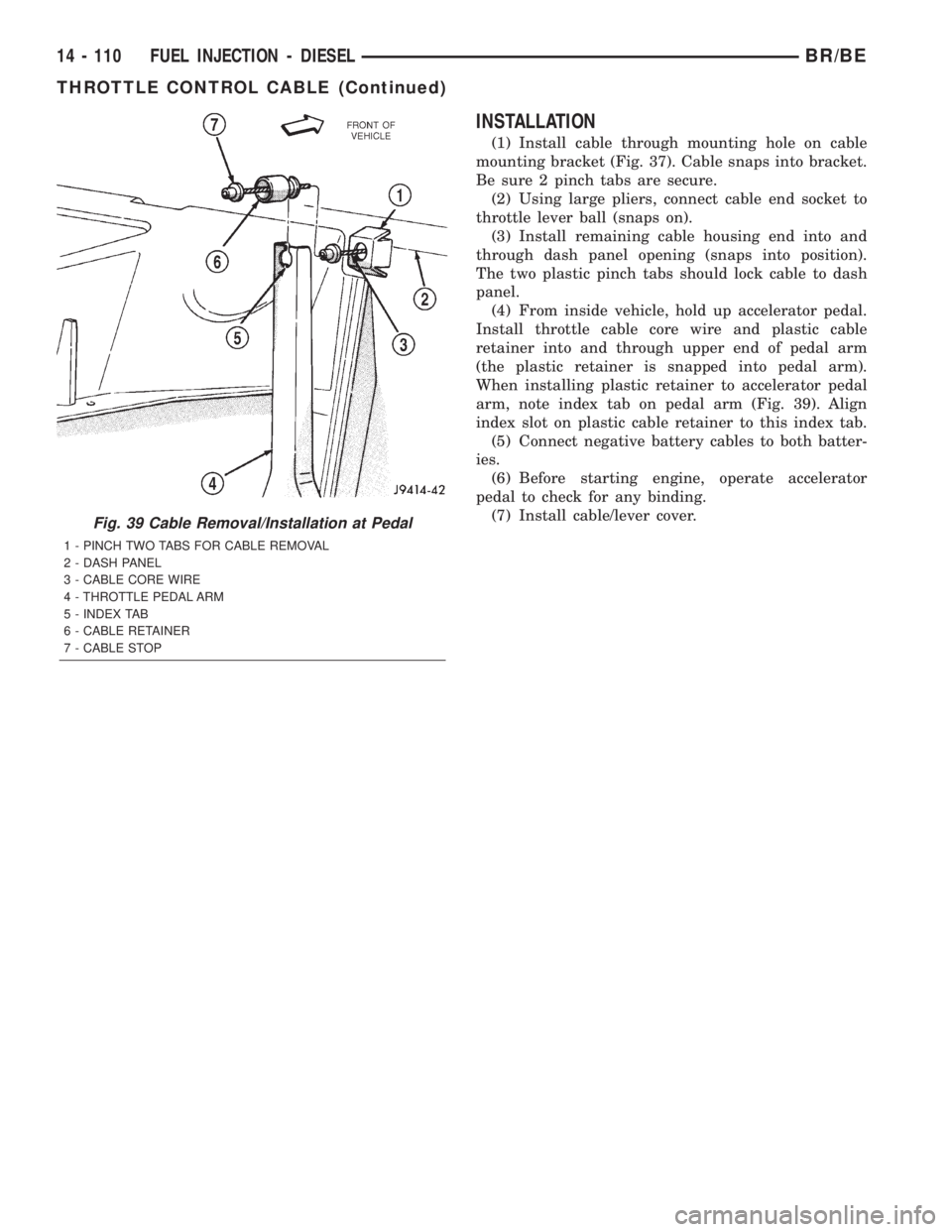
(4) From inside vehicle, hold up accelerator pedal.
Install throttle cable core wire and plastic cable
retainer into and through upper end of pedal arm
(the plastic retainer is snapped into pedal arm).
When installing plastic retainer to accelerator pedal
arm, note index tab on pedal arm (Fig. 39). Align
index slot on plastic cable retainer to this index tab.
(5) Connect negative battery cables to both batter-
ies.
(6) Before starting engine, operate accelerator
pedal to check for any binding.
(7) Install cable/lever cover.
Fig. 39 Cable Removal/Installation at Pedal
1 - PINCH TWO TABS FOR CABLE REMOVAL
2 - DASH PANEL
3 - CABLE CORE WIRE
4 - THROTTLE PEDAL ARM
5 - INDEX TAB
6 - CABLE RETAINER
7 - CABLE STOP
14 - 110 FUEL INJECTION - DIESELBR/BE
THROTTLE CONTROL CABLE (Continued)
Page 1457 of 2255
HARD SHIFTING
Hard shifting is usually caused by a low lubricant
level, improper or contaminated lubricants. The con-
sequence of using non-recommended lubricants is
noise, excessive wear, internal bind and hard shift-
ing. Substantial lubricant leaks can result in gear,
shift rail, synchro, and bearing damage. If a leak
goes undetected for an extended period, the first indi-
cations of component damage are usually hard shift-
ing and noise.
Component damage, incorrect clutch adjustment or
damaged clutch pressure plate or disc are additional
probable causes of increased shift effort. Incorrect
adjustment or a worn/damaged pressure plate or disc
can cause incorrect release. If clutch problem is
advanced, gear clash during shifts can result. Worn
or damaged synchro rings can cause gear clash when
shifting into any forward gear. In some new or
rebuilt transmissions, new synchro rings may tend to
stick slightly causing hard or noisy shifts. In most
cases this condition will decline as the rings wear-in.
TRANSMISSION NOISE
Most manual transmissions make some noise dur-
ing normal operation. Rotating gears generate a mild
whine that is audible, but generally only at extreme
speeds. Severe highly audible transmission noise is
generally the initial indicator of a lubricant problem.
Insufficient, improper or contaminated lubricant
will promote rapid wear of gears, synchros, shift
rails, forks and bearings. The overheating caused by
a lubricant problem, can also lead to gear breakage.
REMOVAL
(1) Disconnect battery negative cable.
(2) Shift transmission into Neutral.
(3) Remove shift boot screws from floorpan and
slide boot upward on the shift lever.
(4) Remove shift lever extension from shift tower
and lever assembly.
(5) Remove shift tower bolts holding tower to iso-
lator plate and transmission shift cover.
(6) Remove shift tower and isolator plate from
transmission shift cover.
(7) Raise and support vehicle.
(8) Remove skid plate, if equipped.
(9) Mark propeller shaft and axle yokes for instal-
lation reference and remove shaft/shafts.
(10) Remove exhaust system Y-pipe.
(11) Disconnect speed sensor and backup light
switch connectors.
(12) Support engine with safety stand and a wood
block.
(13) If transmission is to be disassembled for,
remove drain bolt at bottom of PTO cover and drain
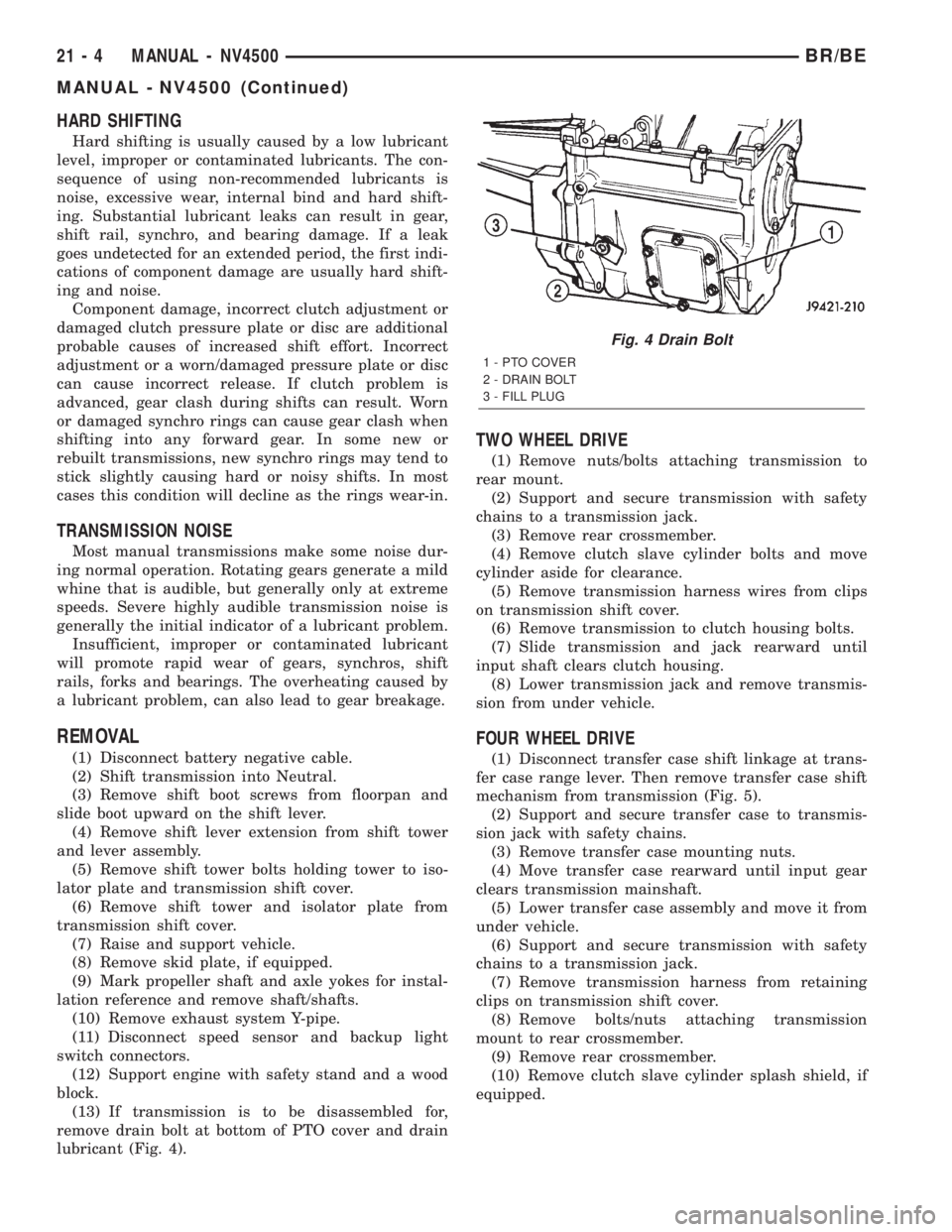
lubricant (Fig. 4).
TWO WHEEL DRIVE
(1) Remove nuts/bolts attaching transmission to
rear mount.
(2) Support and secure transmission with safety
chains to a transmission jack.
(3) Remove rear crossmember.
(4) Remove clutch slave cylinder bolts and move
cylinder aside for clearance.
(5) Remove transmission harness wires from clips
on transmission shift cover.
(6) Remove transmission to clutch housing bolts.
(7) Slide transmission and jack rearward until
input shaft clears clutch housing.
(8) Lower transmission jack and remove transmis-
sion from under vehicle.
FOUR WHEEL DRIVE
(1) Disconnect transfer case shift linkage at trans-
fer case range lever. Then remove transfer case shift
mechanism from transmission (Fig. 5).
(2) Support and secure transfer case to transmis-
sion jack with safety chains.
(3) Remove transfer case mounting nuts.
(4) Move transfer case rearward until input gear
clears transmission mainshaft.
(5) Lower transfer case assembly and move it from
under vehicle.
(6) Support and secure transmission with safety
chains to a transmission jack.
(7) Remove transmission harness from retaining
clips on transmission shift cover.
(8) Remove bolts/nuts attaching transmission
mount to rear crossmember.
(9) Remove rear crossmember.
(10) Remove clutch slave cylinder splash shield, if
equipped.
Fig. 4 Drain Bolt
1 - PTO COVER
2 - DRAIN BOLT
3 - FILL PLUG
21 - 4 MANUAL - NV4500BR/BE
MANUAL - NV4500 (Continued)
Page 1459 of 2255
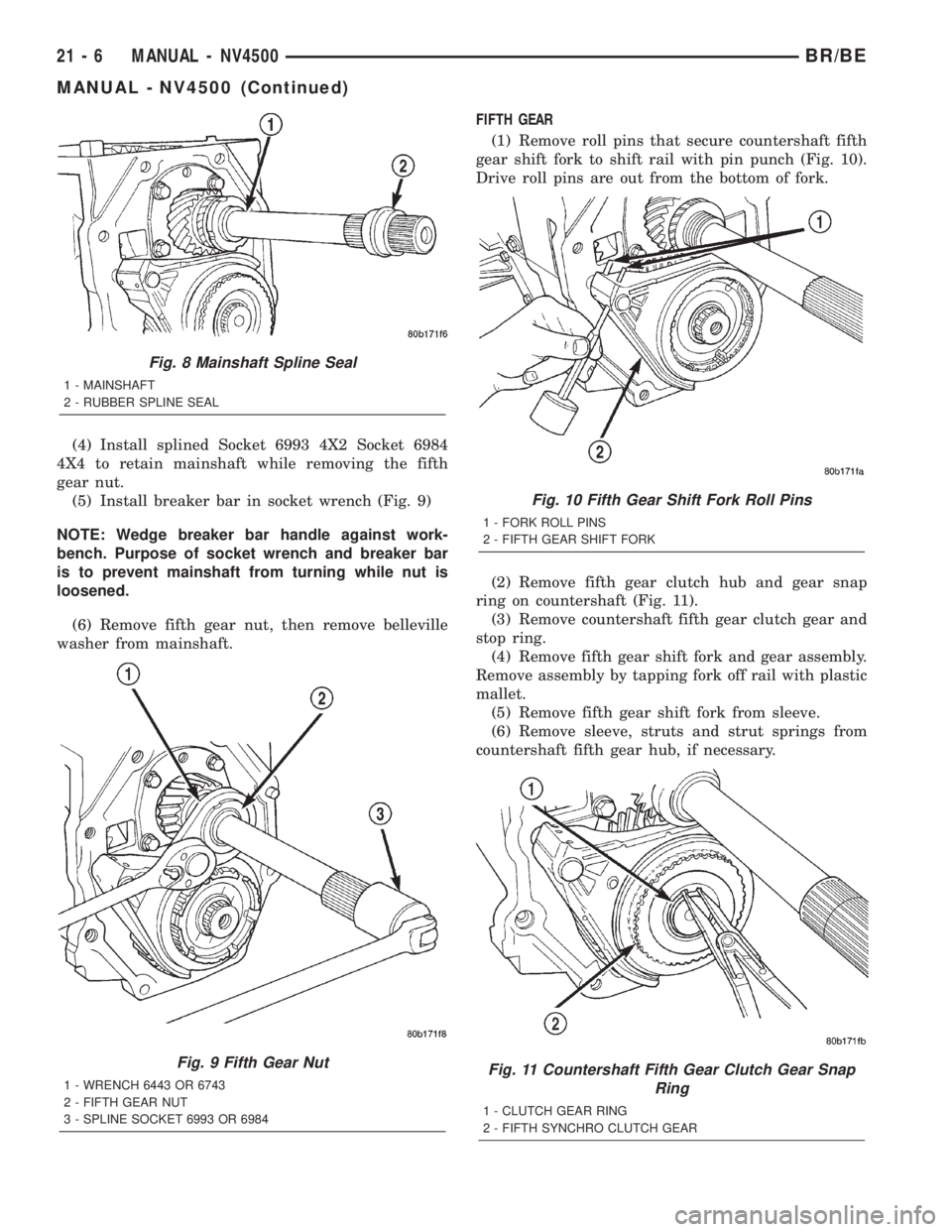
(4) Install splined Socket 6993 4X2 Socket 6984
4X4 to retain mainshaft while removing the fifth
gear nut.
(5) Install breaker bar in socket wrench (Fig. 9)
NOTE: Wedge breaker bar handle against work-
bench. Purpose of socket wrench and breaker bar
is to prevent mainshaft from turning while nut is
loosened.
(6) Remove fifth gear nut, then remove belleville
washer from mainshaft.FIFTH GEAR
(1) Remove roll pins that secure countershaft fifth
gear shift fork to shift rail with pin punch (Fig. 10).
Drive roll pins are out from the bottom of fork.
(2) Remove fifth gear clutch hub and gear snap
ring on countershaft (Fig. 11).
(3) Remove countershaft fifth gear clutch gear and
stop ring.
(4) Remove fifth gear shift fork and gear assembly.
Remove assembly by tapping fork off rail with plastic
mallet.
(5) Remove fifth gear shift fork from sleeve.
(6) Remove sleeve, struts and strut springs from
countershaft fifth gear hub, if necessary.
Fig. 8 Mainshaft Spline Seal
1 - MAINSHAFT
2 - RUBBER SPLINE SEAL
Fig. 9 Fifth Gear Nut
1 - WRENCH 6443 OR 6743
2 - FIFTH GEAR NUT
3 - SPLINE SOCKET 6993 OR 6984
Fig. 10 Fifth Gear Shift Fork Roll Pins
1 - FORK ROLL PINS
2 - FIFTH GEAR SHIFT FORK
Fig. 11 Countershaft Fifth Gear Clutch Gear Snap
Ring
1 - CLUTCH GEAR RING
2 - FIFTH SYNCHRO CLUTCH GEAR
21 - 6 MANUAL - NV4500BR/BE
MANUAL - NV4500 (Continued)
Page 1460 of 2255
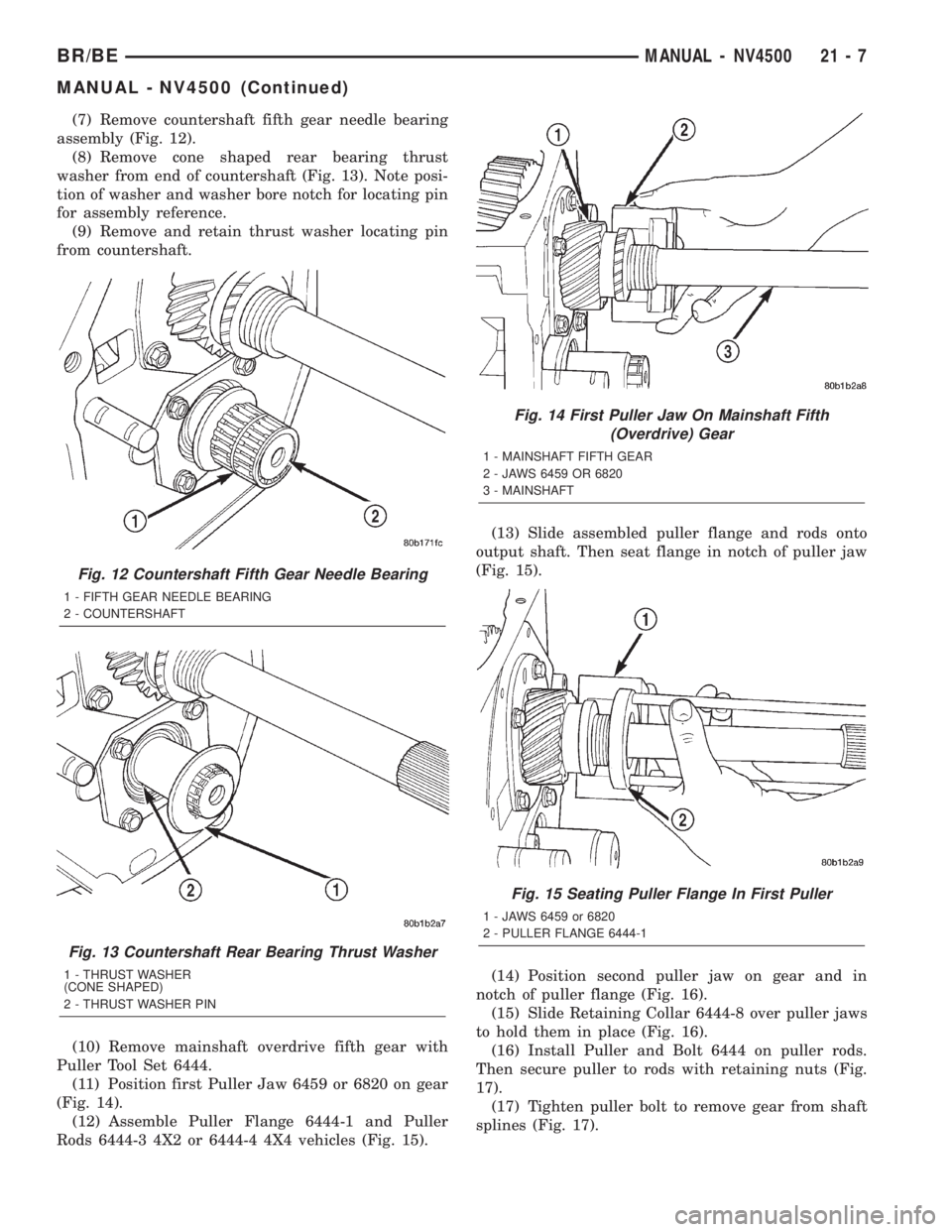
(7) Remove countershaft fifth gear needle bearing
assembly (Fig. 12).
(8) Remove cone shaped rear bearing thrust
washer from end of countershaft (Fig. 13). Note posi-
tion of washer and washer bore notch for locating pin
for assembly reference.
(9) Remove and retain thrust washer locating pin
from countershaft.
(10) Remove mainshaft overdrive fifth gear with
Puller Tool Set 6444.
(11) Position first Puller Jaw 6459 or 6820 on gear
(Fig. 14).
(12) Assemble Puller Flange 6444-1 and Puller
Rods 6444-3 4X2 or 6444-4 4X4 vehicles (Fig. 15).(13) Slide assembled puller flange and rods onto
output shaft. Then seat flange in notch of puller jaw
(Fig. 15).
(14) Position second puller jaw on gear and in
notch of puller flange (Fig. 16).
(15) Slide Retaining Collar 6444-8 over puller jaws
to hold them in place (Fig. 16).
(16) Install Puller and Bolt 6444 on puller rods.
Then secure puller to rods with retaining nuts (Fig.
17).
(17) Tighten puller bolt to remove gear from shaft
splines (Fig. 17).
Fig. 12 Countershaft Fifth Gear Needle Bearing
1 - FIFTH GEAR NEEDLE BEARING
2 - COUNTERSHAFT
Fig. 13 Countershaft Rear Bearing Thrust Washer
1 - THRUST WASHER
(CONE SHAPED)
2 - THRUST WASHER PIN
Fig. 14 First Puller Jaw On Mainshaft Fifth
(Overdrive) Gear
1 - MAINSHAFT FIFTH GEAR
2 - JAWS 6459 OR 6820
3 - MAINSHAFT
Fig. 15 Seating Puller Flange In First Puller
1 - JAWS 6459 or 6820
2 - PULLER FLANGE 6444-1
BR/BEMANUAL - NV4500 21 - 7
MANUAL - NV4500 (Continued)
Page 1466 of 2255
(7) Remove idler gear thrust washers from gear
case. Install washers on idler shaft to keep them
together for cleaning and inspection.
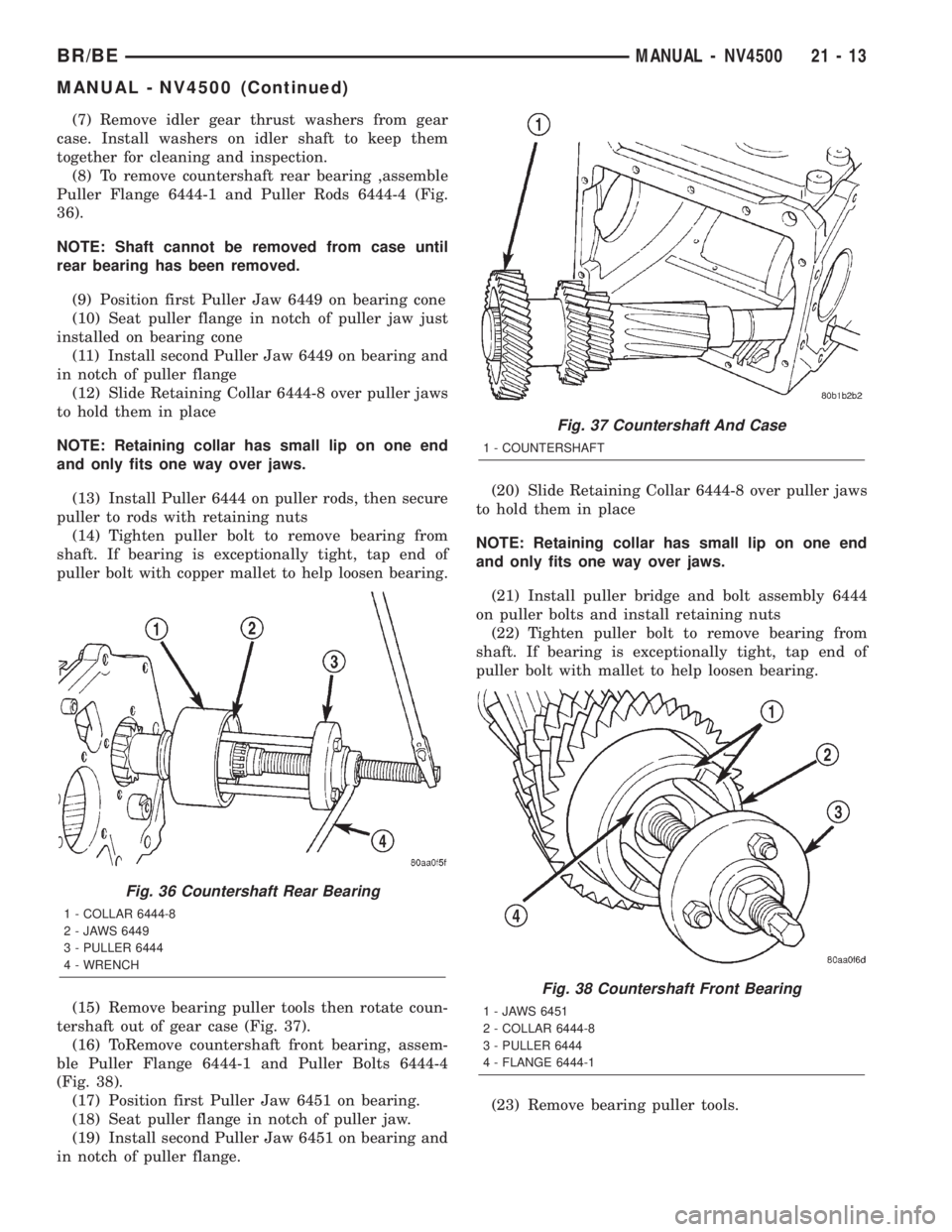
(8) To remove countershaft rear bearing ,assemble
Puller Flange 6444-1 and Puller Rods 6444-4 (Fig.
36).
NOTE: Shaft cannot be removed from case until
rear bearing has been removed.
(9) Position first Puller Jaw 6449 on bearing cone
(10) Seat puller flange in notch of puller jaw just
installed on bearing cone
(11) Install second Puller Jaw 6449 on bearing and
in notch of puller flange
(12) Slide Retaining Collar 6444-8 over puller jaws
to hold them in place
NOTE: Retaining collar has small lip on one end
and only fits one way over jaws.
(13) Install Puller 6444 on puller rods, then secure
puller to rods with retaining nuts
(14) Tighten puller bolt to remove bearing from
shaft. If bearing is exceptionally tight, tap end of
puller bolt with copper mallet to help loosen bearing.
(15) Remove bearing puller tools then rotate coun-
tershaft out of gear case (Fig. 37).
(16) ToRemove countershaft front bearing, assem-
ble Puller Flange 6444-1 and Puller Bolts 6444-4
(Fig. 38).
(17) Position first Puller Jaw 6451 on bearing.
(18) Seat puller flange in notch of puller jaw.
(19) Install second Puller Jaw 6451 on bearing and
in notch of puller flange.(20) Slide Retaining Collar 6444-8 over puller jaws
to hold them in place
NOTE: Retaining collar has small lip on one end
and only fits one way over jaws.
(21) Install puller bridge and bolt assembly 6444
on puller bolts and install retaining nuts
(22) Tighten puller bolt to remove bearing from
shaft. If bearing is exceptionally tight, tap end of
puller bolt with mallet to help loosen bearing.
(23) Remove bearing puller tools.
Fig. 36 Countershaft Rear Bearing
1 - COLLAR 6444-8
2 - JAWS 6449
3 - PULLER 6444
4 - WRENCH
Fig. 37 Countershaft And Case
1 - COUNTERSHAFT
Fig. 38 Countershaft Front Bearing
1 - JAWS 6451
2 - COLLAR 6444-8
3 - PULLER 6444
4 - FLANGE 6444-1
BR/BEMANUAL - NV4500 21 - 13
MANUAL - NV4500 (Continued)
Page 1467 of 2255
GEAR CASE
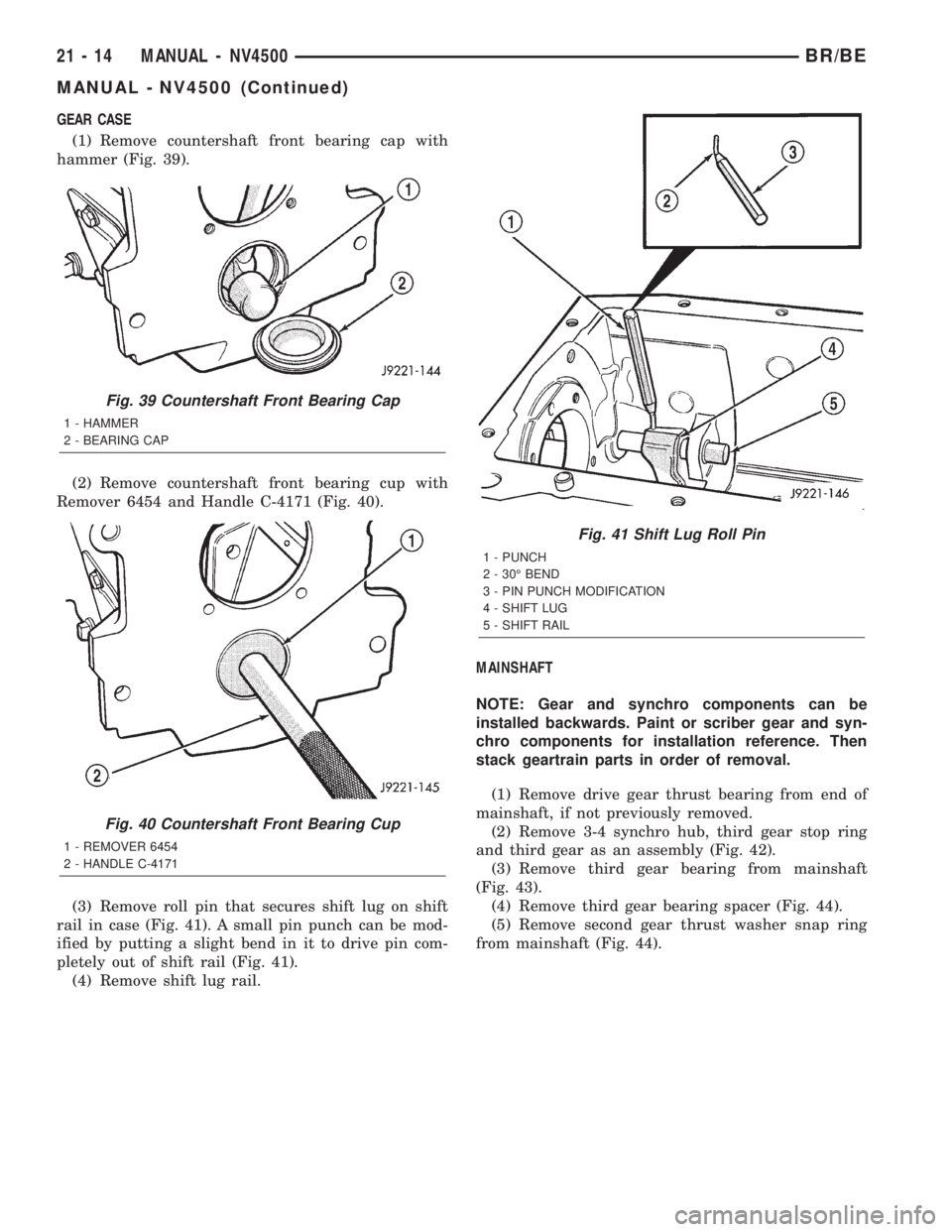
(1) Remove countershaft front bearing cap with
hammer (Fig. 39).
(2) Remove countershaft front bearing cup with
Remover 6454 and Handle C-4171 (Fig. 40).
(3) Remove roll pin that secures shift lug on shift
rail in case (Fig. 41). A small pin punch can be mod-
ified by putting a slight bend in it to drive pin com-
pletely out of shift rail (Fig. 41).
(4) Remove shift lug rail.MAINSHAFT
NOTE: Gear and synchro components can be
installed backwards. Paint or scriber gear and syn-
chro components for installation reference. Then
stack geartrain parts in order of removal.
(1) Remove drive gear thrust bearing from end of
mainshaft, if not previously removed.
(2) Remove 3-4 synchro hub, third gear stop ring
and third gear as an assembly (Fig. 42).
(3) Remove third gear bearing from mainshaft
(Fig. 43).
(4) Remove third gear bearing spacer (Fig. 44).
(5) Remove second gear thrust washer snap ring
from mainshaft (Fig. 44).
Fig. 39 Countershaft Front Bearing Cap
1 - HAMMER
2 - BEARING CAP
Fig. 40 Countershaft Front Bearing Cup
1 - REMOVER 6454
2 - HANDLE C-4171
Fig. 41 Shift Lug Roll Pin
1 - PUNCH
2 - 30É BEND
3 - PIN PUNCH MODIFICATION
4 - SHIFT LUG
5 - SHIFT RAIL
21 - 14 MANUAL - NV4500BR/BE
MANUAL - NV4500 (Continued)
Page 1471 of 2255
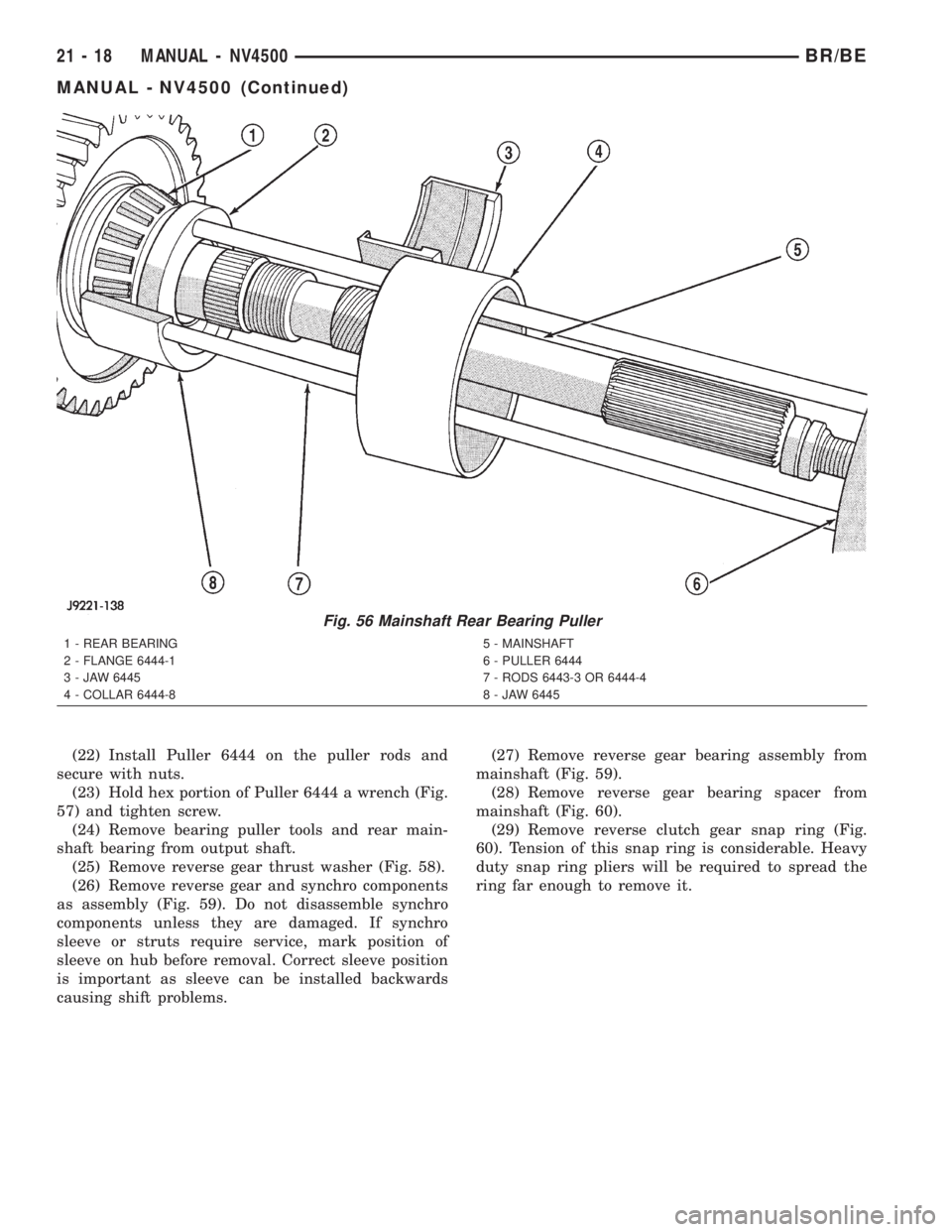
(22) Install Puller 6444 on the puller rods and
secure with nuts.
(23) Hold hex portion of Puller 6444 a wrench (Fig.
57) and tighten screw.
(24) Remove bearing puller tools and rear main-
shaft bearing from output shaft.
(25) Remove reverse gear thrust washer (Fig. 58).
(26) Remove reverse gear and synchro components
as assembly (Fig. 59). Do not disassemble synchro
components unless they are damaged. If synchro
sleeve or struts require service, mark position of
sleeve on hub before removal. Correct sleeve position
is important as sleeve can be installed backwards
causing shift problems.(27) Remove reverse gear bearing assembly from
mainshaft (Fig. 59).
(28) Remove reverse gear bearing spacer from
mainshaft (Fig. 60).
(29) Remove reverse clutch gear snap ring (Fig.
60). Tension of this snap ring is considerable. Heavy
duty snap ring pliers will be required to spread the
ring far enough to remove it.
Fig. 56 Mainshaft Rear Bearing Puller
1 - REAR BEARING
2 - FLANGE 6444-1
3 - JAW 6445
4 - COLLAR 6444-85 - MAINSHAFT
6 - PULLER 6444
7 - RODS 6443-3 OR 6444-4
8 - JAW 6445
21 - 18 MANUAL - NV4500BR/BE
MANUAL - NV4500 (Continued)
Page 1477 of 2255
(6)Install countershaft rear bearing plate (Fig. 72).
NOTE: Verify plate is seated in reverse idler shaft
notch and end play shims are still in position
before installing bolts.
(7) Apply 1-2 drops Mopar Loc N' Seal or equiva-
lent to threads of rear bearing plate bolts. Then
install and tighten bearing plate bolts to 23 N´m (200
in. lbs.).
SHIFT LUG AND RAIL
(1) Lubricate shift lug and rail with CastroltSyn-
torq or equivalent.
(2) Insert shift lug rail part way into case.
(3) Install shift lug on rail.
(4) Position shift rail so roll pin notches are
toward outside of case (Fig. 76).
(5) Install roll pin that secures lug to rail (Fig. 76).
MAINSHAFT AND GEARTRAIN
CAUTION: The reverse, 1-2 and 3-4 synchro compo-
nents can be assembled and installed incorrectly.
Follow assembly procedures for component identi-
fication and location.
Lubricate mainshaft bearing surfaces and all bear-
ing assemblies with CastroltSyntorq or with petro-
leum jelly.
(1) Install first snap ring in rear most groove of
mainshaft hub (Fig. 77). This snap ring locates first
gear clutch gear on shaft.NOTE: Four of these snap rings are used to secure
various components on the mainshaft 1-2 synchro
hub. The snap rings are all the same size and are
interchangeable.
(2) Install first gear clutch cone on mainshaft 1-2
synchro hub with recessed side of cone facing front
(Fig. 78). Verify cone is seated against snap ring on
hub.
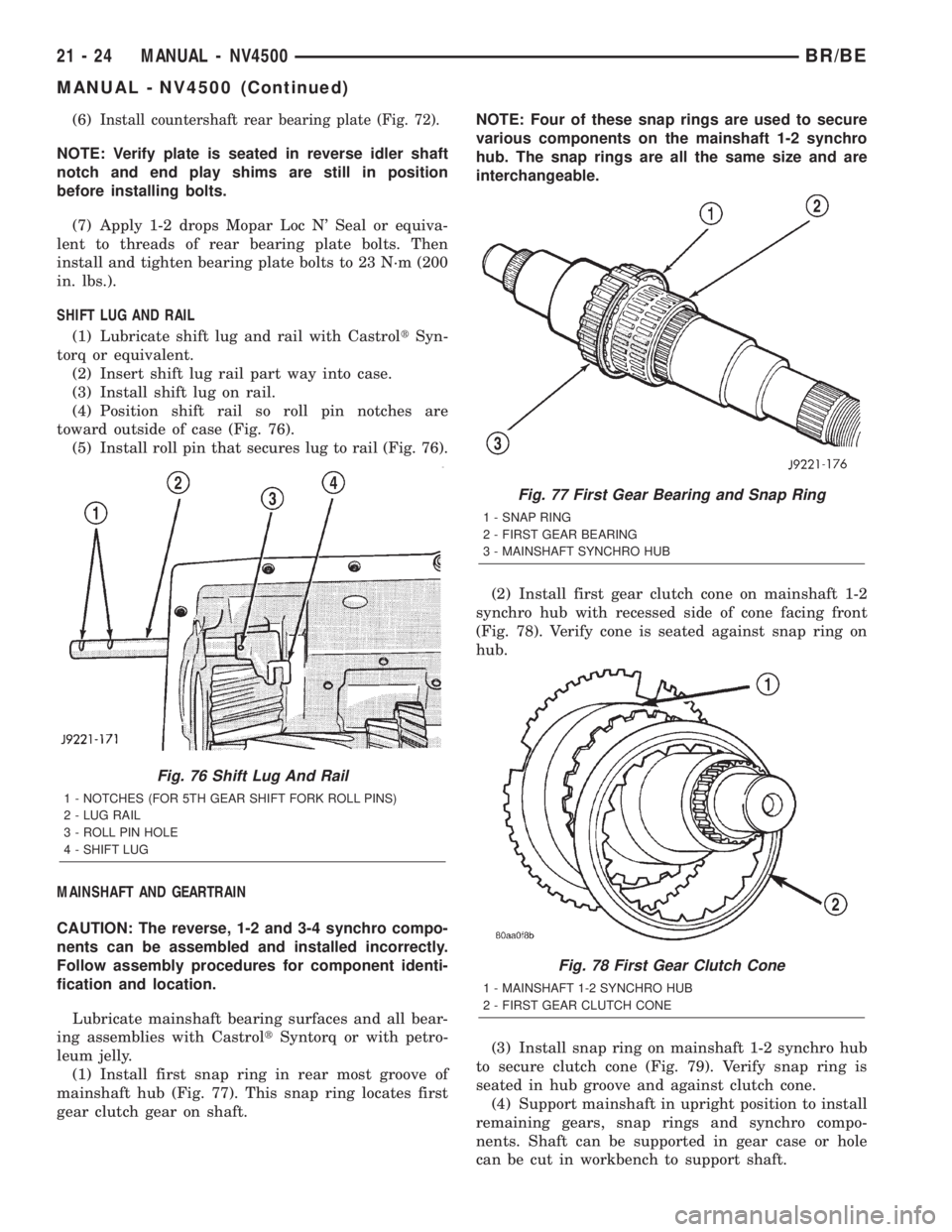
(3) Install snap ring on mainshaft 1-2 synchro hub
to secure clutch cone (Fig. 79). Verify snap ring is
seated in hub groove and against clutch cone.
(4) Support mainshaft in upright position to install
remaining gears, snap rings and synchro compo-
nents. Shaft can be supported in gear case or hole
can be cut in workbench to support shaft.
Fig. 76 Shift Lug And Rail
1 - NOTCHES (FOR 5TH GEAR SHIFT FORK ROLL PINS)
2 - LUG RAIL
3 - ROLL PIN HOLE
4 - SHIFT LUG
Fig. 77 First Gear Bearing and Snap Ring
1 - SNAP RING
2 - FIRST GEAR BEARING
3 - MAINSHAFT SYNCHRO HUB
Fig. 78 First Gear Clutch Cone
1 - MAINSHAFT 1-2 SYNCHRO HUB
2 - FIRST GEAR CLUTCH CONE
21 - 24 MANUAL - NV4500BR/BE
MANUAL - NV4500 (Continued)