lock DODGE RAM 2002 Service Repair Manual
[x] Cancel search | Manufacturer: DODGE, Model Year: 2002, Model line: RAM, Model: DODGE RAM 2002Pages: 2255, PDF Size: 62.07 MB
Page 1513 of 2255
(4) Install the remainder of the output shaft into
Fixture 8227 with press blocks under second gear.
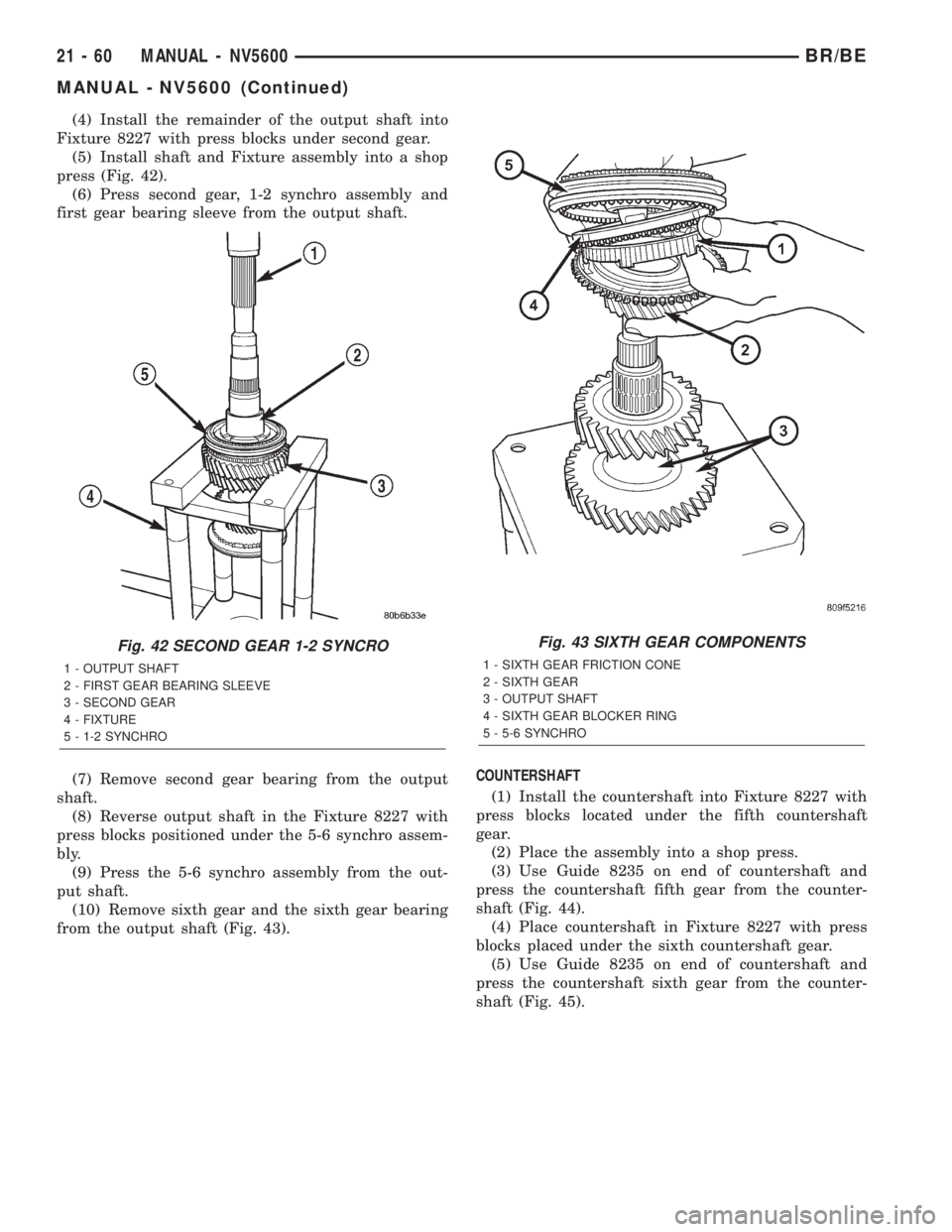
(5) Install shaft and Fixture assembly into a shop
press (Fig. 42).
(6) Press second gear, 1-2 synchro assembly and
first gear bearing sleeve from the output shaft.
(7) Remove second gear bearing from the output
shaft.
(8) Reverse output shaft in the Fixture 8227 with
press blocks positioned under the 5-6 synchro assem-
bly.
(9) Press the 5-6 synchro assembly from the out-
put shaft.
(10) Remove sixth gear and the sixth gear bearing
from the output shaft (Fig. 43).COUNTERSHAFT
(1) Install the countershaft into Fixture 8227 with
press blocks located under the fifth countershaft
gear.
(2) Place the assembly into a shop press.
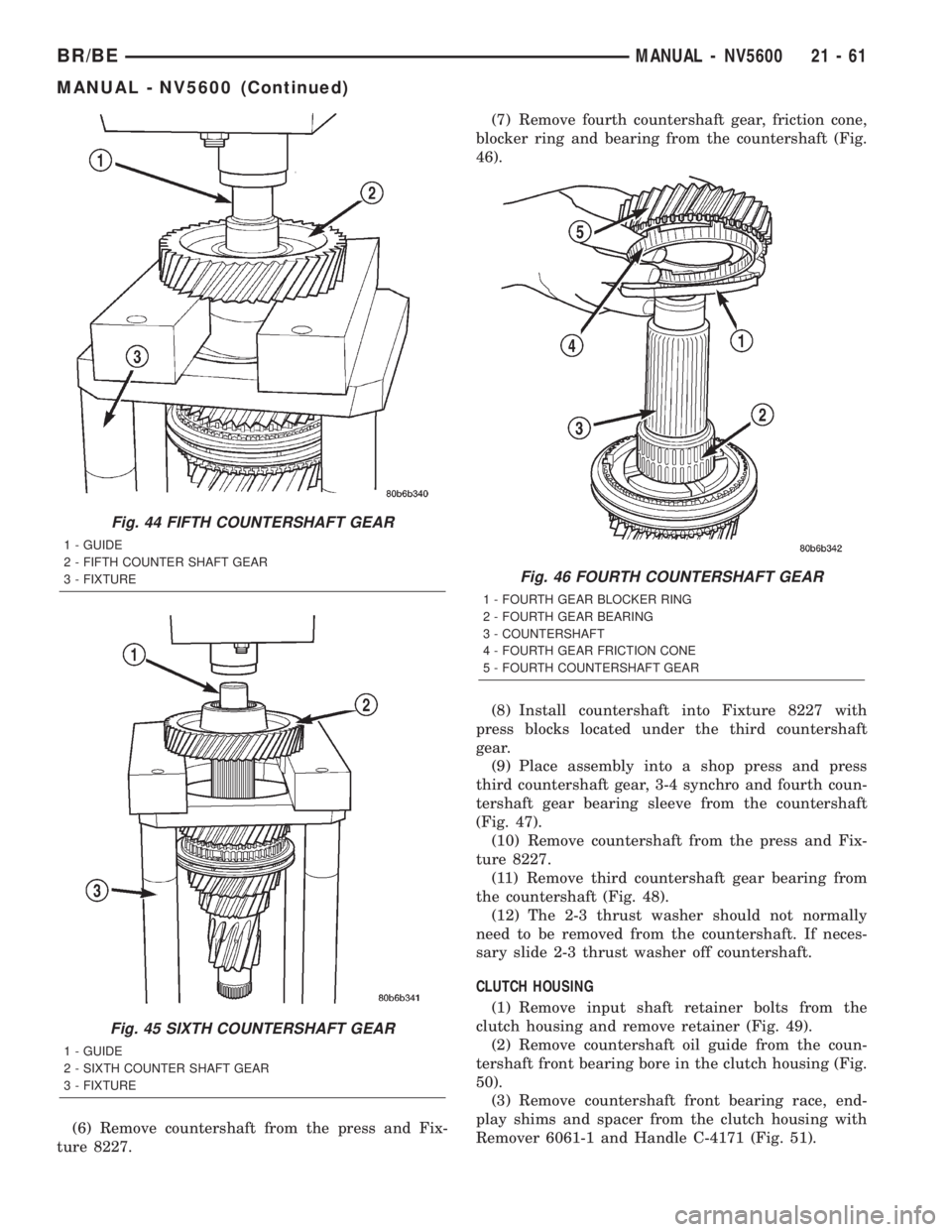
(3) Use Guide 8235 on end of countershaft and
press the countershaft fifth gear from the counter-
shaft (Fig. 44).
(4) Place countershaft in Fixture 8227 with press
blocks placed under the sixth countershaft gear.
(5) Use Guide 8235 on end of countershaft and
press the countershaft sixth gear from the counter-
shaft (Fig. 45).
Fig. 42 SECOND GEAR 1-2 SYNCRO
1 - OUTPUT SHAFT
2 - FIRST GEAR BEARING SLEEVE
3 - SECOND GEAR
4 - FIXTURE
5 - 1-2 SYNCHRO
Fig. 43 SIXTH GEAR COMPONENTS
1 - SIXTH GEAR FRICTION CONE
2 - SIXTH GEAR
3 - OUTPUT SHAFT
4 - SIXTH GEAR BLOCKER RING
5 - 5-6 SYNCHRO
21 - 60 MANUAL - NV5600BR/BE
MANUAL - NV5600 (Continued)
Page 1514 of 2255
(6) Remove countershaft from the press and Fix-
ture 8227.(7) Remove fourth countershaft gear, friction cone,
blocker ring and bearing from the countershaft (Fig.
46).
(8) Install countershaft into Fixture 8227 with
press blocks located under the third countershaft
gear.
(9) Place assembly into a shop press and press
third countershaft gear, 3-4 synchro and fourth coun-
tershaft gear bearing sleeve from the countershaft
(Fig. 47).
(10) Remove countershaft from the press and Fix-
ture 8227.
(11) Remove third countershaft gear bearing from
the countershaft (Fig. 48).
(12) The 2-3 thrust washer should not normally
need to be removed from the countershaft. If neces-
sary slide 2-3 thrust washer off countershaft.
CLUTCH HOUSING
(1) Remove input shaft retainer bolts from the
clutch housing and remove retainer (Fig. 49).
(2) Remove countershaft oil guide from the coun-
tershaft front bearing bore in the clutch housing (Fig.
50).
(3) Remove countershaft front bearing race, end-
play shims and spacer from the clutch housing with
Remover 6061-1 and Handle C-4171 (Fig. 51).
Fig. 44 FIFTH COUNTERSHAFT GEAR
1 - GUIDE
2 - FIFTH COUNTER SHAFT GEAR
3 - FIXTURE
Fig. 45 SIXTH COUNTERSHAFT GEAR
1 - GUIDE
2 - SIXTH COUNTER SHAFT GEAR
3 - FIXTURE
Fig. 46 FOURTH COUNTERSHAFT GEAR
1 - FOURTH GEAR BLOCKER RING
2 - FOURTH GEAR BEARING
3 - COUNTERSHAFT
4 - FOURTH GEAR FRICTION CONE
5 - FOURTH COUNTERSHAFT GEAR
BR/BEMANUAL - NV5600 21 - 61
MANUAL - NV5600 (Continued)
Page 1516 of 2255
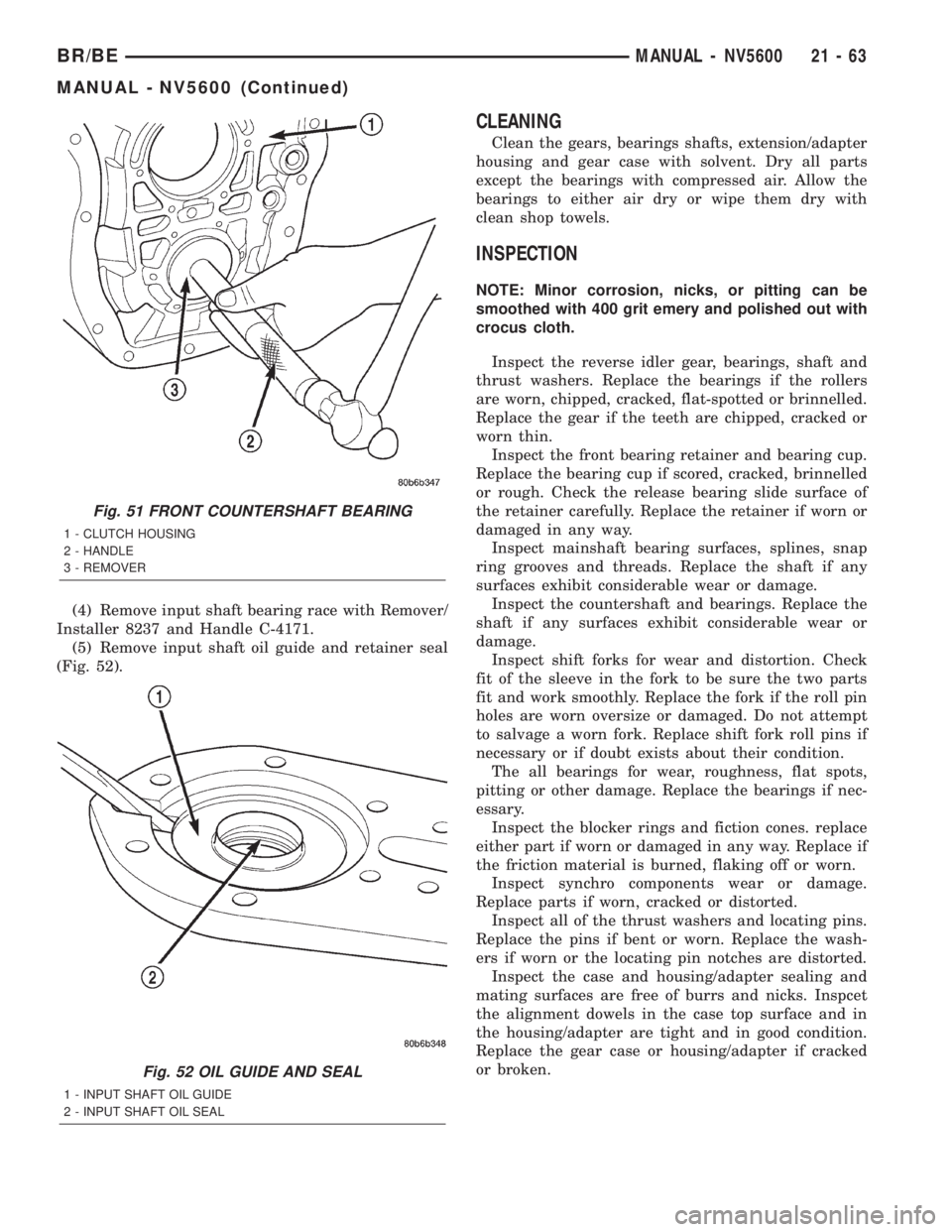
(4) Remove input shaft bearing race with Remover/
Installer 8237 and Handle C-4171.
(5) Remove input shaft oil guide and retainer seal
(Fig. 52).
CLEANING
Clean the gears, bearings shafts, extension/adapter
housing and gear case with solvent. Dry all parts
except the bearings with compressed air. Allow the
bearings to either air dry or wipe them dry with
clean shop towels.
INSPECTION
NOTE: Minor corrosion, nicks, or pitting can be
smoothed with 400 grit emery and polished out with
crocus cloth.
Inspect the reverse idler gear, bearings, shaft and
thrust washers. Replace the bearings if the rollers
are worn, chipped, cracked, flat-spotted or brinnelled.
Replace the gear if the teeth are chipped, cracked or
worn thin.
Inspect the front bearing retainer and bearing cup.
Replace the bearing cup if scored, cracked, brinnelled
or rough. Check the release bearing slide surface of
the retainer carefully. Replace the retainer if worn or
damaged in any way.
Inspect mainshaft bearing surfaces, splines, snap
ring grooves and threads. Replace the shaft if any
surfaces exhibit considerable wear or damage.
Inspect the countershaft and bearings. Replace the
shaft if any surfaces exhibit considerable wear or
damage.
Inspect shift forks for wear and distortion. Check
fit of the sleeve in the fork to be sure the two parts
fit and work smoothly. Replace the fork if the roll pin
holes are worn oversize or damaged. Do not attempt
to salvage a worn fork. Replace shift fork roll pins if
necessary or if doubt exists about their condition.
The all bearings for wear, roughness, flat spots,
pitting or other damage. Replace the bearings if nec-
essary.
Inspect the blocker rings and fiction cones. replace
either part if worn or damaged in any way. Replace if
the friction material is burned, flaking off or worn.
Inspect synchro components wear or damage.
Replace parts if worn, cracked or distorted.
Inspect all of the thrust washers and locating pins.
Replace the pins if bent or worn. Replace the wash-
ers if worn or the locating pin notches are distorted.
Inspect the case and housing/adapter sealing and
mating surfaces are free of burrs and nicks. Inspcet
the alignment dowels in the case top surface and in
the housing/adapter are tight and in good condition.
Replace the gear case or housing/adapter if cracked
or broken.
Fig. 51 FRONT COUNTERSHAFT BEARING
1 - CLUTCH HOUSING
2 - HANDLE
3 - REMOVER
Fig. 52 OIL GUIDE AND SEAL
1 - INPUT SHAFT OIL GUIDE
2 - INPUT SHAFT OIL SEAL
BR/BEMANUAL - NV5600 21 - 63
MANUAL - NV5600 (Continued)
Page 1517 of 2255
ASSEMBLY
NOTE: Gaskets are not used in the transmission.
Use Mopar Gasket Maker or equivalent on all gear
case and extension housing sealing surfaces.
OUTPUT SHAFT
(1) Place second gear on bench with the synchro
clutch ring up.
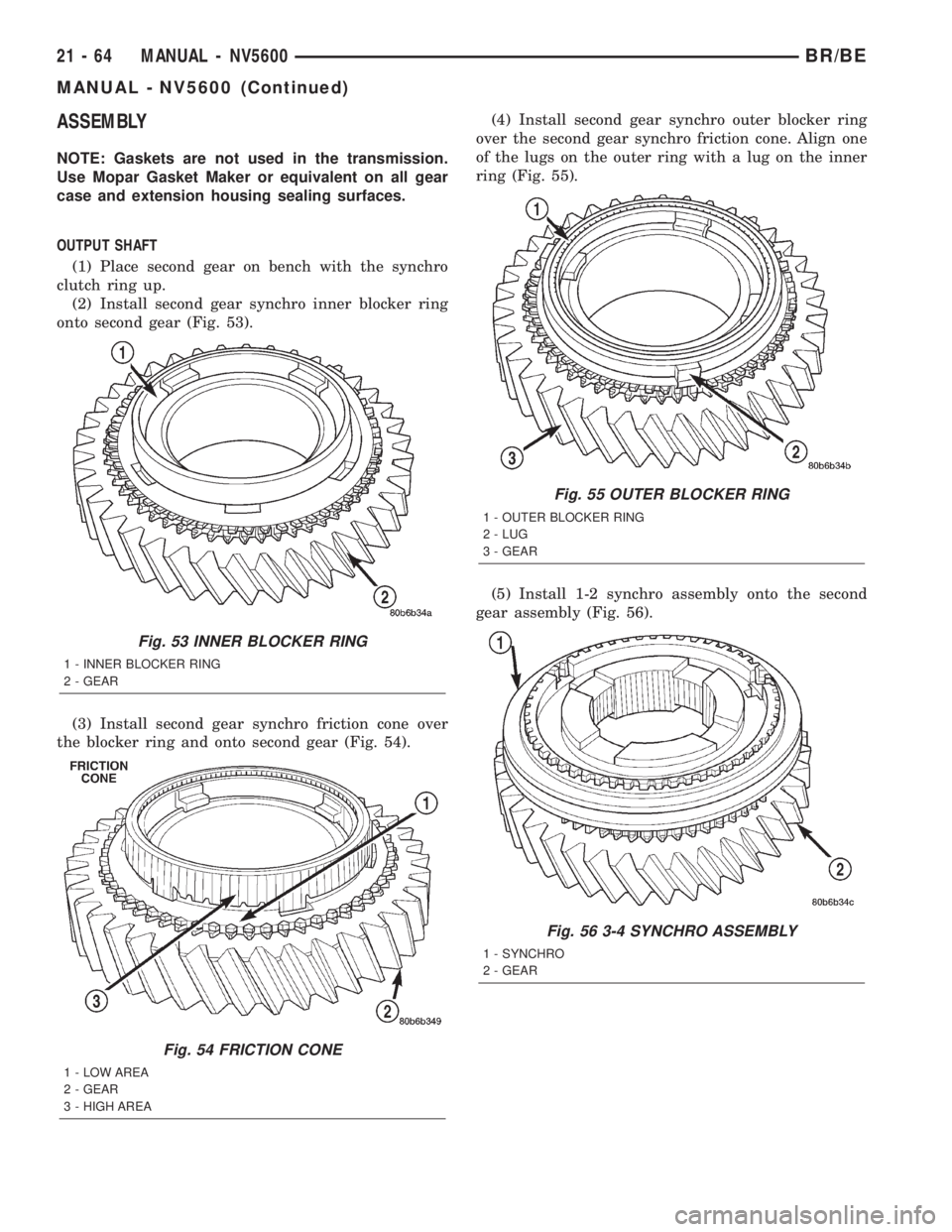
(2) Install second gear synchro inner blocker ring
onto second gear (Fig. 53).
(3) Install second gear synchro friction cone over
the blocker ring and onto second gear (Fig. 54).(4) Install second gear synchro outer blocker ring
over the second gear synchro friction cone. Align one
of the lugs on the outer ring with a lug on the inner
ring (Fig. 55).
(5) Install 1-2 synchro assembly onto the second
gear assembly (Fig. 56).
Fig. 53 INNER BLOCKER RING
1 - INNER BLOCKER RING
2 - GEAR
Fig. 54 FRICTION CONE
1 - LOW AREA
2 - GEAR
3 - HIGH AREA
Fig. 55 OUTER BLOCKER RING
1 - OUTER BLOCKER RING
2 - LUG
3 - GEAR
Fig. 56 3-4 SYNCHRO ASSEMBLY
1 - SYNCHRO
2 - GEAR
21 - 64 MANUAL - NV5600BR/BE
MANUAL - NV5600 (Continued)
Page 1518 of 2255
(6) Reverse assembly on the bench.
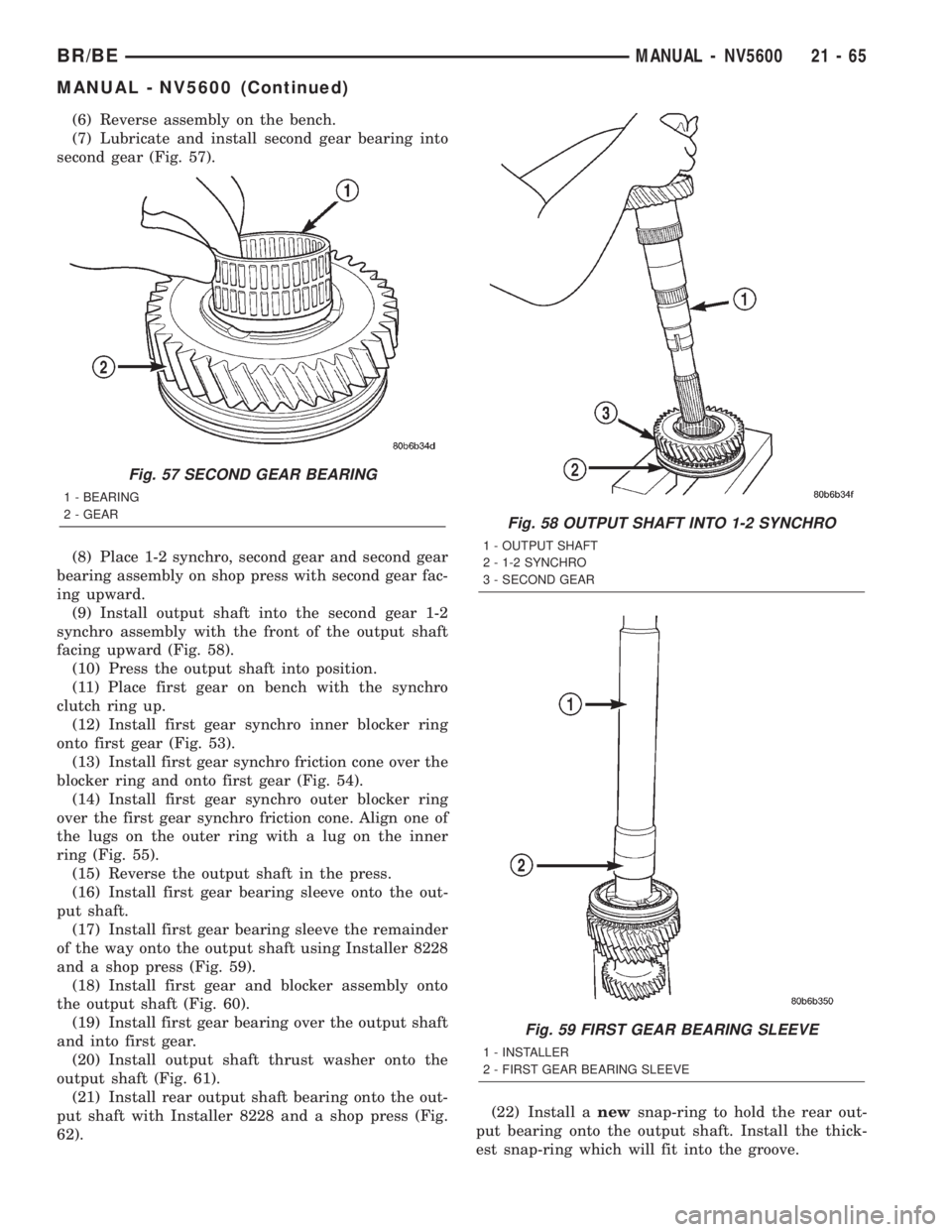
(7) Lubricate and install second gear bearing into
second gear (Fig. 57).
(8) Place 1-2 synchro, second gear and second gear
bearing assembly on shop press with second gear fac-
ing upward.
(9) Install output shaft into the second gear 1-2
synchro assembly with the front of the output shaft
facing upward (Fig. 58).
(10) Press the output shaft into position.
(11) Place first gear on bench with the synchro
clutch ring up.
(12) Install first gear synchro inner blocker ring
onto first gear (Fig. 53).
(13) Install first gear synchro friction cone over the
blocker ring and onto first gear (Fig. 54).
(14) Install first gear synchro outer blocker ring
over the first gear synchro friction cone. Align one of
the lugs on the outer ring with a lug on the inner
ring (Fig. 55).
(15) Reverse the output shaft in the press.
(16) Install first gear bearing sleeve onto the out-
put shaft.
(17) Install first gear bearing sleeve the remainder
of the way onto the output shaft using Installer 8228
and a shop press (Fig. 59).
(18) Install first gear and blocker assembly onto
the output shaft (Fig. 60).
(19) Install first gear bearing over the output shaft
and into first gear.
(20) Install output shaft thrust washer onto the
output shaft (Fig. 61).
(21) Install rear output shaft bearing onto the out-
put shaft with Installer 8228 and a shop press (Fig.
62).(22) Install anewsnap-ring to hold the rear out-
put bearing onto the output shaft. Install the thick-
est snap-ring which will fit into the groove.
Fig. 57 SECOND GEAR BEARING
1 - BEARING
2 - GEAR
Fig. 58 OUTPUT SHAFT INTO 1-2 SYNCHRO
1 - OUTPUT SHAFT
2 - 1-2 SYNCHRO
3 - SECOND GEAR
Fig. 59 FIRST GEAR BEARING SLEEVE
1 - INSTALLER
2 - FIRST GEAR BEARING SLEEVE
BR/BEMANUAL - NV5600 21 - 65
MANUAL - NV5600 (Continued)
Page 1519 of 2255
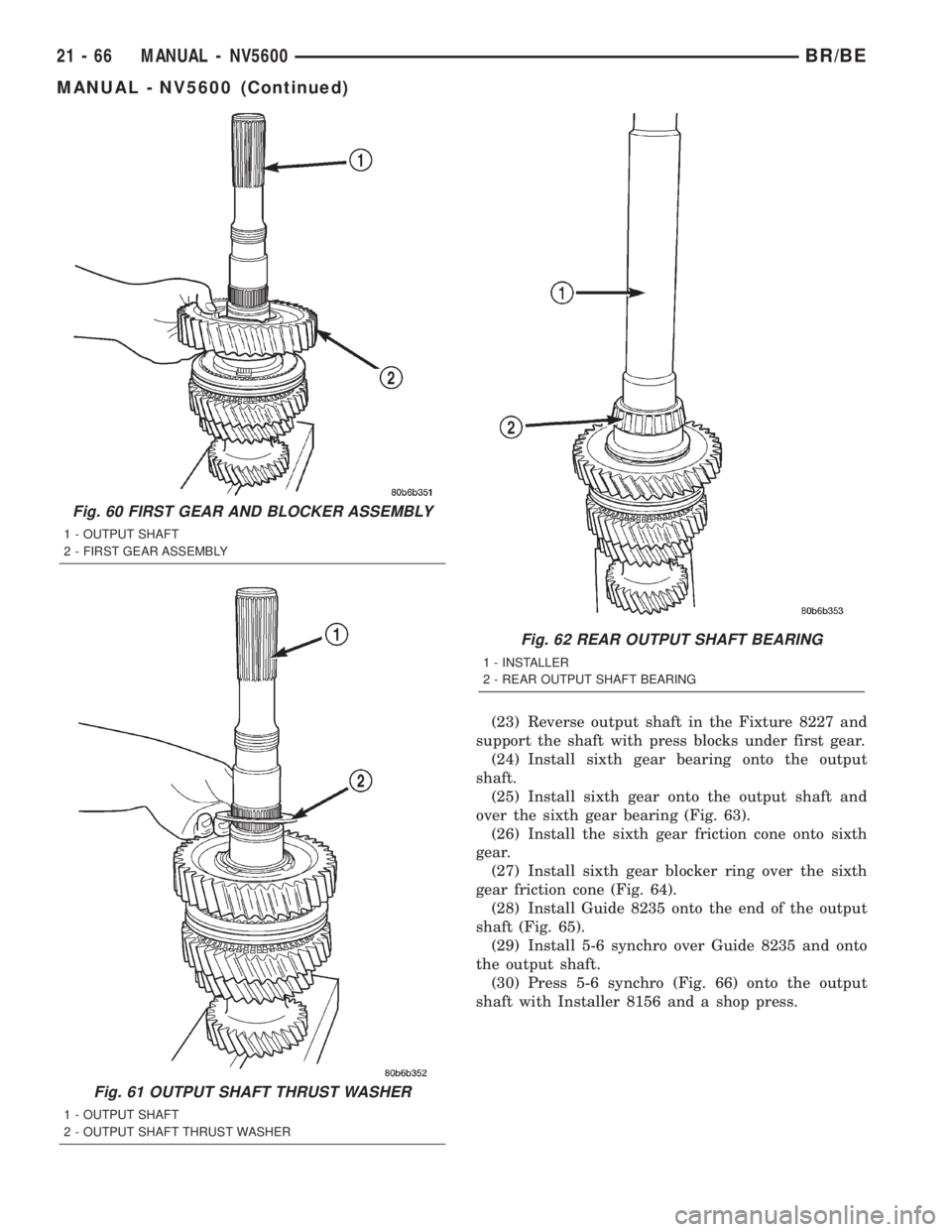
(23) Reverse output shaft in the Fixture 8227 and
support the shaft with press blocks under first gear.
(24) Install sixth gear bearing onto the output
shaft.
(25) Install sixth gear onto the output shaft and
over the sixth gear bearing (Fig. 63).
(26) Install the sixth gear friction cone onto sixth
gear.
(27) Install sixth gear blocker ring over the sixth
gear friction cone (Fig. 64).
(28) Install Guide 8235 onto the end of the output
shaft (Fig. 65).
(29) Install 5-6 synchro over Guide 8235 and onto
the output shaft.
(30) Press 5-6 synchro (Fig. 66) onto the output
shaft with Installer 8156 and a shop press.
Fig. 60 FIRST GEAR AND BLOCKER ASSEMBLY
1 - OUTPUT SHAFT
2 - FIRST GEAR ASSEMBLY
Fig. 61 OUTPUT SHAFT THRUST WASHER
1 - OUTPUT SHAFT
2 - OUTPUT SHAFT THRUST WASHER
Fig. 62 REAR OUTPUT SHAFT BEARING
1 - INSTALLER
2 - REAR OUTPUT SHAFT BEARING
21 - 66 MANUAL - NV5600BR/BE
MANUAL - NV5600 (Continued)
Page 1520 of 2255
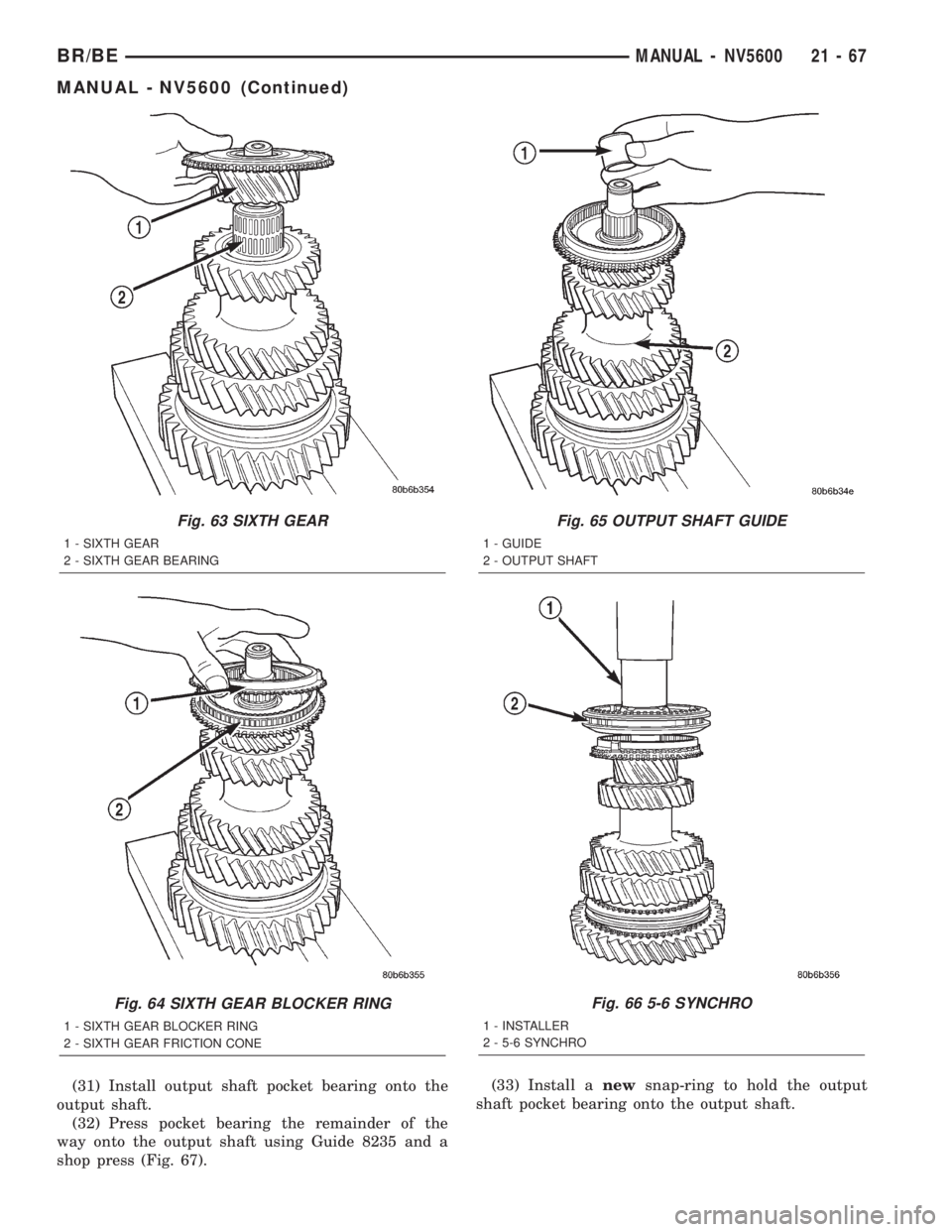
(31) Install output shaft pocket bearing onto the
output shaft.
(32) Press pocket bearing the remainder of the
way onto the output shaft using Guide 8235 and a
shop press (Fig. 67).(33) Install anewsnap-ring to hold the output
shaft pocket bearing onto the output shaft.
Fig. 63 SIXTH GEAR
1 - SIXTH GEAR
2 - SIXTH GEAR BEARING
Fig. 64 SIXTH GEAR BLOCKER RING
1 - SIXTH GEAR BLOCKER RING
2 - SIXTH GEAR FRICTION CONE
Fig. 65 OUTPUT SHAFT GUIDE
1 - GUIDE
2 - OUTPUT SHAFT
Fig. 66 5-6 SYNCHRO
1 - INSTALLER
2 - 5-6 SYNCHRO
BR/BEMANUAL - NV5600 21 - 67
MANUAL - NV5600 (Continued)
Page 1521 of 2255
COUNTERSHAFT
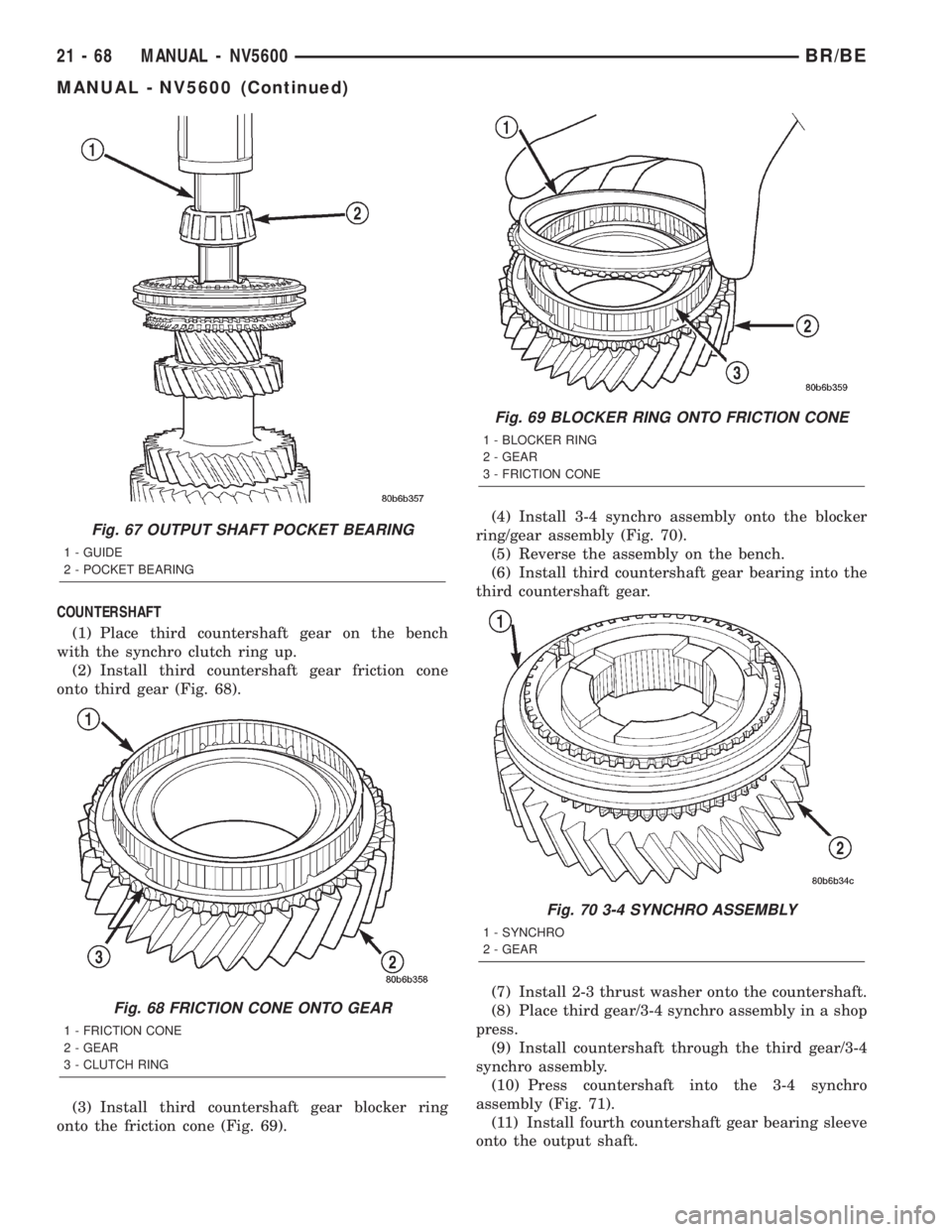
(1) Place third countershaft gear on the bench
with the synchro clutch ring up.
(2) Install third countershaft gear friction cone
onto third gear (Fig. 68).
(3) Install third countershaft gear blocker ring
onto the friction cone (Fig. 69).(4) Install 3-4 synchro assembly onto the blocker
ring/gear assembly (Fig. 70).
(5) Reverse the assembly on the bench.
(6) Install third countershaft gear bearing into the
third countershaft gear.
(7) Install 2-3 thrust washer onto the countershaft.
(8) Place third gear/3-4 synchro assembly in a shop
press.
(9) Install countershaft through the third gear/3-4
synchro assembly.
(10) Press countershaft into the 3-4 synchro
assembly (Fig. 71).
(11) Install fourth countershaft gear bearing sleeve
onto the output shaft.
Fig. 67 OUTPUT SHAFT POCKET BEARING
1 - GUIDE
2 - POCKET BEARING
Fig. 68 FRICTION CONE ONTO GEAR
1 - FRICTION CONE
2 - GEAR
3 - CLUTCH RING
Fig. 69 BLOCKER RING ONTO FRICTION CONE
1 - BLOCKER RING
2 - GEAR
3 - FRICTION CONE
Fig. 70 3-4 SYNCHRO ASSEMBLY
1 - SYNCHRO
2 - GEAR
21 - 68 MANUAL - NV5600BR/BE
MANUAL - NV5600 (Continued)
Page 1522 of 2255
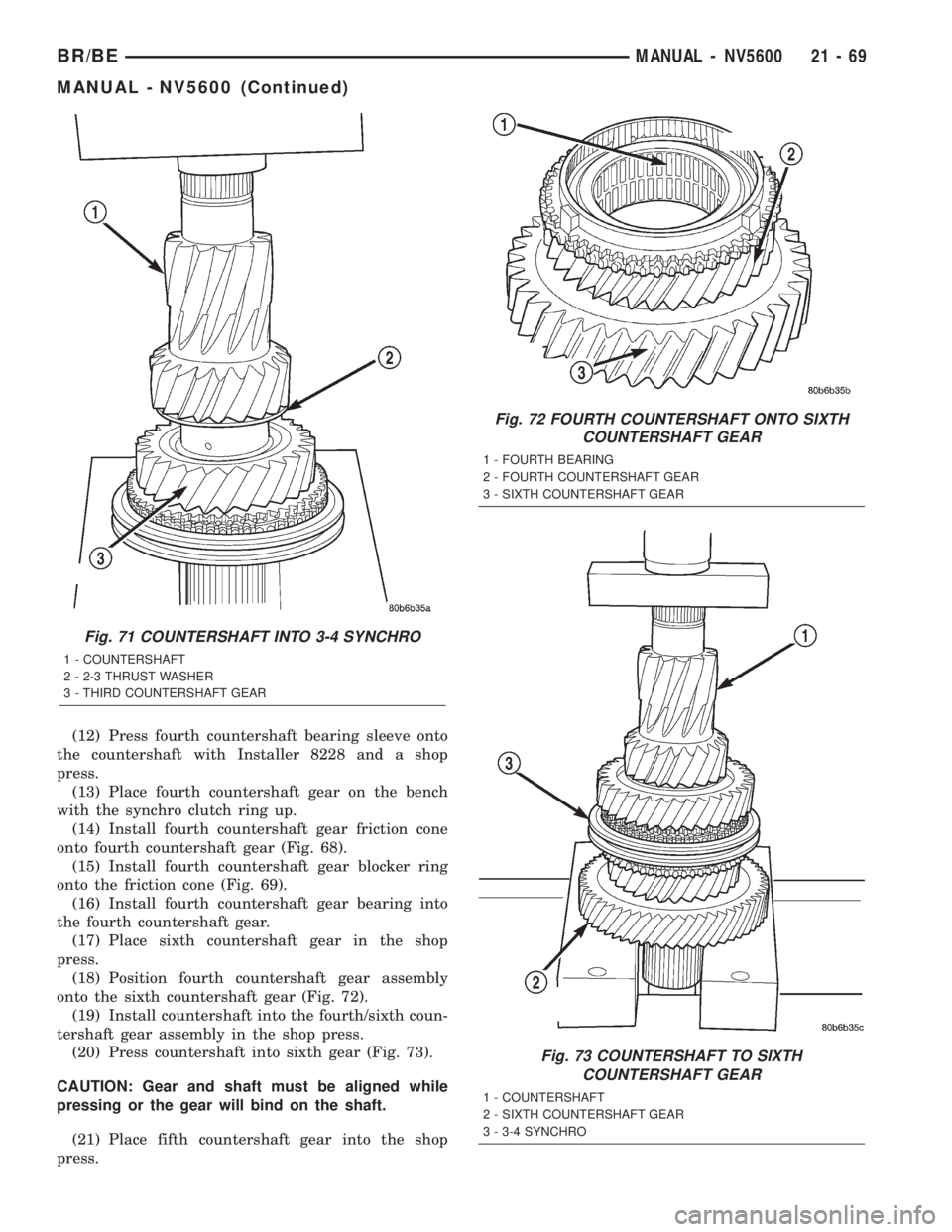
(12) Press fourth countershaft bearing sleeve onto
the countershaft with Installer 8228 and a shop
press.
(13) Place fourth countershaft gear on the bench
with the synchro clutch ring up.
(14) Install fourth countershaft gear friction cone
onto fourth countershaft gear (Fig. 68).
(15) Install fourth countershaft gear blocker ring
onto the friction cone (Fig. 69).
(16) Install fourth countershaft gear bearing into
the fourth countershaft gear.
(17) Place sixth countershaft gear in the shop
press.
(18) Position fourth countershaft gear assembly
onto the sixth countershaft gear (Fig. 72).
(19) Install countershaft into the fourth/sixth coun-
tershaft gear assembly in the shop press.
(20) Press countershaft into sixth gear (Fig. 73).
CAUTION: Gear and shaft must be aligned while
pressing or the gear will bind on the shaft.
(21) Place fifth countershaft gear into the shop
press.
Fig. 71 COUNTERSHAFT INTO 3-4 SYNCHRO
1 - COUNTERSHAFT
2 - 2-3 THRUST WASHER
3 - THIRD COUNTERSHAFT GEAR
Fig. 72 FOURTH COUNTERSHAFT ONTO SIXTH
COUNTERSHAFT GEAR
1 - FOURTH BEARING
2 - FOURTH COUNTERSHAFT GEAR
3 - SIXTH COUNTERSHAFT GEAR
Fig. 73 COUNTERSHAFT TO SIXTH
COUNTERSHAFT GEAR
1 - COUNTERSHAFT
2 - SIXTH COUNTERSHAFT GEAR
3 - 3-4 SYNCHRO
BR/BEMANUAL - NV5600 21 - 69
MANUAL - NV5600 (Continued)
Page 1525 of 2255
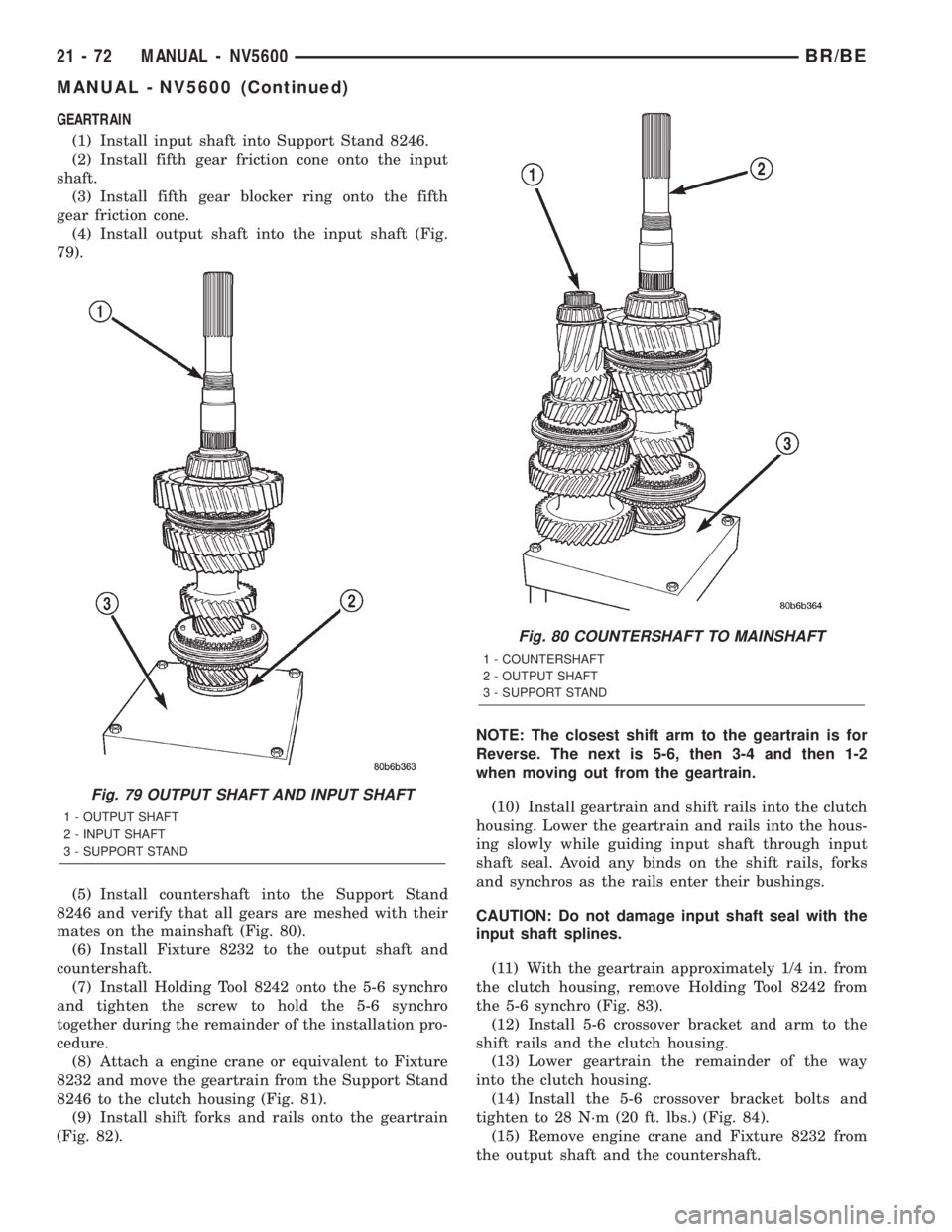
GEARTRAIN
(1) Install input shaft into Support Stand 8246.
(2) Install fifth gear friction cone onto the input
shaft.
(3) Install fifth gear blocker ring onto the fifth
gear friction cone.
(4) Install output shaft into the input shaft (Fig.
79).
(5) Install countershaft into the Support Stand
8246 and verify that all gears are meshed with their
mates on the mainshaft (Fig. 80).
(6) Install Fixture 8232 to the output shaft and
countershaft.
(7) Install Holding Tool 8242 onto the 5-6 synchro
and tighten the screw to hold the 5-6 synchro
together during the remainder of the installation pro-
cedure.
(8) Attach a engine crane or equivalent to Fixture
8232 and move the geartrain from the Support Stand
8246 to the clutch housing (Fig. 81).
(9) Install shift forks and rails onto the geartrain
(Fig. 82).NOTE: The closest shift arm to the geartrain is for
Reverse. The next is 5-6, then 3-4 and then 1-2
when moving out from the geartrain.
(10) Install geartrain and shift rails into the clutch
housing. Lower the geartrain and rails into the hous-
ing slowly while guiding input shaft through input
shaft seal. Avoid any binds on the shift rails, forks
and synchros as the rails enter their bushings.
CAUTION: Do not damage input shaft seal with the
input shaft splines.
(11) With the geartrain approximately 1/4 in. from
the clutch housing, remove Holding Tool 8242 from
the 5-6 synchro (Fig. 83).
(12) Install 5-6 crossover bracket and arm to the
shift rails and the clutch housing.
(13) Lower geartrain the remainder of the way
into the clutch housing.
(14) Install the 5-6 crossover bracket bolts and
tighten to 28 N´m (20 ft. lbs.) (Fig. 84).
(15) Remove engine crane and Fixture 8232 from
the output shaft and the countershaft.
Fig. 79 OUTPUT SHAFT AND INPUT SHAFT
1 - OUTPUT SHAFT
2 - INPUT SHAFT
3 - SUPPORT STAND
Fig. 80 COUNTERSHAFT TO MAINSHAFT
1 - COUNTERSHAFT
2 - OUTPUT SHAFT
3 - SUPPORT STAND
21 - 72 MANUAL - NV5600BR/BE
MANUAL - NV5600 (Continued)