wheel DODGE SPRINTER 2007 2.G User Guide
[x] Cancel search | Manufacturer: DODGE, Model Year: 2007, Model line: SPRINTER, Model: DODGE SPRINTER 2007 2.GPages: 393, PDF Size: 7.61 MB
Page 34 of 393
33 Safety
Occupant safety
2
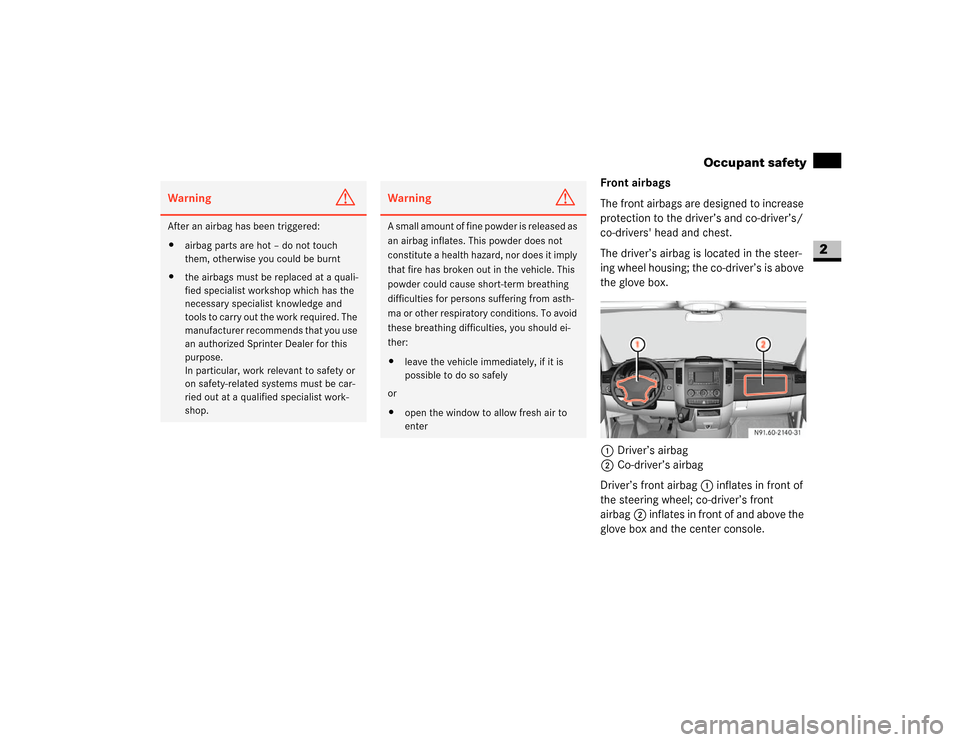
Front airbags
The front airbags are designed to increase
protection to the driver’s and co-driver’s/
co-drivers' head and chest.
The driver’s airbag is located in the steer-
ing wheel housing; the co-driver’s is above
the glove box.
1Driver’s airbag
2Co-driver’s airbag
Driver’s front airbag1 inflates in front of
the steering wheel; co-driver’s front
airbag2 inflates in front of and above the
glove box and the center console.
Warning
G
After an airbag has been triggered:
\4airbag parts are hot – do not touch
them, otherwise you could be burnt
\4the airbags must be replaced at a quali-
fied specialist workshop which has the
necessary specialist knowledge and
tools to carry out the work required. The
manufacturer recommends that you use
an authorized Sprinter Dealer for this
purpose.
In particular, work relevant to safety or
on safety-related systems must be car-
ried out at a qualified specialist work-
shop.
Warning
G
A small amount of fine powder is released as
an airbag inflates. This powder does not
constitute a health hazard, nor does it imply
that fire has broken out in the vehicle. This
powder could cause short-term breathing
difficulties for persons suffering from asth-
ma or other respiratory conditions. To avoid
these breathing difficulties, you should ei-
ther:
\4leave the vehicle immediately, if it is
possible to do so safely
or
\4open the window to allow fresh air to
enter
N91.60-2140-31
Page 43 of 393
42 SafetyDriving safety systems
2
\3 Driving safety systemsIn this section, you will find information
about the following driving safety systems:
\4ABS (A
ntilock B
rake S
ystem)
\4BAS (B
rake As
sist)
\4ESP
® (E
lectronic S
tability P
rogram)
\4ASR (acceleration skid control)
\4EBV (electronic brake force distribu-
tion)ABS regulates the brake pressure in such a
way that the wheels do not lock when you
brake. This allows you to continue steering
when braking.
ABS works from a speed of about 3 mph
(5 km/h) upwards, regardless of road sur-
face conditions.
ABS works on slippery surfaces, even
when you only brake gently.
There is a malfunction if the - indicator
lamp is permanently lit while the engine is
running (\2page 271).
Despite this, the normal driving and brak-
ing functions remain available.
iThe maximum effect of ABS, BAS,
ESP
®, ASR and EBV can only be
achieved if you:
\4always drive with the correct tire
pressures adjusted according to
the load (\2page 210)
\4use winter tires (M+S tires) in win-
try conditions, with snow chains if
necessary
Warning
G
There is an increased risk of an accident if
you:
\4drive too fast, in particular when corner-
ing and on a wet or slippery road surface
\4drive too close to the vehicle in front
The driving safety systems described in this
section cannot reduce this risk and are un-
able to override the laws of physics.
Always adapt your driving style to the pre-
vailing road and weather conditions, and
maintain an adequately safe distance from
other road users as well as any obstacles on
the road.iOnly use wheels with the recommend-
ed tire sizes (\2page 367), otherwise
the driving safety systems will not work
correctly.
Antilock Brake System (ABS)Warning
G
Do not depress the brake pedal several
times in quick succession (pumping). De-
press the brake firmly and evenly. Pumping
the brake pedal may reduce the braking ef-
fect.
Page 44 of 393
43 Safety
Driving safety systems
2
Braking
If ABS intervenes during braking, you will
feel the steering wheel vibrate gently and
the brake pedal pulsate.
If ABS intervenes:
\1Continue to depress the brake pedal
firmly until the braking situation is over.
For full brake application:
\1Depress the brake pedal with maxi-
mum force.Brake Assist operates in emergency brak-
ing situations. If you depress the brake
pedal quickly, BAS automatically increases
the brake pressure, thereby reducing the
stopping distance.
\1Keep the brake pedal firmly depressed
until the emergency braking situation is
over.
ABS prevents the wheels from locking.
When you release the brake pedal, the
brakes will work as normal again. BAS is
deactivated.
Vehicles without steering wheel buttons:
There is a malfunction if thek indicator
lamp is permanently lit while the engine is
running (\2page 270).ESP
® monitors driving stability and detects
a tendency of the vehicle to understeer or
oversteer (skidding). ESP
® stabilizes the
vehicle by braking individual wheels, limit-
ing the engine power output, and greatly
assists you when driving on wet or slippery
road surfaces. ESP
® also stabilizes the ve-
hicle when braking.
When ESP
® intervenes, thev warning
lamp in the speedometer flashes.
Warning
G
Always adapt your driving style to the pre-
vailing road and weather conditions, and
maintain an adequately safe distance from
other road users as well as any obstacles on
the road.
If ABS malfunctions, the wheels could lock
when you brake. This means that the steer-
ability of the vehicle is restricted during
braking and the stopping distance may in-
crease. If ABS is deactivated due to a mal-
function, BAS is also deactivated.Brake Assist (BAS)
Warning
G
If BAS malfunctions, the brake system is still
available with the full brake boosting effect.
In an emergency braking situation, however,
the braking force will not be additionally
boosted automatically and the stopping dis-
tance may increase.Electronic Stability Program (ESP
®)
Page 45 of 393
44 SafetyDriving safety systems
2
There is a malfunction if the # indicator
lamp is permanently lit while the engine is
running (\2page 272).
If ESP
® malfunctions, engine power output
may be reduced.ASR improves traction for a sustained peri-
od, i.e. the transfer of power from the tires
to the road surface, and thus also improves
the driving stability of the vehicle. ASR as-
sists you when pulling away and accelerat-
ing, especially on smooth and slippery
surfaces.
ASR brakes individual drive wheels and
limits the engine torque to prevent the
drive wheels from spinning. When ASR in-
tervenes, thev indicator lamp in the
speedometer flashes.
If the road surface is not capable of provid-
ing sufficient traction, bearing in mind the
tires, load and gradient, it is not be possi-
ble to pull away smoothly even with ASR.
Vehicles without steering wheel buttons:
There is a malfunction if thek indicator
lamp is permanently lit while the engine is
running (\2page 270).
If ASR malfunctions, engine power output
may be reduced.
Warning
G
Proceed as follows if the v warning lamp
in the speedometer flashes:
\4Do not deactivate ASR under any cir-
cumstances.
\4Only depress the accelerator pedal as
far as necessary when pulling away.
\4Adapt your driving style to suit the pre-
vailing road and weather conditions.
Otherwise, the vehicle could begin to skid.
ESP
® cannot reduce the risk of an accident
if you drive too fast. ESP
® is unable to over-
ride the laws of physics.
!
CAUTION
Only operate the vehicle briefly (maxi-
mum of 10 seconds) on a brake dyna-
mometer. The key must be turned to
position1 in the ignition lock during
this time. You could damage the drive
train or the brake system.
!
CAUTION
Do not operate the vehicle on a roller
dynamometer (for example for perfor-
mance testing). If you wish to operate
the vehicle on a roller dynamometer,
please consult an authorized Sprinter
Dealer beforehand. You could other-
wise damage the drive train or the
brake system.
Acceleration skid control (ASR)
Page 46 of 393
45 Safety
Driving safety systems
2
Activating/deactivating ASR
ASR is automatically activated as soon as
the engine is switched on.
It may be best to deactivate ASR in the fol-
lowing situations:
\4if snow chains are being used
\4in deep snow
\4on sand or gravel
If you deactivate ASR:
\4the engine’s torque is then no longer
limited and the drive wheels could spin;
the spinning wheels produce a cutting
effect for better traction
\4traction control still intervenes by brak-
ing if one drive wheel reaches its grip
limit, for example if the surface under
one side of the vehicle is slippery. The
wheel is then braked to increase trac-
tion in this situation.
\4ESP
® still intervenes to stabilize the ve-
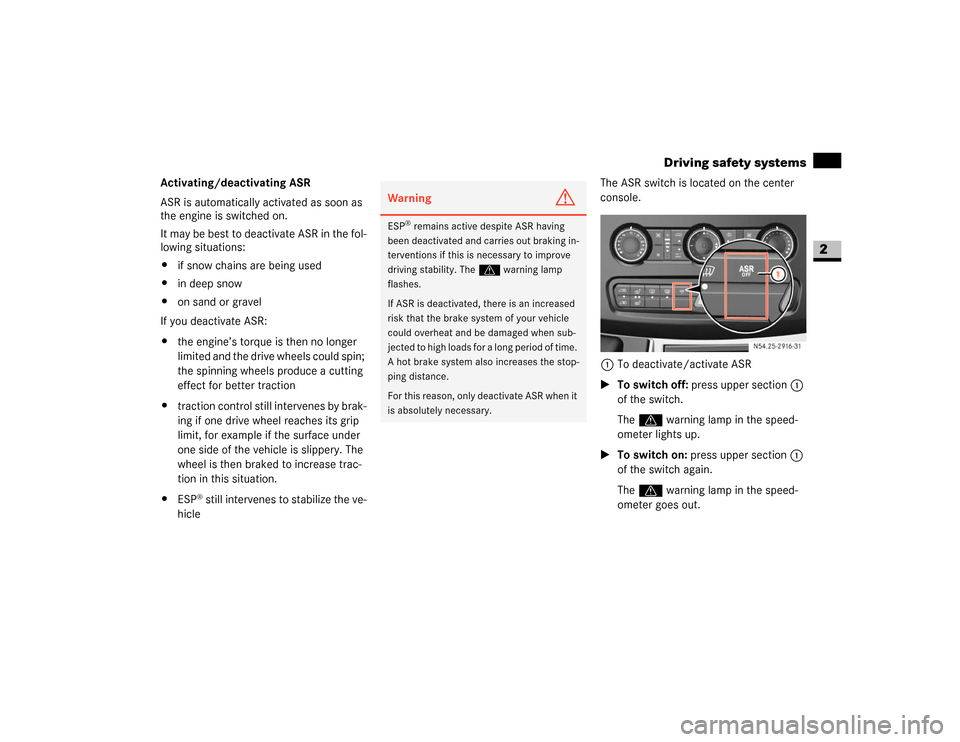
hicleThe ASR switch is located on the center
console.
1To deactivate/activate ASR
\1To switch off: press upper section1
of the switch.
The v warning lamp in the speed-
ometer lights up.
\1To switch on: press upper section1
of the switch again.
Thev warning lamp in the speed-
ometer goes out.
Warning
G
ESP
® remains active despite ASR having
been deactivated and carries out braking in-
terventions if this is necessary to improve
driving stability. Thev warning lamp
flashes.
If ASR is deactivated, there is an increased
risk that the brake system of your vehicle
could overheat and be damaged when sub-
jected to high loads for a long period of time.
A hot brake system also increases the stop-
ping distance.
For this reason, only deactivate ASR when it
is absolutely necessary.
N54.25-2916-31
Page 47 of 393
46 SafetyDriving safety systems
2
EBV monitors and regulates the brake
pressure at the rear wheels to improve
driving stability during braking.There is a malfunction if the #, k,
- and indicator lamps are perma-
nently lit while the engine is running
(\2page 268). Electronic brake force distribution
(EBV)Warning
G
If EBV malfunctions, the brake system is still
available with the full brake boosting effect.
However, the rear wheels may lock, for ex-
ample if the brakes are applied with maxi-
mum force. You could then lose control of
the vehicle and cause an accident. Always
adapt your driving style to the change in
handling characteristics.
Have the system checked at an authorized
Sprinter Dealer as soon as possible.
Page 49 of 393
48 SafetyAnti-theft systems
2
A visual and audible alarm is triggered if
the inclination of the vehicle changes while
tow-away protection is enabled.
Enabling tow-away protection
Tow-away protection is automatically en-
abled approximately 20 seconds after you
lock the vehicle.
Tow-away protection is automatically de-
activated when you unlock the vehicle.Deactivating the tow-away protection
for transportation
Deactivate tow-away protection if the vehi-
cle is transported or loaded onto another
vehicle. This will prevent false alarms.
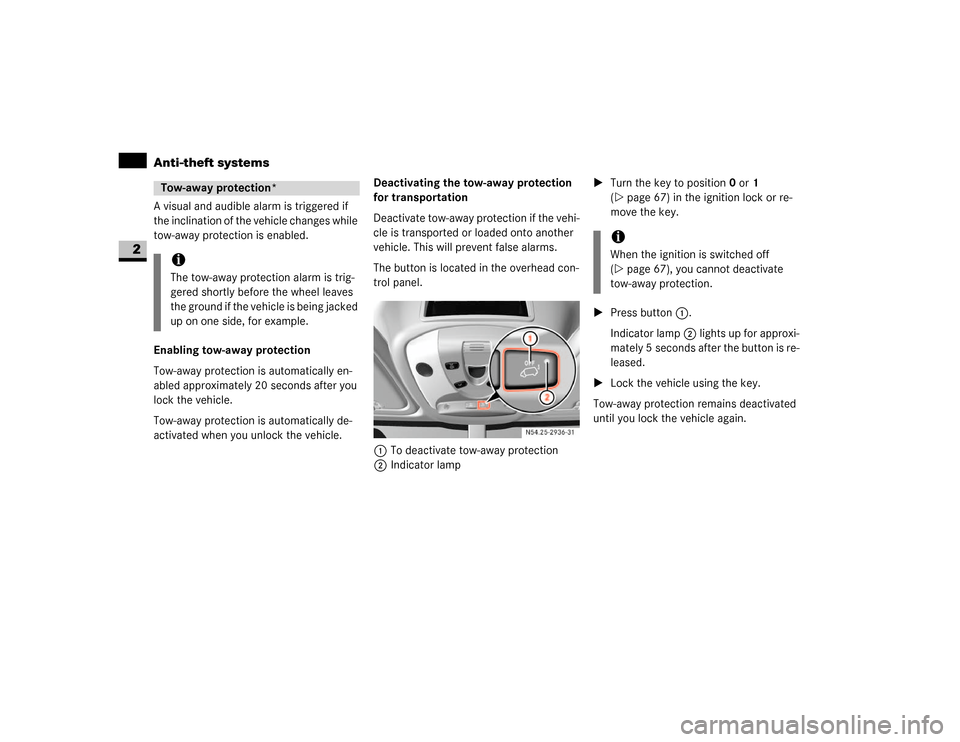
The button is located in the overhead con-
trol panel.
1To deactivate tow-away protection
2Indicator lamp\1Turn the key to position0 or1
(\2page 67) in the ignition lock or re-
move the key.
\1Press button1.
Indicator lamp2 lights up for approxi-
mately 5 seconds after the button is re-
leased.
\1Lock the vehicle using the key.
Tow-away protection remains deactivated
until you lock the vehicle again.Tow-away protection*iThe tow-away protection alarm is trig-
gered shortly before the wheel leaves
the ground if the vehicle is being jacked
up on one side, for example.
iWhen the ignition is switched off
(\2page 67), you cannot deactivate
tow-away protection.
Page 52 of 393
51 Controls in detail
3
Controls in detail
Opening and closing ............52
Key positions ............67
Seats ............68
Steering wheel adjustment ............76
Lighting ............77
Instrument cluster ............84
Operating system without steering wheel buttons ............87
Operating system with steering wheel buttons* ............89
Driving and parking ......... 110
Automatic transmission ......... 121
Good visibility ......... 125
Tempmatic ......... 129
Auxiliary heating/ventilation* ......... 139
Open air ......... 144
Driving systems ......... 147
Operating the vehicle ......... 154
Transporting ......... 156
Features ......... 164
Page 68 of 393
67 Controls in detail
Key positions
3
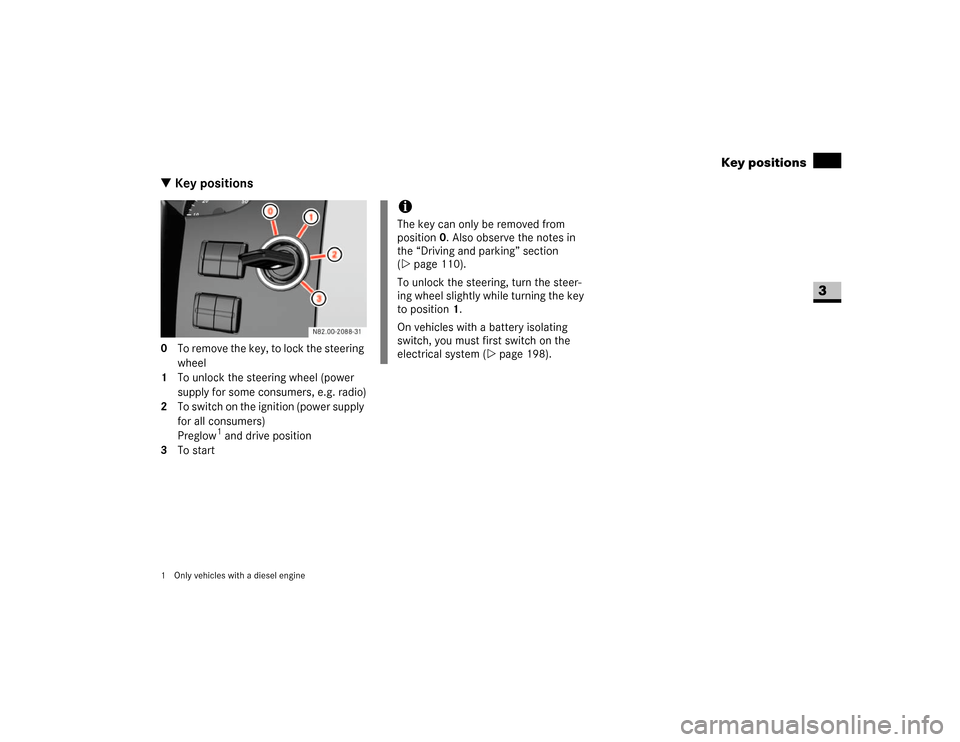
\3 Key positions0 To remove the key, to lock the steering
wheel
1 To unlock the steering wheel (power
supply for some consumers, e.g. radio)
2 To switch on the ignition (power supply
for all consumers)
Preglow
1 and drive position
3 To start
1 Only vehicles with a diesel engine
iThe key can only be removed from
position0. Also observe the notes in
the “Driving and parking” section
(\2page 110).
To unlock the steering, turn the steer-
ing wheel slightly while turning the key
to position 1.
On vehicles with a battery isolating
switch, you must first switch on the
electrical system (\2page 198).
Page 69 of 393
68 Controls in detailSeats
3
Driver’s and co-driver’s seatsWarning
G
Only adjust the seats when the vehicle is
stationary and the handbrake is applied. You
could otherwise lose control of the vehicle
as a result of the seat moving and cause an
accident.Warning
G
Make sure that nobody can become trapped
as the seat is adjusted. Never place your
hands under the seat or near to moving
parts.
Your seat must be adjusted in such a way
that you can wear the seat belt correctly
(\2page 27).
Observe the following points:
\4Position the backrest as vertically as
possible and sit upright.
\4Avoid seat positions that do not allow
the seat belt to be routed correctly. The
shoulder section of the seat belt must
be routed across the middle of your
shoulder and must fit closely across
your chest. The lap section of the belt
must be routed as low as possible
across your pelvic area, i.e. across your
hip joints. Never drive with the backrest
tilted too far back.
\4Your arms should be slightly bent when
you are holding the steering wheel.
\4The distance from the pedals should be
such that you can depress them fully.
\4Adjust the head restraint in such a way
that the upper edge of the head restraint
is level with your head.
\4Make sure that you hear the seat en-
gage. Otherwise, the seat is not correct-
ly locked in place.
Injuries may be caused if these notes are
not observed.Warning
G
Avoid seat positions in which you cannot
wear your seat belt correctly. They are a
safety hazard and must therefore be
avoided.