wheel DODGE SPRINTER 2007 2.G Workshop Manual
[x] Cancel search | Manufacturer: DODGE, Model Year: 2007, Model line: SPRINTER, Model: DODGE SPRINTER 2007 2.GPages: 393, PDF Size: 7.61 MB
Page 107 of 393
106 Controls in detailOperating system with steering wheel buttons*
3
\1Press the æ or ç button to
switch key dependence
On or
Off
.
The Trip computer menu displays statisti-
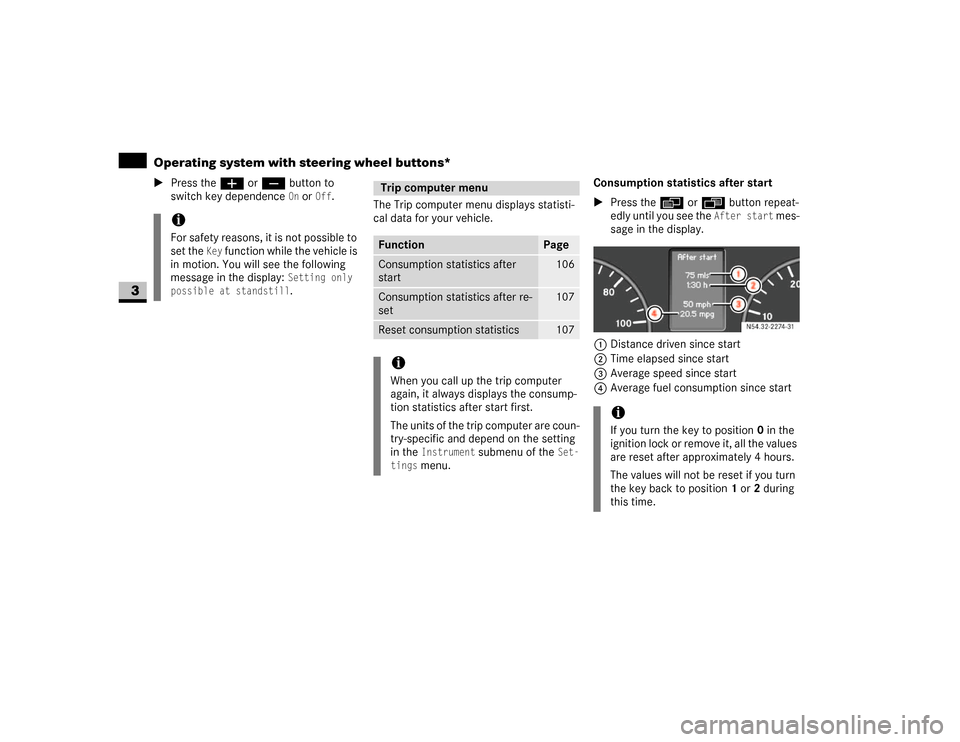
cal data for your vehicle.Consumption statistics after start
\1Press the è or ÿ button repeat-
edly until you see the
After start
mes-
sage in the display.
1Distance driven since start
2Time elapsed since start
3Average speed since start
4Average fuel consumption since start
iFor safety reasons, it is not possible to
set the
Key
function while the vehicle is
in motion. You will see the following
message in the display:
Setting only
possible at standstill.
Trip computer menuFunction
Page
Consumption statistics after
start
106
Consumption statistics after re-
set
107
Reset consumption statistics
107
iWhen you call up the trip computer
again, it always displays the consump-
tion statistics after start first.
The units of the trip computer are coun-
try-specific and depend on the setting
in the
Instrument
submenu of the
Set-
tings
menu.
iIf you turn the key to position 0 in the
ignition lock or remove it, all the values
are reset after approximately 4 hours.
The values will not be reset if you turn
the key back to position1 or2 during
this time.
N54.32-2274-31
Page 108 of 393
107 Controls in detail
Operating system with steering wheel buttons*
3
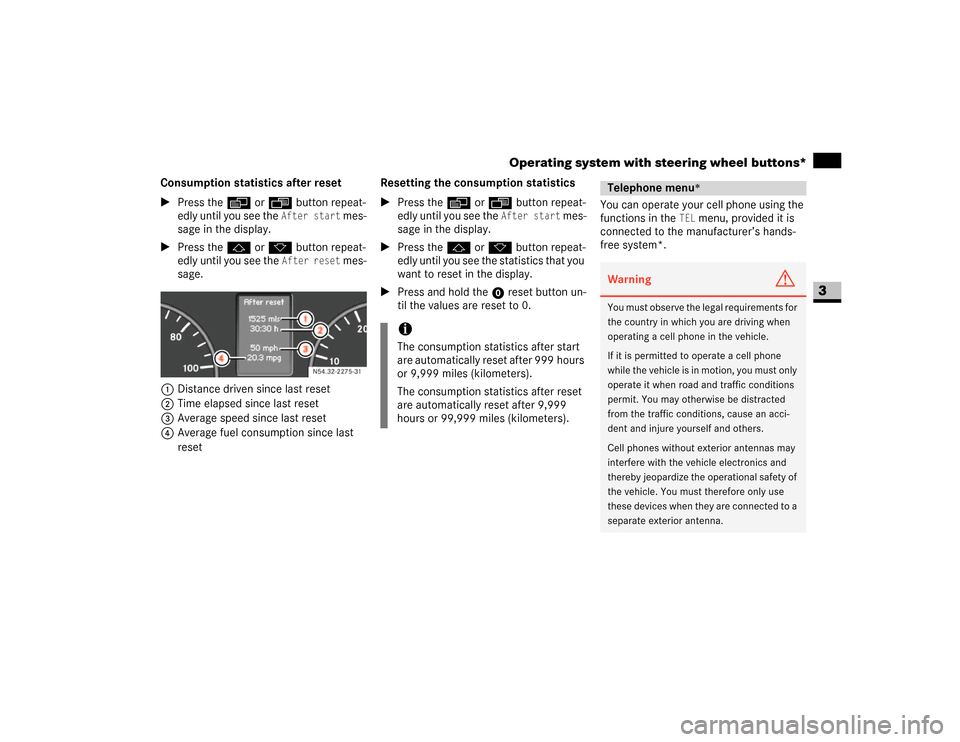
Consumption statistics after reset
\1Press the è or ÿ button repeat-
edly until you see the
After start
mes-
sage in the display.
\1Press the j or k button repeat-
edly until you see the
After reset
mes-
sage.
1Distance driven since last reset
2Time elapsed since last reset
3Average speed since last reset
4Average fuel consumption since last
resetResetting the consumption statistics
\1Press the è or ÿ button repeat-
edly until you see the
After start
mes-
sage in the display.
\1Press the j or k button repeat-
edly until you see the statistics that you
want to reset in the display.
\1Press and hold the reset button un-
til the values are reset to 0.You can operate your cell phone using the
functions in the
TEL
menu, provided it is
connected to the manufacturer’s hands-
free system*.
N54.32-2275-31
iThe consumption statistics after start
are automatically reset after 999 hours
or 9,999 miles (kilometers).
The consumption statistics after reset
are automatically reset after 9,999
hours or 99,999 miles (kilometers).
Telephone menu
*
Warning
G
You must observe the legal requirements for
the country in which you are driving when
operating a cell phone in the vehicle.
If it is permitted to operate a cell phone
while the vehicle is in motion, you must only
operate it when road and traffic conditions
permit. You may otherwise be distracted
from the traffic conditions, cause an acci-
dent and injure yourself and others.
Cell phones without exterior antennas may
interfere with the vehicle electronics and
thereby jeopardize the operational safety of
the vehicle. You must therefore only use
these devices when they are connected to a
separate exterior antenna.
Page 109 of 393
108 Controls in detailOperating system with steering wheel buttons*
3
\1Switch on the cell phone and audio sys-
tem or COMAND APS*.
See the separate operating instruc-
tions.
\1Press theè or ÿ button repeat-
edly until you see the
TEL
menu in the
display.
You will see different messages in the
display, depending on the status of
your cell phone:
\4If the cell phone is switched off, you
will see the
TEL off
message
(Sound 20) or
Tel Turn on
message
(COMAND APS*) in the display.
\4If you have not yet entered a PIN,
you will see the
TEL PIN
message
(Sound 20) or
Enter PIN
message
(COMAND APS*).
\1Enter the PIN code using the cell
phone, audio system or
COMAND APS*.The cell phone searches for a network. The
display remains blank during this time.
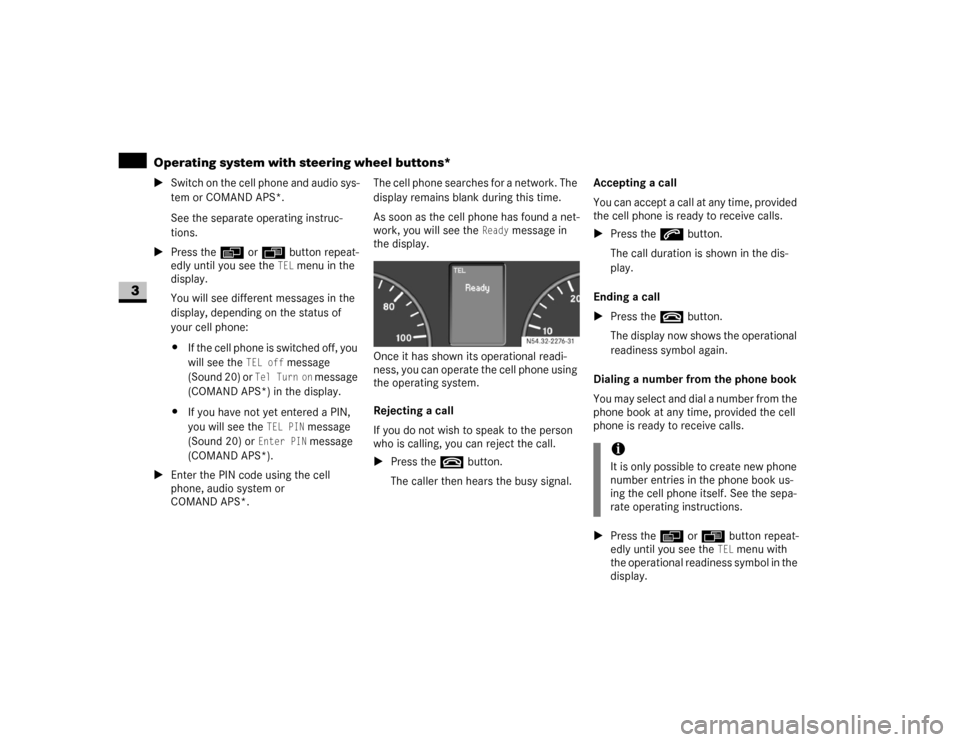
As soon as the cell phone has found a net-
work, you will see the
Ready
message in
the display.
Once it has shown its operational readi-
ness, you can operate the cell phone using
the operating system.
Rejecting a call
If you do not wish to speak to the person
who is calling, you can reject the call.
\1Press the t button.
The caller then hears the busy signal.Accepting a call
You can accept a call at any time, provided
the cell phone is ready to receive calls.
\1Press the s button.
The call duration is shown in the dis-
play.
Ending a call
\1Press the t button.
The display now shows the operational
readiness symbol again.
Dialing a number from the phone book
You may select and dial a number from the
phone book at any time, provided the cell
phone is ready to receive calls.
\1Press the è or ÿ button repeat-
edly until you see the
TEL
menu with
the operational readiness symbol in the
display. N54.32-2276-31
iIt is only possible to create new phone
number entries in the phone book us-
ing the cell phone itself. See the sepa-
rate operating instructions.
Page 110 of 393
109 Controls in detail
Operating system with steering wheel buttons*
3
\1Press thej or k button.
The operating system reads the phone
book stored on the SIM card or in the
phone. This may take more than
1minute.
You will see the
Processing
message
(Sound 20) or
Wait...
message
(COMAND APS*) in the display.
\1Press the j or k button repeat-
edly until you see the name you are
looking for.
The stored names are displayed alpha-
betically from A to Z, or Z to A.
\1Press the s button.The operating system dials the select-
ed phone number. You will see the
dialing
message (Sound 20) or
Dial-
ing...
message (COMAND APS*) in
the display.
The operating system stores the phone
numbers in the redial memory.
If a connection is made, you will see the
name of the person you are calling and
the call duration.
Redialing
The operating system stores the most re-
cently dialed phone numbers. This means
that you do not have to search through the
entire phone book.
\1Press the ÿ or è button repeat-
edly until you see the
TEL
menu with
the operational readiness symbol in the
display.\1Press the s button.
The redial memory shows the most re-
cently dialed numbers or names.
\1Press the j or k button repeat-
edly until the number or the name you
are looking for is displayed.
\1Press the s button.
The operating system dials the select-
ed phone number.
If a connection is made, you will see the
call duration and name of the person
you are calling if stored in the phone
book. Otherwise, the number you are
dialing continues to be displayed.
iThe operating system scrolls through
the names rapidly if you press and hold
the j or k button for more than
one second. Releasing the button stops
the rapid scroll.
If you no longer wish to make a call,
press the t button.
iIf you no longer wish to make a call,
press the t button.
Page 113 of 393
112 Controls in detailDriving and parking
3
\1Depress the brake pedal and keep it
depressed.
The selector lever lock is released.
\1Release the handbrake (\2page 115).
The7 indicator lamp in the instru-
ment cluster goes out.
\1Move the selector lever to position D or
R.\1Release the brake pedal.
\1Carefully depress the accelerator ped-
al.
You will find more information about selec-
tor lever positions, shift ranges and driving
tips in the “Automatic transmission” sec-
tion (\2page 121).
Pulling awayWarning
G
Do not downshift for additional engine brak-
ing on a slippery surface. The drive wheels
may lose their grip and the vehicle could
skid.!
CAUTION
Only drive at high speeds once the en-
gine has warmed up. This protects the
engine.
When driving on slippery surfaces,
avoid spinning the drive wheels where
possible as this could damage the drive
train.
iOn vehicles with a reverse warning fea-
ture*, an audible warning sounds for
other road users when reverse gear is
engaged (\2page 153).
iDepending on the vehicle's settings,
the vehicle automatically locks itself
centrally after it has driven off, at the
latest (\2page 64). The locking knobs
on the front doors and the sliding door
drop down.
You can open the doors from the inside
at any time.
You can also switch off the automatic
door lock (\2page 64). !
CAUTION
Only select reverse gear when the vehi-
cle is stationary, otherwise you could
damage the automatic transmission.
iWait until the gear selection has com-
pleted before pulling away.iAutomatic transmission upshifts are
made at higher engine speeds after a
cold start. This helps the catalytic con-
verter to reach its operating tempera-
ture more quickly.
Page 116 of 393
115 Controls in detail
Driving and parking
3
Handbrake
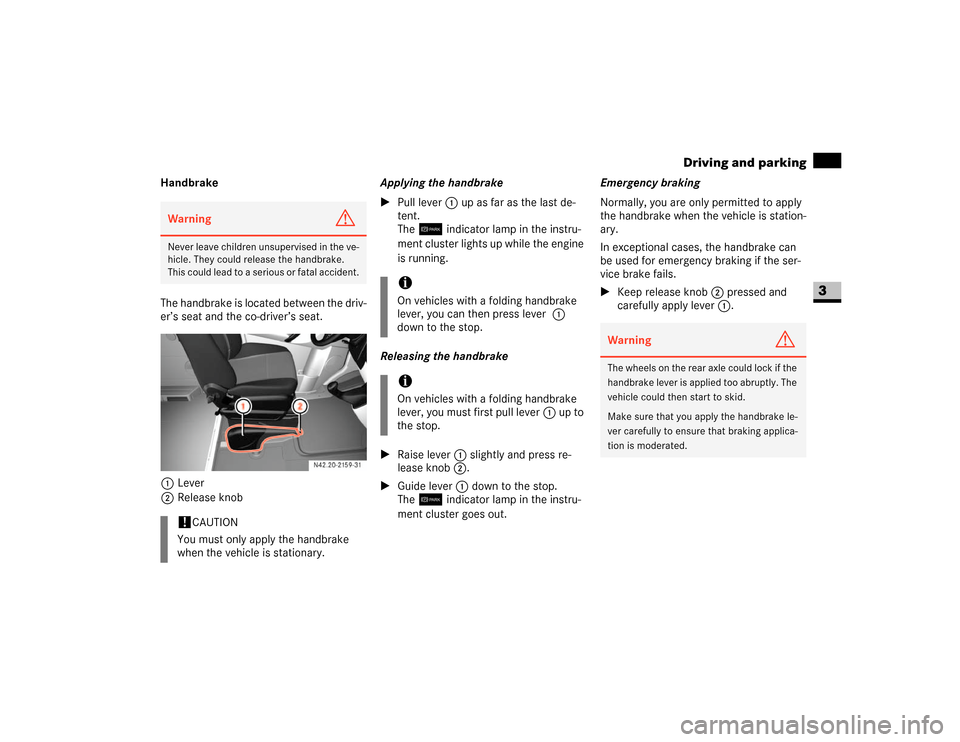
The handbrake is located between the driv-
er’s seat and the co-driver’s seat.
1Lever
2Release knobApplying the handbrake
\1Pull lever1 up as far as the last de-
tent.
The7 indicator lamp in the instru-
ment cluster lights up while the engine
is running.
Releasing the handbrake
\1Raise lever1 slightly and press re-
lease knob2.
\1Guide lever1 down to the stop.
The7 indicator lamp in the instru-
ment cluster goes out.Emergency braking
Normally, you are only permitted to apply
the handbrake when the vehicle is station-
ary.
In exceptional cases, the handbrake can
be used for emergency braking if the ser-
vice brake fails.
\1Keep release knob2 pressed and
carefully apply lever1.Warning
G
Never leave children unsupervised in the ve-
hicle. They could release the handbrake.
This could lead to a serious or fatal accident.!
CAUTION
You must only apply the handbrake
when the vehicle is stationary.
iOn vehicles with a folding handbrake
lever, you can then press lever1
down to the stop.iOn vehicles with a folding handbrake
lever, you must first pull lever1 up to
the stop.
Warning
G
The wheels on the rear axle could lock if the
handbrake lever is applied too abruptly. The
vehicle could then start to skid.
Make sure that you apply the handbrake le-
ver carefully to ensure that braking applica-
tion is moderated.
Page 117 of 393
116 Controls in detailDriving and parking
3
Stopping the engine
\1Apply handbrake (\2page 115).
\1Move selector lever to P.
\1Turn key to position 0 (\2page 67) in
the ignition lock and remove it.
The immobilizer is activated.\1Secure the vehicle at the front axle if
unloaded and at the rear axle if loaded,
e.g. using a chock (\2page 303).
Drinking and drivingSteering
!
CAUTION
If the coolant temperature is raised,
e.g. following driving in mountainous
terrain, run the engine at idling speed
for a further 1 or 2 minutes before you
switch off the engine. This allows the
coolant temperature to return to nor-
mal again.
iWhen parking on steep uphill or down-
hill gradients, turn the front wheels to-
wards the curb.iYou can only remove the key from the
ignition lock when the selector lever is
in positionP.
General driving tipsWarning
G
Drinking and driving and/or taking drugs
and driving are very dangerous combina-
tions. Even a small amount of alcohol or
drugs can affect your reflexes, perceptions
and judgment. The possibility of a serious or
even fatal accident is sharply increased
when you drink or take drugs and drive.
Never drink or take drugs and drive or allow
anyone to drive after drinking or taking
drugs.
Warning
G
There is no power-steering assistance when
the engine is not running.
You will need to use significantly more force
to steer and could therefore lose control of
the vehicle and cause an accident.
Never switch off the engine while driving.!
CAUTION
Do not hold the steering wheel in its
end positions for longer than neces-
sary (e.g. when turning or maneuver-
ing).
The hydraulic pump can be damaged
by the increased temperature of the
hydraulic fluid.
Page 118 of 393
117 Controls in detail
Driving and parking
3
Overrun cut-off
The gasoline/diesel supply is cut off if the
driver's foot is completely removed from
the accelerator pedal when the engine is
overrunning at engine speeds outside of
the idling control range.
Driving in wet conditionsDriving on flooded roads
If you are forced to drive on stretches of
road on which water has collected, please
note that:
\4the water level must not reach above
the lower edge of the front bumper
\4the maximum speed at which you may
drive is walking speed
Tires
The tires are particularly important for the
operating and road safety of the vehicle.
You should therefore check the pressure,
tread and condition of the tires on a regular
basis.A tire dealer, a qualified specialist work-
shop or any authorized Sprinter Dealer will
be able to provide further information re-
garding the:
\4list of recommended makes of tire
\4tire load-bearing capacity (LI Load
Index)
\4maximum tire speed (SI Speed Index)
\4tire age
\4causes and consequences of tire wear
\4measures to be taken in the event of
tire damage
\4tire types for certain regions, areas of
operation or conditions of vehicle use
\4interchangeability of tires, etc.
Modifications to the brake system or
wheels are not permissible, nor is the use
of spacer plates or brake dust shields. Any
such modifications will invalidate the vehi-
cle’s general operating permit.Warning
G
The vehicle may hydroplane despite having
adequate tire tread depth and being driven
at low speeds, depending on the depth of
water on the road surface.
For this reason, avoid tire ruts and brake
carefully.
!
CAUTION
Note that vehicles in front or oncoming
vehicles create waves.
This may mean that the maximum per-
mitted water depth is exceeded.
These notes must be observed to avoid
the risk of engine damage.
Page 119 of 393
118 Controls in detailDriving and parking
3
Treadwear indicators (TWI) are required by
law. These indicators are located in six
places on the tread circumference and be-
come visible at a tread depth of approxi-
mately 1/16 in (1.6 mm), at which point
the tire is considered worn and should be
replaced.
The Treadwear Indicator appears as a solid
band across the tread.Specified tire inflation pressures must be
maintained. This applies particularly if the
tires are subject to extreme operating con-
ditions (e.g. high speeds, heavy loads, high
ambient temperatures).For detailed information on tires, see "Tires
and wheels" (\2page 199).
Hydroplaning
Depending on the depth of the water layer
on the road, hydroplaning may occur, even
at low speeds and with new tires. Reduce
vehicle speed, avoid track grooves in the
road and apply brakes cautiously in the
rain.Warning
G
If you feel a sudden significant vibration or
ride disturbance, or you suspect that possi-
ble damage to your vehicle has occurred,
you should turn on the hazard warning flash-
ers, carefully slow down, and drive with cau-
tion to an area which is a safe distance from
the road.
Inspect the tires and the vehicle undercar-
riage for possible damage. If the vehicle or
tires appear unsafe, have the vehicle towed
to the nearest authorized Sprinter Dealer or
tire dealer for repairs.
Warning
G
Although the applicable federal motor vehi-
cle safety laws consider a tire to be worn
when the Treadwear Indicators (TWI) be-
come visible at approximately 1/16 in
(1.6 mm), do not allow your tires to wear
down to that level. As tread depth approach-
es 1/8 in (3 mm) for summer tires or 1/6 in
(4 mm) for winter tires, the adhesion proper-
ties on a wet road are sharply reduced.
Depending upon the weather and/or road
surface (conditions), the tire traction varies
widely.
Warning
G
Do not drive with a flat tire. A flat tire affects
the ability to steer or brake the vehicle. You
may lose control of the vehicle. Continued
driving with a flat tire or driving at high
speed with a flat tire will cause excessive
heat buildup and possibly a fire.
Page 120 of 393
119 Controls in detail
Driving and parking
3
Tire traction
Tire grip is greatly reduced on a wet, snow
covered or icy road. Speed and driving
style must therefore be adapted to suit
road conditions. The safe speed on a wet,
snow covered or icy road is always lower
than on a dry road.
Below a tread depth of 1/8 in (3 mm), tire
grip begins to decrease rapidly on wet
roads.
Pay particular attention to the condition of
the road whenever the outside tempera-
tures is close to the freezing point.In winter, install M+S radial tires with a
minimum tread depth of approximately 1/
6 in (4 mm) on all wheels to ensure normal
balanced handling characteristics. On
packed snow, they can reduce your stop-
ping distance compared to summer tires.
Stopping distance, however, is still consid-
erably greater than when the road is not
covered with snow or ice. Exercise appro-
priate caution.
For information on winter tires, see "Winter
tires" (\2page 234).
Tire speed rating
Regardless of the tire speed rating, local
speed limits should be obeyed. Use pru-
dent driving speeds appropriate to prevail-
ing conditions.The vehicles are factory equipped with "L"
(vehicles type 2500 only) or "N"-rated
tires, which have a speed rating of 74 mph
(120 km / h) or 87 mph (140 km / h) re-
spectively.
For information on speed ratings or for ad-
ditional general information on tire speed
markings on the tire side wall, see "Tire
speed rating" (\2page 224).Warning
G
If ice has formed on the road, tire traction
will be substantially reduced. Under such
weather conditions, drive, steer and brake
with extreme caution.
!
CAUTION
Avoid spinning a drive wheel. This may
cause serious damage to the drive train
which is not covered by the Sprinter
warranty.
Warning
G
Even when permitted by law, never operate
a vehicle at speeds greater than the maxi-
mum speed rating of the tires.
Exceeding the maximum speed for which
tires are rated can lead to sudden tire fail-
ure, causing loss of vehicle control and pos-
sibly resulting in an accident and / or serious
injury and possible death, for you and for
others.