door lock DODGE SPRINTER 2008 2.G Owner's Guide
[x] Cancel search | Manufacturer: DODGE, Model Year: 2008, Model line: SPRINTER, Model: DODGE SPRINTER 2008 2.GPages: 666, PDF Size: 14.11 MB
Page 145 of 666
143 Controls in detail
Instrument cluster
3
The display in the instrument cluster is
activated when you:\4
open the driver’s door
\4
switch on the ignition
\4
press the reset button
\4
switch on the lights
The display switches off automatically
after approximately 30 seconds if:
\4
there is no vehicle lighting switched
on
\4
the key is in position
0 in the ignition
lock
(\2
page 111)
Warning
G
No messages can be displayed if the in-
strument cluster and / or the display is
malfunctioning.You will not then be able to see informa-
tion about the vehicle status, such as
speed and outside temperature, warning
and indicator lamps, malfunction and
warning messages or the malfunction of
systems. Handling characteristics may be
affected.
Continued
Warning (Continued)
G
Contact a qualified specialist workshop
immediately which has the necessary spe-
cialist knowledge and tools to carry out
the work required.The manufacturer recommends that you
use an authorized Sprinter Dealer for this
purpose. In particular, work relevant to
safety or on safety-related systems must
be carried out at a qualified specialist
workshop.
Continued
nf_BA.book Page 143 Friday, January 25, 2008 3:53 PM
Page 174 of 666
172 Controls in detailOperating system with steering wheel buttons*
3
Switching the locator lighting on or
off*If you switch the locator lighting to
On,
the following lamps light up in the dark
after you have unlocked the vehicle us-
ing the key:
\4
The parking lamps
\4
The tail lamps
\4
The license plate lamp
\4
The front foglampsThe locator lighting automatically
switches off after 40 seconds or when
you:
\4
open the driver’s door
\4
insert the key into the ignition lock
\4
lock the vehicle with the key
\1
Press the
æ
or
ç
to select the
Lighting
submenu.
\1
Press the
j
or
k
button re-
peatedly until you see the
Loc.
lighting
message in the display.
The current setting is highlighted. USA only:
If you turn the light switch to
C
or
B
, the corresponding light
switches on. Constant headlamp
mode remains activated if the light
switch is turned to
U
.
Canada only:
If you turn the light switch to
B
,
the low-beam headlamps are
switched on. Constant headlamp
mode remains activated if the light
switch is turned to
C
or
U
.
nf_BA.book Page 172 Friday, January 25, 2008 3:53 PM
Page 185 of 666
183 Controls in detail
Driving and parking
3
\3 Driving and parking
\1
Before each journey, check the vehi-
cle lighting and the general condition
of the vehicle.
\1
Observe the general driving tips at
the end of this section (
\2
page 194).
Warning
G
The movement of the pedals must not be
obstructed. The vehicle’s operating and
road safety are otherwise jeopardized.Objects could fall and get caught between
the pedals if you accelerate or brake sud-
denly. You will no longer be able to brake
or accelerate. You could cause an acci-
dent, which could result in injury to your-
self and others.
Continued
Warning (Continued)
G
If floor mats and carpets are used, make
sure that these are secured correctly and
cannot slip and that there is sufficient
pedal clearance.Do not place any objects in the driver’s
footwell.Store and secure all loose objects so they
cannot get into the driver’s footwell while
the vehicle is in motion.
Warning
G
The doors could open of their own accord
while the vehicle is in motion if they are
not fully closed. For this reason, please
make sure that all the doors are properly
closed and locked before driving off
(\2page 83).
nf_BA.book Page 183 Friday, January 25, 2008 3:53 PM
Page 189 of 666
187 Controls in detail
Driving and parking
3
\1
Depress the brake pedal and keep it
depressed.
The selector lever lock is released.
\1
Release the handbrake
(\2
page 191).
The7
indicator lamp in the in-
strument cluster goes out.
\1
Move the selector lever to position
D
or
R.
\1
Release the brake pedal.
\1
Carefully depress the accelerator pedal.
You will find more information about se-
lector lever positions, shift ranges and
driving tips in the “Automatic transmis-
sion” section (
\2
page 201).
iOn vehicles with a reverse warning
feature*, an audible warning sounds
for other road users when reverse
gear is engaged (
\2
page 271).
iDepending on the vehicle's settings,
the vehicle automatically locks itself
centrally after it has driven off, at the
latest (
\2
page 106). The locking
knobs on the front doors and the
sliding door drop down.
You can open the doors from the in-
side at any time.
You can also switch off the automat-
ic door lock (
\2
page 106).
!
CAUTION
Only select reverse gear when the ve-
hicle is stationary, otherwise you
could damage the automatic trans-
mission.
iWait until the gear selection has
completed before pulling away.iAutomatic transmission upshifts are
made at higher engine speeds after a
cold start. This helps the catalytic
converter to reach its operating tem-
perature more quickly.
nf_BA.book Page 187 Friday, January 25, 2008 3:53 PM
Page 246 of 666
244 Controls in detailOpen air
3
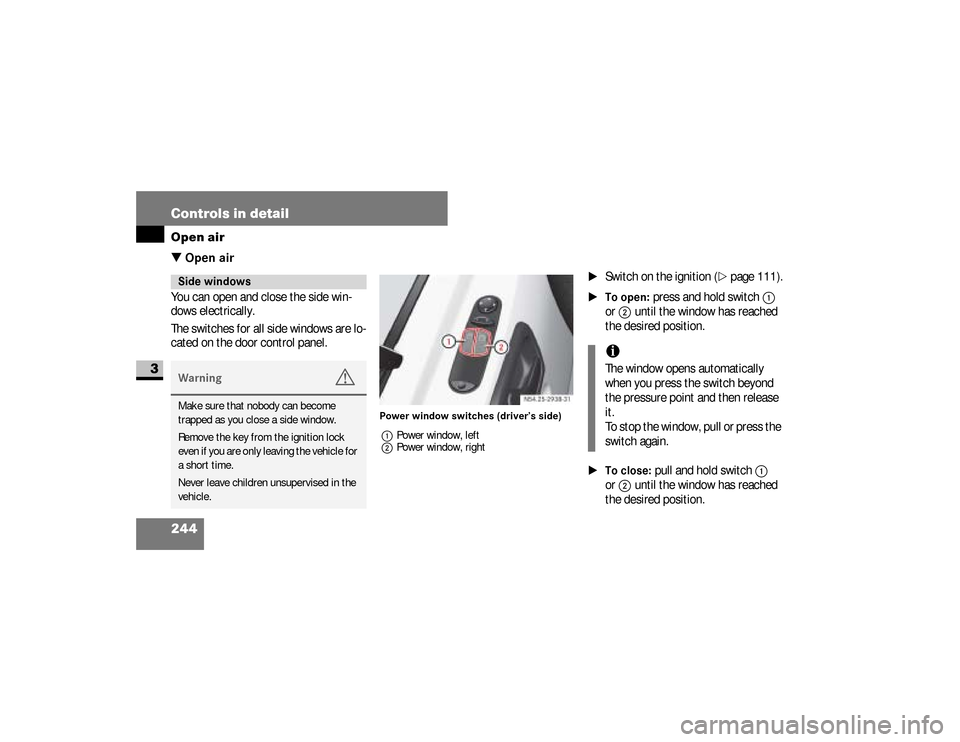
\3 Open airYou can open and close the side win-
dows electrically.
The switches for all side windows are lo-
cated on the door control panel.
Power window switches (driver’s side)
1Power window, left
2Power window, right
\1
Switch on the ignition (
\2
page 111).
\1To open:
press and hold switch
1
or
2
until the window has reached
the desired position.
\1To close:
pull and hold switch
1
or
2
until the window has reached
the desired position.
Side windowsWarning
G
Make sure that nobody can become
trapped as you close a side window.
Remove the key from the ignition lock
even if you are only leaving the vehicle for
a short time.
Never leave children unsupervised in the
vehicle.
iThe window opens automatically
when you press the switch beyond
the pressure point and then release
it.
To stop the window, pull or press the
switch again.
nf_BA.book Page 244 Friday, January 25, 2008 3:53 PM
Page 290 of 666
288 Controls in detailFeatures
3
Storage compartments in the doorsYou can use these storage compart-
ments for the safe storage of small and
light items.Storage compartment under the twin
passenger's seat*On vehicles with a twin passenger’s
seat, the storage compartment is under
the seat cushion (
\2
page 119).
You can use the storage compartment
for the safekeeping of tools and other
small items.
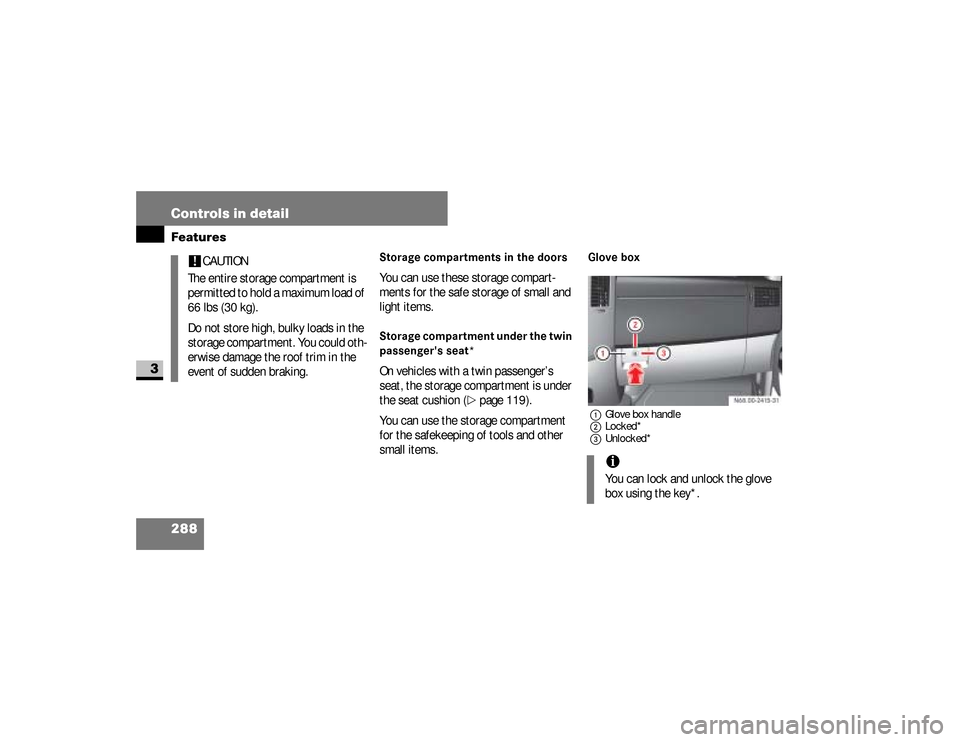
Glove box1Glove box handle
2Locked*
3Unlocked*
!
CAUTION
The entire storage compartment is
permitted to hold a maximum load of
66 lbs (30 kg).
Do not store high, bulky loads in the
storage compartment. You could oth-
erwise damage the roof trim in the
event of sudden braking.
iYou can lock and unlock the glove
box using the key*.
nf_BA.book Page 288 Friday, January 25, 2008 3:53 PM
Page 319 of 666
317 Operation
Refueling
4
\1
Remove the key from the ignition
lock.
\1
Switch off the auxiliary heating.
\1
Open the driver’s door.
\1
Open the fuel filler flap.
\1
Close all the vehicle’s doors, so that
no fuel vapors can enter the vehicle.
\1
Turn fuel filler cap
2
counterclock-
wise and let it hang by retaining
strap
1
.
\1
Only fill the tank until the pump noz-
zle switches off.
\1
Replace fuel filler cap
2
and turn it
clockwise.A clicking sound indicates that the
fuel filler cap is fully closed.
\1
Open the driver’s door and close the
fuel filler flap.
You will find information about fuel in
the “Technical data” section
(
\2
page 610).
nf_BA.book Page 317 Friday, January 25, 2008 3:53 PM
Page 433 of 666
431 Practical hints
What to do if ...
5
Problem
Possible cause / result
Suggested solutions
The anti-theft alarm system is suddenly trig-
gered.
You have opened the vehicle using the key
while the anti-theft alarm system was still
primed.
Key:
\1Press theΠbutton.
or
\1Insert the key into the ignition lock.
The anti-theft alarm system is deacti-
vated.
You hear a warning signal.
A message appears in the display.
\1Observe the instructions on
(\2page 484).
You are driving with the handbrake applied.
\1Release the handbrake (\2page 191).
You opened the driver’s door and forgot to
switch off the lights.
\1Turn the light switch to0.
Warning
G
You are not wearing your seat belt.
\1Fasten your seat belt .
nf_BA.book Page 431 Friday, January 25, 2008 3:53 PM
Page 448 of 666
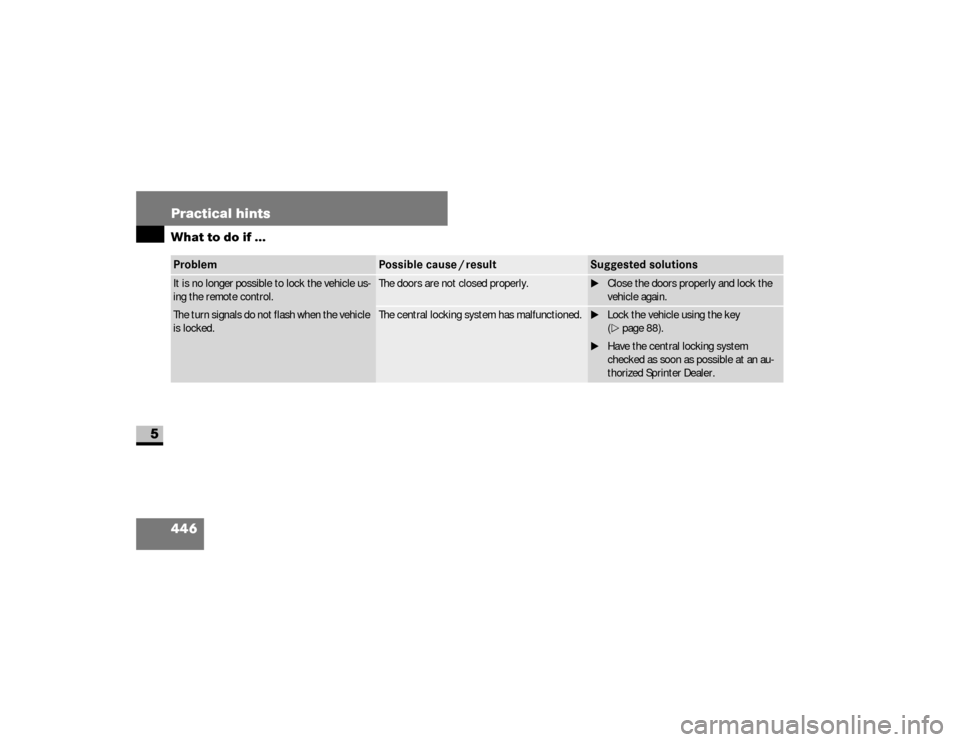
446 Practical hintsWhat to do if ...
5
Problem
Possible cause / result
Suggested solutions
It is no longer possible to lock the vehicle us-
ing the remote control.
The turn signals do not flash when the vehicle
is locked.
The doors are not closed properly.
\1Close the doors properly and lock the
vehicle again.
The central locking system has malfunctioned.
\1Lock the vehicle using the key
(\2page 88).
\1Have the central locking system
checked as soon as possible at an au-
thorized Sprinter Dealer.
nf_BA.book Page 446 Friday, January 25, 2008 3:53 PM
Page 449 of 666
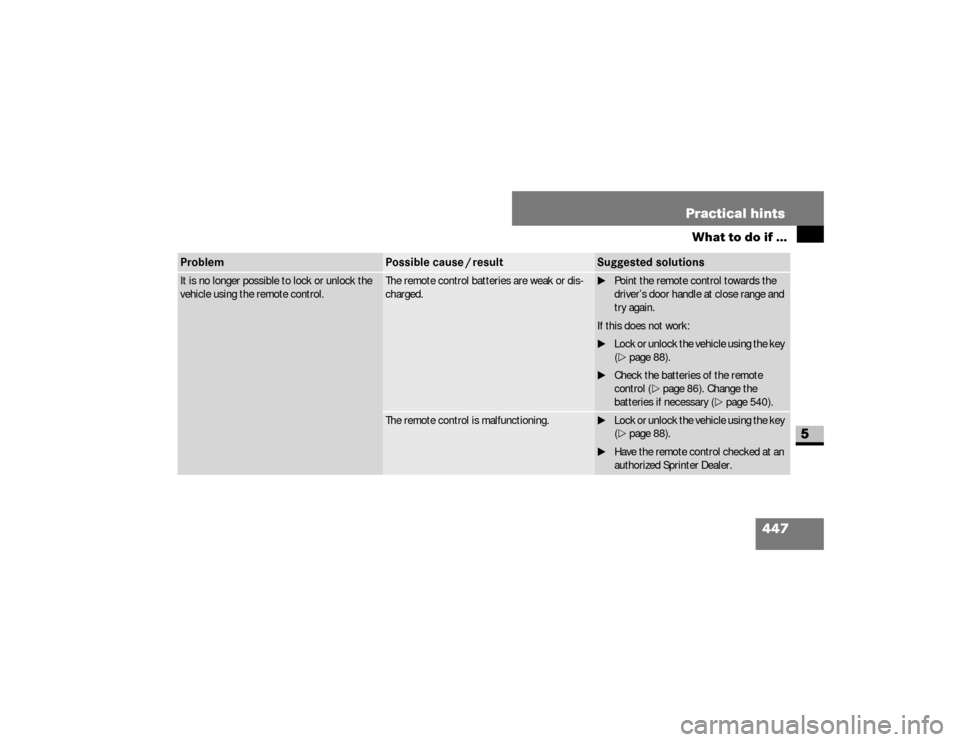
447 Practical hints
What to do if ...
5
It is no longer possible to lock or unlock the
vehicle using the remote control.
The remote control batteries are weak or dis-
charged.
\1Point the remote control towards the
driver’s door handle at close range and
try again.
If this does not work:
\1Lock or unlock the vehicle using the key
(\2page 88).
\1Check the batteries of the remote
control (\2page 86). Change the
batteries if necessary (\2page 540).
The remote control is malfunctioning.
\1Lock or unlock the vehicle using the key
(\2page 88).
\1Have the remote control checked at an
authorized Sprinter Dealer.
Problem
Possible cause / result
Suggested solutions
nf_BA.book Page 447 Friday, January 25, 2008 3:53 PM