ECU DODGE SPRINTER 2008 2.G Workshop Manual
[x] Cancel search | Manufacturer: DODGE, Model Year: 2008, Model line: SPRINTER, Model: DODGE SPRINTER 2008 2.GPages: 666, PDF Size: 14.11 MB
Page 577 of 666
575 Practical hints
Battery
5
\1
Switch off all electrical consumers.
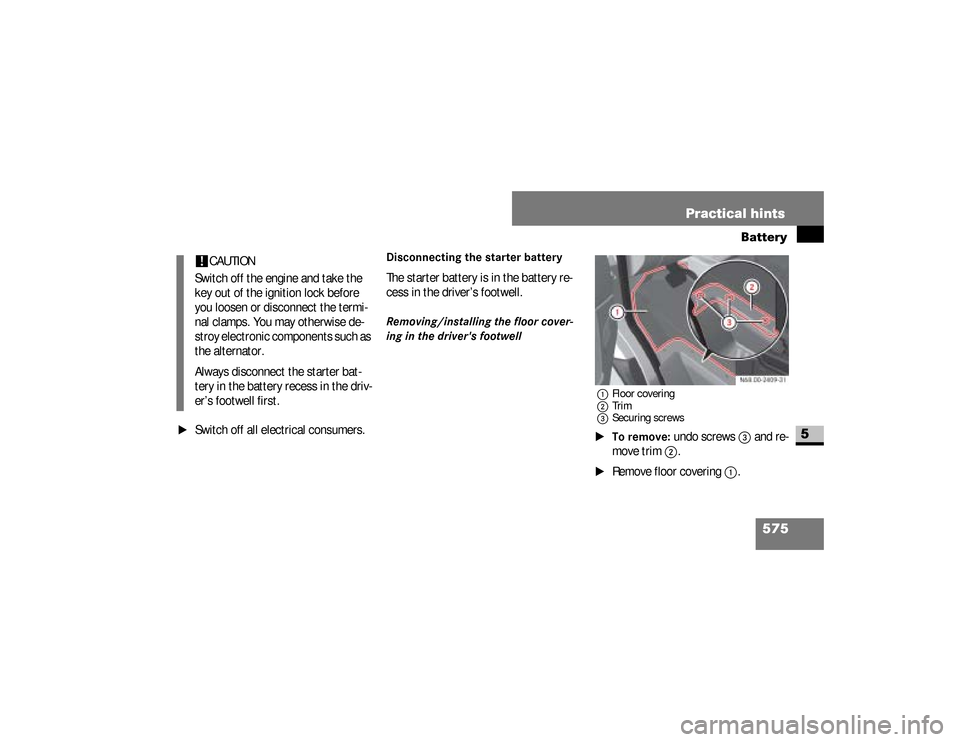
Disconnecting the starter batteryThe starter battery is in the battery re-
cess in the driver’s footwell.Removing/installing the floor cover-
ing in the driver's footwell
1Floor covering
2Trim
3Securing screws\1To remove:
undo screws
3
and re-
move trim
2
.
\1
Remove floor covering
1
.
!
CAUTION
Switch off the engine and take the
key out of the ignition lock before
you loosen or disconnect the termi-
nal clamps. You may otherwise de-
stroy electronic components such as
the alternator.
Always disconnect the starter bat-
tery in the battery recess in the driv-
er’s footwell first.
nf_BA.book Page 575 Friday, January 25, 2008 3:53 PM
Page 578 of 666
576 Practical hintsBattery
5
\1To install:
place floor covering
1
into the driver’s footwell.
\1
Push floor covering
1
under the
plate metal bracket of the accelera-
tor pedal and align it with the driver’s
seat base and the doorway
Make sure the floor covering does
not obstruct the accelerator’s range
of movement.
\1
Position trim
2
and screw
screws
3
back in.
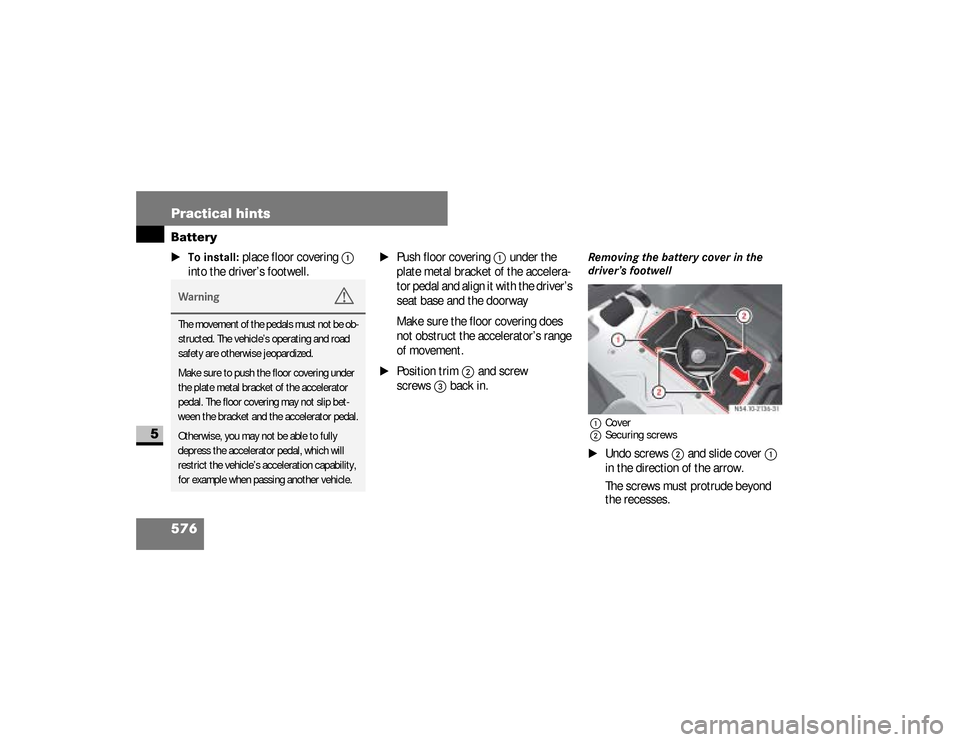
Removing the battery cover in the
driver’s footwell1Cover
2Securing screws\1
Undo screws
2
and slide cover
1
in the direction of the arrow.
The screws must protrude beyond
the recesses.
Warning
G
The movement of the pedals must not be ob-
structed. The vehicle’s operating and road
safety are otherwise jeopardized.
Make sure to push the floor covering under
the plate metal bracket of the accelerator
pedal. The floor covering may not slip bet-
ween the bracket and the accelerator pedal.
Otherwise, you may not be able to fully
depress the accelerator pedal, which will
restrict the vehicle’s acceleration capability,
for example when passing another vehicle.
nf_BA.book Page 576 Friday, January 25, 2008 3:53 PM
Page 582 of 666
580 Practical hintsBattery
5
\1
Switch off all electrical consumers.
\1
Connect the positive terminal and
secure the cover.
\1
Connect the negative terminal.
Warning
G
Only charge the battery in well-ventilated
areas. As the battery is being charged,
gases can escape and generate minor ex-
plosions, which can injure you and others
and may cause damage to the paintwork
or permit acid corrosion on the vehicle.
During the charge procedure, there is a
risk of acid burns due to gases escaping
from the battery. Do not, therefore, lean
over the battery while it is being re-
charged.
iIt is also possible to charge the start-
er battery using the jump-starting
connection point in the engine com-
partment (
\2
page 581).
Reconnecting the battery!
CAUTION
Never swap the terminal clamps.
Otherwise, the vehicle’s electronics
system may be damaged. After re-
connecting the battery, you must re-
set the electric sliding door*
(\2
page 92).
nf_BA.book Page 580 Friday, January 25, 2008 3:53 PM
Page 586 of 666
584 Practical hintsJump-starting
5
Use a rigid towing bar and secure this
only to the front towing eye
(\2
page 585).
Tow-starting!
CAUTION
Your vehicle is equipped with an au-
tomatic transmission. Do not tow-
start your vehicle.
Warning
G
When tow-starting another vehicle, its
weight should not be greater than the per-
missible gross weight of your vehicle.
nf_BA.book Page 584 Friday, January 25, 2008 3:53 PM
Page 589 of 666
587 Practical hints
Towing
5
\1
Switch on the ignition (
\2
page 111).
\1
For a distance of up to 30 miles
(50 km), move the selector lever to
position
N.
\1
For a distance greater than 30 miles
(50 km), remove the propeller shafts
to the driven axles.
Take great care when attempting to tow
the vehicle free if its drive wheels have
become embedded in loose earth or
mud, particularly if the vehicle is loaded.
Tow the vehicle smoothly and straight-
ahead. The chassis could otherwise be
damaged.
Do not attempt to tow out the vehicle if
a trailer is coupled up.Where possible, tow the vehicle out
backwards along the track made by the
vehicle previously.
With transmission damage
\1
Always remove the propeller shafts
to the driven axles.
iDeactivate the automatic locking
while driving function when towing .
You could otherwise become locked
out when pushing or towing the vehi-
cle.!
CAUTION
Do not exceed a towing speed of
50 km / h, otherwise the transmis-
sion could be damaged.
Towing out a vehicle that is stuck
Towing the vehicle in the event of
particular malfunctions!
CAUTION
Use new self-securing nuts when in-
stalling the propeller shafts.
nf_BA.book Page 587 Friday, January 25, 2008 3:53 PM
Page 590 of 666
588 Practical hintsTowing
5
With front axle damage
\1
Turn the key to position
1 in the igni-
tion lock(
\2
page 111).
In the event of a malfunction in the
electrical systemIf the battery is malfunctioning, the auto-
matic transmission will be locked in
position
P. To shift the automatic trans-
mission to position
N, you must provide
power to the vehicle’s electrical system
in the same way as jump-starting
(
\2
page 581).
Have the vehicle transported on a trans-
porter or trailer.The towing eye can be used to pull the
vehicle onto a special transporter or
trailer for transportation.
\1
Shift the transmission to neutral or
move the selector lever to
position
N.
!
CAUTION
The vehicle must not be towed with
its front wheels raised and with the
key in position
2 in the ignition lock.
Active brake intervention by ESP
® or
ASR could otherwise lock the wheels
and damage the brake system.
Transporting the vehicle!
CAUTION
Only secure the vehicle at the
wheels / rims. Your vehicle could oth-
erwise be damaged.
nf_BA.book Page 588 Friday, January 25, 2008 3:53 PM
Page 632 of 666
630 *Technical dataLashing points and carrier systems
6
The specified values only apply to loads
on the load compartment floor if:\4
the load is secured to 2 lashing
points on the rail and
\4
the distance to the next lashing point
used on the same rail is about 3 ft
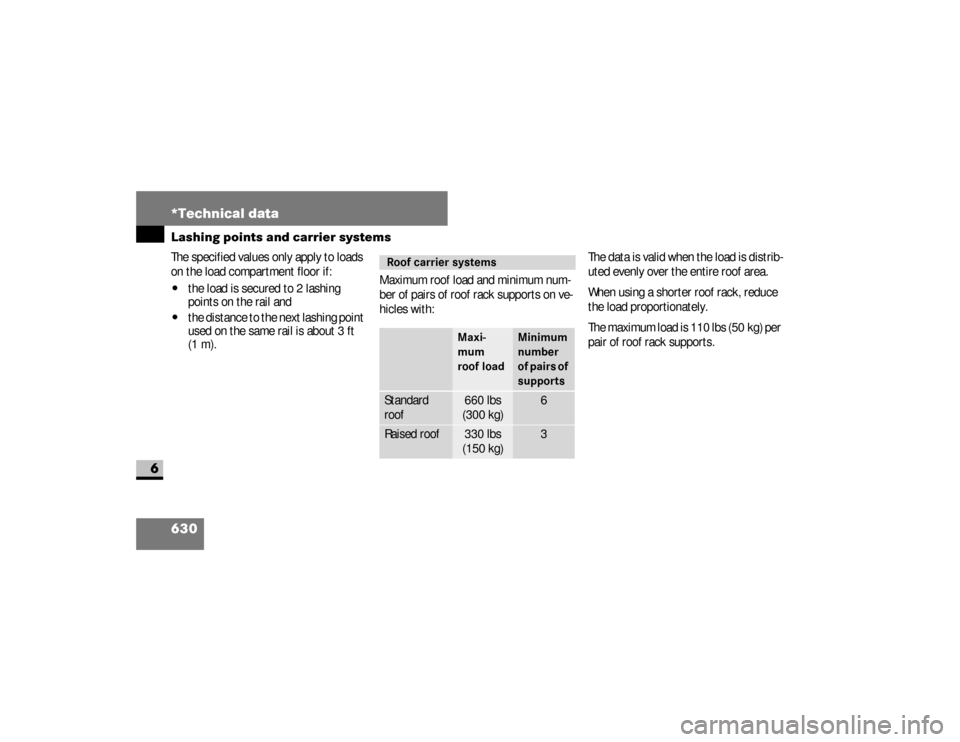
(1 m).Maximum roof load and minimum num-
ber of pairs of roof rack supports on ve-
hicles with:The data is valid when the load is distrib-
uted evenly over the entire roof area.
When using a shorter roof rack, reduce
the load proportionately.
The maximum load is 110 lbs (50 kg) per
pair of roof rack supports.
Roof carrier systems
Maxi-
mum
roof load
Minimum
number
of pairs of
supports
Standard
roof
660 lbs
(300 kg)
6
Raised roof
330 lbs
(150 kg)
3
nf_BA.book Page 630 Friday, January 25, 2008 3:53 PM
Page 634 of 666
632 *Technical dataVehicle identification labels
6
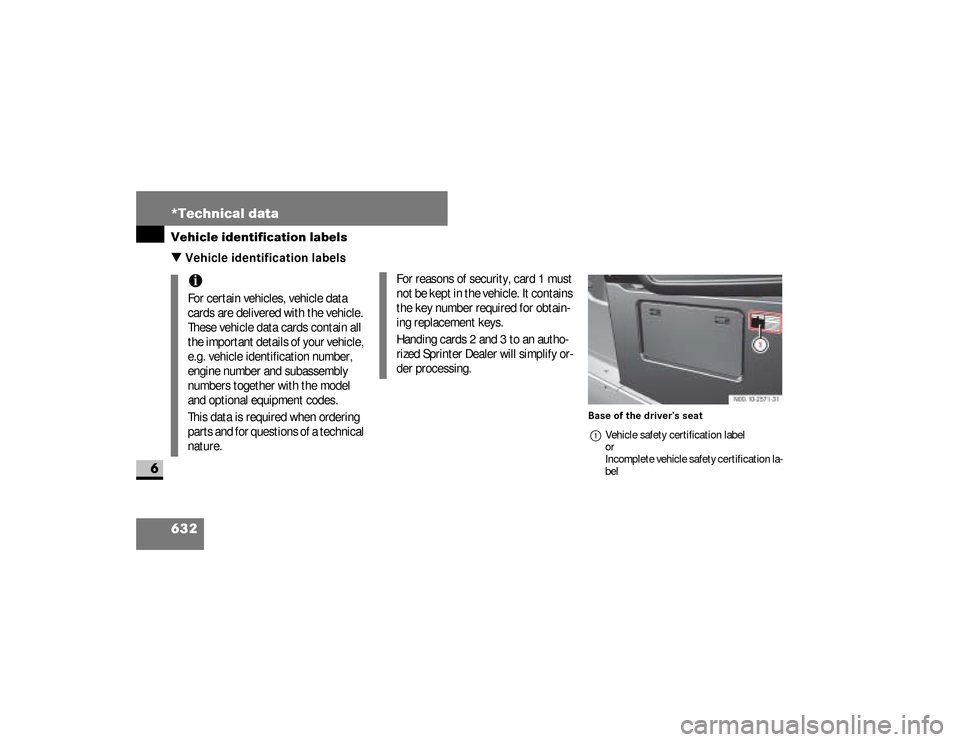
\3 Vehicle identification labels
Base of the driver’s seat
1Vehicle safety certification label
or
Incomplete vehicle safety certification la-
bel
iFor certain vehicles, vehicle data
cards are delivered with the vehicle.
These vehicle data cards contain all
the important details of your vehicle,
e.g. vehicle identification number,
engine number and subassembly
numbers together with the model
and optional equipment codes.
This data is required when ordering
parts and for questions of a technical
nature.
For reasons of security, card 1 must
not be kept in the vehicle. It contains
the key number required for obtain-
ing replacement keys.
Handing cards 2 and 3 to an autho-
rized Sprinter Dealer will simplify or-
der processing.
nf_BA.book Page 632 Friday, January 25, 2008 3:53 PM
Page 643 of 666
641 Index
Checking tire pressure electronically
with the Advanced Tire Pressure
Monitoring System
(Advanced TPMS)
. . . . . . . . . . . . 373
Checking tire pressure electronically
with the Tire Pressure Monitoring
System (TPMS)
. . . . . . . . . . . . . . 367
Checks, regular
. . . . . . . . . . . . . . 312
Childrenin the vehicle . . . . . . . . . . . . . . . . 55
ISOFIX seat securing system . . . . 61
LATCH type child restraint
system . . . . . . . . . . . . . . . . . . . . . 61
restraint systems . . . . . . . . . . . . . 56Chock
. . . . . . . . . . . . . . . . . . . . . . 521
Cigarette lighter
. . . . . . . . . . . . . 295
Cleaning
. . . . . . . . . . . . . . . . 416
,424
after driving off-road or
on construction sites . . . . . . . . . 425
air cleaner element . . . . . . . . . . 415
cockpit . . . . . . . . . . . . . . . . . . . . 424
headlamps . . . . . . . . . . . . . . . . . 421
padded boss of the steering
wheel . . . . . . . . . . . . . . . . . . . . . 424
radio display . . . . . . . . . . . . . . . 424
rear view camera lens . . . . . . . . 422
rear view camera monitor . . . . . 424
rear window . . . . . . . . . . . . . . . . 421
side windows . . . . . . . . . . . . . . . 421
vehicle . . . . . . . . . . . . . . . . . . . . 418
windshield . . . . . . . . . . . . . . . . . 420
windshield wipers . . . . . . . . . . . 420
Clearance lampchanging bulbs . . . . . . . . . . . . . 535
see identification lamp . . . . . . . 533Clocksetting
vehicles with steering wheel
buttons . . . . . . . . . . . . . . . . . . 168
vehicles without steering
wheel buttons . . . . . . . . . . . . 150Cockpit
. . . . . . . . . . . . . . . . . . . . . .18
Cold tire inflation pressure
. . . . 394
COMANDsee the separate Operating
InstructionsComfort seat
. . . . . . . . . . . . . . . . 114
Constant headlamp mode
. . . . . 171
nf_BA.book Page 641 Friday, January 25, 2008 3:53 PM
Page 650 of 666
648 Indexbrake pad/lining wear . . . . . . . . 470
coolant . . . . . . . . . . . . . . . . . . . . 474
engine diagnostic . . . . . . . . . . . . 477
ESP
®
. . . . . . . . . . . . . . . . . 462
,468
handbrake . . . . . . . . . . . . . . . . . 189
operating speed governor (ADR) . . 274poly-V-belt . . . . . . . . . . . . . . . . . 469
preglow . . . . . . . . . . . . . . . 186
,476
reserve warning
indicator (fuel) . . . . . . . . . . 475,476
windshield washer/headlamp
cleaning system washer fluid
level . . . . . . . . . . . . . . . . . . . . . . 482
Inflation pressuresee Tires, Inflation pressuresInformation regarding electronic
recording devices
. . . . . . . . . . . . . 16
Instrument cluster
. . . . . . . . 20
,142
lighting . . . . . . . . . . . . . . . . . . . . 144
speedometer . . . . . . . . . . . . . . . 145
tachometer . . . . . . . . . . . . . . . . 145
vehicles with steering wheel buttons
selecting the language . . . . . . 166
setting the status line . . . . . . . 167
Instrument lighting
. . . . . . . . . . . 144
Interior lightingchanging bulbs . . . . . . . . . . . . . . 537
front . . . . . . . . . . . . . . . . . . . . . . 137
rear . . . . . . . . . . . . . . . . . . . . . . 138Interior lighting, rear
. . . . . . . . . 138
Interior motion sensor
. . . . . . . . . 80
Intermittent wipe
. . . . . . . . . . . . 210
ISOFIX child seat securing
system
. . . . . . . . . . . . . . . . . . . . . . 61
TopTether . . . . . . . . . . . . . . . . . . 64
J
Jackjacking points . . . . . . . . . . . . . . 551
preparing . . . . . . . . . . . . . . . . . . 550
storage location . . . . . . . . . . . . . 515Jump-starting
. . . . . . . . . . . . . . . 581
connection point . . . . . . . . . . . . 582
Jump-starting connection
point
. . . . . . . . . . . . . . . . . . . . . . . 582
J
nf_BA.book Page 648 Friday, January 25, 2008 3:53 PM