instrument panel DODGE VIPER 2015 VX / 3.G User Guide
[x] Cancel search | Manufacturer: DODGE, Model Year: 2015, Model line: VIPER, Model: DODGE VIPER 2015 VX / 3.GPages: 400, PDF Size: 9.59 MB
Page 52 of 400
•Passenger Air Bag Disabled (PAD) Indicator Light – an
amber light located in the center of the instrument
panel
•Air Bag Warning Light
Occupant Classification Module (OCM)
The Occupant Classification Module (OCM) is located
underneath the front passenger seat. The OCM uses
input from the Bladder to determine the front passen-
ger ’s most probable classification. The OCM communi-
cates this information to the ORC. The ORC may deacti-
vate the Passenger Advanced Front Air Bag deployment
based on occupant classification.
Bladder
The Bladder is located beneath the passenger seat cush-
ion foam. The Bladder sends signals to the OCM for
classifying the occupant in the front passenger seat. Any
weight on the seat will be sensed by the Bladder. In order
for the OCS to operate as designed, it is important for the
front passenger to be seated properly and properly
wearing the seat belt. Properly seated passengers are:
•Sitting upright
•Facing forward
•Sitting in the center of the seat with their feet comfort-
ably on or near the floor
•Sitting with their back against the seat back and the
seat back in an upright position
50 THINGS TO KNOW BEFORE STARTING YOUR VEHICLE
Page 55 of 400
Advanced Front Air Bag will not inflate even though the
Passenger Air Bag Disable (PAD) System Indicator Light
is NOT illuminated.
** It is possible for a child to be classified as an adult,
allowing the deployment of the passenger Advanced
Front Air Bag. Never allow children to ride in the front
passenger seat and never install a child restraint system,
including a rear-facing child restraint, in this vehicle.
Passenger Advanced Front Air Bag Disabled (PAD)
Indicator Light
The PAD Indicator Light (an amber light located in the
center of the instrument panel) tells the driver and front
passenger when the passenger Advanced Front Air Bag is
deactivated. The PAD Indicator light illuminates the
words “PASSENGER AIR BAG OFF” to show that the
Passenger Advanced Front Air Bag will not inflate during
a collision. When the right front passenger seat is empty
or when very light objects are placed on the seat, the
Passenger Advanced Front Air Bag will not inflate even
though the PAD Indicator Light is not illuminated.
The PAD Indicator Light should not be illuminated when
an adult passenger is properly seated in the front passen-
ger seat. Drivers and adult passengers should verify that
the PAD Indicator Light is not illuminated when an adult
is riding in the front passenger seat. If an adult is not
seated properly the Passenger Advanced Front Air Bag
may be deactivated and the PAD Indicator Light will be
illuminated.
The PAD Indicator Light should be illuminated and the
Passenger Advanced Front Air Bag should be deactivated
for most properly seated and restrained children in the
passenger seat and for most properly installed child
restraint systems. However, under certain conditions,
even with a properly installed child restraint system, the
PAD Indicator Light may not be illuminated, even
though the Advanced Front Air Bag is deactivated. This
2
THINGS TO KNOW BEFORE STARTING YOUR VEHICLE 53
Page 62 of 400
WARNING!(Continued)
in a collision. Do not place any objects on the floor
under the front passenger seat.
The Air Bag Warning Lightin the instrument panel
will turn on whenever the OCS is unable to classify the
front passenger seat status will illuminate whenever
the OCS is unable to classify the front passenger seat
status or when there is a fault present in the OCS
WARNING!
•Ignoring the Air Bag Warning Light in your instru-
ment panel could mean you won’t have the air bags
to protect you in a collision. If the light does not
come on as a bulb check when the ignition is first
placed in the on position, and stays on after you
start the vehicle, or if it comes on as you drive, have
an authorized dealer service the air bag system
immediately.
•If there is a fault present in the OCS, both the PAD
Indicator Light and the Air Bag Warning Light will
illuminate to show that the Passenger Advanced
Front Air Bag is deactivated. Should this occur, the
Passenger Advanced Front Air Bag will remain
deactivated until the fault is cleared. This indicates
that you should take the vehicle to an authorized
dealer for service immediately.
60 THINGS TO KNOW BEFORE STARTING YOUR VEHICLE
Page 69 of 400
•Turn on the interior lights, which remain on as long as
the battery has power or until the ignition is placed in
the “OFF” position.
•Unlock the doors automatically.
System Reset Procedure
In order to reset the Enhanced Accident Response System
functions after an event, the ignition must be changed
from ignition START or ON/RUN to ignition OFF.
Air Bag Warning Light
The air bags must be ready to inflate for your
protection in a collision. The Occupant Re-
straint Controller (ORC) monitors the internal
circuits and interconnecting wiring associated
with air bag system electrical components.
The ORC monitors the readiness of the electronic parts of
the air bag system whenever the ignition is in the START
or ON/RUN position. If the ignition is in the OFF
position or in the ACC position, the air bag system is not
on and the air bags will not inflate.
The ORC contains a backup power supply system that
may deploy the air bags even if the battery loses power or
it becomes disconnected prior to deployment.
The ORC turns on the Air Bag Warning Light in the
instrument panel for approximately four to eight seconds
for a self-check when the ignition is first placed in the
ON/RUN position. After the self-check, the Air Bag
Warning Light will turn off. If the ORC detects a mal-
function in any part of the system, it turns on the Air Bag
Warning Light, either momentarily or continuously. A
single chime will sound to alert you if the light comes on
again after initial startup.
The ORC also includes diagnostics that will illuminate
the instrument panel Air Bag Warning Light if a malfunc-
tion is detected that could affect the air bag system. The
2
THINGS TO KNOW BEFORE STARTING YOUR VEHICLE 67
Page 71 of 400
Maintaining Your Air Bag System
WARNING!
•Modifications to any part of the air bag system
could cause it to fail when you need it. You could
be injured if the air bag system is not there to
protect you. Do not modify the components or
wiring, including adding any kind of badges or
stickers to the steering wheel hub trim cover or the
upper right side of the instrument panel. Do not
modify the front bumper, vehicle body structure, or
add aftermarket side steps or running boards.
•It is dangerous to try to repair any part of the air
bag system yourself. Be sure to tell anyone who
works on your vehicle that it has an air bag system.
(Continued)
WARNING!(Continued)
•Do not attempt to modify any part of your air bag
system. The air bag may inflate accidentally or may
not function properly if modifications are made.
Take your vehicle to an authorized dealer for any
air bag system service. If your seat, including your
trim cover and cushion, needs to be serviced in any
way (including removal or loosening/tightening of
seat attachment bolts), take the vehicle to your
authorized dealer. Only manufacturer approved
seat accessories may be used. If it is necessary to
modify the air bag system for persons with dis-
abilities, contact your authorized dealer.
Event Data Recorder (EDR)
This vehicle is equipped with an event data recorder
(EDR). The main purpose of an EDR is to record, in
certain crash or near crash-like situations, such as an air
2
THINGS TO KNOW BEFORE STARTING YOUR VEHICLE 69
Page 87 of 400

Lights
Have someone observe the operation of brake lights and
exterior lights while you work the controls. Check turn
signal and high beam indicator lights on the instrument
panel.
Door Latches
Check for proper closing, latching, and locking.
Fluid Leaks
Check area under vehicle after overnight parking for fuel,
engine coolant, oil, or other fluid leaks. Also, if gasoline
fumes are detected or if fuel, power steering fluid (if
equipped), or brake fluid leaks are suspected. The cause
should be located and corrected immediately.
2
THINGS TO KNOW BEFORE STARTING YOUR VEHICLE 85
Page 104 of 400
WARNING!
Be sure the hood is fully latched before driving your
vehicle. If the hood is not fully latched, it could open
when the vehicle is in motion and block your vision.
Failure to follow this warning could result in serious
injury or death.
LIGHTS
Headlight Switch
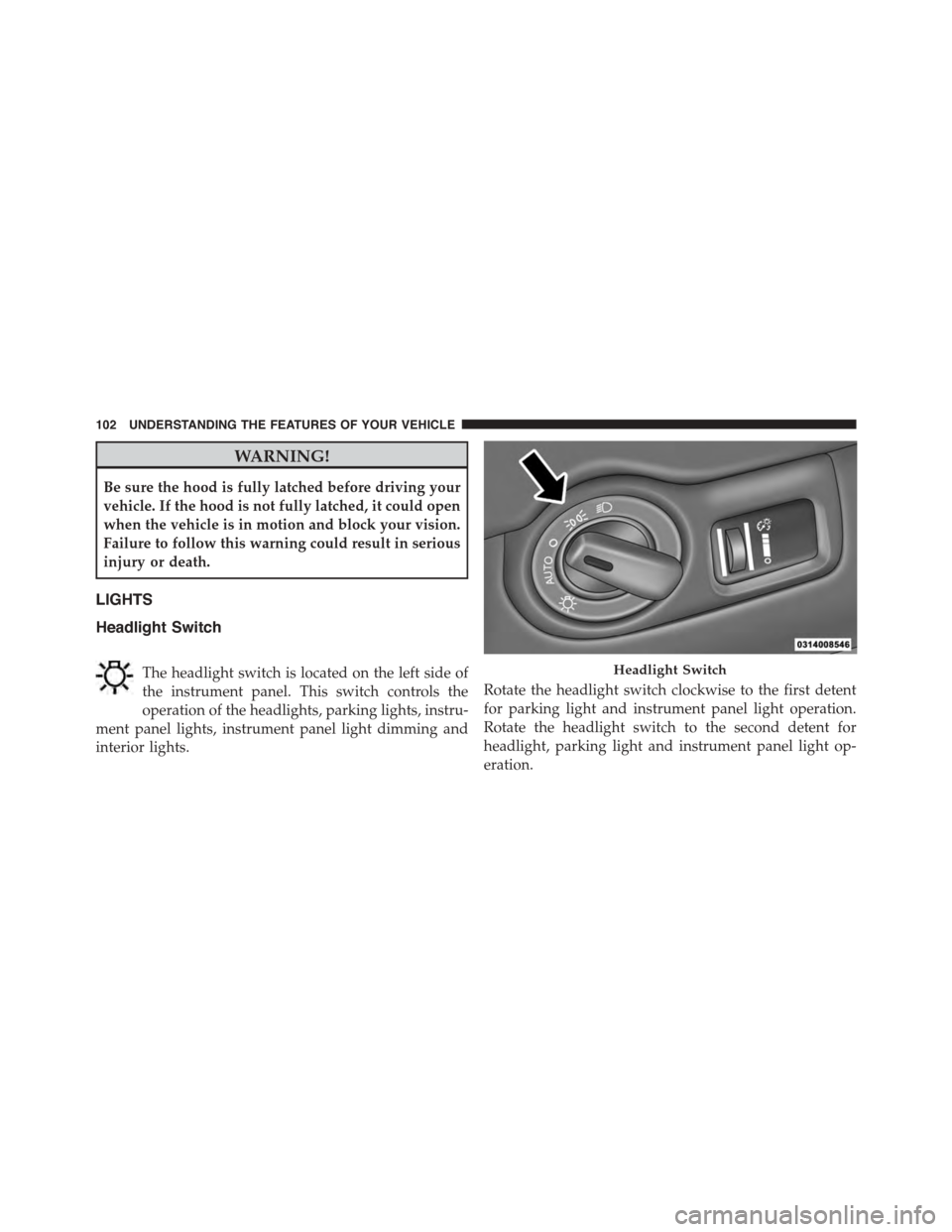
The headlight switch is located on the left side of
the instrument panel. This switch controls the
operation of the headlights, parking lights, instru-
ment panel lights, instrument panel light dimming and
interior lights.
Rotate the headlight switch clockwise to the first detent
for parking light and instrument panel light operation.
Rotate the headlight switch to the second detent for
headlight, parking light and instrument panel light op-
eration.
Headlight Switch
102 UNDERSTANDING THE FEATURES OF YOUR VEHICLE
Page 105 of 400
Automatic Headlights
This system automatically turns the headlights on or off
according to ambient light levels. To turn the system on,
rotate the headlight switch counterclockwise to the A
(AUTO) position. When the system is on, the headlight
time delay feature is also on. This means the headlights
will stay on for up to 90 seconds after placing the ignition
in the OFF position. To turn the Automatic system off,
move the headlight switch out of the AUTO position.
NOTE:The engine must be running before the head-
lights will come on in the automatic mode.
Headlights On With Wipers (Available With
Automatic Headlights Only)
When this feature is active, the headlights will turn on
after the wipers are turned on if the headlight switch is
placed in the AUTO position and programmable feature
is set to ON. In addition, the headlights will turn off
when the wipers are turned off if they were turned on by
this feature.
NOTE:The Headlights On with Wipers feature can be
turned on or off using the Uconnect® System. Refer to
“Uconnect® Settings/Customer Programmable Fea-
tures” in “Understanding Your Instrument Panel” for
further information.
Headlight Time Delay
This feature provides the safety of headlight illumination
for up to 90 seconds (programmable) when leaving your
vehicle in an unlit area.
To activate the delay feature, place the ignition in the OFF
position while the headlights are still on. Then, turn off
the headlights within 45 seconds. The delay interval
begins when the headlight switch is turned off.
3
UNDERSTANDING THE FEATURES OF YOUR VEHICLE 103
Page 106 of 400
If you turn the headlights or parking lights on, or place
the ignition in ACC or RUN, the system will cancel the
delay.
If you turn the headlights off before the ignition, they will
turn off in the normal manner.
NOTE:
•The lights must be turned off within 45 seconds of
placing the ignition in the OFF position to activate this
feature.
•The headlight delay time is programmable using the
Uconnect® System, refer to “Uconnect® Settings” in
“Understanding Your Instrument Panel” for further
information.
Daytime Running Lights
The LED Daytime Running Lights will come on when-
ever the engine is running and the park brake is off. The
headlight switch must be used for normal nighttime
driving.
NOTE:If allowed by law in the country in which the
vehicle was purchased the Daytime Running Lights can
be turned on and off using the Uconnect® System, refer
to “Uconnect® Settings” in “Understanding Your Instru-
ment Panel” for further information.
Lights-On Reminder
If the headlights or parking lights are on after the ignition
is placed in the OFF position, a chime will sound to alert
the driver when the driver’s door is opened.
104 UNDERSTANDING THE FEATURES OF YOUR VEHICLE
Page 109 of 400
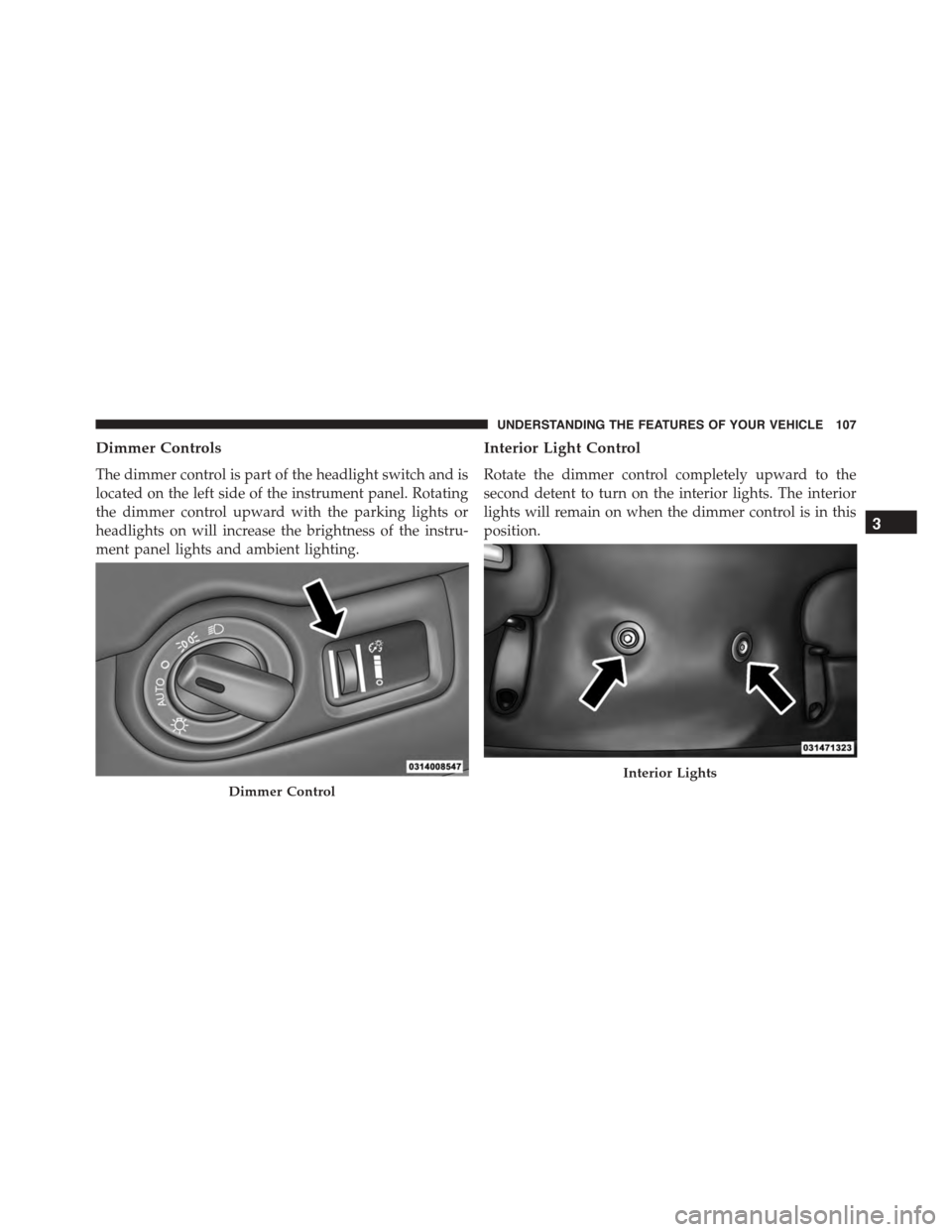
Dimmer Controls
The dimmer control is part of the headlight switch and is
located on the left side of the instrument panel. Rotating
the dimmer control upward with the parking lights or
headlights on will increase the brightness of the instru-
ment panel lights and ambient lighting.
Interior Light Control
Rotate the dimmer control completely upward to the
second detent to turn on the interior lights. The interior
lights will remain on when the dimmer control is in this
position.
Dimmer Control
Interior Lights
3
UNDERSTANDING THE FEATURES OF YOUR VEHICLE 107