PRESSURE FIAT 500 2017 2.G User Guide
[x] Cancel search | Manufacturer: FIAT, Model Year: 2017, Model line: 500, Model: FIAT 500 2017 2.GPages: 350, PDF Size: 3.01 MB
Page 125 of 350
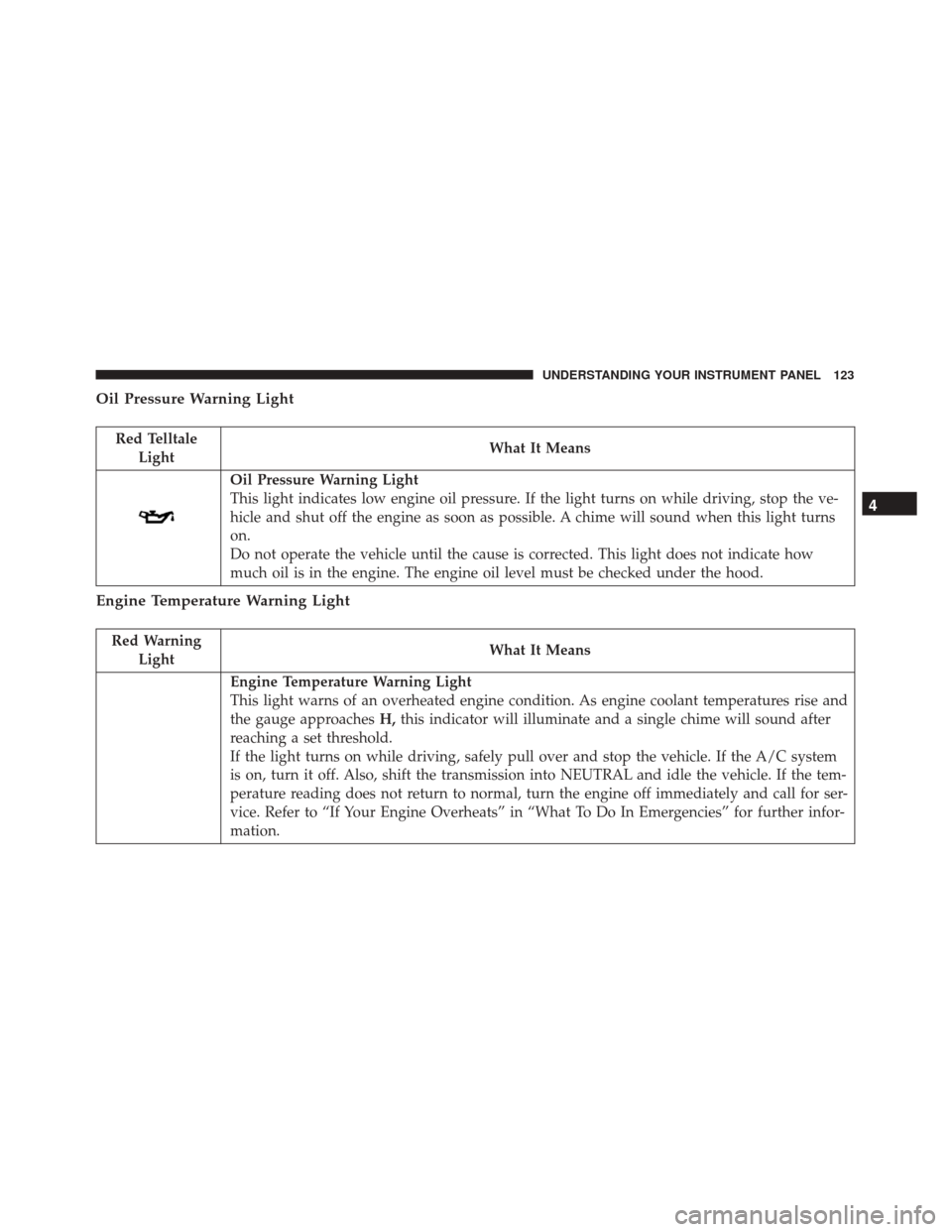
Oil Pressure Warning Light
Red TelltaleLight What It Means
Oil Pressure Warning Light
This light indicates low engine oil pressure. If the light turns on while driving, stop the ve-
hicle and shut off the engine as soon as possible. A chime will sound when this light turns
on.
Do not operate the vehicle until the cause is corrected. This light does not indicate how
much oil is in the engine. The engine oil level must be checked under the hood.
Engine Temperature Warning Light
Red Warning
Light What It Means
Engine Temperature Warning Light
This light warns of an overheated engine condition. As engine coolant temperatures rise and
the gauge approaches
H,this indicator will illuminate and a single chime will sound after
reaching a set threshold.
If the light turns on while driving, safely pull over and stop the vehicle. If the A/C system
is on, turn it off. Also, shift the transmission into NEUTRAL and idle the vehicle. If the tem-
perature reading does not return to normal, turn the engine off immediately and call for ser-
vice. Refer to “If Your Engine Overheats” in “What To Do In Emergencies” for further infor-
mation.
4
UNDERSTANDING YOUR INSTRUMENT PANEL 123
Page 127 of 350
Transmission Fault Warning Light
Red TelltaleLight What It Means
Transmission Fault Warning Light
This light will illuminate (together with a message in the Instrument Cluster Display and a
buzzer) to indicate a transmission fault. This light indicates that the transmission fluid tem-
perature is running hot. This may occur with severe usage. If this light turns on, safely pull
over and stop the vehicle. Then, place the transmission into NEUTRAL and run the engine
at idle speed or apply light foot pressure to increase the engine speed RPM until the Trans-
mission Temperature light turns off. Contact your authorized dealer if the message remains
after restarting the engine.
WARNING!
If you continue operating the vehicle when the
Transmission Temperature Warning Light is illumi-
nated you could cause the fluid to boil over, come in
contact with hot engine or exhaust components and
cause a fire.
CAUTION!
Continuous driving with the Transmission Tem-
perature Warning Light illuminated will eventually
cause severe transmission damage or transmission
failure.
4
UNDERSTANDING YOUR INSTRUMENT PANEL 125
Page 128 of 350
Hood Open Warning Light — If Equipped
Red TelltaleLight What It Means
Hood Open Warning Light
This indicator will illuminate when the hood is ajar/open and not fully closed.
Yellow Telltale Indicator Lights
Tire Pressure Monitoring Indicator Light
Yellow Telltale
Light What It Means
Tire Pressure Monitoring Indicator Light
The warning light switches on and a message is displayed to indicate that the tire pressure
is lower than the recommended value and/or that slow pressure loss is occurring. In these
cases, optimal tire duration and fuel consumption may not be guaranteed.
Should one or more tires be in the condition mentioned above, the display will show the
indications corresponding to each tire in sequence.
126 UNDERSTANDING YOUR INSTRUMENT PANEL
Page 129 of 350
IMPORTANT:Do not continue driving with one or
more flat tires as handling may be compromised. Stop
the vehicle, avoiding sharp braking and steering. Repair
immediately using the dedicated tire repair kit and
contact your authorized dealership as soon as possible.
Each tire, including the spare (if provided), should be
checked monthly when cold and inflated to the inflation
pressure recommended by the vehicle manufacturer on
the vehicle placard or tire inflation pressure label. If
your vehicle has tires of a different size than the size
indicated on the vehicle placard or tire inflation pres-
sure label, you should determine the proper tire infla-
tion pressure for those tires.
As an added safety feature, your vehicle has been
equipped with a Tire Pressure Monitoring System (TPMS)
that illuminates a low tire pressure telltale when one or
more of your tires is significantly under-inflated. Accord-
ingly, when the low tire pressure telltale illuminates, you
should stop and check your tires as soon as possible and
inflate them to the proper pressure. Driving on a signifi-
cantly under-inflated tire causes the tire to overheat and
can lead to tire failure. Under-inflation also reduces fuel
efficiency and tire tread life, and may affect the vehicle’s
handling and stopping ability.
Please note that the TPMS is not a substitute for proper
tire maintenance, and it is the driver ’s responsibility to
maintain correct tire pressure, even if under-inflation
has not reached the level to trigger illumination of the
TPMS low tire pressure telltale.
Your vehicle has also been equipped with a TPMS
malfunction indicator to indicate when the system is
not operating properly. The TPMS malfunction indi-
cator is combined with the low tire pressure telltale.
When the system detects a malfunction, the telltale
will flash for approximately one minute and then
remain continuously illuminated. This sequence will
continue upon subsequent vehicle start-ups as long
as the malfunction exists. When the malfunction
indicator is illuminated, the system may not be able
to detect or signal low tire pressure as intended.
TPMS malfunctions may occur for a variety of rea-
sons, including the installation of replacement or
alternate tires or wheels on the vehicle that prevent
the TPMS from functioning properly. Always check
the TPMS malfunction telltale after replacing one or
more tires or wheels on your vehicle, to ensure that
the replacement or alternate tires and wheels allow
the TPMS to continue to function properly. 4
UNDERSTANDING YOUR INSTRUMENT PANEL 127
Page 130 of 350
CAUTION!
The TPMS has been optimized for the original
equipment tires and wheels. TPMS pressures and
warning have been established for the tire size
equipped on your vehicle. Undesirable system op-
eration or sensor damage may result when using
replacement equipment that is not of the same size,
type, and/or style. Aftermarket wheels can cause
sensor damage. Using aftermarket tire sealants may
cause the Tire Pressure Monitoring System (TPMS)
sensor to become inoperable. After using an after-
market tire sealant it is recommended that you take
your vehicle to an authorized dealership to have
your sensor function checked.
128 UNDERSTANDING YOUR INSTRUMENT PANEL
Page 135 of 350
Generic Warning Indicator Light
Yellow TelltaleLight What It Means
Generic Warning Indicator Light
The Generic Warning Light will illuminate if any of the following conditions occur: Oil
Change Request, Engine Oil Pressure Sensor Failure, External Light Failure, Fuel Cut-Off
Not Available, Parking Sensor Failure, DST System Failure.
Icy Road Condition Indicator Light
Yellow Telltale
Light What It Means
Icy Road Condition Indicator Light
This light will illuminate during an icy road condition.
Exterior Bulb Failure Indicator Light
Yellow Telltale
Light What It Means
Exterior Bulb Failure Indicator Light
This light will illuminate when there is a malfunction in one of the exterior bulbs.
4
UNDERSTANDING YOUR INSTRUMENT PANEL 133
Page 140 of 350
INSTRUMENT CLUSTER DISPLAY
Your vehicle may be equipped with an Instrument
Cluster Display, which offers useful information to the
driver. With the ignition in the STOP/OFF position (and
the key removed, for vehicles with mechanical key),
opening/closing of a door will activate the display for
viewing, and display the total miles or kilometers in the
odometer. Your Instrument Cluster Display is designed
to display important information about your vehicle’s
systems and features. Using a driver interactive display
located on the instrument panel, your Instrument Clus-
ter Display can show you how systems are working and
give you warnings when they aren’t. The steering wheel
mounted controls allow you to scroll through and enter
the main menus and submenus. You can access the
specific information you want and make selections and
adjustments.
Instrument Cluster Display And Controls
The driver-interactive Instrument Cluster Display is
located in the center of the instrument cluster.The system display consists of the following:
•
System Status
• Vehicle Information Warning Message Displays
•
Personal Settings (Customer-Programmable Features)
• Outside Temperature Display
• Trip Computer Functions
• Tire Pressure Monitoring Display
Instrument Cluster Display
138 UNDERSTANDING YOUR INSTRUMENT PANEL
Page 144 of 350
•A short button push displays the different values.
• A long button push resets the system and then starts
a new trip.
New Trip
To reset:
• Push and hold the TRIPbutton to reset the system
manually.
• When the “Trip distance” reaches 99999.9 kilometers
(621370 miles) or when the “Travel time” reaches
99.59 (99 hours and 59 minutes), the system is reset
automatically.
• Disconnecting/Reconnecting the battery resets the
system.
NOTE: If the reset operation occurs in the presence of
the screens concerning Trip A or Trip B, only the
information associated with Trip A or Trip B functions
will be reset.
Start Of Trip Procedure
With the ignition on, push and hold the TRIPbutton for
over 2 seconds to reset trip information.
Exit Trip
To exit the Trip function, wait until all the values have
been displayed or hold the MENUbutton for longer
than one second.
Briefly push and release the MENUbutton to go back to
the menu screen or push and hold the MENU(approxi-
mately one second) to go back to the main screen
without storing settings.
Tire Pressure
This function will be used to display the tire pressures
individually for all four tires by location.
Trip Functions
Both trip functions are resettable (reset — start of new
trip).
“Trip A” can be used to display the figures relating to:
• Trip Distance A
• Average Fuel Consumption
• Average Speed A
• Travel Time A (Driving Time)
142 UNDERSTANDING YOUR INSTRUMENT PANEL
Page 145 of 350
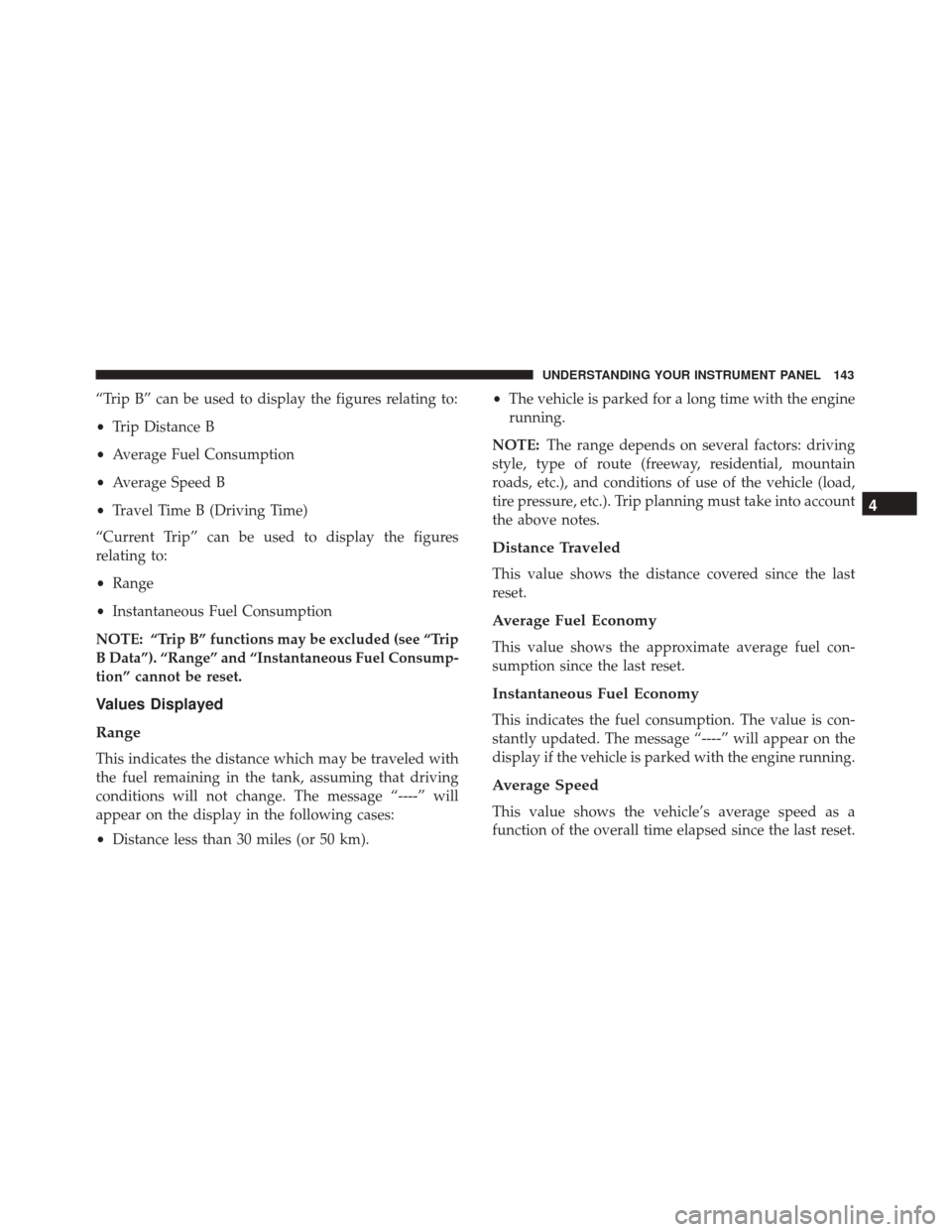
“Trip B” can be used to display the figures relating to:
•Trip Distance B
• Average Fuel Consumption
• Average Speed B
• Travel Time B (Driving Time)
“Current Trip” can be used to display the figures
relating to:
• Range
• Instantaneous Fuel Consumption
NOTE: “Trip B” functions may be excluded (see “Trip
B Data”). “Range” and “Instantaneous Fuel Consump-
tion” cannot be reset.
Values Displayed
Range
This indicates the distance which may be traveled with
the fuel remaining in the tank, assuming that driving
conditions will not change. The message “----” will
appear on the display in the following cases:
• Distance less than 30 miles (or 50 km). •
The vehicle is parked for a long time with the engine
running.
NOTE: The range depends on several factors: driving
style, type of route (freeway, residential, mountain
roads, etc.), and conditions of use of the vehicle (load,
tire pressure, etc.). Trip planning must take into account
the above notes.
Distance Traveled
This value shows the distance covered since the last
reset.
Average Fuel Economy
This value shows the approximate average fuel con-
sumption since the last reset.
Instantaneous Fuel Economy
This indicates the fuel consumption. The value is con-
stantly updated. The message “----” will appear on the
display if the vehicle is parked with the engine running.
Average Speed
This value shows the vehicle’s average speed as a
function of the overall time elapsed since the last reset.
4
UNDERSTANDING YOUR INSTRUMENT PANEL 143
Page 156 of 350
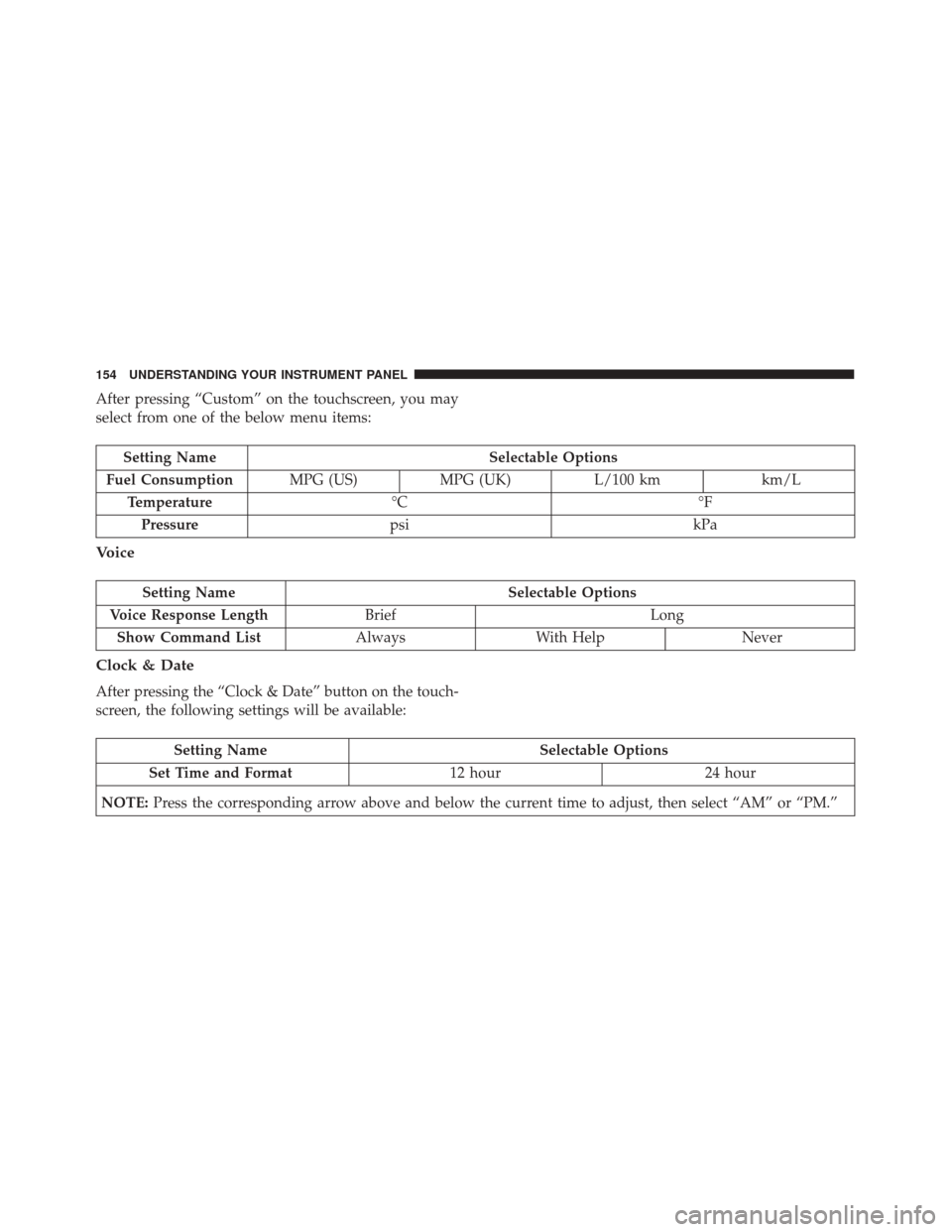
After pressing “Custom” on the touchscreen, you may
select from one of the below menu items:
Setting NameSelectable Options
Fuel Consumption MPG (US)MPG (UK) L/100 km km/L
Temperature °C °F
Pressure psi kPa
Voice
Setting Name Selectable Options
Voice Response Length Brief Long
Show Command List AlwaysWith Help Never
Clock & Date
After pressing the “Clock & Date” button on the touch-
screen, the following settings will be available:
Setting Name Selectable Options
Set Time and Format 12 hour24 hour
NOTE: Press the corresponding arrow above and below the current time to adjust, then select “AM” or “PM.”
154 UNDERSTANDING YOUR INSTRUMENT PANEL