radio FIAT 500 ABARTH 2013 2.G User Guide
[x] Cancel search | Manufacturer: FIAT, Model Year: 2013, Model line: 500 ABARTH, Model: FIAT 500 ABARTH 2013 2.GPages: 388, PDF Size: 9.03 MB
Page 176 of 388
4. Briefly press theSET ESCbutton to go back to the
menu screen, or press and hold the button (approxi-
mately one second) to go back to the main screen
without storing the settings.
Exit Menu
This function closes the initial menu screen.
Briefly press theSET ESCbutton to go back to the main
screen.
Press thebutton to return to the first menu option
(Speed Beep).
Press thebutton to return to the last menu option
(Daylights).
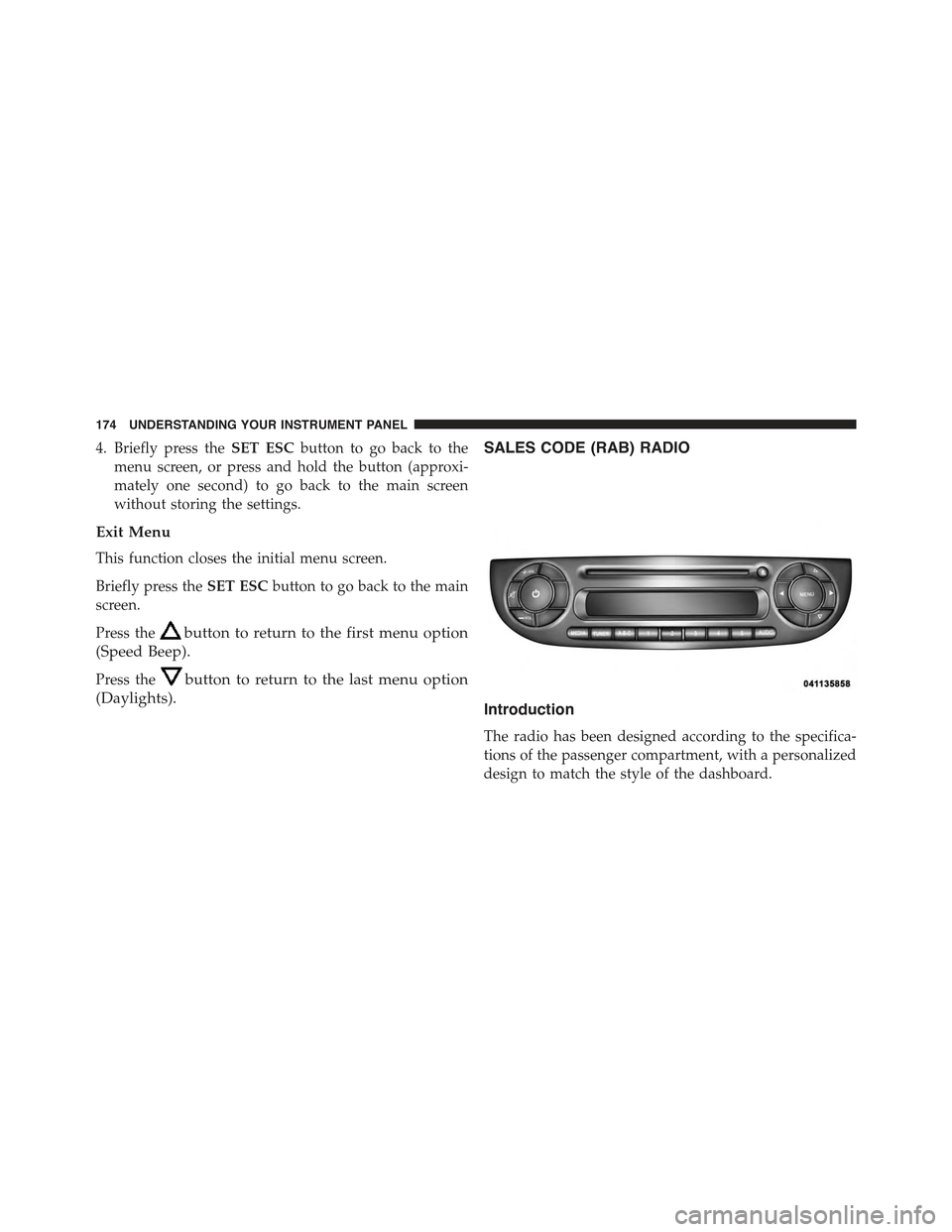
SALES CODE (RAB) RADIO
Introduction
The radio has been designed according to the specifica-
tions of the passenger compartment, with a personalized
design to match the style of the dashboard.
174 UNDERSTANDING YOUR INSTRUMENT PANEL
Page 177 of 388
If the radio has BLUE&ME™, refer to the appropriate
“BLUE&ME™ User ’s Manual” for further information.
The instructions for use are given below and we recom-
mend you to read them carefully.
Suggestions
Road Safety
Please, learn how to use all different radio functions (e.g.
store stations) before beginning to drive.
Reception Conditions
Reception conditions change constantly while driving.
Reception may be interfered with by the presence of
mountains, buildings or bridges, or when you are far
away from the broadcaster.
WARNING!
Having the volume turned up high can cause the
driver to not be able to hear important traffic sounds,
i.e. sirens, horns, etc. This could cause an accident.
Always adjust the volume so that you can still hear
background noises.
Care And Maintenance
Clean the cover with a soft antistatic cloth only. Cleaning
and polishing products could damage the surface.
4
UNDERSTANDING YOUR INSTRUMENT PANEL 175
Page 179 of 388
copied is often shown in very small letters or is
difficult to read on the actual CD cover where it may
be, for example, “COPY CONTROL”, “COPY PRO-
TECTED”, “THIS CD CANNOT BE PLAYED ON A
PC/MAC”.
•The CD player is capable of reading most compression
systems currently in use, following the development of
these systems, the reading of all compression formats
is not guaranteed.
Technical Specifications
The complete system consists of:
•Two 165 mm diameter midwoofer speakers, one
speaker in each of the front doors.
•Two 22 mm diameter tweeter speakers, one speaker in
each of the front pillars.
•Two 100 mm diameter full range speakers, one speaker
in each of the rear side panels.
•Antenna on the car roof.
•Radio with CD/MP3 player.
With Alpine Premium Audio system (if equipped):
•Two 165 mm diameter midwoofer speakers.
•Two 11 mm tweeter speakers in the front pillars.
•Two 100 mm full range speakers, one speaker in each
of the rear side panels.
•An amplifier in the trunk on the right-hand side panel.
•Antenna on the car roof.
•Radio with CD/MP3 player.
4
UNDERSTANDING YOUR INSTRUMENT PANEL 177
Page 180 of 388
Quick Guide
Radio Controls
BUTTONGENERAL FUNCTIONSMODE
OnShort button press
OffShort button press
TUNERAM, FM, SAT (if equipped) source
selection
Short repeated button press
A-B-CCycles A, B, C presets for AM, FM,
SAT (if equipped)
Short repeated button press
MEDIACD/AUX/Media Player (if
equipped and present) source selec-
tion
Short repeated button press
BUTTONGENERAL FUNCTIONSMODE
(Mute/Pause Button)Volume activation/deactivation
(Mute/Pause)
Short button press
178 UNDERSTANDING YOUR INSTRUMENT PANEL
Page 182 of 388
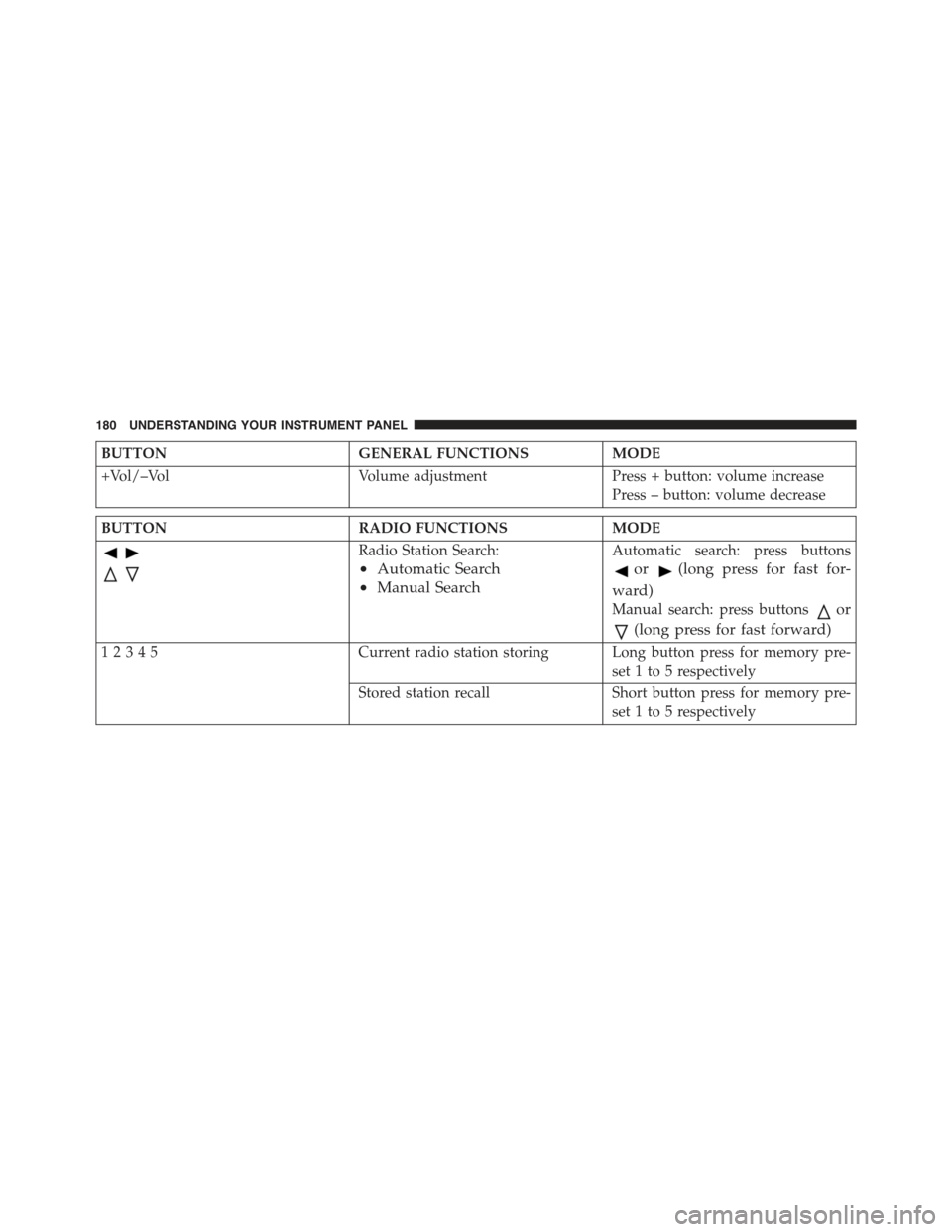
BUTTONGENERAL FUNCTIONSMODE
+Vol/–VolVolume adjustmentPress + button: volume increase
Press – button: volume decrease
BUTTONRADIO FUNCTIONSMODE
Radio Station Search:
•Automatic Search
•Manual Search
Automatic search: press buttons
or(long press for fast for-
ward)
Manual search: press buttonsor
(long press for fast forward)
12345Current radio station storing Long button press for memory pre-
set 1 to 5 respectively
Stored station recall Short button press for memory pre-
set 1 to 5 respectively
180 UNDERSTANDING YOUR INSTRUMENT PANEL
Page 183 of 388
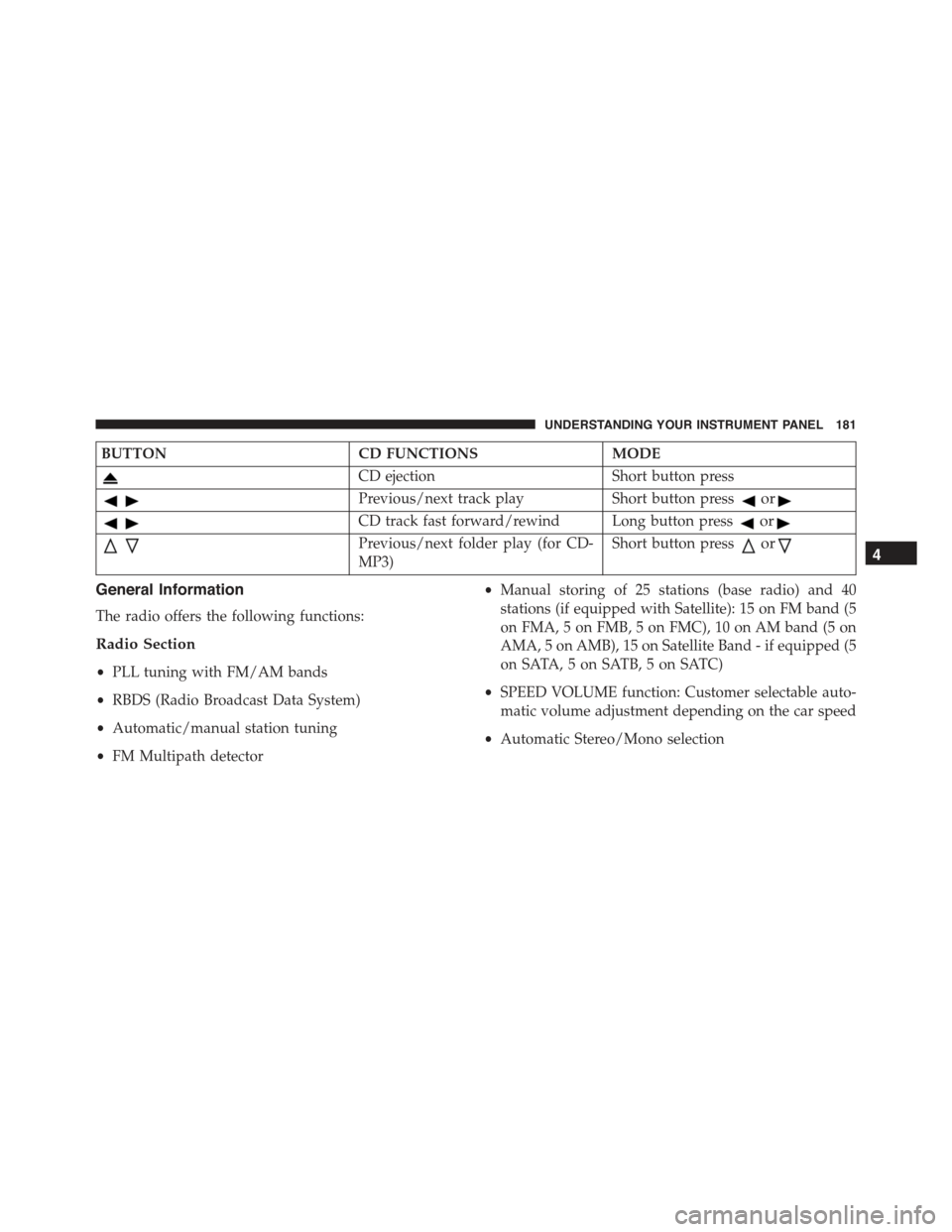
BUTTONCD FUNCTIONSMODE
CD ejectionShort button press
Previous/next track playShort button pressor
CD track fast forward/rewind Long button pressor
Previous/next folder play (for CD-
MP3)
Short button pressor
General Information
The radio offers the following functions:
Radio Section
•PLL tuning with FM/AM bands
•RBDS (Radio Broadcast Data System)
•Automatic/manual station tuning
•FM Multipath detector
•Manual storing of 25 stations (base radio) and 40
stations (if equipped with Satellite): 15 on FM band (5
on FMA, 5 on FMB, 5 on FMC), 10 on AM band (5 on
AMA, 5 on AMB), 15 on Satellite Band - if equipped (5
on SATA, 5 on SATB, 5 on SATC)
•SPEED VOLUME function: Customer selectable auto-
matic volume adjustment depending on the car speed
•Automatic Stereo/Mono selection
4
UNDERSTANDING YOUR INSTRUMENT PANEL 181
Page 185 of 388
Audio Section
•Mute/pause function
•Soft mute function
•Loudness function
•Graphic 7 band equalizer (if equipped)
•Separate bass/treble tone adjustment
•Right/left channel balancing
•Front/rear fader
Functions And Adjustments
Turning The Car Radio On
The car radio comes on when the(ON/OFF) button
is pressed briefly.
When the car radio is turned on and the on volume limit
is on, the volume is limited to a setting of five even if it
had been set higher when previously used.
Turning The Car Radio Off
Press the(ON/OFF) button to turn the radio off.
4
UNDERSTANDING YOUR INSTRUMENT PANEL 183
Page 186 of 388
Selecting The Radio Functions
By pressing the TUNER button briefly and repeatedly,
the following audio sources can be selected cyclically:
•AM, FM and Satellite Bands (if equipped)
Selecting The CD Function
By briefly pressing the MEDIA button, the CD audio
source can be selected (only if a CD is loaded).
Volume Adjustment
To adjust the volume, press the buttons +Vol or –Vol to
increase/decrease the volume.
Mute/Pause Function
Press thebutton briefly to activate the MUTE func-
tion. The volume will gradually decrease and the
wording “TUNER Mute” will be shown on the display
(in radio mode) or “CD Pause” (in CD mode).
Press thebutton again to deactivate the MUTE
function. The volume will gradually increase until it
reaches the previously set level.
When the volume level is changed using the dedicated
controls, the Mute function is deactivated and the vol-
ume is adjusted to the new level selected.
Audio Adjustment
The functions that can be selected from the audio menu
change depending on the context: AM/FM/MEDIA/
SATELLITE.
Press the AUDIO button briefly to change the Audio
functions. After the AUDIO button is first pressed, the
display will show the Bass level value for the source
activated at that time (e.g. in FM mode the display will
show the wording “FM Bass +2”).
184 UNDERSTANDING YOUR INSTRUMENT PANEL
Page 191 of 388
The functions managed by the Menu are:
•Speech Volume
•Aux Audio Offset
•Radio Off
•Sat ID
•SiriusXM Telephone Number
•System Reset
•Speed Volume
•On Volume Limit
Press the MENU button again to exit the Menu function.
Speed Volume Function — If Equipped
This function automatically adapts the volume level to
the speed of the car, turning up the volume when the
speed increases to maintain the ratio with the noise level
inside the passenger compartment. To activate/
deactivate the function, use the buttons. The wording
“Speed volume” appears on the display, followed by the
current status of the function:
•Off: function deactivated
•Low: function activated (low sensitivity)
•High: function activated (high sensitivity)
On Volume Limit
This function makes it possible to activate/deactivate the
maximum volume limit when turning the radio on.
The display shows the function status:
•“On volume limit: on” – when the radio is turned on
the volume level will be:
– If the volume level is equal to or higher than the
maximum value, the radio will come on at the
maximum volume.
4
UNDERSTANDING YOUR INSTRUMENT PANEL 189
Page 192 of 388
– If the volume level is between the minimum and
maximum values, the radio will come on at the
same volume as before it was switched off.
– If the volume level is equal to or lower than the
minimum value, the radio will come on at the
minimum volume.
•“On volume limit: off” – The radio will come on at the
same volume as before it was switched off. The
volume level can be between 0 and 40.
Use the buttonsorto change the setting.
NOTE:
•Using the Menu it is only possible to adjust the
activation/deactivation of the function and not the
minimum or maximum volume value.
•If the battery charge is too low, the volume cannot be
adjusted between the minimum and the maximum
level.
Radio Off Function
This function makes it possible to set the radio switching
off mode by choosing between two methods.
The chosen mode appears on the display:
•“Radio off: 00 min” — The radio turns off in connec-
tion with the ignition key; the radio is turned auto-
matically off as soon as the key is turned to the STOP
position.
•“Radio off: 20 min” — The radio turns off indepen-
dently from the ignition key; the radio remains on for
a maximum period of 20 minutes after the key has
been turned to the STOP position.
190 UNDERSTANDING YOUR INSTRUMENT PANEL