radio FIAT 500 ABARTH 2013 2.G Owners Manual
[x] Cancel search | Manufacturer: FIAT, Model Year: 2013, Model line: 500 ABARTH, Model: FIAT 500 ABARTH 2013 2.GPages: 388, PDF Size: 9.03 MB
Page 22 of 388
General Information
This device complies with Part 15 of the FCC rules and
RSS 210 of Industry Canada. Operation is subject to the
following conditions:
•This device may not cause harmful interference.
•This device must accept any interference received,
including interference that may cause undesired op-
eration.
NOTE:Changes or modifications not expressly approved
by the party responsible for compliance could void the
user’s authority to operate the equipment.
If your RKE transmitter fails to operate from a normal
distance, check for these two conditions:
1. A weak battery in the transmitter. The expected life of
the battery is a minimum of three years.
2. Closeness to a radio transmitter such as a radio station
tower, airport transmitter, and some mobile or CB
radios.
DOOR LOCKS
The door locks can be manually locked or unlocked from
inside the vehicle by using the door handle. If the door
handle is pushed a red lock indicator will show on the
door handle (indicating locked) when the door is closed,
the door will lock.
20 THINGS TO KNOW BEFORE STARTING YOUR VEHICLE
Page 44 of 388
WARNING!(Continued)
•Do not put anything on or around the air bag
covers or attempt to open them manually. You may
damage the air bags and you could be injured
because the air bags may no longer be functional.
The protective covers for the air bag cushions are
designed to open only when the air bags are
inflating.
•Do not drill, cut or tamper with the knee bolster in
any way.
•Do not mount any accessories to the knee bolster
such as alarm lights, stereos, citizen band radios,
etc.
Supplemental Seat-Mounted Side Air Bags (SAB)
Supplemental Seat-Mounted Side Air Bags (SAB) provide
enhanced protection to help protect an occupant during a
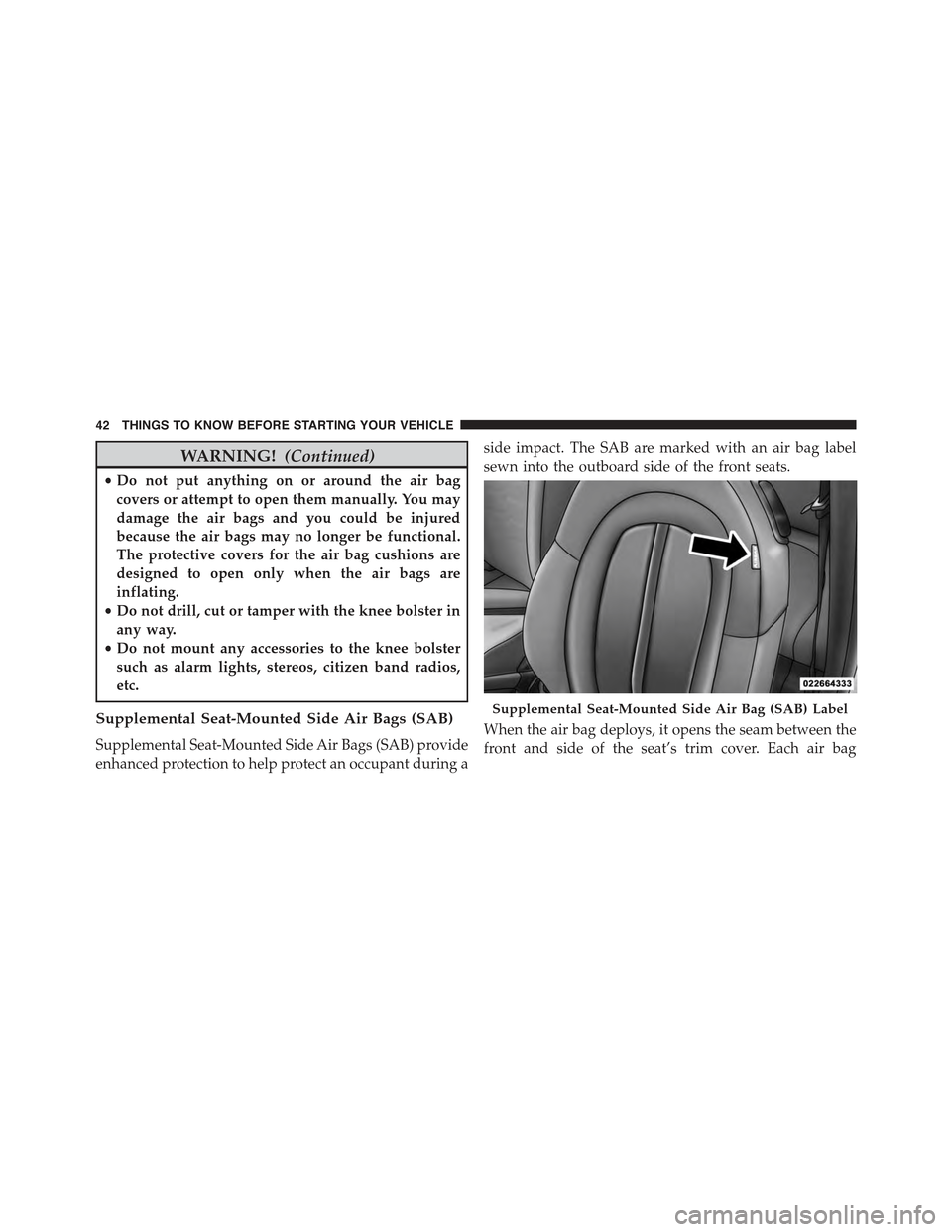
side impact. The SAB are marked with an air bag label
sewn into the outboard side of the front seats.
When the air bag deploys, it opens the seam between the
front and side of the seat’s trim cover. Each air bag
Supplemental Seat-Mounted Side Air Bag (SAB) Label
42 THINGS TO KNOW BEFORE STARTING YOUR VEHICLE
Page 118 of 388
•When the doors are locked with the Key Fob the lights
will turn off.
Interior Light Timing (On/Right Position)
•When all doors are closed a 15 minute timer is
activated.
NOTE:The timer is deactivated when the key is moved
into the ON/RUN position.
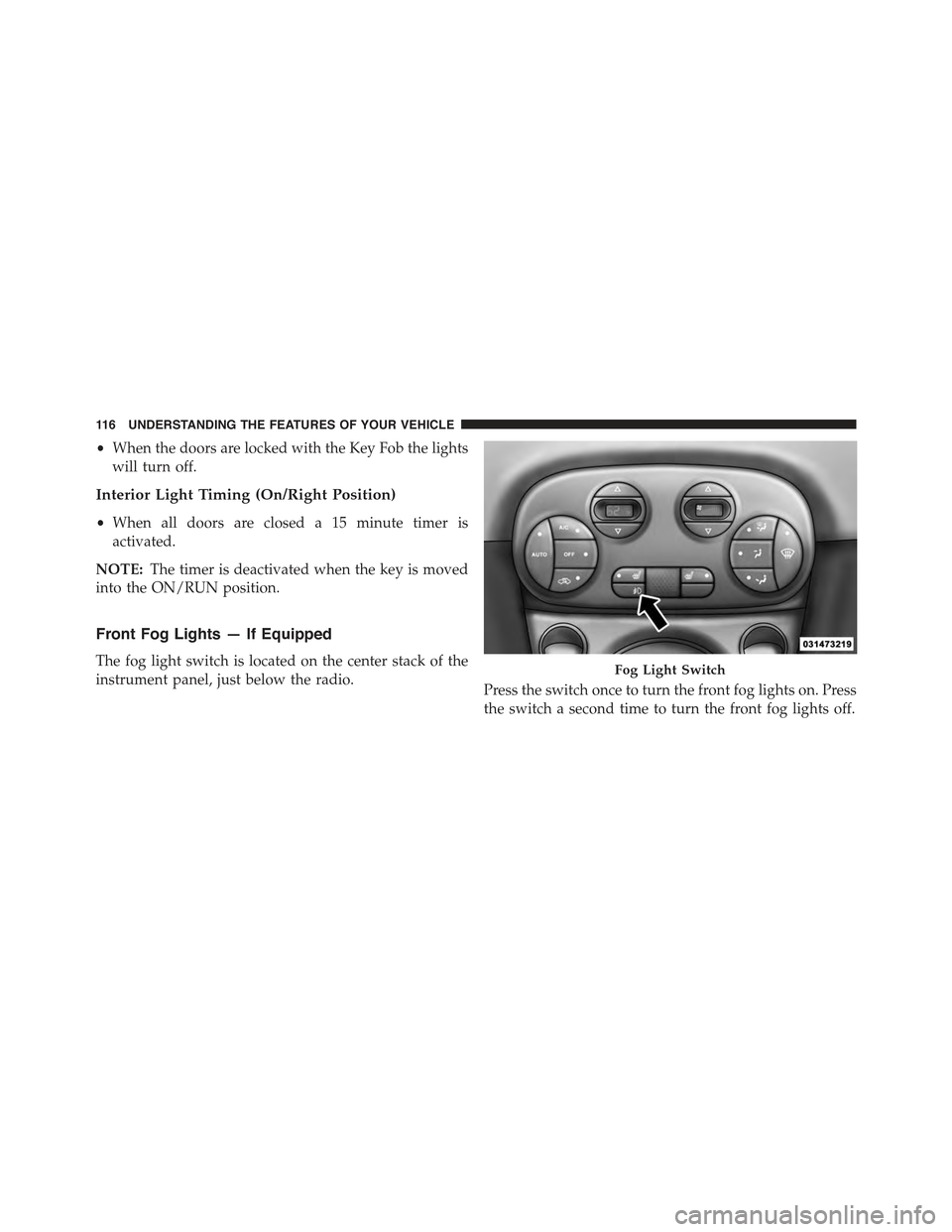
Front Fog Lights — If Equipped
The fog light switch is located on the center stack of the
instrument panel, just below the radio.Press the switch once to turn the front fog lights on. Press
the switch a second time to turn the front fog lights off.
Fog Light Switch
11 6 U N D E R S TA N D I N G T H E F E AT U R E S O F Y O U R V E H I C L E
Page 141 of 388
REAR WINDOW FEATURES
Rear Window Defroster
The rear window defroster button is located in the
center of the instrument panel, below the radio.
Press this button to turn on the rear window defroster.
An indicator in the button will illuminate when the rear
window defroster is on. The rear window defroster
automatically turns off after approximately 20 minutes.
To manually shut the defroster off, push the button a
second time.
NOTE:To prevent excessive battery drain, use the rear
window defroster only when the engine is operating.
CAUTION!
Failure to follow these cautions can cause damage to
the heating elements:
•Use care when washing the inside of the rear
window. Do not use abrasive window cleaners on
the interior surface of the window. Use a soft cloth
and a mild washing solution, wiping parallel to the
heating elements. Labels can be peeled off after
soaking with warm water.
•Do not use scrapers, sharp instruments, or abrasive
window cleaners on the interior surface of the
window.
•Keep all objects a safe distance from the window.
3
UNDERSTANDING THE FEATURES OF YOUR VEHICLE 139
Page 143 of 388
UNDERSTANDING YOUR INSTRUMENT PANEL
CONTENTS
!INSTRUMENT PANEL FEATURES..........143
!TURBO BOOST GAUGE..................144
!INSTRUMENT CLUSTER.................145
!INSTRUMENT CLUSTER DESCRIPTIONS.....146
!ELECTRONIC VEHICLE INFORMATION CENTER
(EVIC)..............................158
▫EVIC Control Buttons..................158
▫Electronic Vehicle Information Center (EVIC)
Setup Menu.........................159
▫Change Engine Oil Indicator System........161
▫Trip Computer.......................161
▫Trip Button..........................162
▫Trip Functions........................163
▫Values Displayed......................163
▫Personal Settings (Customer-Programmable
Features)............................164
!SALES CODE (RAB) RADIO..............174
▫Introduction.........................174
▫Suggestions..........................175
▫Technical Specifications.................177
4
Page 144 of 388
▫Quick Guide.........................178
▫General Information....................181
▫Functions And Adjustments..............183
▫Radio..............................191
▫SiriusXM Satellite Radio — If Equipped......193
▫CD Player...........................196
▫CD MP3 Player.......................198
▫Troubleshooting.......................200
!iPod®/USB/MEDIA PLAYER CONTROL — IF
EQUIPPED...........................202
!STEERING WHEEL AUDIO CONTROLS......203
▫Radio Operation......................204
▫CD Player Operation...................204
▫Operating Instructions — Hands-Free Phone (If
Equipped)...........................204
!CD/DVD DISC MAINTENANCE...........204
!RADIO OPERATION AND MOBILE PHONES . .205
!CLIMATE CONTROLS...................205
▫Manual Heating And Air Conditioning......206
▫Operating Tips Chart...................209
▫Automatic Temperature Control (ATC) — If
Equipped...........................210
▫Operating Tips Chart...................217
142 UNDERSTANDING YOUR INSTRUMENT PANEL
Page 145 of 388
INSTRUMENT PANEL FEATURES
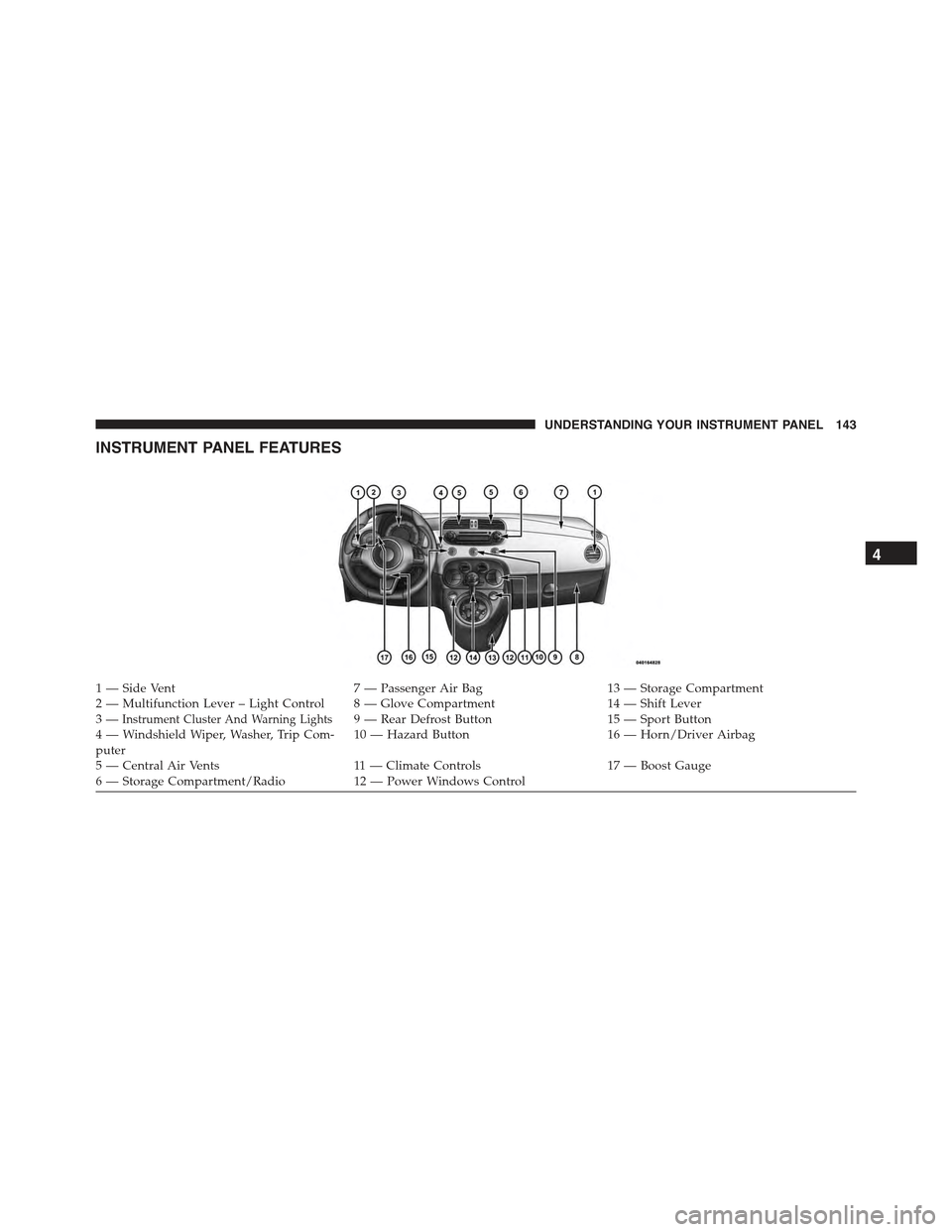
1—SideVent7—PassengerAirBag13 — Storage Compartment2—MultifunctionLever–LightControl 8—GloveCompartment14 — Shift Lever3—Instrument Cluster And Warning Lights9 — Rear Defrost Button15 — Sport Button4 — Windshield Wiper, Washer, Trip Com-puter10 — Hazard Button16 — Horn/Driver Airbag
5 — Central Air Vents11 — Climate Controls17 — Boost Gauge6—StorageCompartment/Radio12 — Power Windows Control
4
UNDERSTANDING YOUR INSTRUMENT PANEL 143
Page 161 of 388
Press the DOWNbutton to scroll downward
through the displayed menu and the related options
or to decrease the value displayed.
NOTE:UPand DOWNbuttons activate differ-
ent functions according to the following situations:
•To scroll the menu options upwards or downwards.
•To increase or decrease values during settings.
NOTE:When opening one of the front doors, the EVIC
display will turn on the clock and the miles or kilometers
covered (for versions/markets, where provided) for a
few seconds.
Electronic Vehicle Information Center (EVIC)
Setup Menu
The menu comprises a series of functions arranged in a
cycle. Press the UPand DOWNbuttons to access
the different options and settings (setup).
The setup menu can be activated by pressing theSET
ESCbutton. Single presses on the UPor DOWN
buttons will scroll through the setup menu op-
tions. The menu includes the following functions:
•Speed Beep
•Trip B Data
•Set Time
•Set Date
•See Radio
•Speed Display
•Autoclose
•Units
•Language
•Buzzer Volume
4
UNDERSTANDING YOUR INSTRUMENT PANEL 159
Page 170 of 388
2. Press the UPor DOWNbutton for setting.
3. Briefly press theSET ESCbutton and “month” will
flash on the display.
4. Press the UPor DOWNbutton for setting.
5. Briefly press theSET ESCbutton and “day” will flash
on the display.
6. Press the UPor DOWNbutton for setting.
NOTE:The setting will increase or decrease by one unit
each time the UPor DOWNbutton is pressed.
Press and hold the UPor DOWNbutton to
increase/decrease the setting rapidly. Save the setting
by briefly pressing the button when you approach the
required setting.
•Briefly press theSET ESCbutton to go back to the
menu screen, or press and hold theSET ESCbutton
(approximately one second) to go back to the main
screen without storing the settings.
See Radio (Repeat Audio Information)
With this function active, the EVIC display shows infor-
mation relevant to the sound system.
•Radio: tuned radio station frequency, automatic tuning
activation or AutoSTore.
•CD audio, CD MP3: track number.
To activate (On) or to deactivate (Off) the sound system
info displaying proceed as follows:
1. Briefly press theSET ESCbutton “On” or “Off” will
flash on the display (according to the previous set-
ting).
2. Press the UPor DOWNbutton for setting.
3. Briefly press theSET ESCbutton to go back to the
menu screen, or press and hold theSET ESCbutton
(approximately one second) to go back to the main
screen without storing the settings.
168 UNDERSTANDING YOUR INSTRUMENT PANEL
Page 171 of 388
If the radio has BLUE&ME™, refer to the appropriate
“BLUE&ME™ User ’s Manual” for further information.
Speed Display
When this function is activated the cluster will display
the vehicle speed (MPH or km/h).
To activate (On) or to deactivate (Off) the speed display
feature, proceed as follows:
1. Briefly press theSET ESCbutton. “MPH”, “km/h”,
then “Off” will flash on the display (according to
previous setting).
2. Press the UPor DOWNbutton to select
display deactivation “Off”, “MPH” or “km/h”.
3. Briefly press theSET ESCbutton to go back to the
menu screen, or press and hold theSET ESCbutton
(approximately one second) to go back to the main
screen.
Autoclose
With this function active, the doors will automatically
lock at when the vehicle’s speed exceeds 15 mph
(24 km/h).
To change the setting proceed as follows:
1. Briefly press theSET ESCbutton “On” or “Off” will
flash on the display (according to the previous set-
ting).
2. Press the UPor DOWNbutton for setting.
3. Briefly press theSET ESCbutton to go back to the
menu screen, or press and hold theSET ESCbutton
(approximately one second) to go back to the main
screen without storing the settings.
4
UNDERSTANDING YOUR INSTRUMENT PANEL 169