lock FIAT 500 ABARTH 2013 2.G Owner's Guide
[x] Cancel search | Manufacturer: FIAT, Model Year: 2013, Model line: 500 ABARTH, Model: FIAT 500 ABARTH 2013 2.GPages: 388, PDF Size: 9.03 MB
Page 85 of 388
Periodic Safety Checks You Should Make Outside
The Vehicle
Tires
Examine tires for excessive tread wear and uneven wear
patterns. Check for stones, nails, glass, or other objects
lodged in the tread or sidewall. Inspect the tread for cuts
and cracks. Inspect sidewalls for cuts, cracks and bulges.
Check the wheel bolts for tightness. Check the tires for
proper cold inflation pressure.
Lights
Have someone observe the operation of brake lights and
exterior lights while you work the controls. Check turn
signal and high beam indicator lights on the instrument
panel.
Door Latches
Check for positive closing, latching, and locking.
Fluid Leaks
Check area under vehicle after overnight parking for fuel,
engine coolant, oil, or other fluid leaks. Also, if gasoline
fumes are detected or if fuel, power steering fluid (if
equipped), or brake fluid leaks are suspected, the cause
should be located and corrected immediately.
2
THINGS TO KNOW BEFORE STARTING YOUR VEHICLE 83
Page 109 of 388
Lift the seatback upright and push the seat rearward to
its locked position once the rear passengers are seated.
Memory Feature
The driver seat also has a memory feature, which can
operate in two ways:
Memory Function Option 1 — Full Seat Back And
Track Fore/Aft Position Memory:
After using the EZ entry function, the seatback angle and
the Track fore/aft adjuster can both re-lock into the
position they were most recently adjusted to. This is
accomplished if the seat is moved fully rearward to its
last fore/aft position on the tracks before the seat back is
returned upright.
Memory Function Option 2 — Seat Back Only
Memory:
After using the EZ entry function, the seat back may first
be returned upright prior to going back to the last
fore/aft (memory) position on the tracks. This results in
the seat back memory being set only – The track will then
be locked forward of its last set fore/aft memory posi-
tion. To then reset the fore/aft track memory feature (to
reestablish memory function option 1), the seat has to be
returned fully rearward to its last fore/aft memory track
position as described in Memory function option 1.
Heated Seats — If Equipped
On some models, the front driver and passenger seats
may be equipped with heaters in both the seat cushions
and seatbacks. The controls for the front heated seats are
located on the center instrument panel area.
Press the switch once to turn on the heated
seats. Press the switch a second time to shut the
heating elements off.
NOTE:Once a heat setting is selected, heat will be felt
within two to five minutes.
3
UNDERSTANDING THE FEATURES OF YOUR VEHICLE 107
Page 113 of 388
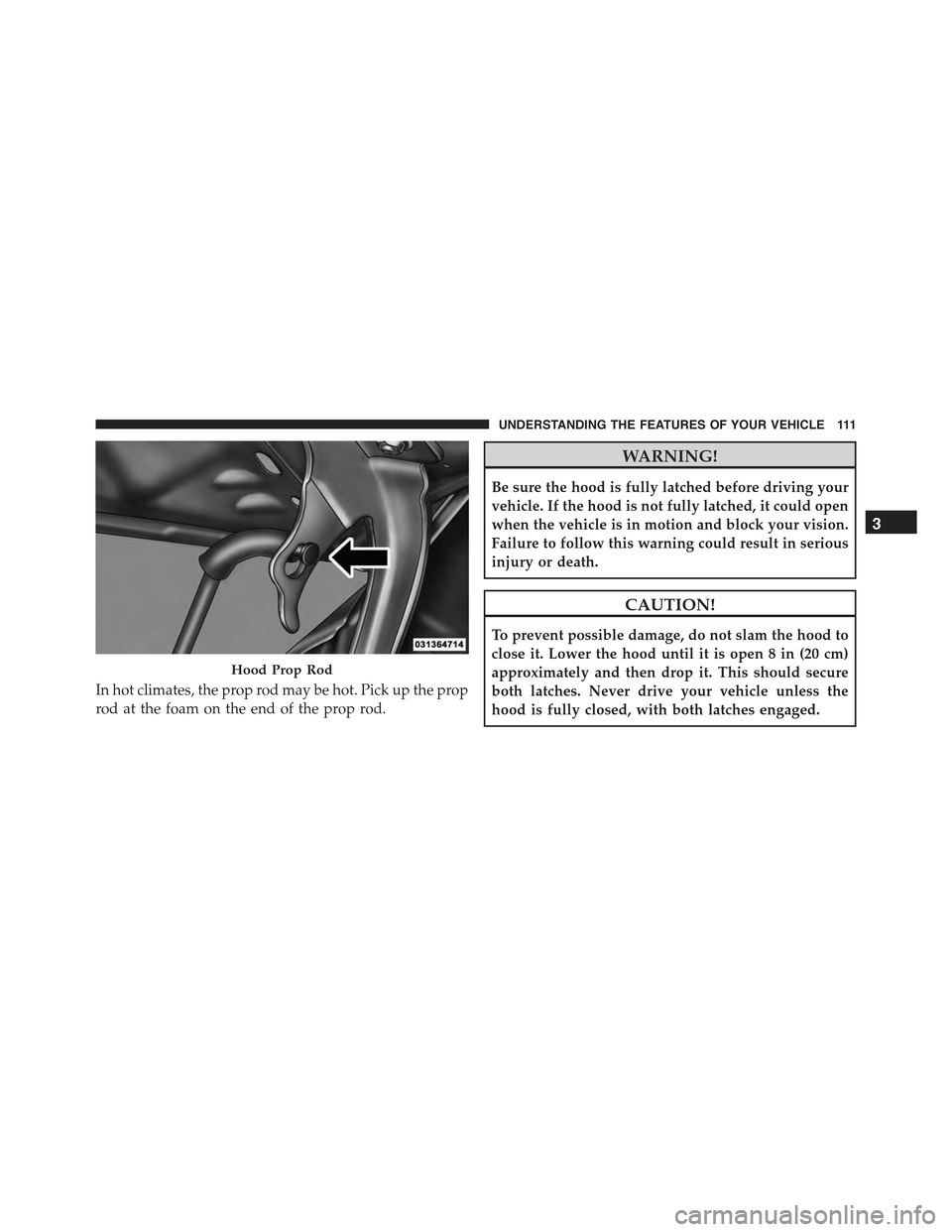
In hot climates, the prop rod may be hot. Pick up the prop
rod at the foam on the end of the prop rod.
WARNING!
Be sure the hood is fully latched before driving your
vehicle. If the hood is not fully latched, it could open
when the vehicle is in motion and block your vision.
Failure to follow this warning could result in serious
injury or death.
CAUTION!
To prevent possible damage, do not slam the hood to
close it. Lower the hood until it is open 8 in (20 cm)
approximately and then drop it. This should secure
both latches. Never drive your vehicle unless the
hood is fully closed, with both latches engaged.
Hood Prop Rod
3
UNDERSTANDING THE FEATURES OF YOUR VEHICLE 111
Page 115 of 388
High Beams
With the low beams activated, push the multi-
function lever towards the instrument panel to
turn on the high beams. Pull the multifunction lever
toward the steering wheel to turn off the high beams.
Flash-To-Pass
You can signal another vehicle with your headlights by
lightly pulling the multifunction lever toward the steer-
ing wheel. This will turn on the high beams until the
lever is released.
Parking Lights
To turn on the parking lights, remove the key
or turn the ignition to OFF/LOCK position and
turn on the headlights.
Daytime Running Lights — If Equipped
To activate the Daytime Running Lights (DRL), rotate the
end of the multifunction lever to theOsymbol.
NOTE:The low beams and side/taillights will not be on
with DRL.
The DRL function can be turned on or off using the
display menus. Refer to “Electronic Vehicle Information
Center (EVIC)” in “Understanding Your Instrument
Panel” for further information.
Turn Signals
Push the multifunction lever upward to signal a right
turn or downward to signal a left turn. The correspond-
ing indicator in the instrument cluster will blink to
indicate the operation of the turn signal.
3
UNDERSTANDING THE FEATURES OF YOUR VEHICLE 113
Page 116 of 388
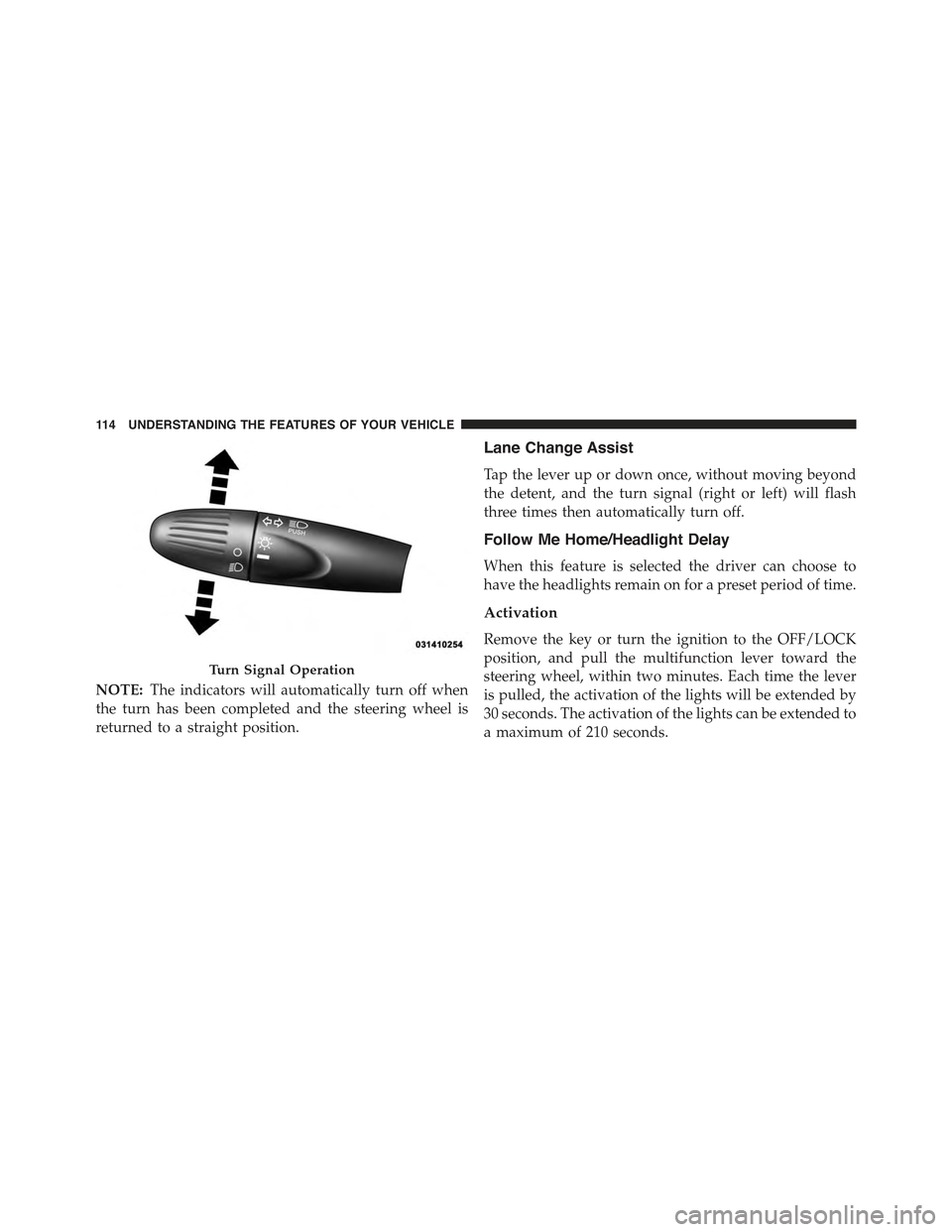
NOTE:The indicators will automatically turn off when
the turn has been completed and the steering wheel is
returned to a straight position.
Lane Change Assist
Tap the lever up or down once, without moving beyond
the detent, and the turn signal (right or left) will flash
three times then automatically turn off.
Follow Me Home/Headlight Delay
When this feature is selected the driver can choose to
have the headlights remain on for a preset period of time.
Activation
Remove the key or turn the ignition to the OFF/LOCK
position, and pull the multifunction lever toward the
steering wheel, within two minutes. Each time the lever
is pulled, the activation of the lights will be extended by
30 seconds. The activation of the lights can be extended to
a maximum of 210 seconds.
Turn Signal Operation
11 4 U N D E R S TA N D I N G T H E F E AT U R E S O F Y O U R V E H I C L E
Page 117 of 388
Deactivation
Pull the multifunction lever toward the steering wheel
and hold it for more than two seconds.
Interior Lights
The interior light switches are located in the overhead
console. The interior lights can be set to three different
positions (Off/Left Position, Center Position, On/Right
Position).
Using the switch on the left overhead, press the switch to
the right from its center position and the lights are always
on. Press the switch to the left from its center position and
the lights are always off. Leave the switch in the center
position, and the lights are turned on and off when the
doors are opened or closed. The switch on the right side
of the overhead console controls the map or reading
function of the lights. Press the switch to the right to turn
on the right light and press the switch to the left to turn
on the left light.
CAUTION!
Before getting out of the vehicle be sure that the
switch is in the center position or that the lights are
off to avoid draining the battery.
Interior Light Timing (Center Position)
There are four different modes of operation that can be
activated in this position:
•When one door is opened a 3 minute timer is activated.
•When the key is removed from the ignition (within
two minutes of the ignition being turned off), a 10
second timer is activated.
•When the doors are unlocked with Key Fob a 10
second timer is activated.
3
UNDERSTANDING THE FEATURES OF YOUR VEHICLE 115
Page 118 of 388
•When the doors are locked with the Key Fob the lights
will turn off.
Interior Light Timing (On/Right Position)
•When all doors are closed a 15 minute timer is
activated.
NOTE:The timer is deactivated when the key is moved
into the ON/RUN position.
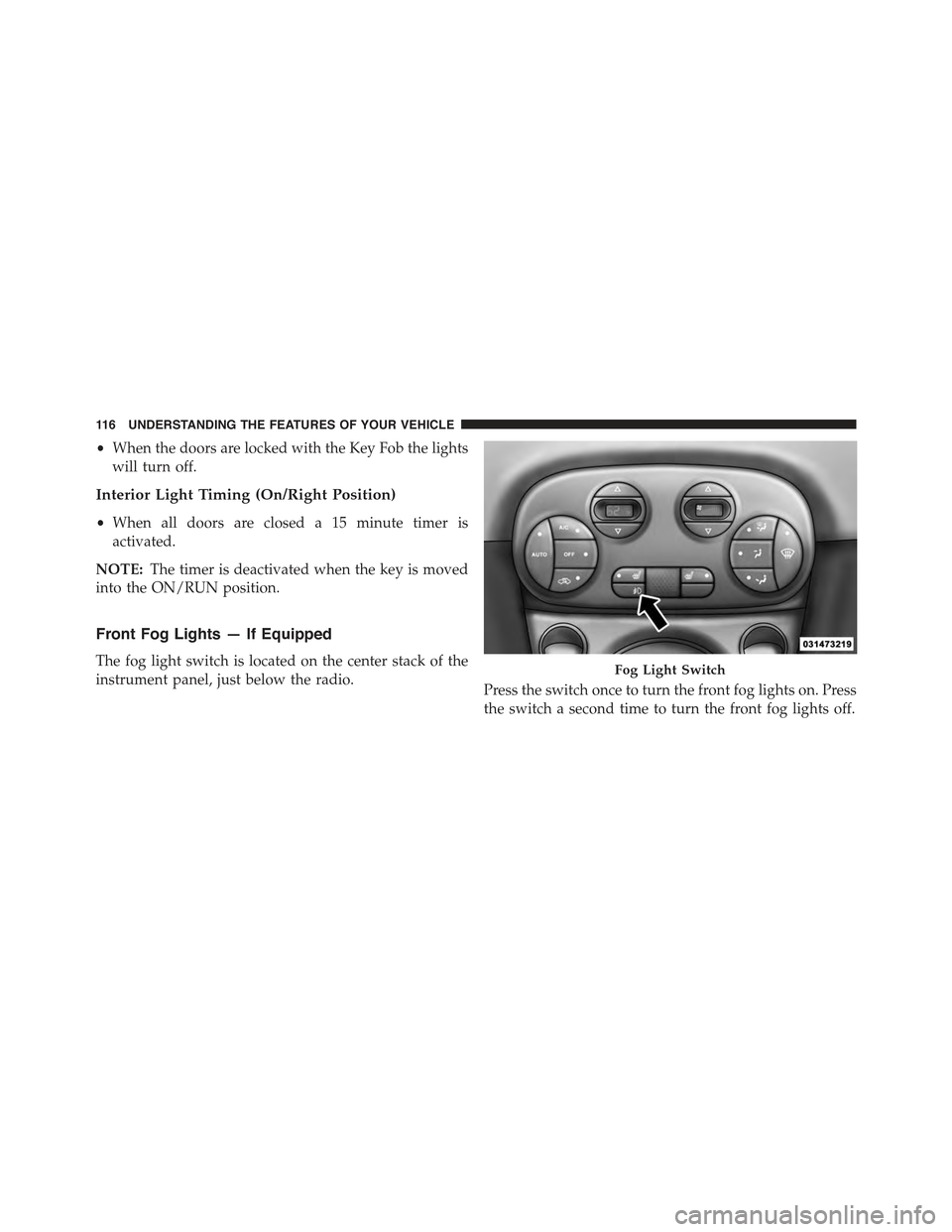
Front Fog Lights — If Equipped
The fog light switch is located on the center stack of the
instrument panel, just below the radio.Press the switch once to turn the front fog lights on. Press
the switch a second time to turn the front fog lights off.
Fog Light Switch
11 6 U N D E R S TA N D I N G T H E F E AT U R E S O F Y O U R V E H I C L E
Page 122 of 388
Rear Windshield Washer Operation
Push the windshield wiper/washer lever toward the
instrument panel to activate the rear washer. Push and
hold the lever for more than a half second and the wipers
will activate automatically for three cycles after the lever
is released.
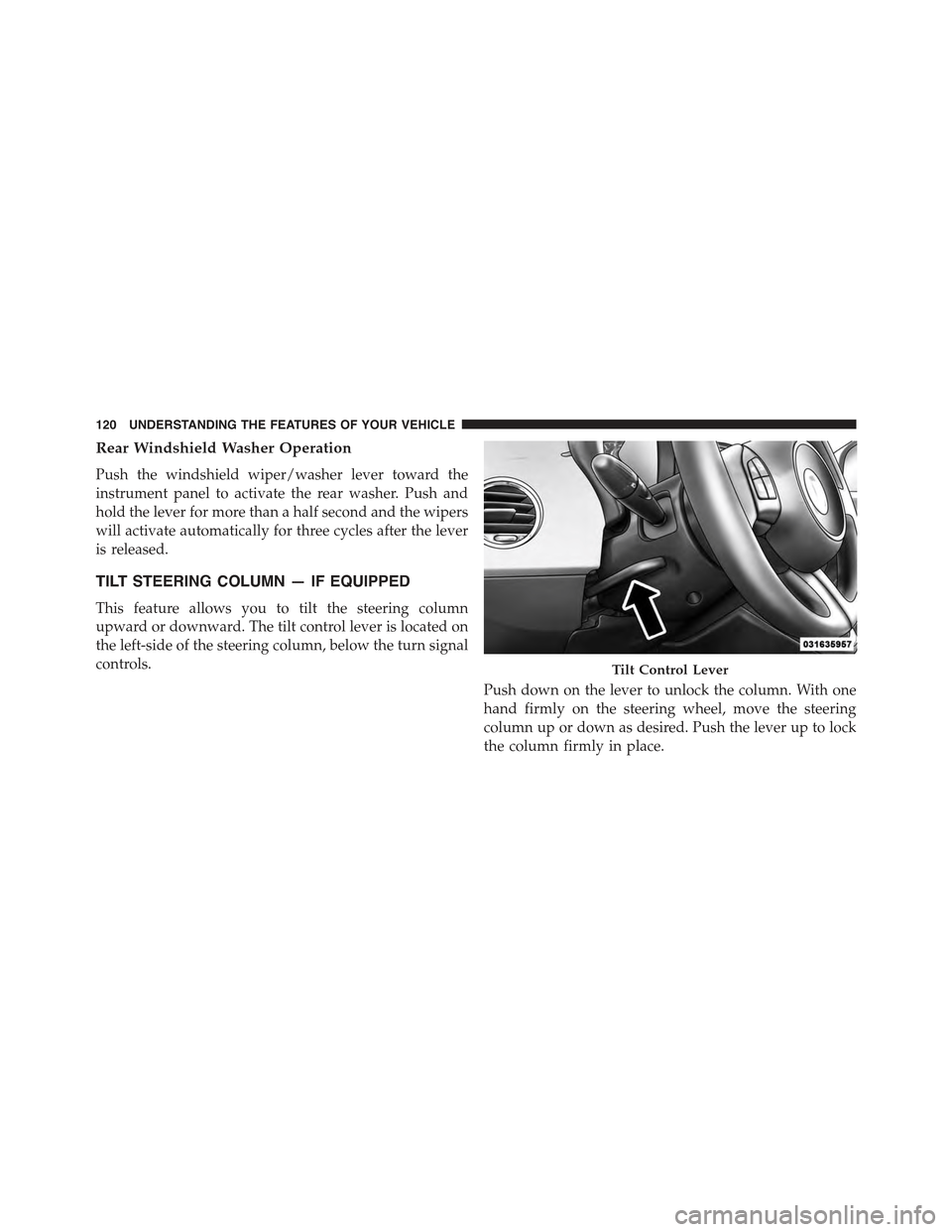
TILT STEERING COLUMN — IF EQUIPPED
This feature allows you to tilt the steering column
upward or downward. The tilt control lever is located on
the left-side of the steering column, below the turn signal
controls.
Push down on the lever to unlock the column. With one
hand firmly on the steering wheel, move the steering
column up or down as desired. Push the lever up to lock
the column firmly in place.
Tilt Control Lever
120 UNDERSTANDING THE FEATURES OF YOUR VEHICLE
Page 123 of 388
WARNING!
Do not adjust the steering column while driving.
Adjusting the steering column while driving or driv-
ing with the steering column unlocked, could cause
the driver to lose control of the vehicle. Failure to
follow this warning may result in serious injury or
death.
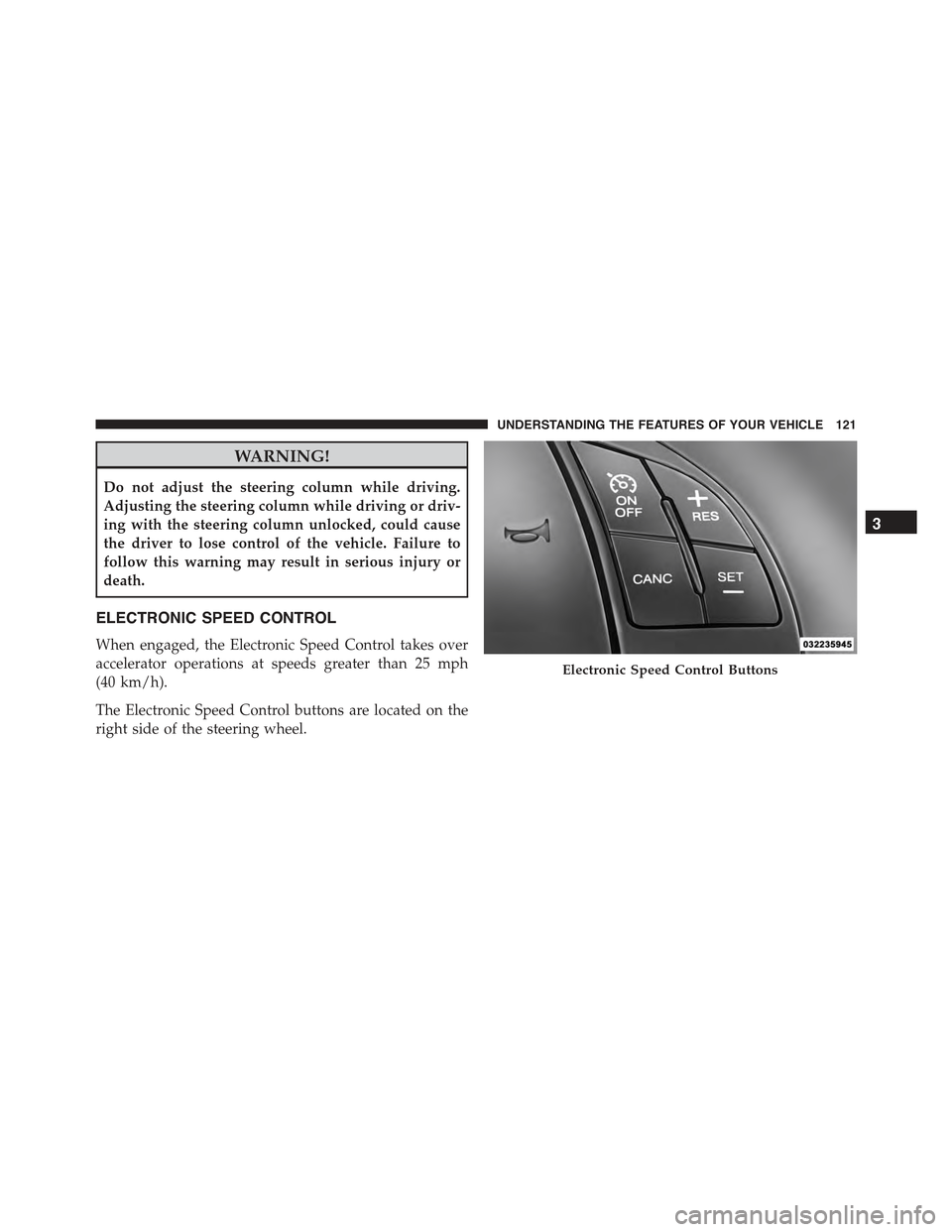
ELECTRONIC SPEED CONTROL
When engaged, the Electronic Speed Control takes over
accelerator operations at speeds greater than 25 mph
(40 km/h).
The Electronic Speed Control buttons are located on the
right side of the steering wheel.
Electronic Speed Control Buttons
3
UNDERSTANDING THE FEATURES OF YOUR VEHICLE 121
Page 148 of 388
INSTRUMENT CLUSTER DESCRIPTIONS
1. Glow Plug Light — If Equipped
The Glow Plug light will flash during engine oil
viscosity sensor measurement in cold weather.
During this measurement (up to 10 seconds), the starter
will be disabled. If the measured oil viscosity is OK, the
light will turn off and the engine will be allowed to crank.
If the measured oil viscosity is too high, engine cranking
will be disabled and the light will blink repeatedly until
the oil temperature is raised, preferably by an externally-
powered electric engine block heater (available from
your authorized studio).
The message#Plug In Engine Heater#, will be displayed
in the instrument cluster when the ambient temperature
is below 5°F (-15°C) at the time the engine is shut off as
a reminder to avoid possible crank delays at the next cold
start.
2. Rear Defrost Button
Press and release this button to turn on the rear
window defroster. This indicator will illuminate
when the rear window defroster is on. The rear window
defroster automatically turns off after 20 minutes.
CAUTION!
Failure to follow these cautions can cause damage to
the heating elements:
•Use care when washing the inside of the rear
window. Do not use abrasive window cleaners on
the interior surface of the window. Use a soft cloth
and a mild washing solution, wiping parallel to the
heating elements. Labels can be peeled off after
soaking with warm water.
(Continued)
146 UNDERSTANDING YOUR INSTRUMENT PANEL