warning FIAT 500 ABARTH 2013 2.G Owner's Manual
[x] Cancel search | Manufacturer: FIAT, Model Year: 2013, Model line: 500 ABARTH, Model: FIAT 500 ABARTH 2013 2.GPages: 84, PDF Size: 4.63 MB
Page 24 of 84
WARNING!
• Leaving the Electronic Speed Control system on when not in use is danger-
ous. You could accidentally set the system or cause it to go faster than you
want. You could lose control and have a collision. Always leave the Elec-
tronic Speed Control system off when you are not using it.
• Electronic Speed Control can be dangerous where the system cannot main-
tain a constant speed. Your vehicle could go too fast for the conditions, and
you could lose control. A collision could be the result. Do not use Electronic
Speed Control in heavy traffic or on roads that are winding, icy, snow-
covered or slippery.
POWER WINDOWS
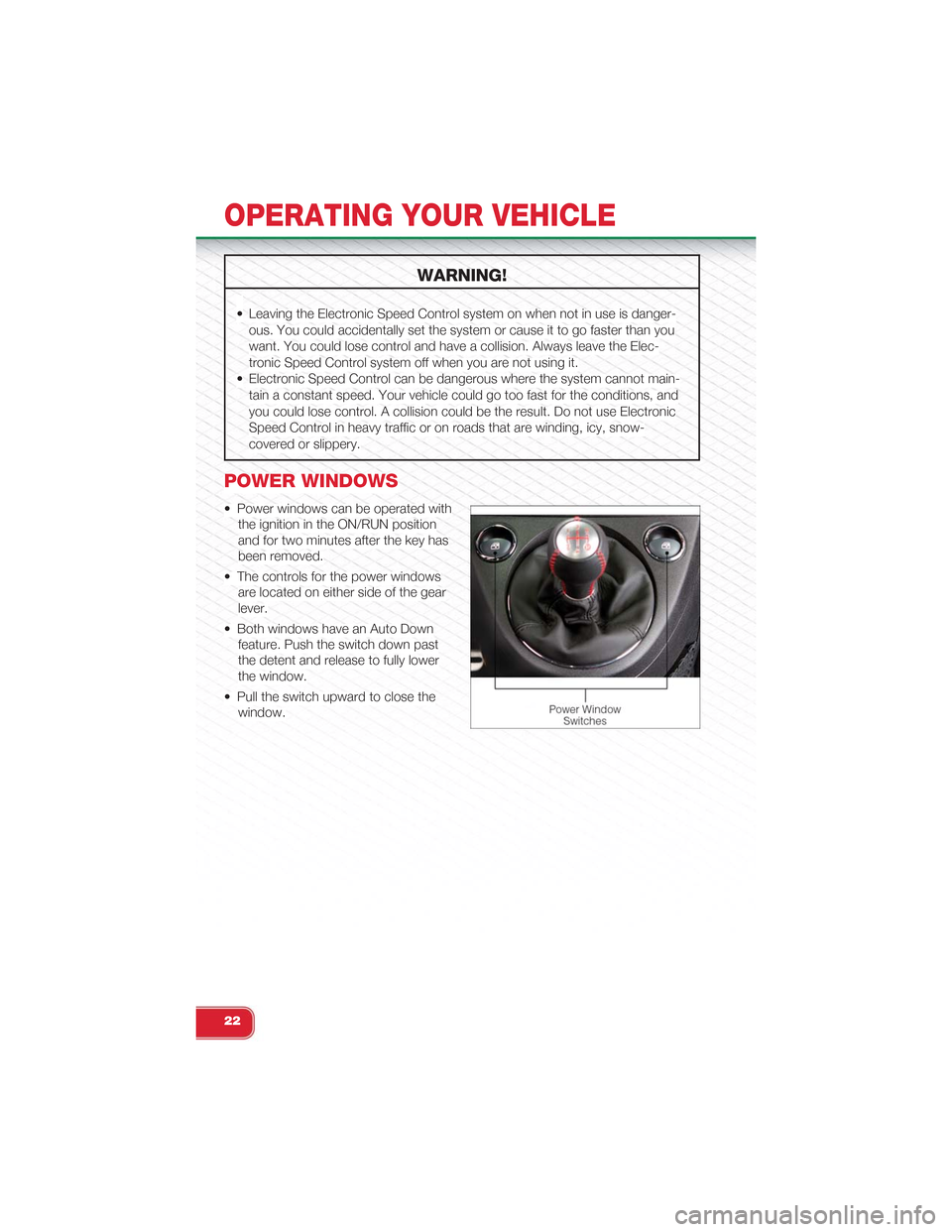
• Power windows can be operated with
the ignition in the ON/RUN position
and for two minutes after the key has
been removed.
• The controls for the power windows
are located on either side of the gear
lever.
• Both windows have an Auto Down
feature. Push the switch down past
the detent and release to fully lower
the window.
• Pull the switch upward to close the
window.
OPERATING YOUR VEHICLE
22
Page 28 of 84
POWER SUNROOF
• The power sunroof roof switch is located in the overhead console.
To Open
• Press and hold the power sunroof switch rearward for approximately two sec-
onds and the sunroof will stop at the vented position. Press the switch a second
time and hold for approximately one second and release, the sunroof will open
fully, then stop automatically. This is called “Express Open”. During Express
Open operation, any movement of the sunroof switch will stop the sunroof.
To Close
• With the sunroof in the full open position, pull the power sunroof button and hold
it for approximately one second, the sunroof will return to the completely close
position. During Express Close operation, any movement of the sunroof switch
will stop the sunroof.
Pinch Protection Feature
• This feature will detect an obstruction in the opening of the sunroof during Ex-
press Close operation. If an obstruction in the path of the sunroof is detected, the
sunroof will automatically retract. Remove the obstruction if this occurs. Next,
press the switch forward and release to Express Close.
NOTE:If three consecutive sunroof close attempts result in Pinch Protect reversals, the fourthclose attempt will be a Manual Close movement with Pinch Protect disabled.
Sun Shade
• For vehicles equipped with a power sunroof, there is a sun shade that can be
open or closed. To open the sun shade press the tab and move the shade to a
full open position.
WARNING!
• Do not let children play with the sunroof, or leave children unattended in the
vehicle, and do not leave the key in or near the vehicle (or in a location ac-
cessible to children). Occupants, particularly unattended children, can be-
come entrapped by the power sunroof while operating the power sunroof
switch. Such entrapment may result in serious injury or death.
• In a collision, there is a greater risk of being thrown from a vehicle with an
open sunroof. You could also be seriously injured or killed. Always fasten
your seat belt properly and make sure all passengers are properly secured.
• Do not allow small children to operate the sunroof. Never allow your fingers,
other body parts, or any object to project through the sunroof opening. Injury
may result.
OPERATING YOUR VEHICLE
26
Page 30 of 84
CAUTION!
Failure to follow these cautions may cause interior water damage, stains or mil-
dew on the top material:
• Avoid high-pressure car washes, as they can damage the top material. Also,
increased water pressure may force water past the weather strips.
• Remove any standing water from the top and dry the surface before opening
it. Operating the top, opening a door or lowering a window while the top is
wet may allow water to drip into the vehicle’s interior.
• Use care when washing the vehicle, water pressure directed at the weather
strip seals may cause water to leak into the vehicle’s interior.
WARNING!
The convertible top does not provide the structural protection that a reinforced
metal roof does and the fabric top cannot be expected to prevent the ejection
of the occupants in a collision. Therefore, it is important that all occupants wear
their seat belts at all times. Death or serious injuries could occur if you are
ejected from the vehicle during a collision.
Power Convertible Top Relearn Procedure
If your power convertible top does not operate in the Auto Opening/Closing mode
(automatically opening/closing to the one-quarter open and three-quarter open
comfort stops), or if the remote keyless power top function is inoperable, or if the
trunk lid does not open - the following relearn procedure may be necessary.
1. Confirm that the door/trunk lid are closed.
2. Begin with the top in the fully closed position (using manual mode).
3. Hold the OPEN button to move the top to the fully open position.
4. CONTINUE to hold the OPEN button for an additional three seconds.
5. Release the OPEN button.
6. Hold the CLOSED button to move the top to the fully closed position.
7. CONTINUE to hold the CLOSED button until the top begins to cycle fully open,
then release the CLOSED button.
OPERATING YOUR VEHICLE
28
Page 36 of 84
STEERING WHEEL AUDIO CONTROLS
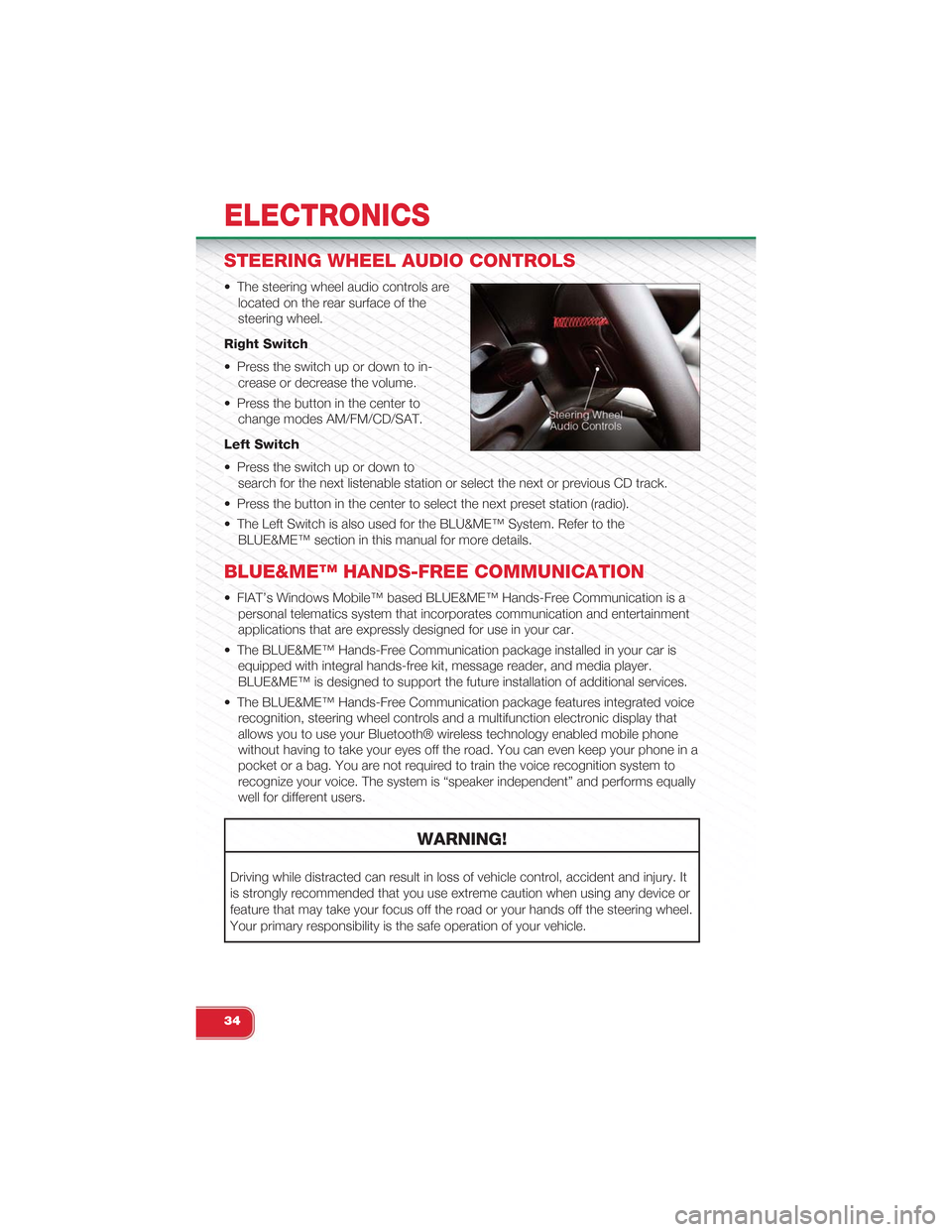
• The steering wheel audio controls are
located on the rear surface of the
steering wheel.
Right Switch
• Press the switch up or down to in-
crease or decrease the volume.
• Press the button in the center to
change modes AM/FM/CD/SAT.
Left Switch
• Press the switch up or down to
search for the next listenable station or select the next or previous CD track.
• Press the button in the center to select the next preset station (radio).
• The Left Switch is also used for the BLU&ME™ System. Refer to the
BLUE&ME™ section in this manual for more details.
BLUE&ME™ HANDS-FREE COMMUNICATION
• FIAT’s Windows Mobile™ based BLUE&ME™ Hands-Free Communication is a
personal telematics system that incorporates communication and entertainment
applications that are expressly designed for use in your car.
• The BLUE&ME™ Hands-Free Communication package installed in your car is
equipped with integral hands-free kit, message reader, and media player.
BLUE&ME™ is designed to support the future installation of additional services.
• The BLUE&ME™ Hands-Free Communication package features integrated voice
recognition, steering wheel controls and a multifunction electronic display that
allows you to use your Bluetooth® wireless technology enabled mobile phone
without having to take your eyes off the road. You can even keep your phone in a
pocket or a bag. You are not required to train the voice recognition system to
recognize your voice. The system is “speaker independent” and performs equally
well for different users.
WARNING!
Driving while distracted can result in loss of vehicle control, accident and injury. It
is strongly recommended that you use extreme caution when using any device or
feature that may take your focus off the road or your hands off the steering wheel.
Your primary responsibility is the safe operation of your vehicle.
ELECTRONICS
34
Page 40 of 84
• If John Smith has several phone numbers but the “location” (i.e.: the type of
phone number like work, home, etc.) is missing, the system will display the se-
lected contact and a list of related phone numbers on the instrument cluster dis-
play. The hands-free phone system will ask if you would like to call the phone
number displayed. To respond with yes, say “Yes”, otherwise say “No”. If this is
the correct contact but the wrong number, say “Forward” or “Backward” to navi-
gate to the phone number you’d like to call. To call the displayed phone number,
pronounce “Call”. You can also scroll through the phone number list manually by
pressing the buttons on the back of the steering wheel until you find the required
number. Then, press the PRESET UP/OK button on the rear of the steering
wheel to start the call.
• To end the phone call, press the PHONE HANG UP button on the steering wheel.
Media Player
• With the BLUE&ME™ media player you can play, via the car sound system, the
digital audio files stored on a USB device by simply connecting it to the USB port
located in the glove box of the car.
• The MEDIA PLAYER menu enables the following:
– Display tracks stored on your USB stick/iPod®.
– Play audio files stored on your USB stick/iPod®.
How To Connect The USB Stick/iPod® To BLUE&ME™
• To connect your USB stick/iPod® to BLUE&ME™, proceed as follows:
• Copy tracks on your USB stick/iPod® (BLUE&ME™ recognizes .wma, .mp3 and
.wav, .aac formats for audio files and .wpl and .m3u for playlists).
• USB devices without USB wire: just connect the USB stick/iPod® (directly or by
an extension lead) to the USB port on the car.
• USB stick/iPod® with USB wire: use the wire to connect the USB stick/iPod® to
the USB port on the car.
• Turn the ignition key to ON. BLUE&ME™ will start automatically to play your digi-
tal tracks selecting them from the library built at the moment the USB stick/iPod®
is connected.
• If AUTOPLAY is set to “ON”, BLUE&ME™ will start playback automatically.
• Refer to the iPod®/USB/MP3 CONTROL section in this manual and the
BLUE&ME™ User's Manual on the DVD for more details.
WARNING!
Driving while distracted can result in loss of vehicle control, accident and injury. It
is strongly recommended that you use extreme caution when using any device or
feature that may take your focus off the road or your hands off the steering wheel.
Your primary responsibility is the safe operation of your vehicle.
ELECTRONICS
38
Page 41 of 84
iPod®/USB/MP3 CONTROL
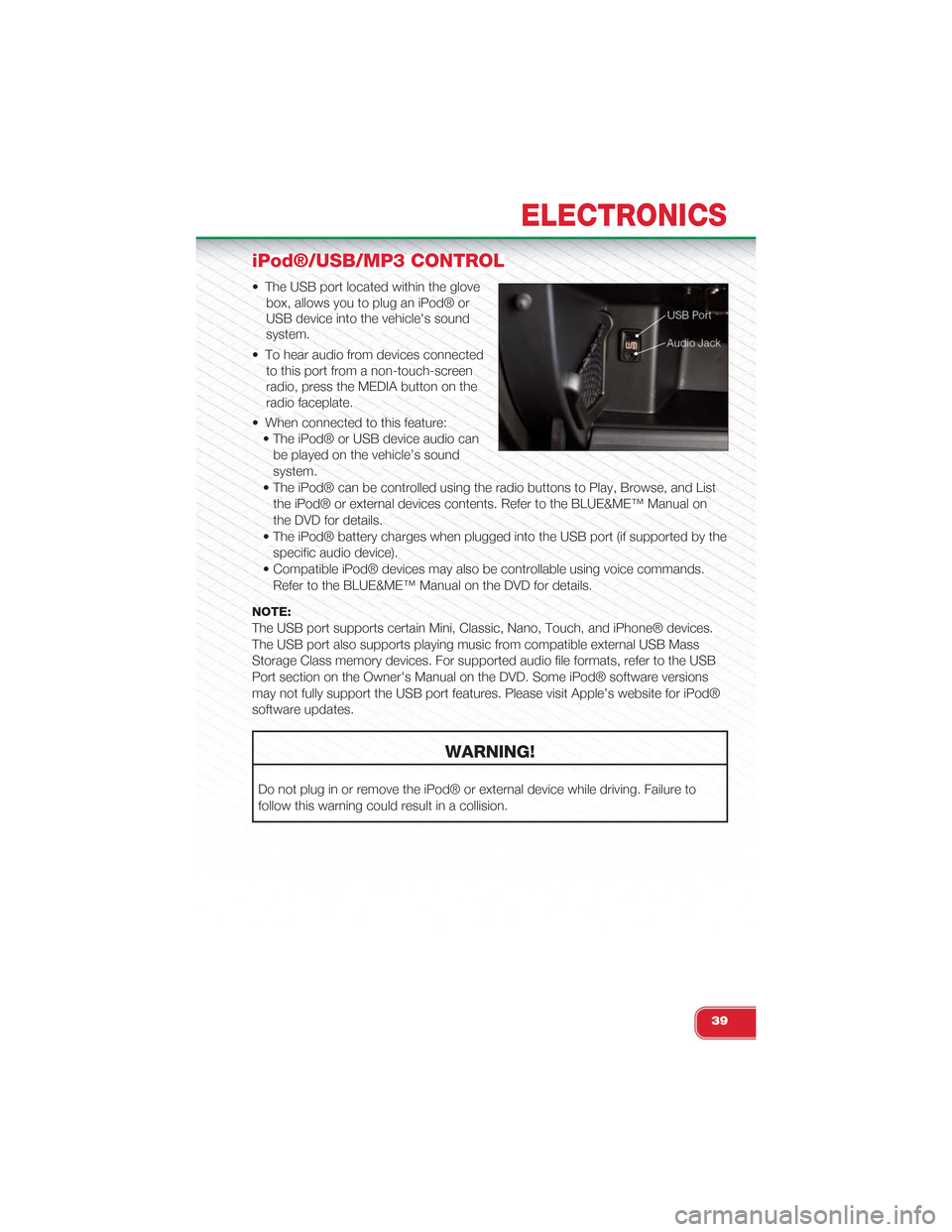
• The USB port located within the glove
box, allows you to plug an iPod® or
USB device into the vehicle's sound
system.
• To hear audio from devices connected
to this port from a non-touch-screen
radio, press the MEDIA button on the
radio faceplate.
• When connected to this feature:
• The iPod® or USB device audio can
be played on the vehicle’s sound
system.
• The iPod® can be controlled using the radio buttons to Play, Browse, and List
the iPod® or external devices contents. Refer to the BLUE&ME™ Manual on
the DVD for details.
• The iPod® battery charges when plugged into the USB port (if supported by the
specific audio device).
• Compatible iPod® devices may also be controllable using voice commands.
Refer to the BLUE&ME™ Manual on the DVD for details.
NOTE:
The USB port supports certain Mini, Classic, Nano, Touch, and iPhone® devices.
The USB port also supports playing music from compatible external USB Mass
Storage Class memory devices. For supported audio file formats, refer to the USB
Port section on the Owner's Manual on the DVD. Some iPod® software versions
may not fully support the USB port features. Please visit Apple’s website for iPod®
software updates.
WARNING!
Do not plug in or remove the iPod® or external device while driving. Failure to
follow this warning could result in a collision.
ELECTRONICS
39
Page 46 of 84
24-HOUR ROADSIDE ASSISTANCE
• If your Abarth requires jump start assistance, out of gas/fuel delivery, tire service,
lockout service or towing due to a defect covered under the Basic Limited War-
ranty, dial toll-free 1-888-242-6342. See your Warranty booklet for further details.
• Provide your name, vehicle identification number and license plate number.
• Provide your location, including telephone number, from which you are calling.
• Briefly describe the nature of the problem and answer a few simple questions.
• You will be given the name of the service provider and an estimated time of ar-
rival. If you feel you are in an “unsafe situation”, please let us know. With your
consent, we will contact local police or safety authorities.
INSTRUMENT CLUSTER WARNING LIGHTS
- Generic Warning Light
• The Generic Warning Light will illuminate if any of the following conditions occur:
Oil Change Request, Engine Oil Pressure Sensor Failure, After Run Cooling
Pump, External Light Failure, Fuel Cut-Off Intervention, Fuel Cut-Off Not Available,
Parking Sensor Failure.
- Power Steering System Warning
• If the “POWER STEERING SYSTEM OVER TEMP” message and icon are dis-
played in the Electronic Vehicle Information Center (EVIC) display, it indicates that
extreme steering maneuvers have occurred, which caused an over temperature
condition in the power steering system. You will lose power steering assistance
momentarily until the over temperature condition no longer exists. Once driving
conditions are safe, pull over and let the vehicle idle. After approximately five min-
utes, the system will cool and return to normal operation.
- Engine Temperature Warning Light
• This light warns of an overheated engine condition.
• If the light turns on or flashes continuously while driving, safely pull over and stop
the vehicle. If the A/C system is on, turn it off. Also, shift the transmission into
NEUTRAL and idle the vehicle. If the temperature reading does not return to nor-
mal, turn the engine off immediately.
• We recommend that you do not operate the vehicle or engine damage will occur.
Have the vehicle serviced immediately.
WARNING!
A hot engine cooling system is dangerous. You or others could be badly burned
by steam or boiling coolant. You may want to call an authorized studio for service
if your vehicle overheats.
WHAT TO DO IN EMERGENCIES
44
Page 49 of 84
NOTE:
Tire pressures change by approximately 1 psi (7 kPa) per 12° F (7° C) of air tem-
perature change. Keep this in mind when checking tire pressure inside a garage,
especially in the winter. Example: If garage temperature is 68°F (20°C) and the out-
side temperature is 32°F (0°C), then the cold tire inflation pressure should be in-
creased by 3 psi (21 kPa), which equals 1 psi (7 kPa) for every 12°F (7°C) for this
outside temperature condition.
CAUTION!
The TPMS has been optimized for the original equipment tires and wheels. TPMS
pressures and warning have been established for the tire size equipped on your
vehicle. Undesirable system operation or sensor damage may result when using
replacement equipment that is not of the same size, type, and/or style. Aftermar-
ket wheels can cause sensor damage. Do not use tire sealant from a can, or bal-
ance beads if your vehicle is equipped with a TPMS, as damage to the sensors
may result.
BRAKE- Brake Warning Light
• The Brake Warning light illuminates when there is either a system malfunction or
the parking brake is applied. If the light is on and the parking brake is not applied,
it indicates a possible brake hydraulic malfunction, brake booster problem or an
Anti-Lock Brake System problem.
• Please have your vehicle serviced immediately.
WARNING!
Driving a vehicle with the red brake light on is dangerous. Part of the brake sys-
tem may have failed. It will take longer to stop the vehicle. You could have a colli-
sion. Have the vehicle checked immediately.
- Malfunction Indicator Light (MIL)
• Certain conditions, such as a loose or missing gas cap, poor fuel quality, etc.,
may illuminate the MIL after engine start. The vehicle should be serviced if the
light stays on through several typical driving cycles. In most situations, the vehicle
will drive normally and not require towing.
• If the MIL flashes when the engine is running, serious conditions may exist that
could lead to immediate loss of power or severe catalytic converter damage.
We recommend you do not operate the vehicle. Have the vehicle serviced
immediately.
WHAT TO DO IN EMERGENCIES
47
Page 50 of 84
- Charging System Light
• This light shows the status of the electrical charging system. If the charging sys-
tem light remains on, it means that the vehicle is experiencing a problem with the
charging system.
• We recommend you do not continue driving if the charging system light is on.
Have the vehicle serviced immediately.
- Oil Pressure Warning Light
• This light indicates low engine oil pressure. If the light turns on while driving, stop
the vehicle and shut off the engine as soon as possible. A chime will sound when
this light turns on.
• We recommend you do not operate the vehicle or engine damage will occur.
Have the vehicle serviced immediately.
- Anti-Lock Brake (ABS) Light
• This light monitors the Anti-Lock Brake System (ABS).
• If the light is not on during starting, stays on, or turns on while driving, we recom-
mend you drive to the nearest authorized studio immediately and have the vehicle
serviced immediately.
- Air Bag Warning Light
• If the light is not on during starting, stays on, or turns on while driving, have the
vehicle serviced by an authorized studio immediately.
IF YOUR ENGINE OVERHEATS
• In any of the following situations, you can reduce the potential for overheating by
taking the appropriate action.
• On the highways — slow down.
• In city traffic — while stopped, shift transmission into NEUTRAL, but do not in-
crease engine idle speed.
NOTE:There are steps that you can take to slow down an overheat condition:
• If your air conditioner (A/C) is on, turn it off. The A/C system adds heat to the en-
gine cooling system and turning the A/C off can help remove this heat.
• You can also turn the Temperature control to maximum heat, the Mode control to
floor and the Fan control to high. This allows the heater core to act as a supple-
ment to the radiator and aids in removing heat from the engine cooling system.
• If the temperature reading does not return to normal, turn the engine off immedi-
ately.
• We recommend that you do not operate the vehicle or engine damage will occur.
Have the vehicle serviced immediately.
WHAT TO DO IN EMERGENCIES
48
Page 51 of 84
CAUTION!
Driving with a hot cooling system could damage your vehicle. If the temperature
gauge reads hot, pull over and stop the vehicle. Idle the vehicle with the air condi-
tioner turned off until the pointer drops back into the normal range. If the pointer
remains on hot, turn the engine off immediately and call for service.
WARNING!
You or others can be badly burned by hot engine coolant (antifreeze) or steam
from your radiator. If you see or hear steam coming from under the hood, do not
open the hood until the radiator has had time to cool. Never try to open a cooling
system pressure cap when the radiator or coolant bottle is hot.
TIREFIT KIT
• Your vehicle may be equipped with a TIREFIT kit. The TIREFIT kit is located under
the front driver’s seat.
• Small punctures up to 1/4 in (6 mm) in the tire tread can be sealed with TIREFIT.
Foreign objects (e.g., screws or nails) should not be removed from the tire.
TIREFIT can be used in outside temperatures down to approximately -4°F
(-20°C).
• This kit will provide a temporary tire seal, allowing you to drive your vehicle up to
100 miles (160 km) with a maximum speed of 55 mph (88 km/h).
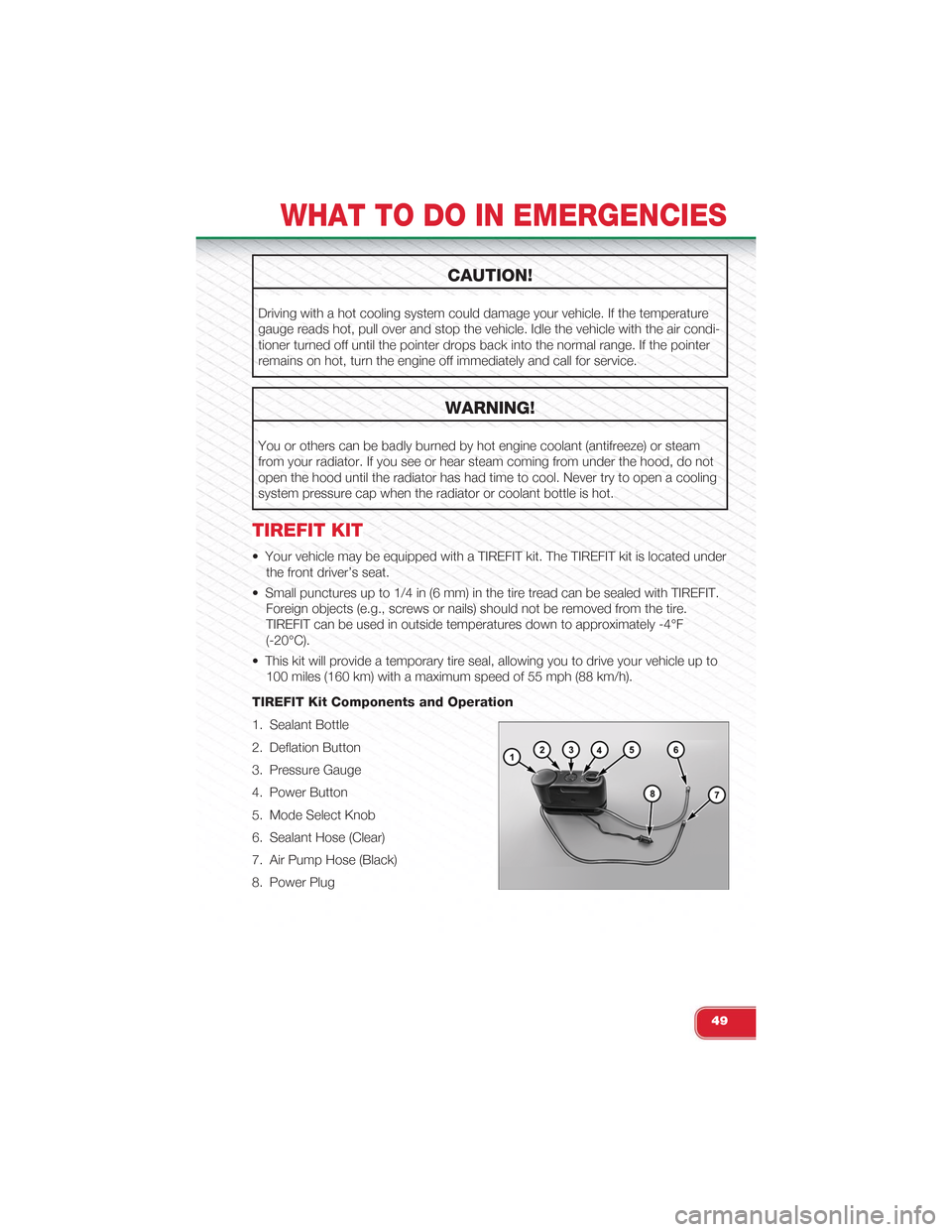
TIREFIT Kit Components and Operation
1. Sealant Bottle
2. Deflation Button
3. Pressure Gauge
4. Power Button
5. Mode Select Knob
6. Sealant Hose (Clear)
7. Air Pump Hose (Black)
8. Power Plug
WHAT TO DO IN EMERGENCIES
49