tire pressure FIAT 500 ABARTH 2013 2.G User Guide
[x] Cancel search | Manufacturer: FIAT, Model Year: 2013, Model line: 500 ABARTH, Model: FIAT 500 ABARTH 2013 2.GPages: 84, PDF Size: 4.63 MB
Page 3 of 84
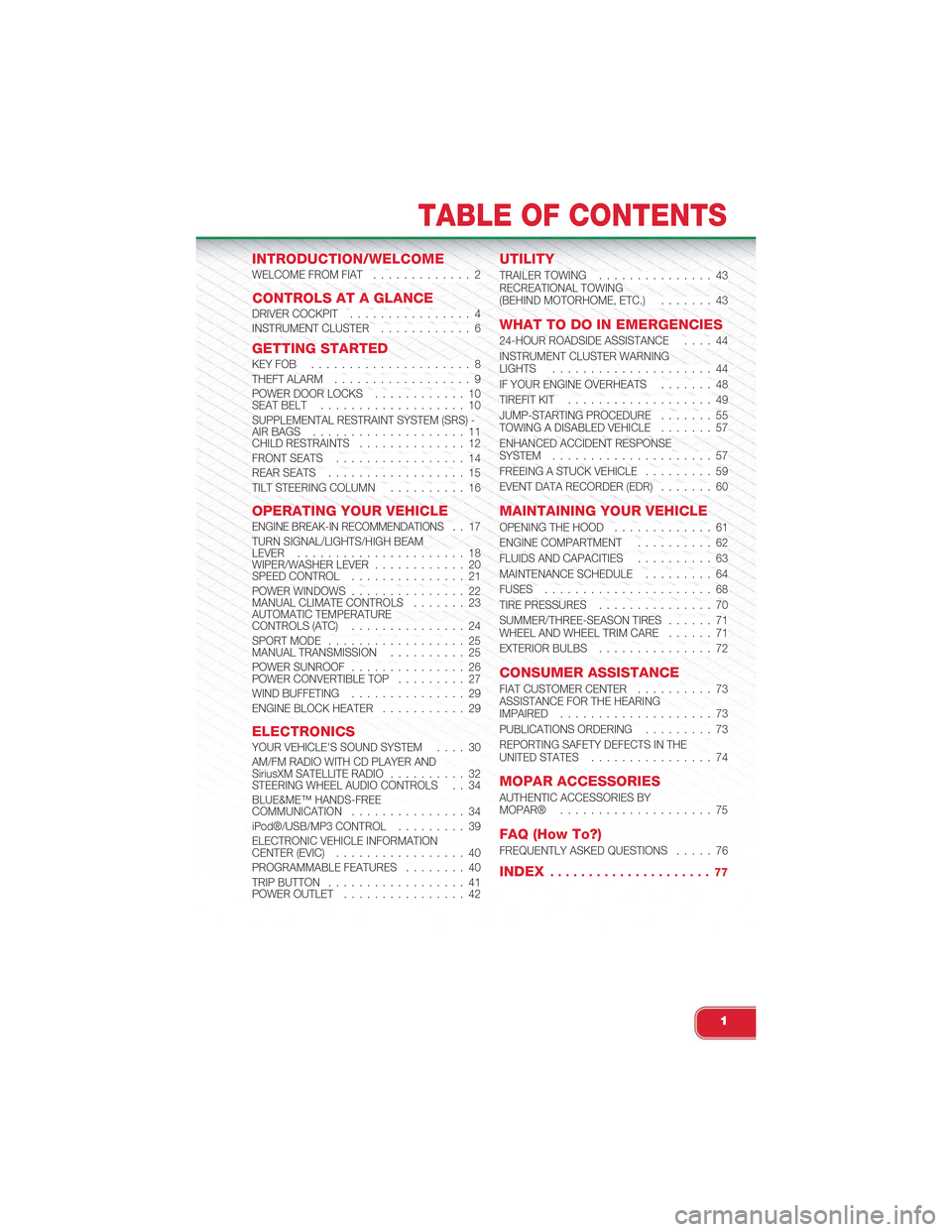
INTRODUCTION/WELCOMEWELCOME FROM FIAT............. 2
CONTROLS AT A GLANCEDRIVER COCKPIT................ 4INSTRUMENT CLUSTER............ 6
GETTING STARTEDKEY FOB . . . . . . . . . . . . . . . . . . . . . 8THEFT ALARM.................. 9POWER DOOR LOCKS. . . . . . . . . . . . 10SEAT BELT. . . . . . . . . . . . . . . . . . . 10SUPPLEMENTAL RESTRAINT SYSTEM (SRS) -AIR BAGS. . . . . . . . . . . . . . . . . . . . 11CHILD RESTRAINTS. . . . . . . . . . . . . . 12FRONT SEATS. . . . . . . . . . . . . . . . . 14REAR SEATS. . . . . . . . . . . . . . . . . . 15TILT STEERING COLUMN. . . . . . . . . . 16
OPERATING YOUR VEHICLEENGINE BREAK-IN RECOMMENDATIONS. . 17TURN SIGNAL/LIGHTS/HIGH BEAMLEVER. . . . . . . . . . . . . . . . . . . . . . 18WIPER/WASHER LEVER. . . . . . . . . . . . 20SPEED CONTROL. . . . . . . . . . . . . . . 21POWER WINDOWS. . . . . . . . . . . . . . . 22MANUAL CLIMATE CONTROLS. . . . . . . 23AUTOMATIC TEMPERATURECONTROLS (ATC). . . . . . . . . . . . . . . 24SPORT MODE. . . . . . . . . . . . . . . . . . 25MANUAL TRANSMISSION. . . . . . . . . . 25POWER SUNROOF. . . . . . . . . . . . . . . 26POWER CONVERTIBLE TOP. . . . . . . . . 27WIND BUFFETING. . . . . . . . . . . . . . . 29ENGINE BLOCK HEATER. . . . . . . . . . . 29
ELECTRONICSYOUR VEHICLE'S SOUND SYSTEM. . . . 30AM/FM RADIO WITH CD PLAYER ANDSiriusXM SATELLITE RADIO. . . . . . . . . . 32STEERING WHEEL AUDIO CONTROLS . . 34BLUE&ME™ HANDS-FREECOMMUNICATION. . . . . . . . . . . . . . . 34iPod®/USB/MP3 CONTROL. . . . . . . . . 39ELECTRONIC VEHICLE INFORMATIONCENTER (EVIC). . . . . . . . . . . . . . . . . 40PROGRAMMABLE FEATURES. . . . . . . . 40TRIP BUTTON. . . . . . . . . . . . . . . . . . 41POWER OUTLET. . . . . . . . . . . . . . . . 42
UTILITY
TRAILER TOWING. . . . . . . . . . . . . . . 43RECREATIONAL TOWING(BEHIND MOTORHOME, ETC.). . . . . . . 43
WHAT TO DO IN EMERGENCIES
24-HOUR ROADSIDE ASSISTANCE. . . . 44INSTRUMENT CLUSTER WARNINGLIGHTS. . . . . . . . . . . . . . . . . . . . . 44IF YOUR ENGINE OVERHEATS. . . . . . . 48TIREFIT KIT. . . . . . . . . . . . . . . . . . . 49JUMP-STARTING PROCEDURE. . . . . . . 55TOWING A DISABLED VEHICLE. . . . . . . 57ENHANCED ACCIDENT RESPONSESYSTEM. . . . . . . . . . . . . . . . . . . . . 57FREEING A STUCK VEHICLE. . . . . . . . . 59EVENT DATA RECORDER (EDR). . . . . . . 60
MAINTAINING YOUR VEHICLE
OPENING THE HOOD. . . . . . . . . . . . . 61ENGINE COMPARTMENT. . . . . . . . . . 62FLUIDS AND CAPACITIES. . . . . . . . . . 63MAINTENANCE SCHEDULE. . . . . . . . . 64FUSES. . . . . . . . . . . . . . . . . . . . . . 68TIRE PRESSURES. . . . . . . . . . . . . . . 70SUMMER/THREE-SEASON TIRES. . . . . . 71WHEEL AND WHEEL TRIM CARE. . . . . . 71EXTERIOR BULBS. . . . . . . . . . . . . . . 72
CONSUMER ASSISTANCE
FIAT CUSTOMER CENTER. . . . . . . . . . 73ASSISTANCE FOR THE HEARINGIMPAIRED. . . . . . . . . . . . . . . . . . . . 73PUBLICATIONS ORDERING. . . . . . . . . 73REPORTING SAFETY DEFECTS IN THEUNITED STATES. . . . . . . . . . . . . . . . 74
MOPAR ACCESSORIES
AUTHENTIC ACCESSORIES BYMOPAR®. . . . . . . . . . . . . . . . . . . . 75
FAQ (How To?)
FREQUENTLY ASKED QUESTIONS. . . . . 76
INDEX. . . . . . . . . . . . . . . . . . . . . 77
TABLE OF CONTENTS
1
Page 8 of 84
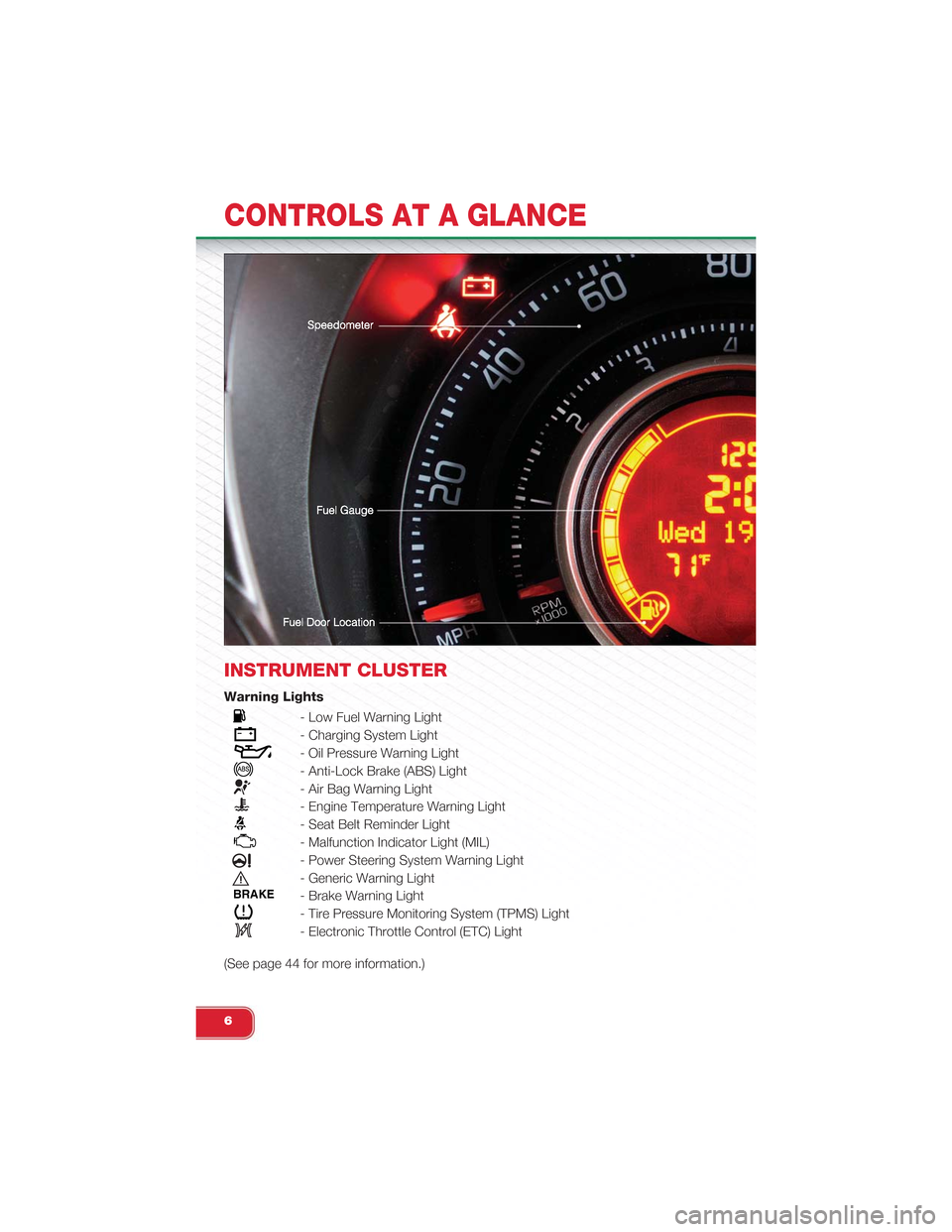
INSTRUMENT CLUSTER
Warning Lights
- Low Fuel Warning Light
- Charging System Light
- Oil Pressure Warning Light
- Anti-Lock Brake (ABS) Light
- Air Bag Warning Light
- Engine Temperature Warning Light
- Seat Belt Reminder Light
- Malfunction Indicator Light (MIL)
- Power Steering System Warning Light
- Generic Warning Light
BRAKE- Brake Warning Light
- Tire Pressure Monitoring System (TPMS) Light
- Electronic Throttle Control (ETC) Light
(See page 44 for more information.)
CONTROLS AT A GLANCE
6
Page 42 of 84
ELECTRONIC VEHICLE INFORMATION
CENTER (EVIC)
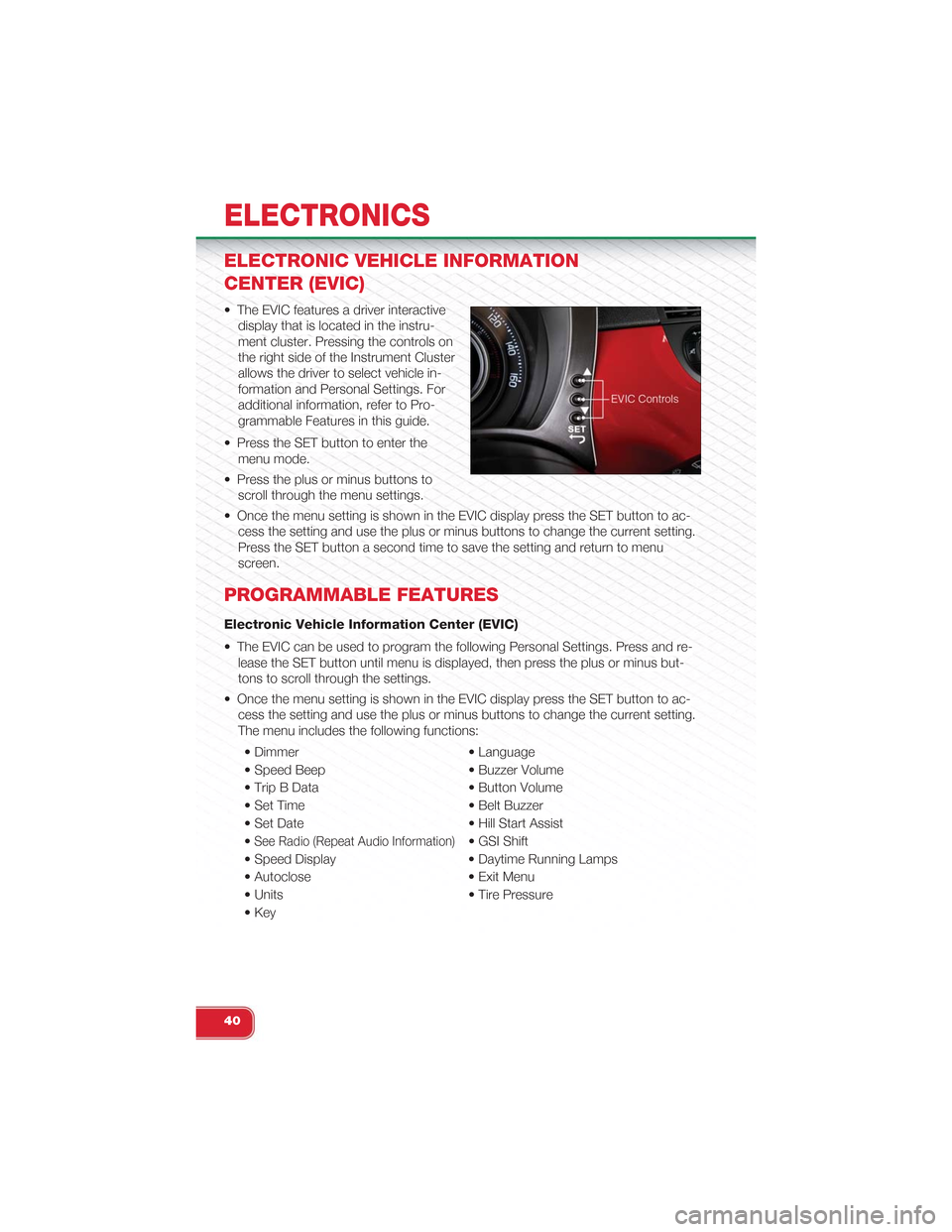
• The EVIC features a driver interactive
display that is located in the instru-
ment cluster. Pressing the controls on
the right side of the Instrument Cluster
allows the driver to select vehicle in-
formation and Personal Settings. For
additional information, refer to Pro-
grammable Features in this guide.
• Press the SET button to enter the
menu mode.
• Press the plus or minus buttons to
scroll through the menu settings.
• Once the menu setting is shown in the EVIC display press the SET button to ac-
cess the setting and use the plus or minus buttons to change the current setting.
Press the SET button a second time to save the setting and return to menu
screen.
PROGRAMMABLE FEATURES
Electronic Vehicle Information Center (EVIC)
• The EVIC can be used to program the following Personal Settings. Press and re-
lease the SET button until menu is displayed, then press the plus or minus but-
tons to scroll through the settings.
• Once the menu setting is shown in the EVIC display press the SET button to ac-
cess the setting and use the plus or minus buttons to change the current setting.
The menu includes the following functions:
• Dimmer • Language
• Speed Beep • Buzzer Volume
• Trip B Data • Button Volume
• Set Time • Belt Buzzer
• Set Date • Hill Start Assist
•See Radio (Repeat Audio Information)• GSI Shift
• Speed Display • Daytime Running Lamps
• Autoclose • Exit Menu
• Units • Tire Pressure
• Key
ELECTRONICS
40
Page 46 of 84
24-HOUR ROADSIDE ASSISTANCE
• If your Abarth requires jump start assistance, out of gas/fuel delivery, tire service,
lockout service or towing due to a defect covered under the Basic Limited War-
ranty, dial toll-free 1-888-242-6342. See your Warranty booklet for further details.
• Provide your name, vehicle identification number and license plate number.
• Provide your location, including telephone number, from which you are calling.
• Briefly describe the nature of the problem and answer a few simple questions.
• You will be given the name of the service provider and an estimated time of ar-
rival. If you feel you are in an “unsafe situation”, please let us know. With your
consent, we will contact local police or safety authorities.
INSTRUMENT CLUSTER WARNING LIGHTS
- Generic Warning Light
• The Generic Warning Light will illuminate if any of the following conditions occur:
Oil Change Request, Engine Oil Pressure Sensor Failure, After Run Cooling
Pump, External Light Failure, Fuel Cut-Off Intervention, Fuel Cut-Off Not Available,
Parking Sensor Failure.
- Power Steering System Warning
• If the “POWER STEERING SYSTEM OVER TEMP” message and icon are dis-
played in the Electronic Vehicle Information Center (EVIC) display, it indicates that
extreme steering maneuvers have occurred, which caused an over temperature
condition in the power steering system. You will lose power steering assistance
momentarily until the over temperature condition no longer exists. Once driving
conditions are safe, pull over and let the vehicle idle. After approximately five min-
utes, the system will cool and return to normal operation.
- Engine Temperature Warning Light
• This light warns of an overheated engine condition.
• If the light turns on or flashes continuously while driving, safely pull over and stop
the vehicle. If the A/C system is on, turn it off. Also, shift the transmission into
NEUTRAL and idle the vehicle. If the temperature reading does not return to nor-
mal, turn the engine off immediately.
• We recommend that you do not operate the vehicle or engine damage will occur.
Have the vehicle serviced immediately.
WARNING!
A hot engine cooling system is dangerous. You or others could be badly burned
by steam or boiling coolant. You may want to call an authorized studio for service
if your vehicle overheats.
WHAT TO DO IN EMERGENCIES
44
Page 48 of 84
- Tire Pressure Monitoring System (TPMS) Light
• Each tire should be checked monthly when it is cold and inflated to the tire pres-
sure recommended by the vehicle manufacturer. This can be found on the ve-
hicle placard or tire inflation pressure label on the driver's door. (If your vehicle
has tires of a different size than the size indicated on the vehicle placard or tire
inflation pressure label, you should determine the proper tire inflation pressure for
those tires.)
• As an added safety feature, your vehicle has been equipped with a Tire Pressure
Monitoring System (TPMS) that illuminates a low tire pressure telltale when one or
more of your tires is significantly under-inflated. Accordingly, when the low tire
pressure telltale illuminates, you should stop and check your tires as soon as
possible, and inflate them to the proper pressure. Driving on a significantly under-
inflated tire causes the tire to overheat and can lead to tire failure. Under-inflation
also reduces fuel efficiency and tire tread life, and may affect the vehicle’s han-
dling and stopping ability.
•IF THE LIGHT STARTS FLASHING INDICATING A LOW TIRE PRES-
SURE, ADJUST THE AIR PRESSURE IN THE LOW TIRE TO THE AIR
PRESSURE SHOWN ON THE VEHICLE PLACARD OR TIRE INFLATION
PRESSURE LABEL LOCATED ON THE DRIVER'S DOOR. NOTE: AFTER
INFLATION, THE VEHICLE MAY NEED TO BE DRIVEN FOR 20 MIN-
UTES BEFORE THE FLASHING LIGHT WILL TURN OFF.
• Please note that the TPMS is not a substitute for proper tire maintenance, and it
is the driver’s responsibility to maintain correct tire pressure, even if under-
inflation has not reached the level to trigger illumination of the TPMS low tire pres-
sure telltale.
• Your vehicle has also been equipped with a TPMS malfunction indicator to indi-
cate when the system is not operating properly. The TPMS malfunction indicator
is combined with the low tire pressure telltale. When the system detects a mal-
function, the telltale will flash for approximately one minute and then remain con-
tinuously illuminated. This sequence will continue each time the vehicle is re-
started as long as the malfunction exists.
• When the malfunction indicator is illuminated, the system may not be able to de-
tect or signal low tire pressure as intended. TPMS malfunctions may occur for a
variety of reasons, including the installation of replacement or alternate tires or
wheels on the vehicle that prevent the TPMS from functioning properly. Always
check the TPMS malfunction telltale after replacing one or more tires or wheels
on your vehicle, to ensure that the replacement or alternate tires and wheels al-
low the TPMS to continue to function properly.
WHAT TO DO IN EMERGENCIES
46
Page 49 of 84
NOTE:
Tire pressures change by approximately 1 psi (7 kPa) per 12° F (7° C) of air tem-
perature change. Keep this in mind when checking tire pressure inside a garage,
especially in the winter. Example: If garage temperature is 68°F (20°C) and the out-
side temperature is 32°F (0°C), then the cold tire inflation pressure should be in-
creased by 3 psi (21 kPa), which equals 1 psi (7 kPa) for every 12°F (7°C) for this
outside temperature condition.
CAUTION!
The TPMS has been optimized for the original equipment tires and wheels. TPMS
pressures and warning have been established for the tire size equipped on your
vehicle. Undesirable system operation or sensor damage may result when using
replacement equipment that is not of the same size, type, and/or style. Aftermar-
ket wheels can cause sensor damage. Do not use tire sealant from a can, or bal-
ance beads if your vehicle is equipped with a TPMS, as damage to the sensors
may result.
BRAKE- Brake Warning Light
• The Brake Warning light illuminates when there is either a system malfunction or
the parking brake is applied. If the light is on and the parking brake is not applied,
it indicates a possible brake hydraulic malfunction, brake booster problem or an
Anti-Lock Brake System problem.
• Please have your vehicle serviced immediately.
WARNING!
Driving a vehicle with the red brake light on is dangerous. Part of the brake sys-
tem may have failed. It will take longer to stop the vehicle. You could have a colli-
sion. Have the vehicle checked immediately.
- Malfunction Indicator Light (MIL)
• Certain conditions, such as a loose or missing gas cap, poor fuel quality, etc.,
may illuminate the MIL after engine start. The vehicle should be serviced if the
light stays on through several typical driving cycles. In most situations, the vehicle
will drive normally and not require towing.
• If the MIL flashes when the engine is running, serious conditions may exist that
could lead to immediate loss of power or severe catalytic converter damage.
We recommend you do not operate the vehicle. Have the vehicle serviced
immediately.
WHAT TO DO IN EMERGENCIES
47
Page 51 of 84
CAUTION!
Driving with a hot cooling system could damage your vehicle. If the temperature
gauge reads hot, pull over and stop the vehicle. Idle the vehicle with the air condi-
tioner turned off until the pointer drops back into the normal range. If the pointer
remains on hot, turn the engine off immediately and call for service.
WARNING!
You or others can be badly burned by hot engine coolant (antifreeze) or steam
from your radiator. If you see or hear steam coming from under the hood, do not
open the hood until the radiator has had time to cool. Never try to open a cooling
system pressure cap when the radiator or coolant bottle is hot.
TIREFIT KIT
• Your vehicle may be equipped with a TIREFIT kit. The TIREFIT kit is located under
the front driver’s seat.
• Small punctures up to 1/4 in (6 mm) in the tire tread can be sealed with TIREFIT.
Foreign objects (e.g., screws or nails) should not be removed from the tire.
TIREFIT can be used in outside temperatures down to approximately -4°F
(-20°C).
• This kit will provide a temporary tire seal, allowing you to drive your vehicle up to
100 miles (160 km) with a maximum speed of 55 mph (88 km/h).
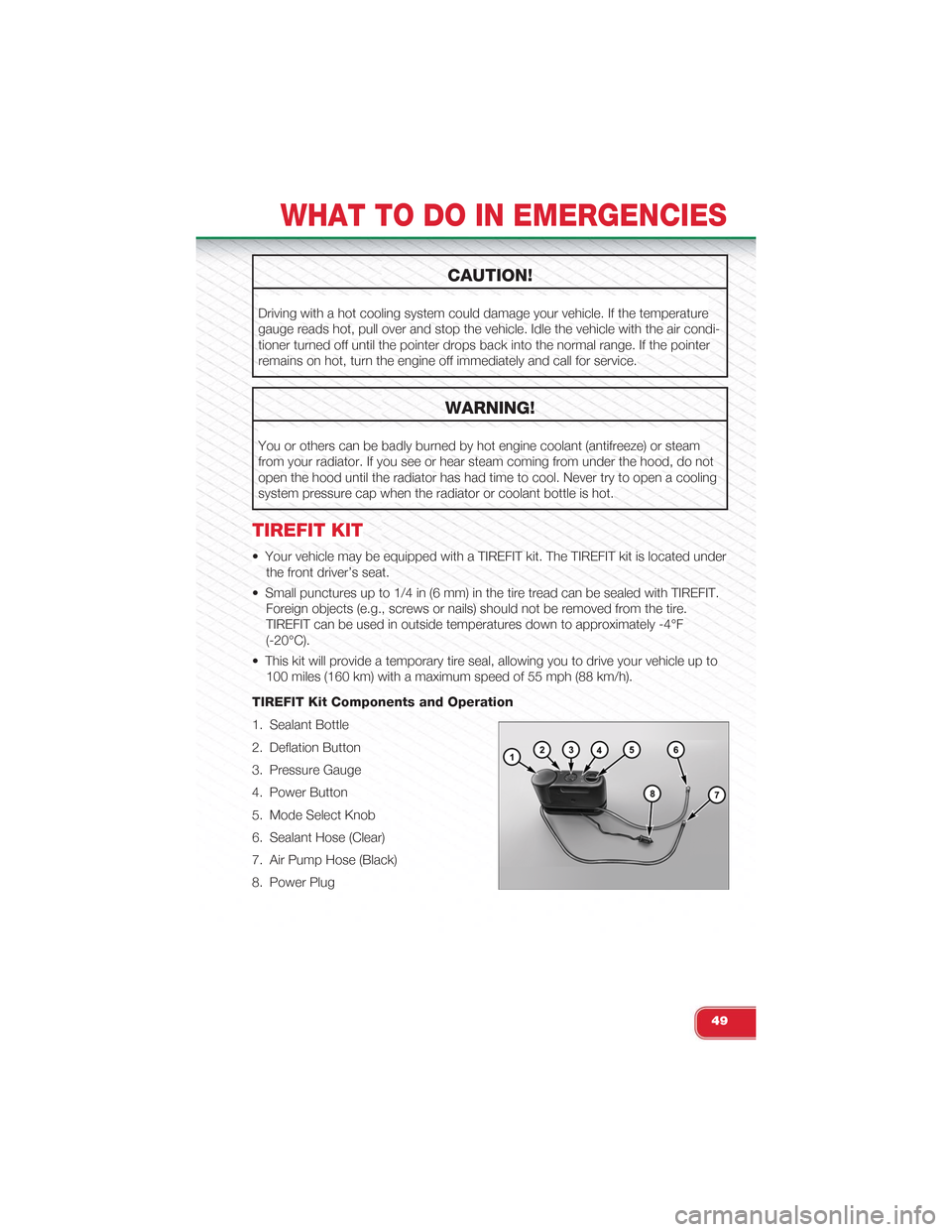
TIREFIT Kit Components and Operation
1. Sealant Bottle
2. Deflation Button
3. Pressure Gauge
4. Power Button
5. Mode Select Knob
6. Sealant Hose (Clear)
7. Air Pump Hose (Black)
8. Power Plug
WHAT TO DO IN EMERGENCIES
49
Page 52 of 84
Using The Mode Select Knob and Hoses
• Your TIREFIT kit is equipped with the following symbols to indicate the air or seal-
ant mode.
Selecting Air Mode
• Turn the Mode Select Knob (5) to this position for air pump operation only. Use
the Black Air Pump Hose (7) when selecting this mode.
Selecting Sealant Mode
• Turn the Mode Select Knob (5) to this position to inject the TIREFIT Sealant and
to inflate the tire. Use the Sealant Hose (clear hose) (6) when selecting this mode.
Using The Power Button
• Push and release the Power Button (4) once to turn On the TIREFIT kit. Push and
release the Power Button (4) again to turn Off the TIREFIT kit.
Using The Deflation Button
• Press the Deflation Button (2) to reduce the air pressure in the tire if it becomes
over-inflated.
TIREFIT Usage Precautions
• Replace the TIREFIT Sealant Bottle (1) and Sealant Hose (6) prior to the expiration
date (printed on the bottle label) to assure optimum operation of the system. Re-
fer to “Sealing a Tire with TIREFIT” section (F) “Sealant Bottle and Hose Replace-
ment”.
• The Sealant Bottle (1) and Sealant Hose (6) are a one tire application use. After
each use, always replace these components immediately at an authorized studio.
• When the TIREFIT sealant is in a liquid form, clean water, and a damp cloth will
remove the material from the vehicle or tire and wheel components. Once the
sealant dries, it can easily be peeled off and properly discarded.
• For optimum performance, make sure the valve stem on the wheel is free of de-
bris before connecting the TIREFIT kit.
•You can use the TIREFIT air pump to inflate bicycle tires. The kit also comes with
two needles, located in the Accessory Storage Compartment (on the bottom of the
air pump) for inflating sport balls, rafts, or similar inflatable items. However, use only
the Air Pump Hose (7) and make sure the Mode Select Knob (5) is in the Air Mode
when inflating such items to avoid injecting sealant into them. The TIREFIT Sealant is
only intended to seal punctures less than 1/4 in (6 mm) diameter in the tread of your
vehicle.
• Do not lift or carry the TIREFIT kit by the hoses.
WHAT TO DO IN EMERGENCIES
50
Page 54 of 84
2. Connect the Power Plug (8) to a different 12 Volt power outlet in your vehicle or
another vehicle, if available. Make sure the engine is running before turning ON
the TIREFIT kit.
3. The Sealant Bottle (1) may be empty due to previous use. Call for assistance.
NOTE:If the Mode Select Knob (5) is on Air Mode and the pump is operating, air will dispensefrom the Air Pump Hose (7) only, not the Sealant Hose (6).
•If the sealant (white fluid) does flow through the Sealant Hose (6):
1. Continue to operate the pump until sealant is no longer flowing through the hose
(typically takes 30 - 70 seconds). As the sealant flows through the Sealant Hose
(6), the Pressure Gauge (3) can read as high as 70 psi (5 kPa). The Pressure
Gauge (3) will decrease quickly from approximately 70 psi (5 kPa) to the actual
tire pressure when the Sealant Bottle (1) is empty.
2. The pump will start to inject air into the tire immediately after the Sealant Bottle
(1) is empty. Continue to operate the pump and inflate the tire to the pressure
indicated on the tire pressure label on the driver-side latch pillar (recommended
pressure). Check the tire pressure by looking at the Pressure Gauge (3).
•If the tire does not inflate to at least 26 psi (1.8 kPa) pressure within
15 minutes:
• The tire is too badly damaged. Do not attempt to drive the vehicle further. Call
for assistance.
NOTE:If the tire becomes over-inflated, press the Deflation Button to reduce the tire pressure tothe recommended inflation pressure before continuing.
•If the tire inflates to the recommended pressure or is at least 26 psi
(1.8 Bar) pressure within 15 minutes:
1. Press the Power Button (4) to turn off the TIREFIT kit.
2. Remove the Speed Limit sticker from the top of the Sealant Bottle (1) and place
the sticker on the instrument panel.
3. Immediately disconnect the Sealant Hose (6) from the valve stem, reinstall the
cap on the fitting at the end of the hose, and place the TIREFIT kit in the vehicle
storage location. Quickly proceed to (D) “Drive Vehicle”.
(D) Drive Vehicle:
• Immediately after injecting sealant and inflating the tire, drive the vehicle 5 miles
(8 km) or 10 minutes to ensure distribution of the TIREFIT Sealant within the tire.
Do not exceed 55 mph (88 km/h).
WHAT TO DO IN EMERGENCIES
52
Page 55 of 84
(E) After Driving:
• Pull over to a safe location. Refer to “Whenever You Stop to Use TIREFIT” before
continuing.
1. Turn the Mode Select Knob (5) to the Air Mode position.
2. Uncoil the Air Pump Hose (7) (black in color) and screw the fitting at the end of
hose (7) onto the valve stem.
3. Uncoil the power plug and insert the plug into the vehicles 12 Volt power outlet.
4. Check the pressure in the tire by reading the Pressure Gauge (3).
•If tire pressure is less than 19 psi (1.3 kPa), the tire is too badly dam-
aged. Do not attempt to drive the vehicle further. Call for assistance.
If the tire pressure is 19 psi (1.3 kPa) or higher:
1.Press the Power Button (4) to turn on TIREFIT and inflate the tire to the pressure
indicated on the tire and loading information label on the driver-side door opening.
2. Disconnect the TIREFIT kit from the valve stem, reinstall the cap on the valve
stem and unplug from 12 Volt outlet.
3. Place the TIREFIT kit in its proper storage area in the vehicle.
4. Have the tire inspected and repaired or replaced at the earliest opportunity at an
authorized studio or tire service center.
5. Replace the Sealant Bottle (1) and Sealant Hose (6) assembly at your authorized
studio as soon as possible. Refer to “(F) Sealant Bottle and Hose Replacement.”
NOTE:
• If the tire becomes over-inflated, press the Deflation Button to reduce the tire
pressure to the recommended inflation pressure before continuing.
• When having the tire serviced, advise the authorized studio or service center that
the tire has been sealed using the TIREFIT service kit.
(F) Sealant Bottle And Hose Replacement:
1. Uncoil the Sealant Hose (6) (clear in color).
2. Locate the round Sealant Bottle release button in the recessed area under the
sealant bottle.
3. Press the Sealant Bottle release button. The Sealant Bottle (1) will pop up. Re-
move the bottle and dispose of it accordingly.
4. Clean any remaining sealant from the TIREFIT housing.
5. Position the new Sealant Bottle (1) in the housing so that the Sealant Hose (6)
aligns with the hose slot in the front of the housing. Press the bottle into the
housing. An audible click will be heard indicating the bottle is locked into place.
WHAT TO DO IN EMERGENCIES
53