ignition FIAT 500E 2018 Workshop Manual
[x] Cancel search | Manufacturer: FIAT, Model Year: 2018, Model line: 500E, Model: FIAT 500E 2018Pages: 302, PDF Size: 3.32 MB
Page 213 of 302
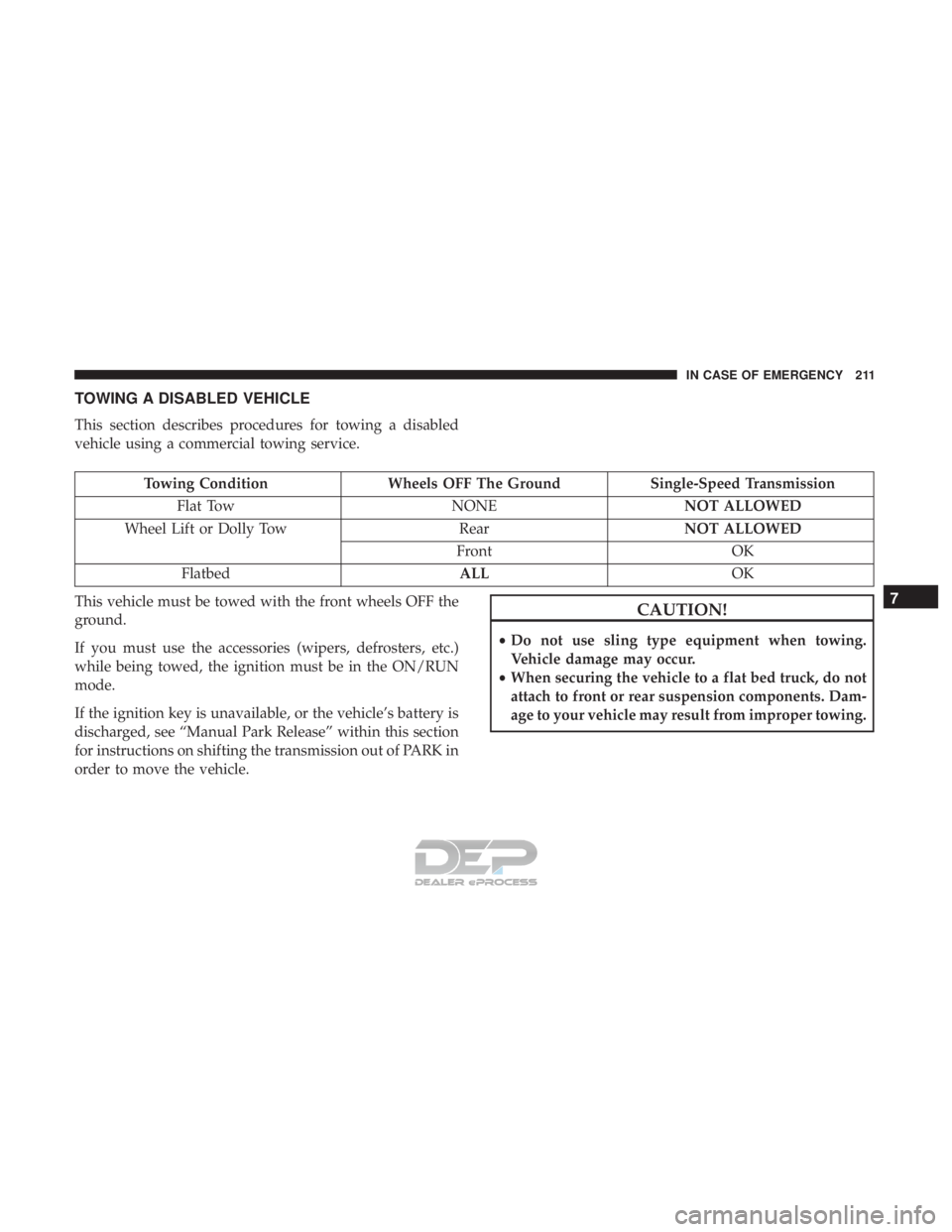
TOWING A DISABLED VEHICLE
This section describes procedures for towing a disabled
vehicle using a commercial towing service.
Towing ConditionWheels OFF The Ground Single-Speed Transmission
Flat Tow NONENOT ALLOWED
Wheel Lift or Dolly Tow RearNOT ALLOWED
Front OK
Flatbed ALLOK
This vehicle must be towed with the front wheels OFF the
ground.
If you must use the accessories (wipers, defrosters, etc.)
while being towed, the ignition must be in the ON/RUN
mode.
If the ignition key is unavailable, or the vehicle’s battery is
discharged, see “Manual Park Release” within this section
for instructions on shifting the transmission out of PARK in
order to move the vehicle.
CAUTION!
• Do not use sling type equipment when towing.
Vehicle damage may occur.
• When securing the vehicle to a flat bed truck, do not
attach to front or rear suspension components. Dam-
age to your vehicle may result from improper towing.
7
IN CASE OF EMERGENCY 211
Page 226 of 302
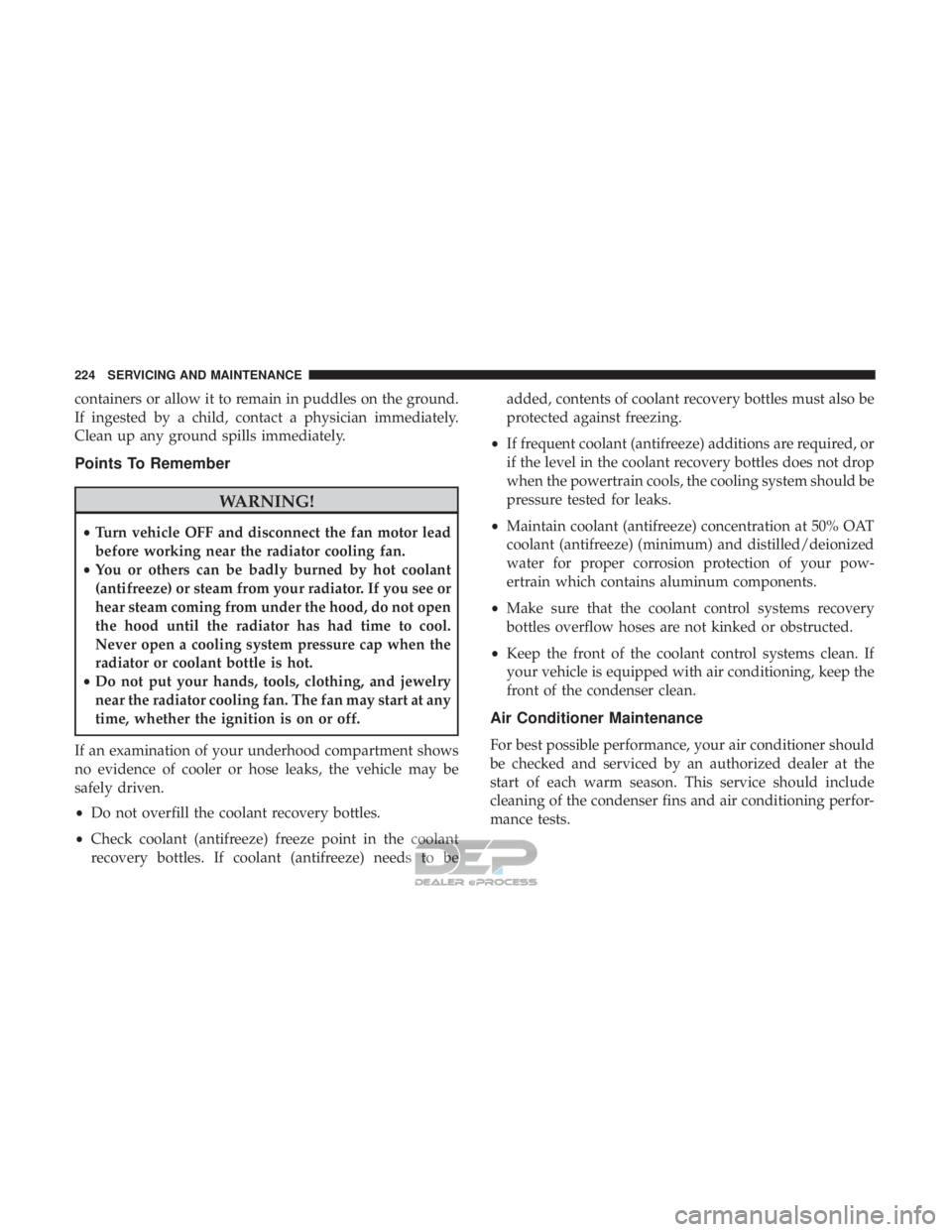
containers or allow it to remain in puddles on the ground.
If ingested by a child, contact a physician immediately.
Clean up any ground spills immediately.
Points To Remember
WARNING!
•Turn vehicle OFF and disconnect the fan motor lead
before working near the radiator cooling fan.
• You or others can be badly burned by hot coolant
(antifreeze) or steam from your radiator. If you see or
hear steam coming from under the hood, do not open
the hood until the radiator has had time to cool.
Never open a cooling system pressure cap when the
radiator or coolant bottle is hot.
• Do not put your hands, tools, clothing, and jewelry
near the radiator cooling fan. The fan may start at any
time, whether the ignition is on or off.
If an examination of your underhood compartment shows
no evidence of cooler or hose leaks, the vehicle may be
safely driven.
• Do not overfill the coolant recovery bottles.
• Check coolant (antifreeze) freeze point in the coolant
recovery bottles. If coolant (antifreeze) needs to be added, contents of coolant recovery bottles must also be
protected against freezing.
• If frequent coolant (antifreeze) additions are required, or
if the level in the coolant recovery bottles does not drop
when the powertrain cools, the cooling system should be
pressure tested for leaks.
• Maintain coolant (antifreeze) concentration at 50% OAT
coolant (antifreeze) (minimum) and distilled/deionized
water for proper corrosion protection of your pow-
ertrain which contains aluminum components.
• Make sure that the coolant control systems recovery
bottles overflow hoses are not kinked or obstructed.
• Keep the front of the coolant control systems clean. If
your vehicle is equipped with air conditioning, keep the
front of the condenser clean.
Air Conditioner Maintenance
For best possible performance, your air conditioner should
be checked and serviced by an authorized dealer at the
start of each warm season. This service should include
cleaning of the condenser fins and air conditioning perfor-
mance tests.
224 SERVICING AND MAINTENANCE
Page 266 of 302
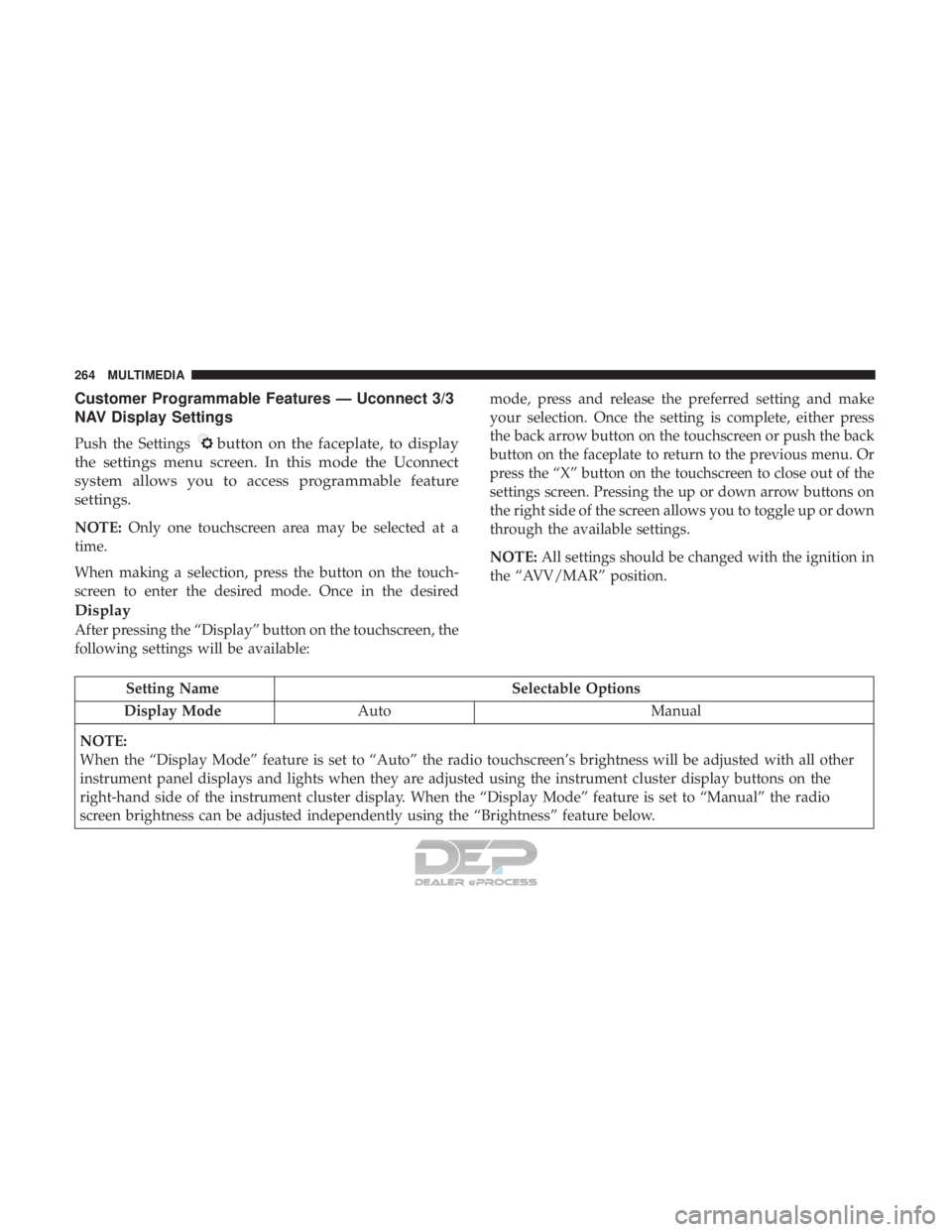
Customer Programmable Features — Uconnect 3/3
NAV Display Settings
Push the Settingsbutton on the faceplate, to display
the settings menu screen. In this mode the Uconnect
system allows you to access programmable feature
settings.
NOTE: Only one touchscreen area may be selected at a
time.
When making a selection, press the button on the touch-
screen to enter the desired mode. Once in the desired mode, press and release the preferred setting and make
your selection. Once the setting is complete, either press
the back arrow button on the touchscreen or push the back
button on the faceplate to return to the previous menu. Or
press the “X” button on the touchscreen to close out of the
settings screen. Pressing the up or down arrow buttons on
the right side of the screen allows you to toggle up or down
through the available settings.
NOTE:
All settings should be changed with the ignition in
the “AVV/MAR” position.
Display
After pressing the “Display” button on the touchscreen, the
following settings will be available:
Setting Name Selectable Options
Display Mode Auto Manual
NOTE:
When the “Display Mode” feature is set to “Auto” the radio touchscreen’s brightness will be adjusted with all other
instrument panel displays and lights when they are adjusted using the instrument cluster display buttons on the
right-hand side of the instrument cluster display. When the “Display Mode” feature is set to “Manual” the radio
screen brightness can be adjusted independently using the “Brightness” feature below.
264 MULTIMEDIA
Page 273 of 302
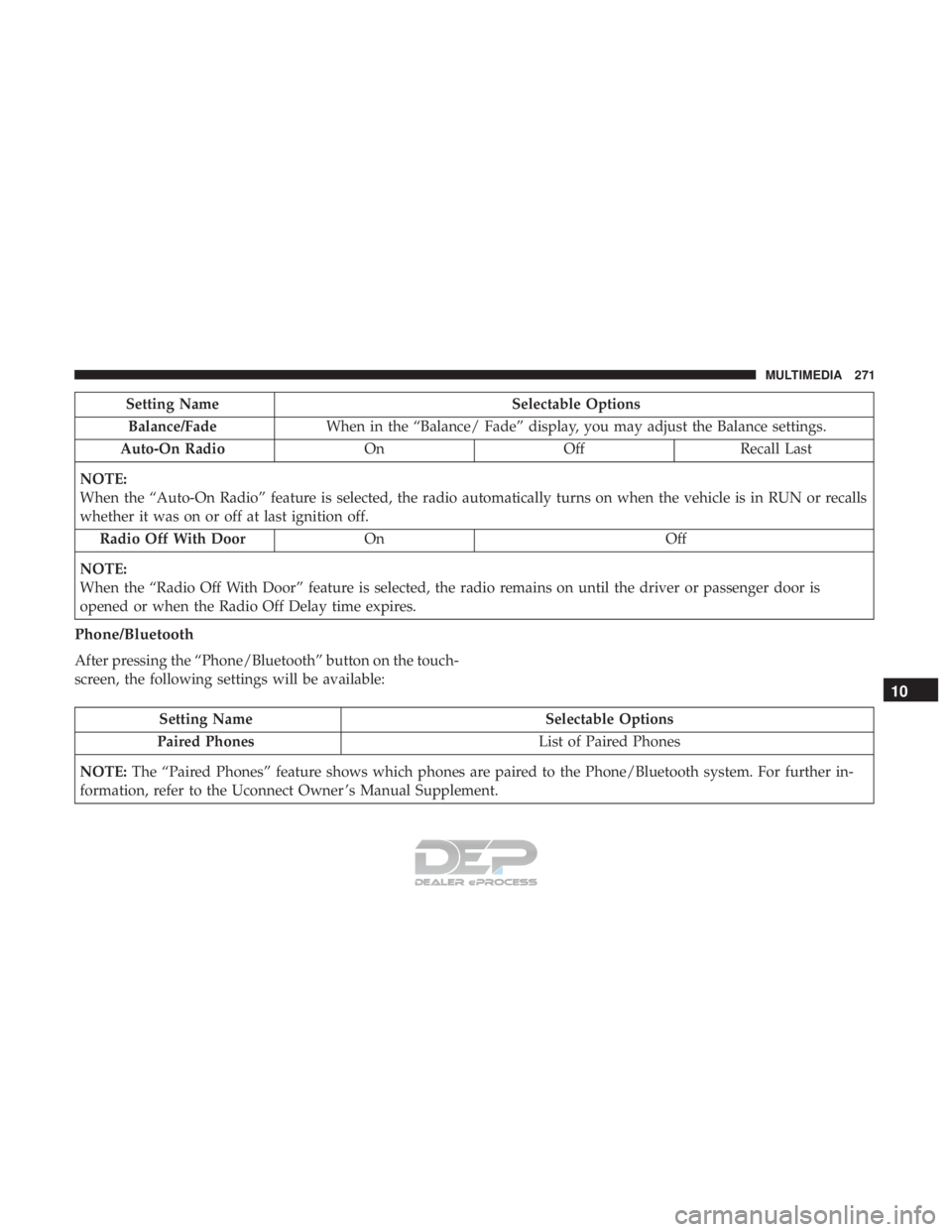
Setting NameSelectable Options
Balance/Fade When in the “Balance/ Fade” display, you may adjust the Balance settings.
Auto-On Radio OnOffRecall Last
NOTE:
When the “Auto-On Radio” feature is selected, the radio automatically turns on when the vehicle is in RUN or recalls
whether it was on or off at last ignition off. Radio Off With Door On Off
NOTE:
When the “Radio Off With Door” feature is selected, the radio remains on until the driver or passenger door is
opened or when the Radio Off Delay time expires.
Phone/Bluetooth
After pressing the “Phone/Bluetooth” button on the touch-
screen, the following settings will be available:
Setting Name Selectable Options
Paired Phones List of Paired Phones
NOTE: The “Paired Phones” feature shows which phones are paired to the Phone/Bluetooth system. For further in-
formation, refer to the Uconnect Owner ’s Manual Supplement.
10
MULTIMEDIA 271
Page 295 of 302
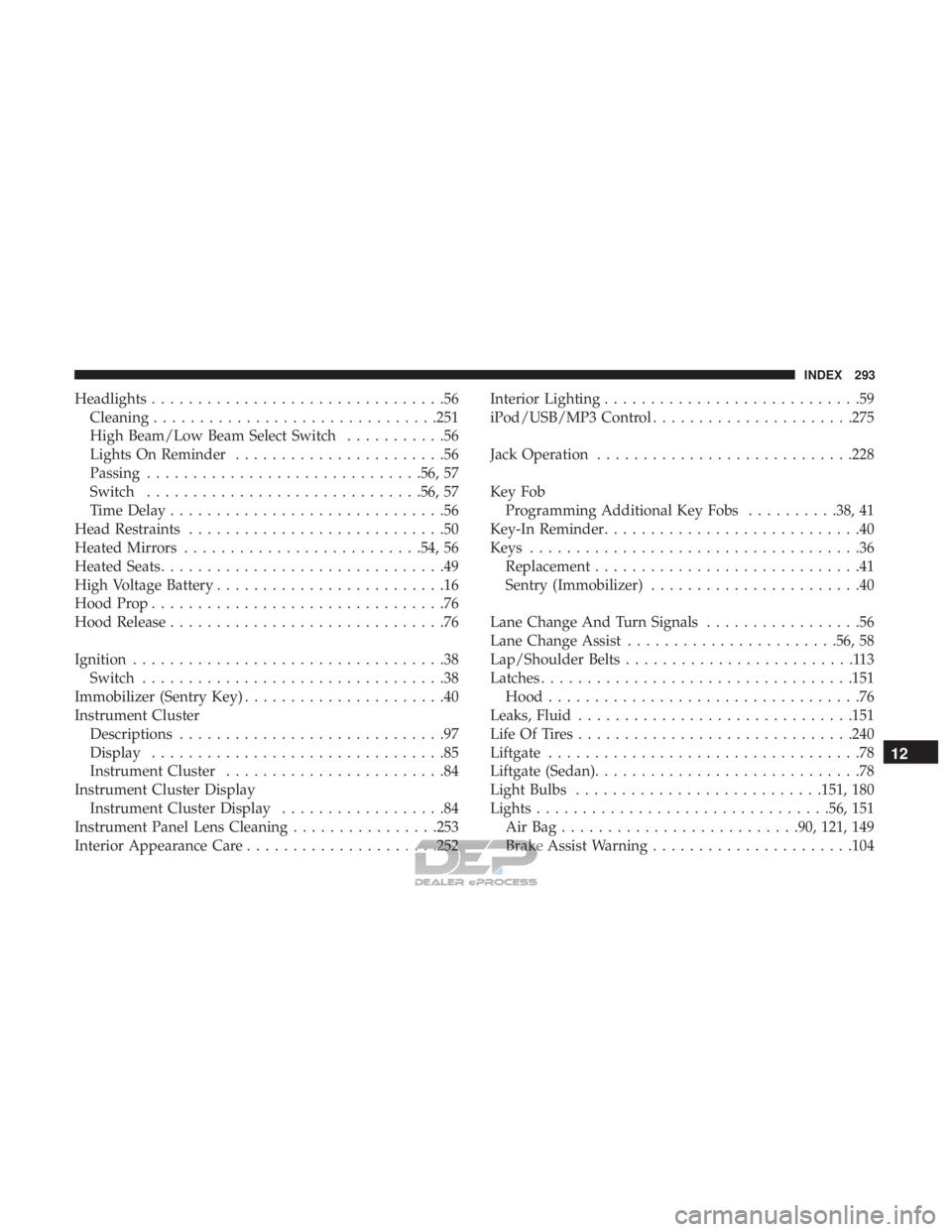
Headlights................................56
Cleaning ...............................251
High Beam/Low Beam Select Switch ...........56
Lights On Reminder .......................56
Passing ............................. .56, 57
Switch ............................. .56, 57
Time Delay ..............................56
Head Restraints ............................50
Heated Mirrors ..........................54, 56
Heated Seats ...............................49
High Voltage Battery .........................16
Hood Prop ................................76
Hood Release ..............................76
Ignition ..................................38
Switch .................................38
Immobilizer (Sentry Key) ......................40
Instrument Cluster Descriptions .............................97
Display ................................85
Instrument Cluster ........................84
Instrument Cluster Display Instrument Cluster Display ..................84
Instrument Panel Lens Cleaning ................253
Interior Appearance Care .....................252 Interior Lighting
............................59
iPod/USB/MP3 Control ..................... .275
Jack Operation ............................228
Key Fob Programming Additional Key Fobs ..........38, 41
Key-In Reminder ............................40
Keys ....................................36
Replacement .............................41
Sentry (Immobilizer) .......................40
Lane Change And Turn Signals .................56
Lane Change Assist .......................56, 58
Lap/Shoulder Belts .........................113
Latches ................................. .151
Hood ..................................76
Leaks, Fluid ............................. .151
Life Of Tires ............................. .240
Liftgate ..................................78
Liftgate (Sedan) .............................78
Light Bulbs .......................... .151, 180
Lights ............................... .56, 151
AirBag......................... .90, 121, 149
Brake Assist
Warning ..................... .104
12
INDEX 293