phone FIAT 500L 2015 2.G Owner's Manual
[x] Cancel search | Manufacturer: FIAT, Model Year: 2015, Model line: 500L, Model: FIAT 500L 2015 2.GPages: 148, PDF Size: 3.77 MB
Page 82 of 148
Phonebook
The Uconnect® system will automatically sync your phonebook from your paired phone,
if this feature is supported by your phone.Phonebook contacts are updated each time
that the phone is connected.If your phone book entries do not appear, check the set-
tings on your phone.Some phones require you to enable this feature manually.
•Your phonebook can be browsed on the Uconnect® system touchscreen, but editing
can only be done on your phone.To browse, press the “Phone” button on the touch-
screen, then the “Phonebook” button on the touchscreen.
Favorite phonebook entries can be saved as Favorites for quicker access.Favorites are
shown at the top of the main phone screen.
Voice Command Tips
•Speaking complete names (i.e; Call John Doe vs.Call John) will result in greater system
accuracy.
•You can “link” commands together for faster results.Say “Call John Doe, mobile,” for
example.
•If you are listening to available voice command options, you do not have to listen to
the entire list.When you hear the command that you need, push thebutton
on the steering wheel, wait for the beep and say your command.
Changing The Volume
•Start a dialogue by pushing the Phone button, then say a command for example
- "Help."
•Use the radio VOLUME/MUTE rotary knob to adjust the volume to a comfortable
level while the Uconnect® system is speaking.Please note the volume setting for
Uconnect® is different than the audio system.
NOTE:
To access help, push the Uconnect® Phone buttonon the steering wheel and say
"help." Press the display or press either the Phoneor VRbutton and say
"cancel" to cancel the help session.
Incoming Text Messages
After pairing your Uconnect® system with a Bluetooth® enabled mobile device with the
Message Access Profile (MAP), the Uconnect® system can announce a new incoming text
message and read it to you over the vehicle’s audio system.
NOTE:
Only incoming text messages received during the current ignition cycle can be viewed/
read.
To enable incoming text messaging:
iPhone®
1.Press the settings button on the mobile phone.
ELECTRONICS
80
Page 83 of 148
2.Select Bluetooth®.
•Ensure Bluetooth is enabled, and the mobile phone is paired to the Uconnect®
system.
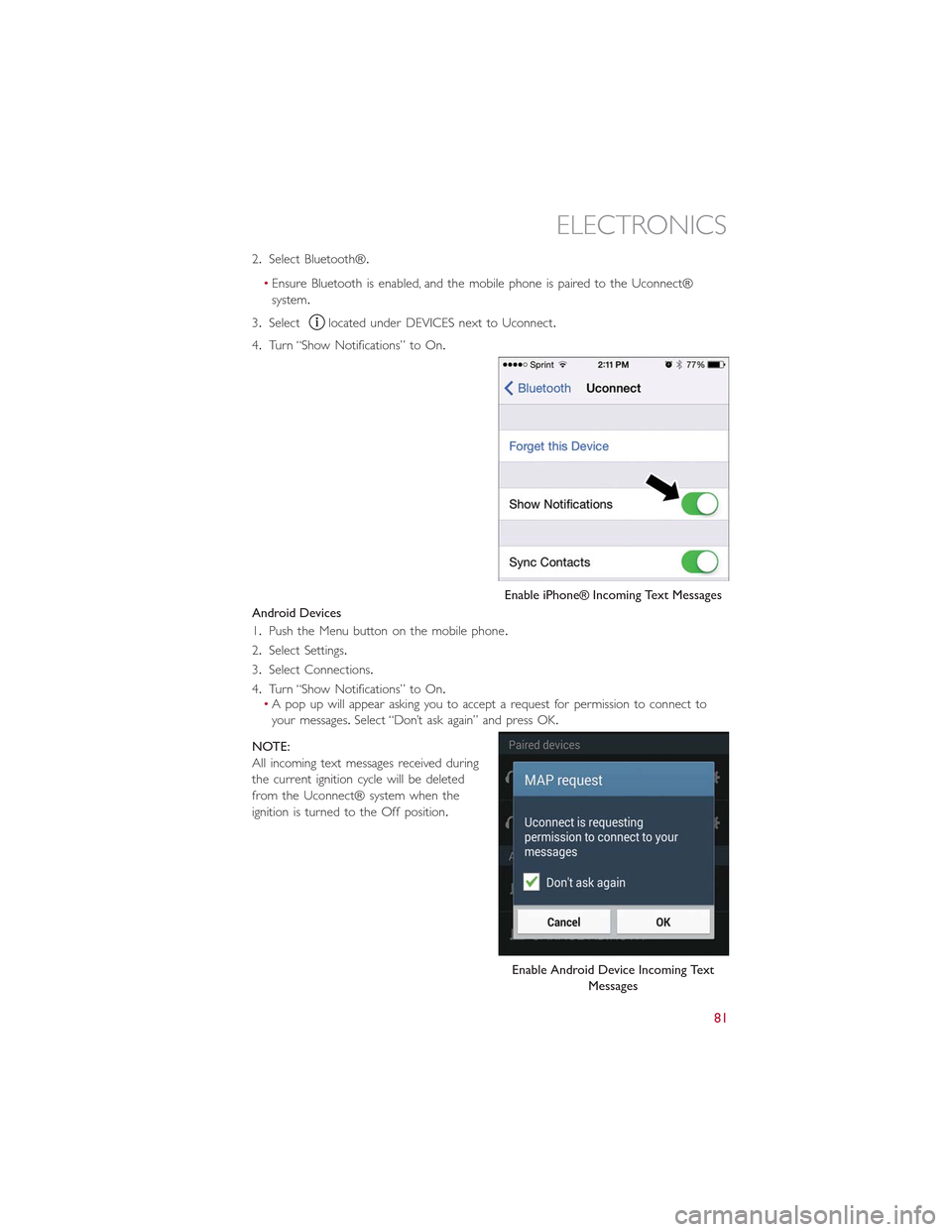
3.Selectlocated under DEVICES next to Uconnect.
4.Turn “Show Notifications” to On.
Android Devices
1.Push the Menu button on the mobile phone.
2.Select Settings.
3.Select Connections.
4.Turn “Show Notifications” to On.•A pop up will appear asking you to accept a request for permission to connect to
your messages.Select “Don’t ask again” and press OK.
NOTE:
All incoming text messages received during
the current ignition cycle will be deleted
from the Uconnect® system when the
ignition is turned to the Off position.
Enable iPhone® Incoming Text Messages
Enable Android Device Incoming Text
Messages
ELECTRONICS
81
Page 84 of 148
Voice Text Reply (Not Compatible With iPhone®)
NOTE:
Voice texting reply and voice texting features require a compatible mobile device enabled
with Bluetooth® Message Access Profile (MAP).iPhone®, and some other smartphones,
may not entirely support Bluetooth® MAP.Visit UconnectPhone.com for the latest sys-
tem and device compatibility.
•Due to the extremely large number of mobile phone manufacturers, your mobile de-
vice may not be listed.For further assistance, contact Uconnect Customer Care @
1-877-855-8400 for U.S.residents or, 1-800-465-2001 (English) / 1-800-387-9983
(French) for Canadian residents.
Once your Uconnect® system is paired with a compatible mobile device, the system can
announce a new incoming text message, and read it to your over the vehicle audio sys-
tem.You can reply to the message using Voice Recognition by selecting, or saying, one of
the 18 pre-defined messages.
Here’s How:
1.Push the Uconnect® Phone buttonand wait for the beep, then say “reply.”
Uconnect® will give the following prompt: “Please say the message you would like to
send.”
2.Wait for the beep and say one of the pre-defined messages.(If you are not sure, you
can say “help”).Uconnect® will then read the pre-defined messages allowed.
3.As soon as you hear the message you would like to send, you can interrupt the list of
prompts by pushing the Uconnect® phone button and saying the phrase.Uconnect®
will confirm the message by reading it back to you.
4.Push the Phone button and say “Send.”
PRE-DEFINED VOICE TEXT REPLY RESPONSES
Yes.Stuck in Traffic.See you later.
No.Start without me.I’ll be Late.
Okay.Where are you?I will be <5, 10, 15,...etc.>minutes late.Call me.Are you there yet?
I’ll call you later.I need directions.See you in <5, 10,15,...etc.> of minutes.I’m on my way.Can’t talk right now.I’m lost.Thanks.
Want to dictate a personal message?
•You must first register with Uconnect® Access (U.S.residents only) to take advantage
of a new, cloud-based Voice Texting service, an enhancement to Voice Text Reply
(Uconnect® 6.5AN systems ONLY).
ELECTRONICS
82
Page 85 of 148
Helpful Tips And Common Questions To Improve Bluetooth®
Performance With Your Uconnect® System
Mobile Phone won’t reconnect to system after pairing:
•Set mobile phone to auto-connect or trusted device in mobile phone Bluetooth® set-
tings (Blackberry devices).
•Perform a factory reset on your mobile phone.Refer to your mobile phone manufac-
turer or cellular provider for instructions.
•Many mobile phones do not automatically reconnect after being restarted (hard re-
boot).Your mobile phone can still be connected manually.Close all applications that
may be operating (refer to mobile phone manufacturer’s instructions), and follow “Pair-
ing (Wirelessly Connecting) Your Mobile Phone To The Uconnect® System.”
Mobile Phone won’t pair to system:
•Perform a hard reset in the mobile phone by removing the battery (if removable —
see your mobile phone’s owner manual).
•Delete pairing history in mobile phone and Uconnect system; usually found in phone’s
Bluetooth® connection settings.
•Verify you are selecting “Uconnect” in the discovered Bluetooth® devices on your mo-
bile phone.
•If your vehicle system generates a pin code the default is 0000.
Mobile Phonebook didn’t download:
•Check “Do not ask again,” then accept the “phonebook download” request on your
mobile phone.
•Up to 5,000 contact names with four numbers per contact will transfer to the
Uconnect® 6.5AN system phonebook.
•Up to 2,000 contact names with six numbers per contact will transfer to the
Uconnect® 5.0 system phonebook.
Text messaging won’t work:
•Check “Do not ask again,” then accept the “connect to your messages” request on
your mobile phone.
•Verify that your mobile phone has the Bluetooth® feature (Message Access Profile).
Can’t make a conference call:
•CDMA (Code-Division Multiple Access) carriers do not support conference calling.
Refer to your mobile phone user’s manual for further information.
Making calls while connected to AUX:
•Plugging in your mobile phone to AUX while connected to Bluetooth® will disable
Hands-Free Calling.Do not make calls while your mobile phone is plugged into the
AUX jack.
ELECTRONICS
83
Page 87 of 148
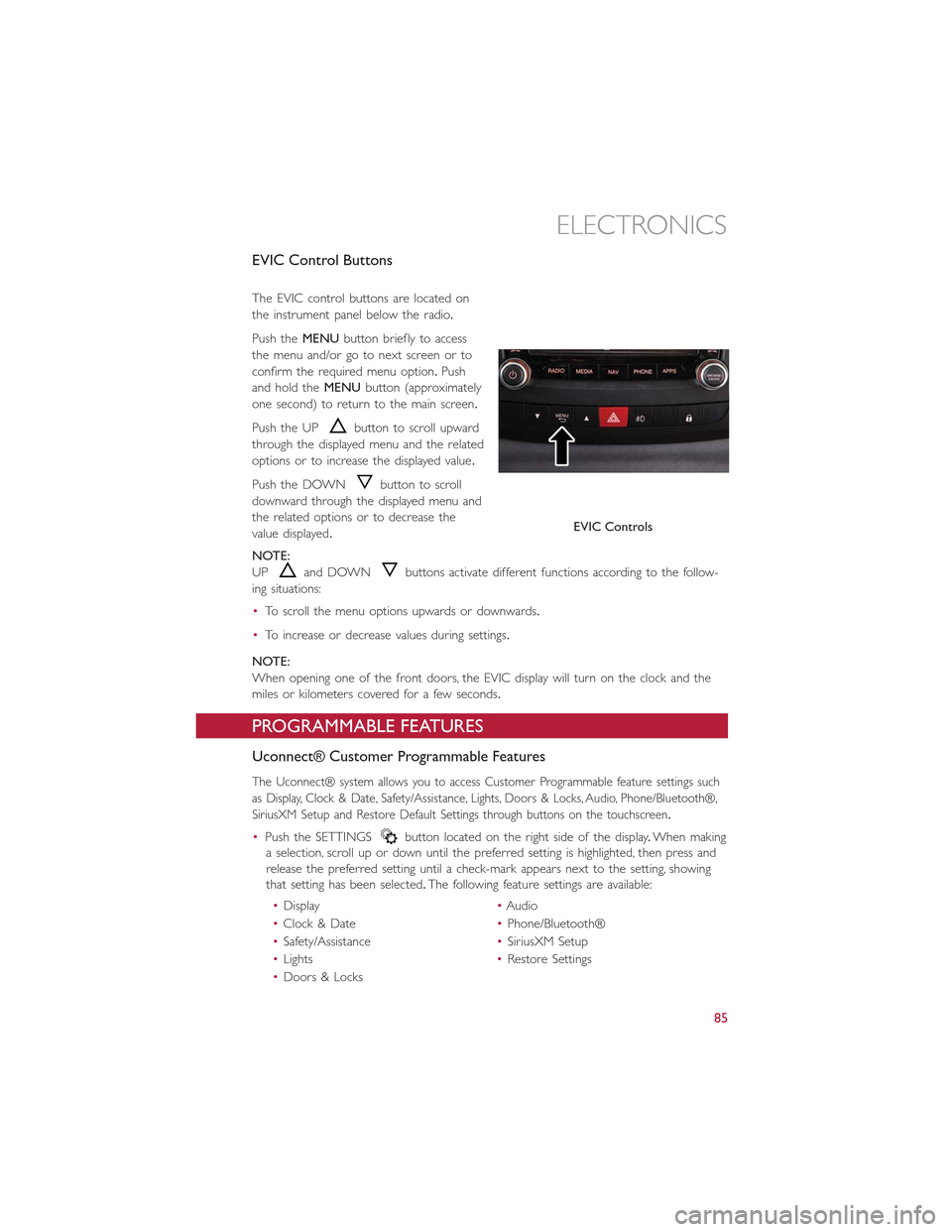
EVIC Control Buttons
The EVIC control buttons are located on
the instrument panel below the radio.
Push theMENUbutton briefly to access
the menu and/or go to next screen or to
confirm the required menu option.Push
and hold theMENUbutton (approximately
one second) to return to the main screen.
Push the UPbutton to scroll upward
through the displayed menu and the related
options or to increase the displayed value.
Push the DOWNbutton to scroll
downward through the displayed menu and
the related options or to decrease the
value displayed.
NOTE:
UPand DOWNbuttons activate different functions according to the follow-
ing situations:
•To scroll the menu options upwards or downwards.
•To increase or decrease values during settings.
NOTE:
When opening one of the front doors, the EVIC display will turn on the clock and the
miles or kilometers covered for a few seconds.
PROGRAMMABLE FEATURES
Uconnect® Customer Programmable Features
The Uconnect® system allows you to access Customer Programmable feature settings such
as Display, Clock & Date, Safety/Assistance, Lights, Doors & Locks, Audio, Phone/Bluetooth®,
SiriusXM Setup and Restore Default Settings through buttons on the touchscreen.
•Push the SETTINGSbutton located on the right side of the display.When making
a selection, scroll up or down until the preferred setting is highlighted, then press and
release the preferred setting until a check-mark appears next to the setting, showing
that setting has been selected.The following feature settings are available:
•Display•Audio
•Clock & Date•Phone/Bluetooth®
•Safety/Assistance•SiriusXM Setup
•Lights•Restore Settings
•Doors & Locks
EVIC Controls
ELECTRONICS
85
Page 90 of 148
Using HomeLink®
To operate, push and release the programmed HomeLink®button.Activation will
now occur for the programmed device (i.e., garage door opener, gate operator, security
system, entry door lock, home/office lighting, etc.,).The hand-held transmitter of the de-
vice may also be used at any time.
WARNING!
•Your motorized door or gate will open and close while you are programming the
universal transceiver.Do not program the transceiver if people or pets are in the
path of the door or gate.
•Do not run your vehicle in a closed garage or confined area while programming
the transceiver.Exhaust gas from your vehicle contains Carbon Monoxide (CO)
which is odorless and colorless.Carbon Monoxide is poisonous when inhaled and
can cause you and others to be severely injured or killed.
POWER INVERTER — IF EQUIPPED
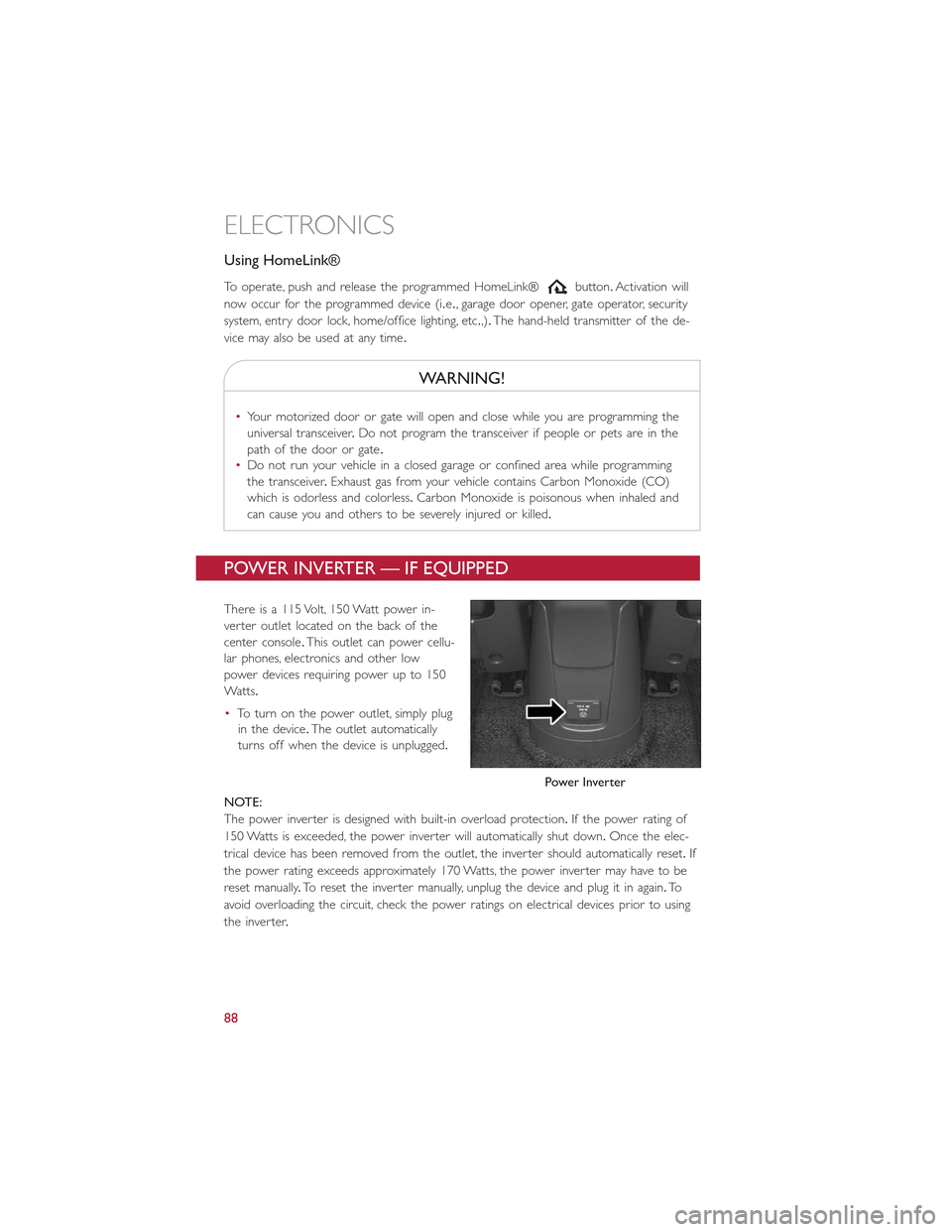
There is a 115 Volt, 150 Watt power in-
verter outlet located on the back of the
center console.This outlet can power cellu-
lar phones, electronics and other low
power devices requiring power up to 150
Wa t t s.
•To turn on the power outlet, simply plug
in the device.The outlet automatically
turns off when the device is unplugged.
NOTE:
The power inverter is designed with built-in overload protection.If the power rating of
150 Watts is exceeded, the power inverter will automatically shut down.Once the elec-
trical device has been removed from the outlet, the inverter should automatically reset.If
the power rating exceeds approximately 170 Watts, the power inverter may have to be
reset manually.To reset the inverter manually, unplug the device and plug it in again.To
avoid overloading the circuit, check the power ratings on electrical devices prior to using
the inverter.
Power Inverter
ELECTRONICS
88
Page 91 of 148
WARNING!
To Avoid Serious Injury or Death DO NOT:
•insert any objects into the receptacles
•touch with wet hands
Close the lid when not in use.If this outlet is mishandled, it may cause an electric shock
and failure.
POWER OUTLET
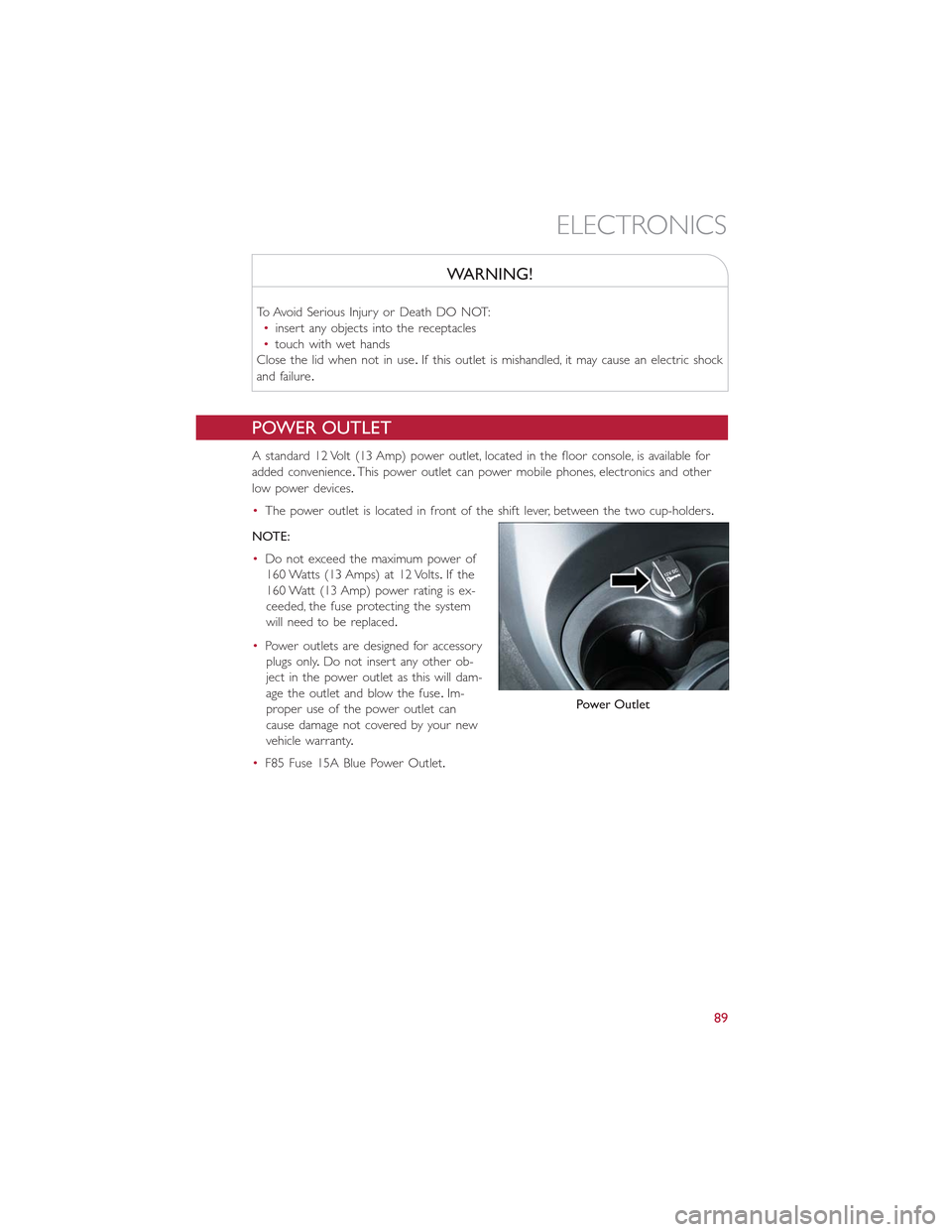
A standard 12 Volt (13 Amp) power outlet, located in the floor console, is available for
added convenience.This power outlet can power mobile phones, electronics and other
low power devices.
•The power outlet is located in front of the shift lever, between the two cup-holders.
NOTE:
•Do not exceed the maximum power of
160 Watts (13 Amps) at 12 Volts.If the
160 Watt (13 Amp) power rating is ex-
ceeded, the fuse protecting the system
will need to be replaced.
•Power outlets are designed for accessory
plugs only.Do not insert any other ob-
ject in the power outlet as this will dam-
age the outlet and blow the fuse.Im-
proper use of the power outlet can
cause damage not covered by your new
vehicle warranty.
•F85 Fuse 15A Blue Power Outlet.
Power Outlet
ELECTRONICS
89
Page 94 of 148
ROADSIDE ASSISTANCE
•If your FIAT 500L requires jump start assistance, out of gas/fuel delivery, tire service,
lockout service or towing due to a defect covered under the Basic Limited Warranty,
dial toll-free 1-888-242-6342 or 1-800-363-4869 for Canadian Residents.See your
Warranty booklet for further details.
•Provide your name, vehicle identification number and license plate number.
•Provide your location, including telephone number, from which you are calling.
•Briefly describe the nature of the problem and answer a few simple questions.
•You will be given the name of the service provider and an estimated time of arrival.If
you feel you are in an “unsafe situation,” please let us know.With your consent, we will
contact local police or safety authorities.
INSTRUMENT CLUSTER WARNING LIGHTS
- Low Fuel Warning Light
This warning light indicates when the fuel level reaches approximately 2.0 gal (7.8 L).This
light will turn on and a single chime will sound.
Charging System Light
This light shows the status of the electrical charging system.If the charging system light
remains on, it means that the vehicle is experiencing a problem with the charging system.
We recommend you do not continue driving if the charging system light is on.Have the
vehicle serviced immediately.
Oil Pressure Warning Light
This light indicates low engine oil pressure.If the light turns on while driving, stop the
vehicle and shut off the engine as soon as possible.A chime will sound when this light
turns on.
We recommend you do not operate the vehicle or engine damage will occur.Have the
vehicle serviced immediately.
Anti-Lock Brake (ABS) Light
This light monitors the Anti-Lock Brake System (ABS).
If the light is not on during starting, stays on or turns on while driving, we recommend
you contact the nearest authorized dealer and have the vehicle serviced immediately.
Air Bag Warning Light
If the light is not on during starting, stays on, or turns on while driving, have the vehicle
serviced by an authorized dealer immediately.
WHAT TO DO IN EMERGENCIES
92
Page 117 of 148
Follow these steps to connect the negative(-)battery cable:
1.Connect the negative(-)battery terminal to the negative(-)post of the battery.
2.Push inward on the negative(-)battery cable terminal release lever to the closed po-
sition.
•If frequent jump-starting is required to start your vehicle, you should have the battery
and charging system inspected at your authorized dealer.
CAUTION!
•Accessories that can be plugged into the vehicle power outlets draw power from
the vehicle’s battery, even when not in use (i.e., cellular phones, etc.).Eventually, if
plugged in long enough, the vehicle’s battery will discharge sufficiently to degrade
battery life and/or prevent the engine from starting.
•Do not use a portable battery booster pack or any other booster source with a
system voltage greater than 12 Volts or damage to the battery, starter motor, alter-
nator or electrical system may occur.
•Failure to follow these procedures could result in damage to the charging system
of the booster vehicle or the discharged vehicle.
WARNING!
•Do not attempt jump-starting if the battery is frozen.It could rupture or explode
and cause personal injury.
•Take care to avoid the radiator cooling fan whenever the hood is raised.It can
start anytime the ignition switch is on.You can be injured by moving fan blades.
•Remove any metal jewelry such as watch bands or bracelets that might make an
inadvertent electrical contact.You could be seriously injured.
•Batteries contain sulfuric acid that can burn your skin or eyes and generate hydro-
gen gas which is flammable and explosive.Keep open flames or sparks away from
the battery.
•Do not allow vehicles to touch each other as this could establish a ground con-
nection and personal injury could result.
•Failure to follow this procedure could result in personal injury or property damage
due to battery explosion.
•Do not connect the cable to the negative post (-)
of the discharged battery.The resulting electrical spark could cause the battery to
explode and could result in personal injury.
WHAT TO DO IN EMERGENCIES
115
Page 139 of 148
FIAT CUSTOMER CENTER
P.O.Box 21–8004 Auburn Hills, MI 48321–8004 Phone: 1-888-242-6342
FIAT CANADA CUSTOMER CENTER
P.O.Box 1621 Windsor, Ontario N9A 4H6 Phone: 1-800-465-2001 (English) Phone:
1-800-387-9983 (French)
ASSISTANCE FOR THE HEARING IMPAIRED
To assist customers who have hearing difficulties, the manufacturer has installed special
TDD (Telecommunication Devices for the Deaf ) equipment at its customer center.Any
hearing or speech impaired customer, who has access to a TDD or a conventional tele-
typewriter (TTY) in the United States, can communicate with the manufacturer by dialing
1-800-380-CHRY.Canadian residents with hearing difficulties that require assistance can
use the special needs relay service offered by Bell Canada.For TTY teletypewriter users,
dial 711 and for Voice callers, dial 1-800-855-0511 to connect with a Bell Relay Service
operator.
WARNING!
Engine exhaust, some of its constituents, and certain vehicle components contain, or
emit, chemicals known to the State of California to cause cancer and birth defects, or
other reproductive harm.In addition, certain fluids contained in vehicles and certain
products of component wear contain, or emit, chemicals known to the State of
California to cause cancer and birth defects, or other reproductive harm.
PUBLICATIONS ORDERING
•If you are the first registered retail owner of your vehicle, you may obtain a compli-
mentary printed copy of the Owner's Manual, Navigation/Uconnect® Manuals or War-
ranty Booklet.United States customers may visit the Fiat Contact Us page at
www.fiat.com scroll to the bottom of the page and select the “Contact Us” link, then
select the “Owner’s Manual and Glove Box Material” from the left menu.You may also
obtain a complimentary copy by calling 1-888-242-6342 (U.S.) or 1-800-387-1143
(Canada).
•Replacement English User Guide kits or DVDs may be purchased by visiting
www.techauthority.com or by calling 1-800-890-4038 (U.S.) or 1-800-387-1143
(Canada).Visa, Master Card, American Express and Discover orders are accepted.If
you prefer mailing your order, please call the above numbers for an order form.
NOTE:
A street address is required when ordering manuals (no P.O.Boxes).
CONSUMER ASSISTANCE
137