light FIAT 500X 2022 User Guide
[x] Cancel search | Manufacturer: FIAT, Model Year: 2022, Model line: 500X, Model: FIAT 500X 2022Pages: 312, PDF Size: 13.26 MB
Page 23 of 312

GETTING TO KNOW YOUR VEHICLE21
VEHICLE SECURITY SYSTEM — IF EQUIPPED
The Vehicle Security system monitors the vehicle
doors, hood, liftgate, and the Keyless Enter ‘n Go™
Ignition for unauthorized operation. While the
Vehicle Security system is armed, interior switches
for door locks and liftgate release are disabled. If
something triggers the alarm, the Vehicle Security
system will provide the following audible and
visible signals:
The horn will pulse
The turn signals will flash
The Vehicle Security Light in the instrument
cluster will flash
TO ARM THE SYSTEM
Follow these steps to arm the Vehicle Security
system:
1. Make sure the vehicle’s ignition is placed in
the OFF position.
2. Perform one of the following methods to lock the vehicle:
Push the lock button on the interior power
door lock switch with the driver and/or
passenger door open.
Push the lock button on the exterior Passive
Entry door handle with a valid key fob avail -
able in the same exterior zone Ú page 23.
Push the lock button on the key fob.
3. If any doors are open, close them.
TO DISARM THE SYSTEM
The Vehicle Security system can be disarmed using
any of the following methods:
Push the unlock button on the key fob.
Grab the Passive Entry door handle to unlock
the door Ú page 23.
Cycle the ignition out of the OFF position to
disarm the system.
NOTE:
The driver's door key cylinder cannot arm or
disarm the Vehicle Security system.
The Vehicle Security system remains armed
during liftgate entry. If someone enters the
vehicle through the liftgate and opens any door,
the alarm will sound.
When the Vehicle Security system is armed, the
interior power door lock switches will not unlock
the doors. The Vehicle Security system is designed to protect
your vehicle. However, you can create conditions
where the system will give you a false alarm. If one
of the previously described arming sequences has
occurred, the Vehicle Security system will arm,
regardless of whether you are in the vehicle or not.
If you remain in the vehicle and open a door, the
alarm will sound. If this occurs, disarm the Vehicle
Security system.
If the Vehicle Security system is armed and the
battery becomes disconnected, the Vehicle
Security system will remain armed when the
battery is reconnected; the exterior lights will flash,
and the horn will sound. If this occurs, disarm the
Vehicle Security system.
DISABLING
To completely disable the alarm (e.g. in the case of
long inactivity of the car), lock the doors by turning
the emergency key in the exterior door lock
cylinder.
NOTE:If the batteries in the key fob discharge in the event
of a failure to the system or to switch off the alarm,
place the ignition in the ON/RUN position.
2
22_FD_OM_EN_USC_t.book Page 21
Page 35 of 312
GETTING TO KNOW YOUR VEHICLE33
MIRRORS
INSIDE REARVIEW MIRROR
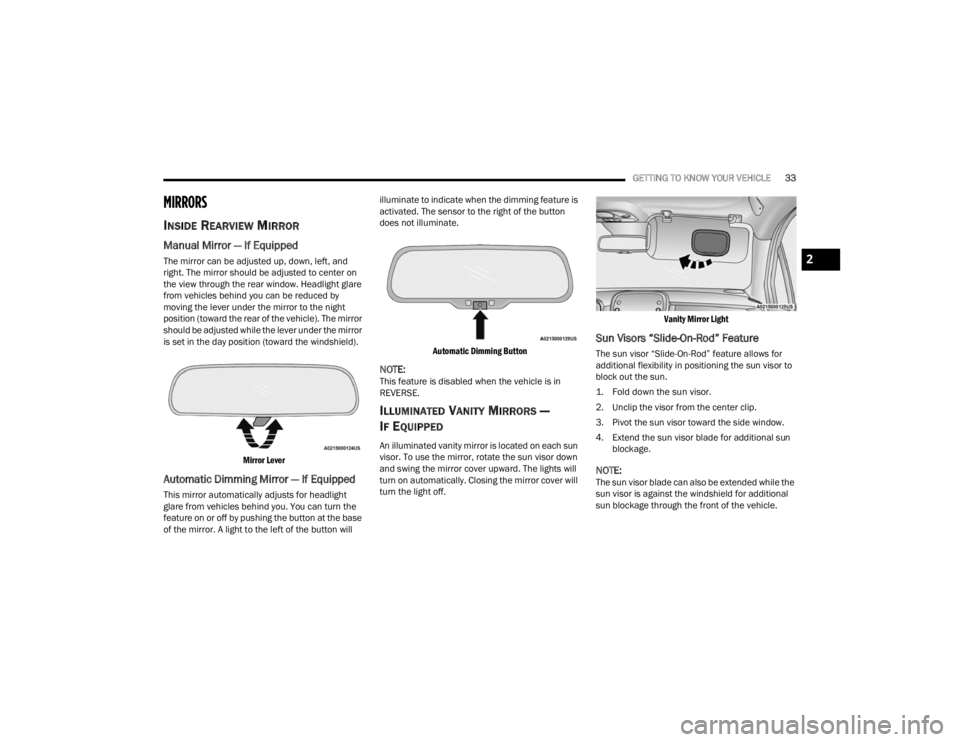
Manual Mirror — If Equipped
The mirror can be adjusted up, down, left, and
right. The mirror should be adjusted to center on
the view through the rear window. Headlight glare
from vehicles behind you can be reduced by
moving the lever under the mirror to the night
position (toward the rear of the vehicle). The mirror
should be adjusted while the lever under the mirror
is set in the day position (toward the windshield).
Mirror Lever
Automatic Dimming Mirror — If Equipped
This mirror automatically adjusts for headlight
glare from vehicles behind you. You can turn the
feature on or off by pushing the button at the base
of the mirror. A light to the left of the button will illuminate to indicate when the dimming feature is
activated. The sensor to the right of the button
does not illuminate.
Automatic Dimming Button
NOTE:This feature is disabled when the vehicle is in
REVERSE.
ILLUMINATED VANITY MIRRORS —
I
F EQUIPPED
An illuminated vanity mirror is located on each sun
visor. To use the mirror, rotate the sun visor down
and swing the mirror cover upward. The lights will
turn on automatically. Closing the mirror cover will
turn the light off.
Vanity Mirror Light
Sun Visors “Slide-On-Rod” Feature
The sun visor “Slide-On-Rod” feature allows for
additional flexibility in positioning the sun visor to
block out the sun.
1. Fold down the sun visor.
2. Unclip the visor from the center clip.
3. Pivot the sun visor toward the side window.
4. Extend the sun visor blade for additional sun
blockage.
NOTE:The sun visor blade can also be extended while the
sun visor is against the windshield for additional
sun blockage through the front of the vehicle.
2
22_FD_OM_EN_USC_t.book Page 33
Page 38 of 312
36GETTING TO KNOW YOUR VEHICLE
EXTERIOR LIGHTS
HEADLIGHT SWITCH
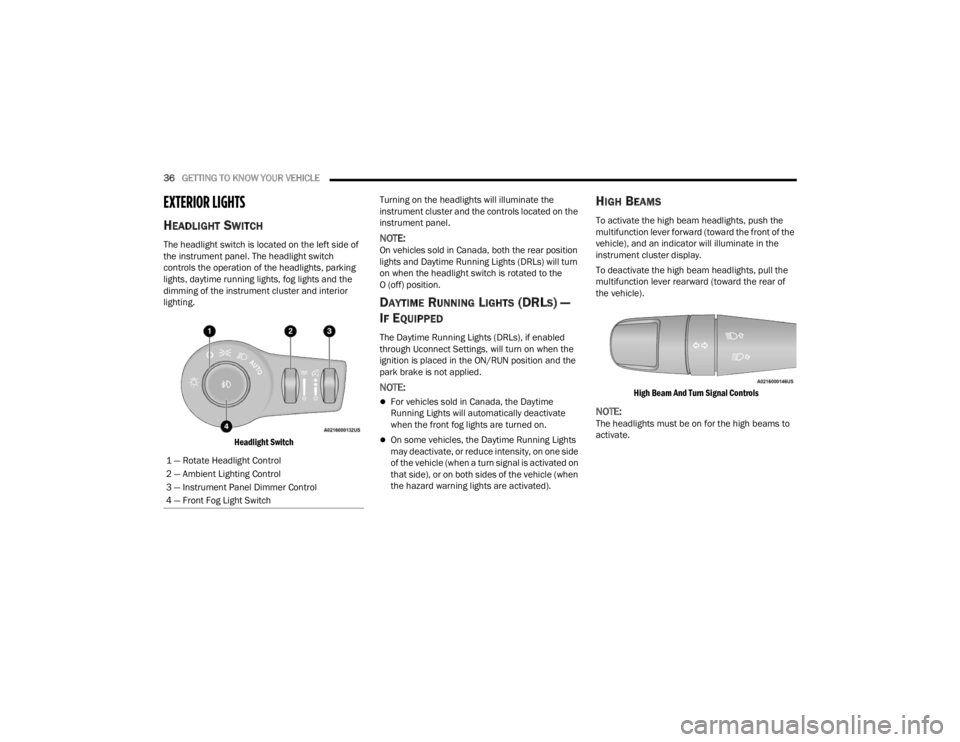
The headlight switch is located on the left side of
the instrument panel. The headlight switch
controls the operation of the headlights, parking
lights, daytime running lights, fog lights and the
dimming of the instrument cluster and interior
lighting.
Headlight Switch
Turning on the headlights will illuminate the
instrument cluster and the controls located on the
instrument panel.NOTE:On vehicles sold in Canada, both the rear position
lights and Daytime Running Lights (DRLs) will turn
on when the headlight switch is rotated to the
O (off) position.
DAYTIME RUNNING LIGHTS (DRLS) —
I
F EQUIPPED
The Daytime Running Lights (DRLs), if enabled
through Uconnect Settings, will turn on when the
ignition is placed in the ON/RUN position and the
park brake is not applied.
NOTE:
For vehicles sold in Canada, the Daytime
Running Lights will automatically deactivate
when the front fog lights are turned on.
On some vehicles, the Daytime Running Lights
may deactivate, or reduce intensity, on one side
of the vehicle (when a turn signal is activated on
that side), or on both sides of the vehicle (when
the hazard warning lights are activated).
HIGH BEAMS
To activate the high beam headlights, push the
multifunction lever forward (toward the front of the
vehicle), and an indicator will illuminate in the
instrument cluster display.
To deactivate the high beam headlights, pull the
multifunction lever rearward (toward the rear of
the vehicle).
High Beam And Turn Signal Controls
NOTE:The headlights must be on for the high beams to
activate.
1 — Rotate Headlight Control
2 — Ambient Lighting Control
3 — Instrument Panel Dimmer Control
4 — Front Fog Light Switch
22_FD_OM_EN_USC_t.book Page 36
Page 39 of 312

GETTING TO KNOW YOUR VEHICLE37
AUTOMATIC HIGH BEAM HEADLAMP
C
ONTROL — IF EQUIPPED
The Automatic High Beam Headlamp Control
system provides increased forward lighting at night
by automating high beam control through the use
of a digital camera mounted on the windshield.
This camera detects vehicle specific light and
automatically switches from high beams to low
beams until the approaching vehicle is out of view.
NOTE:
The Automatic High Beam Headlamp Control
can be turned on or off through Uconnect
Settings Ú page 123.
Broken, muddy, or obstructed headlights and
taillights of vehicles in the field of view will
cause headlights to remain on longer (closer to
the vehicle). Also, dirt, film, and other obstruc -
tions on the windshield or camera lens will
cause the system to function improperly.
FLASH-TO-PASS
You can signal another vehicle with your headlights
by lightly pulling the multifunction lever toward you.
This will cause the high beam headlights to turn on,
and remain on, until the lever is released.
AUTOMATIC HEADLIGHTS — IF EQUIPPED
This system automatically turns the headlights on
or off according to ambient light levels. To turn the
system on, rotate the headlight switch clockwise to
the last detent (AUTO position) for automatic
headlight operation. To turn the automatic system
off, move the headlight switch out of the AUTO
position.
NOTE:The ignition must be in the ON/RUN or START
position before the headlights will come on in the
automatic mode.
Light Sensor
The light sensor is equipped with an infrared LED,
located on the windshield. It detects changes in
light intensity outside the vehicle, based on the
sensitivity of light set by using the menu on the
display or on the Uconnect system.
The higher the sensitivity, the lesser the amount of
external light required for controlling the lighting.
PARKING LIGHTS
Rotate the headlight switch to the first position to
turn on the parking lights. The parking light
indicator in the cluster will illuminate.
HEADLIGHT TIME DELAY
This feature provides the safety of headlight
illumination for up to 90 seconds when leaving
your vehicle in an unlit area.
The time delay of the headlights is programmable
between 0, 30, 60 and 90 seconds within
Uconnect Settings Ú page 123.
Headlight Delay Activation
To activate the delay feature, place the ignition in
the OFF position while the headlights are still on.
Then, turn off the headlights within two minutes.
The delay interval begins when the headlight
switch is turned off.
Headlight Delay Deactivation
The feature is disabled by turning on the
headlights, the parking lights or by placing the
ignition in the ON/RUN position.
If you shut off the lights before the ignition is
turned on, they will turn off in the normal manner.
NOTE:The lights must be turned off within two minutes of
placing the ignition in the OFF position to activate
this feature.
2
22_FD_OM_EN_USC_t.book Page 37
Page 40 of 312
38GETTING TO KNOW YOUR VEHICLE
FRONT FOG LIGHTS — IF EQUIPPED
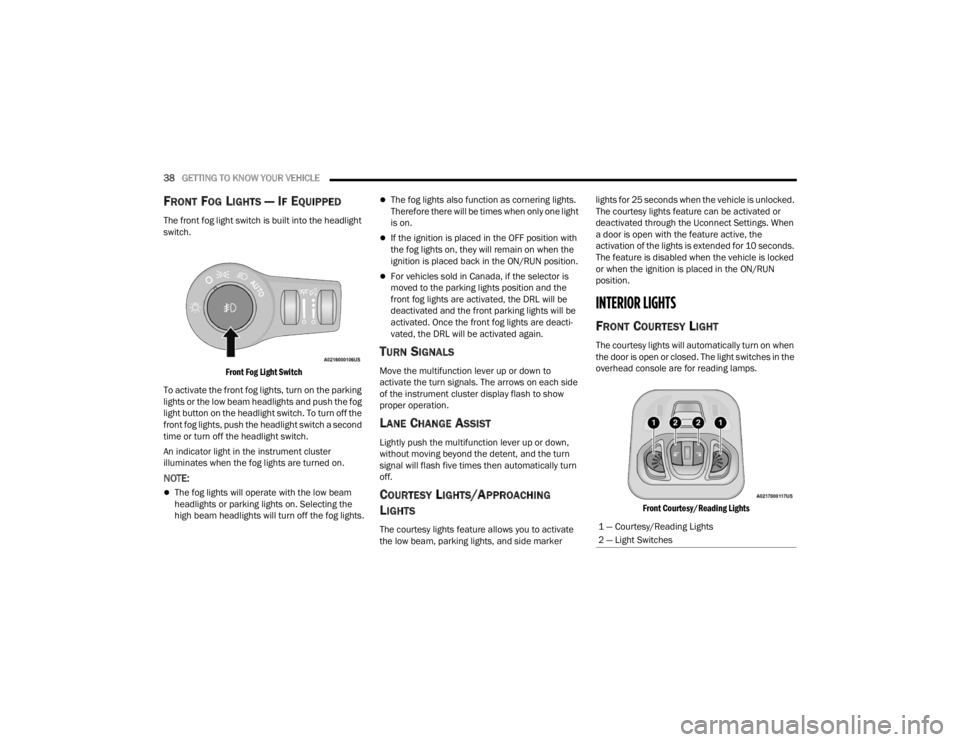
The front fog light switch is built into the headlight
switch.
Front Fog Light Switch
To activate the front fog lights, turn on the parking
lights or the low beam headlights and push the fog
light button on the headlight switch. To turn off the
front fog lights, push the headlight switch a second
time or turn off the headlight switch.
An indicator light in the instrument cluster
illuminates when the fog lights are turned on.
NOTE:
The fog lights will operate with the low beam
headlights or parking lights on. Selecting the
high beam headlights will turn off the fog lights.
The fog lights also function as cornering lights.
Therefore there will be times when only one light
is on.
If the ignition is placed in the OFF position with
the fog lights on, they will remain on when the
ignition is placed back in the ON/RUN position.
For vehicles sold in Canada, if the selector is
moved to the parking lights position and the
front fog lights are activated, the DRL will be
deactivated and the front parking lights will be
activated. Once the front fog lights are deacti -
vated, the DRL will be activated again.
TURN SIGNALS
Move the multifunction lever up or down to
activate the turn signals. The arrows on each side
of the instrument cluster display flash to show
proper operation.
LANE CHANGE ASSIST
Lightly push the multifunction lever up or down,
without moving beyond the detent, and the turn
signal will flash five times then automatically turn
off.
COURTESY LIGHTS/APPROACHING
L
IGHTS
The courtesy lights feature allows you to activate
the low beam, parking lights, and side marker lights for 25 seconds when the vehicle is unlocked.
The courtesy lights feature can be activated or
deactivated through the Uconnect Settings. When
a door is open with the feature active, the
activation of the lights is extended for 10 seconds.
The feature is disabled when the vehicle is locked
or when the ignition is placed in the ON/RUN
position.
INTERIOR LIGHTS
FRONT COURTESY LIGHT
The courtesy lights will automatically turn on when
the door is open or closed. The light switches in the
overhead console are for reading lamps.
Front Courtesy/Reading Lights
1 — Courtesy/Reading Lights
2 — Light Switches
22_FD_OM_EN_USC_t.book Page 38
Page 41 of 312
GETTING TO KNOW YOUR VEHICLE39
Push the driver or passenger light switch to
operate the reading lamps individually.
NOTE:
Before exiting the vehicle, make sure that the
interior lights are turned off. This will prevent the
battery from discharging once the doors are
closed.
If a light is left on it will automatically be turned
off after approximately 15 minutes after the
ignition is in the OFF position.
Dome Light Timing
The dome light will automatically illuminate when
the doors are unlocked, the doors are opened or
after the doors are closed.
Timing Entering The Vehicle
The dome lights illuminate in the following ways:
When the doors are unlocked, the dome light
will illuminate for approximately 27 seconds.
When one of the doors is opened, the dome light
will illuminate for approximately three minutes.
When the doors are closed, the dome light will
automatically shut off after approximately
27 seconds.
NOTE:The timing stops once the ignition is placed in the
ON/RUN position. The dome light will turn off under any of the
following conditions:
The dome light is disabled when the ignition is
placed in the ON/RUN position.
The dome lights will turn off automatically when
the doors are locked.
The dome lights will automatically turn off after
approximately 15 minutes of inactivity to
preserve the battery.
Timing Exiting The Vehicle
The dome light will illuminate under the following
conditions when the ignition is placed in the OFF
position:
The dome light will illuminate for 27 seconds
after the key is removed from the vehicle.
The opening of one of the doors (approximately
three minutes).
After closing a door (approximately 27 seconds).
The dome light timing is disabled when the doors
are locked.
Dimmer Controls
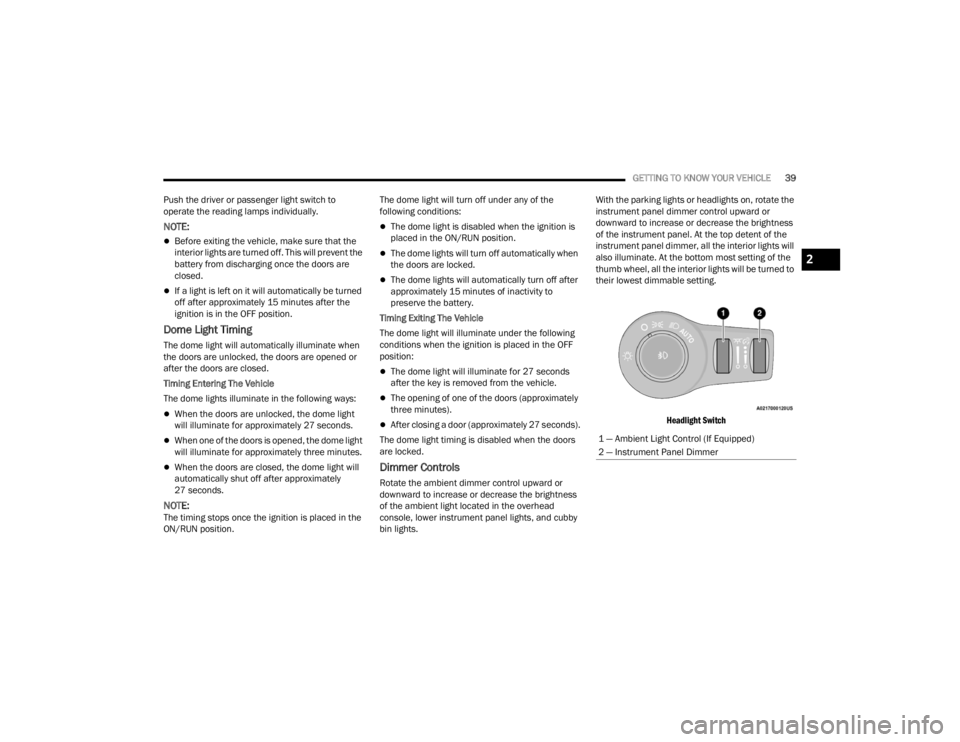
Rotate the ambient dimmer control upward or
downward to increase or decrease the brightness
of the ambient light located in the overhead
console, lower instrument panel lights, and cubby
bin lights. With the parking lights or headlights on, rotate the
instrument panel dimmer control upward or
downward to increase or decrease the brightness
of the instrument panel. At the top detent of the
instrument panel dimmer, all the interior lights will
also illuminate. At the bottom most setting of the
thumb wheel, all the interior lights will be turned to
their lowest dimmable setting.
Headlight Switch
1 — Ambient Light Control (If Equipped)
2 — Instrument Panel Dimmer
2
22_FD_OM_EN_USC_t.book Page 39
Page 42 of 312
40GETTING TO KNOW YOUR VEHICLE
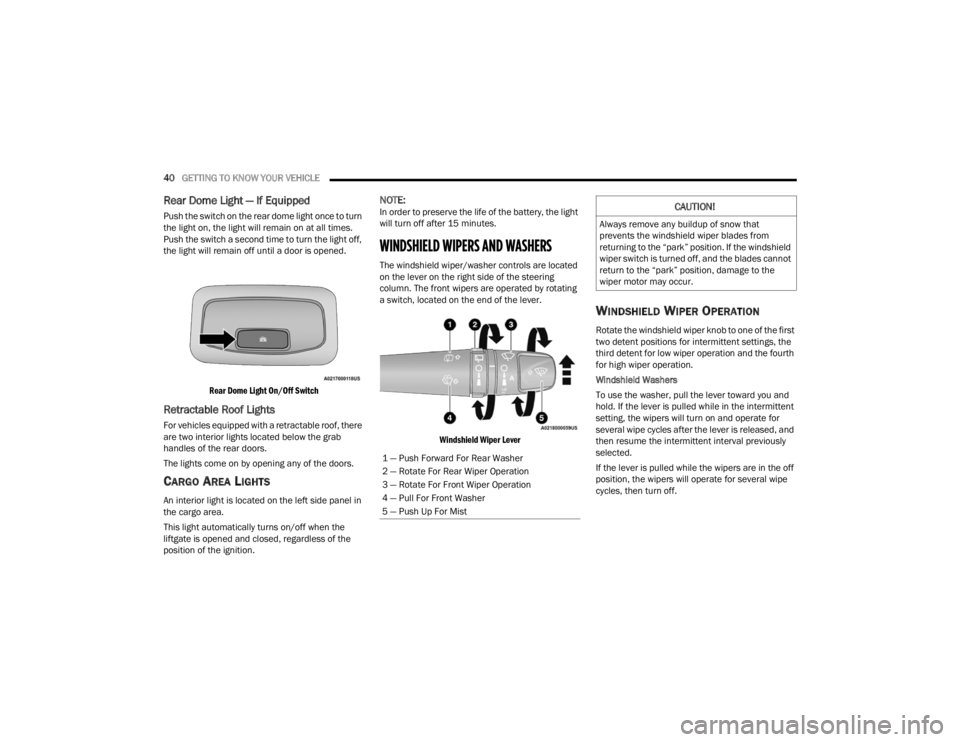
Rear Dome Light — If Equipped
Push the switch on the rear dome light once to turn
the light on, the light will remain on at all times.
Push the switch a second time to turn the light off,
the light will remain off until a door is opened.
Rear Dome Light On/Off Switch
Retractable Roof Lights
For vehicles equipped with a retractable roof, there
are two interior lights located below the grab
handles of the rear doors.
The lights come on by opening any of the doors.
CARGO AREA LIGHTS
An interior light is located on the left side panel in
the cargo area.
This light automatically turns on/off when the
liftgate is opened and closed, regardless of the
position of the ignition.
NOTE:In order to preserve the life of the battery, the light
will turn off after 15 minutes.
WINDSHIELD WIPERS AND WASHERS
The windshield wiper/washer controls are located
on the lever on the right side of the steering
column. The front wipers are operated by rotating
a switch, located on the end of the lever.
Windshield Wiper Lever
WINDSHIELD WIPER OPERATION
Rotate the windshield wiper knob to one of the first
two detent positions for intermittent settings, the
third detent for low wiper operation and the fourth
for high wiper operation.
Windshield Washers
To use the washer, pull the lever toward you and
hold. If the lever is pulled while in the intermittent
setting, the wipers will turn on and operate for
several wipe cycles after the lever is released, and
then resume the intermittent interval previously
selected.
If the lever is pulled while the wipers are in the off
position, the wipers will operate for several wipe
cycles, then turn off.
1 — Push Forward For Rear Washer
2 — Rotate For Rear Wiper Operation
3 — Rotate For Front Wiper Operation
4 — Pull For Front Washer
5 — Push Up For Mist
CAUTION!
Always remove any buildup of snow that
prevents the windshield wiper blades from
returning to the “park” position. If the windshield
wiper switch is turned off, and the blades cannot
return to the “park” position, damage to the
wiper motor may occur.
22_FD_OM_EN_USC_t.book Page 40
Page 47 of 312
GETTING TO KNOW YOUR VEHICLE45
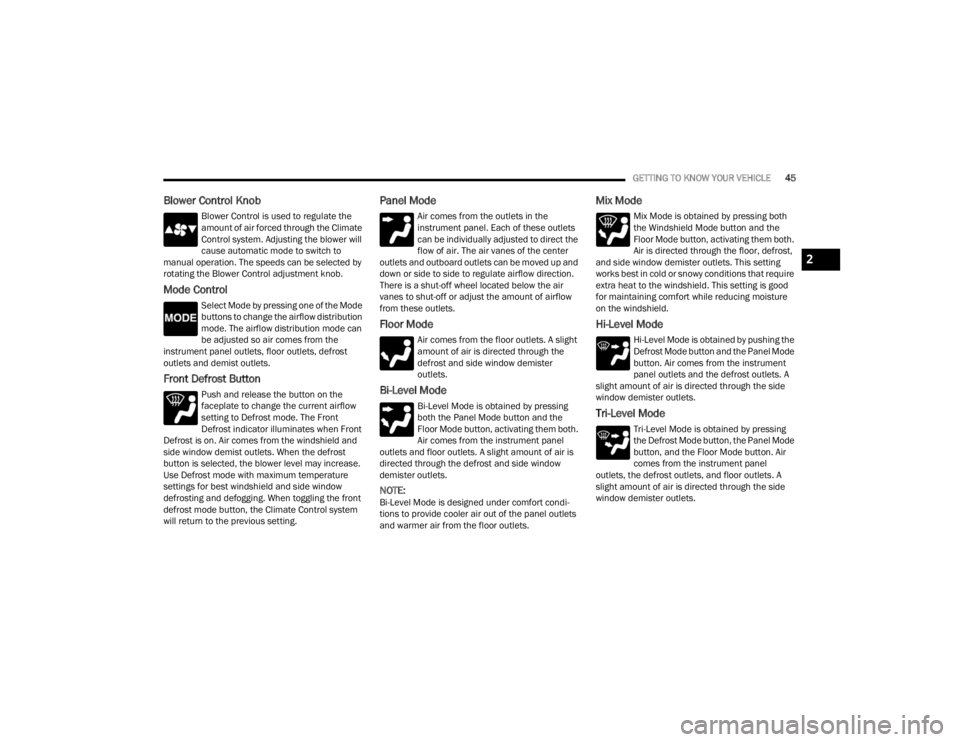
Blower Control Knob
Blower Control is used to regulate the
amount of air forced through the Climate
Control system. Adjusting the blower will
cause automatic mode to switch to
manual operation. The speeds can be selected by
rotating the Blower Control adjustment knob.
Mode Control
Select Mode by pressing one of the Mode
buttons to change the airflow distribution
mode. The airflow distribution mode can
be adjusted so air comes from the
instrument panel outlets, floor outlets, defrost
outlets and demist outlets.
Front Defrost Button
Push and release the button on the
faceplate to change the current airflow
setting to Defrost mode. The Front
Defrost indicator illuminates when Front
Defrost is on. Air comes from the windshield and
side window demist outlets. When the defrost
button is selected, the blower level may increase.
Use Defrost mode with maximum temperature
settings for best windshield and side window
defrosting and defogging. When toggling the front
defrost mode button, the Climate Control system
will return to the previous setting.
Panel Mode
Air comes from the outlets in the
instrument panel. Each of these outlets
can be individually adjusted to direct the
flow of air. The air vanes of the center
outlets and outboard outlets can be moved up and
down or side to side to regulate airflow direction.
There is a shut-off wheel located below the air
vanes to shut-off or adjust the amount of airflow
from these outlets.
Floor Mode
Air comes from the floor outlets. A slight
amount of air is directed through the
defrost and side window demister
outlets.
Bi-Level Mode
Bi-Level Mode is obtained by pressing
both the Panel Mode button and the
Floor Mode button, activating them both.
Air comes from the instrument panel
outlets and floor outlets. A slight amount of air is
directed through the defrost and side window
demister outlets.
NOTE:Bi-Level Mode is designed under comfort condi -
tions to provide cooler air out of the panel outlets
and warmer air from the floor outlets.
Mix Mode
Mix Mode is obtained by pressing both
the Windshield Mode button and the
Floor Mode button, activating them both.
Air is directed through the floor, defrost,
and side window demister outlets. This setting
works best in cold or snowy conditions that require
extra heat to the windshield. This setting is good
for maintaining comfort while reducing moisture
on the windshield.
Hi-Level Mode
Hi-Level Mode is obtained by pushing the
Defrost Mode button and the Panel Mode
button. Air comes from the instrument
panel outlets and the defrost outlets. A
slight amount of air is directed through the side
window demister outlets.
Tri-Level Mode
Tri-Level Mode is obtained by pressing
the Defrost Mode button, the Panel Mode
button, and the Floor Mode button. Air
comes from the instrument panel
outlets, the defrost outlets, and floor outlets. A
slight amount of air is directed through the side
window demister outlets.
2
22_FD_OM_EN_USC_t.book Page 45
Page 49 of 312
GETTING TO KNOW YOUR VEHICLE47
illuminates when the rear window defroster is on.
The rear window defroster automatically turns off
after 20 minutes.
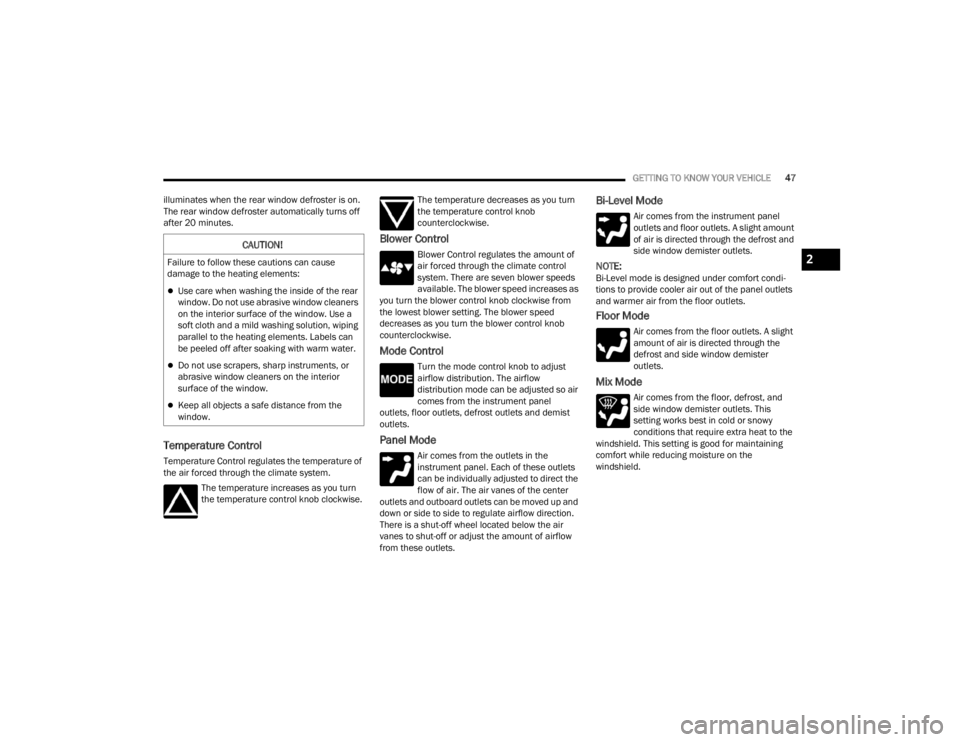
Temperature Control
Temperature Control regulates the temperature of
the air forced through the climate system. The temperature increases as you turn
the temperature control knob clockwise. The temperature decreases as you turn
the temperature control knob
counterclockwise.
Blower Control
Blower Control regulates the amount of
air forced through the climate control
system. There are seven blower speeds
available. The blower speed increases as
you turn the blower control knob clockwise from
the lowest blower setting. The blower speed
decreases as you turn the blower control knob
counterclockwise.
Mode Control
Turn the mode control knob to adjust
airflow distribution. The airflow
distribution mode can be adjusted so air
comes from the instrument panel
outlets, floor outlets, defrost outlets and demist
outlets.
Panel Mode
Air comes from the outlets in the
instrument panel. Each of these outlets
can be individually adjusted to direct the
flow of air. The air vanes of the center
outlets and outboard outlets can be moved up and
down or side to side to regulate airflow direction.
There is a shut-off wheel located below the air
vanes to shut-off or adjust the amount of airflow
from these outlets.
Bi-Level Mode
Air comes from the instrument panel
outlets and floor outlets. A slight amount
of air is directed through the defrost and
side window demister outlets.
NOTE:Bi-Level mode is designed under comfort condi -
tions to provide cooler air out of the panel outlets
and warmer air from the floor outlets.
Floor Mode
Air comes from the floor outlets. A slight
amount of air is directed through the
defrost and side window demister
outlets.
Mix Mode
Air comes from the floor, defrost, and
side window demister outlets. This
setting works best in cold or snowy
conditions that require extra heat to the
windshield. This setting is good for maintaining
comfort while reducing moisture on the
windshield.
CAUTION!
Failure to follow these cautions can cause
damage to the heating elements:
Use care when washing the inside of the rear
window. Do not use abrasive window cleaners
on the interior surface of the window. Use a
soft cloth and a mild washing solution, wiping
parallel to the heating elements. Labels can
be peeled off after soaking with warm water.
Do not use scrapers, sharp instruments, or
abrasive window cleaners on the interior
surface of the window.
Keep all objects a safe distance from the
window.
2
22_FD_OM_EN_USC_t.book Page 47
Page 54 of 312
52GETTING TO KNOW YOUR VEHICLE
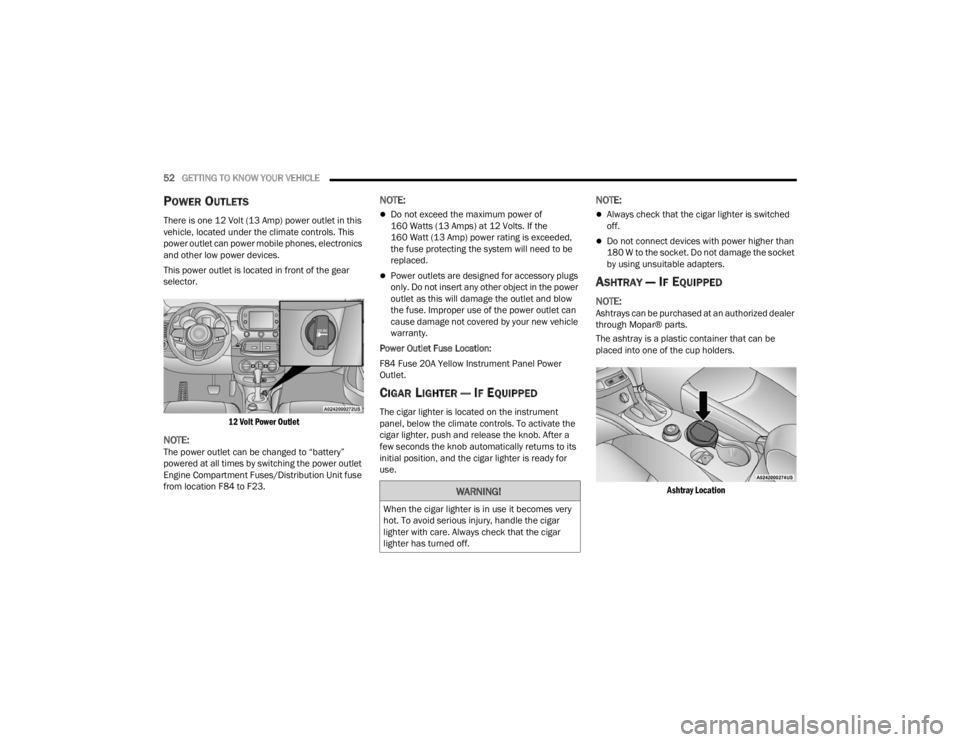
POWER OUTLETS
There is one 12 Volt (13 Amp) power outlet in this
vehicle, located under the climate controls. This
power outlet can power mobile phones, electronics
and other low power devices.
This power outlet is located in front of the gear
selector.
12 Volt Power Outlet
NOTE:The power outlet can be changed to “battery”
powered at all times by switching the power outlet
Engine Compartment Fuses/Distribution Unit fuse
from location F84 to F23.
NOTE:
Do not exceed the maximum power of
160 Watts (13 Amps) at 12 Volts. If the
160 Watt (13 Amp) power rating is exceeded,
the fuse protecting the system will need to be
replaced.
Power outlets are designed for accessory plugs
only. Do not insert any other object in the power
outlet as this will damage the outlet and blow
the fuse. Improper use of the power outlet can
cause damage not covered by your new vehicle
warranty.
Power Outlet Fuse Location:
F84 Fuse 20A Yellow Instrument Panel Power
Outlet.
CIGAR LIGHTER — IF EQUIPPED
The cigar lighter is located on the instrument
panel, below the climate controls. To activate the
cigar lighter, push and release the knob. After a
few seconds the knob automatically returns to its
initial position, and the cigar lighter is ready for
use.
NOTE:
Always check that the cigar lighter is switched
off.
Do not connect devices with power higher than
180 W to the socket. Do not damage the socket
by using unsuitable adapters.
ASHTRAY — IF EQUIPPED
NOTE:Ashtrays can be purchased at an authorized dealer
through Mopar® parts.
The ashtray is a plastic container that can be
placed into one of the cup holders.
Ashtray Location
WARNING!
When the cigar lighter is in use it becomes very
hot. To avoid serious injury, handle the cigar
lighter with care. Always check that the cigar
lighter has turned off.
22_FD_OM_EN_USC_t.book Page 52