light FIAT 500X 2022 Owners Manual
[x] Cancel search | Manufacturer: FIAT, Model Year: 2022, Model line: 500X, Model: FIAT 500X 2022Pages: 312, PDF Size: 13.26 MB
Page 4 of 312

2
INTRODUCTION
SYMBOLS KEY ...........................................................8
ROLLOVER WARNING ............................................. 8
VEHICLE MODIFICATIONS/ALTERATIONS .............9
SYMBOL GLOSSARY.................................................9
GETTING TO KNOW YOUR VEHICLE
KEYS ....................................................................... 14 Key Fob .............................................................14
SENTRY KEY ........................................................... 17
IGNITION SWITCH .................................................. 17
Keyless Enter ‘n Go™ Ignition .........................17
REMOTE START — IF EQUIPPED .......................... 18
How To Use Remote Start ................................19
To Exit Remote Start Mode ..............................19
Remote Start Front Defrost Activation —
If Equipped........................................................20
Remote Start Comfort Systems —
If Equipped .......................................................20
Remote Start Windshield Wiper De–Icer
And Rear Defrost Activation — If Equipped.....20
Remote Start Cancel Message —
If Equipped........................................................20
VEHICLE SECURITY SYSTEM — IF EQUIPPED ..... 21
To Arm The System .........................................21
To Disarm The System ....................................21
Disabling ...........................................................21 DOORS .....................................................................22
Manual Door Locks ..........................................22
Power Door Locks ............................................22
Keyless Enter ‘n Go™ — Passive Entry
(If Equipped) .....................................................23
Automatic Door Locks — If Equipped .............24
Child-Protection Door Lock System —
Rear Doors ........................................................24
STEERING WHEEL ..................................................25
Manual Tilt/Telescoping Steering Column .....25
SEATS ......................................................................26
Manual Adjustment (Front Seats) ...................26
Manual Adjustment (Rear Seats) ....................27
Power Adjustment Front Seats —
If Equipped........................................................28
Heated Seats — If Equipped ...........................29
Head Restraints ..............................................30
UCONNECT VOICE RECOGNITION .........................32
Introducing Voice Recognition.........................32
Get Started .......................................................32
Basic Voice Commands ...................................32
Additional Information .....................................32
MIRRORS ...............................................................33
Inside Rearview Mirror .....................................33
Illuminated Vanity Mirrors —
If Equipped .......................................................33
Outside Mirrors ................................................34
Power Mirrors ...................................................34
Folding Mirror ...................................................34
Power Folding Mirrors — If Equipped ..............35
Heated Mirrors — If Equipped..........................35 EXTERIOR LIGHTS.................................................. 36
Headlight Switch ............................................. 36
Daytime Running Lights (DRLs) —
If Equipped ...................................................... 36
High Beams ...................................................... 36
Automatic High Beam Headlamp Control —
If Equipped .......................................................37
Flash-To-Pass ................................................... 37
Automatic Headlights — If Equipped .............. 37
Parking Lights ................................................... 37
Headlight Time Delay ...................................... 37
Front Fog Lights — If Equipped .......................38
Turn Signals...................................................... 38
Lane Change Assist ......................................... 38
Courtesy Lights/Approaching Lights ............... 38
INTERIOR LIGHTS ................................................. 38
Front Courtesy Light......................................... 38
Cargo Area Lights ............................................. 40
WINDSHIELD WIPERS AND WASHERS .............. 40
Windshield Wiper Operation ........................... 40
Rain Sensing Wipers — If Equipped ................41
Rear Window Wiper/Washer ........................... 42
Windshield Wiper De-Icer — If Equipped ........ 42
CLIMATE CONTROLS ............................................ 43
Automatic Climate Control Descriptions And
Functions .......................................................... 43
Manual Climate Control Descriptions And
Functions .......................................................... 46
Automatic Temperature Control (ATC) ........... 48
Climate Voice Recognition............................... 48
Operating Tips .................................................48
22_FD_OM_EN_USC_t.book Page 2
Page 5 of 312

3
INTERIOR STORAGE AND EQUIPMENT ............... 50 Storage..............................................................50
USB/Media Player Control ...............................51
Power Outlets ..................................................52
Cigar Lighter — If Equipped .............................52
Ashtray — If Equipped ......................................52
Grab Handles....................................................53
WINDOWS............................................................... 53
Power Window Controls ...................................53
SUNROOF — IF EQUIPPED .................................... 55
Opening And Closing The Sunroof...................55
Pinch Protect Feature ......................................55
Venting Sunroof ................................................55
Sun Shade ........................................................56
Sunroof Maintenance ......................................56
Emergency Operation.......................................56
Power Sunroof Relearn Procedure..................56
POWER FOLDING ROOF — IF EQUIPPED ............ 57
Opening The Power Folding Roof ....................57
Closing The Power Roof ...................................58
Power Roof Maintenance ................................58
Ignition Off Operation .......................................58
Relearn Procedure ...........................................58
HOOD ...................................................................... 58
To Open The Hood ............................................58
To Close The Hood ...........................................59 LIFTGATE ................................................................. 60
To Unlock/Open The Liftgate...........................60
Lock/Close The Liftgate ...................................60
Cargo Area Features ........................................61
GETTING TO KNOW YOUR
INSTRUMENT PANEL
INSTRUMENT CLUSTER .........................................63
Instrument Cluster Descriptions .....................64
INSTRUMENT CLUSTER DISPLAY .......................64
Instrument Cluster Display Control Buttons ...64
Engine Oil Change Reset — If Equipped .........65
Instrument Cluster Display Main Menu ..........65
WARNING LIGHTS AND MESSAGES ....................69
Red Warning Lights ..........................................69
Yellow Warning Lights ......................................72
Yellow Indicator Lights .....................................76
Green Indicator Lights .....................................76
White Indicator Lights ......................................77
Blue Indicator Lights ........................................77
Gray Indicator Lights ........................................77
ONBOARD DIAGNOSTIC SYSTEM — OBD II.........78
Onboard Diagnostic System (OBD II)
Cybersecurity ....................................................78
EMISSIONS INSPECTION AND MAINTENANCE
PROGRAMS.............................................................78
STARTING AND OPERATING
STARTING THE ENGINE ......................................... 80
Tip Start Feature ............................................. 80
Cold Weather Operation .................................. 80
Extended Park Starting ....................................80
If Engine Fails To Start ....................................81
After Starting — Warming Up The Engine ....... 81
Stopping The Engine ........................................ 81
Turbocharger “Cool Down” — If Equipped ...... 82
ENGINE BREAK-IN RECOMMENDATIONS .......... 82
ELECTRIC PARK BRAKE (EPB) ............................. 82
Auto Park Brake ............................................... 84
SafeHold ........................................................... 84
Brake Service Mode......................................... 84
AUTOMATIC TRANSMISSION .............................. 85
Gear Selector.................................................... 86
Gear Ranges ..................................................... 86
Transmission Limp Home Mode ..................... 89
Ignition Park Interlock...................................... 89
Brake Transmission Shift Interlock (BTSI)
System ..............................................................89
ALL-WHEEL DRIVE (AWD) — IF EQUIPPED ........ 90
DYNAMIC SELECTOR — IF EQUIPPED ................. 90
Warning Messages........................................... 90
ELECTRIC POWER STEERING .............................. 90
22_FD_OM_EN_USC_t.book Page 3
Page 11 of 312
9
VEHICLE MODIFICATIONS/ALTERATIONS
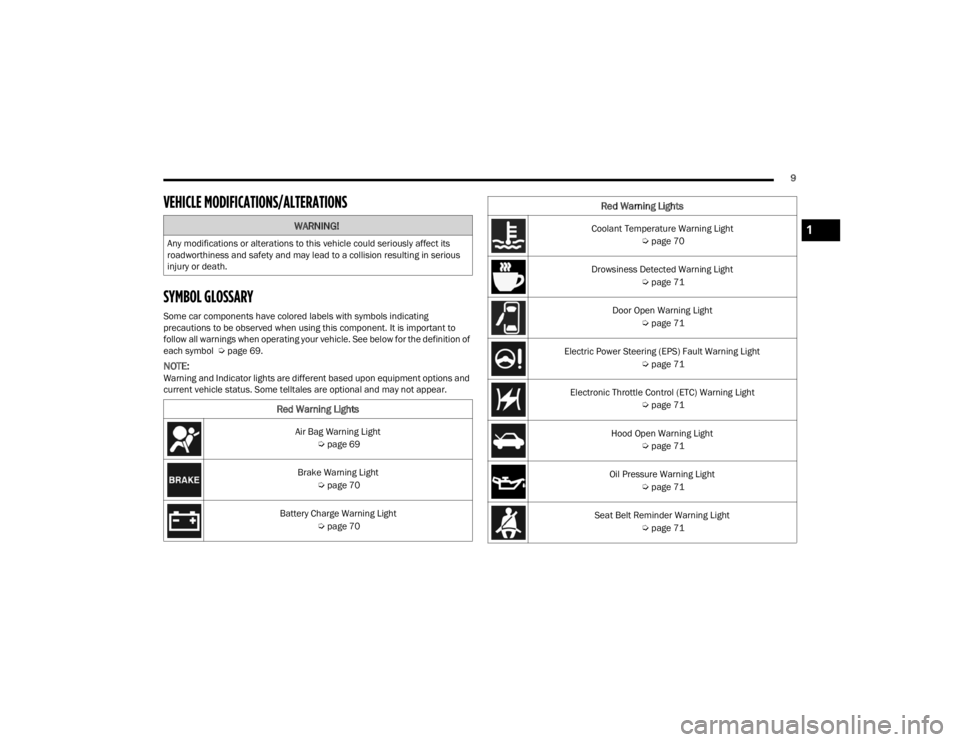
SYMBOL GLOSSARY
Some car components have colored labels with symbols indicating
precautions to be observed when using this component. It is important to
follow all warnings when operating your vehicle. See below for the definition of
each symbol Úpage 69.
NOTE:Warning and Indicator lights are different based upon equipment options and
current vehicle status. Some telltales are optional and may not appear.
WARNING!
Any modifications or alterations to this vehicle could seriously affect its
roadworthiness and safety and may lead to a collision resulting in serious
injury or death.
Red Warning Lights
Air Bag Warning Light
Úpage 69
Brake Warning Light Úpage 70
Battery Charge Warning Light Úpage 70
Coolant Temperature Warning Light
Úpage 70
Drowsiness Detected Warning Light Úpage 71
Door Open Warning Light Úpage 71
Electric Power Steering (EPS) Fault Warning Light Úpage 71
Electronic Throttle Control (ETC) Warning Light Úpage 71
Hood Open Warning Light Úpage 71
Oil Pressure Warning Light Úpage 71
Seat Belt Reminder Warning Light Úpage 71
Red Warning Lights
1
22_FD_OM_EN_USC_t.book Page 9
Page 12 of 312
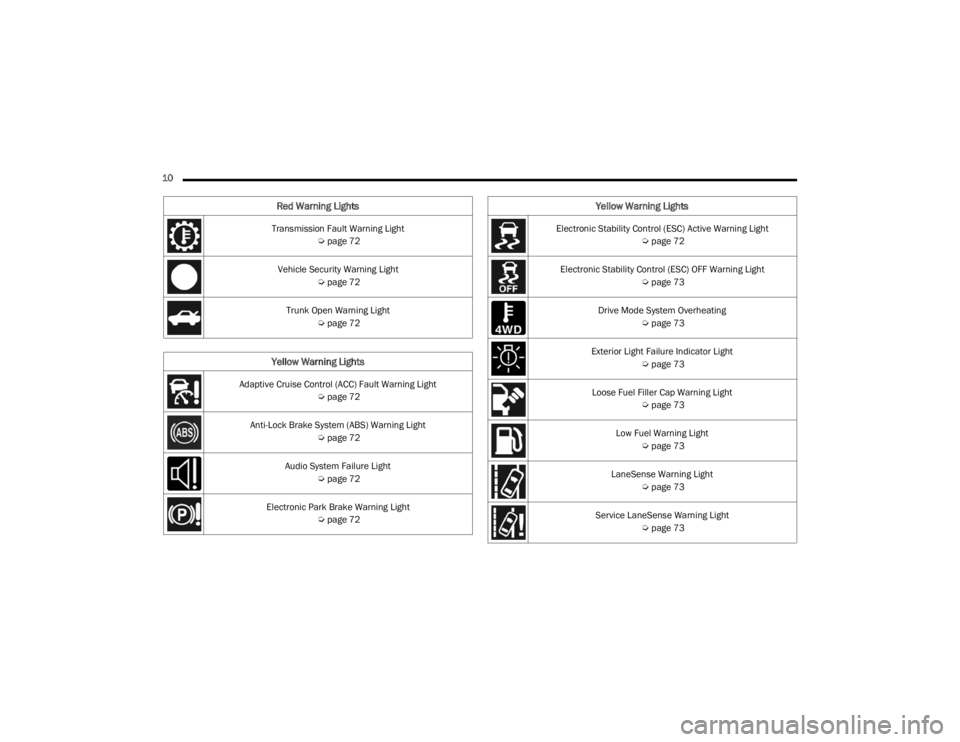
10 Transmission Fault Warning Light Úpage 72
Vehicle Security Warning Light Úpage 72
Trunk Open Warning Light Úpage 72
Yellow Warning Lights
Adaptive Cruise Control (ACC) Fault Warning Light
Úpage 72
Anti-Lock Brake System (ABS) Warning Light Úpage 72
Audio System Failure Light Úpage 72
Electronic Park Brake Warning Light Úpage 72
Red Warning Lights
Electronic Stability Control (ESC) Active Warning Light
Úpage 72
Electronic Stability Control (ESC) OFF Warning Light Úpage 73
Drive Mode System Overheating Úpage 73
Exterior Light Failure Indicator Light Úpage 73
Loose Fuel Filler Cap Warning Light Úpage 73
Low Fuel Warning Light Úpage 73
LaneSense Warning Light Úpage 73
Service LaneSense Warning Light Úpage 73
Yellow Warning Lights
22_FD_OM_EN_USC_t.book Page 10
Page 13 of 312
11
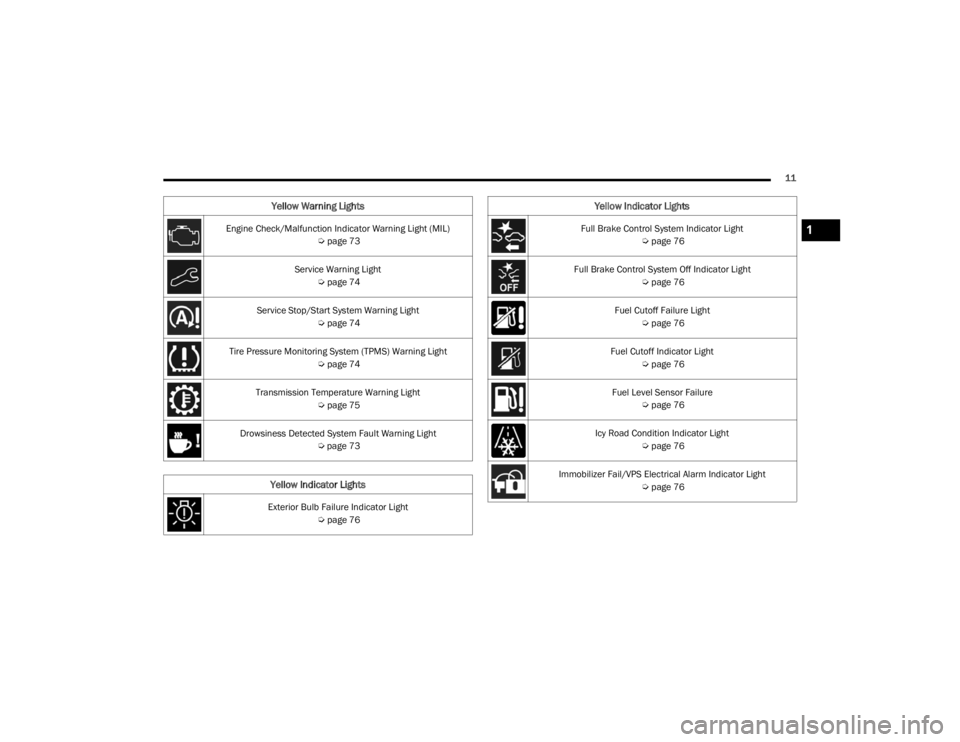
Engine Check/Malfunction Indicator Warning Light (MIL) Úpage 73
Service Warning Light Úpage 74
Service Stop/Start System Warning Light Úpage 74
Tire Pressure Monitoring System (TPMS) Warning Light Úpage 74
Transmission Temperature Warning Light Úpage 75
Drowsiness Detected System Fault Warning Light Úpage 73
Yellow Indicator Lights
Exterior Bulb Failure Indicator Light
Úpage 76
Yellow Warning Lights
Full Brake Control System Indicator Light
Úpage 76
Full Brake Control System Off Indicator Light Úpage 76
Fuel Cutoff Failure Light Úpage 76
Fuel Cutoff Indicator Light Úpage 76
Fuel Level Sensor Failure Úpage 76
Icy Road Condition Indicator Light Úpage 76
Immobilizer Fail/VPS Electrical Alarm Indicator Light Úpage 76
Yellow Indicator Lights
1
22_FD_OM_EN_USC_t.book Page 11
Page 14 of 312
12
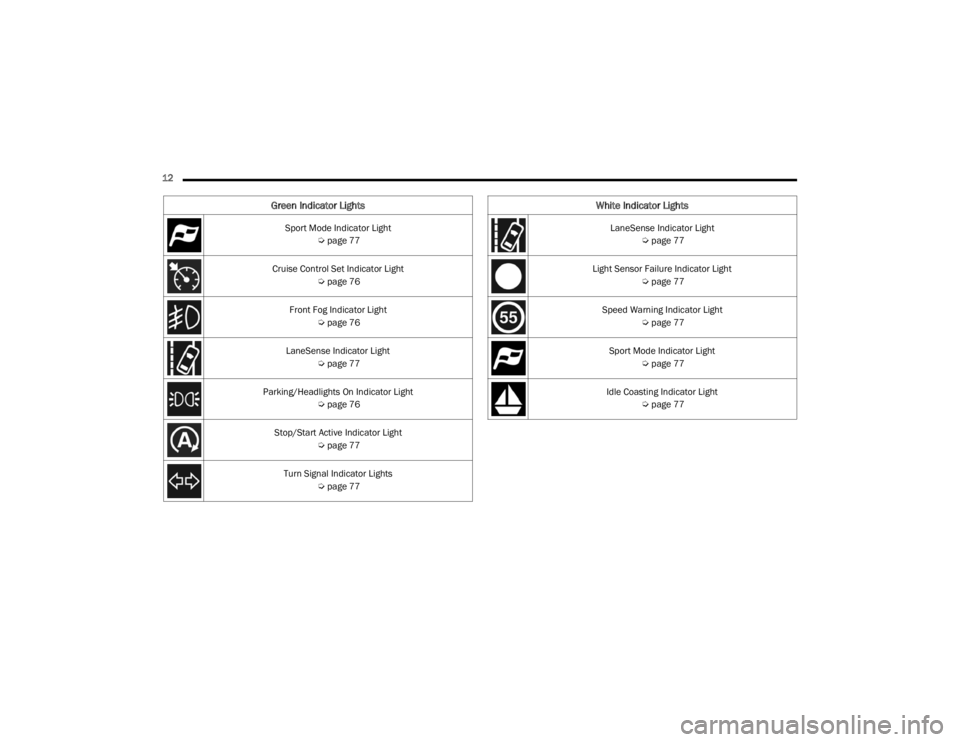
Green Indicator Lights
Sport Mode Indicator Light Úpage 77
Cruise Control Set Indicator Light Úpage 76
Front Fog Indicator Light Úpage 76
LaneSense Indicator Light Úpage 77
Parking/Headlights On Indicator Light Úpage 76
Stop/Start Active Indicator Light Úpage 77
Turn Signal Indicator Lights Úpage 77
White Indicator Lights
LaneSense Indicator Light
Úpage 77
Light Sensor Failure Indicator Light Úpage 77
Speed Warning Indicator Light Úpage 77
Sport Mode Indicator Light Úpage 77
Idle Coasting Indicator Light Úpage 77
22_FD_OM_EN_USC_t.book Page 12
Page 15 of 312

13
Blue Indicator Lights
High Beam Indicator Light Úpage 77
Gray Indicator Lights
Cruise Control Ready/Canceled Indicator Light
Úpage 771
22_FD_OM_EN_USC_t.book Page 13
Page 17 of 312
GETTING TO KNOW YOUR VEHICLE15
The vehicle’s horn will rapidly chirp three times
along with a single flash of the vehicle’s exterior
lights.
NOTE:
The doors have to be open and then closed in
order for the vehicle to check for the presence of
a key fob; the Key Left Vehicle feature will not
activate until all of the doors are closed.
These alerts will not be activated in situations
where the vehicle’s engine is left running with
the key fob inside.
Replacing The Battery In The Key Fob
The recommended replacement battery is one
CR2032 battery.
NOTE:
Customers are recommended to use a battery
obtained from Mopar®. Aftermarket coin
battery dimensions may not meet the original
OEM coin battery dimensions.
Perchlorate Material — special handling may
apply. See www.dtsc.ca.gov/hazardouswaste/
perchlorate for further information.
Do not touch the battery terminals that are on
the back housing or the printed circuit board.
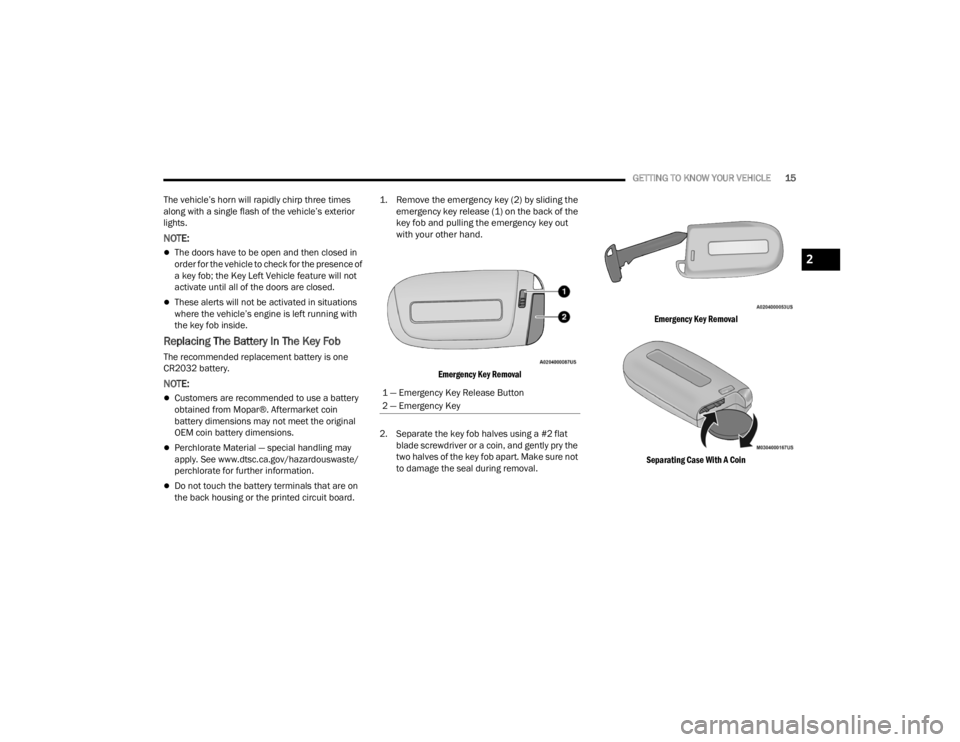
1. Remove the emergency key (2) by sliding the
emergency key release (1) on the back of the
key fob and pulling the emergency key out
with your other hand.
Emergency Key Removal
2. Separate the key fob halves using a #2 flat blade screwdriver or a coin, and gently pry the
two halves of the key fob apart. Make sure not
to damage the seal during removal.
Emergency Key Removal
Separating Case With A Coin
1 — Emergency Key Release Button
2 — Emergency Key
2
22_FD_OM_EN_USC_t.book Page 15
Page 19 of 312
GETTING TO KNOW YOUR VEHICLE17
SENTRY KEY
The Sentry Key Immobilizer system prevents
unauthorized vehicle operation by disabling the
engine. The system does not need to be armed or
activated. Operation is automatic, regardless of
whether the vehicle is locked or unlocked.
The system uses a key fob, keyless push button
ignition and a Radio Frequency (RF) receiver to
prevent unauthorized vehicle operation. Therefore,
only key fobs that are programmed to the vehicle
can be used to start and operate the vehicle. The
system will shut the engine off in two seconds if an
incorrect key fob is used to start the engine.
After placing the ignition switch in the ON/RUN
position, the Vehicle Security Light will turn on for
three seconds for a bulb check. If the light remains
on after the bulb check, it indicates that there is a
problem with the electronics. In addition, if the light
begins to flash after the bulb check, it indicates
that someone used an invalid key fob to start the
engine. Either of these conditions will result in the
engine being shut off after two seconds.
If the Vehicle Security Light turns on during normal
vehicle operation (vehicle running for longer than
10 seconds), it indicates that there is a fault in the
electronics. Should this occur, have the vehicle
serviced as soon as possible by an authorized
dealer. All of the key fobs provided with your new vehicle
have been programmed to the vehicle electronics
Ú
page 297.
IGNITION SWITCH
KEYLESS ENTER ‘N GO™ IGNITION
This feature allows the driver to operate the
ignition switch with the push of a button as long as
the key fob is in the passenger compartment.
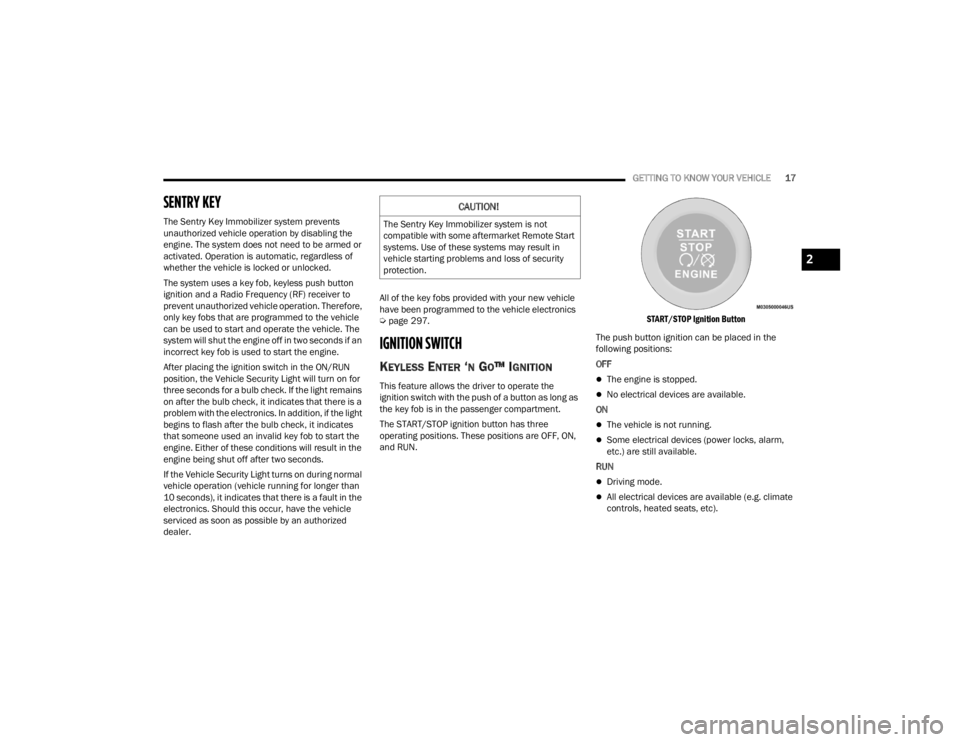
The START/STOP ignition button has three
operating positions. These positions are OFF, ON,
and RUN.
START/STOP Ignition Button
The push button ignition can be placed in the
following positions:
OFFThe engine is stopped.
No electrical devices are available.
ON
The vehicle is not running.
Some electrical devices (power locks, alarm,
etc.) are still available.
RUN
Driving mode.
All electrical devices are available (e.g. climate
controls, heated seats, etc).
CAUTION!
The Sentry Key Immobilizer system is not
compatible with some aftermarket Remote Start
systems. Use of these systems may result in
vehicle starting problems and loss of security
protection.
2
22_FD_OM_EN_USC_t.book Page 17
Page 21 of 312

GETTING TO KNOW YOUR VEHICLE19
HOW TO USE REMOTE START
Push and release the Remote Start button on the
key fob twice within five seconds. The vehicle
doors will lock, the parking lights will flash, and the
horn will chirp twice (if programmed). Then the
engine will start and the vehicle will remain in the
Remote Start mode for a 15 minute cycle. Pushing
the Remote Start button a third time shuts the
engine off.
With Remote Start, the engine will only run for
15 minutes.
If an engine fault is present or fuel level is low,
the vehicle will start and then shut down in 10
seconds.
The parking lights will turn on and remain on
during Remote Start mode.
For security, power window and power sunroof
operation (if equipped) are disabled when the
vehicle is in the Remote Start mode.
The ignition must be placed in the ON/RUN posi -
tion before the Remote Start sequence can be
repeated for a third cycle. All of the following conditions must be met before
the engine will remote start:
Gear Selector in PARK
Doors closed
Hood closed
Liftgate closed
Hazard switch off
Brake switch inactive (brake pedal not pressed)
Battery at an acceptable charge level
PANIC button not pushed
System not disabled from previous Remote
Start event
Vehicle Security Light flashing
Ignition in OFF position
Fuel level meets minimum requirement
Vehicle Security system is not signaling an intru
-
sion
Malfunction Indicator Light (MIL) is not illumi -
nated
TO EXIT REMOTE START MODE
To drive the vehicle after starting the Remote Start
system, push and release the START/STOP ignition
button while pressing the brake pedal prior to the
end of the 15 minute cycle.
The Remote Start system will turn the engine off
with another push and release of the Remote Start
button on the key fob, or if the engine is allowed to
run for the entire 15 minute cycle. Once the
ignition is placed in the ON/RUN position, the
climate controls will resume the previously set
operations (temperature, blower control, etc.).
NOTE:
For vehicles equipped with the Keyless
Enter ‘n Go™ — Passive Entry feature, the
WARNING!
Do not start or run an engine in a closed
garage or confined area. Exhaust gas contains
Carbon Monoxide (CO) which is odorless and
colorless. Carbon Monoxide is poisonous and
can cause serious injury or death when
inhaled.
Keep key fobs away from children. Operation
of the Remote Start system, windows, door
locks or other controls could cause serious
injury or death.
2
22_FD_OM_EN_USC_t.book Page 19