light FIAT 500X 2022 Owner's Manual
[x] Cancel search | Manufacturer: FIAT, Model Year: 2022, Model line: 500X, Model: FIAT 500X 2022Pages: 312, PDF Size: 13.26 MB
Page 56 of 312
54GETTING TO KNOW YOUR VEHICLE
Auto-Up Feature With Anti-Pinch Protection
Lift the window switch up for a short period of time
and release; the window will go up automatically.
To stop the window from going all the way up
during the Auto-Up operation, pull up or push down
on the switch briefly.
To close the window part way, lift the window
switch briefly and release it when you want the
window to stop.
If the window runs into any obstacle during
auto-closure, it will reverse direction and then go
back down. Remove the obstacle and use the
window switch again to close the window.
NOTE:Any impact due to rough road conditions may
trigger the auto-reverse function unexpectedly
during auto-closure. If this happens, pull the switch
lightly and hold to close the window manually.
Reset Auto-Up
Should the Auto-Up feature be interrupted and
stop working, the feature will need to be reset. To
reset Auto-Up:
1. Pull the window switch up to close the window completely and continue to hold the switch up
for an additional two seconds after the
window is closed.
2. Push the window switch down firmly to open the window completely and continue to hold
the switch down for an additional two seconds
after the window is fully open.
NOTE:All doors must be closed before beginning the
Auto-Up reset procedure.
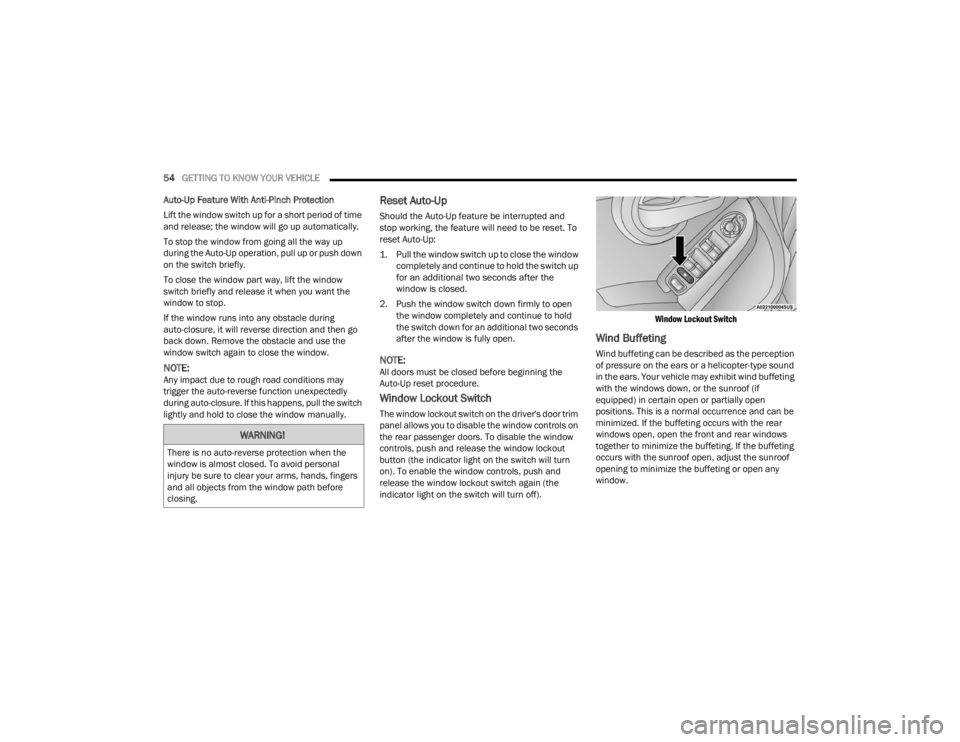
Window Lockout Switch
The window lockout switch on the driver's door trim
panel allows you to disable the window controls on
the rear passenger doors. To disable the window
controls, push and release the window lockout
button (the indicator light on the switch will turn
on). To enable the window controls, push and
release the window lockout switch again (the
indicator light on the switch will turn off).
Window Lockout Switch
Wind Buffeting
Wind buffeting can be described as the perception
of pressure on the ears or a helicopter-type sound
in the ears. Your vehicle may exhibit wind buffeting
with the windows down, or the sunroof (if
equipped) in certain open or partially open
positions. This is a normal occurrence and can be
minimized. If the buffeting occurs with the rear
windows open, open the front and rear windows
together to minimize the buffeting. If the buffeting
occurs with the sunroof open, adjust the sunroof
opening to minimize the buffeting or open any
window.
WARNING!
There is no auto-reverse protection when the
window is almost closed. To avoid personal
injury be sure to clear your arms, hands, fingers
and all objects from the window path before
closing.
22_FD_OM_EN_USC_t.book Page 54
Page 59 of 312
GETTING TO KNOW YOUR VEHICLE57
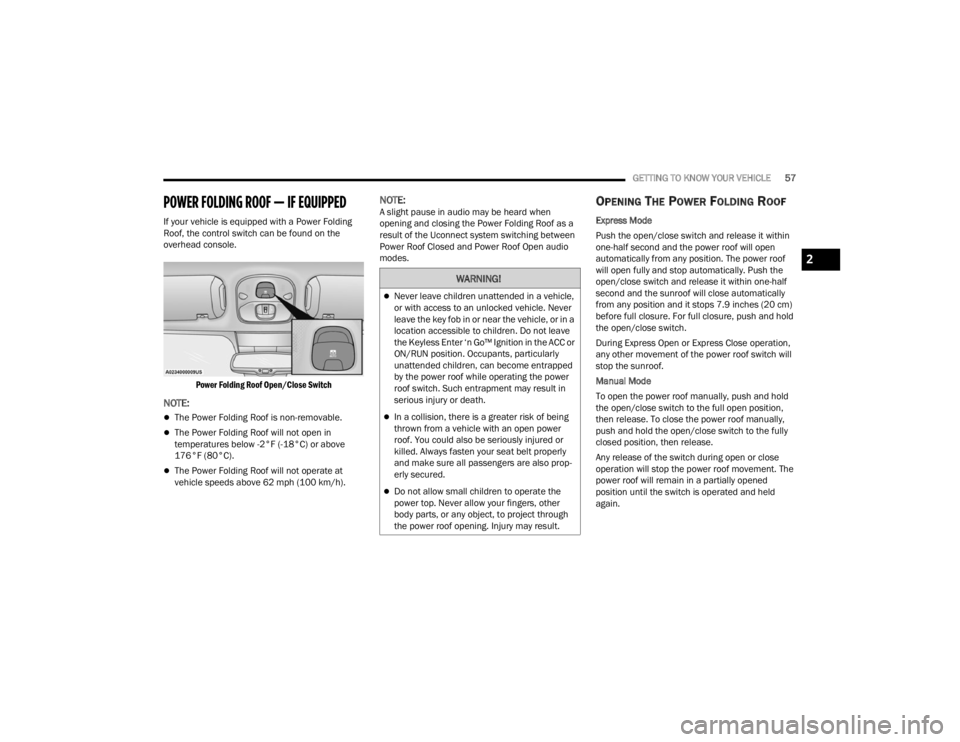
POWER FOLDING ROOF — IF EQUIPPED
If your vehicle is equipped with a Power Folding
Roof, the control switch can be found on the
overhead console.
Power Folding Roof Open/Close Switch
NOTE:
The Power Folding Roof is non-removable.
The Power Folding Roof will not open in
temperatures below -2°F (-18°C) or above
176°F (80°C).
The Power Folding Roof will not operate at
vehicle speeds above 62 mph (100 km/h).
NOTE:A slight pause in audio may be heard when
opening and closing the Power Folding Roof as a
result of the Uconnect system switching between
Power Roof Closed and Power Roof Open audio
modes.OPENING THE POWER FOLDING ROOF
Express Mode
Push the open/close switch and release it within
one-half second and the power roof will open
automatically from any position. The power roof
will open fully and stop automatically. Push the
open/close switch and release it within one-half
second and the sunroof will close automatically
from any position and it stops 7.9 inches (20 cm)
before full closure. For full closure, push and hold
the open/close switch.
During Express Open or Express Close operation,
any other movement of the power roof switch will
stop the sunroof.
Manual Mode
To open the power roof manually, push and hold
the open/close switch to the full open position,
then release. To close the power roof manually,
push and hold the open/close switch to the fully
closed position, then release.
Any release of the switch during open or close
operation will stop the power roof movement. The
power roof will remain in a partially opened
position until the switch is operated and held
again.
WARNING!
Never leave children unattended in a vehicle,
or with access to an unlocked vehicle. Never
leave the key fob in or near the vehicle, or in a
location accessible to children. Do not leave
the Keyless Enter ‘n Go™ Ignition in the ACC or
ON/RUN position. Occupants, particularly
unattended children, can become entrapped
by the power roof while operating the power
roof switch. Such entrapment may result in
serious injury or death.
In a collision, there is a greater risk of being
thrown from a vehicle with an open power
roof. You could also be seriously injured or
killed. Always fasten your seat belt properly
and make sure all passengers are also prop -
erly secured.
Do not allow small children to operate the
power top. Never allow your fingers, other
body parts, or any object, to project through
the power roof opening. Injury may result.
2
22_FD_OM_EN_USC_t.book Page 57
Page 62 of 312
60GETTING TO KNOW YOUR VEHICLE
LIFTGATE
TO UNLOCK/OPEN THE LIFTGATE
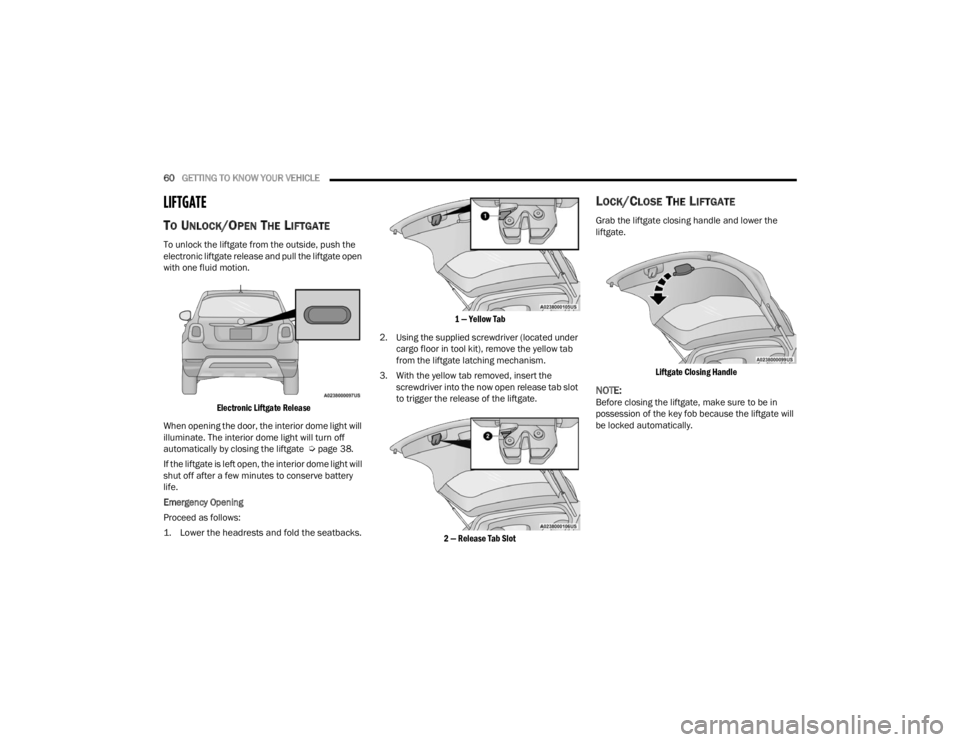
To unlock the liftgate from the outside, push the
electronic liftgate release and pull the liftgate open
with one fluid motion.
Electronic Liftgate Release
When opening the door, the interior dome light will
illuminate. The interior dome light will turn off
automatically by closing the liftgate Ú page 38.
If the liftgate is left open, the interior dome light will
shut off after a few minutes to conserve battery
life.
Emergency Opening
Proceed as follows:
1. Lower the headrests and fold the seatbacks.
1 — Yellow Tab
2. Using the supplied screwdriver (located under cargo floor in tool kit), remove the yellow tab
from the liftgate latching mechanism.
3. With the yellow tab removed, insert the screwdriver into the now open release tab slot
to trigger the release of the liftgate.
2 — Release Tab Slot
LOCK/CLOSE THE LIFTGATE
Grab the liftgate closing handle and lower the
liftgate.
Liftgate Closing Handle
NOTE:Before closing the liftgate, make sure to be in
possession of the key fob because the liftgate will
be locked automatically.
22_FD_OM_EN_USC_t.book Page 60
Page 66 of 312
64GETTING TO KNOW YOUR INSTRUMENT PANEL
INSTRUMENT CLUSTER DESCRIPTIONS
1. Speedometer
Indicates the speed of the car.
2. Fuel Level Gauge
The fuel gauge in the instrument panel indi -
cates the amount of fuel left in the tank.
The light comes on, together with a chime
and the display of a message in the instru -
ment cluster display, when the gas tank has
1.5 to 2 gallons (5 to 7 liters) of fuel
remaining.
3. Instrument Cluster Display
The vehicle can be equipped with multi
functional instrument cluster display which
offers useful information to the driver.
With the ignition in the OFF position (and
the key removed, for vehicles with a
mechanical key), opening/closing of a door
will activate the instrument cluster display
for viewing, and display the total miles or
kilometers in the odometer.
4. Engine Coolant Temperature
The temperature gauge on the instrument
panel displays the temperature of the
engine coolant and starts providing indica -
tions when the coolant temperature
exceeds approximately 122°F (50°C). In the normal use of the car, the temperature
gauge can move in different directions
based on the use of the car. The light comes
on, together with a chime and the display of
a message in the instrument cluster display,
to indicate an excessive increase in the
temperature of the engine coolant. Stop the
engine and contact an authorized dealer.
5. Tachometer
Indicates the engine speed in Revolutions
Per Minute (RPM x 1000).
INSTRUMENT CLUSTER DISPLAY
The vehicle is equipped with multi functional
instrument cluster display which offers useful
information to the driver. With the ignition in the
OFF position (and the key removed, for vehicles
with a mechanical key), opening/closing of a door
will activate the instrument cluster display for
viewing, and display the total miles or kilometers in
the odometer. The instrument cluster display is
designed to display important information about
the vehicle’s systems and features. Using a driver
interactive display located on the instrument
panel, your instrument cluster display can show
you how systems are working and give you
warnings when they aren’t. The steering wheel
mounted controls allow you to scroll through and enter the main menus and submenus. You can
access the specific information you want and
make selections and adjustments.
INSTRUMENT CLUSTER DISPLAY
C
ONTROL BUTTONS
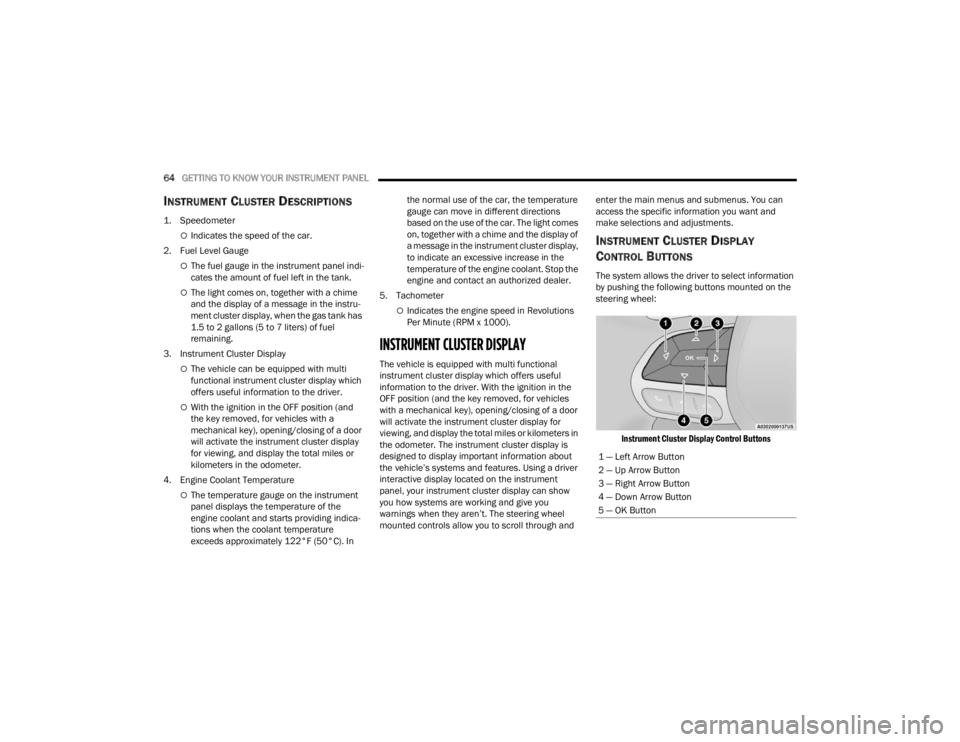
The system allows the driver to select information
by pushing the following buttons mounted on the
steering wheel:
Instrument Cluster Display Control Buttons
1 — Left Arrow Button
2 — Up Arrow Button
3 — Right Arrow Button
4 — Down Arrow Button
5 — OK Button
22_FD_OM_EN_USC_t.book Page 64
Page 68 of 312
66GETTING TO KNOW YOUR INSTRUMENT PANEL
Vehicle Info
Tire Pressure
Oil Temperature
Battery Voltage
Driver Assist
Lane Departure Warning
Adaptive Cruise Control
Stop/Start — If Equipped
Audio
Phone
Navigation
Messages
Settings
Display
Units
Clock and Date
Security
Safety & Assistance
Lights
Doors & Locks
Engine OFF Procedure — If Equipped
Speedometer
View and change the speedometer scale from mph
to km/h (km/h to mph).
Trip
This instrument cluster display menu item allows
you to view and select information about the "Trip
Computer”:
Instantaneous info
View the distance to empty (miles or km).
View the instantaneous consumption (mpg,
or l/100km or km/l).
Trip A
View Trip A distance (miles or km).
View travel time A (hours/minutes/
seconds).
View average consumption A (mpg, or
l/100km or km/l).
View average speed A (mph or km/h).
Trip B
View Trip B distance (miles or km).
View travel time B (hours/minutes/
seconds).
View average consumption B (mpg, or
l/100km or km/l).
View average speed B (mph or km/h).
Drive Mode Selector
This instrument cluster display menu/submenu
items allows you to view and select information
about the "Drive Mode".
Vehicle Info
Push and release the up or down arrow
button until "Vehicle Info" is highlighted in the
instrument cluster display. Push and release the
right arrow button and Coolant Temp will be
displayed. Push the right or left arrow button
to scroll through the following information displays:
Tire pressure
View the information relating to the Tire
Pressure Monitoring System (TPMS) (if
equipped).
Oil Temperature
View the engine oil temperature.
Battery Voltage
View the voltage value (state of charge) of
the battery.
22_FD_OM_EN_USC_t.book Page 66
Page 69 of 312
GETTING TO KNOW YOUR INSTRUMENT PANEL67
Driver Assist
This menu item allows you to change the settings
(Notice LaneSense and Intensity LaneSense)
relating to the LaneSense system (if equipped):
Notice LaneSense
By selecting this function, you can select the
“readiness” of LaneSense, choosing between
the options "Near," "Medium," or "Far."
Intensity LaneSense
Using this function, you can select the force
applied to the steering wheel to keep the car in
the roadway through the electrical drive system
due to LaneSense.
Stop/Start – If Equipped
Automatically stops the engine during a vehicle
stop under the right conditions to reduce fuel
consumption.
Push and release the up or down arrow
button until the Stop/Start menu title is displayed
in the instrument cluster. This menu shows
messages related to Stop/Start. Only one message
can be viewed at a time until the condition is
cleared.
When the Stop/Start is engaged (and the engine is
off), the associated hardware indicator light is
turned on. When the Stop/Start button on the central stack is pushed, a Stop/Start status
message will appear in the instrument cluster
display.
Audio
This menu item allows you to view the instrument
cluster display and the information present on the
display of the Uconnect system.
The information displayed is:
“Radio (AM or FM)”: view Radio Station Name (if
equipped), frequency, and graphical icon.
MP3: title display or song number playing.
USB: title display or song number playing.
Ipod: display the song title and graphic element.
Bluetooth®: displays the song title and a
graphic element.
SAT: displays the station name and a graphic
element.
APP: displays strings and a graphic element.
Phone
This menu displays the current status of a phone
connected to the vehicle via Bluetooth®.
If no phone is connected, the menu will not
function when the
OK button is pushed. Otherwise,
if a phone is connected, push the OK button to
enter the menu. The following items will display:
Recent calls: displays a list of the last 10 calls.
SMS reader: displays the last 10 text messages
and if they are read or unread.
Favorite numbers: displays a maximum of six
favorite numbers.
Navigation
If activated, this menu item will display navigation
status and directions.
Messages (Stored)
This menu item allows you to display the
information messages/malfunction stored.
The background color of the display varies
according to the priorities of the failure:
Failed Messages with low priority display in
yellow.
Failed Messages with high priority display in red.
Settings
This menu item allows you to change the settings
for the following:
Display
Units
Clock and Date
Security
Safety and Assistance
3
22_FD_OM_EN_USC_t.book Page 67
Page 70 of 312

68GETTING TO KNOW YOUR INSTRUMENT PANEL
Lights
Doors and Locks
Engine OFF Procedure — If Equipped
Display
By selecting "Display," you can access the following
settings:
Screen Setup: Allows you to configure the
display screen.
Language: Allows you to select the language in
which to display the information/warnings.
Automatic Reset Trip B: Allows you to set the
options to reset the Trip B (never, always, every
two hours or every eight hours).
Phone Repetition: Allows you to select “On” or
“Off”. The instrument cluster display can also
display the information concerning phone
mode. The information that can be displayed is
the connection status of the mobile phone
(phone connected or disconnected), the active
telephone calls/incoming/on hold, and the
management of double calls (first incoming
second waiting, etc.).
Navigation Repetition: Allows you to select “On”
or “Off” on the instrument cluster display, infor -
mation relating to the navigation mode.
Units
By selecting the item "Units Of Measure,” you can
select the unit of measure used in the display. Possible options are:
US
Metric
Custom
Clock And Date
By selecting the item "clock and date," you can
adjust the clock.
Possible options are:
Set Time: Adjust hours/minutes.
Set Format: Adjust the time format "12h"
(12 hours) or "24h" (24 hours).
Set Date: Adjust day/month/year.
Security
By selecting the item “Security,” you can make the
following adjustments:
Speed Warning: Set the vehicle speed limit
(mph or km/h), which the driver is notified
through a visual and acoustic signaling (display
of a message and a symbol on the display).
Seat Belt Buzzer: This function is only viewable
when the Seat Belt Reminder (SBR) system is
active.
Hill Start Assist: Activation/Deactivation of the
Hill Start Assist system. Safety And Assistance
By selecting the item "Safety & Assistance," you
can make the following adjustments:
Full Brake Control: A selection of operating
modes of the Full Brake Control system.
Full Brake Control Sensitivity: A selection of the
"readiness" of intervention of the Full Brake
Control system, based on the distance to the
obstacle.
Park Assist: A selection of the type of informa
-
tion provided by Park Assist.
Park Assist Vol.: A selection of the volume of
acoustic signals provided by Park Assist.
Rain Sensing Wipers: Enabling/disabling the
automatic operation of wipers in the event of
rain.
LaneSense Warning — If Equipped: A selection
of the "readiness" of intervention of LaneSense.
Warning Buzzer Volume: Increase or decrease
the volume of the buzzer by selecting “Low”,
“Medium”, or “High”.
Maintenance Brakes — If Equipped: Activation
of the procedure to carry out braking system
maintenance.
Auto Park Brake — If Equipped: Enable/disable
auto-insertion of the Electric Parking Brake.
22_FD_OM_EN_USC_t.book Page 68
Page 71 of 312
GETTING TO KNOW YOUR INSTRUMENT PANEL69
Lights
By selecting the item "Lights," you can make the
following adjustments:
Headlight Off Delay: Set the delay for headlight
shutoff after engine shutoff.
Headlight Sensitivity: Adjust the sensitivity of
headlight brightness.
Interior Ambient Lights: Increase or decrease
the brightness of the Interior Ambient Lights.
Greeting Lights: Enable/disable the vehicle’s
Greeting Lights.
Auto High Beam: Activate/deactivate the auto -
matic main beam headlights — If Equipped.
Daytime Lights: Activate/deactivate the daytime
running lights.
Cornering Lights: Activate/deactivate the
cornering lights — If Equipped.
Doors And Locks
By selecting the item "Doors & Locks," you can
make the following adjustments:
Auto Door Lock: Activate/deactivate the auto -
matic locking of the doors with the vehicle
moving.
Auto Unlock On Exit: Automatic unlocking of the
doors when exiting the vehicle.
Flash Light With Lock: Activate the direction indi -
cators when closing the doors.
Sound Horn With Lock: Activate/deactivate the
horn when pushing the lock button on the
Remote Keyless Entry. The options are "Off,"
"First Press,” and "Second Press."
Horn With Remote Start: Activate/deactivate
the horn at the Remote Starting of the engine
with the Remote Keyless Entry.
Remote Door Unlock Without Passive Entry:
Allows you to choose whether to unlock all the
doors or only the driver’s side door on the first
push of the unlock button on the Remote
Keyless Entry.
Door Unlock With Passive Entry: Allows you to
open the driver door only on the first push of the
unlock button on the Remote Keyless Entry or
using the passive entry handles on the doors or
liftgates.
Passive Entry — If Equipped: Activate the auto -
matic locking of the doors.
Engine OFF Procedure — If Equipped: Allows you
to turn off the engine from the instrument
cluster in the event of an ignition switch failure.
Instructions for turning off the engine via the
instrument cluster display controls will display in
the instrument cluster.
WARNING LIGHTS AND MESSAGES
The warning/indicator lights will illuminate in the
instrument panel together with a dedicated
message and/or acoustic signal when applicable.
These indications are indicative and precautionary
and as such must not be considered as exhaustive
and/or alternative to the information contained in
the Owner’s Manual, which you are advised to read
carefully in all cases. Always refer to the
information in this chapter in the event of a failure
indication. All active telltales will display first if
applicable. The system check menu may appear
different based upon equipment options and
current vehicle status. Some telltales are optional
and may not appear.
RED WARNING LIGHTS
Air Bag Warning Light
This warning light will illuminate to
indicate a fault with the air bag, and will
turn on for four to eight seconds as a bulb
check when the ignition is placed in the
ON/RUN position. This light will illuminate with a
single chime when a fault with the air bag has been
detected, it will stay on until the fault is cleared. If
the light is either not on during startup, stays on, or
turns on while driving, have the system inspected
at an authorized dealer as soon as possible.
3
22_FD_OM_EN_USC_t.book Page 69
Page 72 of 312
70GETTING TO KNOW YOUR INSTRUMENT PANEL
Brake Warning Light
This warning light monitors various brake
functions, including brake fluid level and
parking brake application. If the brake
light turns on it may indicate that the
parking brake is applied, that the brake fluid level
is low, or that there is a problem with the Anti-Lock
Brake System reservoir.
If the light remains on when the parking brake has
been disengaged, and the fluid level is at the full
mark on the master cylinder reservoir, it indicates
a possible brake hydraulic system malfunction or
that a problem with the Brake Booster has been
detected by the Anti-Lock Brake System (ABS) /
Electronic Stability Control (ESC) system. In this
case, the light will remain on until the condition has
been corrected. If the problem is related to the
brake booster, the ABS pump will run when
applying the brake, and a brake pedal pulsation
may be felt during each stop.
The dual brake system provides a reserve braking
capacity in the event of a failure to a portion of the
hydraulic system. A leak in either half of the dual
brake system is indicated by the Brake Warning
Light, which will turn on when the brake fluid level
in the master cylinder has dropped below a
specified level.
The light will remain on until the cause is corrected.
NOTE:The light may flash momentarily during sharp
cornering maneuvers, which change fluid level
conditions. The vehicle should have service
performed, and the brake fluid level checked.
If brake failure is indicated, immediate repair is
necessary.
Vehicles equipped with the Anti-Lock Brake System
(ABS) are also equipped with Electronic Brake
Force Distribution (EBD). In the event of an EBD
failure, the Brake Warning Light will turn on along
with the ABS Light. Immediate repair to the ABS
system is required.
Operation of the Brake Warning Light can be
checked by turning the ignition switch from the OFF
position to the ON/RUN position. The light should
illuminate for approximately two seconds. The light
should then turn off unless the parking brake is
applied or a brake fault is detected. If the light does
not illuminate, have the light inspected by an
authorized dealer. The light also will turn on when the parking brake
is applied with the ignition switch in the ON/RUN
position.
NOTE:This light shows only that the parking brake is
applied. It does not show the degree of brake appli
-
cation.
Battery Charge Warning Light
This warning light will illuminate when the
battery is not charging properly. If it stays
on while the engine is running, there may
be a malfunction with the charging
system. Contact an authorized dealer as soon as
possible.
This indicates a possible problem with the
electrical system or a related component.
Coolant Temperature Warning Light
This light warns of an overheated engine
condition. If the light turns on while driving,
safely pull over and stop the vehicle. If the
Air Conditioning (A/C) system is on, turn it
off. Also, shift the transmission into NEUTRAL and
idle the vehicle. If the temperature reading does not
return to normal, turn the engine off immediately
and call for service.
NOTE:As the coolant temperature gauge approaches "H",
this indicator will illuminate and a single chime will
sound.
WARNING!
Driving a vehicle with the red brake light on is
dangerous. Part of the brake system may have
failed. It will take longer to stop the vehicle. You
could have a collision. Have the vehicle checked
immediately.
22_FD_OM_EN_USC_t.book Page 70
Page 73 of 312
GETTING TO KNOW YOUR INSTRUMENT PANEL71
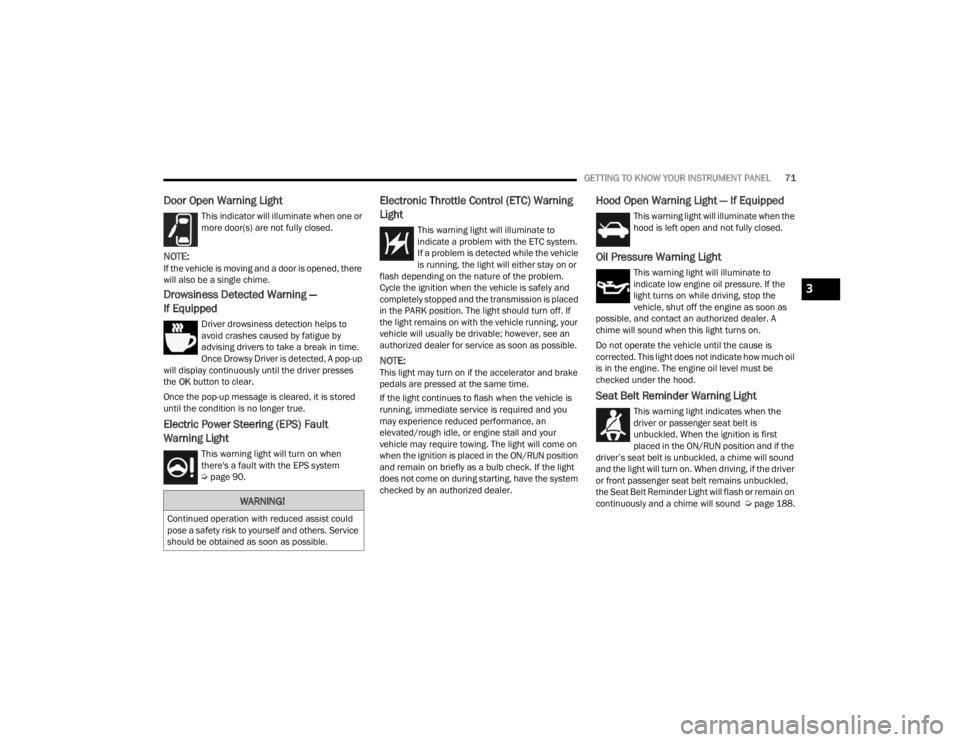
Door Open Warning Light
This indicator will illuminate when one or
more door(s) are not fully closed.
NOTE:If the vehicle is moving and a door is opened, there
will also be a single chime.
Drowsiness Detected Warning —
If Equipped
Driver drowsiness detection helps to
avoid crashes caused by fatigue by
advising drivers to take a break in time.
Once Drowsy Driver is detected, A pop-up
will display continuously until the driver presses
the OK button to clear.
Once the pop-up message is cleared, it is stored
until the condition is no longer true.
Electric Power Steering (EPS) Fault
Warning Light
This warning light will turn on when
there's a fault with the EPS system
Ú page 90.
Electronic Throttle Control (ETC) Warning
Light
This warning light will illuminate to
indicate a problem with the ETC system.
If a problem is detected while the vehicle
is running, the light will either stay on or
flash depending on the nature of the problem.
Cycle the ignition when the vehicle is safely and
completely stopped and the transmission is placed
in the PARK position. The light should turn off. If
the light remains on with the vehicle running, your
vehicle will usually be drivable; however, see an
authorized dealer for service as soon as possible.
NOTE:This light may turn on if the accelerator and brake
pedals are pressed at the same time.
If the light continues to flash when the vehicle is
running, immediate service is required and you
may experience reduced performance, an
elevated/rough idle, or engine stall and your
vehicle may require towing. The light will come on
when the ignition is placed in the ON/RUN position
and remain on briefly as a bulb check. If the light
does not come on during starting, have the system
checked by an authorized dealer.
Hood Open Warning Light — If Equipped
This warning light will illuminate when the
hood is left open and not fully closed.
Oil Pressure Warning Light
This warning light will illuminate to
indicate low engine oil pressure. If the
light turns on while driving, stop the
vehicle, shut off the engine as soon as
possible, and contact an authorized dealer. A
chime will sound when this light turns on.
Do not operate the vehicle until the cause is
corrected. This light does not indicate how much oil
is in the engine. The engine oil level must be
checked under the hood.
Seat Belt Reminder Warning Light
This warning light indicates when the
driver or passenger seat belt is
unbuckled. When the ignition is first
placed in the ON/RUN position and if the
driver’s seat belt is unbuckled, a chime will sound
and the light will turn on. When driving, if the driver
or front passenger seat belt remains unbuckled,
the Seat Belt Reminder Light will flash or remain on
continuously and a chime will sound Ú page 188.
WARNING!
Continued operation with reduced assist could
pose a safety risk to yourself and others. Service
should be obtained as soon as possible.
3
22_FD_OM_EN_USC_t.book Page 71